Author Archive
Thursday, May 27th, 2010
 VirtualBox is a powerful x86 and AMD64/Intel64 virtualization product which is the only professional solution that is freely available as Open Source Software under the GNU General License (GPL). VirtualBox therefore is for both home use and enterprise. VirtualBox is not only a high performance product for enterprise customers but also comes with extremely rich features. VirtualBox is a powerful x86 and AMD64/Intel64 virtualization product which is the only professional solution that is freely available as Open Source Software under the GNU General License (GPL). VirtualBox therefore is for both home use and enterprise. VirtualBox is not only a high performance product for enterprise customers but also comes with extremely rich features.
Presently, as it stand today, VirtualBox runs efficiently well on Windows, Macintosh and OpenSolaris hosts, Linux, and also supports a large number of guest operating systems such as Windows (NT 4.0, 2000, XP, Vista, Windows 7, Server 2003), 3.x, Linux (2.4 and 2.6), DOS/Windows, Solaris and OpenSolaris, and OpenBSD.
The memory requirement of VirtualBox is at least 512 MB of RAM and any thing shot of this minimum automatically means that users will likely not enjoy the experience. If the system memory is not up to the required minimum, what happens is that VirtualBox will refuse to install. This obviously can best be described as one of its limitation.
VirtualBox is intended for wide audience that includes the general users, third-party OEM vendors and developers. This product is of interest mainly to developers and system administrators because it comes with advanced functionality and distinctive capabilities.
Want to check it out? Visit Virtualbox
Posted in Main | No Comments »
Tuesday, May 25th, 2010
 UnDBX is a tool that is designed to extract messages from Outlook Express (though users should note that Outlook Express overwrites the first 4 bytes of every 512-byte chunk of each deleted message). When installed for the first time to extracts all the messages as individual .eml files. After the first installation, the subsequent run of UnDBX synchronizes the output folder with the contents of the, dbl files. UnDBX is a tool that is designed to extract messages from Outlook Express (though users should note that Outlook Express overwrites the first 4 bytes of every 512-byte chunk of each deleted message). When installed for the first time to extracts all the messages as individual .eml files. After the first installation, the subsequent run of UnDBX synchronizes the output folder with the contents of the, dbl files.
The way it works is that new messages in the, dbx files that do not correspond to existing .eml files will be extracted and existing .eml files that do not correspond to messages in the, dbx files will be treated as deleted messages and will be deleted. The file names of extracted .eml files are composed from the contents of the “from” “To” and Subject: message headers.
It is a very user-friendly tool and there is no need for installation or set up program. What it requires is simply to extract the distribution .zip files to some folder. Thereafter, user will end up with several files/icons in that folder.
Massages deleted are usually stored by Outlook Express in a special folder and can therefore be restored by extracting them from the corresponding .dbx files.
Want to check it out? Visit Code.Google
Posted in Main | No Comments »
Tuesday, May 25th, 2010
 PowerDVD 10.0.1705 is CyberLink’s most advanced movie media player that exist today, PowerDVD 10 delivers HD and 3D and movies on the computers. It is universal unique player which provides the best playback quality available today. Whatever the content, whether 3D movie content, your digital music files or captured home videos, PowerDVD 10 provides you access all of them from the same convenient player software, enhancing your experience in all type ways. PowerDVD 10.0.1705 is CyberLink’s most advanced movie media player that exist today, PowerDVD 10 delivers HD and 3D and movies on the computers. It is universal unique player which provides the best playback quality available today. Whatever the content, whether 3D movie content, your digital music files or captured home videos, PowerDVD 10 provides you access all of them from the same convenient player software, enhancing your experience in all type ways.
Users can also experience Blu-Ray movies the unique way that only PowerDVD 10 can provide. It is absolutely optimized for the latest hardware acceleration technologies from NVIDIA, Intel and AMD. It also provides smoother movie performance for users.
Some of the more noticeable features that stand PowerDVD 10.0.1705 out are its advanced TrueTheater 3D technology that converts 2D movies into a spectacular 3D experience; it has optimized playback quality for movie content and hardware and much more.
It supports Windows 7 latest music library features, and makes it very easier for users to listen to music from the player that they use to enjoy their movies.
Be that as it may, it is just a DVD player and only useful to play DVD’s, therefore it should have cost as much as it does.
Want to check it out? Visit Cyberlink
Posted in Main | No Comments »
Tuesday, May 25th, 2010
 µTorrent is the world’s most popular BitTorrent client which was written with efficiency in mind. Most of the features present in other BitTorrent clients are present in µTorrent, including scheduling, RSS auto-downloading, bandwidth prioritization, and Mainline DHT (compatible with BitComet). Furthermore, µTorrent supports the Protocol Encryption joint specification (compatible with Azureus 2.4.0.0 and upward, BitComet 0.63 and above) and not forgetting peer exchange. µTorrent is the world’s most popular BitTorrent client which was written with efficiency in mind. Most of the features present in other BitTorrent clients are present in µTorrent, including scheduling, RSS auto-downloading, bandwidth prioritization, and Mainline DHT (compatible with BitComet). Furthermore, µTorrent supports the Protocol Encryption joint specification (compatible with Azureus 2.4.0.0 and upward, BitComet 0.63 and above) and not forgetting peer exchange.
Unlike many torrent clients, µTorrent is indeed very efficient so much so that it does not hog valuable system resources – typically using less than 6MB of memory, allowing users to use the computer as though it was not on the system in the first place. The µTorrent program is contained within a single executable less than 220 KB in size making it quite unique.
µTorrent comes with in-built support for localization, and with a language file present, will automatically switch to your system language for ease of use. Should a user’s language be not available, the user can easily add language of his choice, or edit other existing translations to improve.
UTorrent various icon, status icon replacements are and toolbar graphic are all available to users, and users can easily create their own because it very simple.
Want to check it out? Visit Utorrent
Posted in Main | No Comments »
Tuesday, May 25th, 2010
 TagScanner 5.1.563 Portable is a multifunction program designed for managing and organizing music collections. TagScanner edits tags of mostly state-of-the-art audio formats, generate tag information from filenames, rename files based on the tag information and perform any transformations of the text from filenames and tags. Users can get album info through online databases like Amazon or freedb and it does manual text-search for information in freedb. TagScanner 5.1.563 Portable is a multifunction program designed for managing and organizing music collections. TagScanner edits tags of mostly state-of-the-art audio formats, generate tag information from filenames, rename files based on the tag information and perform any transformations of the text from filenames and tags. Users can get album info through online databases like Amazon or freedb and it does manual text-search for information in freedb.
TagScanner also supports ID3v1, ID3v2, APEv2, Vorbis comments, MP4 (iTunes) tags and Windows Media player. It also comes with a Powerful TAG editor with batch functions and special features. It has a Play list maker with ability to export play lists to Excel or HTML.
This product is designed to run on the following operating systems; Windows Server 2008, Windows Vista, Windows XP, Windows 2003 and Windows 2000.
What is new about TagScanner 5.1.563 is that it has been updated to rule for words capitalization and retuned autocorrection function for filenames. it also supports ID3 1.0/1.1/2.2/2.3/2.4 tags, APE v1 and v2 tags, WMA tags, Vorbis Comments, embedded lyrics, cover art, Tag fields formatting and rearrangement and MP4(iTunes) metadata.
The problem with TagScanner 5.1.563 is that it is not easy to use and also very fragmented.
Want to check it out? Visit Xdlab
Posted in Main | No Comments »
Monday, May 24th, 2010
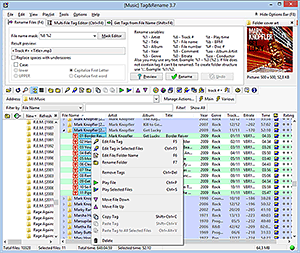 Tag&Rename 3.5.6 is a music files tag editor that is simply designed to handle all popular digital audio formats. No matter what music compressor a user prefers to use, it will enable the user to keep music collection organized. Tag&Rename 3.5.6 is a music files tag editor that is simply designed to handle all popular digital audio formats. No matter what music compressor a user prefers to use, it will enable the user to keep music collection organized.
Tag&Rename 3.5.6 the only known tag editor and organizer which comes with full native support for: MusePack mpc/mp+ (ID3v1 tags APEv1 and APEv2), mp3 (ID3v1, ID3v2.2, ID3v2.3 and ID3v2.4 tags), asf and wmv files, Windows Media wma, Windows Media lossless, Wav and Aiff, Apple iTunes and iPod aac (m4a) files including mp4, lossless m4a and protected m4p files, Ogg Vorbis/Flac/Speex (vorbis comments), most popular lossless codecs including Monkey’s Audio, Flac, Wav Pack, Optim Frog, True Audio, Apple.
Tag&Rename allows users to; automatically fix and complete file tags using online freedb database, export files information to CSV, HTML, XML and text formats, rename your mp3 files and folders according to its music information in a batch, you can do manual and batch id3 tag editor, you can automatically fix and complete file tags using online freedb database and so much more.
Also, Tag&Rename can support a lot of files and tags standards in a simple way, so users can work with music metadata and not have to think about file codecs and tag versions.
Want to check it out? Visit Softpointer.
Posted in Main | No Comments »
Monday, May 24th, 2010
 AttributeMagic Pro 3.0 is a utility designed to modify file-folder date from AM to PM, attributes and also for batch rename files and folders. A user of this utility can actually set or reset individual attributes, Modified, Accessed, Created dates, Picture Taken timestamp, modify JPEG metadata, modify MS Office document date-time stamps and properties. AttributeMagic Pro 3.0 is a utility designed to modify file-folder date from AM to PM, attributes and also for batch rename files and folders. A user of this utility can actually set or reset individual attributes, Modified, Accessed, Created dates, Picture Taken timestamp, modify JPEG metadata, modify MS Office document date-time stamps and properties.
AttributeMagic Pro 3.0 can mass rename files and folders (including document files images, etc.) users can add date-time (AM or FM) stamps to the name of file or folder, convert file/folder name, add EXIF tags to the file name and extension to the lower or upper case, add file and folder size to its name.
With this utility, users can modify the following file system attributes; hidden, system, read-only, archived offline. AttributeMagic Pro 3.0 utility can modify metadata stored with MS Excel, MS Word documents ,MS PowerPoint and. It has the ability to clear or change the following document properties; subject, title, template, author, keywords, last author, revision number. Date-time stamps of MS Office documents can also be changed: document created, last printed, and last saved. Using AttributeMagic Pro 3.0, users can clear all metadata or only particular element. It also comes with powerful custom filters and templates to selectively stamp necessary files or folders.
Want to check it out? Visit AttributeMagic
Posted in Main | No Comments »
Monday, May 24th, 2010
 FBackup is freeware backup program for Windows that protects important files and folders from partial or total loss. This is done by simply automating backup tasks, password protecting and compressing files to save storage space. FBackup is backup software that is equally free for both personal and commercial use. It enables users to effortlessly backup any local or network drive or to external drives (such as USB drives). FBackup is freeware backup program for Windows that protects important files and folders from partial or total loss. This is done by simply automating backup tasks, password protecting and compressing files to save storage space. FBackup is backup software that is equally free for both personal and commercial use. It enables users to effortlessly backup any local or network drive or to external drives (such as USB drives).
This software is so efficient to the extent that it allows users to schedule date that they may like to run backup and it will automatically run the backup at that scheduled date. What this means is that users now have the benefit not only of having their data protected, but also saving precious time.
The major reason why anyone will want to use this software is basically because it has two main functions which are the backup and restore operations. It makes them so easy for you in just by offering very friendly wizards. How this works is that, after starting the new backup wizard, simply select where, what, when and how to backup, and the backup is ready to run. To restore files, users only need to open a restore wizard and it will ask guide the user through the rest of the process.
Want to check it out? Visit Fbackup
Posted in Main | No Comments »
Monday, May 24th, 2010
 K-Lite Codec Pack is a collection of DirectShow filters, VFW/ACM Codecs, and tools that has a major advantage of been frequently up-dated. All components of K-Lite Mega Codec Pack have been carefully selected for specific purposes so much so that it is not just a random bunch of stuff thrown together. K-Lite Codec Pack is a collection of DirectShow filters, VFW/ACM Codecs, and tools that has a major advantage of been frequently up-dated. All components of K-Lite Mega Codec Pack have been carefully selected for specific purposes so much so that it is not just a random bunch of stuff thrown together.
K-Lite Codecs and DirectShow filters are usually needed for encoding and decoding video formats and audio. The K-Lite Codec Pack is designed in such a way that it is absolutely user-friendly solution for playing all audio and movie files. With the K-Lite Codec Pack users should be able to play all the popular audio and video formats and even several less common formats.
Another high point of K-Lite Codec Pack is that it works great with Windows Media Player and Windows Media Center and also with all other DirectShow players, such as BS.Player, Media Player Classic, ZoomPlayer, and much more.
K-Lite Codec Pack has a lot of options that enables users to tweak it to your own specific needs and preferences. For instance, uninstallation option removes everything that was installed by the pack including all registry keys.
Some of its major advantages are; DivX Pro (Decoding), DivX Pro (Encoding), 3ivX Pro (Decoding), 3ivXPro (encoding), Windows Media 9 VCM, Windows Media and may more.
Want to check it out? Visit Codecguide.com
Posted in Main | No Comments »
Friday, May 21st, 2010
 Website-Watcher is a software that is designed to perfectly suite the beginners and professionals. This software puts the user in total control by allow him decide what to check, when to check and how users are noticed. Website-Watcher is a software that is designed to perfectly suite the beginners and professionals. This software puts the user in total control by allow him decide what to check, when to check and how users are noticed.
With the aid of Website-Watcher, users will be able to spend fewer hours monitoring web pages. It also reduces the number of hours ordinarily spent on surfing the web for information because Website-Watcher can easily do the job for you. Website-Watcher supports all types of pages with textual content i.e. HTML, ASP, and PHP.
Some of its main features are; the capacity to disclose when a new software version or driver is updated and released, it can monitor what other competitors are doing by scanning their websites (thereby putting you ahead of others), it keeps users informed of new postings or answers in discussion forums (forums like phpBB, SMF, IPB, and vBulletin), it has integrated Check-Macro feature which records logins to a password protected page and can convert RSS/Atom feeds into a readable format using a template system.
Now there is no longer need for users to compare the old content with the new because Website-Watcher can easily do this. Contents that have been filtered will not be highlighted so that users do not waste their precious time going through them.
Want to check it out? Visit Aignes.com
Posted in Main | No Comments »
|
|
|




