Author Archive
Wednesday, March 31st, 2010
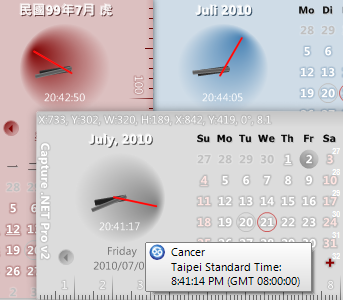 This program falls in the same category as other freeware programs that are fast becoming force to be reckoned with. It does not really matter whether a program is a freeware or shareware, if it has the capacity to satisfy and meet the expectations of users, it is deserves some commendations. Capture .NET is an integrated and fully multifunctional program that is can be regarded as good for general purpose. This program falls in the same category as other freeware programs that are fast becoming force to be reckoned with. It does not really matter whether a program is a freeware or shareware, if it has the capacity to satisfy and meet the expectations of users, it is deserves some commendations. Capture .NET is an integrated and fully multifunctional program that is can be regarded as good for general purpose.
It has some very fine and useful tools that can help users capture screen, colour, screen ruler, windows spy and erase privacy when online. Some other features include the following: backup expert; device manager; alarm clock; screen calendar and reminders; file manager and screen pencil; world clock and notifier memory manager among others.
To download and use capture.NET free 7.1.3737, users may have to install .NET Framework 1.1 on their computer for it to work. It is also a well-coded program and seems to do a lot of work on the system, a great job from the publishers and one can only hope that the good work continues.
Want to check it out? Visit Capture
Posted in Main | No Comments »
Wednesday, March 31st, 2010
 This program can fully replace standard Windows Desktop and deliver some other new features for users. Aston works as a Desktop manager and shell replacement for Windows. The interface is simple to understand and easy to change, the skins for all elements, simple virtual configuration, and detailed setup of element and toolbars of any size with numerous levels all make up a colorful user interface. This program can fully replace standard Windows Desktop and deliver some other new features for users. Aston works as a Desktop manager and shell replacement for Windows. The interface is simple to understand and easy to change, the skins for all elements, simple virtual configuration, and detailed setup of element and toolbars of any size with numerous levels all make up a colorful user interface.
Among the latest changes are: flexible toolbar widgets; clock widget now supports multiple time zones; define your very own hotkeys with powerful built-in hotkey manager; flexible toolbar widget for yet more enjoyable everyday computing among so many others.
The menu is feature rich and all its elements are skin able and can also be animated, making it more attractive. Users can also populate Aston 2.0 program with some useful widgets like clock, disks, top-list, weather and recycle bin among other ones.
At $2.00 per download, Aston is not a freeware; I think it is a fair price to place on a program that has a lot of useful widgets and features.
Want to check it out? Visit Astonshell
Posted in Main | No Comments »
Wednesday, March 31st, 2010
 For the music freak out there, this one is good enough, and for the price, not a bad as well. Easy CD-DA Extractor 2010 is a program built for audio CD ripping, converting of tracks and disc burning. The interface allows for easy configuration to suit your software. As soon as a CD is inserted, the Audio ripper Windows starts displaying details such as name of artists, year of production, track length and track list. For the music freak out there, this one is good enough, and for the price, not a bad as well. Easy CD-DA Extractor 2010 is a program built for audio CD ripping, converting of tracks and disc burning. The interface allows for easy configuration to suit your software. As soon as a CD is inserted, the Audio ripper Windows starts displaying details such as name of artists, year of production, track length and track list.
On the Windows, users will find a section called the output section which lets them set the destination folder, quality and format of output tracks, and not to forget that you can even set the filename format. Way CD-DA extractor 2010 goes for $34.95 per download, but when you put all the features to work, you will be amazed at how much work it does for you.
For anyone who wants to try it out, they can have it for free for only thirty days after which they may have to pay for it. I think it gets better for this program each time a new version is introduced into the market.
Want to check it out? Visit Poikosoft
Posted in Main | No Comments »
Friday, March 26th, 2010
 Like many other users out there, I don’t have any problem with Opera and I am absolutely sure that the more updates there are, the better it gets. Opera (v10.52) 10.52 Build 3333 Beta is a new update, and even if it is still in Beta stage, it has a lot to look up to. Like many other users out there, I don’t have any problem with Opera and I am absolutely sure that the more updates there are, the better it gets. Opera (v10.52) 10.52 Build 3333 Beta is a new update, and even if it is still in Beta stage, it has a lot to look up to.
Opera Web browser offers the best internet browsing experience available. As a matter of fact, the opera browser has witnessed a tremendous amount of usage over the last few years. Some sites used to be very difficult to access in the past, but this new update is putting all that to rest now.
The publishers of this web browser have taken time out to fix some minor bugs which include the following: core-28533; core 950; core 8930 and other minor fixes here and there. Some of the features of this version include: search shortcuts; speed dials and trash can. As usual, it is a freeware program and is free for download.
Want to check it out? Visit Opera.com
Posted in Main | No Comments »
Thursday, March 25th, 2010
 I used to worry so much about how to uninstall some of these so-called antivirus programs that are so stubborn. I know I am not alone on this, some antivirus become so used to your system that it takes a complete formatting of your system for them to be removed. Well, this program gets the job done for you and gives you all the confidence you need when installing any program. I used to worry so much about how to uninstall some of these so-called antivirus programs that are so stubborn. I know I am not alone on this, some antivirus become so used to your system that it takes a complete formatting of your system for them to be removed. Well, this program gets the job done for you and gives you all the confidence you need when installing any program.
AppRemover 2.2.1.1 is a free application that helps users to uninstall completely any antivirus and antispyware applications from your computer. Using this program is not really difficult to do, as a user of this program, all you need to do is to download it, double-click the Icon on your desktop. When this is done, you can be sure it will begin to uninstall any security application it detects on your computer. Some of the applications you can uninstall with this application are: Panda: F-Secure; McAfee; AVG; Symantec and Trend Micro.
AppRemover 2.2.1.1 is a freeware program and is even more useful and effective than most uninstaller I have come across. The only difference is that it makes the job of uninstalling security applications much simpler.
Want to check it out? Visit Appremover
Posted in Main | 1 Comment »
Thursday, March 25th, 2010
 Opinion may differ on this one, but I find it a little bit more useful despite being an open source application. I mean, we have seen so many useful open source programs that stand shoulder-shoulder with some shareware. Not that Kubuntu is entirely perfect and without faults, the fact that it uses the solid base of Ubuntu makes it good enough for me. Opinion may differ on this one, but I find it a little bit more useful despite being an open source application. I mean, we have seen so many useful open source programs that stand shoulder-shoulder with some shareware. Not that Kubuntu is entirely perfect and without faults, the fact that it uses the solid base of Ubuntu makes it good enough for me.
Kubuntu is free and is user-friendly system that is based on the KDE’s desktop software and also on the very popular Ubuntu operating system just like I already mentioned above. The good thing about Kubuntu is that anyone can use it because it is not technical at all. It is designed for people like: notebook owners; small-businesses; educational institutions and others.
Like I said during my opening paragraph, opinion differs and I personally like this program, and the fact that it is still in Beta stage makes room for improvements.
Want to find out more? Visit Kubuntu.org
Posted in Main | No Comments »
Wednesday, March 24th, 2010
 ZipGenius has all the major features of a compression program, but a bit different from others because of the additional features it has. Users can try encryption for a better protection of their archives rather than the standard zip password. Users can send email when they use the in-built mail client and even publish archives on the web with the FTP Genius. ZipGenius has all the major features of a compression program, but a bit different from others because of the additional features it has. Users can try encryption for a better protection of their archives rather than the standard zip password. Users can send email when they use the in-built mail client and even publish archives on the web with the FTP Genius.
When you compare this program with other programs in similar category, you will always be tempted to go for this one because of so many good reasons. Users can enjoy the feature that lets them automatically scan downloaded files with their antivirus software before committing to unzip and open them for use.
One major problem people who use free programs like this one encounter have to do with malware. Users should always scan their files properly before going ahead to open them. As a matter of fact, this program lets them do exactly that. On the whole, it is not a bad program even though it is classified as a freeware.
Want to check it out? Please visit Zipgenius
Posted in Main | No Comments »
Wednesday, March 24th, 2010
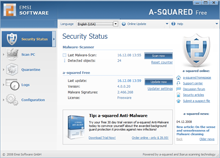 The problem with a-squared free 4.5.0.27 is too much false positive alarms. I mean I got too many false positives during the first few days of use and this really worried me. This is not the first time users will be complaining about this issue, and one would think the publishers would have done something about it before now. The problem with a-squared free 4.5.0.27 is too much false positive alarms. I mean I got too many false positives during the first few days of use and this really worried me. This is not the first time users will be complaining about this issue, and one would think the publishers would have done something about it before now.
a-squared free 4.5.0.27 is a free antivirus scanner that scans your computer for malicious software (malware) and other harmful programs. The publishers have combined many tools in this version to make it a version specially built for people who wants to find and remove Trojans, dialers and worms safely without causing any major damage to their system.
The program has a memory scan that helps to scan and detect malware almost immediately and save users the pain of having to do it themselves. Users therefore have the opportunity to choose which of the harmful programs they wish to delete after detection.
My advice for those who always do many things online is to go for a paid version of antivirus to safeguard their files and other things on their computer.
Want to check it out? Visit Emsisoft
Posted in Main | No Comments »
Tuesday, March 23rd, 2010
 Do not be fooled, as there are real and genuine antivirus security programs, so are there fake ones. These fake ones cause a lot of damages to our computer, making us to spend so much money in putting things in order and making our computers vulnerable to attacks. This is where Remove Fake Antivirus 1.63 comes in. Do not be fooled, as there are real and genuine antivirus security programs, so are there fake ones. These fake ones cause a lot of damages to our computer, making us to spend so much money in putting things in order and making our computers vulnerable to attacks. This is where Remove Fake Antivirus 1.63 comes in.
Remove Fake Antivirus 1.63 is designed to help users remove fake antivirus programs which are either known as viruses or Trojans. Users can find this tool useful when they want to deal with the following programs and threats: personal security; cyber security; Windows Enterprise Suite; Windows Police Pro; Alpha Antivirus; Braviax; Total Security 2009 and a host of others.
It is a freeware program and really should not cause any user to panic, but the risk of tagging some programs as fake is always there. Sometimes, a user may even find the system restore on his computer more useful than a program like this. My opinion on this one goes like this; if you do not have a fair idea about some programs on your system, never run this stuff.
Want to check it out? Visit Freeofvirus
Posted in Main | No Comments »
Monday, March 22nd, 2010
 This program works just fast and fine, using three different interfaces namely: graphical; native and console. The GUI represents the file system of the a user virtually as a color coded cluster map. UltraDefrag is an open source program useful for those who want to carry out defragmentation of their system, and especially for Windows NT. This program works just fast and fine, using three different interfaces namely: graphical; native and console. The GUI represents the file system of the a user virtually as a color coded cluster map. UltraDefrag is an open source program useful for those who want to carry out defragmentation of their system, and especially for Windows NT.
For those who prefer the command line, this program offers them a very useful alternative in terms of tool. Users can run UltraDefrag right from the task scheduler and scripts with much technical worries or difficulties. Even if skeptics have resentments about the suitability of a free or open source program like this one, I think they should have a rethink. This programs rocks very well on your system and is quite fast.
The new UltraDefrag 4.2.0 RC4 is not just new, but out with some other new updates and minor bug changes. Some of these updates and changes include the following: much faster volume analysis; updates of many language translations; better volume status messages in GUI among others.
Want to check it out? Visit: Ultradefrag
Posted in Main | No Comments »
|
|
|




