Author Archive
Friday, September 4th, 2009
 The name says it all – Moo0 FileShredder is a very simple tool used to permanently delete files in your computer. This is very efficient tool to permanently delete files that contain highly sensitive or personal information. Moo0 FileShredder allows users to bypass “Recycle Bin” stage. The name says it all – Moo0 FileShredder is a very simple tool used to permanently delete files in your computer. This is very efficient tool to permanently delete files that contain highly sensitive or personal information. Moo0 FileShredder allows users to bypass “Recycle Bin” stage.
The main advantage of Moo0 FileShredder is its ability to delete the files without any possibility of future access. There are applications that can retrieve even the deleted files. This scenario will never happen if the file has been deleted using FileShredder.
Moo0 FileShredder is not like your average file deletion application. Many applications of this type will usually delete the files permanently without other options. FileShredder on the other hand, offers a variety of permanent deletion for the user. The application can change the file name, time stamp (when the file was created), file size and remove data inside the file after deletion. Users can choose to use all or select methods of deletion.
Even the interface of Moo0 FileShredder is unique. Instead of using right click function to delete the file, the application will provide “drop box” in the desktop. This is where users can drag and drop the file or files they need to delete. They can customize the level of deletion before they permanently delete the files.
Moo0 FileShredder is not your average file deletion tool. While it only does one thing, the application offers a good variety of options for users. The installation file is also relatively small (2.42mb) so the time from downloading the file and installation is fast.
Check it out at moo0.com
Posted in Main | No Comments »
Friday, August 28th, 2009
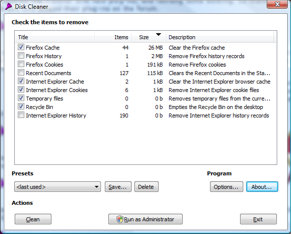
 Ever wonder why your pc or laptop slows down at times? It could be because you are taking too much unnecessary space. Note that I said unnecessary space. So many times we download stuff from the internet, visit sites etc and we don’t really pay attention to the extra garbage gathered in the process. I’m talking about temporary files, cookies, cached stuff etc. Well this software will help free your PC or laptop disk space and let you enjoy the best of your computer. It is called Disk Cleaner. Ever wonder why your pc or laptop slows down at times? It could be because you are taking too much unnecessary space. Note that I said unnecessary space. So many times we download stuff from the internet, visit sites etc and we don’t really pay attention to the extra garbage gathered in the process. I’m talking about temporary files, cookies, cached stuff etc. Well this software will help free your PC or laptop disk space and let you enjoy the best of your computer. It is called Disk Cleaner.
Like the name signifies, it basically cleans up your disk by getting rid of the “unnecessaries”. Disk Cleaner cleans up disk space used by temporary files like those in the system temporary folder, the Internet Explorer Cache and Cookies folder, and the Recycle Bin.
One thing the tool has going for it is its ease of use. It is very easy to use, simply select the items you would like to clean, press the clean button, and you’re done!
Want to try it? It is free! Check it out at diskcleaner.nl
Posted in Main | No Comments »
Friday, August 28th, 2009
 Since computers have become a necessary commodity these days, wisdom demands that you take good care of your computer. A good application that can help you accomplish this is CrystalDiskInfo. CrystalDiskInfo is a HDD health monitoring utility. Since computers have become a necessary commodity these days, wisdom demands that you take good care of your computer. A good application that can help you accomplish this is CrystalDiskInfo. CrystalDiskInfo is a HDD health monitoring utility.
Why should you bother with this tool?
Well it displays basic HDD information, monitors S.M.A.R.T. values and disk temperature. Helping you keep an eye on things so as to know what needs attending to. In the latest version which just hit the market on 27th of August, Thursday, a couple of errors have been fixed and changes made to make sure it works better.
The latest version is CrystalDiskInfo 3.0.0 Beta 3 and changes in this version includes
- Improved Indilinx’s Controller support!
- Improved SSD support!
- Fixed Bugs
- Added High DPI (max. 192 DPI) support.
Want to check it out? Go to http://crystalmark.info/?lang=en
Posted in Main | No Comments »
Friday, August 28th, 2009
 Here is a cool tool with multiple functions worth checking out! It is called Konvertor. Konvertor is a picture viewer, thumbnail browser, graphic, audio, video, and text converter. Yeah all of that rolled into one. Here is a cool tool with multiple functions worth checking out! It is called Konvertor. Konvertor is a picture viewer, thumbnail browser, graphic, audio, video, and text converter. Yeah all of that rolled into one.
What I really love about this cool tool is that it gives you the power to organize all your pictures, graphics, videos and music with personalized descriptions, so you can find them quickly. That’s not all, It also provides you with an intuitive, professional-quality imaging tools to get, view, modify, organize, enhance and print your images quickly.
The user interface is really friendly as it is easy to use. Another thing really worth mentioning is the fact that Konvertor allows conversion between many file formats.
Want to check it out? Visit konvertor.net
Posted in Main | No Comments »
Thursday, August 27th, 2009
 Removable Storage Protector (or RSP as labeled by its developer) is an encryption tool that allows complete protection of data for various portable storage devices. Data stored in flash disks, portable hard drives and other storage devices will never be read by any computer easily with this application. The computer needs to have an installed RSP application and provide the necessary credentials just to read the data in the portable storage device. If you lose your portable storage device, no one can read the data in case the storage device is found. Removable Storage Protector (or RSP as labeled by its developer) is an encryption tool that allows complete protection of data for various portable storage devices. Data stored in flash disks, portable hard drives and other storage devices will never be read by any computer easily with this application. The computer needs to have an installed RSP application and provide the necessary credentials just to read the data in the portable storage device. If you lose your portable storage device, no one can read the data in case the storage device is found.
Implementing the security feature in the storage device is very simple. The application should be installed in the portable storage device and in the preferred computer. The user will open the application in the storage device and indicate the password so that the security protocol will be implemented.
There are however, limitations in the application. Users who implement this security application can only protect the data but cannot render the portable storage device useless when found. That means the storage device can still be reused through simple formatting. The data will not be read but it can be deleted or destroyed.
The application comes in two versions: the free, but limited version and the unlimited version. The only difference of the unlimited to the free version is the storage capacity of the portable device. The free version can only protect up to 4GB of storage. But even though the storage capacity is limited, 4GB is already considered a large capacity for a portable storage device since these gadgets are usually for office documents and rarely for multimedia.
Check it out at unisoft-removable-storage-protector.smartcode.com
Posted in Main | 1 Comment »
Thursday, August 27th, 2009
 Pazera has released a couple of video converters in the past. However, the previous video converters are all geared towards specific video formats. The Pazera Video Converters Suite is basically a collection of these video converters so that users do not have to use different applications for video conversion. Pazera has released a couple of video converters in the past. However, the previous video converters are all geared towards specific video formats. The Pazera Video Converters Suite is basically a collection of these video converters so that users do not have to use different applications for video conversion.
The application helps users convert videos to specific mobile devices. Video formats that can play in iPod, Zune and PSP are grouped and tagged according to the device. Most users will no longer have to manually configure the video since the links offered for portable devices are already set for the specific portable device.
Pazera Video Converters Suite also supports FLV and 3GP. Users can covert FLV files into AVI or MPEG. The application also supports conversion of any video format to FLV for faster upload to popular video sharing websites. 3GP support is almost the same as it allows conversion of 3GP to AVI as well as conversion of other popular video formats to 3GP.
Conversion of large file formats is also possible with Pazera Video Converters Suite. Specifically, MP4 files can be converted to AVI and MOV (for iPod) can also be converted into the same file format. Audio extraction is also possible with the application and audio conversion is a breeze.
The simplicity of the interface of the application has made Pazera Video Converters Suite a highly recommended conversion application. This is especially recommended for first time users who do not want to deal with manual configuration. It has helped many users through its collection of shortcuts to various tools with simple explanation on video format conversion.
Check it out at pazera-software.com
Posted in Main | 1 Comment »
Thursday, August 27th, 2009
 Pola is a small and lightweight application that can easily convert any photo into Polaroid format. The application is less than 1MB so downloading the application and using it can only be in minutes even in slow internet connection. Pola is a small and lightweight application that can easily convert any photo into Polaroid format. The application is less than 1MB so downloading the application and using it can only be in minutes even in slow internet connection.
Pola’s unique interface makes it a must download for those who wanted to have a fancy version of their digital images. The application has no buttons as it will allow you to operate the application through mouse clicks. To convert a photo, you simply drag the image you want in the application and wait for it to convert your photo into Polaroid version. If you want to save the file, simply right click on the image and save the image in your preferred destination. Small image files can be converted instantly but high resolution images could require a minute or two. The application automatically provides an almost authentic-Polaroid shot in any image.
Aside from its unique interface, there are also additional features that made Pola a worthy download for those who wanted an instant Polaroid processing application. The application is portable which means you don’t need to install the application just to use it. Simply click on the application file and the Pola will instantly launch. The application is also cross-platform which means Pola can be used in major operating systems. You can place the application in your portable storage device and use in any computer even in a different operating system.
Pola may only have one function but it has enough features that made this application a worthy download for everyone.
Check it out at manuelbarzi.com
Posted in Main | No Comments »
Wednesday, August 26th, 2009
 LuckyWire is basically a clone of a popular P2P file sharing application, LimeWire. But even though it’s a clone of the popular file sharing application, it offers distinct features that made the application a recommended application for many users. LuckyWire is basically a clone of a popular P2P file sharing application, LimeWire. But even though it’s a clone of the popular file sharing application, it offers distinct features that made the application a recommended application for many users.
The interface of LuckyWire is not difficult to understand especially for those who have used LimeWire a few times. Even the default screen of the application has the same look with LimeWire although the buttons have the Mac-like look. The application also loads like LimeWire as it inform the users of the current action of the application before it is completely loaded.
There are two unique features in LuckyWire that can’t be found in the LimeWire. The first unique feature is the information sharing with other websites. Users can share the information about the downloaded file in FaceBook, LiveJournal or send the data via email. The second unique feature of the application is its ability to connect to as many sources possible. This feature is also available in LimeWire but you have to spend before you can avail this feature. The basic account in LimeWire only limits the number of sources which significantly slows down download of the specific file.
The only downside of LuckyWire is that the application has a very large installation file. The installation file size is 43.77mb for LuckyWire while the latest LimeWire version only has 18mb. But with a decent internet connection, LuckyWire can be downloaded in less than an hour and installed in the local computer in minutes.
Check it out luckywire.com
Posted in Main | 2 Comments »
Wednesday, August 26th, 2009
 Modify File Timestamp is an application for advanced computer users but very easy to use. Its sole function is to modify the time and date tags in your file and folders. You’ll be able to implement these changes even though you did not manually access your files. Modify File Timestamp is an application for advanced computer users but very easy to use. Its sole function is to modify the time and date tags in your file and folders. You’ll be able to implement these changes even though you did not manually access your files.
The impressive feature of the application is in its ability to timestamp multiple files and folders. Users simply target the files and folders they want to change and the application will immediately implement your preferred timestamp. This makes it easier for users to change the tags in their files to easily organize the files in their system.
Users can also specify which fields should be changed when timestamp is implemented. Users can choose to change when the file was created, last modified or last accessed. Of course, they can also change these types of data at the same time.
There are two forms of implementation of timestamp in the application: first is auto-synchronization with the computer or a specific time zone. The second format is the specific time and date. You can actually specify the date accessed up to the last second. When users choose multiple files or a folder, the timestamp can implement intervals depending on the user’s specification.
It’s a relatively large application (2.41mb) for this small function. But the file size only increases the speed of the application in the computer without using too much resource. The interface is also very straightforward as the instructions and commands are placed in a single page.
Check it out at moo0.com
Posted in Main | No Comments »
Tuesday, August 25th, 2009
 As the name suggests, the application will help users download videos for free online. The application is geared towards video sharing sites such as YouTube.com. The application is very easy to launch since it does not need installation. Free Video Downloader will launch as soon as the files are extracted from the zipped (.zip) file. As the name suggests, the application will help users download videos for free online. The application is geared towards video sharing sites such as YouTube.com. The application is very easy to launch since it does not need installation. Free Video Downloader will launch as soon as the files are extracted from the zipped (.zip) file.
The interface of Free Video Downloader is very small. The application starts with a small box that asks users if they want to convert or download videos online. The application continues by asking users to place the specific link on the URL box, ask for the output filename and the destination of the downloaded file. Additional options also allow users to download the high quality version of the video.
An impressive feature of the small application is the auto-conversion tool of the application. The application will download the videos and convert them to the specified format at the same time. The application can even be used as a converter into popular formats. It can also be used to extract audio from YouTube.com and store them as mp3 format. Audio from videos in your hard drive can be extracted by Free Video Downloader.
While the application is relatively small and can launch without any installation, the websites where the application can work is very limited. Free Video Downloader is only useful for YouTube.com and Wrzuta.pl. Available file formats are also limited to major file formats. The application lacks conversion for 3GP which should have allowed viewing of videos in mobile phones and other portable media devices.
More info and download available here.
Posted in Main | No Comments »
|
|
|




