Author Archive
Saturday, June 27th, 2009
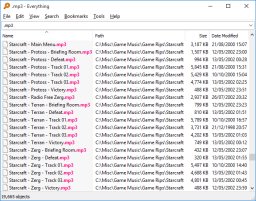 Everything may seem like an odd name for an application but that’s exactly the name for a very small (less than 1mb) application used to search for files in your computer. This application is fast, efficient and will not use up the resources of the local gadget. The default search tool in Windows-OS will usually use up a lot of resources which means other applications will slowly slow down while search is active. Everything, on the other hand, will search your computer while allowing other applications to normally operate. Everything may seem like an odd name for an application but that’s exactly the name for a very small (less than 1mb) application used to search for files in your computer. This application is fast, efficient and will not use up the resources of the local gadget. The default search tool in Windows-OS will usually use up a lot of resources which means other applications will slowly slow down while search is active. Everything, on the other hand, will search your computer while allowing other applications to normally operate.
For the application to speed up the search process, the application indexes your gadget before allowing you to search for files. The indexing process may take up a minute or two depending on the number of files in your computer. After this process, the user could search by filename and the application will display the matching files in real time. Although the application is limited to filename only, it speeds up the process of file search without requiring resources from your gadget.
Everything indexes the files and folders and keeps them for future references. That means you do not need to wait for the application to restart for a very long time. The application will merely get updates on the latest file changes as well as the new files and folders added in the system.
Everything is highly recommended application for new computers with Windows OS. This is a great tool that automates file changes so that it will ease search for specific files in the future.
Check it out at http://www.voidtools.com/
Posted in Main | No Comments »
Saturday, June 27th, 2009
 Monitor and control your finances with JaHoCa. This Java-based application provides highly interactive interface as users can enter various financial transactions during the day and compare them to their monthly earnings. Detailed information for every transaction is also allowed which means your financial transactions will have more than just simple spending data. As a Java-based application, users can see in real time how their funds are spent. Multiple-users are allowed in the application so everyone can actively monitor their spending in one computer. Monitor and control your finances with JaHoCa. This Java-based application provides highly interactive interface as users can enter various financial transactions during the day and compare them to their monthly earnings. Detailed information for every transaction is also allowed which means your financial transactions will have more than just simple spending data. As a Java-based application, users can see in real time how their funds are spent. Multiple-users are allowed in the application so everyone can actively monitor their spending in one computer.
JaHoCa is basically a “learning” application. After weeks and months of using the application, users will be able to extract data from JaHoca about their past expenses as well as the time period on how the funds were spent. Users can use filtering so that the right data could be extracted in no time.
Summarization in JaHoCa could come in either purely text format or through a diagram. Users can easily create a diagram for their expenses so that they will have a visual representation on how much they have spent on certain products and services. Grouping the expenses is also possible such as utilities, groceries, entertainment and other expenses that should be grouped together. This makes it easier for the diagram to implement which eases user understanding. The data from the application can also be exported as PDF which eases printing and prevents it from being edited.
Although the application requires JRE (Java Runtime Environment) before it could be launched, downloading JRE is worth it with this simple but very useful application.
Check it out at http://www.arcanea.net/
Posted in Main | No Comments »
Saturday, June 27th, 2009
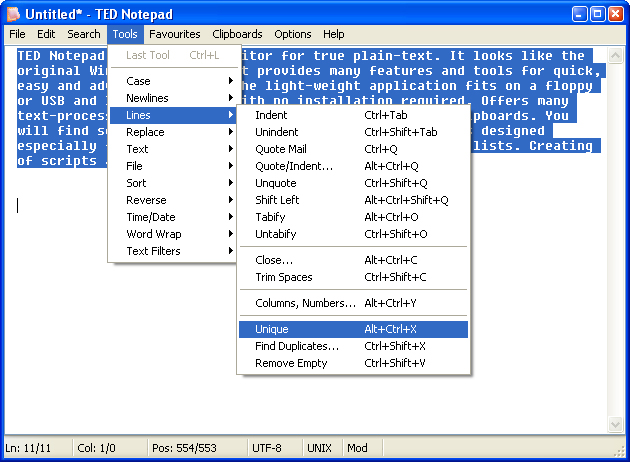 There are many free notepad applications that you can download online. Most of them offer more than simple editing tools offered by the native notepad application. TED Notepad is one of those applications but this particular application extends some of the simple functions on most notepads which makes it one of the must download notepad application. There are many free notepad applications that you can download online. Most of them offer more than simple editing tools offered by the native notepad application. TED Notepad is one of those applications but this particular application extends some of the simple functions on most notepads which makes it one of the must download notepad application.
The first thing you’ll notice about the application is its size. TED Notepad is less than 200kb which means you can download and use the application in less than a minute. But even with the size of the application, TED Notepad comes with very powerful features. Among them is the ability to swap through different files fast although the application will continuously ask you to save the file before transferring to new window. Undo and redo features are almost unlimited unlike the basic notepad which only allow you one undo and redo.
Text editing is also very efficient in the application. You can create up to 9 clips and paste them immediately with predefined shortcuts. Auto-completion of long words in the file is also enabled so you can encode faster. Hot keys that are also customizable to initiate special functions are also possible in the application. The application could even number the lines so that users can easily swap certain text to various destinations within the file.
All of these features could be enjoyed once the application is installed. But aside from full installation option, users can also download the portable version and launch them from portable storage devices.
Check it out at http://jsimlo.sk/notepad/
Posted in Main | No Comments »
Friday, June 26th, 2009
 ZScreen is a screen a capture tool that provides complete control to the user on how screenshots are done on their local gadget. It’s a very lightweight application (less than 1mb) which means download and installation is a breeze. The application may only offer a single function but it is very efficient in what it does that it has become a must download for many user. ZScreen is a screen a capture tool that provides complete control to the user on how screenshots are done on their local gadget. It’s a very lightweight application (less than 1mb) which means download and installation is a breeze. The application may only offer a single function but it is very efficient in what it does that it has become a must download for many user.
The application is installed in the system tray wherein an icon is displayed to signify the ZScreen is active. Users do not need to open the application from the system tray to use the screen capture tool. Hot keys are provided so that users would only use a keystroke for screen capture. Before the screen capture, users can define the region where the application should be used. The full screen can also be captured or only the window depending on user’s preferences.
Aside from configuration of the size and area to be captured, users can also define the location of the saved file. Users can immediately save the file to their hard drive, copy the screen to be loaded in your favorite image editing tool or they can upload the image captured on the screen on ImageShack – a popular file hosting website.
While the application is lightweight, it’s only downside is its additional requirement. Before the application could work in the system tray, it will need the latest .Net framework installed. If you don’t have the latest framework yet, it will take sometime before you can use ZScreen because of the size of the framework. But after the .Net framework is already installed, the application can launch without any problem.
Check it out at http://brandonz.net/projects/zscreen/index.html
Posted in Main | No Comments »
Thursday, June 25th, 2009
 ISO, RAW, CUE and BIN are installation files that needed to be burned in CDs or DVDs first before they can be installed in specific computers. These files will require a blank CD, a CD burning application with ISO burning feature and the right hardware to implement these operations. These processes could take time and funds especially if the computer does not have the right hardware to burn CDs and DVDs. ISO, RAW, CUE and BIN are installation files that needed to be burned in CDs or DVDs first before they can be installed in specific computers. These files will require a blank CD, a CD burning application with ISO burning feature and the right hardware to implement these operations. These processes could take time and funds especially if the computer does not have the right hardware to burn CDs and DVDs.
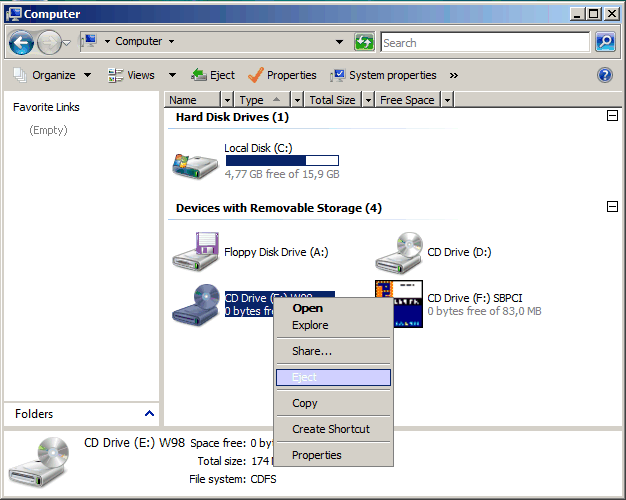
This problem could be easily solved by a simple application called WinCDEmu. This application will emulate the functions of CD and DVD hardware with writing (burning) capabilities. The ISO, RAW, CUE and BIN files will be read as installation files. That means you don’t need to burn them on a CD just to initiate installation. The application will automatically read the said files and allow the user full installation.
In order to do this process, the application will create a virtual CD/DVD drive. The virtual drive will detect all these files that could be installed in the application. All the user needs to do is to click the files to initiate the installation. WinCDEmu will allow the user to implement everything without a CD or DVD hardware. Traditional installation could also improve because the application will automatically detect the image in the CD required for installation.
While WinCDEmu eases the operation of application installation, it may require a relatively powerful computer. A virtual drive will require a lot of resources from the user’s computer. But with the rapid improvement of specifications of computers today, WinCDEmu could run in most computers with ease.
Check it out at http://wincdemu.sysprogs.org/
Posted in Main | No Comments »
Thursday, June 25th, 2009
 Convert your computer and webcam into a CCTV camera with this simple software. CyeWeb One Channel is a free application that could be used to actively monitor the surroundings. The video output of the free application could be streamed via Windows Mobile Broadcast which eases launching of the application for many Windows-based OS. This one channel CCTV is even better than standard monitoring tool since it can also record audio as long as the webcam is equipped with the right hardware. Convert your computer and webcam into a CCTV camera with this simple software. CyeWeb One Channel is a free application that could be used to actively monitor the surroundings. The video output of the free application could be streamed via Windows Mobile Broadcast which eases launching of the application for many Windows-based OS. This one channel CCTV is even better than standard monitoring tool since it can also record audio as long as the webcam is equipped with the right hardware.
CyeWeb One Channel also has the ability to tag certain events in monitors. This allows easier playback since the application will create a bookmark on the times where event occurred. This feature is very useful as it will allow easier search on the recorded video.
One of the many user concerns of this type of application is on the required space to store videos. CyeWeb One Channel answers that problem through full configuration of the application. Users can choose between 60fps (frames per second) which requires a hard disk with a relatively large storage capacity or they can select a 5fps configuration will not require a lot of storage on a computer. Colors could even be configured so that the application will not require too resources from the computer.
Other functions of the application are the scheduler, auto-email alerts, ease of playback and visual mapping of the timeline. It is also built in with motion detectors which complements the tagging feature of the application. You can also try their 8-channel version for 14-days if you want to have the full featured version of the application.
Check it out at http://www.novosun.com/
Posted in Main | 1 Comment »
Tuesday, June 23rd, 2009
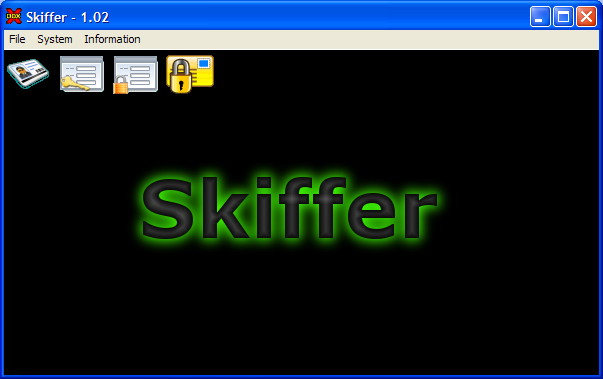 Skiffer is a very simple but very useful security application geared for email messages. The application is used to encrypt messages that could be only read by the appointed reader. The application comes with a key that should be shared by two users (the sender and recipient) in order for the email to be read. Skiffer is a very simple but very useful security application geared for email messages. The application is used to encrypt messages that could be only read by the appointed reader. The application comes with a key that should be shared by two users (the sender and recipient) in order for the email to be read.
The interface of the application is very simple since users will just enter the information they want to be encrypted in the application. A key will be generated on the first use of the application which can only be shared to one person. No one can read the email – except for the user who has the key.
Aside from encrypting the message, Skiffer also comes with a plug-in that could be used in MS Outlook 2003 and 2007. It works like the stand-alone application but it uses the interface of MS Outlook. The only challenge on the plug-in is when you have too many contacts. Since the application could only be used for one person only, the plug-in could be confused and used for those who cannot read the email. A little bit of practice is required before the plug-in could be fully used in MS Outlook.
Although the application is very easy to use, it might not work well for users who are not familiar with encryption. It would take time before the application is fully configured in both ends. But as soon as the encryption key is shared, the application could be used without any problem.
Check it out at http://www.v-data.se/pub/win.html
Posted in Main | No Comments »
Tuesday, June 23rd, 2009
 Control projects, monitor used applications and get consistent updates with this very small but useful application. Kwok Information Server allows various users to update their projects without the need to actively inform project managers. Everything the project manager has to know about the status of the project is available in the application. Control projects, monitor used applications and get consistent updates with this very small but useful application. Kwok Information Server allows various users to update their projects without the need to actively inform project managers. Everything the project manager has to know about the status of the project is available in the application.
Aside from active monitoring of the projects, problems reported such as bugs could be easily addressed as the project manager can reassign projects through this application. Users will have active updates about the project and should be provided with details instantly regarding their assignments
The ease of information streaming between users is based on two features: the application uses Java-based interface so real time interaction should be expected and the application also use browsers so that no further configuration is required from users. Kwok Information Server is practically a web-based application that allows streaming information among project manager and developers. Administrators could even write blogs which could be used to update users regarding the status of the application or simply anything the project manager wants to say.
Project managers can also monitor the applications used in project development. But aside from knowing the tools, project managers will also know if some applications are unlicensed. Applications that are rarely used can also be verified from the application.
Contact information of those involved in the project can also be edited from the application. Although it requires manual entry of contacts, the data entered can be easily extracted. Contacts could even be exported as CVS so that it could be read by applications that recognizes the file format.
More info at http://www.kwoksys.com
Posted in Main | No Comments »
Tuesday, June 23rd, 2009
 USB devices offer portability and durability of storing files and even applications. However, the USB device has become major hub for different viruses as they can auto-run in a computer. The virus can easily inject itself in the gadget especially if the user does not have an active anti-virus application. USB devices offer portability and durability of storing files and even applications. However, the USB device has become major hub for different viruses as they can auto-run in a computer. The virus can easily inject itself in the gadget especially if the user does not have an active anti-virus application.
The problem of viruses from automatically running from the USB device could be prevented with a simple application called Panda USB Vaccine. In gist, the function of the application is to prevent the USB device from auto-running in computers. This will allow user to run the anti-virus application in the specific USB device before it could be read by the computer. This might seem very simple but disabling the auto-run feature for USB devices is very difficult since Windows OS wanted this feature to allow easy installation of applications.
Panda USB Vaccine also comes with a small application called Computer Vaccination. This application works almost the same as Panda USB Vaccine. However, its focus is on other external device that might come with potentially harmful applications. CDs, DVDs and other external USB devices will be prevented from automatically running in the computer in order to prevent harmful auto-run applications in the computer.
The interface of Panda USB Vaccine is very simple. After installation, the interface gives you two options: run the USB Vaccine or PC Vaccination. These applications will immediately disable the auto-run features depending on which application you choose. Panda USB Vaccine may not be another anti-virus but it comes with a security feature that will prevent viruses from being installed in your computer.
Check it out at http://www.pandasecurity.com/homeusers/downloads/usbvaccine/
Posted in Main | 1 Comment »
Monday, June 22nd, 2009
 Snowbird is a small application that could be used for file search and transfer. At first glance, this application might sound unnecessary since computers already have the capacity to search for specific files and transfer them to various destinations. While this is true, the ability to search and transfer files to different folders might not be as efficient as Snowbird. The default file transfer in computers does not have the capacity to pause and resume transfer of files. Once the user presses “cancel” during file transfer, users have to restart the processes again. Snowbird is a small application that could be used for file search and transfer. At first glance, this application might sound unnecessary since computers already have the capacity to search for specific files and transfer them to various destinations. While this is true, the ability to search and transfer files to different folders might not be as efficient as Snowbird. The default file transfer in computers does not have the capacity to pause and resume transfer of files. Once the user presses “cancel” during file transfer, users have to restart the processes again.
Snowbird is a file transfer application that allows users to pause file transfer. This type of application is very useful when transferring large files from various folders since users can temporarily stop the file transfer in case they need to use the computer. Because of Snowbird’s ability to transfer files efficiently, it might use up a large chunk of resources in the application. The search function of Snowbird is also very efficient since it will aggressively run through the file on the targeted folder. Again, the search function my slow down your computer for the sake of the search function. However, the search tool is very fast so you can sacrifice a small downtime just to get the file you need sooner.
The application may just be limited in two functions: file search and file transfer. But the developers of the application ensure that these functions will be a lot better compared to Windows OS search and transfer tools. The application is also very small as it focuses on file transfer instead of providing interactive features.
Check it out at http://lmadhavan.com/software/snowbird/
Posted in Main | 1 Comment »
|
|
|




