Author Archive
Saturday, May 23rd, 2009
 Picture Collage Maker is a very smart tool intended for users who wanted to create something special out of their photos. The application is basically an aid for those who wanted to create scrapbook – friendly photos or pictures with artistic bordering or rendering. Picture Collage Maker is a very smart tool intended for users who wanted to create something special out of their photos. The application is basically an aid for those who wanted to create scrapbook – friendly photos or pictures with artistic bordering or rendering.
The application allows users to create collage and scrapbook photos in three ways: first is through the wizard wherein users will be aided by the application on creating photos. By following the wizard, users will be able to select the right photos, edit them with the available tools and add something artistic. The second way the application allows is to select a group of photos and edit them with uniformed background.
The third way of creating collage and scrapbook through this application is by freely selecting the number of photos and resizing them according to the preference of the users. Users will practically create a page composed of different photos in different sizes with different designs.
But aside from collage and scrapbook friendly photos, users can also create postcards that they can print and send through snail mail to their friends or through email. The photos could also be edited so that it could be part of the calendar.
Picture Collage Maker is a very simple application but very useful and time saving. The options on how the photo will be designed are almost unlimited that hobbyists will have a great time using the application. Even the casual users will like the application because it doesn’t require a lot of learning before the application could be used.
Check it out at http://www.picturecollagesoftware.com
Posted in Main | 3 Comments »
Saturday, May 23rd, 2009
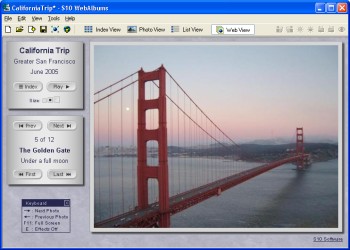 S10 WebAlbums is a very user friendly application that allows users create online albums without the need for complicated HTML coding. Through this application, users will be able to create fully customizable photo albums and allow the photos to be streamed online according to the preference of the online viewers. S10 WebAlbums is a very user friendly application that allows users create online albums without the need for complicated HTML coding. Through this application, users will be able to create fully customizable photo albums and allow the photos to be streamed online according to the preference of the online viewers.
Aside from easing the creation of web albums; the S10 WebAlbums also serve as an efficient photo editing application. Common problems in photos such as red-eye and color balancing could be easily done with this simple application. Users can just drag and drop the photos to the application and edit them as soon as they are uploaded.
The look of the album could be edited as well as the presentation of their photos. The speed of transition from one photo to another as well as layers and borders could be edited on each photo. The design options for photos and borders are almost endless. Additional options for users when the photo has been uploaded are also available such as full screen mode, auto-play of albums as well options for additional language.
Before the album could be created online, users can use the local server to stream photos in computers. This will give the users a feel on how the album will look like when they are eventually uploaded. With less than 500kb in size, the application can run seamlessly after installation.
Since the web album is not affiliated in any website, users would have to use their own FTP (file transfer protocol) before the web album could be created. It could be downside for those who are unfamiliar but learning the basics of FTP is very easy.
Check it out at http://www.s10soft.com/webalbums.htm
Posted in Main | No Comments »
Friday, May 22nd, 2009
 MyGoBar at first glance may look like a simple browser. But a closer look at the application will reveal a very powerful browser that will virtually transform your desktop experience. Although MyGoBar labels itself as “thin browser” so that users can easily access the web, it can dramatically change the way users interact with their browsers. MyGoBar at first glance may look like a simple browser. But a closer look at the application will reveal a very powerful browser that will virtually transform your desktop experience. Although MyGoBar labels itself as “thin browser” so that users can easily access the web, it can dramatically change the way users interact with their browsers.
In gist, MyGoBar is an application that transforms your desktop into a browser. The background image of your desktop will have a search bar on top where you can place the website’s address and let them load right in your desktop. Instead of opening another browser, the desktop background will show the website that you wish to visit.
Even though MyGoBar will transform the desktop into a browser, it will never take away the desktop experience of the user. The shortcuts to certain applications will still be there as well as shortcuts to important folders within the gadget. Additional features in the browser are also available such as favorites and Google search.
Downloading and installation of the application is almost in an instant. The application is less than 1MB so in a DSL connection, the application could be downloaded and installed in less than five minutes. However, the downside of the application is that it will require Adobe Air before it could be launched. While Adobe Air improves the interface of the application, it will require a lot of processing power from the local gadget. That is why; the application is only recommended as the alternative browser if the regular browsers fail.
Check it out at http://www.mygobar.com
Posted in Main | No Comments »
Friday, May 22nd, 2009
 CE Cover is a very simple yet very powerful application aimed to protect users from local as well as online attacks. The application is a perfect complement for firewalls since it can help in cloaking files and shortcuts within the desktop. As soon as the application is implemented, users will be able to cover as many files or shortcuts as possible on the desktop. CE Cover is a very simple yet very powerful application aimed to protect users from local as well as online attacks. The application is a perfect complement for firewalls since it can help in cloaking files and shortcuts within the desktop. As soon as the application is implemented, users will be able to cover as many files or shortcuts as possible on the desktop.
In gist, the application has the ability to cover the icons on the desktop to avoid detection. The application will be able to help users cover important and personal files to avoid intrusion.
When the application is installed, users can launch the application as many times as they prefer so that it could cloak many desktop icons. However, take note that it could slow down the processing speed of the application. The application requires the SP2 Version of Windows .Net Framework before it could be launched and multiple windows of the application that uses .Net Framework could affect the computer’s performance.
Control of the application requires some getting used to. There are no visible commands or shortcuts within the application so users would have to consult the help file that could be downloaded from the site’s official webpage. Controls such as removing the cover and other functions are available in the help file.
Generally, CE Cover is a perfect tool for protecting files on the desktop from different intrusions. However, with the requirement of .Net Framework as well as the familiarity with commands, it might take some time before the user could fully harness the application.
Check it out at http://www.casualengine.com/software/cecover.htm
Posted in Main | No Comments »
Friday, May 22nd, 2009
 The name of the application says it all. Simpo PDF to Text is an easy to use converter that extracts text documents from PDF to simple txt files. Users can quickly convert PDF files without additional steps. The application doesn’t even need a PDF reader before it can covert the said file. The name of the application says it all. Simpo PDF to Text is an easy to use converter that extracts text documents from PDF to simple txt files. Users can quickly convert PDF files without additional steps. The application doesn’t even need a PDF reader before it can covert the said file.
The interface of Simpo PDF to Text is very straight forward. The main body of the application lists the files that have been uploaded for conversion. On top are functions where users can upload or remove files that need to be converted. The application can convert multiple files so users can upload as many files as possible and expect them to be converted without further prompts. After conversion, the extracted text from the PDF document does not even need to be edited to be easily read. The text will be automatically adjusted for readability.
Secured files can even be converted by the application. Of course, the user would have to provide the username and password of the PDF document before they can be converted. The target or destination of the converted files can also be customized by users. With less than 1MB in file, installation is very fast and conversion is known to be fast as well.
Unfortunately, the application is not a PDF reader. Users who wanted to read PDF documents should still download the latest version of known a PDF reader. But the simplified interface as well as the speed of the conversion of the application makes this application on a worthy download.
Check it out at http://www.simpopdf.com
Posted in Main | 2 Comments »
Wednesday, May 13th, 2009
 Sending an email to more than one person is usually referred to as SPAM email which is highly discouraged and illegal. But there are scenarios where sending email to more than one recipient is legal and possible. For example, you want to update your co-workers about a meeting or your clients about the recent changes in your company policy. Sending an email to more than one person is usually referred to as SPAM email which is highly discouraged and illegal. But there are scenarios where sending email to more than one recipient is legal and possible. For example, you want to update your co-workers about a meeting or your clients about the recent changes in your company policy.
That’s where Spryka ePostMailer could help you. This simple tool could help you send email up to 200 contacts (for free version) at once. For small businesses and for personal use, the number of contacts allowed is more than enough. It’s a simple but very helpful marketing tool for small and home based businesses in order to improve their client base.
The interface of Spryka ePostMailer is not your regular Outlook. Instead of emulating the popular email client, Spryka ePostMailer uses an explorer-like interface. This makes it very easy for users to understand the functions even though they will use the application for the first time. Because of its explorer-like interface, customizing messages with additional graphics is a lot easier.
The contacts could be customized as well. Instead of simple tags, you’ll be able to color code your contacts so that you can easily distinguish their role or importance to your business. Even the tools in the application are presented like explorer wherein the functions are presented in tree to know their hierarchy.
The professional version will allow you to send email to an unlimited number of recipients. But as already indicated; 200 contacts should be more than enough for many small businesses and solo professionals.
Check it out at http://www.spryka.com/
Posted in Main | No Comments »
Wednesday, May 13th, 2009
 As the name suggests, Moo0 SystemMonitor is a small but useful application that could be used to monitor the performance of your computer. The information about your computer will be displayed on your desktop in real time. This will give you a good idea on how fast (or slow) your computer works. As the name suggests, Moo0 SystemMonitor is a small but useful application that could be used to monitor the performance of your computer. The information about your computer will be displayed on your desktop in real time. This will give you a good idea on how fast (or slow) your computer works.
There are other applications that could be likened with Moo0 SystemMonitor. But this application is not just your regular monitor wherein it provides you the CPU usage, memory and temperature. The application could monitor up to 30 hardware functions in your computer. Some of these facts are not even familiar to some computer technicians but they can be actively monitored by the application. Network connections, connection time, HDD (hard disk drive) performance and usage and other hardware functions could be actively monitored by this small application.
On the other hand, the complexity of the application requires a little bit familiarity of your system. Since Moo0 SystemMonitor will provide real time data about your computer, it has to be a little bit intrusive which means it could slow down your gadget. It will show the cause of the error but the additional cause of your computer’s sluggish performance is the application itself. Another shortcoming of the application is the temperature monitor tool. The tool could only monitor Intel and AMD hardware but they are actively working on a new version to adopt other manufacturers as well.
Overall, Moo0 is a very powerful tool that will give you a good idea on how your computer works. By knowing what slows down your gadget, you should be able to provide fixes fast and improve the performance of your computer.
Check it out at moo0.com
Posted in Main | No Comments »
Tuesday, May 12th, 2009
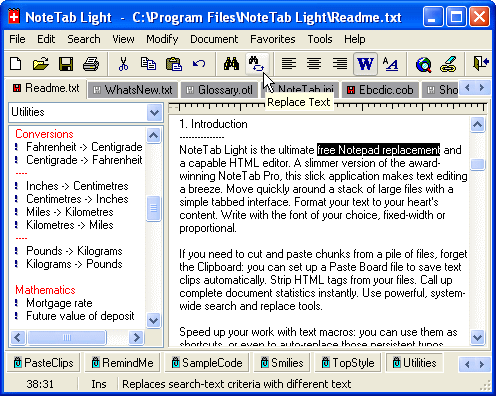 NoteTab Light is a very impressive notepad replacement. The application provides impressive tools and functions not found in regular notepads. Although at first it’s only seen as a notepad alternative, it has grown into a very powerful application that aims to assist not just regular users of notepad application but also web developers. Your notepad will not just be a simple clipboard anymore but a highly interactive application for document editing. NoteTab Light is a very impressive notepad replacement. The application provides impressive tools and functions not found in regular notepads. Although at first it’s only seen as a notepad alternative, it has grown into a very powerful application that aims to assist not just regular users of notepad application but also web developers. Your notepad will not just be a simple clipboard anymore but a highly interactive application for document editing.
The most impressive feature of NoteTab Light is the tabbed feature. It has a browser-like behavior because you can easily launch multiple tabs in a single application so that you can easily navigate through various files with ease. Identifying the tabs is also easy since they will be tagged by their filenames. Like the native Notepad, the application is also compatible to various file formats including HTML files for easy editing.
The controls of the NoteTab Light are another difference maker for the application. The application comes with the standard commands for Notepad but adds functions such as replace, highlight, search and modify the text document. On the left side of the application, you’ll also have a slew of utilities that could be automatically added in the file. The sidebar is considered as the clipping tool wherein you can insert functions with only one click.
Because of the impressive features of NoteTab Light, you can expect that the application would be a little bit heavier compared to other notepad replacements (1.8MB) but launching and navigating through the application is a breeze as the application will not be a resource hog.
Check it out at http://www.fookes.com/notetab/index.php
Posted in Main | No Comments »
Tuesday, May 12th, 2009
 Although Windows Vista is hailed as the next generation OS after XP, its reception is mostly on the negative. Instead of providing better interaction and security for users, it only increased the hardware requirements without doing anything better than XP. The Vista also constantly connects to Windows Servers which could slow down your connection and expose you to different form of attacks. Although Windows Vista is hailed as the next generation OS after XP, its reception is mostly on the negative. Instead of providing better interaction and security for users, it only increased the hardware requirements without doing anything better than XP. The Vista also constantly connects to Windows Servers which could slow down your connection and expose you to different form of attacks.
These problems could be prevented by a simple tool called Vispa. In gist, this application will help you make some changes in the said OS without having to navigate through complicated processes of the application. The functions that you wanted to disable in Vista are normally hard to find especially for new users and those who are not proficient with computers. Vispa answers these problems by creating a list on the things that you wanted to disable in Vista. After selecting the things you wanted to be disabled, just click apply and the application will do the rest of changing the OS based on your preferences.
Aside from Vista, users could also use Vispa to tweak or customize their Internet Explorer. You’ll be able to disable updates, improve connections as well as preventing pop-ups from showing up while using the said browser.
But take caution on using the application. Vispa could disable some functions without affecting the operating system but you might disable something important the system. Be sure you are familiar with the functions you are disabling so that you don’t have deal with the inconvenience that your OS is not properly running anymore.
Check it out at http://vispa.whyeye.org/
Posted in Main | No Comments »
Tuesday, May 12th, 2009
 Sucubus is a music and video search tool that also allow users to download the said videos directly from its source. The video search tool of Sucubus automatically searches YouTube and provides an option for users if they want to download the file for future viewing even when they are offline. Sucubus is a music and video search tool that also allow users to download the said videos directly from its source. The video search tool of Sucubus automatically searches YouTube and provides an option for users if they want to download the file for future viewing even when they are offline.
The music search tool connects users to websites that freely shares their music online. Like the video search tool, users can download the said file directly from the source. It’s almost a P2P but without the waiting time for the uploader to “seed” the said file.
Aside from allowing users to download videos online, the application also comes with a video converter. Users can convert the videos into formats that could be read in mobile devices. Videos could be converted to 3gp or Mp4 – formats that could be read by mobile phones and Apple created mobile devices. Users can also rip the audio from the downloaded video and convert them into an Mp3 file. This is especially useful if you wanted live performance as an audio instead of a music video.
The interface of Sucubus is very straight forward. The main page asks to you enter the keywords of the file you want to use and the application will show video results on top and audio on the bottom. You can expand the video and audio results for more choices.
Once you opt to download a file, you’ll be able to see the download progress in real time. The file size of the folder is also displayed so you’ll know how many videos and mp3 files you have downloaded so far.
More info available at http://www.sucub.us/
Posted in Main | No Comments »
|
|
|




