Author Archive
Thursday, May 7th, 2009
 Cloud computing is a form of online interaction wherein the experience is almost desktop like. Instead of using your regular desktop as the source of your application, you can just use your browser to launch important applications. Because everything is online, you can access the information wherever you go as long as there is a decent internet connection. Cloud computing is a form of online interaction wherein the experience is almost desktop like. Instead of using your regular desktop as the source of your application, you can just use your browser to launch important applications. Because everything is online, you can access the information wherever you go as long as there is a decent internet connection.
Gladinet is an application that lets you experience cloud computing with a twist. Instead of using the online application to edit your files, you can use local software to edit the files and save them online. Although you still can use the application online, using your regular desktop application speeds up the process. You’re practically using your MS Office (or any relative application) and save them directly to your online storage account.
The interface of Gladinet launches as a file explorer. Through this explorer, you can find your files and make the necessary changes on the files or even folders as you wish. There is a task bar that serves as an upload/download tool which also servers as a control panel for software compatibility of your files. The Gladinet works well with Google Docs, Amazon S3 and other file storage servers.
There are two editions of Gladinet but the free edition should be more than enough if you’re only planning to use the application for personal use. The professional edition offers more efficient file transfer tools (for large files) and more settings for better customization. You can try the pro edition for 14 days but it will revert to starter edition (no limitations) if you opted not to purchase the pro license.
Check it out http://www.gladinet.com/
Posted in Main | No Comments »
Thursday, May 7th, 2009
 ActiveSolid is a relatively small but very powerful CAD tool for architects and designers. Less than 3MB in size, the application quickly launches to aid users in designing structures in full 3D interpretation. The output of the application could be fully integrated online for IE (but only though ActiveX) and MS Office applications as well. ActiveSolid is a relatively small but very powerful CAD tool for architects and designers. Less than 3MB in size, the application quickly launches to aid users in designing structures in full 3D interpretation. The output of the application could be fully integrated online for IE (but only though ActiveX) and MS Office applications as well.
The application provides the user practically everything they need to create an impressive 3D modeling. Along with standard shapes and sizes that could be automatically added in the application, specific points of the design could be accessed and manipulated easily because they can be targeted through efficient use of X,Y and Z planes.
The application also aid developers in efficiently editing and improving their work. Before the design could be applied, the application will show the outline of the outcome when the design is applied. When the user presses “Apply” the final work is created. But it doesn’t stop there. If the user finds that the new design does not look good, the “Undo” button could still be used – without limitations.
Aside from impressive 3D imaging, the application also helps users who wanted to add a 2D image especially when they want to add simple designs on the final work. Like the 3D counterpart, manipulation is also easy and the under/redo function is virtually unlimited. The application is a very lightweight application but comes with very useful 3D and 2D design functions especially on the variety of designs that could be integrated. Designing a structure has never been easier using this application.
Check it out at http://www.threedify.com/
Posted in Main | No Comments »
Tuesday, May 5th, 2009
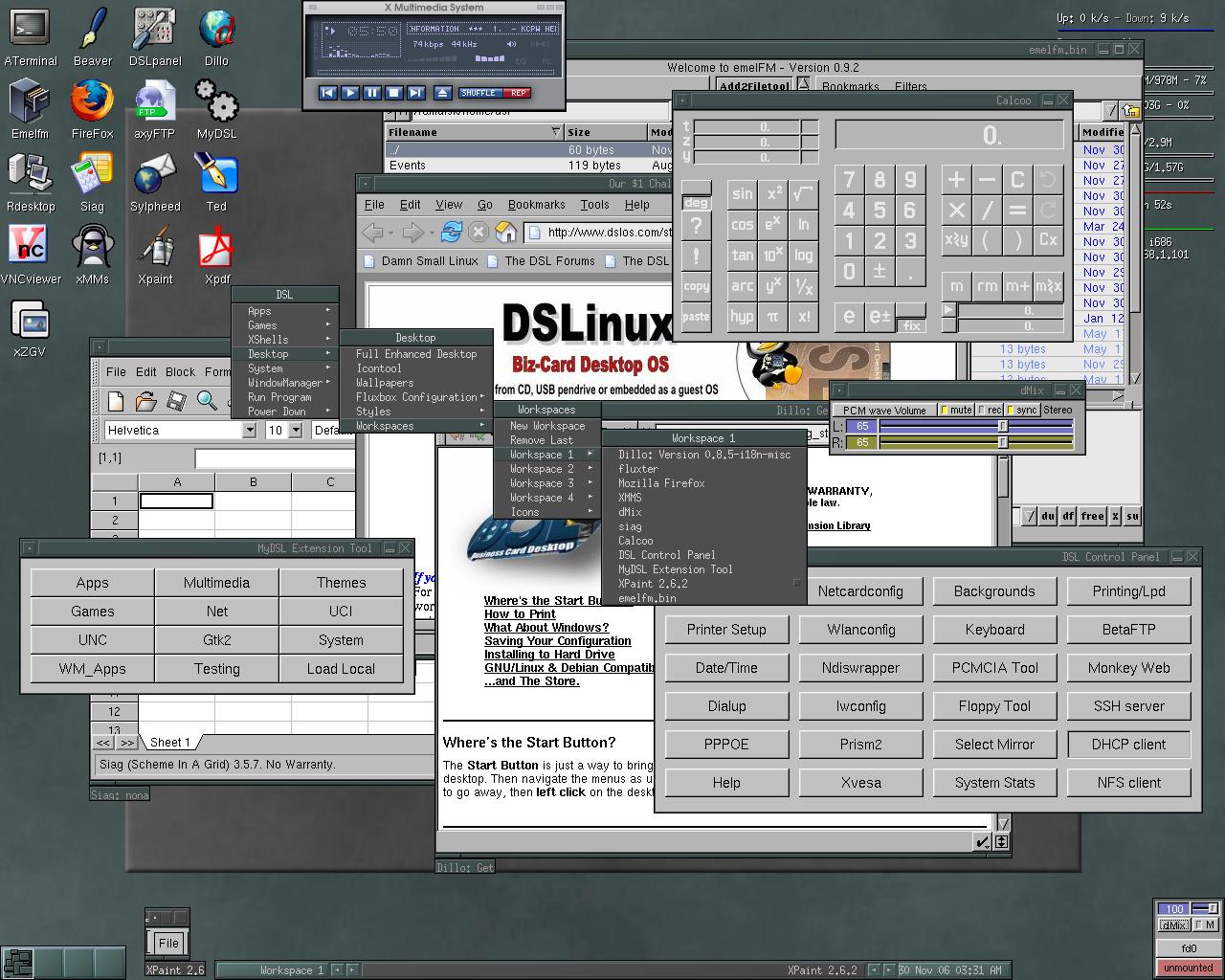 Damn Small Linux is an increasingly popular Linux operating system adapted in low-powered laptops and old computers. It’s also a choice by many computer enthusiasts who wanted to increase speed of their gadgets without compromising function. As a form of Linux, it’s a free operating system without any strings attached to those who opted to download. Damn Small Linux is an increasingly popular Linux operating system adapted in low-powered laptops and old computers. It’s also a choice by many computer enthusiasts who wanted to increase speed of their gadgets without compromising function. As a form of Linux, it’s a free operating system without any strings attached to those who opted to download.
The main feature of the operating system is its size. The name says it all – DSL is only 50MB in size. In comparison, Windows XP is 1.5GB in its simplest form. You’ll be able to save more than 1GB in hard disk space not to mention speed. Every basic function you need is already included in DSL which includes document formatting, VOIP and even games.
But DSL has also something unique to offer to users – normally, installing an OS will require a CD and will automatically give you a fresh start on your gadget. In DSL, users will be able to boot the operating system from a flash drive or a USB with a memory of no more than 128MB. Users will be able to boot the operating system right from the USB. There is also a function in DSL where the operating system will be able to boot inside another operating system.
Although DSL looks simple to run with its lightweight function, configuring DSL to work without any hitches takes time and careful research. It is highly recommended to read through the documentations to avoid any troubles such as losing data or crash in the native operating system.
For more info visit http://www.damnsmalllinux.org
Posted in Main | 4 Comments »
Monday, May 4th, 2009
 VZOchat is an increasingly popular video conferencing and chat application. It’s a very powerful application as it allows two users to connect to up to 120 participants in the video conference. The video quality of the video does not change even though you increase the number of participants in the video conference. However, only up to two users could see the entire participants as the rest would be “members only” and will only see the administrators. VZOchat is an increasingly popular video conferencing and chat application. It’s a very powerful application as it allows two users to connect to up to 120 participants in the video conference. The video quality of the video does not change even though you increase the number of participants in the video conference. However, only up to two users could see the entire participants as the rest would be “members only” and will only see the administrators.
The unique feature of VZOchat is in its ability to effectively communicate even in dial up connections. The maximum Internet speed in dial-up connection is only 56kbs but VZOchat streams video at the speed of 30kbs which could be easily handled by a dial-up connection. But since the Internet connection is slow, video quality might not be optimized or audio communication is disabled (chat is still possible).
The interface is very easy to understand. The main window will show users or participants in the video conference. The video could be minimized or maximized through the integrated webcam control. Standard add-ons such as timers, microphone volume as well as speaker volume are also added. The application can also record the video conference but it will require permission from other users for security purposes.
Before the application is enjoyed, users are required to sign-up in the application. The username can be shared to anyone online or could be blocked to prevent spamming.
Because of its ability to work with dial-up connection, it’s a great alternative to current popular VOIP and IM applications.
Check it out at http://vzochat.com/en/Default.aspx
Posted in Main | No Comments »
Sunday, May 3rd, 2009
 Businesses today have to rely on their electronic gadgets or software in monitoring their inventory and even the improvement of their business. The PeerTranet Business 2009 Free Edition should be able to provide the said function for business owners, managers and employees. Businesses today have to rely on their electronic gadgets or software in monitoring their inventory and even the improvement of their business. The PeerTranet Business 2009 Free Edition should be able to provide the said function for business owners, managers and employees.
The free edition of this software is intended for small businesses who only sell or use limited number of materials. The free edition allows 30 types of products to be placed in the inventory including the source or the suppliers. The products becoming part of the inventory could be placed with a barcode which will be recognized by the software as well.
The application interface almost looks like a file explorer in XP. Information on products and inventory are itemized carefully since they are placed in tree view.
The impressive feature of the free edition is the multi-user support. The application could be shared within the network so that employees could easily update the stock. Up to five employees could be added in the network. Access to important data could be limited to employees depending on the preference of the administrator. Users could even add up to 10 customers so that their data could be looked up anytime.
A commercial edition is also available which unlocks the entire limitation on inventory and number of users. However, this might not be necessary for small business. The application comes with automatic data back-up in case you wanted to transfer to other applications. An option for conversion to different document formats is also available.
Check it out at Peertranet.co.uk
Posted in Main | No Comments »
Thursday, April 30th, 2009
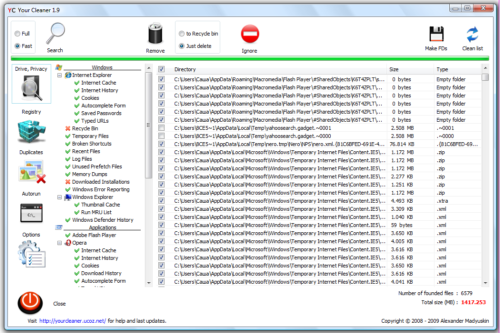 Your Cleaner is a straightforward optimization tool. It can help users delete unnecessary files in their computers so that users will increase their disk space as well as speed up computer process. The application could also work in major browsers wherein they will delete the temporary files in the browser and remove passwords stored in the system. But aside from cleaning up the temporary files in the system, the application could also be used to scan the hard drive to delete files with the same file name. Your Cleaner is a straightforward optimization tool. It can help users delete unnecessary files in their computers so that users will increase their disk space as well as speed up computer process. The application could also work in major browsers wherein they will delete the temporary files in the browser and remove passwords stored in the system. But aside from cleaning up the temporary files in the system, the application could also be used to scan the hard drive to delete files with the same file name.
The interface of Your Cleaner is very easy to understand. What the tasks users want to execute in the application could be launched through its shortcuts. The results are displayed with its corresponding information. Users could sort through the files and select the files that should be deleted. Of course, the option of deleting all temporary files is available for a faster process.
Your Cleaner is not just your regular temporary file deletion tool. The application also comes with a simple to use registry cleaner. Like the temporary file cleaner, the tool could be used to clean up the registry so that it could speed up the process of the applications.
Users can run the application in two modes: the fast mode wherein it will scan major applications and common tools in the browser. The full mode will run a full system diagnostic so that it could detect temporary files and promptly delete them. Expect that the full mode will require more time and could slow down the application, especially the registry cleaner.
Check it out at http://yourcleaner.ucoz.net/
Posted in Main | 2 Comments »
Thursday, April 30th, 2009
 Choosing a domain name for a website is often a difficult task. Almost any word in the entire English language is already used or already registered for another user. Manually searching for the perfect domain name in a browser is very difficult and the results might not be accurate. Choosing a domain name for a website is often a difficult task. Almost any word in the entire English language is already used or already registered for another user. Manually searching for the perfect domain name in a browser is very difficult and the results might not be accurate.
This problem could be easily addressed by a simple application simple called “Findname”. As the name of the application suggests, the tool is used to check if the proposed domain name is already registered. The application is practically a small “whois” application.
The interface is very easy to use. The application comes with three columns – the left panel is where you place your preferred domain name, the center panel is where you’ll see the search results and the right panel provides additional information about the search results. Although the default language is in Chinese, the application is very simple and enough to be understood.
The search results will provide eight different types of TLD (top level domains). This will give you more than enough options of domain names and see which ones are available. You could even suggest numbers and letters and the application will provide variation of results as suggestions.
Bulk inquiry is also possible with the application. The lower-right side panel of the application allows users to upload text files for batch search. The search results could also be exported as a text file. The application is less than 300kb in size which eases the installation and its use will yield very minimal footprint.
Check it out at http://www.findname.cn/
Posted in Main | No Comments »
Thursday, April 30th, 2009
 Note Mania is small yet a highly useful tool for those who wanted to be reminded and keep notes on almost everything the work on and see online. This application uses the basic concept of the traditional “sticky notes” while adding more functionality for ease of use and versatility. Note Mania is small yet a highly useful tool for those who wanted to be reminded and keep notes on almost everything the work on and see online. This application uses the basic concept of the traditional “sticky notes” while adding more functionality for ease of use and versatility.
The application lets you add notes to virtually everything – calendars, contacts, documents and bookmarks could be placed with a note. You can also launch a note on an RSS or Atom feed so that you’ll be able to be notified in case an update on your feed is available.
The best thing about Note Mania is the customization of skins. Not only you’ll be able to change the skin of the application but you can create a number of skins. These skins could be used to different tasks and other appointments. Aside from an additional note, you’ll have color coding for additional information. Colors could even be added with for easier recognition. Note Mania could even be used as stand-alone reminder which automatically pops-up in your preferred time or date. You can also configure your notes so that it will not pop-up anymore.
Note Mania doesn’t even have to be a permanent note in your computer. You can set the file as “temporary” which will automatically be deleted forever once you close the window.
This application could be easily set up in Window-based computers (less than 1MB). The footprint and RAM requirement of the application is also minimal so that it will not interfere in your running applications.
Check it out at http://www.utilhaven.com/nm/index.htm
Posted in Main | No Comments »
Thursday, April 30th, 2009
 The name of the application out rightly tells its users what it can do. It will delete all temporary files in computers in order to free up disk space as well as increase the speed of the applications. The name of the application out rightly tells its users what it can do. It will delete all temporary files in computers in order to free up disk space as well as increase the speed of the applications.
The application does not need any installation before it can be used. As soon as the .exe file is downloaded, it can be launched for use. However, the application will require the latest Java (version 1.6 or higher) before it can be used. This is probably the downside of the application. Although the .exe file is only 954kb, the latest Java could be very heavy for users as it could slow down the computer.
But downloading Java could be worth it with this application. The application could delete temporary files in computers but will also let users have complete control where to look for the temporary files to be deleted. The application could also be used to delete temporary files from browsers so that it could speed up the browser’s performance.
The impressive functionality of the application is its ability to “force delete” temporary files. These unnecessary files are usually left behind by uninstalled applications but have been interpreted by the system to be important. But take note that some files are actually useful – be sure that you’re familiar with the file so that it will not cause any system problems later. After deletion of temporary files, detailed information is provided.
Temp File Cleaner is an easy to use application. But its functionality is geared towards those who are already familiar with computer processes as it might delete important files.
Check it out http://software.addpcs.com/tfc/index.php
Posted in Main | No Comments »
Thursday, April 30th, 2009
 B Lyrics Mimer is a very simple application created to sync lyrics with an MP3 file. The application is based on VisualBasic programming language which means the application will smoothly execute its functions. You’ll be able to play MP3 files in the application while adding lyrics to go with the music. B Lyrics Mimer is a very simple application created to sync lyrics with an MP3 file. The application is based on VisualBasic programming language which means the application will smoothly execute its functions. You’ll be able to play MP3 files in the application while adding lyrics to go with the music.
The interface is very basic. As soon as you open the compatible file, it will start to play the file while letting the user encode the lyrics. The song could be paused at will so that lyrics could be added. There is a volume control for the song and you can drag the progress bar so that you can proceed to the unfinished area.
Syncing is possible when you click on “Start Making Lyrics” button on the application. This part of the application requires familiarity because the lyrics might not be able to sync with the music. But after two to three use of the application, you’ll be able to sync the lyrics without any problem.
The unique feature of the application is the second text box. This text box is intended for translating the lyrics so that the song could be understandable in other languages. However, no translation tool is found so you should add the data yourself.
The output of the application could be played in the same application. You’ll know if the lyrics sync with the song since the words will be highlighted as the song progresses. It’s a very simple application that requires familiarity so that application would be fully useful.
Check it out at http://www.psyzone.co.in/
Posted in Main | 1 Comment »
|
|
|




