Author Archive
Tuesday, February 24th, 2009
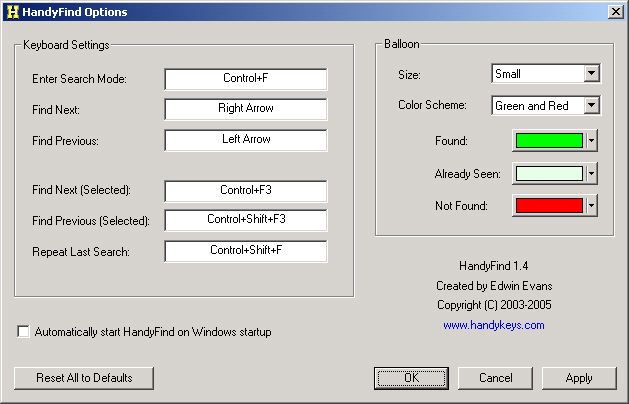 HandyFind is a very simple application that might be very helpful for some situations. Whenever you need to search for a word in MS Office applications (Word, Excel, etc) and IE, you have to go to find command or press CTRL F. You have to enter the word and press enter to go to that word. You still need to scroll to go to the next area where the word is found. HandyFind is a very simple application that might be very helpful for some situations. Whenever you need to search for a word in MS Office applications (Word, Excel, etc) and IE, you have to go to find command or press CTRL F. You have to enter the word and press enter to go to that word. You still need to scroll to go to the next area where the word is found.
This problem could be answered by HandyFind. This application will show the word you are looking for as you write them. Instead of going through the problem of pressing “next” and scrolling through the document or website to find the word, this application will help you find the word faster. This is very helpful when you’re using IE since this browser has a rather awkward way of looking for words in the website. With HandyFind, the word is searched as you write and will inform you immediately if the word is not found there.
The application also has an interesting feature: whenever the searched word is part of the URL, you can visit the link by simply pressing enter. This feature is the difference maker for HandyFind.
But HandyFind is an application that wants to oversimplify things. Although it could provide ease of usage for IE, using the application for MS Office applications may not really worth it especially if you’re already familiar with the native “find” functionality. Besides the “find” function in most office applications can find and replace words in the document – a feature not yet found in HandyFind.
Check it out at http://www.handykeys.com/
Posted in Main | No Comments »
Tuesday, February 24th, 2009
 Gmail, Google’s answer to free email services of Yahoo, AOL and MSN when it was released easily became one of the most popular email service in the world. Aside from being made by Google, it’s friendly interface, additional options and continuously increasing storage capacity its no wonder why Gmail became a sought after email client. Although Gmail could be integrated to POP and IMAP for Microsoft Outlook, users still wish to have the actual version of Gmail to be fully available in their desktop – an application without a browser. To answer that need, Google launched an application for offline Gmail using Gears (Google Desktop Plug-in). Gmail, Google’s answer to free email services of Yahoo, AOL and MSN when it was released easily became one of the most popular email service in the world. Aside from being made by Google, it’s friendly interface, additional options and continuously increasing storage capacity its no wonder why Gmail became a sought after email client. Although Gmail could be integrated to POP and IMAP for Microsoft Outlook, users still wish to have the actual version of Gmail to be fully available in their desktop – an application without a browser. To answer that need, Google launched an application for offline Gmail using Gears (Google Desktop Plug-in).
But if you’re looking for something faster and more Gmail-like, consider the application called GeeMail. Compared to Gears-based application, this is a lot faster. With a decent connection, you can easily download more than a thousand of emails although it starts with the test first and the attachments later. Some functionality is only available when the application is online especially its labeling function.
The good thing about GeeMail is based on the fact that you can compose an email or respond to new emails even if you’re offline. Of course, it will only proceed to send the email of you is able to reconnect to the internet. The user interface is also very user friendly as it uses the old version of Gmail.
The downside of the application is that it doesn’t have the search functionality yet. It also uses Adobe AIR which might drag your computer if you don’t have a powerful gadget.
More info at sourcebits.com/geemail/
Posted in Main | No Comments »
Friday, February 20th, 2009
 Sometimes reading a text online could become too straining for the eye. This is especially true if you’ve stayed in front of your computer for more than two hours. That is why it is recommended to stay away from your computer from time to time if possible, every hour, to prevent too much strain. Sometimes reading a text online could become too straining for the eye. This is especially true if you’ve stayed in front of your computer for more than two hours. That is why it is recommended to stay away from your computer from time to time if possible, every hour, to prevent too much strain.
So instead of reading them, why not listen to text? This could be easily done through Ultra Hal Text to Speech Reader. As the name suggests, the application aims to read your documents. This application is practically your assistant that will dictate you the document you want to read.
The interface of the application is very easy to understand. All you need to do is to load the document either in text (.txt) or rich text format (.rtf) and you can let the application start reading. You can choose a voice and even mix them according to speed, pitch and volume.
There are two interesting features of the application. First, the application could actually export the voice into .WAV format which could be read by almost any audio player. Second, the application will allow you to read only certain parts of the texts.
Ultra Hal Text to Speech could also be configured to read IM, pop-up messages from browsers and even text from browsers by copying and pasting the text to the clipboard.
An upgraded version is also available for a fee. The upgrade is basically an integration of AT&T Natural Voices which will greatly improve your listening experience.
More info available at http://www.zabaware.com/
Posted in Main | No Comments »
Friday, February 20th, 2009
 EF Commander Lite is a very simple yet highly powerful application that will help you navigate through multiple files with ease. Based on the Norton Commander, the application is a Windows Version that almost has the same features. The Lite Version is the free version of the application wherein a full feature application is simply called “EF Commander”. EF Commander Lite is a very simple yet highly powerful application that will help you navigate through multiple files with ease. Based on the Norton Commander, the application is a Windows Version that almost has the same features. The Lite Version is the free version of the application wherein a full feature application is simply called “EF Commander”.
Aside from simple file navigation, file transfer is very easy since you’ll be using two windows. You can simply drag and drop files from one location to another. The application could also be used to rename multiple files at the same time.
The application is also fully compatible to wide ranges of file formats. It can unzip compressed folders in major formats such as .zip, .rar, .tar, .gz, .7z etc. The application itself could also be used to view pictures, movies and audio. You don’t have to download additional software to play those files. Although the support file formats in multi media is pretty basic, the support for these files right from a file navigation application is very impressive. If your DVD or CD Burner is Nero, this application could launch the burner right on their interface as the application has been fully integrated with the popular burner.
The upgraded version for EF Commander has the ability to connect two servers for efficient FTP transfer. It can pause its file transfer if disconnection is experienced so the users don’t have to start again in transferring files. The application could also be fully integrated with Smartphones or most Windows CE powered devices.
Interested? Check it out at http://www.efsoftware.com/cw/e.htm
Posted in Main | No Comments »
Friday, February 20th, 2009
 The Operating Systems Windows XP and Vista have a built in functionality of providing step-by-step recommendations on how to fix your computer. But oftentimes these recommendations could either be too confusing or just too generic that you already have tried the recommendation. The Operating Systems Windows XP and Vista have a built in functionality of providing step-by-step recommendations on how to fix your computer. But oftentimes these recommendations could either be too confusing or just too generic that you already have tried the recommendation.
PC Fixer was created for that reason. This relatively small application could effectively scan your computer for problems and provide recommendations on how to deal with those problems. If the application sees that could be done without the assistance of the user, the application could automate the fix. Windows XP and Vista’s help support tool is only limited to system tools and Windows applications but PC Fixer could extend to other applications. The application will list the problems and you can choose which problems will be addressed for now. A restore point is also available in case the fix is not what you would expect from the application.
The good thing about PC Fixer is its strong knowledgebase. Aside from the fix that could be automated from the application, it also provides tips and step by step solution to problems that needs to be manually implemented. There is also an optional functionality wherein you can ask for help live if you’re online. The application could also connect you to the application developer’s forum wherein you’ll meet other users who also have the same problem.
PC Fixer is a small application (less than 2MB) but will effectively fix the problems in your computer. The solutions presented are not generic so you’ll learn new tricks in fixing your PC as the application also automates those fix.
Want to check it out? Go to http://www.digitalsupporttech.com/en-us/download.htm
Posted in Main | No Comments »
Wednesday, February 18th, 2009
 EDSAC or Electronic Delay Storage Automatic Calculator is one of the first computers in the world. This computer was built in UK and was first used in 1949 wherein it provided simple calculations. Although it’s relatively unknown outside the developer’s and business realm, it became the basis of today’s computers. EDSAC or Electronic Delay Storage Automatic Calculator is one of the first computers in the world. This computer was built in UK and was first used in 1949 wherein it provided simple calculations. Although it’s relatively unknown outside the developer’s and business realm, it became the basis of today’s computers.
If you want to take a look at how the computer works, download the application called EDSAC Simulator. As the name suggests, the application will let you experience how one of the first computers in the world was used. The application will easily launch in the latest operating systems. Developers of the simulator have also developed versions for Linux and OS below Windows 95. The Mac version of EDSAC Simulator comes in black and white but might not load in recent OS of Mac.
Although the computer is very lightweight (around 2MB in size), the application is a little bit complicated to launch. Don’t forget to download the documentation wherein a tutorial on how to load additional applications to the simulator. Those who have worked with the simulator have also developed simple applications that could be used in EDSAC. The application itself already has a slew of applications to try. A debugging tool is also added in case you wanted to make some small improvements.
The EDSAC Simulator is your ultimate “Blast from the Past” application when it comes to computers. If you’re a computer teacher, you can show this to your students as part of the computer history lesson. It’s also a great way to fully understand how the first computer works.
Check it out at Edsac Software web page
Posted in Main | 1 Comment »
Wednesday, February 18th, 2009
 There are notable video players free for download but most of them are almost the same in terms of playback quality. Some even provide support for new video formats as these video formats promise better video quality with less storage requirement. Other video players provide unique interface that caters to users that have unique needs or just wants to have something different. There are notable video players free for download but most of them are almost the same in terms of playback quality. Some even provide support for new video formats as these video formats promise better video quality with less storage requirement. Other video players provide unique interface that caters to users that have unique needs or just wants to have something different.
One of those unique video players is the MVS Player. At first glance, the MVS Player is a very simple looking application. It has a simple bar interface like most video players. But what makes it different is its capacity to play most video formats fast. By their measurement, the application is set to load a file with 1.5G in size in only 15ms (milliseconds) other video players would probably take more than five seconds before the player starts with the video.
Aside from its remarkable speed, MVS Player has the capacity to play 12 videos at the same time. It has an interface wherein you can assign a video to a slot. You can also resize these videos and even transfer the video to different panel.
But there are also downsides to the application. MVS Player, in terms of codec support, is only for regular video formats. The player only has codec support for DivX, MPEG, AVI, WMV and XviD. That also means it’s only a stand alone video player. Most free video players have the capacity to load most audio formats. However, its feature of playing 12 videos at the same time makes this a worthy download.
Check out http://www.absoftwide.com/mvs_player/ for more info and download
Posted in Main | No Comments »
Wednesday, February 18th, 2009
 Everyone wants to go back to the good old days of computer gaming once in a while. Fortunately, there applications that could be downloaded for free that could imitate the functionality of old school consoles. If you’re looking for this type of application (called emulators), consider downloading the free application called ZSNes. Everyone wants to go back to the good old days of computer gaming once in a while. Fortunately, there applications that could be downloaded for free that could imitate the functionality of old school consoles. If you’re looking for this type of application (called emulators), consider downloading the free application called ZSNes.
In gist, ZSnes is an emulator for SNES (Super Nes). This means you can play almost any game of SNES in this form of application. Although there are other SNES emulators online that are also free for download, not all of them have the capability of supporting a good number of games compared to ZSnes. Installation is very easy – all you need to do is to unzip the file and click on icon. You can create a shortcut and paste it in your desktop for easier access.
The tricky part of ZSnes is on loading games. Emulators do not have any games installed but it will require you to download ROM. These are the games that you need to download and launch in the application. Look for the application with a filename ending in “.smc” to ensure the emulator will read them. Because of the frequent update of ZSnes there is a great possibility that the game will run without any problem. But you can’t point and click on the file, you have to search for the file in the interface of ZSnes which requires a little practice to master.
ZSnes also requires the latest version of DirectX to ensure that the games expected to work will load flawlessly.
Check it out at http://www.zsnes.com
Posted in Main | No Comments »
Tuesday, February 17th, 2009
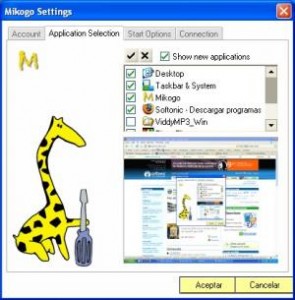 Real time information sharing has practically removed the need of traveling from one city to another. Although business for some companies is good, companies have to make sure they are not spending too much in traveling without any return expected. This is especially true when you are a salesman and the success rate of the transaction is not yet assured. Traveling from one place to another without the assurance of earnings is not a smart business idea. Real time information sharing has practically removed the need of traveling from one city to another. Although business for some companies is good, companies have to make sure they are not spending too much in traveling without any return expected. This is especially true when you are a salesman and the success rate of the transaction is not yet assured. Traveling from one place to another without the assurance of earnings is not a smart business idea.
Instead of traveling from place to another, you can still make presentations online with real time interaction through Mikogo application. Through this software, you can share your desktop up to 10 users at the same time. You can do your presentation right in your office. The viewer can practically be anywhere because the presentation will be based online. As long as the presenter and viewer have a decent DSL connection, the presentation will go through smoothly.
What’s impressive is the addition of the “whiteboard” functionality wherein everyone could collaborate on a frame. Everyone could provide an input on a project or a proposal in real time. Viewers could also become the presenters because of the added functionality of allowing other viewers to take control of the desktop.
Mikogo is also a partner to a very popular VOIP Client Skype. Users could integrate Mikogo to their Skype application so that aside from sharing desktop, they could also be on a conference call. Although there is a limitation to the number of users for Mikogo, 10 users is more than enough for a great presentation.
More info and download at http://www.mikogo.com
Posted in Main | 1 Comment »
Tuesday, February 17th, 2009
 If you’re online for most part of the day, chances are you have membership in different websites that cater to your professional work as well as personal preferences. Although these websites could help you with what you need in an instant, they will always require a username and password to get through. Although these are implemented for security measures, remembering all those username and passwords always spell trouble. Most secured websites will not accept simple passwords like others do so you are forced to remember a good number of passwords. If you’re online for most part of the day, chances are you have membership in different websites that cater to your professional work as well as personal preferences. Although these websites could help you with what you need in an instant, they will always require a username and password to get through. Although these are implemented for security measures, remembering all those username and passwords always spell trouble. Most secured websites will not accept simple passwords like others do so you are forced to remember a good number of passwords.
If you’re having trouble remembering user name and passwords, let Easy Login Assist help you. This application could become your database for your username and passwords. Enter the URL of the website in the application’s interface as well as the username and the password so that the next time you visit the website, the application will automatically fill-out the username and password link.
Although this type of applications is very handy, users are usually hesitant to use the application for security reasons. Some applications are just malware who will just gather the username and password. Easy Login Assist assures security to its users by doubling the encryption – the encryption will be implemented within the application itself and will use the encryption provided by the hard drive or the USB if the application is stored to a Flash Drive.
The difficulty of Easy Login Assist rests on the complexity of the interface. It will take more than a few uses before the user could become familiar with the processes of the application.
Interested? Visit http://easystone.kilu.de/en/prod_easylogin.htm
Posted in Main | No Comments »
|
|
|





