Author Archive
Wednesday, June 25th, 2014
 Having a platform or an opportunity to share your feelings can make a lot of difference for a lot of people. That is why a lot of chat applications are being downloaded daily by a lot of people. With a program like mIRC you can do just that with ease. Having a platform or an opportunity to share your feelings can make a lot of difference for a lot of people. That is why a lot of chat applications are being downloaded daily by a lot of people. With a program like mIRC you can do just that with ease.
What is mIRC?
mIRC is a full featured Internet Relay Chat client for Windows that can be used to communicate, share, play or work with others on IRC networks around the world, either in multi-user group conferences or in one-to-one private discussions.
mIRC has a clean, practical interface that is highly configurable and supports features such as buddy lists, file transfers, multi-server connections, SSL encryption, proxy support, UTF-8 display, customizable sounds, spoken messages, tray notifications, message logging, and more. It also has a powerful scripting language that can be used both to automate mIRC and to create applications that perform a wide range of functions from network communications to playing games.
One of the best parts of this application is that it stacks windows in a tight, overlapping layout. This ensures that you do not have any problem locating a specific page when you need it. Every window has its name across the top, and that is clearly visible whether they are stacked or not.
Does it have any downside?
mIRC interface is not that attractive especially for starters.
Want to check it out? Visit: mIRC.com.
Posted in Main | No Comments »
Monday, June 23rd, 2014
 Do you need a multi-featured program with easy to use features? If you have answered yes to that question, then what you need is XYplorer. Find out more what the software is all about by reading the review below. Do you need a multi-featured program with easy to use features? If you have answered yes to that question, then what you need is XYplorer. Find out more what the software is all about by reading the review below.
What the XYplorer is?
XYplorer is a tabbed file manager for Windows. It features a powerful file search, a versatile preview, a highly customizable interface, optional dual pane, and a large array of unique ways to efficiently automate frequently recurring tasks. It’s fast and light, it’s innovative, and it’s portable.
It is a portable program that requires no installation or changes to your system or registry. You can take it with you and start it from a USB stick, along with your personal configuration. XYplorer is packed with a lot of features that include the following: Dual Breadcrumb Bars show the path of each pane that lets you navigate the entire file system; Queued File Operations with background processing; Custom Copy, an alternative copy method featuring verification, safe overwrite, detailed reporting and logging, and more; Branch View lets you see the contents of all subfolders of a folder in one list; and many more.
Does it have any downside?
XYplorer has a 30 day trial limitation and a hefty chunk of a pricetag – $79.95 (but at the moment you can grab a copy with a 40% discount).
Want to check it out? Visit: http://www.xyplorer.com/index.php
Posted in Main | No Comments »
Sunday, June 22nd, 2014
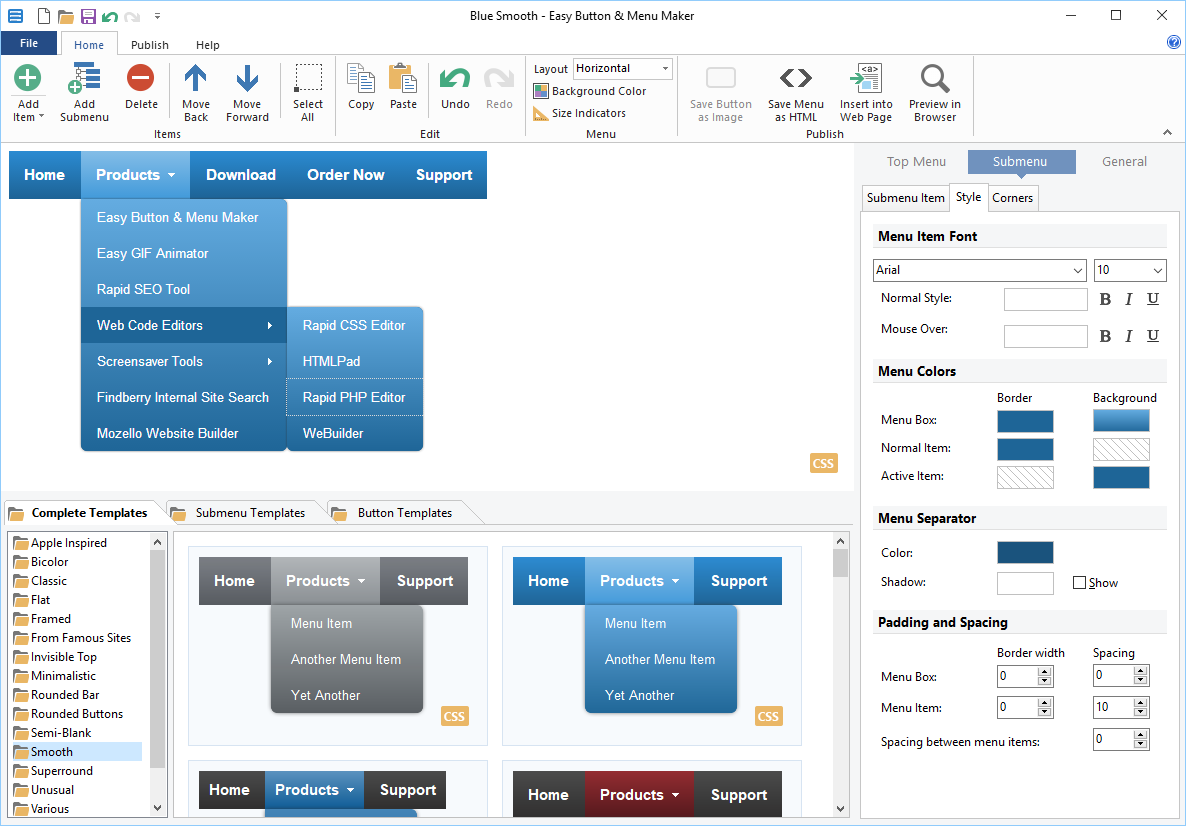 Making a website more attractive and beautiful is always the dream and desire of most people. This is however, achievable with Easy Button & Menu Maker. With improved user interface and improved performance, this easy to use program is now more stable than it used to be in previous versions. Making a website more attractive and beautiful is always the dream and desire of most people. This is however, achievable with Easy Button & Menu Maker. With improved user interface and improved performance, this easy to use program is now more stable than it used to be in previous versions.
What’s Easy Button & Menu Maker all about?
Easy Button & Menu Maker lets you easily create sophisticated buttons and beautiful dynamic menus for your website. More than 200 elegant design templates are available, including so called Glass and Vista styles. Unlike most other menu tools, Easy Button & Menu Maker provides direct WYSIWYG visual menu editor, so it is much easier and pleasant to work with. Easy Button & Menu Maker gives you two solid tools – menu maker and button maker in one package. Now creates pure CSS menu code.
Easy Button & Menu Maker has a lot of features that set it ahead of several others. Some of these features include the following: direct visual menu and button editor is easy and pleasant to work with; supports all modern and all popular but old browsers; create menus that work on tablets and smartphones (new feature); and several others.
Does it have any downsides?
It requires a license agreement, in other words $29.95 out of your pocket. Free (trial) version would only give you a taste, while never helping to complete your task.
More info and download can be found at EasyMenuMaker.com.
Posted in Main | No Comments »
Tuesday, June 10th, 2014
 Do you want a program that can help you create a new document from scratch? Do you also need an application that supports a lot of features including supports for PDF and PS as output formats? Then maybe you should check out Scribus. Do you want a program that can help you create a new document from scratch? Do you also need an application that supports a lot of features including supports for PDF and PS as output formats? Then maybe you should check out Scribus.
What is the big deal about Scribus?
Scribus is an open-source program that brings award-winning professional page layout to Linux/Unix, MacOS X, OS/2 and Windows desktops with a combination of “press-ready” output and new approaches to page layout. Underneath the modern and user friendly interface, Scribus supports professional publishing features, such as CMYK color, separations, ICC color management and versatile PDF creation.
Scribus is a comprehensive application with a user-friendly interface, designed for desktop publishing (DTP), which supports PDF and PS (PostScript) as output formats. It caters to professional users.
With Scribus you can create a new document from scratch or template, as Scribus supports several options when it comes to brochures, regular and business cards, newsletters, packaging, PDF presentations, and posters. Starting a new project from scratch implies specifying the document layout (e.g. single page, double-sided), margins, bleeds, size, orientation, first page, total pages, default measurement unit, and text frame.
Want to check it out? Visit Scribus.net.
Posted in Main | No Comments »
Tuesday, June 10th, 2014
 Want to carry your music with you anywhere you go and listen to it from the cloud on your computer, iPhone, iPod Touch, Android or Windows Phone? Are you also thinking of how to manage your music content between your devices? Then what you need is Style Jukebox. Want to carry your music with you anywhere you go and listen to it from the cloud on your computer, iPhone, iPod Touch, Android or Windows Phone? Are you also thinking of how to manage your music content between your devices? Then what you need is Style Jukebox.
What is the big deal about Jukebox?
Style Jukebox is an easy to use, free app that lets you take your entire music collection and listen to it from the Cloud on your computer, iPhone / iPod Touch, Android or Windows Phone. Never worry about managing your music content between your devices again. You can stream or download your music playlists from the Cloud or play the songs you already have on your device. This new version comes with a couple of bug fixes and performance improvements.
You can upload up to 1,000 songs for free. All your music and playlist are all synced in the Cloud and instantly accessible for download or streaming from all your computers and mobile devices. You can your music playlists over 2G+/3G/Wi-Fi. Pin songs on your phone for offline playback or reduce data plan usage.
Does it have any downside?
A lot of bug fixes have been made, which makes the program more stable than it used to be.
Premium features of this handy mobile app would cost you $0,99 a month or $24,99 a year.
Want to check it out? Visit Get-Jukebox.
Posted in Main | No Comments »
Monday, June 9th, 2014
 For anyone out there who has worked with any advanced image editing tool knows that separating objects from the background is one of the most difficult tasks. However, Picture Cutout Guide is a program that can help you perform this action and many more. For anyone out there who has worked with any advanced image editing tool knows that separating objects from the background is one of the most difficult tasks. However, Picture Cutout Guide is a program that can help you perform this action and many more.
What is Picture Cutout Guide?
Picture Cutout Guide separates solid objects from an arbitrary background, applies background effects (filling, shadowing, blur), and allows transferring objects to another photo. It also makes a photomontage.
Picture Cutout Guide has a clean interface, with an intuitive layout that should make all jobs easy to perform. Furthermore, it comes with extensive tutorials (called “Demonstrations”) for most of the tasks it can complete.
Picture Cutout Guide is an application comes with a few basic tools such as resize, crop and rotate. Also, text can be added to the photos. This can be customized extensively by choosing the font name, size, colour and emphasis (bold, italic, underline and strikethrough).
In addition, when a user is separating objects from the background, he can apply various effects. The background can be replaced with a solid colour or various layers can be applied over it, such as “Shadow”, “Blur” or “Monochrome” for example. Each of the effects can be adjusted with the help of a drop-down menu or through a slider.
Does it have any downside?
This application offers to install software that the user may not require.
Want to check it out? visit: TintGuide.com.
Posted in Main | No Comments »
Monday, June 9th, 2014
 Do you want a program that can simply help you to edit digital pictures? cPicture is a very easy to use program that does not require any installation. All you need to do is to copy the current version of cPicture to get started. Do you want a program that can simply help you to edit digital pictures? cPicture is a very easy to use program that does not require any installation. All you need to do is to copy the current version of cPicture to get started.
What is cPicture?
cPicture is a program to view and work with your digital photos. It offers support for thumbnail browsing, EXIF display, histogram view, as well as various features to resize, rotate, crop and more. You can also remove red-eye effects, create a HTML gallery or picture index, and batch process images to perform selected operations on multiple photos at once. The program supports all popular images formats, and even view/convert various RAW formats as well (including Canon CR2), which is not often found in free image viewers.
The interface is easy to use and provides access to the features with non-technical commands (I want to…) and a modern look. cPicture LE offers several other handy features like mouseover image zooms, lossless rotation, image slideshow, command line options, colour profile support and more. The program comes as standalone executable, and does not require installation – it can be run from a USB drive.
Does it have any downside?
The demo version of the program is limited to ten days trial, while the PRO version goes for €14.95.
Want to check it out? Visit: http://cpicture.thecloudsite.net/
Posted in Main | No Comments »
Sunday, June 8th, 2014
 Did you know you can put your stuff on the web and get to it from your computers, phones, or tablets? Did you also know you can edit documents, automatically add photos, and show off videos from anywhere? Of course, you can do all that and even more with Dropbox. Did you know you can put your stuff on the web and get to it from your computers, phones, or tablets? Did you also know you can edit documents, automatically add photos, and show off videos from anywhere? Of course, you can do all that and even more with Dropbox.
What is Dropbox?
Dropbox is the easiest way to store, sync, and, share files online. There is no complicated interface to learn. Dropbox works seamlessly with your operating system and automatically makes sure your files are up-to-date. Available for Windows, Mac, and Linux. It is a streamlined and comprehensive cross-platform online storage and synchronization utility, designed to store your data in the cloud and automatically keep it in sync between multiple desktop and mobile devices at a time.
Once Dropbox uploads your files onto its cloud storage servers, you can effortlessly generate and share public links to your files in order to allow friends and colleagues to access your data with ease and simplicity.
To use the Dropbox application is to copy your files within the Dropbox folder created on your Mac’s hard drive during the installation process, and they will be instantly synced to all your other devices running the app once the app detects any changes.
Does it have any downside?
The free account does not allow you to store more than 2GB of data. Also Dropbox stays one of the most expensive services. While other companies are fighting for the new clients by lowering the prices for more GBs, Dropbox still charges $10/monthly for a 100GB. Considering the fact that for the same $10 Google offers a 1TB (or just $2/monthly for a 100GB plan) it seems that marketing team of Dropbox have something to think over.
Want to check it out? Visit: Dropbox.com
Posted in Main | No Comments »
Thursday, May 29th, 2014
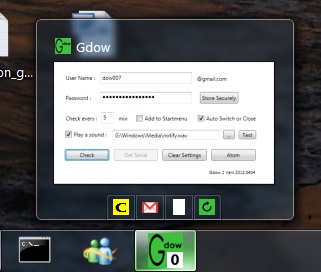 Do you want to be notified when next you receive an email from a loved one in your Gmail account? Then what you need is Gdow software, which has a lot of nice features. Do you want to be notified when next you receive an email from a loved one in your Gmail account? Then what you need is Gdow software, which has a lot of nice features.
What’s the big deal about Gdow?
Gdow 2 is a free Gmail notifier with shareware “on the fly” inbox management capabilities. Gdow 2 uses atom feed parsing for notification and simplified Gdow 2007 engine to connect and interact with Gmail account. For now interaction includes basic “on the fly” actions: delete, spam and archive.
In terms of notification, Gdow is built with all the capabilities of your normal Gmail so that you can know what goes on with your account within a few moments of it actually happening. To make things even better and more attractive, Gdow can be used through a one-click graphical user interface or through a right click menu from its location on the system tray.
The program is absolutely easy to download and install, which makes it all the more attractive to all users. It does not take up a lot of space on your system, and does not make your computer slow especially on start up. The publisher has fixed error ‘when applying an action due to Gmail change of request address.’
Does it have any downside?
A few errors have been dealt with, which makes the program more stable.
Want to check it out? Visit: gdow2.
Posted in Main | No Comments »
Wednesday, May 28th, 2014
 Do you want to read and edit Wikipedia offline? Then you can start by using XOWA, which is a desktop application made just for that and other reasons that you will definitely love. Do you want to read and edit Wikipedia offline? Then you can start by using XOWA, which is a desktop application made just for that and other reasons that you will definitely love.
XOWA is a desktop application for reading and editing Wikipedia offline. Works with any Wikimedia wiki, including Wikipedia, Wiktionary, Wikisource, Wikiquote, and Wikivoyage as well as other specialized wikis such as Wikidata, Wikimedia Commons, Wikispecies, or any other MediaWiki generated dump. Also works with any non-English language wiki such as French Wikipedia, German Wikisource, Dutch Wikivoyage, etc. It can be customized at many levels: from keyboard shortcuts to HTML layouts to internal options.
XOWA has a lot of features that include the following: displays all articles from Wikipedia without an internet connection; works with any Wikimedia wiki, including Wikipedia, Wiktionary, Wikisource, Wikiquote, Wikivoyage; works with any non-English language wiki such as French Wikipedia, German Wikisource, Dutch Wikivoyage, etc.; works with other specialized wikis such as Wikidata, Wikimedia Commons, Wikispecies, or any other MediaWiki generated dump; updates your wiki whenever you want, using Wikimedia database backups; sets up Simple Wikipedia in less than 5 minutes; and many others.
Want to check it out? Visit XOWA.
Posted in Main | No Comments »
|
|
|





