Author Archive
Wednesday, January 15th, 2014
 Are you looking for a tool that can set up a virtual printer in Windows, in order to create PDF files from all types of documents? In other words, you want an application that enables you to create PDF documents using just the print menu. That is what you get when you install Bullzip PDF Printer. Are you looking for a tool that can set up a virtual printer in Windows, in order to create PDF files from all types of documents? In other words, you want an application that enables you to create PDF documents using just the print menu. That is what you get when you install Bullzip PDF Printer.
What is the Bullzip PDF Printer?
Bullzip PDF Printer works as a Microsoft Windows printer and allows you to write PDF documents from virtually any Microsoft Windows application. It also allows you to write BMP, ESP, JPEG, PCX, PNG, PS, TIFF files.
When installing Bullzip PDF Printer, it offers to download and install Ghostscript Lite, a third-party program that BullZip PDF Printer needs in order to properly function. Bullzip PDF Printer’s interface is standard, and the tabs are General, Dialogs, Document, Image, Watermark, Merge, Security as well as Actions.
Also in the general section, you can copy or create a new option set, select the output format (PDF, BMP, EPS, JPEG, PCX, PNG, PS or TIFF) and specify its default name (optionally use displayed macros), append if output exists, confirm overwrite, as well as remember last folder and last file name.
Current version seems more stable; especially with some of the fixes and updates that have already been made by the publisher.
Want to check it out? Visit Bullzip.com.
Posted in Main | No Comments »
Tuesday, January 14th, 2014
 Are you looking for a compression tool that supports a lot of formats? Well, you got one in PowerArchiver. Are you looking for a compression tool that supports a lot of formats? Well, you got one in PowerArchiver.
What is PowerArchiver?
PowerArchiver 2013 is the latest version of the award winning compression utility. Brand new ZIP engine features multicore optimizations that lead up to 4x speed improvement compared to competitors and enable you to use full potential of your PC. New ZIP engine supports ZIPX archives (LZMA, PPMD, WavPacl, BZ2 format support) and makes PowerArchiver the only compression utility fully compatible with WinZip 12. Other ZIP/ZIPX related features include full Unicode support, AES support and unlimited file size/number support. RAR extraction has been optimized and is now up to 30% faster than other software.
The program fully supports open source 7zip format which provides up to 50% stronger compression than zip, with some unique features available only in PowerArchiver such as optimized compression mode where best format is selected automatically. PowerArchiver supports following formats: ZIP, RAR, 7-ZIP, CAB, ACE, HA (LZH), TAR, GZIP, BZIP2, BH, XXE, UUE, yENC, and MIME (Base 64), ARJ, ARC, ACE, ZOO plus ISO, BIN, IMG and NRG disc image formats. If you want more formats, PowerArchiver has plugin system which can be used to add more formats support (msi, chm, etc).
Any downside?
This is about the best program there is in its category.
Want to check it out? Visit PowerArchiver.com.
Posted in Main | No Comments »
Monday, January 13th, 2014
 Want to have some fun with your computer? Do you also want your computer to function as a virtual telescope? Then you might want to check out Microsoft WorldWide Telescope. Want to have some fun with your computer? Do you also want your computer to function as a virtual telescope? Then you might want to check out Microsoft WorldWide Telescope.
The WorldWide Telescope (WWT) is a Web 2.0 visualization software environment that enables your computer to function as a virtual telescope bringing together imagery from the best ground and space-based telescopes in the world for a seamless exploration of the universe.
WorldWide Telescope is created with the Microsoft high performance Visual Experience Engine and allows seamless panning and zooming around the night sky, planets, and image environments. View the sky from multiple wavelenghts: See the x-ray view of the sky and zoom into bright radiation clouds and then crossfade into the visible light view and discover the cloud remnants of a supernova explosion from a thousand years ago.
Microsoft WorldWide Telescope also allows you to switch to the Hydrogen Alpha view to see the distribution and illumination of massive primordial hydrogen cloud structures lit up by the high energy radiation coming from nearby stars in the Milky Way. These are just two of many different ways to reveal the hidden structures in the universe with the WorldWide Telescope. Seamlessly pan and zoom from aerial views of the Moon and selected planets, as well as see their precise positions in the sky from any location on Earth and any time in the past or future with the Microsoft Visual Experience Engine.
Want to check it out? Visit WorldWideTelescope.
Posted in Main | No Comments »
Monday, January 13th, 2014
 One of the things that can easily make a system to crash is a driver; and that is why it is important to keep your drivers updated regularly. So what would you do if you had a program that has the ability to help keep your drivers updated regularly? I am sure you won’t see it as a bad idea because it would save you a lot of time and money. IObit Driver Booster is one program that is designed for that purpose. One of the things that can easily make a system to crash is a driver; and that is why it is important to keep your drivers updated regularly. So what would you do if you had a program that has the ability to help keep your drivers updated regularly? I am sure you won’t see it as a bad idea because it would save you a lot of time and money. IObit Driver Booster is one program that is designed for that purpose.
What is IObit Driver Booster?
IObit Driver Booster is a driver updating tool to protect your PC from hardware failures, conflicts, and resolves system crash problems caused by outdated drivers. All old drivers can be detected by simply clicking on the Scan” button, and then you just need to click “Update All” button to refresh these outdated drivers. Compared with other driver updating tools, IObit Driver Booster can improve your PC performance for gaming as well.
Driver Booster is designed with IObit’s most driver update technology, scans and identifies outdated drivers automatically, and downloads and installs the right update for you with just ONE click, saving you loads of time.
Want to check it out? Visit iObit.com.
Posted in Main | No Comments »
Monday, January 13th, 2014
 Are you looking for a tool that can easily integrate into your favourite player? Are you also looking for a program that can make your music come alive with streaming lyrics also timed with the song? Then you should check out Minilyrics. Are you looking for a tool that can easily integrate into your favourite player? Are you also looking for a program that can make your music come alive with streaming lyrics also timed with the song? Then you should check out Minilyrics.
What’s the Minilyrics?
Minilyrics is a lyrics viewer for synchronizing and displaying lyrics of the currently playing song in many types of media players including; Winamp, Windows Media Player, itunes, MusicMatch Jukebox, Quintessenial Player, foobar2000, and RealOne. It makes your music come alive with streaming lyrics that are timed with the song. You can follow along with the artist and catch every word.
As soon as you load a music file, Minilyrics will automatically search for the correspondent lyrics within its database. Though, some of the lyrics are not accurate, but there is a possibility to correct them in an editor. With Minilyrics, you can can rate and upload lyrics, save them as a LRC file, select character encoding, select lyrics floating mode or lyrics bar mode, or configure display options – adjust hue, enable mouse click-through, enable karaoke display mode, or select vertical scrolling, double line, single line, horizontal scrolling, static text, or movie subtitle style.
Any downside?
It has this annoying registration reminder screen. Full version would cost you $9.99.
Want to check it out? Visit Crintsoft.com.
Posted in Main | No Comments »
Sunday, January 12th, 2014
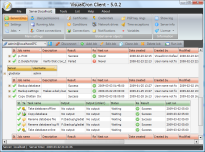 A top rated task automation tool should be one that has all the features you need, and must also be very easy to use or understand. That is why you need to take a look at VisualCron. It enables you to define jobs with tasks that start processes, copy files, execute remote scripts and send keystrokes. A top rated task automation tool should be one that has all the features you need, and must also be very easy to use or understand. That is why you need to take a look at VisualCron. It enables you to define jobs with tasks that start processes, copy files, execute remote scripts and send keystrokes.
What’s the big deal about VisualCron?
VisualCron is an advanced task scheduler/automation tool for Windows. It enables you to do benefit from a number of features including; Client/Server architecture, remote, secure control across the Internet, define jobs with tasks that start processes, copy files, execute remote scripts and send keystrokes.
Other features of VisualCron also include “Conditions” controls internal flow of tasks based on errors, last task result, if a file exists or contains a certain text. “Triggers” that starts jobs can either be based on time or system events like when a file has changed, process has started or ended, a change in the event log, etc, real time status update in a modern, easy to use interface, “Notifications” reports the result for a job or task result in different ways; write to a file, database table or send an email, etc.
Any downside?
Trial version (which is constantly reminded by the nag screen) is only good for 45 day and the full license will cost you $99 for 1 year Separate Maintenance & Support Pack or $299 for 1-server business license.
Want to check it out? Visit VisualCron.com.
Posted in Main | No Comments »
Thursday, January 9th, 2014
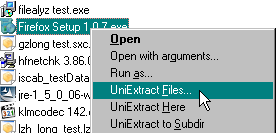 Did you know you can easily extract files from any type of archive, whether it’s a simple zip file, an installation program, or even a Windows Installer (.msi) package? Yes you can do all that even more with Universal Extractor. Did you know you can easily extract files from any type of archive, whether it’s a simple zip file, an installation program, or even a Windows Installer (.msi) package? Yes you can do all that even more with Universal Extractor.
What’s the big deal about Universal Extractor?
Universal Extractor is a program do to exactly what it says: extract files from any type of archive, whether it’s a simple zip file, an installation program, or even a Windows Installer (.msi) package.
Universal Extractor is a program designed to decompress and extract files from any type of archive or installer, such as ZIP or RAR files, self-extracting EXE files, application installers, etc. It cannot (and never will) create archives, and therefore cannot fully replace archivers such as 7-Zip or WinRAR. What it will do, however, is allow you to extract files from virtually any type of archive, regardless of source, file format, compression method, etc.
The original motivation behind this project was to create an easy, convenient way to extract files from various types of installation packages without the need to remember arcane command line switches or track down separate utilities to handle the unpacking. Over time, and with the encouragement of its many users and the fine folks over on the MSFN forum, it has evolved into a mature and very capable unarchiving utility that many, including myself, find indispensable.
Any downside?
Universal Extractor doesn’t have a downside, and does exactly what the publisher claims it was designed for.
Want to check it out? Visit Legroom.net.
Posted in Main | 1 Comment »
Thursday, January 9th, 2014
 Not everyone understands just how important proper accounting system is when it comes to being successful. The truth of the matter is that you won’t go too far in business if you don’t know a jack about money management; and that is why you need Money Manager. Not everyone understands just how important proper accounting system is when it comes to being successful. The truth of the matter is that you won’t go too far in business if you don’t know a jack about money management; and that is why you need Money Manager.
What is Money Manager?
Money Manager is a personal finance program that primarily helps to organize your finances and keeps track of where, when and how your money goes. It is also a tool to get a bird’s eye view of your financial worth. The software supports checking accounts, savings and credit card accounts, as well as Fixed Deposit and Portfolio accounts. The Outlook-style interface provides an overview for all your accounts and total balance. You can transfer money between accounts, create custom categories to organize your income/expenses and more.
Money Manager Ex is a complete rewrite of the original .NET Money Manager. It is Cross Platform and can be ported to run on Windows, Mac OS X and Linux. It has a very powerful and flexible open data storage using SQLite databases.
Some latest changes included in the program include the following: remove custom reports; account balance in CSV export (feature-request #136, partial implementation); proxy server settings (feature-request #181); report added (feature-request #224); added 2nd graph (feature-request #239); etc.
Any downside?
Money Manager is not a bad program, but inexperienced users may need some time to get around it.
Want to check it out? Visit Codelathe.com.
Posted in Main | No Comments »
Wednesday, January 8th, 2014
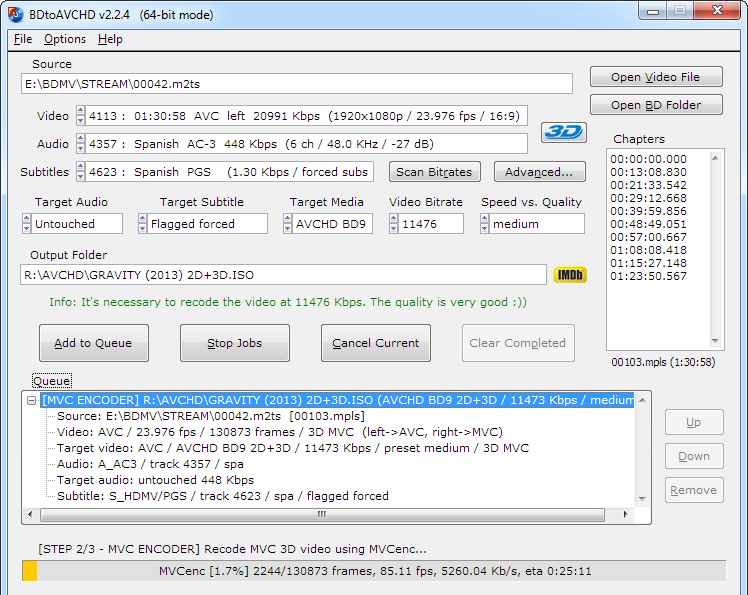 Want to create AVCHD discs from Blu-Ray or HD MKV files? Then you should read this review to find out more. Want to create AVCHD discs from Blu-Ray or HD MKV files? Then you should read this review to find out more.
What is the deal with BDtoAVCHD?
BDtoAVCHD is a tool to create AVCHD discs from Blu-Ray or HD MKV files. As output we get the folder structure ready to burn to a DVD5 or DVD9. The software compresses the video to achieve the desired overall size of 4.7 GB with the highest possible quality.
The AVCHD format allows playback the same type of content that a Blu-Ray and holding high definition (1080p) but on DVD5 or DVD9 media. It is ideal for backing up Blu-Ray with much smaller size and maintaining high quality.
BDtoAVCHD is designed with the idea that is very simple and quick to use and obtain the best possible quality in a DVD5 media. To achieve this avoids unnecessary conversions and do not need any codec installed as avisynth, ffdshow or Haali media splitter. The recorded discs obtained are compatible with almost any Blu-Ray player and PS3. You can also convert Blu-Ray to MKV, MKV to AVCHD and Blu-Ray 3D to AVCHD/MKV 3D side-by-side/top-bottom.
Latest change added to this version includes Hardware acceleration on MVC decoding (utilized in Blu-Ray 3D conversions). This however, requires Windows 7/8/8.1 and Intel Core CPU with Integrated Graphics like i7-3770k.
Want to check it out? Visit Connecta2000.com.
Posted in Main | No Comments »
Sunday, January 5th, 2014
 Everyday we learn about new software that makes our online and computer activities easier. In this review, you also have a chance to find out more about a very popular open source program called LibreCAD. Everyday we learn about new software that makes our online and computer activities easier. In this review, you also have a chance to find out more about a very popular open source program called LibreCAD.
What is LibreCAD?
LibreCAD is a free Open Source CAD application for Windows, Apple and Linux. Support and documentation is free from the publisher’s large, dedicated community of users, contributors and developers.
LibreCAD is a fully comprehensive 2D CAD application that you can download and install for free. There is a large base of satisfied LibreCAD users worldwide, and it is available in more than 20 languages and for all major operating systems, including Microsoft Windows, Mac OS X and Linux (Debian, Ubuntu, Fedora, Mandriva, Suse …).
LibreCAD has a lot of features that include the following: it’s free with no point worrying about license costs or annual fees; no language barriers because it’s available in a large number of languages, with more being added continually; GPLv2 public license, which means you can use it, customize it, hack it and copy it with free user support and developer support from our active worldwide community and our experienced developer team.
LibreCAD is an Open Source community-driven project; and this means that development is open to new talent and new ideas, and our software is tested and used daily by a large and devoted user community; you, too, can get involved and influence its future development.
Any downside?
The program doesn’t have any issues, and seems to be more stable than it used to be.
Want to check it out? Visit Librecad.org.
Posted in Main | No Comments »
|
|
|





