Author Archive
Friday, October 18th, 2013
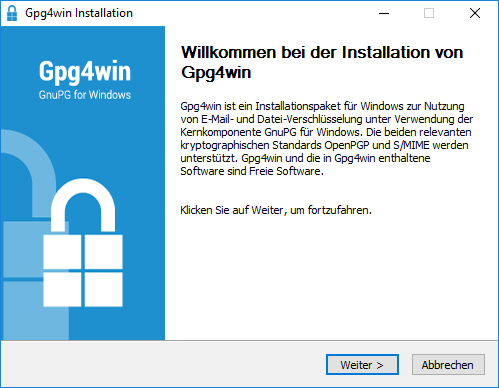 Here is a program that aims to provide a current Gpg4win Windows installation package including the GnuPG encryption tool and associated applications. Read the rest of this review to find out more about this program. Here is a program that aims to provide a current Gpg4win Windows installation package including the GnuPG encryption tool and associated applications. Read the rest of this review to find out more about this program.
What’s Gpg4win?
Gpg4win enables users to securely transport emails and files with the help of encryption and digital signatures. Encryption protects the contents against an unwanted party reading it. Digital signatures make sure that it was not modified and comes from a specific sender.
Gpg4win supports both relevant cryptography standards, OpenPGP and S/MIME (X.509), and is the official GnuPG distribution for Windows. It is maintained by the developers of GnuPG. Gpg4win and the software included with Gpg4win are Free Software (Open Source; among other things free of charge for all commercial and non-commercial purposes).
Gpg4win is essentially designed to focus on the builder that allows you to easily create updated installers. The builder runs best on a GNU/Linux system. Almost all software components are automatically cross-compiled for integration into the installer. That means Gpg4win does not depend on a single person to manually create the installer.
To check this software out, please visit Gpg4Win.org.
Posted in Main | No Comments »
Thursday, October 17th, 2013
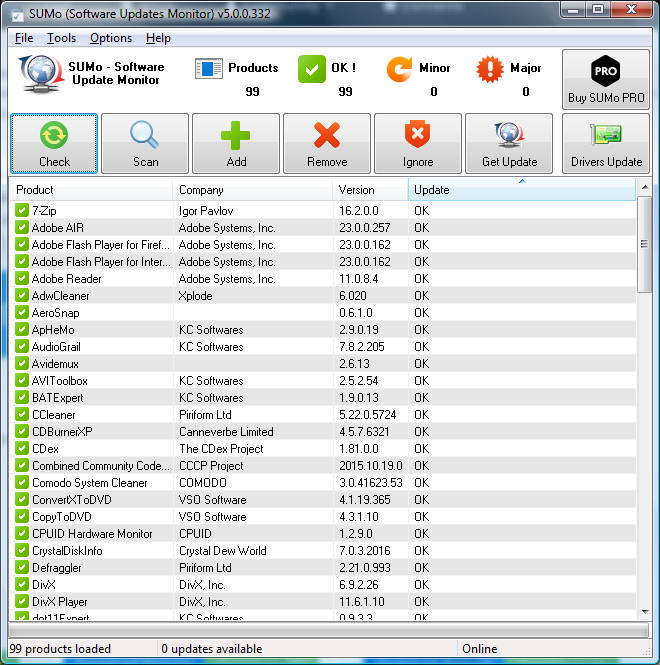 Like to get updates about the latest versions of your applications? Then let SUMo do that for you. Like to get updates about the latest versions of your applications? Then let SUMo do that for you.
What is SUMo?
SUMo (Software Updates Monitoring) is a program that is designed to keep your applications up to date. It detects the applications you’ve installed on your PC and notifies you of their latest updates. Users that have access to make use of up-to-date software will be able reduce the risk of encountering bugs and will benefit from more features.
SUMo’s simple, list-style interface and controls make it very easy to use. The Scan button scanned our PC for installed software, though we could also drag and drop executables directly into SUMo as well as use Add and Remove buttons and configure an Ignore list.
Some of the main features of this application are: automatic detection of installed software, detects required updates / patches for your software, filter / authorize Beta versions (user setting), ignore list : only tracks software YOU want to track. It is more compatibility and less false positive than others Update Monitors and internationalization support.
KC Software, the publisher of this application, has made the following improvements to this version: [Refactoring] Separate BoxCryptor and BoxCryptor Classic, [Bug] overwolf, [Bug] VirtualCloneDrive 5.4.7 misidentified (as “preference”),[Refactoring] PhotoFiltre multiple listing and[Refactoring] Putty / Simon Tatham rationalization.
Downsides?
Contains adware and at times gives you “false positives” updates. A nice all-in-one application updater still.
Want to try it out? Check KCSoftwares.com.
Posted in Main | No Comments »
Thursday, October 17th, 2013
 Want to avoid going through several menu options from the start menu just to restore your computer to an earlier date? Well you can avoid all that by simply downloading or installing Restore Point Creator. Want to avoid going through several menu options from the start menu just to restore your computer to an earlier date? Well you can avoid all that by simply downloading or installing Restore Point Creator.
What’s Restore Point Creator all about?
Restore Point Creator will create and manage System Restore Points quickly and easily, all from a free simple program. No more drilling through multiple menus in Windows just to create a System Restore Point, now all you have to do is run this program and thatâ??s it. Follow the simple program layout and you have your System Restore Point created in no time at all.
Restore Point Creator is also a great program for users of Windows 7 and Windows 8 because it enables them to create system restore points even quicker and easier. Just pin this program to the Taskbar and you have the ability to quickly create System Restore Points using one of the two pinned Tasks (“Create System Checkpoint” and “Create Custom Named”) that the program creates; it’s that simple.
This version of Restore Point Creator comes with a lot of nice features that makes the program even more stable and easier to use.
Restore Point Creator saves you a lot of time, and doesn’t give you anything to worry about.
Want to check it out? Visit Toms-World.org.
Posted in Main | No Comments »
Thursday, October 17th, 2013
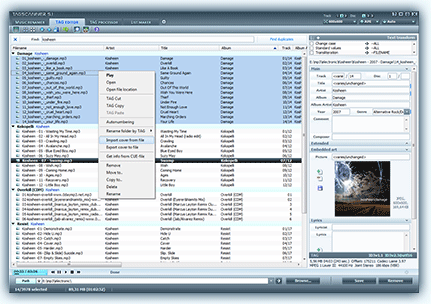 Need an application that will help you organize and manage your collection of favorite music? TagScanner is designed specifically for that purpose. Need an application that will help you organize and manage your collection of favorite music? TagScanner is designed specifically for that purpose.
What is TagScanner?
TagScanner is a multifunction program for organizing and managing your music collection. It can edit tags of mostly state-of-the-art audio formats, rename files based on the tag information, generate tag information from filenames, and perform any transformations of the text from tags and filenames.
You can also get album info and covers via online databases like freedb, Amazon or Discogs. Supports ID3v1, ID3v2, Vorbis comments, APEv2, WindowsMedia and MP4(iTunes) tags. TagScanner is an easy to use application that is unbelievably available as a freeware. As a matter of fact, the application offers you more features and functions than a couple of other paid ones out there.
Some of the main features of this program are: rename files based on the tag and file information, powerful multiple files tag editor, import tag information and album art from online databases like freedb or Amazon, generate tag information from file/folder names, tag fields formatting and rearrangement, words replacement and case conversion from tags and filenames, supports MP3, OGG, FLAC, WMA, MPEG-4, Opus, Musepack, Monkey’s Audio, AAC, OptimFROG, SPEEX, WavPack, TrueAudio files and several others.
Sergey Serkov, the author of this program, added the following improvements to this version: updated support for Beatport service, case change function now works with multiline fields was improved upon, improved: Date of release from web sources now can be saved in full format, increased tag saving speed for most systems and fixed some stability issues on Windows 8.
This is an excellent freeware for my music collection
Want to try out this amazing app? Check it out here XDLab.
Posted in Main | No Comments »
Wednesday, October 16th, 2013
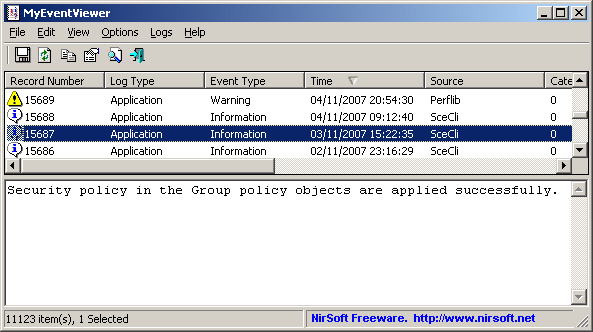 Want to watch multiple event logs in one list? Do you also wish to watch event description and data are displayed in the main window, instead of opening a new one? How about an application that enables you to select multiple event items and then save them to HTML/Text/XML file, or copy them to the clipboard (Ctrl+C) and then paste them into Excel? Then you might want to have a look at MyEventViewer. Want to watch multiple event logs in one list? Do you also wish to watch event description and data are displayed in the main window, instead of opening a new one? How about an application that enables you to select multiple event items and then save them to HTML/Text/XML file, or copy them to the clipboard (Ctrl+C) and then paste them into Excel? Then you might want to have a look at MyEventViewer.
MyEventViewer is a simple alternative to the standard event viewer of Windows. As opposed to Windows event viewer, MyEventViewer allows you to watch multiple event logs in one list, as well as the event description and data are displayed in the main window, instead of opening a new one. Also, with MyEventViewer you can easily select multiple event items and then save them to HTML/Text/XML file, or copy them to the clipboard (Ctrl+C) and then paste them into Excel.
MyEventViewer now features a couple of new additions including addition /cfg command-line option, which instructs MyEventViewer to use a config file in another location instead if the default config file. The application also retains all the unique features you have always loved.
New version of MyEventViewer seems to be a bit more stable than it used to be.
Want to check it out? Visit NirSoft.
Posted in Main | No Comments »
Tuesday, October 15th, 2013
 Need a very good alternative for task manager that would effectively kill a Windows process? Then get Daphne. Need a very good alternative for task manager that would effectively kill a Windows process? Then get Daphne.
What is this program all about?
This is a program that was designed to help you kill an active Windows process. It does this by dragging the mouse over the windows, by right-clicking the process in the main process list, or by typing its name with the “Kill all by name” command. On its Windows display, you will find a list of active processes such as CPU usage, Process ID, Process name, Full path (and arguments), Priority, Class (Process / Service), Current memory usage, Peek memory usage, Current swap usage, Peek swap usage and Number of threads with their detailed information.
Some of the main features of this application are: Hide application tool: drop the target over the application’s window you want to hide. Later, you can restore the application from Daphne menu. Hide applications, makes an application disappear but keeps it running to get more desktop space. Find process window tool: identify the process which owns the targeted window. Traps: you can set up traps to be applied to any process being created and several other features.
All in all portable application and very effective application
To know more about Daphne, please visit Daphne.
Posted in Main | No Comments »
Tuesday, October 15th, 2013
 Want to download your favourite videos from YouTube? Do you want a program that has a couple of nice features that you can easily understand? Then MassTube is a program to check out because it has some nice features you can enjoy. Want to download your favourite videos from YouTube? Do you want a program that has a couple of nice features that you can easily understand? Then MassTube is a program to check out because it has some nice features you can enjoy.
MassTube allows you to download videos from YouTube. Some features include the ability to download videos with a single click; supported formats: FLV, MP4, WebMy 3GP; supported resolutions: 240p, 360p, 480p, HD 720p, Full HD 1080p and Ultra HD 4096p; compatible with Google Chrome, Mozilla Firefox, Internet Explorer, Opera, Apple Safari and other browsers; integrated history manager; designed for Windows 2000, XP, Vista, 7 and 8 and more.
A couple of fixes have been made to MassTube to include fixing of Vevo download problems in some situations when the internal video signature has length 82 or 89. What this means is that MassTube is a bit more stable.
MassTube also retains its old features including the following; download videos from YouTube with a single click, compatible with Google Chrome, Mozilla Firefox, Internet Explorer, Opera, Apple Safari and others, integrated history manage, supported resolutions: 240p, 360p, 480p, HD 720p, Full HD 1080p and Ultra HD 4096p, and a few others.
PS: be aware of the adware while using this download tool.
Want to check it out? Visit MassTube.cl.
Posted in Main | No Comments »
Monday, October 14th, 2013
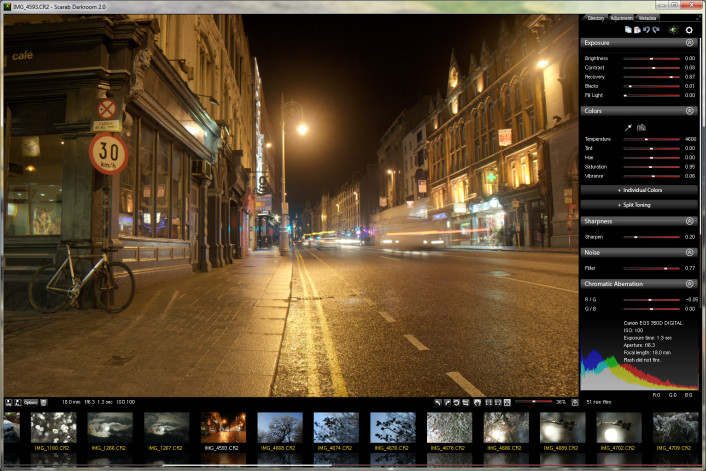 Want to quickly and effortlessly preview RAW graphic files and export them to other formats? Want to quickly and effortlessly preview RAW graphic files and export them to other formats?
What is this program all about?
Scarab Darkroom is a digital camera raw file converter/photo editor that supports most raw format capable cameras from Canon, Nikon, Olympus, Panasonic, Pentax, Samsung, and Sony. It’s fast, easy-to-use, and produces excellent results. The program has improved in terms of features since the last time it was released.
Scarab Darkroom is a digital camera raw file converter/photo editor that supports most raw format capable cameras from Canon, Nikon, Olympus, Panasonic, Pentax, Samsung, and Sony. It’s fast, easy-to-use, and produces excellent results.
Among several updates and fixes made to this version include the following; Fixed a bug of recent versions, where the image appeared broken if viewed at >50% size on some machines. (The problem also goes away after going into the preferences menu, and selecting something in the drop-down menus)
Any downsides?
I have not experienced any. This is an excellent program that still can get even better.
Want to check it out? Please visit ScarabLabs.
Posted in Main | No Comments »
Sunday, October 13th, 2013
 Are you looking for a great server operating system that has got lots of advanced features? Maybe you should read the rest of the review for more on one of the most talked about servers known as FreeBSD? Are you looking for a great server operating system that has got lots of advanced features? Maybe you should read the rest of the review for more on one of the most talked about servers known as FreeBSD?
What is the big deal about FreeBSD?
FreeBSD is an advanced computer operating system used to power modern servers, desktops and embedded platforms. A large community has continually developed it for more than thirty years. Its advanced networking, security and storage features have made FreeBSD the platform of choice for many of the busiest web sites and most pervasive embedded networking and storage devices.
It provides advanced networking, performance, security and compatibility features today that are still missing in several other operating systems, including some of the best commercial ones. FreeBSD also provides robust network services under the heaviest loads and uses memory efficiently to maintain good response times for thousands of simultaneous user processes. FreeBSD brings advanced network operating system features to appliance and embedded platforms, from higher-end Intel-based appliances to Arm, PowerPC, and shortly MIPS hardware platforms.
From mail and web appliances to routers, time servers, and wireless access points, virtually every vendor across the world depend on FreeBSD’s integrated build and cross-build environments and advanced features as the foundation for their embedded products.
Want to check it out? Visit FreeBSD.org.
Posted in Main | No Comments »
Saturday, October 12th, 2013
 Do you want an application that is so easy to use that you can find your way around it without being a pro? Do you also want a program that can help you convert iTunes files to unprotected WMA, MP3, Convert protected M4P, AAC, and many more? Then you might want to read the rest of the review. Do you want an application that is so easy to use that you can find your way around it without being a pro? Do you also want a program that can help you convert iTunes files to unprotected WMA, MP3, Convert protected M4P, AAC, and many more? Then you might want to read the rest of the review.
What’s Drm-Removal?
Drm-Removal is your protected media converter and copier that has a simple user interface and very fast conversion speed (up to 40x) from normal speed will let you enjoy your converted and unprotected music in seconds. Freedom from audio and video copy-protection formats with Drm-Removal software. Convert iTunes files to unprotected WMA, MP3. Convert protected M4P, AAC, etc. Save your Napster music to your laptop, mobile phone and more.
You can also copy audio and video to iPod or iPhone directly. It can convert protected M4P, AAC, etc to unprotected WMA / MP3. Convert Rhapsody music collection to MP3, AAC, WAV. Convert protected RAX to unprotected WMA, MP3 or AAC (iTunes native format).
Want to check it out? Visit DRM-Removal.
Posted in Main | No Comments »
|
|
|





