Author Archive
Monday, July 15th, 2013
 Need an application that allows you to download your favorite videos straight from youtube.com and save them on your PC? Then get YouChoob. Need an application that allows you to download your favorite videos straight from youtube.com and save them on your PC? Then get YouChoob.
What is YouChoob?
YouChoob provides you a very easy and simple way to download videos from YouTube. all it takes to download movies is the URL address to the page that contains the video. The video you download using this application is of high quality.
In addition, this application will support downloading from all the language versions of the YouTube website. If there is a YouTube link in the clipboard when YouChoob starts, it’ll automatically being downloading the video after prompting you for its filename; if you would like to stop it doing this at startup, simply hold down the Shift key when it launches.
Joseph Cox, the author of this program, added the following changes to this version: Added: Documentation and YouChoob 2 links to the About menu, Uses a new file format for storing settings; previous settings are lost, Changed parts of the interface and now works correctly after a major (backend) YouTube site change.
To know more about this program, please go to BootBlock.co.uk.
Posted in Main | No Comments »
Sunday, July 14th, 2013
 What kind of antivirus program do you always look out for? Paid or free or one that simply combines all the features needed to keep your system safe and secure? While most people would easily choose a paid program over a free one; there are lots of users out there who would rather choose an antivirus that does not affect the speed of their computers while also keeping their personal files safe. That is what Baidu Antivirus offers to its users. What kind of antivirus program do you always look out for? Paid or free or one that simply combines all the features needed to keep your system safe and secure? While most people would easily choose a paid program over a free one; there are lots of users out there who would rather choose an antivirus that does not affect the speed of their computers while also keeping their personal files safe. That is what Baidu Antivirus offers to its users.
What’s Baidu Antivirus?
Baidu Antivirus is an ultra light weight, easy to use, and fast anti-virus program that protects your system from malware, viruses, spyware, adware and other malicious programs. It combines the Baidu Antivirus Engine and Baidu Cloud Security Engine with the Avira Antivirus engine to provide you with complete protection against all online threats.
Baidu Antivirus also offers an easy to use interface with several advanced configuration options as well as quarantine of infected files. The application also has an extremely small memory footprint, so you can actually do other things while it is running on your computer. Other features include automatic updates, Host Intrusion Prevention System (HIPS), scan reports and more.
Any downside?
While this application is rated highly by a lots of people for being lightweight; a few users have complained about some false positives.
Want to check it out? Visit Baidu.
Posted in Main | No Comments »
Sunday, July 14th, 2013
 There are times you may need to update and synchronize the contents of two folders simultaneously. Allway Sync can handle that for you. There are times you may need to update and synchronize the contents of two folders simultaneously. Allway Sync can handle that for you.
What is Allway Sync?
Allway Sync is a freeware that allows you to analyze and sync the contents of two folders and update both folders. It uses an algorithm that analyzes the folders for changes and updates both. It has an easy to use, colorful interface with a wide range of options that allows you to manually and automatically sync your folders.
It can access files and folders from removable drives, online sources, and other locations in addition to your main PC. It can conveniently handle multiple synchronization jobs. Allway Sync also offers skins, interface language options, and an extensive Help menu with both local and online resources, support contacts, usage statistics, and more.
Some of the features of this program are: File modifications and deletions are tracked in a local database, Allway Sync helps prevents data loss as it does not rely on on the accuracy of the system clock or network connectivity quality, Supports virtually any file system (FAT, NTFS, SAMBA, Netware, X-Drive, CDFS, UDF and more). Allway Sync can be installed on a desktop, laptop, USB stick, external HDD or a U3-enabled device. It also supports files of any size.
Usov Lab, the publisher of this program, made the following changes to this version: Improved Google Drive support, Fixed some minor bugs, Updated language files and Other Versions.
Downsides?
Nice user interface. Some times it fails to back up files and folders.
To find out more about this program, please visit AllwaySync.
Posted in Main | No Comments »
Friday, July 12th, 2013
Looking to restore corrupt exchange database, then you must take help of Lepide Exchange Recovery Manager Tool.
What is the big deal about this program?
 Lepide is a total exchange recovery and backup restore solution. It can to search, export and recover entire mailboxes or selected email items from corrupt information stores, live exchange servers, exchange backups and OST files.This program is a very useful tool for repairing data from all versions of Exchange including Exchange 2013 and Outlook 2013. With this program, you can repair and perform granular restoration from full backups created by NTBackup, Symantec VERITAS and HP. Lepide is a total exchange recovery and backup restore solution. It can to search, export and recover entire mailboxes or selected email items from corrupt information stores, live exchange servers, exchange backups and OST files.This program is a very useful tool for repairing data from all versions of Exchange including Exchange 2013 and Outlook 2013. With this program, you can repair and perform granular restoration from full backups created by NTBackup, Symantec VERITAS and HP.
It also supports offline Exchange EDB files having Unicode/non-Unicode characters. Exchange manager allows adding various types of sources such as Live Exchange server, Public Folder databases, offline EDBs, OSTs, Live Exchange single and multiple mailbox, offline EDB and PSTs.
Some of the key features of this program are: Repair corrupt Exchange EDB Files, Granular Restoration from EDB (priv and pub folders), Search messages based on multiple criteria such as Subject, Message Body, From, To etc. across multiple sources such as offline EDB, PST, OST and Live Exchange server, Mitigate mailboxes from offline EDB, Live Exchange public folder or a Live Exchange Server to another Live Exchange Server or public folder and Convert EDB to PST.
Lepide Software Private Limited, the author of this program, added the following changes to this version. They are: Option to add archive mailbox for Live Exchange both in Source and Destination, Supports Exchange server 2013 multiple mailboxes, Can add multiple Office 365 mailboxes in destination. Supports Exchange 2013 public folders, Supports differential and incremental HP backup.
Additional filters based on message class and filters added for columns in list view. Messages can be exported to RTF, HTML and Text file formats. Improved preview of Contact, Calendar, Task and Journal items. Improved “To” field recovery. Enhanced speed of exporting messages.
Downsides?
You can not open to view emails or contacts in the unregistered version and you can not extract the backup in the unregistered version. Aside from these, it is a great recovery tool.
To know more about Lepide, please visit Lepide.com.
Posted in Main | No Comments »
Friday, July 12th, 2013
 Need a tool that allows you to download all streaming media? Then get CoCSoft Stream Down. Need a tool that allows you to download all streaming media? Then get CoCSoft Stream Down.
What is CoCSoft Stream Down?
This is a streaming media download tool that supports not just HTTP and FTP download, but also streaming media download such as RTSP, MMS, MMSU, and MMST. It allows you to listen or play online including streaming audio, streaming music, streaming media, streaming movies etc. this program helps to capture both audio and video streaming and save it on your hard dsik so you could play them offline.
It supports the following downloads formats: RTSP, MMS, HTTP, RM, RAM, SMIL, ASF, ASX, WAX, MP3, WMA, and WMV.
It has a cool and intuitive interface and is designed to work with several protocols at the same time. Running on top of all the other applications, this little utility automatically retrieves the URL of the media you find online, offering you the possibility to start a new download almost instantly. It is easy to set up, easy to use and comes with a users’ manual. It is light using just minimal system resources.
System Requirements: CoCSoft Stream Down supports windows 98/me/NT4.0/2000/XP/2003.
CoCSoft Computing Inc, the publisher of this program has added a few changes to this version: Optimized the algorithm of sniffer, Strengthen the capacity to download and Fix the bug of some files with RTSP can not be downloaded.
Downsides?
Nice program that does what it says it would. A bit pricey though.
To find out more about his program, please go to Stream-Down.CoCSoft.com.
Posted in Main | No Comments »
Thursday, July 11th, 2013
 These days we continue to see lots of uninstallers that feature a lot of advanced features apart from the usual feature that lets you uninstall applications on your system. Revo is one of such programs that feature lots of useful features. These days we continue to see lots of uninstallers that feature a lot of advanced features apart from the usual feature that lets you uninstall applications on your system. Revo is one of such programs that feature lots of useful features.
What’s Revo Uninstaller?
Revo Uninstaller is a freeware innovative uninstall utility. It is not just an uninstall program it also includes other tools and features that will help you to clean your Windows based computer system. With its unique “Hunter mode” it offers you some simple, easy to use but effective and powerful approaches to manage (uninstall, stop, delete, disable from auto starting) and to get information about your installed and/or running applications. Many additional tools are included in Revo Uninstaller.
Revo Uninstaller is able to go deeper than most uninstallers when it comes to uninstalling applications from your system. Though, it has a pro version that comes with lots of advanced features; this free one is also capable of carrying out a lot of uninstallation on your computer. The program is also very fast, and is capable of removing or getting rid of those difficult-to-delete applications.
Any downside?
Users who do want more features and options can download the pro version since this free version does not include some advanced features.
Want to check it out? Visit RevoUninstaller.com.
Posted in Main | No Comments »
Wednesday, July 10th, 2013
 Want to be able to change the attributes of a file or folder? What you need is Attribute Changer. Want to be able to change the attributes of a file or folder? What you need is Attribute Changer.
What is the big deal about Attribute Changer?
This is a robust tool that allows you to change all kind of file and folder attributes, date and time and even NTFS compression. It has an easy to use interface with rich features. You can establish filters and exceptions to fine tune the update process. Filters include attributes, size, date and time. Exceptions allow you to include or exclude files and folders based on entire file and folder names respectively patterns.
Some of the features of this program are: you can easily alter the information on a photo by manually entered date and time values or by synchronizing with file date and time stamps, Attribute Changer can modify date and time stamps on files and folders, even single parts of a stamp, such as seconds only, you could make your files read only to protect them against modifications or need to force a new backup version of a particular file without modifying the contents. It has a user guide containing many real life examples and hints to help you get most out of the application. It comes with an uninstaller.
Visit Petges.lu to get more information.
Posted in Main | No Comments »
Tuesday, July 9th, 2013
 With so many archiving software or applications out there; choosing the best one suitable to your needs may not really be as difficult if you can just find out the kind of features included by the publisher. Also, it is important to choose a program that supports a lot of archive formats; and that is why IZArc is not a bad program. With so many archiving software or applications out there; choosing the best one suitable to your needs may not really be as difficult if you can just find out the kind of features included by the publisher. Also, it is important to choose a program that supports a lot of archive formats; and that is why IZArc is not a bad program.
What’s IZArc?
IZArc is a free archiving tool that supports many archive formats. It allows you to drag and drop files from and to Windows Explorer, create multiple archives spanning disks, view and write comments. There is an integrated password detector that allows you to find the passwords of one password protected zip file. IZArc is an application that has built-in multilingual support. The program has an easy-to-use interface that provides support for compressed and encoded files, and access to many powerful features and tools.
IZArc is an application that supports the following archive formats; 7-ZIP, A, ACE, ARC, ARJ, B64, BH, BIN, BZ2, BZA, C2D, CAB, CDI, CPIO, DEB, ENC, GCA, GZ, GZA, HA, IMG, ISO, JAR, LHA, LIB, LZH, MDF, MBF, MIM, NRG, PAK, PDI, PK3, RAR, RPM, TAR, TAZ, TBZ, TGZ, TZ, UUE, WAR, XPI, XXE, YZ1, Z, ZIP, and ZOO.
Want to check it out? Visit: IZArc.org.
Posted in Main | No Comments »
Monday, July 8th, 2013
 Staying safe and surfing the internet everyday is one of those important things one cannot do without. To avoid losing vital information to hackers and malware programs; one of the things you need is to fortify your computer defense system DefenseWall Personal Firewall is a security program that does not require some form of technical skill to configure. Staying safe and surfing the internet everyday is one of those important things one cannot do without. To avoid losing vital information to hackers and malware programs; one of the things you need is to fortify your computer defense system DefenseWall Personal Firewall is a security program that does not require some form of technical skill to configure.
What’s DefenseWall Personal Firewall?
DefenseWall Personal Firewall gives computer users the peace of mind that they need while also offering a solution that works for anyone regardless of their level of IT knowledge. The first program of its kind, this sandbox personal firewall requires no complicated configuration or setup process and is designed to help make sure you have the level of security that you need.
DefenseWall Personal Firewall has been updated to include a couple of fixes and changes that include the following: Internal improvements on performance; Google Chrome crashes when untrusted solved; Internal browser “Tab” issue solved; and Untrusted Zoom Player issue solved.
Any downside?
DefenseWall Personal Firewall is limited to maximum 30 days usage for all customers; but can be extended after paying for the full version.
Want to check it out? Visit SoftSphere.
Posted in Main | No Comments »
Friday, July 5th, 2013
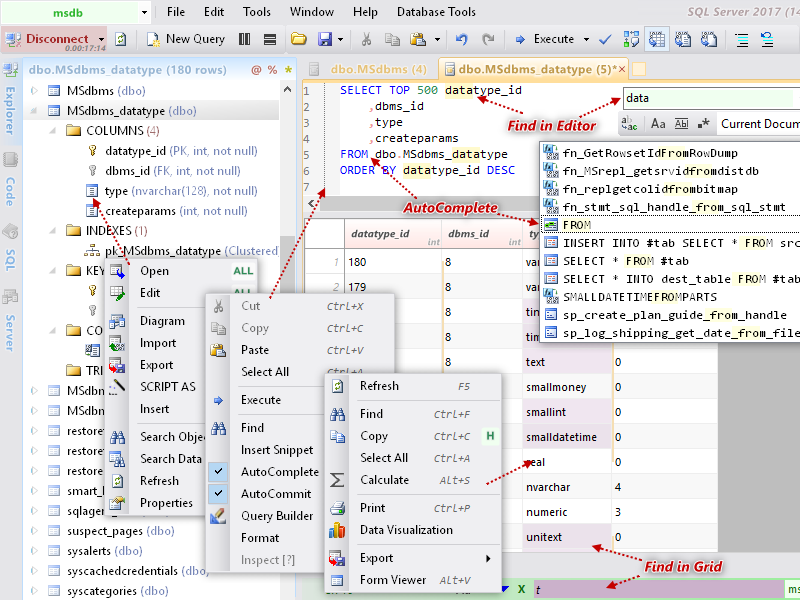 The good thing about the internet is that it gives us loads and loads of opportunities to access different kinds of useful applications. Some of these applications have actually enhanced our abilities to use do some many things on your systems. One important program you need these days is Database .NET. The good thing about the internet is that it gives us loads and loads of opportunities to access different kinds of useful applications. Some of these applications have actually enhanced our abilities to use do some many things on your systems. One important program you need these days is Database .NET.
What’s Database .NET?
Database .NET is a simple, uniform and intuitive database management tool for multiple databases. It makes Local and Remote database administration easier without installing anything. With it you can Create databases, Design tables, Edit data, Export data, Generate scripts and run SQL queries. An innovative, powerful and intuitive multiple database management tool, based on .NET Framework 4.0.
Database .NET has a lot of advanced features that will make your database tasks absolutely easy. Some of these features include the following; shortcut keys, command-line, database editor, browse and edit data, SQL editor, browse object, connection management, database tools, and support for visual studio IDE.
Anyone who wants to install this program must remember to pre-install the .NET Framework 4.0 full for (Windows XP/2003/Vista/2008/7) and .NET Framework 4.5 for (Windows 8/2012).
Want to check it out? Visit FishCodeLib.
Posted in Main | No Comments »
|
|
|




