Author Archive
Friday, June 7th, 2013
 I really can’t remember how many times I have left my USB Flash drives in public cyber cafes. Some of these USBs actually cost me a little fortune. Do you always forget your USB flash drive attached to the work PC or friend’s house or a disc in the DVD reader/burner only to remember it when you want to use it? There is a solution – Free USB Guard. I really can’t remember how many times I have left my USB Flash drives in public cyber cafes. Some of these USBs actually cost me a little fortune. Do you always forget your USB flash drive attached to the work PC or friend’s house or a disc in the DVD reader/burner only to remember it when you want to use it? There is a solution – Free USB Guard.
What is Free USB Guard?
This is a freeware that will alert you in case a flash drive (or another external drive) is attached during the shutdown process. It blocks the shutdown process thus giving you time to take out your USB flash drive. It can also notify you if there is an external HDD that is attached to your PC. Simply open the menu and select the drive under the menu “monitor the presence of these drives”. However, the software can also detect them only if they are plugged after the software has been started. Else, you can select them manually in the menu “monitor the presence of these drives”.
My Portable Software, the author of this program has added some changes to this version. The changes added are: Updated the software installer.
Downsides?
It contains some ads. It is a very useful application for people like me that tend to forget these accessories.
To learn more about this program, please do visit My Portable Software at MyPortableSoftware.com.
Posted in Main | No Comments »
Thursday, June 6th, 2013
 Did you know you can save a lot of time online when you have a simple application that easily directs you to the site of a developer? The truth is most people are showing greater interest in downloaders that can do more than just download an application; they want more features. With DDownloads, you have an application that easily directs you to a site where you can download your favourite application without wasting your time. Did you know you can save a lot of time online when you have a simple application that easily directs you to the site of a developer? The truth is most people are showing greater interest in downloaders that can do more than just download an application; they want more features. With DDownloads, you have an application that easily directs you to a site where you can download your favourite application without wasting your time.
What’s DDownloads?
DDownloads provides you only “Safe” and Direct Download links to your favourite software. If a direct Download link is not available, DDownloads directs you to the Developer page or other “Safe” Download Portal where you can get it. So you need not fear to go to a “Malicious” and fake page.
Among latest changes made to DDownloads version 2.00.0200 include the following: completely redesigned UI (it no longer relies on complete Metro UI touch); applications are stored in an access database (no longer .DEF Files); new database architecture brings new columns like descriptions of app, developer, size, version, etc; completely rewritten source code; multilingual support; new simple download manager; and many more.
This is an excellent application that saves you a lot of stress. DDownloads does not have any downside.
DDownloads.net.
Posted in Main | 1 Comment »
Thursday, June 6th, 2013
 Need a Text-To-Speech (TTS) program for the audio book you’re making? Then get Balabolka. Need a Text-To-Speech (TTS) program for the audio book you’re making? Then get Balabolka.
What is the big deal about Balabolka?
This freeware has features that are as amazing as it name sounds. It uses various versions of Microsoft Speech API (SAPI); it allows you to alter a voice’s parameters, including rate and pitch. The user can apply a special substitution list to improve the quality of the voice’s articulation. This feature is useful when you want to change the spelling of words.
You can save the on-screen text in any of these formats: WAV, MP3, MP4, OGG or WMA files. Balabolka can read the clipboard content, view the text from DOC, EPUB, FB2, HTML, ODT, PDF and RTF files, customize font and background colour, control reading from the system tray or by the global hotkeys. The program uses VBScript syntax for spelling and error correction, so it’s compatible with most spell-checkers.
Balabolka can save the synchronized text in external LRC files or in MP3 tags inside the audio files. When an audio file is played with players on a computer or on modern digital audio players, the text is displayed synchronously (at the same way, as lyrics for songs).
Ilya Morozov, the publisher of this program, has made some changes to this version. The changes are: Added the option “Never prompt to save modified text” (the window “Settings”, the tab “Text”) and resources for Bulgarian, Polish, Portuguese (Brazil), Turkish and Ukrainian languages were updated.
Downsides?
Balabolka requires a large amount of CPU and system memory. This is the best Text-to Speech software ever. What’s more, it’s free!
To familiarize yourself with this program, please visit Balabolka.
Posted in Main | No Comments »
Thursday, June 6th, 2013
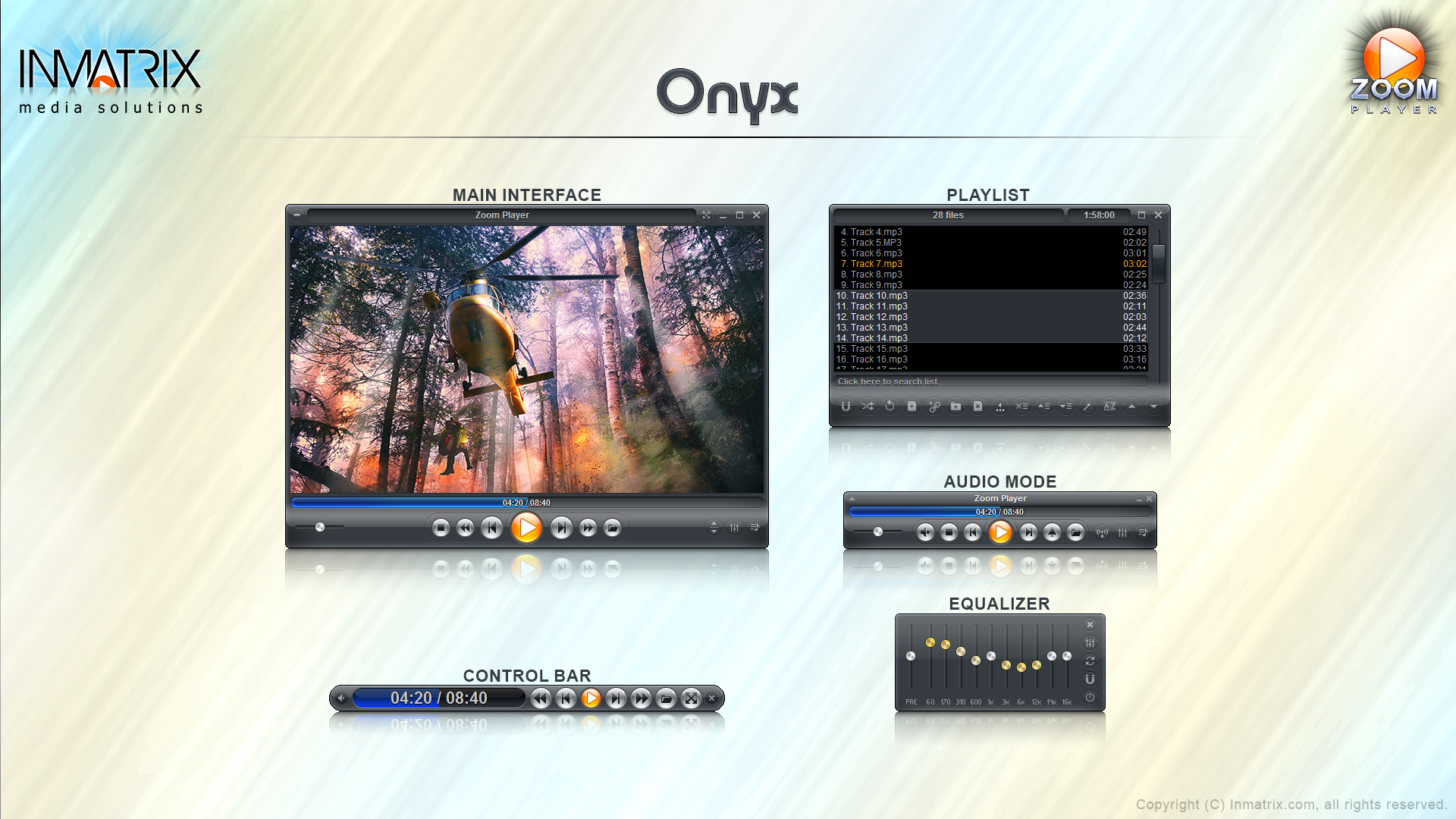 Are you looking for a media player that has the features to play a lot of media files? Then you might want to check Zoom Player Max. Are you looking for a media player that has the features to play a lot of media files? Then you might want to check Zoom Player Max.
What’s Zoom Player Max?
Zoom Player Max is a robust media and DVD front-end player. It was designed to be simple at first glance while being remarkably dynamic and flexible when used to its full potential. It works in two models: a media mode which can play any file supported by DirectShow (any file which plays in MediaPlayer) and a DVD mode which uses pre-installed DirectShow DVD filters to play DVD content.
Zoom Player Max supersedes media player in all its functions and provides several important functions that media player lacks. It provides special zooming functions to improve TV-output quality by eliminating overscan.
A couple of changes and bug fixes have been made to this new version. Some of these new features and fixes include the following; enhanced ‘Slate’ fullscreen navigation style with new ‘Vortex’ default background images, vulnerability fix for specially created BMP files, enhanced MadVR integration, and several other bug fixes.
Zoom Player supports a lot of media formats including the following; DVD, AVI, QuickTime (MOV/HD MOV), XVID, DIVX, Windows Media (WMV/ASF), Flash Video (FLV), Flash (SWF), Cellphone 3GPP (3GP/3G2), Ogg Movie (OGM), Real Media (RM/RMVB), VideoCD (VCD), Super VideoCD (SVCD), MPEG (MPG), MPEG2 Program (MPEG4), and many more.
This version of Zoom Player is a bit more stable than previous versions; which means the publishers have done a great job.
Want to check it out? Visit Inmatrix.
Posted in Main | No Comments »
Wednesday, June 5th, 2013
 Sometimes you don’t just seem to know what’s happening to your laptop battery. Battry that was full a short while ago is suddenly blinking indicating low battery. Now you don’t need to second-guess your battery anymore. Not when you have this application – BatteryCare. Sometimes you don’t just seem to know what’s happening to your laptop battery. Battry that was full a short while ago is suddenly blinking indicating low battery. Now you don’t need to second-guess your battery anymore. Not when you have this application – BatteryCare.
What is BateryCare?
This program is specifically designed to optimize the usage and performance of Laptop’s battery. It monitors the battery’s discharge cycles and helps increasing it’s autonomy and improving its lifetime.
Here are some of the features of this program: its advanced algorithm accurately records when a complete discharge cycle is performed, it notifies you of the need for a full discharge when the configured number of discharge cycles is reached, Shows all the detailed information about the battery, such as wear level, capacities, consumption, manufacturer, etc, · Depending on the power source of the computer, BatteryCare can automatically select the power plan you prefer (only in Windows Vista or higher).
Other features include: In battery mode, the notification icon shows the remaining time and percentage of battery, Automatically disable the graphics accelerated theme in Windows Vista and/or demanding services that degrade battery lifetime, when a new version is available, the program updates itself and given the concern about the battery optimization, BatteryCare does not interfere with the system performance. It requires only a mere 0,1% of Processor and Memory resources.
Filipe Lourenço, the publisher of this application, has added some changes to this version. The changes include: Improved Intel Core temperature readings: Now reads all cores and displays the highest one, Quick power plan change tray menu header is now clickable, Fixed language issues in some dialogs and Bug fix: Tray icon not updating after long periods in battery mode.
If you care about your laptop battery, get this program.
To find out more about this program, please go to BatteryCare.net.
Posted in Main | No Comments »
Tuesday, June 4th, 2013
 Are you a network administrator looking for an application that will enable you manage network computers? Look no further. Check out Remote Computer Manager. Are you a network administrator looking for an application that will enable you manage network computers? Look no further. Check out Remote Computer Manager.
What is Remote Computer Manager?
This is a program that allows network administrators to remote shutdown, run (execute) commands, launch applications and processes, Wake-on-LAN over IPv4, Wake on LAN over IPv6, lock workstation, log on, log off, sleep, hibernate, wake up, reboot, power on, power off, lock and unlock input devices, registry merge, file copy, installation of MSI packages, clock (time) synchronization and other remote operations for computers on network (Windows and Linux PCs). Using Remote Computer Manager you can perform a remote shutdown, power on (turn on), power off (turn off) and restart (reset) the remote computer with Intel AMT (Active Management Technology) and AMD DASH (Desktop and Mobile Architecture for System Hardware).
It also provides you with the list of remote processes and services, netstat information, screenshot, entries from registry, entries from event log and other details for each PC. With Remote Computer Manager, you can make remote operations on one or multiple network computers with a simple click. Your remote operations can be carried out automatically at a preset time. It supports IPv4 and IPv6 protocol and can be run as a service.
The program can also get the list of remote processes and services, netstat information, screenshot, entries from registry, entries from event log and other details for each PC. Using the application you can make remote operations on one or multiple network computers with one click. Remote operations can be executed automatically according with defined schedule, so you can organize fully automatic computer management for your company. The software supports IPv4 and IPv6 protocol and can be run as a service.
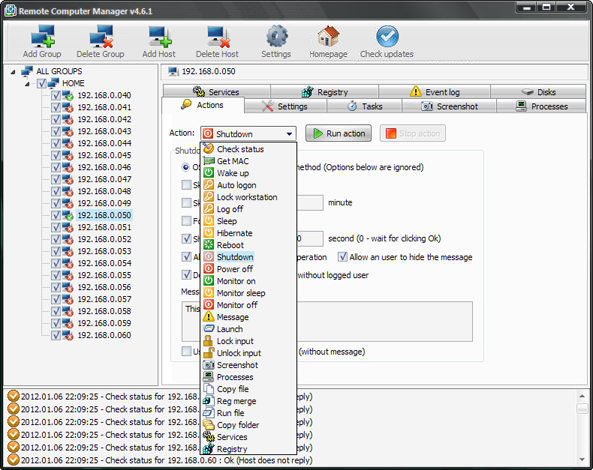
Some of the features of this program are: Remote service manager, Remote registry manager. Remote event log viewer, Remote terminate process, Remote Wake on LAN over IPv4, Remote Wake on LAN over IPv6, Remote wake up with magic packet over IPv4, Remote wake up with magic packet over IPv6, Remote sleep and hibernate and Remote logon and logoff.
Downsides?
Nagscreen in the trial version and quite pricy registration tag – $59. Overall it is a nice application for remote computer management.
To find out more about this program, please go to MyLANViewer.
Posted in Main | No Comments »
Tuesday, June 4th, 2013
 Need a powerful peer-to-peer file transfer system? Check out the all new Tixati. Need a powerful peer-to-peer file transfer system? Check out the all new Tixati.
What is Tixati?
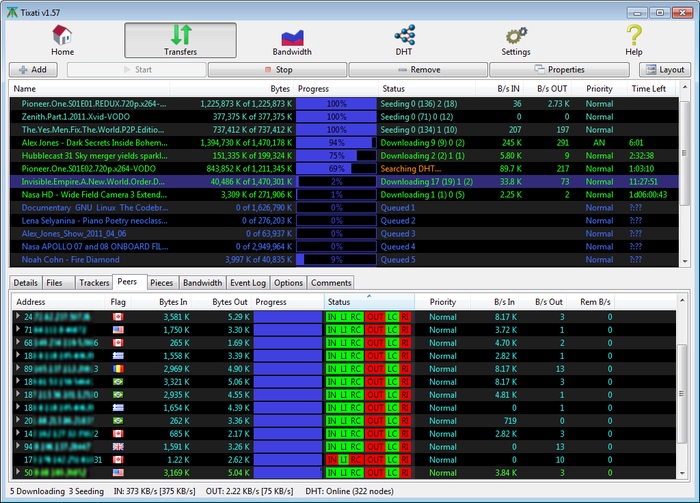
It gives you an easy to use but very powerful and flexible application for peer-to-peer file transfers. Its interface is very easy to use, allowing inexperienced users to manage downloads easily, while also providing a variety of transfer monitoring statistics, such as the upload ratio and the download time, the download source for each file piece, detailed transfer graphs, incoming and outgoing bandwidth usage charts.
It uses bittorrent protocol for fast average download speed, it comes with advanced charting capabilities and transfer properties. Tixati features dedicated functions for helping you configure bandwidth throttling, including trading and seeding limiters, as well as transfer priority options for individual transfers. It enables you to create new transfers and includes efficient peer selection and chocking algorithms.
Some of the main features of this application are: detailed user interface, with views of individual peers, detailed bit-field graphs, and bandwidth usage charting, highly flexible bandwidth throttling, including trading/seeding share adjustment and adjustable priority for individual transfers and peers, efficient peer choking / unchoking algorithms to ensure fast downloads, easy to create and seed new transfers, peer, transfer, and system-wide event logging with adjustable detail level and back-scroll size, move downloaded files to new filesystem location while transfer is in progress, even to different partition and full DHT (Distributed Hash Table) implementation including detailed message traffic charting.
Fast and clean P2P client without nagging and annoying ads.
To learn more about this program, please go to Tixati.
Posted in Main | No Comments »
Monday, June 3rd, 2013
 Our computers are constantly under threat from all kinds of viruses, spyware, Trojans. We therefore need to protect them and keep them safe at all times. One software you could use to provide such protection is Auslogics Antivirus. Our computers are constantly under threat from all kinds of viruses, spyware, Trojans. We therefore need to protect them and keep them safe at all times. One software you could use to provide such protection is Auslogics Antivirus.
What is Auslogics Antivirus?
This is an antivirus that offers comprehensive real-time protection for your PC against viruses, spyware, Trojans and other known and unknown threats before they cause damage to your computer. It would constantly analyze all the applications running on your PC and warns you if any of them tries to perform a malicious action.
Some of the main features of this program include: Prevents viruses from being copied to the disks, monitors and blocks attempts to modify system files, Uses heuristics to counter stealth and polymorphic viruses, unmatched spyware and virus detection rate. Blocks web pages that attempt to steal your credit card data.
It can also block keyloggers monitoring your Internet activity, scans all web, e-mail and instant messaging traffic in real-time. It prevents leaking of personal data via e-mail or instant messenger. Encryption can keep your Yahoo! or MSN Messenger chats private. Your online identity is securely protected: so you can shop, bank and browse privately. It skips safe files for better scan speed and lower CPU load. Laptop mode prolongs battery life of laptops and netbooks and nettops.
Auslogics, the publisher of this program, has added some changes to this version. They are: Full Windows 8 compatible, Auslogics Autopilot – quietly makes all the security related decisions for you, Auslogics Safepay – keeps hackers at bay by automatically opening all your e-banking and e-shopping and USB Immunizer – immunizes Flash Drives from viruses when connected to your PC.
Downsides?
None. Blocked every threat that my computer encountered with.
To know more about this program, visit Auslogics.
Posted in Main | No Comments »
Monday, June 3rd, 2013
 May be your Windows PC is currently running painfully slow. There are several reasons why this is happening. Maybe there are unused files that are clogging up your PC. Probably it is registry issues. Whatever it is, there is an application that can effectively handle them ALL. Simply get CCleaner for Windows and get the solution. May be your Windows PC is currently running painfully slow. There are several reasons why this is happening. Maybe there are unused files that are clogging up your PC. Probably it is registry issues. Whatever it is, there is an application that can effectively handle them ALL. Simply get CCleaner for Windows and get the solution.
What is CCleaner?
This is a freeware system optimization, privacy and cleaning tool. It helps to get rid of unused files thus making your PC run faster and frees up the much needed hard disk space. It performs a thorough analysis of your system and detects unused or invalid entries that clog the Windows registry, and gets rid of them. It can clear all traces of your online activities and contains a fully featured registry cleaner.
CCleaner features a clean, professional-looking interface split into four areas: Cleaner, Registry, Tools and Options. The Registry module concentrates on repairing issues found in the Windows Registry. It contains an uninstall manager (lists and allows you to remove installed software) and a system restore feature (allows you to manage all system restore points) and a drive wiper (securely erases the contents of drives).
One thing I particularly like about this program is the fact that it does not contain any adware or spyware at all. It is very fast (normally taking less than a second to run). CCleaner is able to clean your computer of junk files, unused entries from browsers, system files and third-party software. It keeps your computer fully optimized and saves you the time you would spend uncluttering it manually.
Piriform Ltd, the author of this program, has added some changes to this version. The changes are: Improved History cleaning for Internet Explorer 10, Optimized Cache cleaning for Internet Explorer 10, Improved Download History cleaning for Firefox, Improved DOMStore cookie cleaning for Internet Explorer 10, Optimized detection of Google Chrome Startup items and improved drive detection in File Finder.
To learn more about this amazing program, please visit CCleaner.
Posted in Main | No Comments »
Monday, June 3rd, 2013
 Searching for a good image viewer for your photo collection? If yes, then XnView is one of the best solutions you can ever get. Searching for a good image viewer for your photo collection? If yes, then XnView is one of the best solutions you can ever get.
What is the big deal about XnView?
XnView is a group of utilities that features viewing, converting, screen capture, slideshow, and Twain support. These utilities support viewing more than 400 graphic formats and can be used to create several dozens more. It has a highly-customizable interface that is easy to understand. It has a tabbed GUI that allows you to open as many images as you want and hop from image to image. It is free and does not contain any spyware or adware.
The menu allows you to carry out the following functions: start a batch conversion or renaming, send the photo by email, move or copy it to a certain folder, tag and rate it, set it as wallpaper and many other things. An interesting feature of this application is that you can turn a photo into JPEG, TIFF, BMP and PNG formats in a second by a simple click.
Some of its main features include: import about 400 graphic file formats, export about 50 graphic file formats, multipage TIFF, animated TIFF, animated ICO support, adjust for brightness, contrast, Twain support (windows only), apply effects(lens, wave) among other rich features.
Downsides?
No. Hmm… this is one of the best image viewers around.
To familiarize yourself with this program, please visit Xnview.
Posted in Main | No Comments »
|
|
|




