Author Archive
Friday, April 19th, 2013
 Did you know you can access your unfinished documents without going through the stress of mixing them up with files that are used regularly? That is exactly one of the benefits of Desk & Archive. Did you know you can access your unfinished documents without going through the stress of mixing them up with files that are used regularly? That is exactly one of the benefits of Desk & Archive.
What is Desk & Archive?
Desk & Archive is a file manager with redefined desktop for a workplace. People usually store on Windows desktop their unfinished documents mixed with documents they use frequently and shortcuts to program folders. This makes desktop suboptimal in all of those functions.
Desk & Archives offers desk as a way to create and track your unfinished documents launch bar for shortcuts to programs pinned to Sidebar instead of shortcuts to folders and templates and bookmarks as tools for documents that are constantly being used.
Desk & Archives has a lot of easy to use features that include the following; tabs that enable you to clean clutter from your taskbar, automatic opening and closing of tabs that usually takes such tasks away from you and increases availability of locations you might need, preview of contents on item tile with active preview of folders that allows opening of its items directly from preview, smart sorting that chooses best sort type based on content, ad-hoc items lists that allow easy opening of several folders at once and looking through those folders to view all items in sub-folders, not obstructive and problem solving notifications, and a host of other key features.
Any downsides?
Desk & Archive has a non standard look, and it also takes a long time to get used to.
Want to check it out? Visit DeskandArchive/.
Posted in Main | No Comments »
Friday, April 19th, 2013
 EF Commander is a complete file manager for the Windows. EF Commander is a complete file manager for the Windows.
What is the big deal of EF Commander?
It is a dual-windowed program which allows you to search directory trees and directories and perform actions, including Run, on files. You can also check file attributes and edit files with search-and-replace and drag-and-drop. It has an easy to use interface that gives you full control over your files and folders.
Some of its features are: you could use its tabbed interface to define exactly the views you want in each pane. It comes fitted with a full featured built-in hi quality audio player with playlist and ID3 tag support. You could rename several files in a processing step and its parallel file operations allow you to run several different operations simultaneously. It is the pioneer file manager to offer a direct link to PDAs with Windows CE which allows you to handle your data in the same way as you would on your desktop or laptop. You can also split large files into smaller parts and recombine the parts. it is very friendly on your system resources. It is available in several languages.
Downsides?
It has a 30 day time out. Nag screen.
To familiarize yourself with this program, please see EFsoftware.com
Posted in Main | No Comments »
Thursday, April 18th, 2013
 Need an application that would help you manage all your remote connections and virtual machines? There is one that does that efficiently- its called Remote Desktop Manager. Need an application that would help you manage all your remote connections and virtual machines? There is one that does that efficiently- its called Remote Desktop Manager.
What is the real deal about this program?
This is a very portable, light weight application that helps you to manage all your remote connections and virtual machines. It allows you to add, edit, delete, share, use Windows Command Prompt, text editors, Windows Explorer, and nearly any internet browser, organize and find your remote connection quickly. It is compatible with Microsoft Remote Desktop, Terminal Services, VNC, LogMeIn, Team Viewer, Ftp, SSH, Telnet, Dameware, X Window, VMWare, Virtual PC, PC Anywhere, Hyper-V, Citrix, Radmin, Microsoft Remote Assistance, Sun Virtual Box and more.
Its main advantage is that is supports a wide variety of connections rather than just Remote Desktop Protocol (RDP) ones. You can add connection info as well as manage them. You can organize your connections into groups or types. It allows you to place all your daily needs into one location. You can also export everything you’ve set up into a file and share it with other RDM users to import. It is easy to understand and use and the developers are very responsive.
Devolutions Inc., the author of this program added a new change to this version. It Added “Allow Password in Variable” to credential entries and tab char support in the secure note.
Downsides?
It contains adware and is not truly free – has 30 day trial. A very efficient program for remote connection management.
To know please visit RemoteDesktopManager.
Posted in Main | No Comments »
Thursday, April 18th, 2013
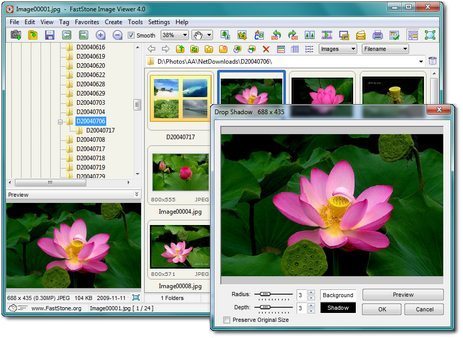 If you want a multipurpose image utility, then you’ve got a good one to check out-FastStone Image Viewer! If you want a multipurpose image utility, then you’ve got a good one to check out-FastStone Image Viewer!
What is FastStone Image Viewer?
This program is a powerful and feature-rich image browser, viewer, converter and editor. It has an easy to sue interface and an intuitive full-screen mode that provides quick access to EXIF information and thumbnail browser via hidden toolbars that emerge when you touch the edge of your screen with the mouse.
Some of the major functionalities of this program include: resizing, renaming, cropping, color adjustments, watermarks, including Lens, Waves, and Morphs. Others include multiple folder slide shows, batch cropping and batch conversion and more. Its other features are a high quality magnifier and built-in slideshow with 60+ transitional effects, as well as lossless JPEG transitions, drop shadow effects, image frames, scanner support, histogram and much more.
It offers support for all major graphic formats: BMP, JPEG, JPEG 2000, animated GIF, PNG, PCX, PSD, EPS, TIFF, WMF, ICO and TGA) and popular digital camera RAW formats (CRW, CR2, NEF, PEF, RAF, MRW, ORF, SRF, ARW, SR2, RW2 and DNG).
FastStone Soft, the author of this program, has added a few changes to this version. They are: Added a Minimize button (hidden at the top-right corner of the screen) to full screen mode, Added two Mouse Click options to use left/right clicks for previous/next images, Improved the Draw Board. Now it is possible to draw curved lines and improved the Print dialog.
Downsides?
This program is pretty simple and amazing. None to be noted.
To learn more please visit Faststone.org.
Posted in Main | No Comments »
Wednesday, April 17th, 2013
 These days, only the best programs are necessary when it comes to taking proactive steps against those applications that threaten our privacy. Rootkits and other potentially dangerous applications or programs pose constant threat to our privacy and personal files; and this call for installation of a program like McAfee Stinger. These days, only the best programs are necessary when it comes to taking proactive steps against those applications that threaten our privacy. Rootkits and other potentially dangerous applications or programs pose constant threat to our privacy and personal files; and this call for installation of a program like McAfee Stinger.
What is McAfee Stinger?
McAfee Stinger is designed by one of the world’s most popular software security companies. It is a program designed and developed to proactively detect and clean Rootkits running on your system. However, the Stinger is best left in the hands or used with the support of experienced people who have knowledge in handling a program of its status.
McAfee Stinger helps to detect and remove prevalent fake alert malware and threats identified in the “List Virus” section of the Stinger application. Please take note that this application is not designed or built with features to replace your regular antivirus applications or programs. However, the application is updated as often as possible every week, which further gives it an edge when it comes to the ability to detect newer threats.
Downside:
McAfee Stinger is a bit too advanced for users with little or no experience in handling a program of its status. However, it remains one of the most advanced applications able to help you take proactive steps against malicious programs.
Want to check it out? Visit Mcafee.com.
Posted in Main | No Comments »
Wednesday, April 17th, 2013
 What exactly is in your computer? Many of us know very little about our computer information. There is a utility that gives you more information about your PC. It’s called Speccy. What exactly is in your computer? Many of us know very little about our computer information. There is a utility that gives you more information about your PC. It’s called Speccy.
What is Speecy?
Speccy is an advanced System Information tool that gives you more information about your computer. It gives you far more information than what you get by clicking on Properties on your my Computer tab. Speccy will give you detailed statistics on every piece of hardware in your computer such as brand, model, version, driver, file, location, capacity, operating condition, CPU, Motherboard, RAM, Graphics Cards, peripherals, network, and operating system, Hard Disks, Optical Drives, Audio support.
It also displayed S.M.A.R.T. data from our hard disks. You can save and reload system “Snapshots” as XML or text files, or even optional INI files.It also gives you the temperatures of your different components, so you can easily see if there’s a problem! It accurately displayed sensor data from the CPU and two hard drives, offering reassuring proof that our disks and CPU were all operating well within their rated temperature range.
Piriform Ltd, the publisher of this program, has added a few changes to this version. These changes are: Added support for multiple monitors, Updated graphics card database to support new models, Improved detection of RAM and memory slots, Improved analysis of hard drive SMART data, Improved SSD and large hard drive detection and Added minimize to tray option.
Downsides?
None to mention. It’s a very good freeware to check out computer specs.
To familiarize yourself with this application, please go to Piriform.
Posted in Main | No Comments »
Wednesday, April 17th, 2013
 Our computers are under a constant threat of viruses, malware; Trojans etc. that’s why antivirus were created. But guess what, there are viruses that now clone an antivirus and infect your computer. They can scan your computer and produce fake alerts. So you’ll need to rid of these fake antiviruses. To do that task effectively you might need a this tool – Remove Fake Antivirus. Our computers are under a constant threat of viruses, malware; Trojans etc. that’s why antivirus were created. But guess what, there are viruses that now clone an antivirus and infect your computer. They can scan your computer and produce fake alerts. So you’ll need to rid of these fake antiviruses. To do that task effectively you might need a this tool – Remove Fake Antivirus.
What is Remove Fake Antivirus?
Remove Fake Antivirus is used to remove fake antivirus programs which are viruses or Trojans. It is used to remove: Security Tool, Antivirus Live, Personal Security, Cyber Security, Alpha Antivirus, Windows Enterprise Suite, Security Center, Control Center, Braviax, Windows Police Pro, Antivirus Pro 2010, PC Antispyware 2010, FraudTool.MalwareProtector.d, Winshield2009.com, Green AV, Windows Protection Suite, Total Security 2009, Windows System Suite, Antivirus BEST, System Security, Personal Antivirus, System Security 2009, Malware Doctor, Antivirus System Pro, WinPC Defender, Anti-Virus-1, Spyware Guard 2008, System Guard 2009, Antivirus 2009, Antivirus 2010, Antivirus Pro 2009, Antivirus 360, MS Antispyware 2009, IGuardPC or I Guard PC, and Additional Guard.
It is fast and very efficient. Because it is a tool that everyone- beginners and experts alike-need, it is designed to be very simple and easy to use. It comes as a stand-alone executable file so it does not need any installation. When the scanning is finished, it can completely remove all traces of the fake antivirus from your computer.
Downsides?
The interface is not so user-friendly as you might have wished for. Still in our days of lots and lots of fake antivirus solutions, this program is a must for every computer users.
To find out more about this tool, please visit the .
Posted in Main | No Comments »
Wednesday, April 17th, 2013
 Searching for a digital photo and media management solution? Look no further! Dominion is the answer. Searching for a digital photo and media management solution? Look no further! Dominion is the answer.
What is the deal about this program?
Daminion is a true multi-user media management system for small teams and creative professionals, at an affordable price. It is an application that you can use to manage your digital photos and media. It is easy to use even for beginners. It provides support for data storage inside files, including copyright information, synchronization of database information with EXIF, IPTC, XMP, and MWG, as well as format-specific metadata in a wide variety of formats.
It supports a wide variety of media formats, including raster, vector, camera RAW images, video, music and PDF files. Your library remains portable; you can multiple catalogs in separate tabs simultaneously on web browsers and allows for easy assets cataloging. Its architecture is scalable and modular. You can add support for virtually any media format and metadata by adding new media processors.
Some of its key features are: Restricted access to content, Version control and audit, Powerful Cataloguing Capabilities, Quick search for any assets, Integration with third-party systems, Support for 100+ media formats and Support for IPTC, XMP, EXIF, MWG and format specific metadata.
Downsides?
A nice digital media solution.
To know more about this program, please visit its web0site at Daminion.net.
Posted in Main | No Comments »
Tuesday, April 16th, 2013
 Are you a comic fan? Need a one stop solution where you can read your eComics and manage your comic library? Then get ComicRack. Are you a comic fan? Need a one stop solution where you can read your eComics and manage your comic library? Then get ComicRack.
What is ComicRack?
It helps you read and manage your eComic library. As a comic reader it supports all the latest features such as: different display modes, full screen, information overlays, magnifier, color adjustments, automatic back color matching and a multitab interface to quickly switch between eComics.
Its comic manager functions allow you to browse and search your eComics in the library, create folders and lists to organize them. You can also customize the lists to show just the information you need and use advanced tools to tag and edit the information for your eComics. Or create Smart lists to display dynamic lists based on eComic info (never read, author, series etc.)
cYo Soft, the author of this program, has added a few changes to this version. These changes are: Support for shared database (MSSQL and MySQL supported), Added support for custom book values with API support, Added new compression engine SharpZip, ComicRack.ini has new settings to choose the engine for each file type (CbzUses, CbrUses, Cb7Uses, CbtUses), Added Frequent jumplist for Windows 7+ and Fixed the Alternate Series setting for syncing.
Downsides?
There are several free alternatives available. Still this is a nice comic reader without any major bugs.
To know more please visit Cyolito.com/
Posted in Main | No Comments »
Tuesday, April 16th, 2013
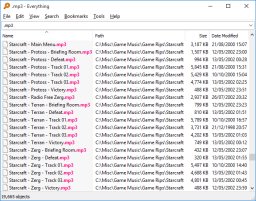 If you are a computer owner that always forgets something fast, then you need a search tool that can help you search for those files even if it’s just a part of the name. Everything works very fast, and can even help you locate files even if it’s just a part of the name you can remember. If you are a computer owner that always forgets something fast, then you need a search tool that can help you search for those files even if it’s just a part of the name. Everything works very fast, and can even help you locate files even if it’s just a part of the name you can remember.
Everything is a fast folder and file name search engine designed for Windows. Everything is quite different from Windows search tools because it initially displays every file and folder on your computer. You type in a search filter to limit what files and folders are displayed. Everything only uses file’s folder names and generally takes only a few seconds to build its database.
Everything is so fast that it can display results of your search within 30 seconds or even less depending on several other factors. You can also find and delete duplicate files that take up unnecessary space on your system. Some of its built-in features include the following; small installation file, clean and simple user interface, quick file indexing, quick searching, minimal resource usage, share files with others easily, real time updating, and many more.
Downsides
Everything only searches for file names, and not contents in a file.
Want to check it out? Visit: Voidtools.com/
Posted in Main | No Comments »
|
|
|




