Author Archive
Wednesday, February 20th, 2013
 Are you interested in downloading a cross platform XML authoring editor that has all the important tools needed for XML authoring, XML conversion, XML Schema, DTD, Relax NG, and Schematron development, etc? Then you might want to check out oXygen; it’s probably one of the most affordable and best programs available. Are you interested in downloading a cross platform XML authoring editor that has all the important tools needed for XML authoring, XML conversion, XML Schema, DTD, Relax NG, and Schematron development, etc? Then you might want to check out oXygen; it’s probably one of the most affordable and best programs available.
What’s oXygen for Windows?
oXygen is a complete cross platform XML editor providing the tools for XML authoring, XML conversion, XML Schema, DTD, Relax NG and Schematron development, Xpath, XSLT, XQuery debugging, SOAP and WSDL testing.
oXygen’s integration with the XML document repositories is made through the WebDAV, Subversion and S/FTP protocols. The program also has support to browse, manage and relational databases. The XML editor is also available as an Eclipse IDE plugin, bringing unique XML development features to this widely used Java IDE.
Latest changes made to version 14.2 of this program include the following; addition of features for both XML Development and XML Authoring, on the XM development side, the program completes the set of XML Schema 1.1 related features with full schema editing support and capabilities to generate XML instances and schema documentation in accordance with this new W3C standard, and a lot of other new updates.
Downsides:
oXygen has a 30 days limitation; and it is advisable to go for the unlimited version to truly enjoy it.
Want to check it out? Visit oXygenXML
Posted in Main | No Comments »
Tuesday, February 19th, 2013
 Do you need a small application that helps you to keep track your DVD collection? Then get EMDB. Do you need a small application that helps you to keep track your DVD collection? Then get EMDB.
What is the real deal about EMDB?
EMDB is a light weight application that helps you organize and keep track of your DVD collection. With this application, you can perform automatic import from the database of IMDB, export to csv, text or complete website, thumbnail cover preview, a loan tracker, search function and multi-language user interface. EMDB is written in C++ using Microsoft Visual Studio 2008 and doesn’t need a .NET framework or any other external libraries. And best of all… it’s free!
Wicked & Wild Inc, the authors of this application has added the following new changes to this program: IMDB Import: Fix import of year for TV Movies, IMDB Import: Fix import of (short) plot outline from IMDB.com, Update All Movies: If a movie was not found on IMDB the previous data was used, Add Movies From Hard disk: Fix crash when adding a single movie from hard disk.
EMDB is available in several languages: English, Dutch, Danish, German, Italian, Portuguese, Slovak, Spanish, Hungarian Croatian, Swedish, Greek, Catalan, Czech, Norwegian, Japanese, French, Finnish, Polish, Russian, Turkish, Simplified Chinese, Serbian, Slovenian, Arabic, Portuguese (Brazil), Hebrew and Persian translations are included in the setup.
Downsides
This is a really nice application. You can use it to add several movies within a very short time.
To learn more about this application, please do visit EMDB.
Posted in Main | No Comments »
Tuesday, February 19th, 2013
 Some applications or programs are sometimes too good to be free when you consider quality of features and the incredible number of download. We do have quite a lot of great programs that are available for free these days; and every one of them including Rapid Environment Editor has a lot to offer. Some applications or programs are sometimes too good to be free when you consider quality of features and the incredible number of download. We do have quite a lot of great programs that are available for free these days; and every one of them including Rapid Environment Editor has a lot to offer.
What is Rapid Environment Editor?
Rapid Environment Editor (RapidEE) is an environment variables editor that includes easy to use GUI and replaces small and inconvenient Windows edit box. The software supports Windows XP, 2003, Vista, 2008 & Windows 7 (including 64 bit versions). If you still use Windows NT or 2000, then use version 6.1 for Windows 9x or ME use version 2.1.
This feature-rich program already boasts of a couple of changes and minor fixes such as; 3rd party components update, and fixing of found and fixed the annoying AV error, which is regression. Rapid Environment Editor also retains most of its key features that include the following; doesn’t require installation and could be run as a “portable application”, automatically checking for invalid pathnames and filenames, translated into number of languages (English, Russian, Japanese, French, Polish, German, Italian, Latvian, etc), and inspector shows miscellaneous information about variables, need to type long pathnames, and many others.
Any downsides?
Rapid Environment Editor is such an amazing program with lots of users across the internet giving it some positive ratings.
Want to check it out? Visit Rapidee.
Posted in Main | No Comments »
Monday, February 18th, 2013
 Ubuntu is one of the world’s famous free operating systems with millions of users all over the world. This particular edition features web application integration and online search results that have been delivered by a company that has years of experience in the field of developing operating systems. Ubuntu is one of the world’s famous free operating systems with millions of users all over the world. This particular edition features web application integration and online search results that have been delivered by a company that has years of experience in the field of developing operating systems.
What is Ubuntu?
Ubuntu is a Linux distribution that starts with the breadth of Debian and adds regular releases (every six months), a clear focus on the user and usability (it should “Just Work”, TM) and a commitment to security updates with 18 months of support for every release. Ubuntu ships with the latest Gnome release as well as a selection of server and desktop software that makes for a comfortable desktop experience off a single installation CD.
Ubuntu is fast, free and very easy to use; and the technology driving this OS is able to power desktop PCs, laptops and servers around the world. Ubuntu is compatible with existing PC files, printers, cameras, music players and smartphones; and it comes with thousands of free apps.
Users of Facebook, Gmail or Flickr can now have more fun with Ubuntu by pinning them to the Launcher on the Ubuntu desktop, so they can launch them with a single click. You can also preview your search results in the Dash to see more options, without having to open more windows.
Want to check it out? Visit Ubuntu.
Posted in Main | No Comments »
Sunday, February 17th, 2013
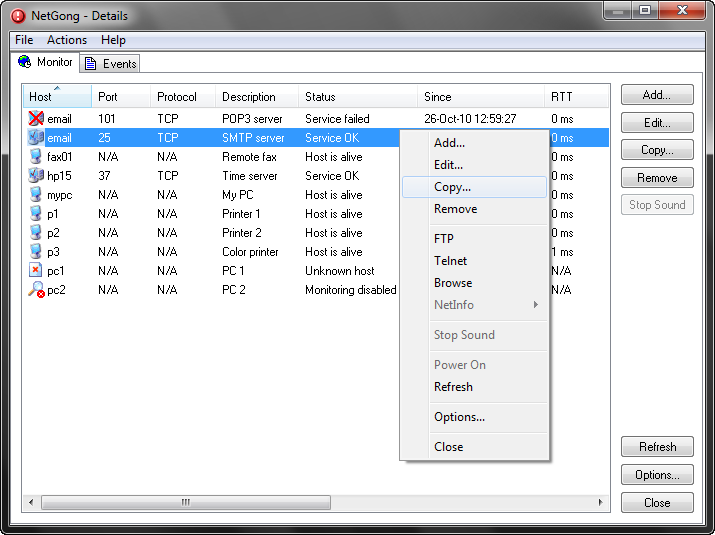 Need an application to monitor your networked devices on the internet? Then try the NetGong. Need an application to monitor your networked devices on the internet? Then try the NetGong.
What is the big deal about NetGong?
This application allows network administrators, webmasters, and Internet service providers to monitor any networked device on the Internet, corporate intranet, or TCP/IP LAN and receive alerts immediately via audible alarm, message, e-mail, or third-party software when a connection fails. This application provides for multitask support, it is very easy to use, and Multiplatform: one-installation runs on Windows XP, Server 2003, Vista, Server 2008, 7, Server 2008 R2, 8, and Server 2012.
NetGong allows users to customize it to their particular area of responsibility, from a single server to a small-office LAN to hundreds of devices within a large corporate network. Corporate network managers can also use NetGong to distribute responsibility among IS staffers and complement existing network management systems. It continually monitors your network resources on timed intervals, to test their availability and responsiveness. If a failure occurs, NetGong automatically notifies you. The result? You are back in business faster!
Some of the key features of the recently released version of the program, NetGong 8.1 Build 210, include: system service, independent parameters that allows you to set all parameters independently for each network resource, maintenance mode permits you to temporarily disable monitoring of certain resources, failure and recovery alerts, custom alerts, test alert configuration and several others.
Downsides?
This is a very useful software for checking monitoring the status of your local LAN or intranet.
To know more about this program, please visit Netgong.
Posted in Main | No Comments »
Sunday, February 17th, 2013
 Want a smoother and easier multi-monitor experience? Go get DisplayFusion. Want a smoother and easier multi-monitor experience? Go get DisplayFusion.
What is the real deal about DisplayFusion?
It helps to organize your windows by adding a taskbar to each monitor and you can even configure the taskbar to show all windows or selected windows. You can also use images from your own computer, or load images from online sources as wallpapers. It allows you to create your own powerful customized functions. You could create functions to load Wallpaper or Monitor Profiles, move windows around, change window opacity, toggle DisplayFusion features and much more.
The Window Location feature allows you to specify which monitor you would like selected applications to open on. Its Window Management feature could be used to easily move windows between your monitors. Why settle for one screen saver on your main monitor? With DisplayFusion you can span your screen saver across all monitors, or even display a different screen saver on each monitor. You can also use DisplayFusion in your corporate environment with ease by using DisplayFusion’s silent installer options, and custom ADMX templates for Active Directory Group Policy environments.
Some of the powerful features of this application include: Multi-Monitor Taskbars, TitleBar Buttons, Advanced Wallpaper Management, Customizable Functions, Monitor Configuration, Multi-Monitor Screen Savers,Desktop Icon Profiles and several more that will make managing your multiple monitors easy.
Binary Fortress Software, the authors of this application has added a few changes to this version. These include: Change: Taskbar support for new alternate Start Menu: Classic Shell, Change: Taskbar support for new alternate Start Menu: Start8, Change: Taskbar support for new alternate Start Menu: StartIsBack, Change: Taskbar support for new alternate Start Menu: Start Menu.
Downsides?
A very nice program. The only snag is that most of the “must have” features are not available in the free version.
To learn more about this program, please visit DisplayFusion.
Posted in Main | No Comments »
Saturday, February 16th, 2013
 If you want an application that helps you to secure the folder on your computer My Lockbox is it. If you want an application that helps you to secure the folder on your computer My Lockbox is it.
What is it about My Lockbox?
This program helps you to password protect the folders on your computer. The protected folder is hidden and locked from any user and application of your system and also from the net. This application is extremely easy to use. My Lockbox adds password protection, drag-and-drop capability, hot keys, trusted apps list, notifications, skins, and more.
After the set up is complete, you can easily change software parameters: password, location of the protected folders, hotkeys, trusted processes. In addition, a skinned user interface lets you choose from different skins to select the most comfortable look and feel of the software. Users can choose from different skins to select the most comfortable look and feel of the software. You can drop files into the My Lockbox desktop icon or your unlocked, open folder to protect them. The Password tab has a Hint field, something not every such program has but should. You can configure how My Lockbox checks for Updates, too.
Some of the features of this program are: Extremely easy in use, Hotkey to open Control Panel with a simple keystroke, Effective password protection, Supports all modern Windows operating systems (XP, Vista, 7) including 64-bit editions, Prevents you from locking system-critical folders, e.g. C:\Windows, Instant protection – no file scrambling or moving to another place, Protects folders even in Windows safe mode and Trusted processes feature lets backup, antivirus or similar software to backup or scan your protected folder.
Downsides?
My Lockbox Free protects only one folder per system, and it has a banner ad. It is a great way to hide what you don’t want others to see.
To learn more about this program, please visit My Lockbox.
Posted in Main | No Comments »
Saturday, February 16th, 2013
 Got so many duplicate files on your computer that you will like to remove but you think it will take forever to search and remove? AllDup can take care of that effectively in no time. Got so many duplicate files on your computer that you will like to remove but you think it will take forever to search and remove? AllDup can take care of that effectively in no time.
What is the deal with AllDup?
This freeware has a very fast search algorithm find duplicates of any file type, e.g., text, pictures, music or movies. It helps you to find duplicates using a combination of the following criteria: file content, file name, file extension, file dates, and file attributes.
One interesting thing about this program is that its users are allowed to fully customize the duplicate finding process and manage the results just the way they want it. Its GUI is plain and intuitive, with all search options displayed right in the main window. You can select not just the source folders or drives, but also the search criteria and thus search for name, extension, size, creation date, attributes or content. What’s more, you can ignore defined characters and time stamp, ID3 tags of MP3 files, EXIF of JPEG and even compare a data block at the end of a file.
The scanning process is a breeze. It has a wide search options that enable the app to scan the content of archive files too, ignore 0-byte folders, exclude files by size and set up file and folder filters.
Some of the key features of this program include the following: Fast search algorithm, Search is performed in multiple specified folders, drives, media storages, CD/DVDs, network drives, Entire folders or individual files can be excluded from the search by masks or size conditions, The built-in file viewer allows you to preview many different file formats and analyze the content of the file before deciding what to do with it and several others more.
Downsides?
It is a freeware that does what it is programmed to do.
To know more about this freeware, please visit Alldup.
Posted in Main | No Comments »
Friday, February 15th, 2013
 Want to turn your monitor into multiple workspaces? Well, what you need is Dexpot. Want to turn your monitor into multiple workspaces? Well, what you need is Dexpot.
What is the big deal about this program?
Dexpot creates additional workspaces you can quickly switch between. You could listen to your favorite music on one desktop, browse the internet on another desktop and play your favorite games on a fourth desktop. You could configure your desktop to handle several tasks at the same time.
It helps you to optimize and manage your computer, eliminates the problem of the disorder on your desktop and has many more functions. Extend your Desktop to a multiple: Dexpot makes working with your system substantially faster and more comfortable.
This program is very easy to use, highly customizable for experts, packed full with rich features, it is very light using just minimal system resources, is updated regularly and best of all it is free!. It helps you avoid desktop clutter, enhance your working with several applications and organize your applications into work areas.
Some of its unique advantages include the ability to customize your display resolution could come in handy if you like to send video from your computer to your TV but lack multiple output settings. You can set a video-specialized desktop in Dexpot and just click to switch when you’re in the mood for a movie. It’s also great for families, working at home, gaming, and any situation that calls for a different desktop.
But Dexpot has some advantages that could make it indispensable. For instance, the ability to customize your display resolution could come in handy if you like to send video from your computer to your TV but lack multiple output settings. You can set a video-specialized desktop in Dexpot and just click to switch when you’re in the mood for a movie. It’s also great for families, working at home, gaming, and any situation that calls for a different desktop.
Patrick Dubbert & Sebastian Brands, the author of this application, has added the following changes to this version: Desktop Rules Run actions support parameters Debug option: Leave tokenized windows enabled, DPI awareness for all Dexpot components, The Windows 8 taskbar wasn’t hidden correctly, Fixed Some Windows 8 Metro UI elements caused utterly confusing issues and Taskbar wasn’t hidden after a resolution change.
Downsides?
One of the best virtual desktop managers available. It is very versatile. This app rocks!
If you want to find out more about this program, please do visit Dexpot.
Posted in Main | No Comments »
Friday, February 15th, 2013
 Need a music player for your windows? Try Winyl. Need a music player for your windows? Try Winyl.
What is the big deal about Winyl?
Winyl is a free digital audio player and audio library application for organizing and playing audio on Windows. It offers you great new ways to organize and enjoy all your music, listen to music, radio, rate your favorite tracks, create playlists, and it is very simple to use. It is fully skinable, small size and minimal use of system resources.
It allows the user to organize his/her media content into categories in the library, which makes it easy to find and play. It uses just minimal system resources, works real fast and is absolutely free.
Some of the key features of this program include: Manage 100,000+ files in your music collection without sacrificing performance, Play all popular audio file formats (MP3, OGG, WMA, AAC, M4A, MPC, APE, FLAC, etc.), Organize music in your audio library with a powerful, intuitive interface, Built-in popular radio stations: Pop, Rock, Classical, Electronic, Comedy, etc, and Simple smart playlists: dynamic, based on tags and ratings, lists of tracks/albums. Other features include Automatic grouping your music by folders, artists, albums, genres and years, Very fast search in your audio library regardless of the number of tracks and 6 built-in skins to choose more convenient the player interface for you.
Winyl Software, the author of this program, has added the following new changes to this version: Fixed updating status line when search, Optimization for search and folders, up to 30% faster, Skin engine changes and Added Dark skin.
It is really easy to use, so just go ahead and try it out yourself – VinylSoft.
Posted in Main | No Comments »
|
|
|




