Author Archive
Friday, February 15th, 2013
 if you need an application that allows you to customize your icons and cursor, then IcoFX might be a tool just for you. if you need an application that allows you to customize your icons and cursor, then IcoFX might be a tool just for you.
What is the deal about this program?
IcoFX is an all-in-one solution for icon creation, extraction and editing. It allows you to easily convert your favorite images into icons, or icons into images. You can use it to create icon libraries or change icons inside exe files. Create a favicon for your website or blog. Convert your Macintosh icons to Windows icons and vice verse. With this program, you can extract icons from other files, including Windows Vista and Macintosh files. You can easily work with multiple files using the batch processing capability of IcoFX.
It puts a wealth of tools and more than 40 effects at your fingertips, with which you can create limitless numbers of icons. It is free, and is very easy to install and uninstall. The work area can be viewed at an impressive 10,000 percent, allowing users the ability to do very detailed editing. It is designed to work with Windows XP, Windows Vista and Macintosh icons supporting transparency.
Some of the key features of this program include: Support for Vista icon with PNG compression, Support for Macintosh OS X icons, create static and animated cursors, Convert Macintosh icons to Windows icons, Create and edit icon and cursor libraries, Create favicon for websites or blogs, Add, change or delete icons inside exe files and so much more.
Downsides?
It lacks the ability to resize a selection. It is also quite buggy. Hopefully all the bugs and minor errors will be fixed in the new release.
To familiarize yourself with this program, please visit http://icofx.ro/
Posted in Main | No Comments »
Friday, February 15th, 2013
 Do you need a painting application that is unique for color graphics? Then go for Pixia. Do you need a painting application that is unique for color graphics? Then go for Pixia.
What is the big deal about this program?
It is a painting tool made exclusively for full color graphics. It offers similar functionality like Photoshop such as layers, multiple undo, and plugins; it will even accept Photoshop’s plug-ins. The difference is that Pixia is free, something Photoshop certainly is not.
It supports layers, masks and many other graphic editing functions. You can use your own customized brush tips and even use an image file as a brush tip to create unique effects. Pixia’s user-friendly interface is suitable for beginners as well as experts. Pixia supports the most common editing techniques and presents a user friendly interface.
Pixia’s user-friendly interface is suitable for beginners as well as experts. Pixia supports the most common editing techniques and presents a user friendly interface. The versatile capability to drag the pen tip’s size in pixels is a neat improvement over Photoshop’s sliders. It is also able to acquire images directly from our digital camera and scanner via full TWAIN compatibility.
Some of the main features of this latest version – 4.80b include: it is made exclusively for full color graphics, Maximum graphic size: 10240 x 10240 dots (Note: this depends on RAM capacity.), Peripheral devices applicable: TWAIN32 devices. Printers made to use for Microsoft Windows. Tablets and Number of Layers: As many as memory lasts.
Downsides?
Haven’t stumbled upon one. At least yet. It is a very good free alternative to Photoshop. Great program.
To know more, please visit Ne.jp.
Posted in Main | No Comments »
Thursday, February 14th, 2013
 If you are searching for an application that allows you to connect with several Internet Relay Chat (IRC) servers at the same time, then you need to get the IceChat 9Release Candidate 6. If you are searching for an application that allows you to connect with several Internet Relay Chat (IRC) servers at the same time, then you need to get the IceChat 9Release Candidate 6.
What is the big deal about this program?
It allows you to connect to multiple IRC Servers simultaneously and chat in channels with other IRC Users. It has scripting support, and emoticons. It is a very user friendly program that can be setup in a matter of minutes. IceChat is capable of connecting to multiple servers and channels all at once, with ease, so you can easily chat with your friends in your favorite channels.
You can easily customize the look and feel of IceChat. You can change the theme, write your own scripts and making your own custom popups, using the IceChat Editor. Users cam also create their own activeX dll’s for advanced scripting solutions using its very powerful built-in VBS (Visual Basic Scripting) script engine. It supports Windows 95/98/ME/2000/XP/2003/Vista and also Windows 7 operating systems.
IceChat, the author of this freeware, has added a few changes to this version: More plugins are in development as well, and script plugin. We have also added more ircv3 compatibility to this release.
Any downsides?
Typing speed is rather slow and some minor bugs are to be fixed. However, it does many things so well and it is stable.
To learn more about this freeware, please visit IceChat.
Posted in Main | No Comments »
Wednesday, February 13th, 2013
 Want to convert your favorite photos to a very beautiful painting or art? Fotosketcher is what you need. Want to convert your favorite photos to a very beautiful painting or art? Fotosketcher is what you need.
What is the real deal about this program?
It is a freeware that allows you to convert your digital photos into art instantly. It helps you to create very beautiful works of art from your digital photos all for free. You could turn a portrait, the photograph of your house or a beautiful landscape into a painting, a sketch or a drawing in just seconds. Automatically turn your photos into paintings, drawings and cartoons.
You can also improve your original photos with simple tools (enhance contrast, sharpen, simplify image, increase luminosity, color saturation etc…) and add simple or realistic frames and text. It has over 20 different styles ranging from pencil sketches to watercolor or oil paintings, pen & ink drawings and cartoons.
David Thoiron, the author of this program, has added a few changes to this version. They include the following: New script engine (press F5 to call the script window) to automatically apply multiple effects, More powerful image merge function (with multiplication of both images), Improved interface (no third party code, reorganized menus and menu icons), DPI support for JPG images and Better directory management (keeping track of current open, save and manual brushes directories)
Downsides?
As far as it goes, it is a nice program.
To know more about this program, please visit FotoSketcher.
Posted in Main | 1 Comment »
Wednesday, February 13th, 2013
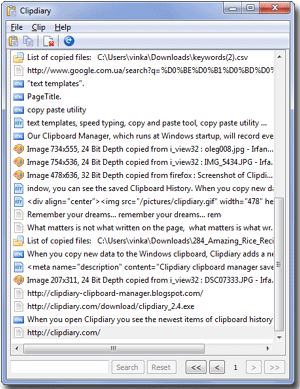 Isn’t it nice to know that you can easily get back anything that was once in the clipboard? If you want an application that allows you to log your clipboard history and record data in several formats, then check out Clipdiary. Isn’t it nice to know that you can easily get back anything that was once in the clipboard? If you want an application that allows you to log your clipboard history and record data in several formats, then check out Clipdiary.
What is the big deal about Clipdiary?
It can log clipboard history and record data in several formats: plain text, RTF (Rich Text Format) and images (BMP), html, files and so on and help you paste them back at a later time. ClipDiary stores all clipboard items in a plain and simple GUI, while offering advanced controls to search for a specific entry, browse pages in case you have tons of stored items or reset filters.
It has a built-in hotkey support to quickly open the clip selection dialog box, copy the previous or the next clip to the clipboard, automatically paste a clip after the quick copy or paste the current clipboard content as plain text. ClipDiary quietly sits in the Windows System Tray and doesn’t slow down the machine at all. It has a clean and well thought out GUI, very powerful features and plenty of information to appeal to all user categories.
Some of the key features of this program are: quickly find and paste a piece of text that was in the clipboard some time ago, Find any data that was once placed into the clipboard, Restore the clipboard contents (if they were accidentally overwritten, Convert any text to plain text (by stripping away its formatting) and Save a lot of time and increase your productivity.
Softvoile, the author of this program, has added a few changes to this version: Added: Function for preview images (F8), Added: Support for copying back into clipboard of several clips, Added: Function for searching text of the clip in the web browser (Alt+G), Added: Option to automatically show tooltip when main window is opened, Fixed: Problem with “Advanced” submenu in main menu and F6 hotkey and Improved a lot of small bug fixes and improvements.
Downsides?
It has a 30-day trial period. It is a great program that works just fine. To know more about this program, please visit ClipDiary.
Posted in Main | No Comments »
Wednesday, February 13th, 2013
 Searching for a solution for creating sites that are compliant and standard? Check out TopStyle. Searching for a solution for creating sites that are compliant and standard? Check out TopStyle.
What is the big deal about this program?
It is user-friendly and packed full with features that make designing and customizing your stylesheets a breeze. It creates cross-browser style sheets by alerting you of problems as you work. It has a very powerful style checker validates against multiple CSS implementations, alerting you of both invalid entries in your style sheets, and also to bugs in popular browsers that may affect their display.
With this program, you can edit your HTML, XHTML and CSS in a single program. It allows you to Preview CSS while you write it, Style Checker to validate style sheets against multiple browsers, Style Upgrade tool to quickly replace all outdated HTML code and Site Reports to see at-a-glance where styles are used in your site.
Some of the key features of this program include: HTML, xHTML and CSS Editing in a Single Program, Easy Navigation Between Documents, Element and Attribute Validation as You Type, Style Checker: Style Upgrade, Site Reports, Full Screen Preview, and Integration with W3C HTML Validation.
Downsides?
None yet. This is a very powerful CSS editor.
If you want to know more about this program, please visit TopStyle4.
Posted in Main | No Comments »
Tuesday, February 12th, 2013
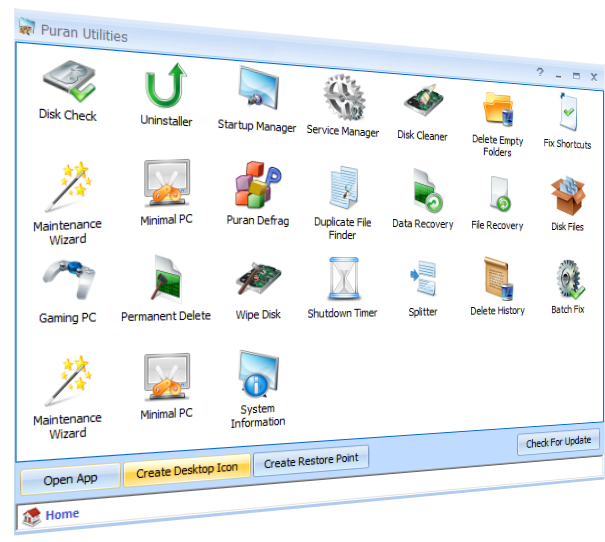 Need a defrag tool to defrag your files and boost your system speed? Get Puran Defrag. Need a defrag tool to defrag your files and boost your system speed? Get Puran Defrag.
What is the big deal about Puran Defrag?
It helps to defrag files, upgrades your hard disk performance and thus overall system speed. In addition it results in low wear and tear of hard disk and therefore increases its life. It is easy to use and is programmed to run automatically in the background. It can be programmed as a “set-and-forget” tool that will keep your disks clean and your system fast through regular background maintenance.
Puran also defragments your PC’s boot sectors for faster start-up, and its Intelligent Optimizer boosts your system’s speed, according to the developers. It can also defragment selected files or folders only and make exclusions by file and folder or wild card. There’s even a command line option for advanced users. Unlike recent Windows editions, Puran’s interface has a cluster map field. It is attractive and legible. It is a freeware that significantly improves the built-in capabilities of Windows.
Some of the main features of this program include: directories consolidation for speed boost, optimization by freeing space, automatic defragmentation for worry free defrag, boot time defragmentation for system files like MFT, low priority defrag for work while defrag experience, individual file or folder Defrag for selective defrag, GUI and Console Command Line Defrag Supported, restart or shutdown After Boot Time Defragmentation, file or folder Exclusion or exclusion by wildcard facility.
Downsides?
This is a solid piece of defrag tool.
If you want to know more about this program, please go to PuranSoftware.
Posted in Main | No Comments »
Tuesday, February 12th, 2013
 Are you missing your Start button on your Windows 8? There is an application that can help you restore it? Are you missing your Start button on your Windows 8? There is an application that can help you restore it?
What is the deal with this program?
This application helps to bring back the Start menu back to your Windows 8 without compromising productivity. It is light weight, very fast and easy to install. You can customize the Start menu behaviors, font, icon sizes, color, style, and which shortcuts you want Start8 to display. Documents, Music, and Pictures folders are back to where they belong (pre-Windows 8) and so is the search bar. This program gives you wider control over the Start menu.
Computer users who have for long depended on the Start button to navigate through their programs and files will appreciate Start8 bringing the familiar features and functionality back to the latest Windows operating system while adding enhancements just for Windows 8. You can now quickly access your applications, devices, music, videos and documents the way you always have with Start 8.
Some of the features of this program include: a Windows 7-style Start menu with Windows 8 enhancements; search for Windows 8-style (Modern UI) apps; pin desktop and Metro apps; boot directly to the Windows 8 desktop; or make the Windows 8 Start screen accessible from the Start menu.
Downsides?
None at all! This is a perfect utility as is. Now I can have my start button back. Good work from the authors.
To know more about this program, please visit Stardock
Posted in Main | No Comments »
Monday, February 11th, 2013
 PasteCopy.NET is a free portable Windows Clipboard Manager with multilingual support. It’s fully automated and has a (auto-) resizable preview pane. PasteCopy.NET is a free portable Windows Clipboard Manager with multilingual support. It’s fully automated and has a (auto-) resizable preview pane.
What is the big deal about this program?
It enlarges the capacity of Windows Clipboard and lets you organize csv (Comma separated values), html, rtf (Rich Text Format), text, unicode- text & images into customizable categories. With a simple click of the mouse, the supported formats can be previewed and copied to the Windows Clipboard. It is very light (780KB) and is very portable- can be run from a USB memory stick. It does not require any installation and leaves no traces on your computer. It is 100% feeware.
Sundrytools, the author of this program, has added quite a few changes to this version: Export/Print/Remove Selection, Convert Image Files (Copy images from path), Treeview Context-Menu (Open URL/Export & Set AutoPaste Category), Edit Catalog option; “Set as Default Auto-Paste Catalog”, Auto exit on USB removal and Option to Play sound on AutoPaste.
System requirement: Windows 98/ME/2000 SP3/2003/2008/XP SP2/Vista/Windows 7/Windows 8 Operating Systems.
Any downsides?
.NET run time environments are usually very slow and bloated.
To know more about this program, please visit SundryTools.
Posted in Main | No Comments »
Monday, February 11th, 2013
 This application supports Unicode as well as Flexible Syntax coloring editor; and is one of few tools that has a couple of other useful features even as an open source. With a file map that shows the overall file differences in a location pane; I doubt if you would find as many open source or freeware tools this good. This application supports Unicode as well as Flexible Syntax coloring editor; and is one of few tools that has a couple of other useful features even as an open source. With a file map that shows the overall file differences in a location pane; I doubt if you would find as many open source or freeware tools this good.
What is WinMerge?
WinMerge is a tool/application for visual difference display and merging; and is highly useful for both files and directories. It has Unicode support, Flexible syntax coloring editor, and Windows Shell integration. Other wonderful features include; Regexp filtering for filenames and lines, Side-by-side line difference and in-line word difference visualization, a file map shows the overall file differences in a location pane.
WinMerge’s user interface is translated into several languages; which gives makes it a great tool for lots of people. Some of the supported languages include the following; Greek, French, German, Japanese, Dutch, Polish, Russian, Swedish, and Turkish.
WinMerge is a program that has been running for a long time, and has been described as one of the most popular open source tools for syntax coloring editing. One of the most interesting aspects of the application is the inclusion of a file map that displays the overall file differences in a location pane.
Downsides
Users might have to stick with stable releases of WinMerge as experimental versions or releases are prone to several issues that bother on instability.
Want to check it out? Visit: http://winmerge.org/
Posted in Main | No Comments »
|
|
|





