Author Archive
Sunday, February 10th, 2013
The fact that we can do a lot of things with our computers these days than in the past makes things more interesting. Today, you can do virtually everything you want to do on your PC just by downloading a couple of applications. Interestingly, these applications are either available as freeware or as shareware. RegShot is one of those fascinating applications that you can download for free while getting the best value.
What is RegShot?
RegShot is a small registry compare utility that allows you to quickly take a snapshop of your registry and then compare it with a second one- done after doing system changes or installing a new application. The changes report can be produced in text or HTML format and contains a list of all modifications that have taken place between snapshot1 and snapshot2. RegShot also lets you specify folders (with sub folders) to be scanned for changes as well.
RegShot is small, and very useful, and the fact that it allows for a comparison between two instances or programs without being connected makes it one of the applications to watch out of for. It is so easy to understand that even a newbie won’t spend more than a couple of minutes before getting used to it.
Any downside?
RegShot has no downside; and the fact that it is an open source makes it a program to watch out for.
Want to check it out? Visit Regshot’s page on SourceForge.
Posted in Main | No Comments »
Saturday, February 9th, 2013
This one is an  application a lot of researchers would certainly love to have on their computers. It simply allows you to extract forensic data from your computer at an absolutely faster rate than usual. Now it is even more advanced with the addition and updates of some of its features. application a lot of researchers would certainly love to have on their computers. It simply allows you to extract forensic data from your computer at an absolutely faster rate than usual. Now it is even more advanced with the addition and updates of some of its features.
What is OSForensics?
With some of the latest and highly advanced features that have newly being added to this program; users are in for great times when it comes to extracting data from their computers because that is precisely what OSForensics is all about. It allows you to extract forensic data from computers, quicker and easier than ever.
OSForensics enables you to discover important forensic data faster with high performance file searches and indexing. You can also identify suspicious files and activities with hash matching, drive signature comparisons, and look into emails, memory, and binary data.
Latest changes made to OSForensics include the following; addition of Snapshots category to case management for exports from the web browser module, and addition of extra URL Meta data to web Snapshots (viewable from case item properties window). A couple of fixes have also being made to this version that include the following; fixed index search bug causing variant words like “testing” instead of “test” to not be found, and fixed index search bug causing exact phrases using quote characters do not return any search results.
Downsides
OSForensics is a bit too technical and difficult to start working with, which may pose some minor challenges for a newbie.
Want to check it out? Visit osForensics.
Posted in Main | No Comments »
Saturday, February 9th, 2013
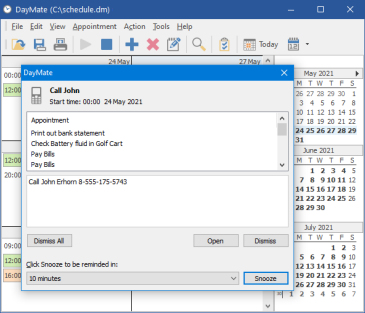 Day to day schedules can be very difficult to arrange in a way that won’t affect business and personal lives. Businesses and individuals fail to hit their set objectives simply because they find it difficult to properly manage their limited time. That is why you need a program like DayMate. Day to day schedules can be very difficult to arrange in a way that won’t affect business and personal lives. Businesses and individuals fail to hit their set objectives simply because they find it difficult to properly manage their limited time. That is why you need a program like DayMate.
What is DayMate?
DayMate (formerly Remind!) is a versatile intuitive day planner that is professionally designed to allow you create and schedule reminders than can pop up messages with optional sound effects; start applications or open documents; and shut down, reboot, or power down your system.
DayMate can also check for new e-mail, dial phone numbers, synchronize system time via the Internet, send messages, and open a specified Web site. You can create single or recurring events, color-code different item types, set reminders for upcoming events, and more. A drag and drop feature allows you to easily reschedule an event or change its duration.
A couple of updates and changes have been made to this version. Some of these changes include the following; Gantt charts, task completion percentage, task status, improved clock rendering, improved holidays handling, and a couple of other minor changes and fixes.
Any downsides?
DayMate is a nice application that costs only a little amount in terms of download. However, the application is limited to one user per license.
Want to check it out? Visit CrystalOffice.com for more info.
Posted in Main | No Comments »
Thursday, February 7th, 2013
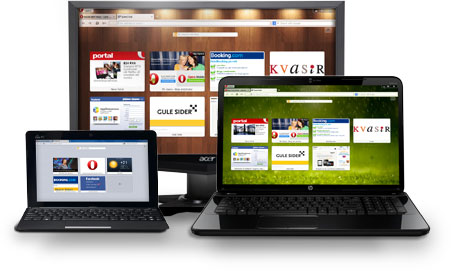 There seems to be no end in sight to the browser war as we keep seeing release of various applications with advanced and easy to use features. Users are spoilt for choice when it comes to making a choice of a browser to use; and that sounds like a great idea. Opera (32) for Windows seems to fit perfectly in the category of browsers that has a lot to offer its users. There seems to be no end in sight to the browser war as we keep seeing release of various applications with advanced and easy to use features. Users are spoilt for choice when it comes to making a choice of a browser to use; and that sounds like a great idea. Opera (32) for Windows seems to fit perfectly in the category of browsers that has a lot to offer its users.
What is the big deal with the latest release of the Opera?
With million of downloads already recorded; Opera is a browser that offers some of the best features when it comes to surfing the internet. It offers latest and advanced internet surfing at a speed that can be regarded as highly encouraging when compared with browsers like Firefox and Google Chrome.
Some of the features you can find in Opera browser include the following; speed dial, search shortcuts, and trash can. Perhaps, one of the most encouraging features of this browser when compared to Google Chrome is its lightweight. The browser consumes less space compared to a couple of other browsers; and loads pretty fast as well.
Downsides
This particular version of Opera (32-bit) for Windows has a couple of inconsistencies that can be very annoying sometimes. A few users have also complained about how the speed of the browser has slowed down over the years.
Want to check it out? Visit Opera.com.
Posted in Main | No Comments »
Monday, February 4th, 2013
 Are you a project manager and you need a program that will help you to planning and managing your projects more effectively and on schedule? Then get RationalPlan Project Management Software. Are you a project manager and you need a program that will help you to planning and managing your projects more effectively and on schedule? Then get RationalPlan Project Management Software.
What is the big deal about this program?
This program assists project managers in developing plans, allocating resources, tracking progress, managing budgets and analyzing workload. It is a very useful utility for project planning, estimate project costs and manage budgets, project scheduling and project tracking.
It is designed to help you easily manage your projects and shared resources, get resources and finances under control, bring project’s critical issues to your attention and track project evolution in terms of completion, time and costs. It can also break down your project, build schedules, allocate resources and manage budgets, enjoy our free Project Viewer, and can undo/redo on multiple levels.
Stand By Soft, the author of this program, has added a few changes to this version. These changes include: Timesheet view displays only the resources working in the current project, In Leveling panel the resources are displayed according to applied task filters, Added a percentage work load chart for resources, Ubuntu operating system integration, and Added a new report for task cost distribution.
Downsides?
This is one nice piece of application for project managers.
To learn more about this program, please go to RationalPlan.
Posted in Main | No Comments »
Monday, February 4th, 2013
 Are you worried that your photos may be stolen when you publish them on the web? If yes, then get Byescout Watermarking Pro. Are you worried that your photos may be stolen when you publish them on the web? If yes, then get Byescout Watermarking Pro.
What is the big deal about this program?
This program is an effective wizard-based images (JPG, PNG, GIF) watermarking software that protects your images with very refined text or image watermark label in just seconds. This softaware helps to secure your photos from unauthorized use. It includes EXIF macros support and advanced settings support (margins for annotation and other).
With this program, you can add several watermarks all at once instead of wasting time adding them one at a time. You also gives you access to the advanced settings that this program offers. This program allows you to watermark several photos at the same time.
Some of the key features of this program include: it has an easy to use interface, support for EXIF macros, Built-in set of ready-to-use watermark types with text and logo images support (annotation, text, text fits page, tiled text, vertical text, diagonal text, transparent logo image, logo image with text, DateTime, FileName stamps); ability to dinamically resize text according to the source input picture size; Ability to preserve original images file format or convert to another (JPG, TIFF, PNG, TIFF) and Integrates with Windows Explorer so just select image and right-click to add protection to the image(s)
Any downsides?
None. This software helps to protect you ownership of photos online and you could use it to watermark several photos at once.
To learn more about this program, please visit Bytescout-Watermarking-PRO.
Posted in Main | No Comments »
Monday, February 4th, 2013
 Need an outstanding on-page SEO application? Get WebSite Auditor Enterprise. Need an outstanding on-page SEO application? Get WebSite Auditor Enterprise.
What is the big deal about this program?
This is a choice utility that helps to optimize your website so as to guarantee a permanent top 10 search engine ranking. It is a two-in-one SEO tool: it deals with (1) on-page audit and (2) content optimization. This shareware runs an in-depth analysis of your site’s structure and display all the structural flaws that may curb your site’s rankings in plain view. It helps you locate and fix such problems as: broken links, HTML code errors, Missing meta data, and Duplicate content, and others.
This program allows you to run a complete SEO site audit, create business-specific optimization strategies for site’s structure and content, push up as many websites as you need, and communicate with your clients using the means they choose. It ensures that every word, HTML tag or link on one page is contributing to the success of all important pages of a site while brushing up keywords in the content.
This software gives a full outline of each winnable on-page optimization step, from techniques that pay back within weeks to quick revisions that transform a website’s sales literally in the same day.
Any downsides?
None yet. This is a very powerful SEO tool.
To know more about this program, please visit Link-Assistant.
Posted in Main | No Comments »
Thursday, January 31st, 2013
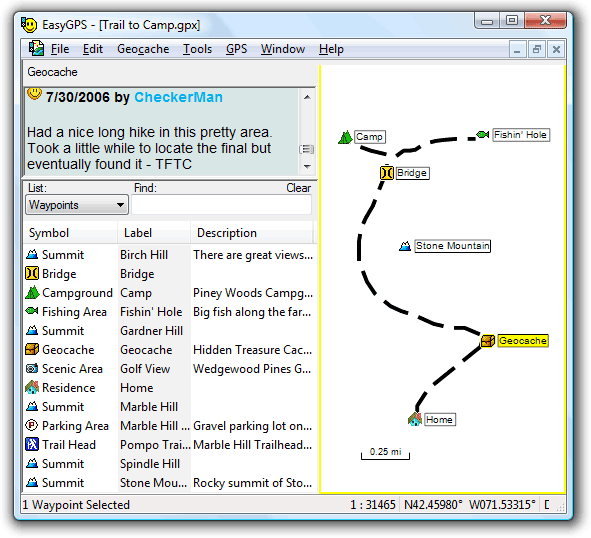 Do you want a tool or application that enables you manage your all your waypoints and routes, and display them in lists sorted by name, elevation, or distance? Well, EasyGPS is a freeware that also gives you several other options when it comes to fast and easy ways to create, edit, and transfer waypoints and routes between your computer and your Garmin, Magellan, or Lowrance GPS. Do you want a tool or application that enables you manage your all your waypoints and routes, and display them in lists sorted by name, elevation, or distance? Well, EasyGPS is a freeware that also gives you several other options when it comes to fast and easy ways to create, edit, and transfer waypoints and routes between your computer and your Garmin, Magellan, or Lowrance GPS.
What is EasyGPS?
EasyGPS is the fast and easy way to create, edit, and transfer waypoints and routes between your computer and your Garmin, Magellan, or Lowrance GPS. You can manage all of your waypoints and routes, and display them in lists sorted by name, elevation, or distance. The program connects your GPS to the best mapping and information sites on the Internet, giving you one-click access to street and topo maps, aerial photos, driving directions, weather forecasts, and nearby attractions.
EasyGPS is absolutely free, and comes with no nags, ads, or spyware that also enables you to download geocaches and waypoints to your GPS, and backup as well as print out your POIs and tracks.
EasyGPS also gives you the edge when it comes to loading new waypoint onto your GPS for your next hike or geocaching adventure. It also works with several famous handheld GPS receivers.
Any downsides?
EasyGPS has no downside, and is remarkably easy to use.
Want to check it out? Visit EasyGPS.
Posted in Main | No Comments »
Thursday, January 31st, 2013
 Having a webcam application that gives you a variety of options when it comes to using various applications on your system is seen by many as a boost these days. It simplifies the way you do things by also splitting one video stream into several video streams among other things you can do with it. Having a webcam application that gives you a variety of options when it comes to using various applications on your system is seen by many as a boost these days. It simplifies the way you do things by also splitting one video stream into several video streams among other things you can do with it.
What is ManyCam?
As the name suggest, ManyCam is a webcam application that enables you use more than one application at a time. It splits one video stream into several video streams. All you need to do is to choose ManyCam virtual Webcam as the video source in your webcam applications. You can also add some features to the video stream by using ManyCam (for example, funny animations, time and text). Right click the ManyCam icon in your bottom right tray to access these features.
ManyCam has a nice and attractive user-interface and with lots of outstanding and easy-to-use features to choose from. It is packed full with several configurable features that make video streaming a delight even for a newbie. Once downloaded and installed; ManyCam sits on your system tray, and does not consume too much space on your PC.
Some of its key features include the following; create your own custom webcam effects and graphics, switch between video & audio sources with our ManyCam Pro live video studio switcher, add thousands of amazing webcam effects and custom graphics inside any webcam application, etc.
Downsides
ManyCam now requires that you pay to have watermarks removed from some of the downloadable effects.
Want to check it out? Visit Manycam.
Posted in Main | No Comments »
Thursday, January 31st, 2013
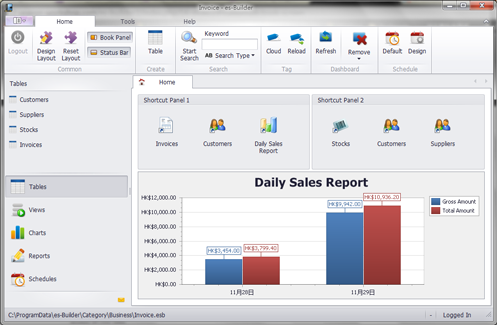 Are you looking for a freeware application that has all the features required to enable you manage and build your own information structure to fit your personal needs? Well, you are lucky because es-Builder is not only free; but has a couple of advanced features to enable you build and share your data quickly, and easily. Are you looking for a freeware application that has all the features required to enable you manage and build your own information structure to fit your personal needs? Well, you are lucky because es-Builder is not only free; but has a couple of advanced features to enable you build and share your data quickly, and easily.
What is es-Builder?
es-Builder is a flexible, customizable, friendly, powerful and unique information manager for private personal use. You can build your own information structure to fit your own needs. Easy to build, and quick to use and share your data. Without the database and programming knowledge, es-Builder is an ideal tool to keep your information in one place. If you are finding software to keep Contacts, Appointments, Tasks, Notes, Daily Journals, Expenses and more, es-Builder is exactly what you’ve been looking for.
Minor changes and fixes have also been made to this version to include the following; addition of progress bar control in report, Data Filter for all plugins, and some other minor bug fixes. es-Builder also has some flexibility in terms of usage, and can be customized even for advanced users.
Downsides
Windows 7 users may have a couple of challenges using this program especially when it comes to administrative privileges. However, this can be taking care of by running the application as an administrator.
Want to check it out? Visit es-Builder.
Posted in Main | No Comments »
|
|
|




