Author Archive
Wednesday, January 30th, 2013
 Have you ever wondered if installing Windows fonts can be installed anywhere or from anywhere? The good news is that you can do just that by downloading and installing a program like ClickFont. It has those amazing and easy to use features that make things absolutely easy and quick. Have you ever wondered if installing Windows fonts can be installed anywhere or from anywhere? The good news is that you can do just that by downloading and installing a program like ClickFont. It has those amazing and easy to use features that make things absolutely easy and quick.
What is ClickFont?
ClickFont is a program that lets you install Windows fonts from anywhere. The program allows easy installation of TrueType, OpenType or PostScript fonts with just two mouse clicks, from anywhere in the system. Makes you wonder, why this wasn’t built into Windows in the first place.
The publishers have introduced a couple of new features and updates that include the following; addition of detection for source directory, skipping installation if matching windows\fonts, addition of UAC handling, addition of detection for already installed fonts, Fixing of UAC parameter stripping, removal, commandline parameters for font installation, and removal of unused language strings.
Before Windows Vista was introduced, it was very difficult installing fonts; and that is why ClickFont is regarded by several users as a nice piece of application. ClickFont can install a variety of font formats from the context-menu, including OpenType, TrueType and Adobe PostScript fonts – the latter is not supported by newer versions of Windows.
Any downsides?
Nice program; especially since it doesn’t cost a dime.
Want to check it out? Visit ClickFont.
Posted in Main | No Comments »
Wednesday, January 30th, 2013
 GPU-Z is a lightweight utility designed to give you all information about your video card and GPU. GPU-Z is a lightweight utility designed to give you all information about your video card and GPU.
What is the big deal about this program?
This freeware allows you to check the status of your video card and GPU. It will give you a snapshot of those items and presents the information in a dialog box-style window. It is an executable file that you run directly – there’s no installing or configuring necessary. GPu-Z is a small file program and it does not take up much system resources. It automatically scans your system and reports the card name, GPU, release date and transistors, BIOS version, ROPs, memory type, and memory size.
GPU-Z support NVIDIA and ATI cards, displays adapter, GPU, and display information, overclock, default clocks, 3D clocks (if available), and validation of results. Some of the main features of this program include: Support NVIDIA and ATI cards, Displays adapter, GPU and display information, Displays overclock, default clocks and 3D clocks (if available), Includes a GPU load test to verify PCI-Express lane configuration, Validation of results, No installation required and Support for Windows XP / Vista / Windows 7 (both 32 and 64 bit versions are supported).
Techpowerup.com, the author of this program has added a few changes to this version. The changes are: Added readout for texture mapping units (TMUs), Window position is now restored on startup, When GPU-Z is minimized, the tray icon tooltip will show some sensor data and Added support for AMD Tahiti LE, HD 7870M, HD 8000M Series.
Downsides?
Works great and does what it is supposed to.
To learn more about this program, please do visit TechPoweru.
Posted in Main | No Comments »
Wednesday, January 30th, 2013
 Are you experiencing network downtimes? Do you need an application that helps you to monitor located on your local network and the Internet? DESKI Network does. Are you experiencing network downtimes? Do you need an application that helps you to monitor located on your local network and the Internet? DESKI Network does.
What is the big deal about this program?
This is a utility that monitors servers located on your local network and the Internet. It enables you to learn when a device is available as well as the time it became unavailable or out of service. After detecting the problem, it attempts to fix it. Where it is not able to fix it, it notifies the admin about the problem via email or network SMS.
DEKSI Network Monitor scans a local area network and automatically retrieves the list of all available hosts. DEKSI Network Monitor generates a list of monitored devices and assigns default checks to all hosts that found, and allows adding a variety of other checks.
Some of the main features of this program are: Rapid multi-threaded scanning of a local network by a specific IP address range, Simultaneous application of a variety of different methods for detecting network devices such as ICMP ping, scanning a list of TCP ports, ARP ping (converting an IP to a MAC address.), Recognition of network and local printers, servers, DB servers, routers, switches, hubs, WiFi devices, etc and several others.
The author has added a few changes to this version. These changes include: Optimized the program operation with a large number of SNMP monitoring checks, Optimized the monitoring service’s operation with gathered statistics, Added ability to specify a unique alert email’s subject for each check, Added ability to display only failed checks in the list (filter out passed checks) and several others.
Downsides?
Nope. Great application. With this, one can easily take charge of his network.
To know more about this software, please visit Deksoftware.
Posted in Main | No Comments »
Tuesday, January 29th, 2013
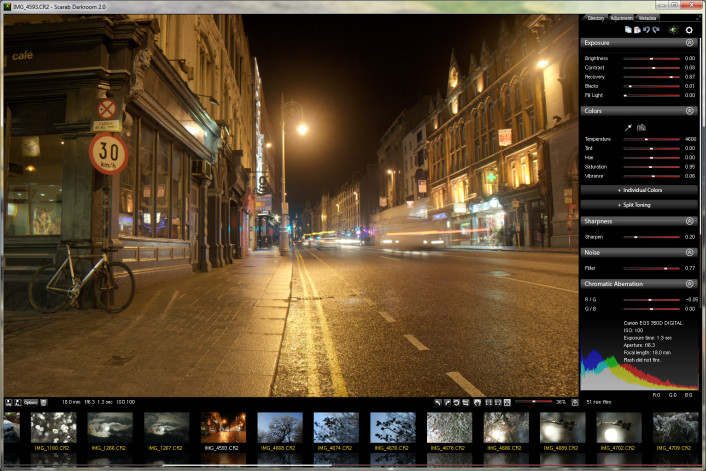 One of the programs that keep getting better and keep coming up with advanced and easy to use features is Scarab Darkroom. The program has improved in terms of features since the last time it was released. This version comes with a couple of fixes and updates that underline the importance attached to it by the publisher. One of the programs that keep getting better and keep coming up with advanced and easy to use features is Scarab Darkroom. The program has improved in terms of features since the last time it was released. This version comes with a couple of fixes and updates that underline the importance attached to it by the publisher.
What about Scarab Darkroom?
Scarab Darkroom is a digital camera raw file converter/photo editor that supports most raw format capable cameras from Canon, Nikon, Olympus, Panasonic, Pentax, Samsung, and Sony. It’s fast, easy-to-use, and produces excellent results.
Among several updates and fixes made to this version include the following; fixing of missing ISO values on some Nikon raw files, and tweaking of thread priorities among others. Among cameras supported in this version include the following; Canon (EOS 1D, 1D Mk II, 1D Mk III, 1D Mk IV, 1Ds, 1Ds Mk II, 1Ds Mk III, 1DX, 5D, 5D Mk II, 5D Mk III, 6D, etc) Fujifilm, Nikon, Olympus, Panasonic, Pentax, Samsung (EX1, GX-1, GX-1S, GX-1L, GX-20, NX10, NX11, Pro 815), and Sony (A100, A200, A230, A290, A300, A330, A350, A380, A390, A450, A500, A550, A560, A580, A700, A850, A900, NEX-3, NEX-5, NEX-5N, NEX-6, NEX-7, etc).
Any downsides?
Scarab Darkroom keeps getting better with each update.
Want to check it out? Visit ScarabLabs.
Posted in Main | No Comments »
Tuesday, January 29th, 2013
 Is your computer system running slowly? Need an application that will speed up your computer? Then try Auslogics Disk Defrag. Is your computer system running slowly? Need an application that will speed up your computer? Then try Auslogics Disk Defrag.
What is the big deal about this program?
This program can speed up your computer by optimizing file system. With this program you are sure to get the best out of your computer because it can defragment files, consolidate free space and move system files to the faster part of the disk. It is very fast, all thanks to its powerful engine and smart algorithms which allow Disk Defrag to run much faster than similar tools.
It boasts of a safe and fast defrag of your disk drives, optimization of clusters structure and file system for even better disk performance. After each defrag, it gives you a graphical report of what has been done. This application is capable of working quietly in the background and can be used to defrag a single file or folder. It moves your system files to the fastest part of the disk.
Some of the main features of this program include the following: Free Space Consolidation, Single File Defragmentation, Auto-Defragmentation, File Clusters Viewer and VSS Compatible Mode.
Any downsides?
It does a good job of defragmentation.
To learn more about this program, please go to Disk-Defrag.
Posted in Main | No Comments »
Tuesday, January 29th, 2013
 Did you know there is an application or a tool that enables you run any application with a parameter instead of going to the command prompt? That is precisely what a tool like RunWithParameters is designed to achieve. This open source application makes your task easier, and saves you a lot of time as well. Did you know there is an application or a tool that enables you run any application with a parameter instead of going to the command prompt? That is precisely what a tool like RunWithParameters is designed to achieve. This open source application makes your task easier, and saves you a lot of time as well.
What is RunWithParameters all about?
RunWithParameters is a tool, which allows running any application with a parameter. Instead of going to the Command Prompt, users can right-click an application and enter the parameters in the pop-up window. Previously used parameters are saved in a history for re-selection.
The publishers have made several changes to version 2.0.0.0, which include the following; addition of option to save global history, installer is rewritten, addition of history parameter, removal of single-user support on windows 2000 (and later), remember typed parameter when toggling history, improved multiuser handling, improved performance, increased default history maximum, updated list of default parameters, and fixed bug when using parameter containing single quotes.
With RunWithParameters, you can run any executable file with the parameters that file accepts as input; especially if you are experienced when it comes to using a program like this.
Downsides
RunWithParameters is an advanced program with advanced features; and may only be useful to users with experience.
Want to check it out? Visit RunWithParameters.
Posted in Main | No Comments »
Tuesday, January 29th, 2013
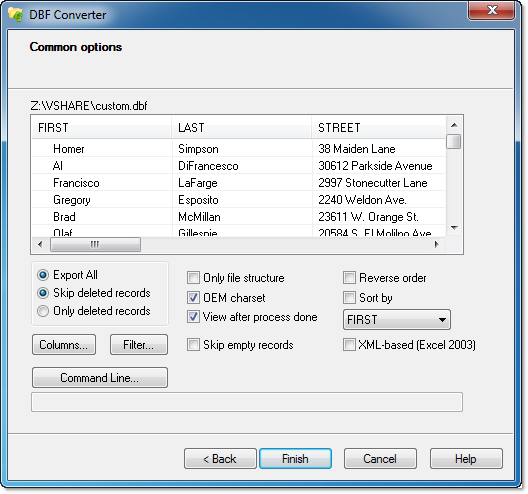 How about an application that costs just a little amount, but has the ability and features that support all modern data interchange formats like XML, CSV, TXT, HTML, RTF, PRG and others? That is what you get and much more when you have a program like DBF Converter. For a little amount of money, the application has some of the easiest features that enable you carry out all your conversion tasks with little or no stress. How about an application that costs just a little amount, but has the ability and features that support all modern data interchange formats like XML, CSV, TXT, HTML, RTF, PRG and others? That is what you get and much more when you have a program like DBF Converter. For a little amount of money, the application has some of the easiest features that enable you carry out all your conversion tasks with little or no stress.
What is DBF Converter?
DBF Converter is a versatile yet easy-to-use conversion program. It has a familiar Wizard-like interface but can also be used as a command-line utility for batch file processing. It supports all the modern data interchange formats, such as XML, CSV, TXT, HTML, RTF, PRG and others. You can even convert your DBF table into a set of SQL queries that can be imported into any SQL database.
DBF Converter also allows you manipulate data by selecting only specific columns and applying filters. DBF Converter dynamically builds a sample database record form. The ability to put advanced masks and rules into any field of the sample record is one of the most valuable DBF Converter features.
Downsides
DBF Converter is a shareware and has a 30 day trial period for all users.
Want to check it out? Visit DBF-Converter.
Posted in Main | No Comments »
Tuesday, January 29th, 2013
 Searching for a software that would help you to compress digital music without loss in the quality of the music? Then Monkey’s Audio is what you need Searching for a software that would help you to compress digital music without loss in the quality of the music? Then Monkey’s Audio is what you need
What is the big deal about this program?
It is a fast and simple way to compress digital music without any loss in the quality of the music. It does all this while saving you space. What is more interesting is that you can decompress the Monkey’s Audio files back to the original files whenever you want. Thus you do not have to recopy your music to switch formats. The decompressed file sounds exactly like the original file.
It allows you to decompress WAV files thus saving space in your hard drive or external drives. Its user interface consists of a standard window. It is a very light application and does not use up much of your system resources.
Some of the main features of this program include: Efficient (fast and great compression), Perfect sound, Error detection, Media Center, Foobar, WMP, Winamp, and more support and several others.
The publisher of this program, Matthew T. Ashland, has added a few changes to this version. These changes include: Switched from MMX to SSE assembly, making compression and decompression faster, Switched to latest Microsoft compiler, making everything around 5% faster, Removed support for old Monkey’s Audio 3.92 and earlier files (it hasn’t been possible to make these files for over ten years — use an old copy of Monkey’s Audio to convert these files to the latest format if you have any) and Removed dependence on third-party NASM assembly compiler in favor of intrinsics (which compile nicely with all major compilers).
Downsides?
None. It is a great application for decompressing your digital music files. It can easily be restored to its original music files; it is very easy to use.
To learn more about this program, please visit MonkeysAudio
Posted in Main | No Comments »
Tuesday, January 29th, 2013
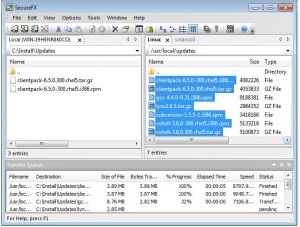 Need an application for safe and secure data transfers FTP over an encrypted SSH2 connection? Try SecureFX. Need an application for safe and secure data transfers FTP over an encrypted SSH2 connection? Try SecureFX.
What is the big deal about SecureFx
It gives you a choice between standard FTP and secure data transfer with FTP over an encrypted SSH2 connection. It has a user-friendly interface and is very easy to learn. If your company network, ISP or web host supports SSH2, you can create a fully encrypted FTP session using SecureFX. It delivers strong security with SFTP, SCP, and SSL-based protocols, as well as legacy FTP support. You can count on it when you’ve got to connect to many different servers, resuming multi-file transfers, and getting through network proxies and firewalls.
Some of the benefits of this program include; Maintain file systems and documents securely, easy to learn, Synchronize files using QuickSynchronize, Recover more easily when transfers fail, and make transfers on auto.
Van Dyke Software, the author of this program has added the following new features to this program: fixed the bug when a folder was renamed to a string that ended in one or more “.” characters, the sessions in the folder were deleted.
Downsides?
None noted. It is a cool FTP client to have. Worth every dime you spend on it.
To know more about this program, please go to SecureFX.
Posted in Main | No Comments »
Monday, January 28th, 2013
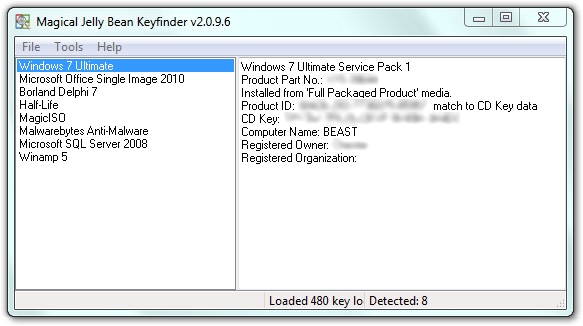 Need to retrieve your product key from your registry so as to install Windows? Then get Magical Jelly Bean Keyfinder. Need to retrieve your product key from your registry so as to install Windows? Then get Magical Jelly Bean Keyfinder.
What is the big deal about this program?
This freeware helps you to retrieve your product key used to install windows from your registry. It not only retrieves product key for windows but it does same for several other applications as well. It also has the ability to retrieve product keys from unbootable Windows installations. It works on Windows 95, 98, ME, 2000, XP, Server 2003, Windows Vista, Office XP, Office 2003, and Office 2007.
Some of the main features of Magical Jelly Bean Keyfinder include: An optional config file – this functionality lets you pull a key stored in the registry for any software, Command line options, load Hive option – allows you to load the registry hive of another Windows installation, Improved Save and Print. If you’re using Windows Vista, Administrator rights are required for this feature. You may have to right click on the Keyfinder and run as Administrator.
Any downsides?
None. It is a cool program.
To learn more about this program, please do visit KeyFinder.
Posted in Main | No Comments »
|
|
|





