Author Archive
Monday, January 21st, 2013
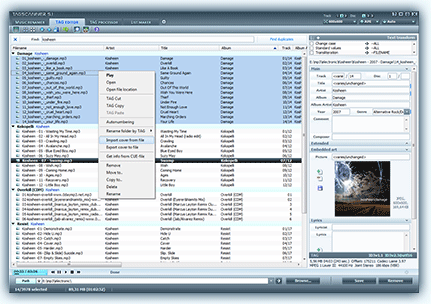 Do you want a program that can help you organize and manage your music collections? Then TagScanner is one application that can be used for such purposes and much more. Do you want a program that can help you organize and manage your music collections? Then TagScanner is one application that can be used for such purposes and much more.
What is TagScanner?
It is an application that can help you organize and manage your music collections. It can also be used for a lot of other things including; editing tags of mostly state-of-the-art studio formats, renaming files based the tag information, generating tag information from filenames, and performing any transformation of the text from tags and filenames.
With TagScanner, you can also get album information from online databases like freedb or Amazon. The program supports ID3v1, ID3v2, Vorbis comments, APEv2, Windows Media, and MP4 (iTunes) tags.
Besides having some of the most advanced features that have been added to it; TagScanner also comes with an easy to use built-in player. This version features a couple of updates and fixes including the following; fixing of changing of filename in export interface didn’t work, fixing of renaming of files directly in filelist, and translations into German.
TagScanner is an easy to use application that is unbelievably available as a freeware. As a matter of fact, the application offers you more features and functions than a couple of other paid ones out there.
Improvements:
A couple of bugs and issues noticed in older versions have been fixed; which makes TagScanner 5.1.530 very stable.
Want to check it out? Visit Xdlab.
Posted in Main | No Comments »
Monday, January 21st, 2013
 Are you having problems with setting up an OSS mail system? Then MDaemon is your best bet. The program is one of the easiest in terms of setup and features. It also offers you great value for money especially when compared to several other programs out there. Are you having problems with setting up an OSS mail system? Then MDaemon is your best bet. The program is one of the easiest in terms of setup and features. It also offers you great value for money especially when compared to several other programs out there.
What is MDaemon?
This program is a Windows-based email server that provides full mail server functionality and control as well as several other great features. MDaemon is also built with antivirus and anti-spam security features, seamless web access to email via the integrated WorldCleint component. The application can be remotely administered through the web-based WebAdmin plug-in and many more.
MDaemon supports IMAP, SMTP, and POP3 protocols, and also delivers solid performance from a wide range of built-in features. The program provides secure and standards-compliant as well as low total cost of ownership features for all kinds and sizes of businesses or organizations.
MDaemon also supports a variety of mobile devices that have access to email, calendar, and contacts. The program also includes support for BlackBerry push email with a seamless experience; which is regarded as a big boost for organizations that require simplicity and affordability. With the programs simple user-interface, organizations can easily setup and receive push email delivery from the mail server to the BlackBerry smartphone.
Downside
MDaemon has no downside, and seems to beat a lot of other programs out there despite the fact that it is a shareware.
Want to check it out? Visit MDaemon.
Posted in Main | No Comments »
Monday, January 21st, 2013
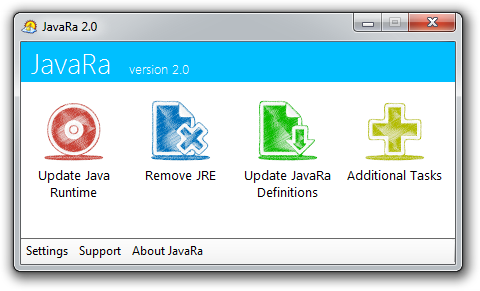 What about installing or having a program installed on your PC that gives you opportunity to have your old version of Java updated as soon as a new or updated version is available online? That is what you get when you install this open source program called JavaRa. What about installing or having a program installed on your PC that gives you opportunity to have your old version of Java updated as soon as a new or updated version is available online? That is what you get when you install this open source program called JavaRa.
What is JavaRa?
It is a program that enables you to update your installed Java application to the latest version as soon as an update is made available online. JavaRa is built or designed with features to enable you update existing Java application to the latest version.
JavaRa will download and also install the latest version of Java Runtime Environment if the version you have installed supersedes a newer version. The application also allows you to remove all older versions of this program. This also ensures that the security of your computer is further boosted; and best of all is that it also creates extra space on your hard disk.
The amazing thing about this application is that virtually everyone can use it because it offers a lot of flexibility. As a matter of fact, all you have to do is download and install it even if you are a newbie.
Downsides
However, the interface of this application is a bit confusing at first.
Want to check it out? Visit: JavaRa.
Posted in Main | No Comments »
Sunday, January 20th, 2013
 Searching for an application that lets you utilize modern hardware COM servers without changing your software or exchanging data between a TCP/IP application and an old-fashioned program that can only connect to a serial port? Then you might want to consider Serial Port Redirector. Searching for an application that lets you utilize modern hardware COM servers without changing your software or exchanging data between a TCP/IP application and an old-fashioned program that can only connect to a serial port? Then you might want to consider Serial Port Redirector.
What is Serial Port Redirector?
Serial Port Redirector is a program that is used as a serial application to a remote TCP socket. It allows you to utilize modern hardware COM servers without changing your software or exchanging data between a TCP/IP application and an old-fashioned program that can only connect to a serial port?
The program now has a couple of new changes that include the following; you can now use virtual ports created by other Fabula Tech products as server physical ports, compatibility with Windows 2000 server has been fixed, and auto update utility has also been fixed.
Serial Port Redirector has a lot of advanced features such as; ability to work exactly as hardware serial port, high configurable virtual COM ports, fully supports Telnet RFC2217 protocol, extra strings sending on port opening/closing, unlimited number of virtual serial ports can be created simultaneously on a single computer, raw data transmission support, preset serial port control, and many more.
Be sure to watch online demos and video tutorials and find out more about usage examples for the software.
Downside
It has a 15 day trial limitation.
Want to check it out? Visit Serial Port Redirector.
Posted in Main | No Comments »
Friday, January 18th, 2013
 Need an application that helps you monitor the weather conditions in your neighborhood right from your desktop? Weather Watcher can do it. Need an application that helps you monitor the weather conditions in your neighborhood right from your desktop? Weather Watcher can do it.
What is the big deal about this program?
Weather Watcher Live is your personal, real-time Windows desktop weather station. It automatically retrieves the current conditions, hourly forecast, daily forecast, detailed forecast, severe weather alerts, and weather maps from over 70,000+or cities world-wide.
Weather Watcher will allow you to automatically retrieve your weather data at a predetermined interval, display the current temperature and the current condition image in a customized tray icon, designate which weather information is displayed in the Weather Watcher system tray tool-tip, convert the weather data using almost any conversion, display a weather map as your desktop wallpaper, log the weather data in any format, export the weather data in any format, and customize the look of the Weather Watcher interface and icons via skins. It is also very easy to install and use.
Downsides?
It has a 30-day trial period. This program has all the info you will need and some more. It is very easy to install and use and it works pretty well.
If you want to learn more about this program, please go to WeatherWatcherLive.
Posted in Main | No Comments »
Friday, January 18th, 2013
 Do you need an application that backup and protects your data, documents, financial data and applications? EaseUS Todo can help you achieve that. Do you need an application that backup and protects your data, documents, financial data and applications? EaseUS Todo can help you achieve that.
What is the big deal about EaseUSTodo ?
EaseUS Todo Backup is a full-featured all-in-one backup and disaster recovery solution, protecting your data, including photos, music, videos, documents, emails, financial data and applications. It creates copies of your files and data and recovers them in the event of a crash. It has a cool and well-organized interface. One interesting feature of this program is that you could schedule full, incremental or differential backup jobs, so you could save extra data since your last backup.
You can also modify a backup plan and apply the changes instantly, remove image files or run previously created tasks. You could also convert the backup image into a bootable emergency disk or ISO file or virtual disk (Virtual PC or VMware).
Some of the main features of this program are: System Backup and Recovery, including the OS and installed applications. File and folder backup and recovery. Differential/Incremental Backup to save time and disk space. Backup Schedule for automatic system & data backup. Automatically delete/overwrite old images. Backup options: image split, image compression, set priority, set password, e-mail notification. Clone or transfer hard disk to another. Explore Image files.
The publisher of this program, CHENGDU Yiwo Tech Development Co., Ltd., has added a few changes to this version: Multiple Languages Supported: English, German, Spanish, French, Italian and Japanese, One click system backup and recovery, including the OS and installed applications and File and folder backup & recovery, including network data.
Downsides?
None that were noted. Excellent backup tool.
To learn more about this program, please visit ToDo-Backup.
Posted in Main | No Comments »
Thursday, January 17th, 2013
.jpg) Autoruns is a freeware that shows you what programs are configured to run during a system bootup or login session. It also shows you the entries in the order they are processed by Windows. Autoruns is a freeware that shows you what programs are configured to run during a system bootup or login session. It also shows you the entries in the order they are processed by Windows.
What is the deal about Autoruns?
You’ll probably be surprised at how many executables are launched automatically! This program shows you the programs that are configured to run when you bootup your computer. These programs include such programs as the ones in your startup folder, Run, RunOnce, and other Registry keys. It can also be configure to show other locations, including Explorer shell extensions, toolbars, browser helper objects, Winlogon notifications, auto-start services, and much more.
It is particularly very useful when you want to disable access for various malware that automatically run when Windows is initiated. Its Hide Signed Microsoft Entries option helps you to zoom in on third-party auto-starting images that have been added to your system and it has support for looking at the auto-starting images configured for other accounts configured on a system.
Systeminternals, the publisher of this freeware, ahs added a few changes to this version. They incude: additional startup locations, fixed several bugs related to image path parsing, added better support for browsing folders on WinPE and fixed a Wow64 redirection bug If you are a novice user, the standard interface probably looks cluttered with all sorts of technical terms. But experts are definitely overcome with joy right now.
Downsides?
None. This is a great program. A must for every computer.
To learn more about this program please do visit Autoruns for Windows.
Posted in Main | No Comments »
Thursday, January 17th, 2013
 DiskCryptor is an open source whole disk encryption software. It can be used to encrypt either a whole hard drive or its individual partitions, including the system partition. DiskCryptor is an open source whole disk encryption software. It can be used to encrypt either a whole hard drive or its individual partitions, including the system partition.
What is the big deal about DiskCryptor?
This program is a useful encryption solution designed to allow users encrypt or mount all the partitions. Some of the main features of this program are: Support for encryption algorithm AES, Twofish, Serpent, including their combinations- Transparent encryption of disk partitions, Full support for dynamic disks and Support for disk devices with large sector size (important for hardware RAID operation); Broad choice in configuration of booting an encrypted OS. Support for various multi-boot options- Full compatibility with third party boot loaders, Encryption of system and bootable partitions with pre-boot authentication, Option to place boot loader on external medium and to authenticate using the key medium; Support for hotkeys and optional command-line interface (CLI).
The publisher of this program, ntldr, has added a few changes to this version. These changes include: Added workaround for AES-NI support on Hyper-V, Added internal self-tests for PKDBF2 and XTS engines, Fixed bug with data loss with some cases on VIA-PadLock, Fixed regression with SSD detection on Windows XP and Fixed bug with no FS creation when formatting from GUI.
Downsides?
None that I know of.
To know more about this program, please go to DiskCryptor.
Posted in Main | No Comments »
Sunday, January 13th, 2013
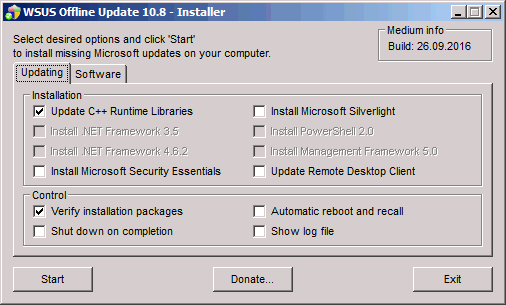 Want to update your MS Windows computer but have no internet access? Then go for WSUS Offline Update. Want to update your MS Windows computer but have no internet access? Then go for WSUS Offline Update.
What is the real deal about WSUS Offline Update?
WSUS Offline Update allows you to safely and quickly update any computer running Microsoft Windows safely without an Internet connection. It also allows you to easily download patches and updates for your Windows and Office without going through the whole procedure on Microsoft’s Windows Update website. So it helps to keep your windows computer updated even when you don’t have access to Microsoft Windows Update website.
Tortsen Wittrock, the publisher of this program, has added a lot of changes to this version. These changes include: Support added for Windows 8 and Server 2012, AddCustomLanguageSupport.cmd {lng}, Support added for Remote Desktop Connection 8.0 client (kb2592687) on Windows 7 / Server 2008 R2 (x86/x64) systems, ISO filters improved to mutually exclude .NET Framework 4.0/4.5 installation packages, Linux scripts reviewed and enhanced to support Windows 8 / Server 2012 targets and Removed obsolete “trailing colon” restriction for environment variable TEMP from UpdateGenerator script amongst several other changes.
Downsides?
This is a very good program for keeping your Windows Computer updated even when you do not have access to MS Windows Update site or internet access.
To familiarize yourself with this program, please go to Wsusoffline.
Posted in Main | No Comments »
Saturday, January 12th, 2013
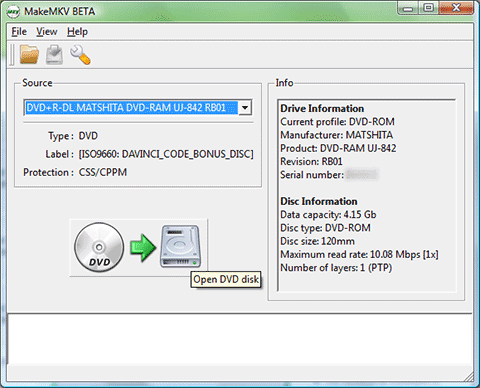 If you want an application that allows you to convert your videos into any format that you can play anywhere, the go get MakeMKV for Windows. If you want an application that allows you to convert your videos into any format that you can play anywhere, the go get MakeMKV for Windows.
What is the big deal about MakeMKV for Windows?
MakeMKV for Windows is a transcoder( a format converter). It allows you to convert your videos into free and patents-unencumbered format that can be played everywhere. It helps to convert videos from patented and usually encrypted disc into a set of MKV files, while preserving most of the original content. The MKV format can store multiple video/audio tracks with all meta-information and preserve chapters. There are several players that can play MKV files on almost all platforms, and there are tools to convert MKV files to many formats, including DVD and Blu-ray discs.
Also MakeMKV can stream decrypted video without intermediate conversion to wide range of players, so you may watch Blu-ray and DVD discs with your favorite player on your favorite OS or on your favorite device.
Some of the main functionalities of this program include: Reads DVD and Blu-ray discs, Reads Blu-ray discs protected with latest versions of AACS and BD+, Preserves all video and audio tracks, including HD audio, Preserves chapters information and Fast conversion – converts as fast as your drive can read data among several other functions.
Guinpin Soft Inc, the publisher of this program, has added these few new changes to this version:
Improved handling for DVD discs with mastering errors and many miscellaneous improvements. Other versions of this program are MakeMKV for Mac OS X.
Downsides?
It is not quite easy to understand. But unlike several other programs in its category, it can create MKV without having to extract first. It also has a quick, multi-audio stream.
To know more about this program, please visit MakeMKV.com.
Posted in Main | No Comments »
|
|
|




