Author Archive
Tuesday, June 24th, 2008
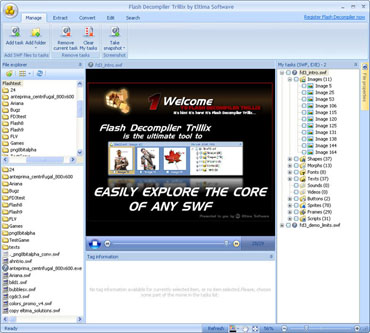 Flash Decompiler Trillix converts SWF files into FLA, extracts sounds, images, videos, shapes, frames, morphs, fonts, texts, buttons, sprites and ActionScripts from any SWF movie and saves extracted elements into a defined folder on the hard drive. Flash Decompiler Trillix converts SWF files into FLA, extracts sounds, images, videos, shapes, frames, morphs, fonts, texts, buttons, sprites and ActionScripts from any SWF movie and saves extracted elements into a defined folder on the hard drive.
Pros: Convert SWF to FLA converts SWF to FLA quickly and with quality. Decompile SWF files and obtain source code FLA. Flash Decompiler supports batch conversion now. It is handy when you don’t need to re-do the whole SWF file, just some of its elements. You can easily export some separate elements of a Flash movie and save them to your hard drive. Images, sounds, texts, links, morphs, fonts, shapes, sprites, buttons and ActionScripts can be exported in a variety of formats. Export Flash Video to AVI, MPEG, FLV and FLA, save sounds as WAV or MP3, images – as PNG, JPEG and BMP, texts as RTF, TXT and HTML. Flash Decompiler lets you convert the whole SWF file into FLA, or export certain Flash resources into FLA format
It helps editing Flash movies; easily edit images, sounds, texts, links, colors and lines of any Flash movie. SWF files are edited on the go – alter any of its elements, save and watch the result immediately. Unique Edit SWF capabilities of Flash Decompiler Trillix let you edit sounds, images, colors, gradients, lines, dynamic texts and links even without conversion to FLA. A built-in explorer makes browsing your PC for Flash movies and adding them even for batch decompilation and conversion extremely simple.
Flash Player EXE files are decompiled the same easy way as common SWF files. The application recovers detailed information about the whole Flash movie. All the elements can be retrieved and saved separately like with SWF. For example shapes, images, morphs etc, tracking their placements in frames and sprites as well as saving original names of frames, ActionScripts etc are made available. It supports Flash versions 5 through 9 and the Action script versions 2.0 and 3.0 completely.
Cons: It would be tempting to decompile creations by others and slightly modify and use the rest as one’s own. User needs to be completely aware of the copyright issues to avoid infringement.
{More Info and Download}
Posted in Main | No Comments »
Tuesday, June 24th, 2008
 Software for applying artistic effects to your photos. The program allows you to use more than 50 effects, including both traditional and original ones. You can combine effects and create truly fantastic compositions! Software for applying artistic effects to your photos. The program allows you to use more than 50 effects, including both traditional and original ones. You can combine effects and create truly fantastic compositions!
Pros: Photo Effects is a program for processing photos with the help of various filters. With it, you can completely transform any image. The program allows you to use more than 50 effects, including both traditional and original ones. Photo Effects has an intuitive interface and it is easy to learn. You will be able to easily process and decorate photos, combine effects and more very quickly.
There are three major kinds of effects one can use effects, decoration and composition. Five categories of filters are available for use such as color effects, lighting effect, traditional, artistic and distortion. It is mainly frames that can be used in the decoration effects category. Frames include the classic set, relief frames and masks etc. Composition features allow one to set the overall composition of a page on which the photo is to be displayed. Rotate the image, add a shadow or let it fly in space are some of the alternatives available. You will be able to take a look at your photos in the rain and snow, in fog or maybe add some sun light to it or swirl it in a storm.
Effects can be combined to create more creative ones for the adventurous or the truly creative user. Whether creating a home album, a web site publication or simply a pleasing greeting card this application has all necessary tools. 100 odd frames are available and more can be made available.
{More Info and Download}
Posted in Main | 1 Comment »
Monday, June 23rd, 2008
 This piece makes it possible to Keep information about your schedule, meetings and special events always with you on a portable flash drive. Plan your day, manage your time, and schedule appointments quickly and easily with Calendarscope. This piece makes it possible to Keep information about your schedule, meetings and special events always with you on a portable flash drive. Plan your day, manage your time, and schedule appointments quickly and easily with Calendarscope.
Pros: Keeping information about your schedule, meetings and special events and keeping it always available with you is now possible with this application. Carry the program and all data with you on a flash memory drive, USB Sticks, U3 smart drives and smart cards. Even if no laptops are being taken this important set of information can always be available in your pocket. Calendarscope Portable Edition can do everything that the regular desktop edition does, yet runs perfectly from a pocket able memory drive. The security of data is guaranteed with strong encryption that protects your schedules from unauthorized access even if you lose the flash device.
The user interaction panel displays current and the next month prominently. There are several different views possible including a year at a glance. View all or selected scheduled tasks, include or exclude Active, Overdue and Completed assignments, and keep track of the tasks with and without deadlines. Tasks and appointments are just as easy to schedule and re-schedule as events.
Different reminders can be assigned to personal and work events, upcoming tasks and appointments. It allows creating distinctive reminders with customizable fonts, colors and sounds to design an alarm that fits an event perfectly. Calendarscope can synchronize its clock with Atomic Time Servers on the net. You can then carry this precise information with you.
Manage special events easily with this application. This lets you create single or recurring events with just a few clicks. Never forget about a special event with comprehensive as well as customizable and distinct reminders. A sudden change of plans can easily be accommodated with simple drag & drop actions.
Cons: With laptops everywhere and web based facilities this functionality looks redundant. But then this is another alternative. There may be situations where this could be useful.
{More Info and Download}
Posted in Main | No Comments »
Monday, June 23rd, 2008
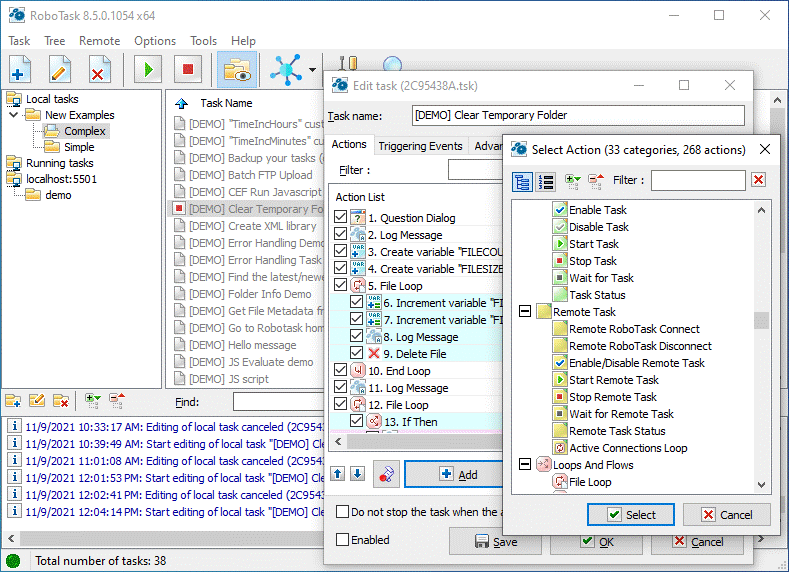 RoboTask allows you to automate any combination of tasks on your computer, ranging from simply launching applications, to checking email, moving or backing up files to uploading/downloading, sending email and much more. RoboTask allows you to automate any combination of tasks on your computer, ranging from simply launching applications, to checking email, moving or backing up files to uploading/downloading, sending email and much more.
Pros: RoboTask can help tasks be done automatically. A task may be simple launching of a program or taking back up of specific files, a specific download etc. Adding power to this is the ability to schedule the tasks or set a recurrence such as every X seconds. One can define a whole sequence of such tasks to be activated in a sequence. What adds further power is the fact the logical controls such as if-then-else- like statements can be used to control the launching of tasks. Highly complex automations, involving conditional IF/ELSE statements, loops, custom variables and other advanced options in addition can be set up.
Scope for automation is wide. Some of these are general actions including running other programs, opening or printing documents, and logging off (which covers a simple user log-off; shutting down all running programs, computer shutdown, shutdown with power off and restart), and dialogs for user interaction. File and folder operations include a folder-synchronization feature , Zip actions for packing and unpacking archives; Internet functions to check for and send e-mail, execute HTTP downloads, and ping hosts; extensive FTP support; and dial-up support. Then there are more actions to create, set and remove RoboTask user variables; loops and flows to provide if . . . then . . . else conditionals; and loops that iterate through the contents of text files or data extracted from SQL queries; and so on.
The user interface consists of a vertical arrangement of panels consisting of a task browser panel divided into a left-hand sub-panel list of folders and a list of the tasks in the selected folder in the right-hand sub-panel. You can run, stop, enable or edit tasks, or save a shortcut to the task on your desktop. The bottom panel is the RoboTask log, which displays information, warnings and error messages.
{More Info and Download}
Posted in Main | No Comments »
Friday, June 20th, 2008
 Have you been facing problems in memorizing any foreign language that you need to learn or to retrieve any specific information? Then try using Universal Study Helper 1.3.1 which is an interactive flash card program that makes it easy for you to learn different things. It can help you to improve vocabulary, grammar, remember definitions and other such information. Its features include multiple choice tests and other processes that prove to be helpful in learning various things. You can add items with their definitions and have the quick look to memorize it easily. You save the items sheet that you have prepared and resume the information when required. Have you been facing problems in memorizing any foreign language that you need to learn or to retrieve any specific information? Then try using Universal Study Helper 1.3.1 which is an interactive flash card program that makes it easy for you to learn different things. It can help you to improve vocabulary, grammar, remember definitions and other such information. Its features include multiple choice tests and other processes that prove to be helpful in learning various things. You can add items with their definitions and have the quick look to memorize it easily. You save the items sheet that you have prepared and resume the information when required.
With the Universal Study Helper 1.3.1 you can have the items added to the program. Select New and then right click on the middle working area and add the new item to form the list of information that you want to memorize. Enter the Item, Comment and then the Definitions related to it. When you have entered all the information then you can have the study started. All the items that you have added are shown on the middle of the screen that you can delete or edit. You can choose anyone method out of the three given; Presentation, Multiple choice, and Question & Answers. Even if you want to have the Study set modified then click on ‘Customize’. While performing the different study exercises have the scores reset whenever required. Change the Settings to make the changes relating to the study. With the Questions Directions you can set what to be provided as questions and what to ask for. Make changes to the count of ‘Number of Choices’ relating to the ‘Multiple Choice’ questions. Enabling and disabling different features like shuffle questions, continuous sessions, case sensitive answers, etc can be done to make the changes for the program to work accordingly.
Universal Study Helper 1.3.1 is very simple to operate and thus scores good on user friendliness parameter.
{More Info and Download}
Posted in Main | No Comments »
Friday, June 20th, 2008
 While watching your favorite videos, don’t you feel like getting them captured and upload them at your PC to view again when desired? Watching your favorite video anytime can be made possible with the help of the VideoCap Pro Video Capture ActiveX SDK 3.1. The program is capable of capturing the videos from DVD player, TV tuner, capture card, DVcam, and save it in the AVI, WMV 9, or WMV8 formats. It can even modify the videos according to your requirements. Make them look different by overlaying bitmap on the video and apply changes like transparent color, overlay text, etc. You can easily configure the video streams, compressors, bitrates and so on. While watching your favorite videos, don’t you feel like getting them captured and upload them at your PC to view again when desired? Watching your favorite video anytime can be made possible with the help of the VideoCap Pro Video Capture ActiveX SDK 3.1. The program is capable of capturing the videos from DVD player, TV tuner, capture card, DVcam, and save it in the AVI, WMV 9, or WMV8 formats. It can even modify the videos according to your requirements. Make them look different by overlaying bitmap on the video and apply changes like transparent color, overlay text, etc. You can easily configure the video streams, compressors, bitrates and so on.
VideoCap Pro Video Capture ActiveX SDK 3.1 has the capability to capture the videos from different sources and save the files with the supported formats. To start working with the software you need to select the Device for capturing the video. Make the selection of the video format and Video Device. Set the Audio and Video Compressor and enable them to be used when capturing the video. Start capturing the video and even you can have the preview of the video with the program. Enable the feature to have the video played while it is being captured while maintaining the aspect ratio. You can have the background color selected and even select other customization features. If you want to overlay any image or text then you need to set its position over the video. Make the changes in the font size, color, date formats and other features. Rotate or invert the video and make changes to the properties of the video.
VideoCap Pro Video Capture ActiveX SDK 3.1 helps you to capture the videos and preview it at the same time.
{More Info and Download}
Posted in Main | No Comments »
Thursday, June 19th, 2008
 Have you been facing difficulty in sharing the Microsoft Outlook calendar, contacts and other information with others? It may be that everyone has been viewing the information and the calendar items. To avoid this, you can opt for the OfficeCalendar 4.5 which makes it simple to have the calendar shared and scheduled easily. It is compatible with Microsoft Outlook XP, 2000, 2003 and 2007. It provides you with the features to share calendar and contacts, and even apply group security so that you can restrict the access to specific group of people. By installing the program, you would be able to view and interact with others Microsoft Outlook calendars, tasks and contacts. You can also get it installed on non-dedicated network server or p2p network. Have you been facing difficulty in sharing the Microsoft Outlook calendar, contacts and other information with others? It may be that everyone has been viewing the information and the calendar items. To avoid this, you can opt for the OfficeCalendar 4.5 which makes it simple to have the calendar shared and scheduled easily. It is compatible with Microsoft Outlook XP, 2000, 2003 and 2007. It provides you with the features to share calendar and contacts, and even apply group security so that you can restrict the access to specific group of people. By installing the program, you would be able to view and interact with others Microsoft Outlook calendars, tasks and contacts. You can also get it installed on non-dedicated network server or p2p network.
OfficeCalendar 4.5 works with different versions of Microsoft Outlook and works to help you share contacts, calendar and task information easily in a secure manner. When you start using the software you are shown the calendars of the interactive Outlook group below the Calendar option in your Outlook. You can make the changes in the scheduled and different other supported information shared easily.
It makes it easy for you to view the contact and other task information that your colleagues have stored from your own Outlook. It also provides you with the feature that enables the user to access your Microsoft Outlook calendar through web. It makes your work as you can give the message in your group about any specific event or meeting that is not concerned whit others. Have the schedules changed and even have the contact shared with your colleague that may help if you’re working on the same project or department. It provides you with secure access so that important information can not be viewed by any unauthorized person.
{More Info and Download}
Posted in Main | No Comments »
Thursday, June 19th, 2008
 If you are a web page author, programmer and are looking for an editor that could assist you to view and edit the text, hexadecimal codes, drive, and html files? If you are, then AptEdit Pro 4.6 is an apt solution for you which is an advanced full featured editor for such files. It is capable of performing different functions such as spell check, visual file comparison, auto completion, terminal edit, binary edit, and many more. The program can be used anywhere as it can be installed on a portable device. The user can work easily with the program anywhere anytime. The program has the ability to convert the data between EBCDIC, UNICODE and ASCII formats and also supports Code Folding for nearly all of the syntax languages. If you are a web page author, programmer and are looking for an editor that could assist you to view and edit the text, hexadecimal codes, drive, and html files? If you are, then AptEdit Pro 4.6 is an apt solution for you which is an advanced full featured editor for such files. It is capable of performing different functions such as spell check, visual file comparison, auto completion, terminal edit, binary edit, and many more. The program can be used anywhere as it can be installed on a portable device. The user can work easily with the program anywhere anytime. The program has the ability to convert the data between EBCDIC, UNICODE and ASCII formats and also supports Code Folding for nearly all of the syntax languages.
AptEdit Pro 4.6 consists of excellent features that enable the developers and programmers to have the source edited easily. With the help of the software you can perform different functions such as spell check, auto completion, make comparison of two or more file and many others. Use the features; Terminal Edit, Binary Edit for the modifications to be made. The program supports full Unicode thus you can open and edit the files to display multi languages. It is capable of working with HEX template that would assist the user in having the knowledge about any binary file. It is capable of having the files compared and merged whenever required. For the HTML files the user can easily have the HTML tags inserted. The configuration that been changed by the can be saved on the movable disk. The application also has some customization features that can be changed according to your preferences. You can even have the files created with the help of the particular templates. Have the changes made to the files and you even can get them printed.
{More Info and Download}
Posted in Main | No Comments »
Friday, June 6th, 2008
 Fun Search Film is a simple and easy-to-use database software to store and organize your personal collection of films and DVDs. The system is capable to store thousands of films including among other things name, description, category and cover. Fun Search Film is a simple and easy-to-use database software to store and organize your personal collection of films and DVDs. The system is capable to store thousands of films including among other things name, description, category and cover.
Pros: Fun Search Film lets one organize one’s film collection including other DVDs, VCDs etc. Films is a common passion and there is nothing we enjoy more than a quiet evening with a good film. The only catch is that when the number of films in a collection begins increasing, the task of arranging, sorting, classifying and even remembering what we actually have becomes difficult. Fun Search Film is a software specially designed for the film hobbyist and collector.
Such details as film name, description, category and cover image etc can be entered that may relate to thousands of entries. The dimensions on which the whole collection can be organized are actually Category, Country, Language, Subtitles, Actors and Rating. Major utility of any such collection is in how effectively searches can be made. One can combine several of these dimensions to form a search criteria to find items. Finding a film that’s in action category, has English dialogs and subtitles in Spanish can be found right away. Tagging on ratings according to personal taste is possible so that personal favorite can be found easily too. If choosing a film by reading descriptions is a bore one can choose by cover art too. If all else fails the application can draw lots to find a film by playing a film lottery. Sharing with friends and family is easy too.
User interface is not all that superbly organized but is adequate for the purpose, could have been better. It does help enter all the information though.
Cons: Biggest issue with any such organizer is that the more effective search makes it necessary to enter as much information about an item as possible. There lies the dilemma. When adding a title a lot of entries are to be made. So if you postpone entering details, a lot of entries piles up quickly and then they do not get done.
{More Info and Download}
Posted in Main | No Comments »
Wednesday, June 4th, 2008
 MD, the Medical Diary or Medical journal, lets you chart your glucose values, cholesterol, blood pressure, pulse rates and your weight, all as 3D charts and printouts. It also allows you to keep a journal, or diary and track your appointments. MD, the Medical Diary or Medical journal, lets you chart your glucose values, cholesterol, blood pressure, pulse rates and your weight, all as 3D charts and printouts. It also allows you to keep a journal, or diary and track your appointments.
Pros: The application has two distinct sections. One that keeps medical history of blood glucose, cholesterol, blood pressure and pulse rates, as well as weight. Historical data can be reviewed as 3D charts or a list. Print out of either is possible. It also allows you to keep a journal, or diary and track your appointments. The journal can be up to 12 pages a day.
Glucose levels can be entered 6 times a day (before/after breakfast, lunch and dinner) and displayed as 3D charts for a week, month or full year. Same for appointments, print them for a month or a full year for complete records. Blood pressure, pulse rates, cholesterol and weight can also be charted in 3D and printed. A large amount information can be stored as much as 8 TB, should anybody need it! Whether you have a chronic illness and need to keep accurate personal electronic medical records, are an active sports person, are trying to track your weight during a diet, or just health conscious, this software is quite suitable. It is easy to use, has help overlays on screen. The help information is right on top of what you are doing and is called up, as well as dismissed, with a single mouse click!
Cons: The user interface is very unusual to say the least. When this operates, no other window/application is available; this application takes over the complete screen. That’s an after effect of creating this as an executable. Thus no normal Windows task window and thus no minimize/ maximize or close buttons. This is one big shortcoming. Navigation on some pages also is difficult. Being an appointments diary too it would be useful to operate like a normal window along with other applications.
{More Info and Download}
Posted in Main | No Comments »
|
|
|




