Author Archive
Monday, April 28th, 2008
 When you want to make some public announcements then it is not possible to make them all by yourself especially when the same things are to be repeated. To deal with such situations, recorded sounds are being used everywhere. However even with this technique often an issue arises someone cannot find the particular sound file and play it. Therefore, to deal with this problem you can try using Time2Play 1.5. The program supports you with the uncomplicated features that help you to schedule when to play the audio file. It also consists of the features like ‘Expiring Announcements’, sound warning before the announcements, sound fade in/out, etc. It supports the file with MP3, WMV, and WAV formats. When you want to make some public announcements then it is not possible to make them all by yourself especially when the same things are to be repeated. To deal with such situations, recorded sounds are being used everywhere. However even with this technique often an issue arises someone cannot find the particular sound file and play it. Therefore, to deal with this problem you can try using Time2Play 1.5. The program supports you with the uncomplicated features that help you to schedule when to play the audio file. It also consists of the features like ‘Expiring Announcements’, sound warning before the announcements, sound fade in/out, etc. It supports the file with MP3, WMV, and WAV formats.
Time2Play 1.5 does not consist of complicated configurations and hence can be easily can be set for scheduling the sound to be played. Make the Playlist of the messages that you can select and easily move on for next. For the message you have been provided with the option of ‘Inert Message’ and ‘Remove Messages’. You can set the Volume for the Messages and Stop them anytime. Talkover and Emergency option are also there. On the right side of the screen your provided with the for Music Track Playlist where you can have the music files selected and scheduled to be played. You can select the music files from the Playlist or from the device as desired by you. Change the volume level to make it clear and loud or have it played as background audio. Set the features with the Sound Options as desired by you and set the schedule of the audio files to be played in the sequence as you want them. Help feature is provided with the program to assist you with the information relating to the program.
{More Info and Download}
Posted in Main | No Comments »
Monday, April 28th, 2008
 Have you faced a situation when someone messed up your Outlook Express data by accessing it when you were not at your system? Well avoid such potentially disastrous situation you should give a try to Outlook Express Security 2.05. The software allows you to set password so that only you access the Outlook Express database. When you set the program to be active, it locks the all the data. Now Outlook Express can be accessed only if the right password is entered. It helps protect your important data like you massages, address book, etc. This function of the software prevents your data from being spoiled or stolen by anyone else. Have you faced a situation when someone messed up your Outlook Express data by accessing it when you were not at your system? Well avoid such potentially disastrous situation you should give a try to Outlook Express Security 2.05. The software allows you to set password so that only you access the Outlook Express database. When you set the program to be active, it locks the all the data. Now Outlook Express can be accessed only if the right password is entered. It helps protect your important data like you massages, address book, etc. This function of the software prevents your data from being spoiled or stolen by anyone else.
MOutlook Express Security 2.05 shows the simple option in front of the user that can be set easily to start working. When you want the program to protect the Outlook Express data then you need to mark the given feature enable the protection. Set the Password that want to be applied for the Outlook Express database protection. It would prompt you to enter the password in the provided small dialog box. If in case you forget one password you can also set an additional password to enter for accessing the data. When you have entered the required details then the protection is applied to the Outlook Express. The software is best to be used of you need to move sometimes from your system or it has happened earlier when somebody damaged the data of your Outlook Express as it has your account defined. It is best suitable for the people who need to stay logged-in whole day as they carry various correspondence through mails. The software is easy to be used as it is complied of very less features.
Outlook Express Security 2.05 protects the information of your Outlook Express through password and denies access to any unauthorized person.
{More info and Download}
Posted in E-mail, Internet | 1 Comment »
Monday, April 28th, 2008
 Have you been into technical writing or professional writing for long or want to start with it? Well while writing, it is quite difficult to write different and better quality article each time. Now you can try Quick Article Pro 3.0 that is an online software for technical writing. With the help of the software, you can have the keyword rich articles written in no matter of time. It helps you to generate high quality articles relating to any topic and you need not to have any information about it. You can own the information rich content that can be modified for giving high impact SEO. It supports Word, WordPad and Notepad formats for publishing the articles. Have you been into technical writing or professional writing for long or want to start with it? Well while writing, it is quite difficult to write different and better quality article each time. Now you can try Quick Article Pro 3.0 that is an online software for technical writing. With the help of the software, you can have the keyword rich articles written in no matter of time. It helps you to generate high quality articles relating to any topic and you need not to have any information about it. You can own the information rich content that can be modified for giving high impact SEO. It supports Word, WordPad and Notepad formats for publishing the articles.
Quick Article Pro 3.0 helps in generating the articles that are unique and contains the required keywords. You can have the keywords searched and article framed easily. To start working with the software you need to enter the keyword on which you want to search the content. When you click on Search the related Topics are shown in left panel from where you can select and view the content. The containing content is shown on the middle left panel from where you can have the added to the Text box. Make the required changes and modify it into a new sentence with correct information. You can view the full sentence separately and add it to your Text box. You can ‘Add a Custom Topic’ to the program. It’s easy to create ‘New Project’, ‘Open an existing Project’ and even ‘Save Project’. You’re provided with features to publish articles with Word, Notepad, Word Pad formats and even have it copied to the Clipboard. You’re also provided with and option, No. of Sentences per Search.
Quick Article Pro 3.0 also provides with Help and Language selection feature. It works to its best to get related search results for you so that you can get the content for writing even if you don’t have any special knowledge about the topic.
{More Info and Download}
Posted in Developer, Shareware, Text, Windows | No Comments »
Wednesday, April 23rd, 2008
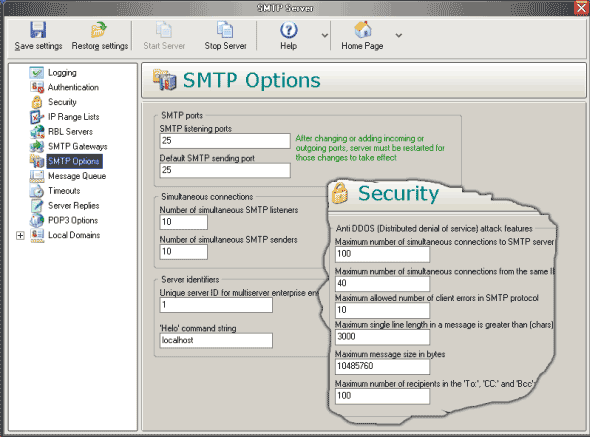 Were you in search for mail server utility that could help you perform your work faster and better without taking much time and effort? If that has been the case then it may be a wise decision to try using 1st Mail Server 3.02. Essentially it is a professional POP3 /SMTP server program which can be used in different environments and can also be used along side a standard mail client for sending emails. It also provides the users with a testing mode for the purpose of testing and debugging the mailing client. When you have a traveling job then you need to carry your laptop, 1st Mail Server 3.02 provides you with settings for multiple SMTP gateways. With this features the program helps you to send the mails by using any of the gateways. The program is suitable to by nearly everyone as it ensures email privacy and security. Were you in search for mail server utility that could help you perform your work faster and better without taking much time and effort? If that has been the case then it may be a wise decision to try using 1st Mail Server 3.02. Essentially it is a professional POP3 /SMTP server program which can be used in different environments and can also be used along side a standard mail client for sending emails. It also provides the users with a testing mode for the purpose of testing and debugging the mailing client. When you have a traveling job then you need to carry your laptop, 1st Mail Server 3.02 provides you with settings for multiple SMTP gateways. With this features the program helps you to send the mails by using any of the gateways. The program is suitable to by nearly everyone as it ensures email privacy and security.
The 1st Mail Server 3.02 program helps you to perform your work efficiently where ever you are. The program shows various options to be set according to your working requirements. The program shows the options on the toolbar and the left side panel on the screen. The sub features that all the options contain are displayed on the right hand area on the screen. To make sure about the safety you can set the security features like number of connections for SMTP servers and protocol. Set the IP range list and other features like RBL servers, SMTP gateways. With the SMTP options you can set the SMTP ports, simultaneous connections, server identities, etc. Message Queue, Timeout, Server Replies, POP3 Options are other features that you need to set according to your preferences. Another feature is Local Domain that contains sub features to be considered by you. Save the settings that also can be restored when required. To start working with you need to select ‘Start Server’ and ‘Stop Server’ as required.
1st Mail Server 3.02 program enables you send mails through any gateway and work with different mail clients.
{More Info and Download}
Posted in Main | No Comments »
Tuesday, April 22nd, 2008
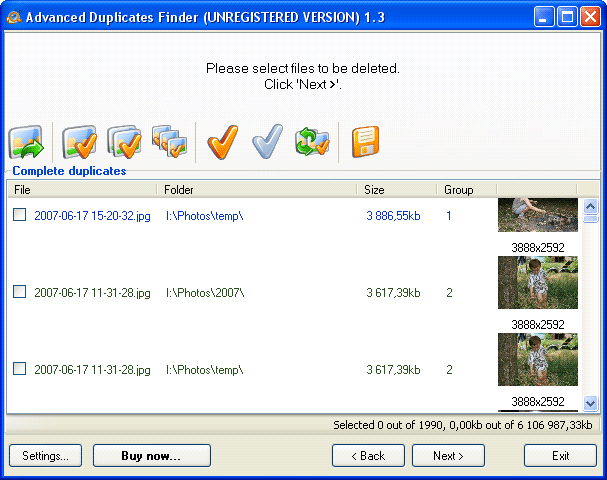 As you keep working on our computers we start to get loads of files collected on it with many of them being duplicates of each other. While working with so many duplicate files that get stored at your PC it becomes a Herculean effort to find them all manually. But now you can ease your work with the help of Advanced Duplicates Finder 1.6. It provides you with wizard style interface that requires you to a simple follow step by step process. The software searches, identifies and deletes the void and duplicate files from the hard drive or nearly any other media. It also finds the MP3 files that contain similar tags and images or those that carry similar size and names. As you keep working on our computers we start to get loads of files collected on it with many of them being duplicates of each other. While working with so many duplicate files that get stored at your PC it becomes a Herculean effort to find them all manually. But now you can ease your work with the help of Advanced Duplicates Finder 1.6. It provides you with wizard style interface that requires you to a simple follow step by step process. The software searches, identifies and deletes the void and duplicate files from the hard drive or nearly any other media. It also finds the MP3 files that contain similar tags and images or those that carry similar size and names.
Advanced Duplicates Finder 1.6 on launch displays a set of easy features that can be operated even by a novice. The wizard interface requires you to first select ‘Find duplicate files’, ‘Open the list of duplicates from a file’ and ‘Restore files moved to a separate folder earlier’. Set the criteria to carry out search for the duplicate files. Enable searching the complete duplicates, similar images, MP3/OGG/WMA files with similar tags, etc. Set the filter features like Mask, Size, Date and Attributes. You can even have the filters disabled i\f required. Move on to the ‘Next’ step and the program shows the folder and drives on your PC that you can mark to select them for searching the duplicate files. You can also enable searching ZIP and ZAR files. Click ‘Next’ and the programs start the process for searching the duplicate files. When the program is finished with the search then the duplicates files are shown listed on the screen. Mark the files the duplicate files found by surfing through them. The selected files can be Deleted, Moved to recycle bin and moved to a new folder or even copied.
Advanced Duplicates Finder 1.6 finds the duplicate files and does the search to the best possible extent according to the features chosen by you.
{More Info and Download}
Posted in Main | 2 Comments »
Tuesday, April 22nd, 2008
 In case you have large collection of music files then it is quite possible that you might have sometimes thought of having them burned to CD for taking them along with on while traveling. As such it requires music files to be burned onto MP3 CDs that can played nearly anywhere. To achieve this you can try Ultra MP3 CD Burner 7.4.0.10 that is designed to effortlessly collect MP3 files collected and then burned to the CD for having a backup or any other purpose. It also supports saving the images as and even the write the disc from ISO files. You can select the burning speed and mode for the process to get the work done efficiently and quickly. In case you have large collection of music files then it is quite possible that you might have sometimes thought of having them burned to CD for taking them along with on while traveling. As such it requires music files to be burned onto MP3 CDs that can played nearly anywhere. To achieve this you can try Ultra MP3 CD Burner 7.4.0.10 that is designed to effortlessly collect MP3 files collected and then burned to the CD for having a backup or any other purpose. It also supports saving the images as and even the write the disc from ISO files. You can select the burning speed and mode for the process to get the work done efficiently and quickly.
Ultra MP3 CD Burner 7.4.0.10 is credited with an aesthetically appealing interface that presents features in a manner that even a novice can operate them. When you enter the Media Device the program detects it and shows the information in the Device bar and also in left side panel. Add the Files as desired and have the displayed listed at the middle right of the screen. Make the selection for the Write Speed and set the Volume ID. You can enable or disable various features like Cache Image, Disc at Once, Finalize Disc, etc. You can also have the program set to Use the File Dates, and Auto-Verify Data. Buffer Protect and enable and the Mode2 XA (CD only). When you’re done with the selection then you simply need to click on Write Disc feature.
Ultra MP3 CD Burner 7.4.0.10 helps in fast burning and also provides features to make the burning process to be as specific as you require.
{More info and Download}
Posted in Main | No Comments »
Monday, April 21st, 2008
 Keeping the notes organized in an easily retrievable manner is often a Herculean task. In case you are looking for a utility that could help you to keep your notes organized, then should definitely try out the remarkable AnyNotes 5.0. It is capable of storing the notes content like texts, web pages, reminders, images, links, and other attached files and turns them into the form of a database with tree-like spatial arrangement for the Folders and Notes. It supports note creation with just a single click and makes it easy for you to build and manage the notes well. You can even have the notes protected with the cryptographic algorithm that affords you with a rather strong protection. It also has a calendar, backup, print manager and various other integrated features. Keeping the notes organized in an easily retrievable manner is often a Herculean task. In case you are looking for a utility that could help you to keep your notes organized, then should definitely try out the remarkable AnyNotes 5.0. It is capable of storing the notes content like texts, web pages, reminders, images, links, and other attached files and turns them into the form of a database with tree-like spatial arrangement for the Folders and Notes. It supports note creation with just a single click and makes it easy for you to build and manage the notes well. You can even have the notes protected with the cryptographic algorithm that affords you with a rather strong protection. It also has a calendar, backup, print manager and various other integrated features.
AnyNotes 5.0 supports structured organization of notes and makes it easy for you to keep them in proper order with convenience. You can create new folders to keep the notes in the specific folders and have them listed according to the particular category. The expandable menu containing the folders and the sub folders are shown on the left and the right side shows the notes that are contained in these folders. Overall it makes it convenient for the user to have a proper look on the folders and notes. You can add different content to the notes as the software supports images, text, links, addresses and much more. In addition you also have the view of the recent viewed or created notes with the History features. This apart the utility provides you with features like Calendar, Favorites, etc. If you have a numerous notes collected with the program, then you can carry out the search for the notes thus saving the time that you had to spend for checking all the folders. It also supports memorizing web pages, book marking web page by dragging the URL and dropping it to the system tray icon of the program. All this is also followed by various other features that support your working.
With all these features AnyNotes 5.0 software also supports synchronization with the Pocket AnyNotes on communicator or Pocket PC, works with multiple databases, supports multi-user access on network and so much more.
{More Info and Download}
Posted in Main | No Comments »
Friday, April 18th, 2008
 CapTrue is a Microsoft Windows application for creating desktop screenshots easily. It behaves just like the Print Screen button, but allows you to do more in a single key stroke. CapTrue is a Microsoft Windows application for creating desktop screenshots easily. It behaves just like the Print Screen button, but allows you to do more in a single key stroke.
Pros: CapTrue works like the print-screen button yet lets the user do more. This application allows one to capture the desktop, window or screen region easily. Video player windows are also supported. That’s an improvement on may screen capture tools which will show a black or a purple rectangle instead of the video player window.
CapTrue can save the screenshots into BMP, PNG or JPG format. Choice of the output format is a simple click on the appropriate radio button on the settings panel. JPEG image have further adjustments possible. One can choose to optimize between file size and quality of the shot. User has control on how to name the screenshots. The name prefix is decided by the user and the application tags a number sequentially starting from a user specified start. Date and time also can be tagged along in the name.
While the default location of screenshots is the temp file, destination file can be specified. That is a useful feature as hunting down the resulting images could be quite an irritation if not know beforehand. An alternate location is copying the resulting screenshots into the clipboard. Make the choice of saving the screenshot images in a file or the clipboard through the settings panel.
Location of the mouse cursor in the screenshots, particularly when demonstrating the use of a software package, is important. CapTrue lets one capture the screenshot including the mouse cursor. The user interaction is through this settings panel and that is easy to use, understand and learn.
{More Info and Download}
Posted in Main | No Comments »
Friday, April 18th, 2008
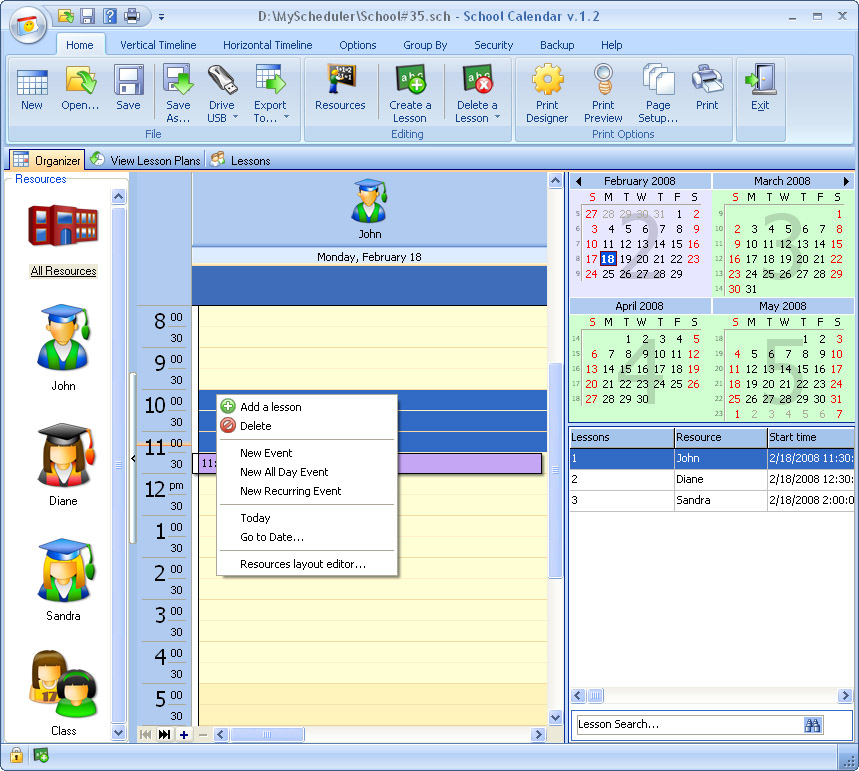 School Calendar will help you with assignment organization, project due dates, and scheduling. It can even remind you when your scheduled event is about to happen. Included are two viewing modes, search, auto-backup, password protection. School Calendar will help you with assignment organization, project due dates, and scheduling. It can even remind you when your scheduled event is about to happen. Included are two viewing modes, search, auto-backup, password protection.
Pros: School Calendar is an application that lets the user set up class schedule, project due date, tasks/assignments etc. To be able to do this planning in absolute details one can draw up detailed lesson plans including listing out resources for it such as instructors, what material to be used and so on. This helps eliminate class timing clashes for a specific student or a group of students. Once drawn up completely this becomes the focal point for information about classes, details, material, notes and comments.
Two modes of viewing are available. One option is as a time line with two variations on the theme a horizontal or a vertical timeline display. The second option is to have a table organization. Reminders help users to be alerted about upcoming events. One could view the payment status of the students too so that the revenue aspect of the business is also taken care of.
The calendar data can be synced with Microsoft Outlook, exported to various formats, such as .xls, .txt, .html, .xml for use in other applications. Included is an auto-backup option with an opportunity to remove old archives automatically.
Complete details of the class schedules, lesson plans, supporting materials are maintained in the internal database. Access to the application is secured by password to protect against unauthorized use. Lesson editor is quite flexible and makes it easy to plan the details including resources that are to be used. While planning resources one could add avatars to be able to identify the type of resource quickly.
The print designer helps print out the schedules in a number of ways. In fact one could organize printing of teaching material too form the data base in flexible ways.
Cons: There’s nothing that is really negative about this application except the difficulty with any database based packages. There’s a lot of details to be entered for the application to be useful.
{More info and Download}
Posted in Main | No Comments »
Thursday, April 17th, 2008
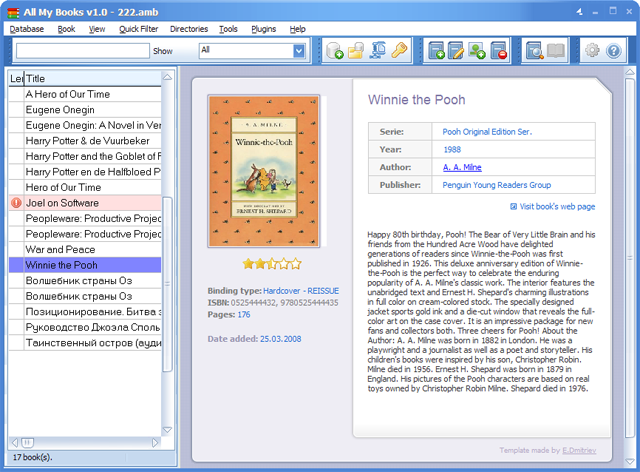 Often possessing a large collection of books can consume a lot of our valuable time in trying to manage them all according to their names or information. As the collection gets larger, it becomes hard to search for the one that you want. To get rid of the confusion and manage all your books in an organized manner you can try using All My Books 1.0. The software is capable of performing the function of Library and Librarian both. It helps by organizing the bookshelves and helps you to search the book easily by its information like author title, or publisher. Even it is capable of having the information collected automatically as you just need to enter the name and ISBN number of the book. Set the comments, memos and the label for the book all by yourself. If you have given any book on loan then you can keep a proper track of that also with the help of the program. Often possessing a large collection of books can consume a lot of our valuable time in trying to manage them all according to their names or information. As the collection gets larger, it becomes hard to search for the one that you want. To get rid of the confusion and manage all your books in an organized manner you can try using All My Books 1.0. The software is capable of performing the function of Library and Librarian both. It helps by organizing the bookshelves and helps you to search the book easily by its information like author title, or publisher. Even it is capable of having the information collected automatically as you just need to enter the name and ISBN number of the book. Set the comments, memos and the label for the book all by yourself. If you have given any book on loan then you can keep a proper track of that also with the help of the program.
All My Books 1.0 manages and organizes the books in a proper manner. With the software it would never be difficult to find any book or information relating to it. When you add the book to the list with the program the program collects the information relating to it from internet with the help of Title and ISBN number. The list of the books is shown on the left side and the related information is shown the right side like rating, author, publisher, etc. You can have the books filtered to find the one you’re looking for and also shows the statistics relating to genres, authors, binding, and so on. While having a large data collected you can also export it into text, XLS, HTML, CHM, format files and even to mobile devices. Have the password protection applied, the book manager, storage for graphics and saving links to online books, and so many others features with the program.
All My Books 1.0 enables you to have all the books managed well and keep proper track of information related to them
{More Info and Download}
Posted in Main | No Comments »
|
|
|




