Archive for the 'Main' Category
Saturday, October 13th, 2012
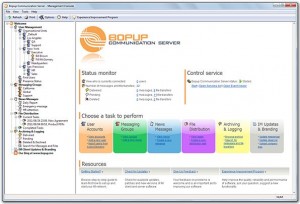 This is an instant messaging server for private IM, internal chat and secure collaboration over corporate and business networks. This is an instant messaging server for private IM, internal chat and secure collaboration over corporate and business networks.
What is the big deal about this program?
It uses very strong algorithms to encrypt personal and group messages and conversations to ensure thus guaranteeing safety and security on info when they are transmitted via the internet. It is very fast to deploy and easy to use. Its user interface is quite flexible and is fitted with built-in messaging systems that allow you to send schedules notifications.
This program also allows you to organize your personal contact lists, access your contacts from any workplace and see who is online and available for communication. The servers support various modes to authenticate and authorize connected users. Users can choose which ever mode best suits them.
You can easily see the online status on the various users in your contact list. Users can organize their contact lists and access them from whatever location. One interesting feature of this program is that BopCommunication also allows you to control the communication server and send messages directly from a command line interface. You could send scheduled and instant messages to users and groups from third-party applications, scripts or batch files.
The publishers, of this program, B Labs, have added the following changes to this version: added option to deliver structured contact lists that include organizational units. You can now create/change settings for IM clients through Setup.ini Configuration Tool. They also fixed manual rebuilding contacts lists.
To learn more about this program, please visit Bopup.
Posted in Main | No Comments »
Friday, October 12th, 2012
 If you want a software that would help you organize your software inventory, then get SoftCAT. If you want a software that would help you organize your software inventory, then get SoftCAT.
What is the real deal about SoftCAT?
SoftCAT helps you to organize your software inventory. This powerful database program also helps you keep track of important information like serial number, registration name, and other registration information. You never know when you need this information. It gives you the exact location of the various software on your computer.
This utility is user friendly and very easy to use even for a beginner. You can also use password to protect the integrity of your database so as to prevent unwanted, unauthorized access. Thus your database is safe and secure. You could also back up copies of your data so that you could retrieve them as often as necessary.
You can customize the program to suit your needs. You could change data fields, determine your own formats and categories ad divide your software collection into several databases and share info between the databases. Using this program, you can create your own reports and design the layouts to suit your preference. You could also control all the various data fields as well.
What are the downsides to this program?
Nice concept. Some of the juicy features are however not available on the free version
To learn more about this program, visit SoftCat.
Posted in Main | No Comments »
Friday, October 12th, 2012
 We are presented with various applications that enable us carry out our conversions with a lot of ease these days. The good news is that some of these applications can convert a lot of video files, which makes it a lot of fun. VideoMach is not a new program, but has actually gone through various updates to improve its features. We are presented with various applications that enable us carry out our conversions with a lot of ease these days. The good news is that some of these applications can convert a lot of video files, which makes it a lot of fun. VideoMach is not a new program, but has actually gone through various updates to improve its features.
So, if you are looking for a program that can convert a lot of files including 3D renderers, time-lapse photography, then VideoMach could be the one you need. VideoMach will convert image sequences from high-speed imagers, 3D renderers, time-lapse photography, stop-motion animation and screen capture applications to video. Convert AVI, Bayer, BMP, Vision Research / Phantom CINE, FLI/FLC, GIF, HAV, JPEG, JPEG-2000, MPEG, OGV, PCX, PNG, PNM, RAS, RGB, Targa, TIFF, WMV, XPM, AC3, OGG, WAV, WMA and other multimedia formats.
VideoMach also lets you fix colors, crop unwanted borders, resize, rotate and apply numerous filters, arrange videos in matrices (tables) to display several videos in parallel, clean up noisy dark videos to read license plates, speed up/slow down videos, like in TV commercials, and overlay text and logos.
Regular users of VideoMach will also find out in this version in review that the publishers have fixed a few bugs that affected previous versions of the program.
Downside
VideoMach is only easy for those who have experience when it comes to program conversion.
Want to check it out? Visit VideoMach.
Posted in Main | No Comments »
Friday, October 12th, 2012
 SuperAntiSpyware is a shareware that helps you scan and detect several spyware that so many other similar products in the market tend to miss out on. SuperAntiSpyware is a shareware that helps you scan and detect several spyware that so many other similar products in the market tend to miss out on.
What does this software do?
It easily removes pests such as WinFixer, SpyAxe, SpyFalcon, and several thousands more. It also repair broken Internet connections, desktops, registry editing and more using its unique repair system. It offers faster scanning and the program start up is very quick. It is very light on your system resources. Unlike other anti-spyware available on the market, it does not interfere with the speed of your computer. Also it is designed not to conflict with the existing anti-spyware on your computer.
With this software, you can prevent malware from installing or re-installing on your computer. Each time your computer starts up or shuts down, this utility is able to scan about 50 critical areas to eliminate threats before ever they have a chance to infect your computer.
Worth Mentioning
This program is able to detect several spyware that others can’t. It also works well with other existing anti-spyware. So you can test it without complications.
To learn more about this program, do visit SuperAntiSpyware.
Posted in Main | No Comments »
Thursday, October 11th, 2012
 Thinking of how best to optimize your Mozilla FireFox browser on Windows Operating Systems so as to get the most out of your computer? Then Pale Moon is what you probably need. Thinking of how best to optimize your Mozilla FireFox browser on Windows Operating Systems so as to get the most out of your computer? Then Pale Moon is what you probably need.
What You Need To Know
It beats me hollow that some people out there still settle for a basic Mozilla FireFox browser on their Windows OS when Fire Fox does not offer optimized browser packages for Windows. This means you lose speed and efficiency on your browser. So this utility is actually a custom-built and optimized Firefox-based browser for Windows. So you can now get the most speed and efficiency out of your browser!
Though very similar to Mozilla FireFox, this browser however has a few features that have been disabled to ensure maximum speed and efficiency. The features disabled do not in any way affect the way web pages are displayed or function. It is very light and uses less system resources since some features of the Fire Fox browser have been disabled in this program. It is quite stable and you’ll experience fewer crashes. It comes with its own uninstaller.
Any downsides?
This is a very clean, optimized version of FireFox. It is fast, safe and easy to use. It is certainly one of the best browsers out there.
To learn more about this amazing program, do visit Palemoon.
Posted in Main | No Comments »
Wednesday, October 10th, 2012
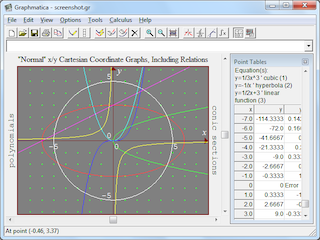 Graph plotting is not one of those tasks you can easily undertake without spending a large chunk of your time; especially if you are just learning the curve. It does take time to plot a nice graph; but not when there is a feature-rich program to make things easier for you. If you have tried Microsoft Mathematics before, you might as well want to give Graphmatica a try for a change. Graph plotting is not one of those tasks you can easily undertake without spending a large chunk of your time; especially if you are just learning the curve. It does take time to plot a nice graph; but not when there is a feature-rich program to make things easier for you. If you have tried Microsoft Mathematics before, you might as well want to give Graphmatica a try for a change.
So What’s The Big Deal With Graphmatica?
Graphmatica is a feature-rich equation plotter with numerical and calculus features. Graph Cartesian functions, relations, and inequalities, plus polar, parametric, and ordinary differential equations. This graph application offers up to 25 graphs on screen at once. Graphmatica also offers copy to clipboard (bitmap and WMF), Button Bar, online help and demo files. It is a great tool for students and teachers of anything from high-school algebra through college calculus.
The program has a lot of advanced features that have recently been included by the publishers. These features not only separate this application from previous versions; but add different dimensions to how you can easily plot your graphs without stress. Some newly added features include; addition of special characters tool dialog to make it easier to enter Greek letters, super- and subscript numerals, support for Greek letters and subscripts in function and constant names, etc.
Downside
There is none since a couple of bugs identified in previous version 2.1 have been fixed.
Want to check it out? Visit Graphmatica.
Posted in Main | No Comments »
Wednesday, October 10th, 2012
 Did you know it is possible to prolong the lifespan of your computer by taking some extra steps? This is not only possible through a couple of software out there; it is also possible to have accurate information about the temperature of any component on your computer. Hmonitor is designed with some features that could monitor and give feedback of the temperature of your computer. Did you know it is possible to prolong the lifespan of your computer by taking some extra steps? This is not only possible through a couple of software out there; it is also possible to have accurate information about the temperature of any component on your computer. Hmonitor is designed with some features that could monitor and give feedback of the temperature of your computer.
What Is Hmonitor?
Hmonitor is an application designed to check the temperature of any component on your computer with a sensor. Hmonitor has alarms that can be set when the temperature goes too high, and also features built in software cooling. The program was developed as a light-weight alternative to Intel LANDesk Client Manager. It takes less memory and monitors only those parameters that are collected by various sensor chips installed on modern motherboards.
Overheating is one major problem that has caused a lot of damages to several computers; and that is one area this program can be of help. This problem causes your personal or company’s computer to display error messages, blue screens and generally start to behave abnormally. However, if this problem can be detected before it gets out of hand; then you or your company can prolong the lifespan of your system. Hmonitor was designed for that purpose, and is about one of a couple of programs that can provide information on what is happening behind the scene.
Does Hmonitor Have A Downside?
The price is affordable, but could it be possible to extend the trial period?
And about the support, don’t expect any customer support, unless you a paying customer.
All in all I’ll give it a fair rating, since it does what it says it does – component cooling and monitoring.
Want to check it out? Visit Hmonitor.
Posted in Main | No Comments »
Tuesday, October 9th, 2012
 A lot of opportunities pass you bye almost everyday for reasons that could easily have been handled properly if there were proper planning. Organizing your daily activities to enable you have that extra energy and time to do a couple of other things could be all that matters in today’s busy world. For most us, our business life could be a lot better with a few applications that can put things in proper perspective. A program like OrganizeMe Simple Style might just be one of those programs that change the way things are organized in the office or at home. A lot of opportunities pass you bye almost everyday for reasons that could easily have been handled properly if there were proper planning. Organizing your daily activities to enable you have that extra energy and time to do a couple of other things could be all that matters in today’s busy world. For most us, our business life could be a lot better with a few applications that can put things in proper perspective. A program like OrganizeMe Simple Style might just be one of those programs that change the way things are organized in the office or at home.
So, What It The Big Deal About This Program?
OrganizeMe Simple Style is your small office, as well as a companion for organizing time. it is designed to also boost productivity, give you more free time and less missed appointments. OrganizeMe Simple Style comes without lots of options that may get you confused and also distract you from being productive. It means OrganizeMe Simple Style lets you all appointments, tasks and notes in clear simplistic view.
OrganizeMe Simple Style uses icons that are meaningful and without much complications. Its strength, however, lies in its simplicity.
Does It Have Any Downside?
Though, the program is affordable; a couple of people may still have issues with the fact that it takes sometime to have it configured.
Want to check it out? Visit GeekFactory4.
Posted in Main | No Comments »
Monday, October 8th, 2012
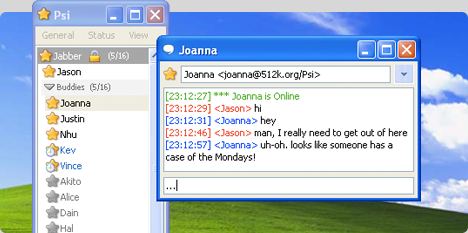 Internet users are constantly developing interests in reaching out to old friends and also making new ones via different chat and social media networks online these days. So, it is not strange that we keep seeing introduction of various chat applications towards that area. People want to chat, they also want to reach out to new friends and build on the old ones they already have. You can now add Psi application to your lists of applications if you have a burning desire to stay in touch with your online friends across the world. Internet users are constantly developing interests in reaching out to old friends and also making new ones via different chat and social media networks online these days. So, it is not strange that we keep seeing introduction of various chat applications towards that area. People want to chat, they also want to reach out to new friends and build on the old ones they already have. You can now add Psi application to your lists of applications if you have a burning desire to stay in touch with your online friends across the world.
What is Psi?
Psi is an Instant Messaging application designed for Windows, Apple Mac OS X and GNU/Linux. Psi is built upon an open protocol named Jabber, which is a fast and lightweight messaging client that utilizes the best in open source technologies. Psi takes advantage of each operating system’s unique features and appearance to provide a first-class IM experience on almost any computer.
Psi also uses same SSL technology that makes it possible for users to safely shop on the web, and automatically encrypt its communication with compatible IM servers to provide secure connection over untrusted networks like public WiFi access points. Advanced users will also find this program useful because it can also encrypt messages end-to-end with OpenPGP.
Does the program have any major downside?
I am not aware of any downside to Psi. The program works well, and does not pose any challenge during use.
Want to check it out? Visit Psi-im.
Posted in Main | No Comments »
Monday, October 8th, 2012
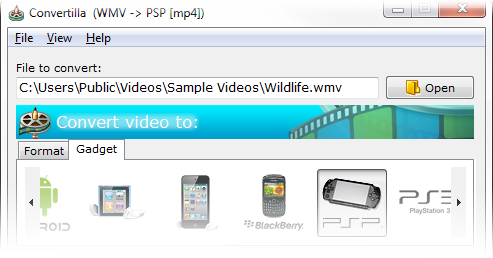 Publishers of various conversion programs can help make our tasks easier by publishing applications that are easier to use. However, there are a few ones that make your video and music converting tasks very easy. Those programs only have features that are easy to configure, and maybe also easy to handle. Convertilla could be one of those easy to use applications that anyone can use; even an amateur. Publishers of various conversion programs can help make our tasks easier by publishing applications that are easier to use. However, there are a few ones that make your video and music converting tasks very easy. Those programs only have features that are easy to configure, and maybe also easy to handle. Convertilla could be one of those easy to use applications that anyone can use; even an amateur.
So What’s Up With Convertilla
Convertilla is a simple and convenient program for converting video and music files between various formats. The program has an easy to use interface that supports MP4, FLV, MKV, MPG, AVI, MOV, WMV, 3GP, MP3. The publishers of Convertilla have also prepared presets for devices such as; Android, iPod, Blackberry, Sony PSP and PS3, Microsoft XBOX 360 and Zune, Nokia N-series and others.
To enable you convert video into various formats of your choice as soon as your download is complete, Convertilla integrates with Internet Download Accelerator. What this means is that videos downloaded from YouTube and other video download sites can be converted to format supported by your mobile phone.
Downside
Convertilla is easy to use, but a few more features would make ir a better software. The publisher should add more language options, work out a few bugs and it should be good to go.
Want to check it out? Visit Convertilla
Posted in Main | No Comments »
|
|
|




