Archive for the 'Main' Category
Wednesday, October 3rd, 2012
 This program renders or converts PDF files to various files or formats. It is also amazing how many people want to have their PDF files converted into different readable or usable formats. The truth is there are lots of freeware programs that can do just that; but quite a lot of them don’t have the capacity to do a clean or neat conversion. The paid ones however, are a bit too expensive; but of course, they offer value for money for those who could afford to buy them. This program renders or converts PDF files to various files or formats. It is also amazing how many people want to have their PDF files converted into different readable or usable formats. The truth is there are lots of freeware programs that can do just that; but quite a lot of them don’t have the capacity to do a clean or neat conversion. The paid ones however, are a bit too expensive; but of course, they offer value for money for those who could afford to buy them.
ByteScout PDF Renderer SDK
PDF Renderer SDK is a new product to convert PDF to PNG, BMP, TIFF, PDF to EMF metafiles. PDF Renderer SDK for .NET, ASP.NET, ActiveX converts PDF to PNG, TIFF, BMP, PDF to EMF metafile without Adobe Reader or other PDF software required. The program requires installation of Microsoft .NET Framework 2.0 before installation.
To ensure stability and probably make it more suitable to the needs of every user, a few changes have also been introduced by the publisher. A few of these changes include; improvement of PDF to image conversion, memory and speed optimization, improvement in image support in PDF, Improved PDF to TIFF conversion functionality, etc.
Cons
Though, the publisher is makes a money back guarantee promise or offer; the price might just be one hurdle to scare some would be users.
Want to check it out? Bytescout.com.
Posted in Main | No Comments »
Tuesday, October 2nd, 2012
 A lot of applications designed to help block or reduce spamming could sometimes be the reason why even legit sites or IP addresses are blocked too. What is the use of an anti-spam application that carries out a blanket block when that is not actually what you need? IpfilterX Praetorian only blocks those sites that are causing you problems. A lot of applications designed to help block or reduce spamming could sometimes be the reason why even legit sites or IP addresses are blocked too. What is the use of an anti-spam application that carries out a blanket block when that is not actually what you need? IpfilterX Praetorian only blocks those sites that are causing you problems.
IpfilterX blocks Anti-P2P companies and the organizations that support them, Corporations, Military Ranges, Government Agencies, Law Firms, P2P spammers and many more. It saves you the stress of having to block more than 1 billion of IPs just to be protected. The truth is overloading further to a certain value will result in banning innocent IP ranges which means legitimate P2P sources, this paranoid setting will hog your machine. You won’t run into risks using IpfilterX and won’t run into more risks than using an over-bloated ipfilter.
For just $10, you can be sure those troublesome sites stay off your back for good. However, some users will argue that there are certain programs that could do similar task without costing a dime. Well, $10 is such a small price to pay for all the latest features recently included in the program.
New updates include; extended Malware Hosts, Malvertising Hosts, GOV, Scan & Statistic eConsulting Agencies, Unfair Industrial Logistics Data Centers, ISP AntiP2P Research, Net Surveillance DataPoints, spammers, and unknown private range customers.
Downsides
Can’t seem to find any problem or anything wrong with this software; at least it gets the job done.
Want to check it out? Visit p2pblocklist.
Posted in Main | No Comments »
Tuesday, October 2nd, 2012
 As expected, many Windows 8 applications or programs will hit start hitting the internet as often as possible. This is to be expected as a lot of publishers need to play catch up or update their current applications to be compatible with the new OS. Whether or not Start8 will represent a good start-menu is a different issue altogether. As expected, many Windows 8 applications or programs will hit start hitting the internet as often as possible. This is to be expected as a lot of publishers need to play catch up or update their current applications to be compatible with the new OS. Whether or not Start8 will represent a good start-menu is a different issue altogether.
Start8 brings the “Start” menu back to Windows 8. The Windows 8 Consumer Preview is available and has taken the Windows interface to a whole new level. Unfortunately, the preview did not come with a desktop feature that the world makes use of billions times a day, the “Start” menu.
So the Windows 8 “Start” menu has been an issue with a couple of people; but should it be? Most people don’t even use the start menu that much; and that probably explains why you won’t find among features of Windows 8 in the first place. Well, this program is out to bring that start-menu feeling back. The publisher has however, introduced a few updates and changes that include the following; addition of a completely new UI, new default theme, Metro/Modern apps have their own “Modern UI Applications” folder, and a few others.
Downsides
I very much doubt if Start8 is the program to replace Windows 8 start-menu that was not even added in the first place. However, it is still a nice program for those who would want to give it a shot.
Want to check it out? Visit Stardock.
Posted in Main | No Comments »
Monday, October 1st, 2012
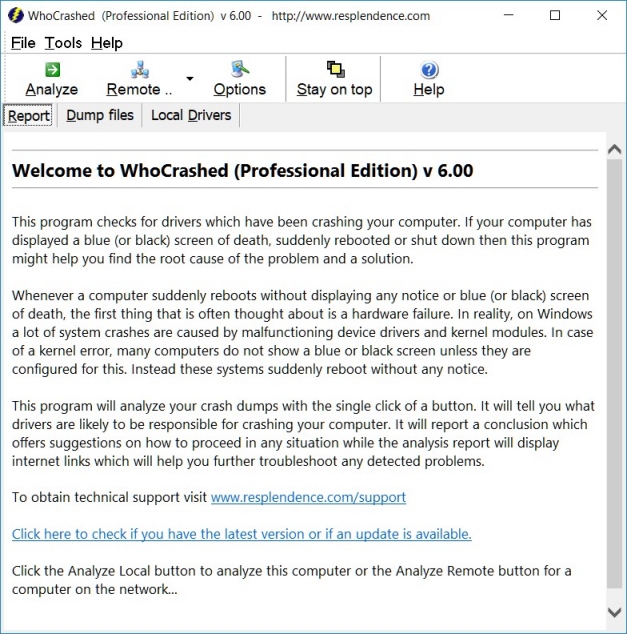 A lot of things happen behind the scene on our systems; and the truth is we all end up guessing what could possibly have happened. Not all sudden reboots can or should be attributed to hardware failure like most people are quick to assume. A computer that suddenly reboots and starts displaying any notice or blue screen of death should be assessed properly before conclusion is drawn. WhoCrashed is a program that shows the drivers that have been crashing computer with a single click. A lot of things happen behind the scene on our systems; and the truth is we all end up guessing what could possibly have happened. Not all sudden reboots can or should be attributed to hardware failure like most people are quick to assume. A computer that suddenly reboots and starts displaying any notice or blue screen of death should be assessed properly before conclusion is drawn. WhoCrashed is a program that shows the drivers that have been crashing computer with a single click.
Actually, most crashes are caused by malfunctioning device drivers and kernel modules. In case of a kernel error, most computers running Windows do not show a blue screen unless they are configured to do so; and that explains why these systems suddenly reboot without any notice.
WhoCrashed shows the drivers which have been crashing computer with a single click. Debugging skills and a set of debugging tools are required to do post-mortem crash dump analysis. WhoCrashed checks for available crash dump files and checks for responsible modules. Sometimes, the program can pinpoint the offending drivers which have been causing misery on your computer system in the past. It does post-mortem crashdump analysis and presents all gathered information in a comprehensible way.
Downside
A few users have complained about not getting results when they tried this program on their systems. The truth is WhoCrashed may not be able to address or identify all issues affecting your system. Sometimes, it is essential to check if some drivers on your system are corrupt, which in some cases could be the reason why your system keeps having issues.
Want to check it out? Visit Resplendence.
Posted in Main | No Comments »
Monday, October 1st, 2012
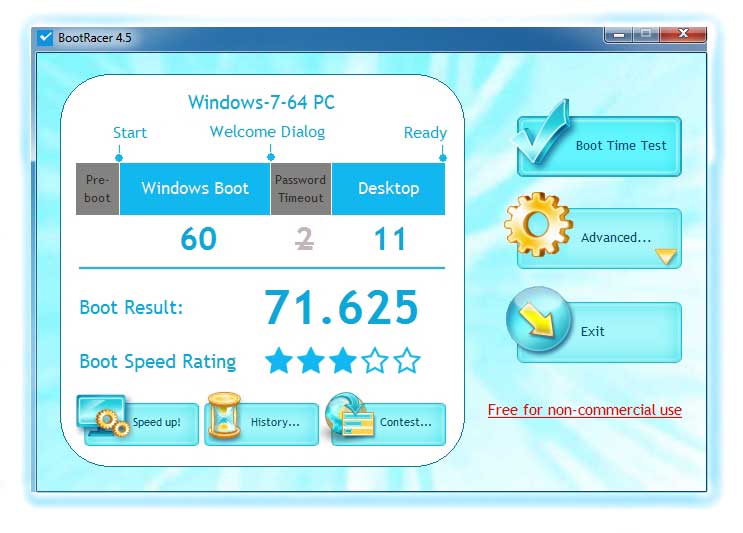 For those who truly care about how long it for their systems to boot; BootRacer should offer a helping hand. The program is free, and should not actually be overlooked as one of those applications that is regarded as a waste of time and space on a PC. However, it is no secret that all computers tend to slow down in terms of boot speed as software installation start piling up. BootRacer is more like an awareness program that draws your attention to the need to speed up your system. For those who truly care about how long it for their systems to boot; BootRacer should offer a helping hand. The program is free, and should not actually be overlooked as one of those applications that is regarded as a waste of time and space on a PC. However, it is no secret that all computers tend to slow down in terms of boot speed as software installation start piling up. BootRacer is more like an awareness program that draws your attention to the need to speed up your system.
Race your Windows boot using BootRacer and look at the result boot rating; and if your rating is not good or an excellent, you need speed up your Windows startup. BootRacer is an easy in everyday using and it suites for even novice users. BootRacer can detect the time to user logon and the full computer boot time. Also BootRacer writes results to the Windows event log and calculates the best boot time. BootRacer uses minimum of your computer resources.
This version low lets you enjoy improved compatibility with Windows 8, and it now measure boot time in milliseconds.
Downside
A few users have been critical of BootRacer; short of calling it a waste of time since Windows 8 was not designed to be rebooted frequently.
Want to check it out? Visit Greatis.
Posted in Main | No Comments »
Sunday, September 30th, 2012
 How smooth can things be when one has a program that can be used to easily transfer files from a remote server to a computer? Downloading files from the company server or even from the internet is easier with the kind of features in some of the recently introduced applications online these days. Well, FlashFXP looks like a program that can come in handy in some of these ways. How smooth can things be when one has a program that can be used to easily transfer files from a remote server to a computer? Downloading files from the company server or even from the internet is easier with the kind of features in some of the recently introduced applications online these days. Well, FlashFXP looks like a program that can come in handy in some of these ways.
What Is FlashFXP?
FlashFXP is a powerful and popular FTP & FXP Client loaded with features for the power user. It has an intuitive user interface that takes only minutes to master. Using the FTP protocol, you can transfer files from remote servers to your computer, or even to another remote server. It makes it easy to update your Web site, download files from the company server, or even download files from the internet that always seem to fail using your Web browser.
It allows you to transfer files between two sites (FXP), resume incomplete downloads, synchronize directories, schedule multiple tasks, and more. The way the local browser handles windows shortcuts when “use accurate shell icons” is unchecked has now been changed.
Any Issues?
Pricing seems to be a major concern of most people when it comes to a program like these; however, the price for FlashFXP is a bit reasonable. The program gives you so much to look out for in terms of features; but you can try it out before going for the unlimited version.
Want to check it out? Visit FlashFXP.
Posted in Main | No Comments »
Sunday, September 30th, 2012
 The browser war has given most users opportunities to choose from a long list of top rated ones. As a matter of fact, most browsers now come with various features and addons to make your surfing experience safer, more exciting, and easier. Avant browser 2012 Build 182, has been updated to meet your expectations. The browser war has given most users opportunities to choose from a long list of top rated ones. As a matter of fact, most browsers now come with various features and addons to make your surfing experience safer, more exciting, and easier. Avant browser 2012 Build 182, has been updated to meet your expectations.
What is the browser all about? Avant Browser is a custom Web browser application based on Internet Explorer with versatile multi-window support. It allows users to browse multiple Web sites simultaneously and block all unwanted pop-up pages. All opened pages can be easily stopped, refreshed, closed or arranged with one click. The integrated cleaner helps users to clear all traces and keep privacy. The built-in Google search engine enables users to easily search for Web pages and images.
The Build 182 is a step-up from previously released version of the browser because of its new additions. Its multiprocessing design offers you a crash-free internet browsing experience and high reliability. When one tab fails, it won’t freeze the browser or pull other pages down. One of the many benefits that have become a part of this browser is its low memory usage. Avant Browser is the lowest memory usage web browser on Windows platform.
Downside
Some users have termed this browser as being complicated; well this may not be true; but it does have some advanced features that may need some time to get used to.
Want to check it out? Visit Avantbrowser.
Posted in Main | No Comments »
Friday, September 28th, 2012
 So many programs have been designed to ease the use of PC, and it still amazes me to see just how great some of them are. Things are a bit easier than they where some years back; and with Log Table Viewer, it gets even easier and looks like you can write any message to the log, and also view it in so many ways as well. So many programs have been designed to ease the use of PC, and it still amazes me to see just how great some of them are. Things are a bit easier than they where some years back; and with Log Table Viewer, it gets even easier and looks like you can write any message to the log, and also view it in so many ways as well.
Log Table Viewer is a new complete SQL-based logger solution. Simply put – you can easily write any message to the log (using our provided stored procedure) and then view it in many different ways (such as Real-time, explorer, search etc.) through our powerful viewer. A couple of updates are now available in this version including SQL Azure support. This means it is now fully compatible with Azure to enable you apply the logger solution on your Azure servers/databases. Of course, the GMT+0 reporting has also been fixed by the publisher.
The program is a solution that provides unified logging interface for your SQL code; which is a set of log-based procedures for your Server Side and a powerful log viewer/explorer for the client side.
Downsides?
Log Table Viewer might be a bit technical for none experienced users; but with time you will find it very useful.
Wan to check it out? Visit Doccolabs.
Posted in Main | No Comments »
Friday, September 28th, 2012
 A lot of open source programs are not doing too badly these days; and PostgreSQL is one of many that can be heavily relied on. The good news for most people is that the program runs pretty well on most operating systems, and is also highly scalable both in the sheer quantity of data it can manage and in the number of concurrent users it can accommodate. A lot of open source programs are not doing too badly these days; and PostgreSQL is one of many that can be heavily relied on. The good news for most people is that the program runs pretty well on most operating systems, and is also highly scalable both in the sheer quantity of data it can manage and in the number of concurrent users it can accommodate.
PostgreSQL is a powerful, open source relational database system that has more than 15 years of active development and a proven architecture that has earned it a strong reputation for reliability, data integrity, and correctness. PostgreSQL runs on all major operating systems, and is highly scalable both in the sheer quantity of data it can manage and in the number of concurrent users it can accommodate. There are active PostgreSQL systems in production environments that manage in excess of 4 terabytes of data.
With many years of experience to fall back on; the publishers of PostgreSQL have certainly established the fact that a great program doesn’t have to cost a fortune. The program just keeps getting better each time there is an update; and this could probably be due to the fact that it is an open source.
The program will keep getting better; and that is why it is worth taking a look at.
Want to check it out? Visit: PostgreSQL.
Posted in Main | No Comments »
Friday, September 28th, 2012
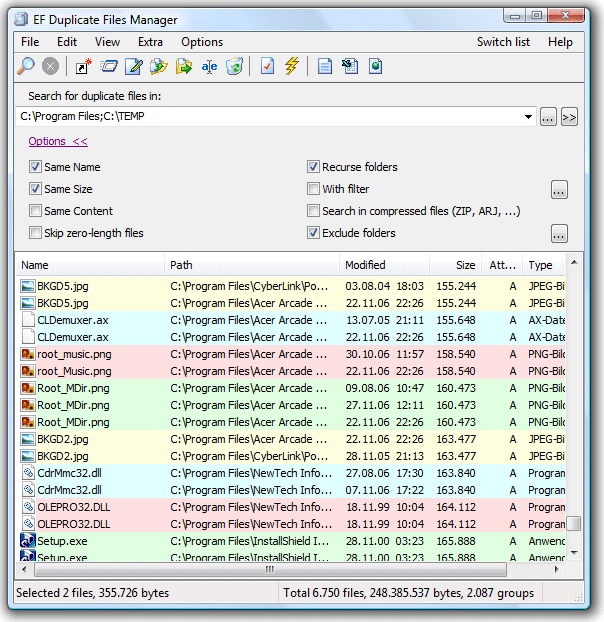 Finding or locating duplicate files on your PC could be a bit easy if there is a program designed just for that; and surely there are lots of them. Though, EF Duplicate File Manger is not a freeware; but it could save you some valuable time so you could do some other things on your system. Finding or locating duplicate files on your PC could be a bit easy if there is a program designed just for that; and surely there are lots of them. Though, EF Duplicate File Manger is not a freeware; but it could save you some valuable time so you could do some other things on your system.
EF Duplicate Files Manager could find out duplicate files with same name, same size, or same content on specific paths. It can handle optional folders like ACE, ARC, ARJ, BZIP2, CAB, CPIO, GZIP, IMG, ISO (ISO9660), LHA, RAR, PRM, TAR, TGZ, ZIP, and ZOO archives.
The program helps you to find out and remove duplicate files with same name, same size, same content on specify paths, and files that occupy so unnecessarily storage place on your computer or your server.
EF Duplicate Files Manager works in various ways including letting it look for all files with similar names or you give that only such files are to be specified in the result list, which exhibit additionally the same file size. The program could also be used to analyze file content, and help you identify those files that are identical.
Downside
Can’t find any; but the price could stand in the way of some seriously interested users out there.
Want to check it out? Visit Efsoftware.
Posted in Main | No Comments »
|
|
|

 This program renders or converts PDF files to various files or formats. It is also amazing how many people want to have their PDF files converted into different readable or usable formats. The truth is there are lots of freeware programs that can do just that; but quite a lot of them don’t have the capacity to do a clean or neat conversion. The paid ones however, are a bit too expensive; but of course, they offer value for money for those who could afford to buy them.



