Archive for the 'Main' Category
Saturday, September 22nd, 2012
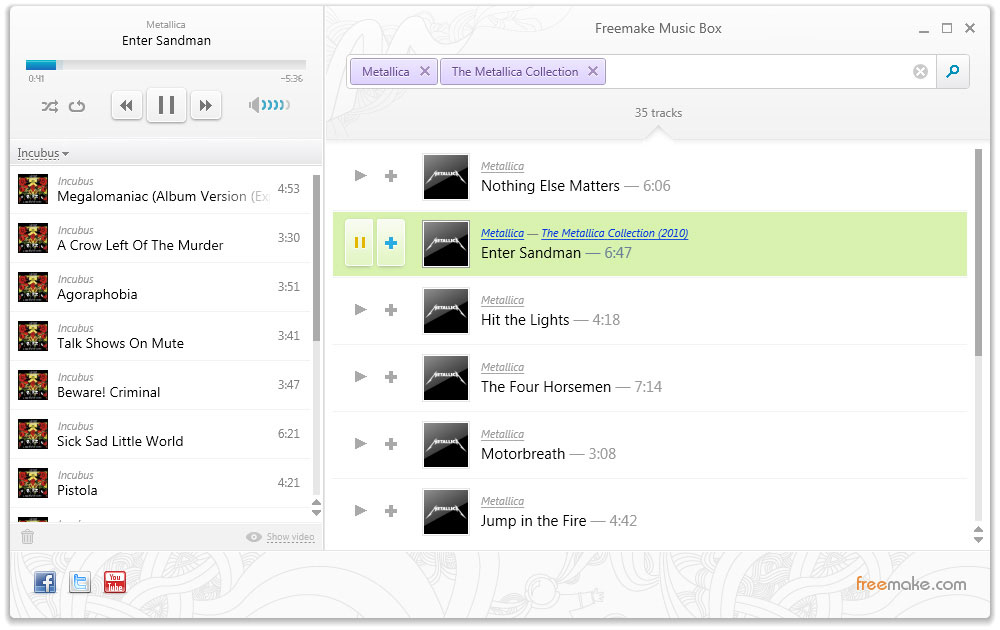 Freemake Music Box is a small program which downloads and installs quickly. The aim of this program is to find you free, legal, music online for you to listen to, sure, there is plenty of ways to download copyrighted music online at the moment, but this program focuses on finding legal music only. Because of this legal issue, it offers streaming music only. Freemake Music Box is a small program which downloads and installs quickly. The aim of this program is to find you free, legal, music online for you to listen to, sure, there is plenty of ways to download copyrighted music online at the moment, but this program focuses on finding legal music only. Because of this legal issue, it offers streaming music only.
Upon initially launching the program, you’ll notice its minimalist but functional interface, you get a search box on one side and a playlist with playback functions on the other side of the window. It’s simple but effective.
When you begin searching for your chosen music, Freemake goes to work searching online, it seems that the bulk of its results come from YouTube, with the associated video then appearing in the left window too. Unfortunately, you are not able to save the files to your hard drive though! Although that isn’t too much of a shock when you consider that one of the aims of this software is to keep everything legal (at least developer promises that “you won’t get into trouble”).
But before you stop reading, there are still things it does let you do. The main one is that you can create a playlist of your found songs, without you having to gather and download all the music together in the first place. It’s here where Freemake becomes a free alternative to several such streaming music subscription services online.
It’s easy to add a song to a playlist as all you have to do is click the plus sign that appears alongside each song in the results, or you can simple press play to hear it. The homepage also says that iPad, Android and sync to mobile versions are on the way soon.
Although it is a very simple bare-bones alternative to paying for a subscription service, it may be just a little too simple and limited for some people, but it might be worth a try, as being free, you have nothing to lose.
Check out the homepage for the download and further info at Freemake.
Posted in Main | No Comments »
Friday, September 21st, 2012
 Tired of using a PDF application that gives you a lot of headaches each time you want to make use of it? Perhaps you should try something that enables you even as a none-experienced user to handle; and that is what pdfFactory offers. Tired of using a PDF application that gives you a lot of headaches each time you want to make use of it? Perhaps you should try something that enables you even as a none-experienced user to handle; and that is what pdfFactory offers.
What’s The Big Deal?
pdfFactory is one of the first PDF creation applications that experienced and non-expert users can handle. The program is designed with lots of easy features that virtually anyone can create PDF documents that can be published on Web sites, emailed, or archived. PDF files are used to represent printed material electronically. When viewed and printed, they contain all the fonts, graphical information, layout and formatting of an original printed document. PDF file created with this application can be viewed on any operating system including MacOS, and all Unix variants including Linux.
A lot of programs exist out there with so much crap and so much hype with nothing much to offer users. This program does have all it takes to be slightly different in terms of its quality and easy to use features. A couple of changes have also being made by the publishers to include; support for custom URLs for online help, fine FinePrint window now always comes to the foreground, you can now replace printed text by selecting it and typing it over, and a couple of others.
Downsides?
pdfFactory is no doubt a nice program; but the price is way too high considering the fact that there are other similarly great app out there that comes for free or costs less.
Want to check it out? Visit FinePrint.
Posted in Main | No Comments »
Friday, September 21st, 2012
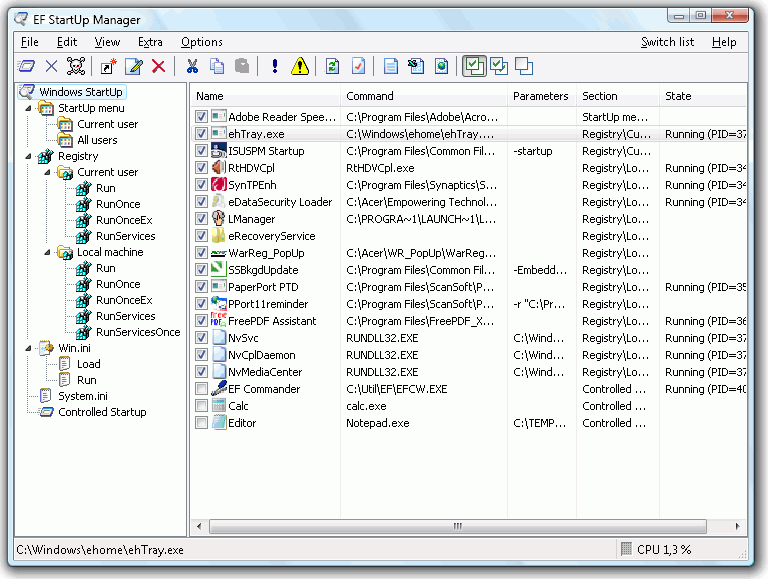 When starting your Windows, some other programs are also started. While some of these programs are necessary, some of these programs use up systems resources unnecessarily and some even spy on your computer. EF StartUp Manager is a shareware that allows you to manage and control the applications which starts when you start up your computer. When starting your Windows, some other programs are also started. While some of these programs are necessary, some of these programs use up systems resources unnecessarily and some even spy on your computer. EF StartUp Manager is a shareware that allows you to manage and control the applications which starts when you start up your computer.
So what’s the real deal about EF StartUp Manager?
With the aid of this program, you can easily insert, temporarily disable or delete new programs. You could also control the starting mode such that you can determine the order you want the programs to start each time you start your windows. You could also define a delay period in between.
To operate optimally, the following system requirements are needed: a Pentium computer, Microsoft Windows 32/64-Bit and a 2 MB free space on your hard disk. It offers support for the following languages: English, German, Arabic, Catalan, Dutch, French, Hebrew, Hungarian, Italian, Japanese, Korean, Romanian, Russian, Spanish, Swedish, Taiwan, and Ukrainian.
Any downsides?
It is very good software for what it does. But compared to other similar freeware, it is quite pricey. I mean why pay for a program when you could get a similar program with same or even better function for free?
To learn more about this program, please visit EFSoftware.
Posted in Main | No Comments »
Thursday, September 20th, 2012
 Everyday we experience new applications or programs that continue to make the use of the internet or computer easier. Today, it is about a program called aiClipboard; a program that remembers everything that have been copied to the clipboard. Everyday we experience new applications or programs that continue to make the use of the internet or computer easier. Today, it is about a program called aiClipboard; a program that remembers everything that have been copied to the clipboard.
aiClipboard, which stands for “ai stands for Artificial Intelligence” is a freeware application that will remember everything you copied to your clipboard: files, folders, graphics, texts, URLs, emails. The program is designed to remember all your clipboard items, forever, with an easy way to copy them back to the clipboard. aiClipboard is designed to make virtually everything you do easier by simply turning your clipboard into a sidekick that will help you organize and remember.
aiClipboard is one small executable file that runs from anywhere, relies on nothing but itself and is fully portable; so there is no need for installation. The program has undergone a couple of changes that include; addition of manual text items to the clipboard, now protects items from accidental deletion, addition of new properties to each item, and a few others.
Downside
The program tends to crash when one clicks on a file to select copy; however, a couple of changes can still be made to it before it is finally released. It is not actually a bad program; after all, it is a freeware.
Want to check it out? Visit aiClipboard.
Posted in Main | No Comments »
Thursday, September 20th, 2012
 Having a good antivirus program is an absolute necessity nowadays, but even that alone isn’t enough. Having a good antivirus program is an absolute necessity nowadays, but even that alone isn’t enough.
This version of Panda Antivirus doubles up as a good quality small scale security suite as well, as they have included a firewall, antiphishing, and some other features too. The same small program which installs Panda Cloud Antivirus Free Edition will also install the Pro Edition as well, you also have the option to upgrade from free to pro edition at any time should you choose to do so. The antivirus component is the same for both the free and pro edition.
A lot of the independent antivirus labs include Panda Antivirus among there tested antivirus programs and it gets good marks overall, although it’s not among the top level scorers. Panda’s anti-phishing component includes a URL filter that prevents you from accidentally clicking through to malicious or fraudulent web pages, along with this, the antivirus will tell you if it detects any threats that are known on any webpages you visit.
Another useful feature is the ability to block programs from running if they get detected connecting to any questionable websites. This moves it to Panda’s recycle bin where it can’t run anymore. The firewall component of the software is called a “Community Firewall”. This uses data from all installations to form a central database which automatically configures network and internet permissions for most programs. Sometimes the firewall will pop up to ask you if it’s OK for a program to connect.
Another ability a good firewall should always have is being able to stealth all ports, most firewalls, including windows firewall , will do this, but Panda left some significant ports merely closed, visible to an attacker.
This program is definitely a lot better than nothing at all, but i would suggest supplementing it with other, more reliable programs and merely using it as a second opinion. The pros would be that it is small and lightweight, as it uses cloud storage for its antivirus signatures and also the firewall doesn’t constantly ask you to deal with popups.
Check out full info at CloudAntivirus.
Posted in Main | No Comments »
Wednesday, September 19th, 2012
 Life becomes easier when you can do a lot of things on your remote computer even while you are not physically in front of it. So, from whatever location you are; all you need is an easy to use application like UltraVNC. Life is even less complicated with a program like this one because you no longer need to wait or get to your remote computer to gain quick access from anywhere in the world. Life becomes easier when you can do a lot of things on your remote computer even while you are not physically in front of it. So, from whatever location you are; all you need is an easy to use application like UltraVNC. Life is even less complicated with a program like this one because you no longer need to wait or get to your remote computer to gain quick access from anywhere in the world.
UltraVNC is an enhanced VNC distribution that is based on RealVNC. The program features TightVNC smart cursor handling and encoding, and almost all the special functionalities can be found in eSVNC and Vdacc-VNC, and many more. It is a program that displays the screen of another computer (via the internet or a network) on your screen. UltraVNC also allows you to use your mouse and keyboard to control other computers remotely.
UltraVNC is a nice piece of work that will no doubt speed up a lot of things for people who must access their computers as soon as they possibly could. However, you must remember to provide computer support in order to gain easy and quick access to your remote computer.
Downside
Great program no doubt; however, users with little or little computer experience or skill may find it a bit difficult to use UltraVNC.
Want to check it out? Visit UVNC.
Posted in Main | No Comments »
Wednesday, September 19th, 2012
 When you’re connected to a random free Wi-Fi or in an internet cafe at a dubious location, it’s probably not the best time to log in and use your internet banking or download important personal documents. When you’re connected to a random free Wi-Fi or in an internet cafe at a dubious location, it’s probably not the best time to log in and use your internet banking or download important personal documents.
At times though, you may not have any option but to use a connection with unknown security. If you really have to transmit sensitive things over an untrusted network, OPSWAT’s free Secure Virtual Desktop may be just what you need. This program doesn’t require any installation at all, so you can use it when on a computer with a non administrator account.
It’s as simple as just downloading this program and running it. It begins with an optional check for any malware that may be currently active on the computer, then it switches into a secure version of the windows desktop. The regular desktop is still available, you can even switch back and forth between both desktops anytime you want.
Whenever you’re using this secure desktop, the only browser that is allowed to run is Internet Explorer, which will always run in private browsing mode. Also, anything that you save locally when using the secure desktop will disappear when the session is over. PrintScreen and any other kind of printing isn’t permitted. It also blocks access to removable and network drives. Programs running on the main desktop can’t interact with secured apps, and it also prevents copy/paste between the secure and regular desktops.
The program clearly shows you when you are in secure mode by changing the desktop background. Also all icons disappear and a small floating window with a shield icon lets you know that you’re in secure mode. It also has a simple button that lets you switch between secure and regular desktops.
Another feature is that, while not being a real VPN (Virtual private Network) tool, during a secure session it still masks your IP address.
The downside of all this is that the program only lets you use it for five minutes at a time. Although there is paid versions available, five minutes may be all you need for an emergency situation.
Find out further info or download it at SecureVirtualDesktop.
Posted in Main | No Comments »
Wednesday, September 19th, 2012
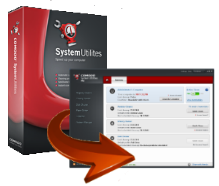 This program could be what you need if you’d like to give an old computer a boost and cleanup, or even if your current PC seems a bit sluggish and in need of an overhall. There are many such utility programs out there, but some might be complicated to use or even cause more harm than good if used incorrectly. The Comodo name has proved its trustworthiness for a long time now, making such things as Comodo Firewall and later branching into antivirus programs,etc, included in its software security suite, so it’s probably a safe bet to use. It also includes such useful features as often seen in other system utility suites such as a registry cleaner, file restoration, and disk wiping. This program could be what you need if you’d like to give an old computer a boost and cleanup, or even if your current PC seems a bit sluggish and in need of an overhall. There are many such utility programs out there, but some might be complicated to use or even cause more harm than good if used incorrectly. The Comodo name has proved its trustworthiness for a long time now, making such things as Comodo Firewall and later branching into antivirus programs,etc, included in its software security suite, so it’s probably a safe bet to use. It also includes such useful features as often seen in other system utility suites such as a registry cleaner, file restoration, and disk wiping.
The interface has two sections, on the left is the utility menu selection and on the right is the main window where everything appears once selected.This makes it very easy to navigate and control. The pro version also includes a very handy “Clean My Computer” button, for ease of use in running several selections at once. Once that is set up as you’d like it, it makes the cleaning procedure a “one click” matter.
It also automatically deletes temporary files without having to bother asking you.
It has a registry cleaner which includes the functions “Registry Protection” and “SafeDelete” . These make it easy to rollback your settings if you accidentally delete something important. While on the subject of deleting, if any files you want to delete are locked, it can delete them on the next reboot.
Additional features also include a “wiper” which will delete everything from your computer, a useful thing if you are giving away or selling your computer and are concerned about privacy, and an “Autorun Manager” for reviewing what programs launch during startup. Deactivating programs that you don’t need can decrease a PC’s boot time.
This is a good utilities suite worth checking out and from a name with a solid reputation. Check it out at Comodo.
Posted in Main | No Comments »
Wednesday, September 19th, 2012
 Do you need a program that allows you to listen to your favorite music with an exceptional sound quality? Then AIMP Classic is probably what you need to get. Do you need a program that allows you to listen to your favorite music with an exceptional sound quality? Then AIMP Classic is probably what you need to get.
What’s up with this AIMP Classic?
It is very easy to use even for a newbie. It’s got customized skins, 18-band equalizer, a cool fading effect that makes your song list appear like an endless music loop. You could use the global hotkeys to control its main functions. It has some utilities with in-built sound effects that allow you to record any sound on your computer, convert audio files from one format to another. It supports multiformat playback.
You could also work with several playlist such that when one is playing, you’re working with the other. It comes with 32-bit audio processing for the best audio quality. It’s got great functionality and its user interface is very friendly.
Any downsides?
Program has been around for a while and it really does its stuff. Once you get used to the sound quality, you’re hooked! And each new release just gets better and better. I would have loved to see an improved version where you can display album arts with ALL skins. Also I feel the playlist can be improved upon.
Apart from these, AIMP is such a great media player program to have.
To find more about this program, please visit AIMP.
Posted in Main | No Comments »
Wednesday, September 19th, 2012
 Do you need a program that would help you rip audio CDs, burn discs and convert tracks? Then Easy CD-DA Extractor is it. Do you need a program that would help you rip audio CDs, burn discs and convert tracks? Then Easy CD-DA Extractor is it.
What’s the real deal about Easy CD-DA Extractor?
You can customize this program to suit your personal needs. It has got a very nice user interface. You could calculate the loudness of audio files. It allows automatic loudness leveling of music on playback. It can accurately rip audio CDs with error detection. It allows addition and editing of metadata which is automatically written to the audio files.
You could also normalize audio, to add fade in/out, and to delete leading/trailing silence. Bypasses copy-protections that exist on some audio CDs. You could also determine the destination folder, the quality and format of the output tracks. Its MP3 settings also include the ability to choose constant, average, or variable bit rates.
Some of the new features in this program include: New Dolby Pulse AAC/HE AAC encoder, automatic ReplayGain calculation, internal sample rate converter which is pre-set to the highest mode. The ReplayGain 2.0 algorithm was replaced with the new, standard, more accurate and faster ITU-R BS 1770. Changes were also made to its audio converter internal behavior, which makes it faster under certain conditions.
Downsides?
None really!
This is definitely a great program. Its license is a lifelong thing. It gets frequently updated and the newer versions are absolutely better with all you need to rip/encode music the best way possible. This is surely a must have program.
To find out more about this program, visit PoikoSoft.
Posted in Main | No Comments »
|
|
|





