Archive for the 'Main' Category
Sunday, September 9th, 2012
 This program is a sleek Windows diagnostic and benchmarking tool. AIDAA64 Extreme Edition is utility that helps you determine how fast your PC carries out tasks such as data processing and mathematical calculations. This program is a sleek Windows diagnostic and benchmarking tool. AIDAA64 Extreme Edition is utility that helps you determine how fast your PC carries out tasks such as data processing and mathematical calculations.
What’s the deal with AIDA64 Extreme Edition?
It has functionalities that help in overclocking, detecting and diagnosing hardware errors, sensor monitoring, system memory and disk drives. It is compatible with all current 32-bit and 64-bit Microsoft Windows operating systems. It has memory and cache benchmarks that help to analyze your PC RAM bandwidth and latency period.
This version includes supports over 150 various sensor devices to measure temperatures, voltages, fan speeds, and power draw. It is designed to notify the user whenever it detects overheating, over-voltage, or cooling fan failure. It has a very accurate hardware detection ability that provides exhaustive information on your computer internals even without having to open it.
FinalWire Ltd, the publishers of this software, have included the following changes in this version: anti-virus software support and firewall software support for DrWeb v7, preliminary support for AMD K16 processors and so on.
Downsides?
It could be a little short on benchmarking features. For those who feel it is a little pricey, like I always say give it a try [download the trial version], if it isn’t worth it to you let it go, if it works for you.
To find out more, visit AIDA64.com.
Posted in Main | No Comments »
Saturday, September 8th, 2012
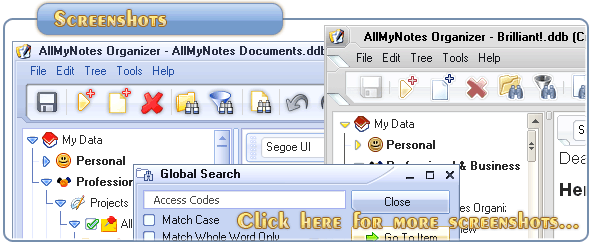 Are you searching for a safe and secured manager to store your passwords and access codes? Then AllMyNotes Organizer is probably what you need to achieve this and so much more. Are you searching for a safe and secured manager to store your passwords and access codes? Then AllMyNotes Organizer is probably what you need to achieve this and so much more.
AllMy Notes Organizer is a personal info manager for windows OS. It helps you to safely store all your documents, diaries, passwords, access codes e.t.c into flexible virtual folders enabling easy, intuitive access, and instant search any time.
This program is suitable for storing contact information such as notes, diaries, letters, events, goals, addresses, phone numbers, and chats etc.
The publishers of this software have added the following new features to this version: Romanian Language, greatly updated Danish localization and an improved Hebrew translation, now majority string are translated. Also this new version comes with an improved Global Search and Search/Replace windows. These windows would be able to remember recent search history, enable auto completion to make it easier to search for recently searched text. With its improved Drag&Drop in feature in hierarchy Tree view, it is now possible to drag and drop data in HTML, RTF, and DIB (images) format from other applications. This version now has a cool new app icon.
Any downsides?
There is the fact that to really enjoy the best of this software you have to upgrade to the paid version. The free edition does not seem to have everything promised.
For more details, please visit Vladonais.
Posted in Main | No Comments »
Friday, September 7th, 2012
 When it comes to decrypting CSS encrypted DVD without hassles, AnyDVD HD is a tool you just can’t ignore. When it comes to decrypting CSS encrypted DVD without hassles, AnyDVD HD is a tool you just can’t ignore.
Here is Why
Created by SlySoft, AnyDVD HD is a powerful decryption shareware that works in the background allowing you to automatically and transparently remove the copy protection on any DVD thus making it possible to back it up. With this software, you could remove the RPC region code. This makes the DVD useable on any DVD player and on any DVD software. This software gives you full control by allowing you to remove any feature of a movie you don’t want such as subtitles, forced delays, and no-skip marks and prohibition messages.
Apart from decryption, this software allows you to manage the speed drive of your DVD drive and reduce the noise level while you’re watching movies on your PC. It allows you to adjust the display frequency of your PC monitor and decrypts protected audio CDs allowing you to copy it. What’s more, AnyDVD helps you to fix any intentionally damaged CD allowing you to be to play and use them.
System requirements: This program is compatible with IBM PC with a minimum 500 MHz Pentium-class microprocessor and 64 MB RAM as well as Windows 2000, Windows XP, Windows Vista or Windows 7 (32 or 64 bit)
Upsides:
Apart from the above, AnyDVD is compatible with all video media and all DVD editing tools. It is extremely fast and does not save data on your hard disk. You can share the DVDs within your home network.
Downside:
None at all. This is one cool software that has little or no known downside. Almost all users have given this software a positive rating.
Latest Version
Latest Updates In The Version Released A Week Ago [AnyDVD HD 7.0.8.0] Includes …
- New (Blu-ray): Updated decryption keys- New (Blu-ray): Support for new BD+ protection
- New (DVD): Support for new copy protections
- New: Driver blocks more commands before disc is made visible
- Fix (DVD): Bug introduced in 7.0.7.0, some menus didn’t work anymore
Want to know more? Visit Slysoft.
Posted in Main | No Comments »
Friday, September 7th, 2012
 Are you looking for how to boot directly to Classic Desktop instead of having to click on “Desktop” each time you log in? Well, this is exactly what Skip Metro Suite helps you to accomplish. With this program, you don’t have to going through the Metro Start Screen. Are you looking for how to boot directly to Classic Desktop instead of having to click on “Desktop” each time you log in? Well, this is exactly what Skip Metro Suite helps you to accomplish. With this program, you don’t have to going through the Metro Start Screen.
What’s the big deal about Skip Metro Suite?
I know some of you may find it annoying going through the Metro Suite Screen before getting to Classic Desktop on Windows 8 RTM and Release Preview. It also allows you to disable ALL edge panels, including square start buttons, Charms Bar and Switcher, not just hide them! So you do not require any tweaks to perform all of these tasks.
The publishers, WinAero, have added the following changes to this software: fixed broken Windows 8 x86 support, fixed annoying bug- the application starts twice when there are many active users on one computer. Also the applications were re-written for better code and optimized performance.
Skip Metro Suite is a group of tools that contains GUI manager, windows service and windows application, and installer uninstaller.
Any downsides?
Seems booting takes a little longer than usual using this. Good concept but more work should be done it.
To learn more about this program, visit Winaero.
Posted in Main | No Comments »
Friday, September 7th, 2012
 Are you searching for a strong anti-virus that can protect your computer from the threats of latest malware variants while using very little of your system resources? Panda Cloud Antivirus may be what you need. Are you searching for a strong anti-virus that can protect your computer from the threats of latest malware variants while using very little of your system resources? Panda Cloud Antivirus may be what you need.
What Is The Big Deal With Panda Cloud Antivirus?
It is a lightweight, cloud-based anti- virus that offers real-time protection against all viruses. It is also free! Using its Panda Security’s Collective Intelligence malware and goodware online database, this anti-virus is able to detect far more malware other anti-viruses available in the market. It offers you protection whether you’re surfing the net, at work or playing your favorite game online. It is extremely light weight, superfast and all its work is carried out online.
Panda Cloud Anti-Virus is easy to install. It has auto updates that instantly update it whenever a newer version is available so you don’t have to bother about manual updates or configuration.
Downsides?
For now, it is only available for home users and non-profit organizations. One other issue users complained about was that it tends to slow down the speed of their computers relative to other anti-viruses they’ve tried out.
But honestly cloud technology is the future. With very good system maintenance software to enhance your system performance, this tool is quite okay. What’s more it is free!
If you want to know more visit http://www.pandasecurity.com/.
Posted in Main | No Comments »
Wednesday, September 5th, 2012
 Did you know you can download an application that delays your computer Startup Process to enable it run faster? That is what you get for installing Startup Delayer on your system. Did you know you can download an application that delays your computer Startup Process to enable it run faster? That is what you get for installing Startup Delayer on your system.
Startup Delayer is a program that gives you the edge when it comes to optimizing your Startup Process by simply delaying applications from starting up as soon as you log into your computer. By simply delaying the applications during startup, your computer becomes usable a lot faster. The program is designed to start launching your delayed applications as soon as your computer becomes idle.
Latest changes
A couple of more changes have been made by the publishers to include fixing of minor issues. Some of the issues that have been fixed include the following; fixing of issues when no user profiles could be located as the active, and fixed for directory permissions due to Unauthorized Access.
With Startup Delayer, you can optimize your Startup Process by delaying applications from starting up as soon as you log into your computer; which makes your system more stable and faster. The program also gives you more control over what starts on your computer.
Downsides
The program takes a bit too long to load, which is a minor setback; but this shouldn’t be a problem eventually.
Want to check it out? Visit StartDelay.
Posted in Main | 1 Comment »
Tuesday, September 4th, 2012
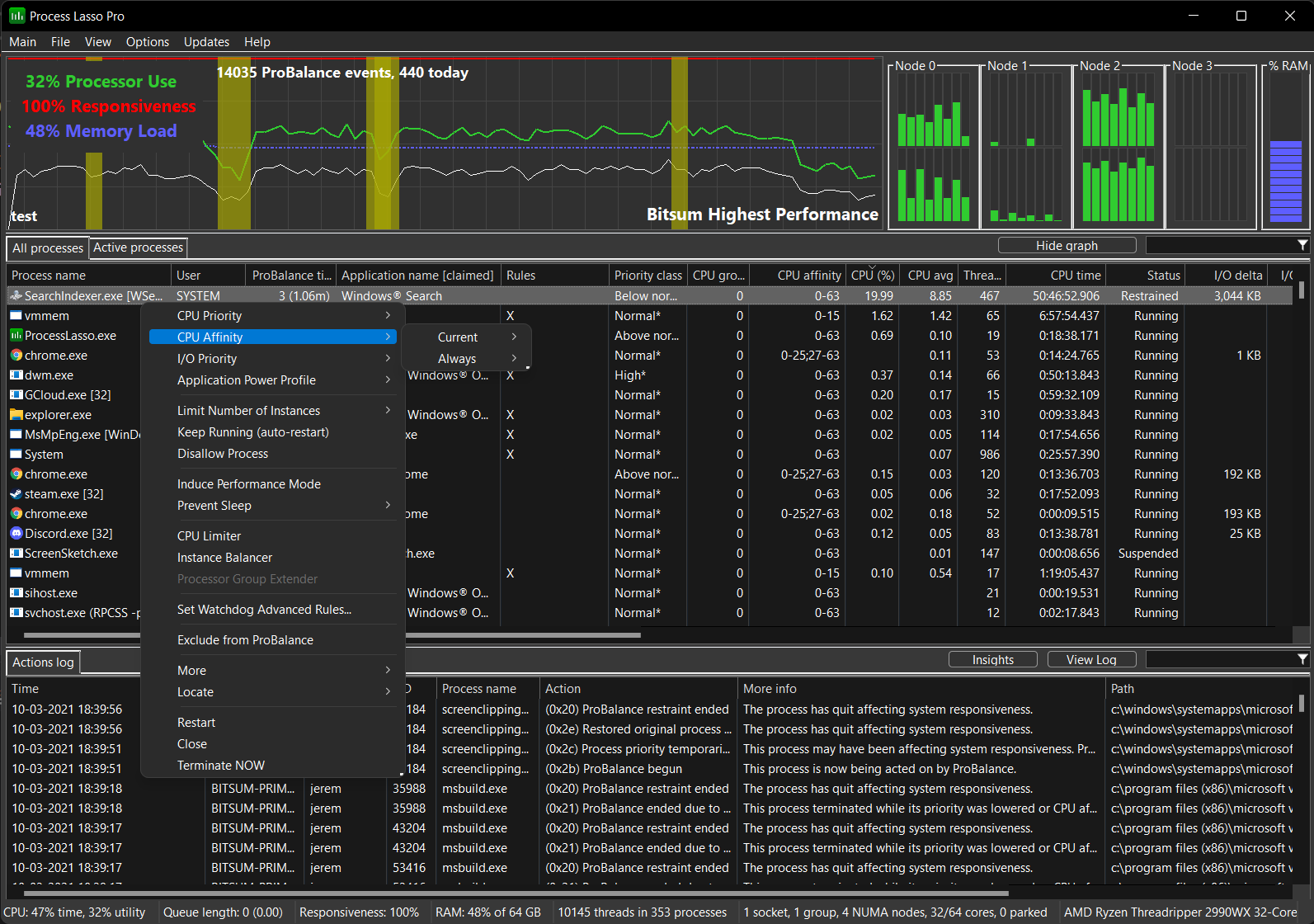 Most computers can be very slow and unresponsive when loads become very high. If you computer is currently experiencing this kind of problem; then you should give Process Lasso a try for a change. Most computers can be very slow and unresponsive when loads become very high. If you computer is currently experiencing this kind of problem; then you should give Process Lasso a try for a change.
Process Lasso is a program that is designed with built-in features to help improve your system responsiveness of high CPU loads. The program loads through dynamic adjustments to process priorities; and this feature is normally called ProBalance, Dynamic Priority Optimization.
Process Lasso is designed to temporarily lower priorities of select background processes when they may possibly be interfering with system responsiveness. The program is also built with a lot of other amazing features such as; ability to automatically terminate undesired processes, apply default priorities and CPU affinities to processes, limit or restrict the amount of instances a process can have, prevent PC sleep while specified processes are running, enter high performance power scheme for specified processes, log all processes, and a host of other features.
However, it is important to emphasize that Process Lasso should not be taken for a task manager.
Downsides
This is a free version of Process Lasso; and lacks a lot of features that may eventually be required in order to fully appreciate how the program works.
Want to check it out? Visit ProLasso.
Posted in Main | No Comments »
Monday, September 3rd, 2012
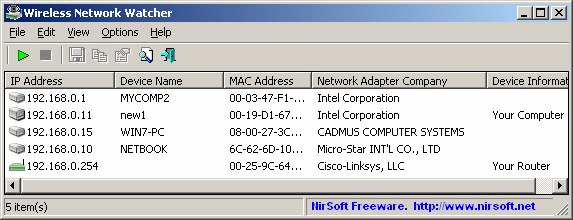 Want to keep an eye on your wireless network without hassles? This nifty tool should come in handy. Want to keep an eye on your wireless network without hassles? This nifty tool should come in handy.
Wireless Network Watcher is a small utility that scans your wireless network and displays the list of all computers and devices that are currently connected to your network. The good thing about every computer connected to your network is the fact that basic information such as IP address, MAC address, the company that manufactured the network card, and optionally the computer name is always available.
To make it even more interesting; the publishers have ensured that you can also export the connected devices list into html/xml/csv/text file, or copy the list to the clipboard and then paste into Excel or other spreadsheet application.
Publishers of Wireless Network Watcher have added an option to set the interval of the background scan (In the ‘Advanced Options’ window) to version 1.55. The program doesn’t take too much of a space on your system since it doesn’t require any installation. All you need to do is extract the executable file WNetWatcher.exe) from the zip file, and run it.
Any Issues?
A few people have argued that a DHCP server could provide similar information as Wireless Network Watcher; but that is not to take anything away from the program.
Want to check it out? Visit Nirsoft.
Posted in Main | No Comments »
Monday, September 3rd, 2012
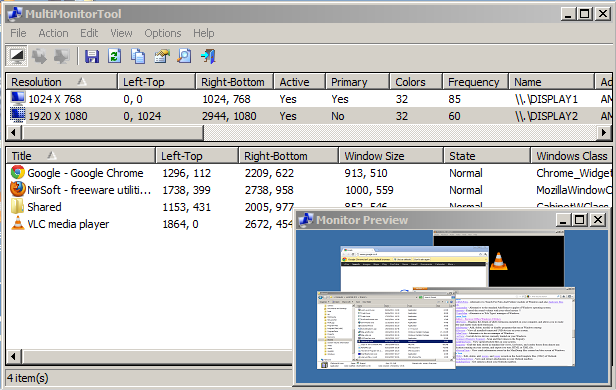 Internet users have better chances of accessing various kinds of applications that simply make their various online activities richer and more exciting. A program like MultiMonitorTool is not only one of those programs that enrich your working experience; but allows you to do some actions related to working with multiple monitors. Internet users have better chances of accessing various kinds of applications that simply make their various online activities richer and more exciting. A program like MultiMonitorTool is not only one of those programs that enrich your working experience; but allows you to do some actions related to working with multiple monitors.
What is in MultiMonitorTool?
MultiMonitorTool is a small tool that allows you to do some actions related to working with multiple monitors. The program allows you to disable/enable monitors, set the primary monitor, save and load the configuration of all monitors, and move windows from one monitor to another. All these actions can be carried out from the user interface or from command-line, without displaying user interface. MultiMonitorTool also provides a preview window, which allows you to watch a preview of every monitor on your system.
MultiMonitorTool has a couple of highly exciting new features or additions that include the following; ‘Orientation’ column (Default, 90 Degrees, 180 Degrees, or 270 Degrees), display orientation is now saved into the monitors configuration file, and the orientation of the monitor is updated when you load the monitors configuration file, ‘Next’ option to the /MoveWindow command-line parameter, which allows you to move the window to the next monitor, etc.
Downsides
MultiMonitorTool is a nice program; but requires some technical experience to handle.
Want to check it out? Visit Nirsoft.
Posted in Main | No Comments »
Monday, September 3rd, 2012
Are you looking for a program that can be used to copy and backup your favourite movies; while also removing the copy protection on the DVD? Well, AnyDVD HD is worth a try because it has a couple of features that can help you achieve your aim.
AnyDVD is a program that works in the background to automatically remove the copy protection of a DVD movie as soon as it is inserted into the drive; thereby allowing you to backup the movie using a DVD backup tool such as CloneDVD and CloneDVD mobile. With AnyDVD HD, you can also remove the RPC region code, thereby making the movie region free and viewable on any DVD player and with any DVD player software.
AnyDVD is also capable of removing unwanted movie features, including subtitles and prohibition messages such as copyright and warnings. It also allows you to launch an external application whenever you insert or remove a disc, or prevent ‘PC-friendly’ software from automatically launching when you insert a video DVD.
Version 7.0.7.2 Beta contains a couple of updates such as; New (Blu-ray): Updated decryption keys, support for new copy protections, driver blocks more commands before disc is made visible, and many more.
Any Issues?
Not a bad program and nothing to complain about because version 7.0.7.2 is a step ahead of previous versions.
Want to check it out? Visit SlySoft.com.
Posted in Main | No Comments »
|
|
|




