Archive for the 'Main' Category
Wednesday, April 25th, 2012
 Document.Editor is a multitab text editor for Windows that includes plain and rich text format support, multi tab interface so you can edit multiple documents in a session, compact application size, and multiple commands. The program also comes with support for opening FlowDocument, Html and plain/rich text formats and support for saving FlowDocument and plain/rich text formats. Document.Editor is a multitab text editor for Windows that includes plain and rich text format support, multi tab interface so you can edit multiple documents in a session, compact application size, and multiple commands. The program also comes with support for opening FlowDocument, Html and plain/rich text formats and support for saving FlowDocument and plain/rich text formats.
The Multiple tab interface ensures you can edit more than one document in a session, Tab rearranging support, compact application size, and multiple Edit/Insert/Format commands. You also enjoy Multiple startup options like Open New Document, load previous documents, do nothing and many more.
Semagsoft Document.Editor also comes with support and key features such as; editing commands like undo/redo, cut(and cut paragraph, cut line), copy(and copy paragraph, copy line), paste(and paste text only), delete(and delete paragraph, delete line), select all(and select paragraph, select line), find, replace and go to, Insert objects, images, links, text files, tables, videos, horizontal lines, date, time, headers and footers into your documents, format you documents with font, font colour, highlight colour, bold, italic, underline, strikethough, subscript, superscript, indent more/less, bullet/number lists, align left/centre/right/justify, line spacing and ltr/rtl and clear formatting, spell check, text to speech, translate and definitions.
Want to check it out? Visit DocumentEditor.
Posted in Main | No Comments »
Tuesday, April 24th, 2012
 Gradually your system that used to be very fast is now so slow that you begin to imagine if it was not the same PC that used to load very fast. It now takes a longer to boot up in the morning and sometimes it takes forever to shut down at the end of the day. Things are no longer the way they used to be because you can have your system running at the speed you thought it should be running at. The publishers of System Cleaner have designed the program to help you get your system up and running as it should be. This version also includes a comprehensive “secrets eraser” that scrubs all of your computer and internet activity files and removes every last trace of where you have been and what you did while you were there. Gradually your system that used to be very fast is now so slow that you begin to imagine if it was not the same PC that used to load very fast. It now takes a longer to boot up in the morning and sometimes it takes forever to shut down at the end of the day. Things are no longer the way they used to be because you can have your system running at the speed you thought it should be running at. The publishers of System Cleaner have designed the program to help you get your system up and running as it should be. This version also includes a comprehensive “secrets eraser” that scrubs all of your computer and internet activity files and removes every last trace of where you have been and what you did while you were there.
System Cleaner fixes and prevents errors by finding and cleaning error-producing and space-wasting garbage files. It operates by regularly scanning your hard drive for various error producing files and then optionally cleaning them from your system for you. Some of the features of System Cleaner include; restores your hard drive’s performance, fixes system errors that slow your PC down and cause it to crash, speeds up your PC’s execution of software programs, removes space-wasting temporary files and other unnecessary disk clutter, tunes up and optimizes the Windows Registry, etc.
System Cleaner only comes with 15 days trail period for new users; and this might be too short to find out all there is about it.
Want to check it out? Visit Pointstone.
Posted in Main | No Comments »
Monday, April 23rd, 2012
 Live File Backup is the user-friendly real-time/live backup program for your home and business PC. The program is designed to help you backup your files while you continue your work in the office or any other place. Live File Backup continuous to important data to external storage media (locally as well as over the network); and if required, the backup software restores your lost or corrupted data including its older versions (generations) as well. Live File Backup is the user-friendly real-time/live backup program for your home and business PC. The program is designed to help you backup your files while you continue your work in the office or any other place. Live File Backup continuous to important data to external storage media (locally as well as over the network); and if required, the backup software restores your lost or corrupted data including its older versions (generations) as well.
Live File Backup is an additional real-time (continuous data protection CDP) or live backup which continuously saves the working files in the background and keeps several older versions of each file for restoration. The program does its tasks in an outstanding straightforward and user-friendly manner so that you never again have to bother about your most valuable data – namely your working files. Some of its key benefits or key features include the following; intelligent algorithms save also open files (e.g. of Word and Excel), flexibility in choosing storage media for the saved data, no loss of valuable work time since in case of necessity the backed up data of the day or the data between regular backups can be restored instantly, extensive help system, online/offline as well as printable manual, and many more.
Want to check it out? Visit: LiveFileBackup.
Posted in Main | No Comments »
Monday, April 23rd, 2012
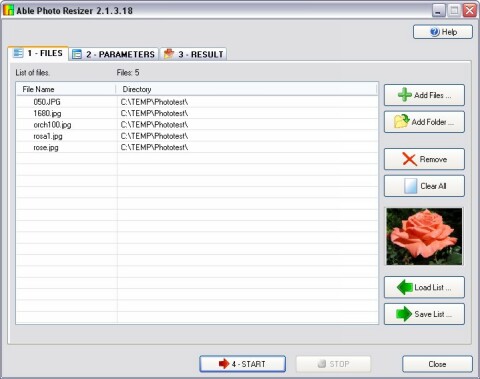 Able Photo Resizer ensures all pictures taken with your digital camera can be resized to load on your website. Actually, most photos acquired using a digital camera or a scanner are too large for use on any web page, and that is why they must be resized first. The purpose of creating a program like this is to allow you to easily resize your photos in three easy steps. Photo Resizer comes with the ability to batch resize pictures, batch resize photos, and perform batch image resize functions for the purpose of email (to friends and family) and web sites, or just to save space on your hard drive, or whatever reason you might have. Able Photo Resizer ensures all pictures taken with your digital camera can be resized to load on your website. Actually, most photos acquired using a digital camera or a scanner are too large for use on any web page, and that is why they must be resized first. The purpose of creating a program like this is to allow you to easily resize your photos in three easy steps. Photo Resizer comes with the ability to batch resize pictures, batch resize photos, and perform batch image resize functions for the purpose of email (to friends and family) and web sites, or just to save space on your hard drive, or whatever reason you might have.
Able Photo Resizer also allows you to force a specified width or height and keep proportions, or define fixed image dimensions. Besides, the program can rename file and more. You will be able to process thousands of files in a few seconds. The program can be used to enlarge a small image for better viewing using different filters for optimum results. Though, a couple of freeware applications can do almost the same thing as Able Photo Resizer; nonetheless, it is a nice application.
Want to check it out? Visit AblePhotoResizer.
Posted in Main | No Comments »
Sunday, April 22nd, 2012
 Miro is a program that lets you watch Internet videos like you watch TV. It enables you to download and watch all the best internet TV shows and videos in one powerful application. New channels arrive daily in the built-in Channel Guide. Miro also enables you to watch big, high resolution videos one after another. It’s so easy to use that you’ll be watching interesting videos in moments. Miro is designed with lots of easy to use features. Though, Miro is an open source program, yet it is one program that has easy to use features. Miro is a program that lets you watch Internet videos like you watch TV. It enables you to download and watch all the best internet TV shows and videos in one powerful application. New channels arrive daily in the built-in Channel Guide. Miro also enables you to watch big, high resolution videos one after another. It’s so easy to use that you’ll be watching interesting videos in moments. Miro is designed with lots of easy to use features. Though, Miro is an open source program, yet it is one program that has easy to use features.
With Miro, you can do a lot of things including the following; easy to switch from iTunes to Miro without any copying, it is one of the best music and video player for Android phones and tablets, you can buy, download, and listen, seamlessly, also buy Android apps from the Amazon or Google app stores and they will sync to your device, plays almost any video or music format and downloads from YouTube, podcasts, Amazon, and bittorrent, convert almost any video with Miro into mp4/h264, with presets for almost any device you can think of (including iPhone, iPod, iPad, Android phones, and more), and many more.
Want to check it out? Visit GetMiro.com/.
Posted in Main | No Comments »
Saturday, April 21st, 2012
 Angel’s Vox is an audio player as well as an eBook reader designed specifically for audiobook enthusiasts. How often have you had to find the last track and position played after an interruption in listening? If you would like to listen to several books or podcasts at the same time, and not lose your place in each one; then this application is for you. Angel’s Vox is an audio player as well as an eBook reader designed specifically for audiobook enthusiasts. How often have you had to find the last track and position played after an interruption in listening? If you would like to listen to several books or podcasts at the same time, and not lose your place in each one; then this application is for you.
Also, Angel’s Vox is also designed to enable you speed-up a book’s playback to save you time, or to slow it down when you cannot recognize the speech (e.g., when you are learning a foreign language). The program is an innovative and handy solution that also includes other great features; but is also easy to use.
Angel’s Vox has a lot of key features that include the following; supports MP3, OGG, MPEG-4, and WAV audio file formats, stores a volume level and playback speed, bookmarks the last played track and position for each audiobook in the library, it comes with a sleep time feature that enables you to shutdown, reboot or log off Windows in the specified time. Besides, this utility allows you to lower the volume level progressively at the end of a period, configurable Skip Commercials feature, and a host of others.
Want to check it out? Visit SuperUtils.
Posted in Main | No Comments »
Friday, April 20th, 2012
 AC3Filter is a high quality free DirectShow filter designed for real time audio decoding and processing. It has a priority on wide functionality and convenient settings. Filter can decode following audio formats: AC3/DTS/MPEG Audio. It also supports multi-channel and digital (SPDIF) outputs. AC3Filter can also process any audio track; much of processing options allows you to adjust the sound in almost any way. It is also possible to upmix any audio source to 6 channels. AC3Filter is a high quality free DirectShow filter designed for real time audio decoding and processing. It has a priority on wide functionality and convenient settings. Filter can decode following audio formats: AC3/DTS/MPEG Audio. It also supports multi-channel and digital (SPDIF) outputs. AC3Filter can also process any audio track; much of processing options allows you to adjust the sound in almost any way. It is also possible to upmix any audio source to 6 channels.
AC3Filter is designed with some advance, but very easy to use features that include the following; watch movies with AC3 and DTS audio tracks, listen multi-channel (AC3/DTS) AudioCD, Playback WAV files with AC3/DTS content, ripped from multi-channel AudioCD without any conversion of these files, Playback raw .AC3 and DTS files (with help of AC3File filter), Up-mix any audio track (even plain stereo) up to 6 channels, down-mix any audio track to any number of channels (to match your speaker configuration), Watch movies under poor hearing conditions (noisy environment, weak speakers), decrease dynamic range to watch movies at night, apply time shift to the audio track to synchronize audio with video, adjust gain of every input/output channel independently to compensate loudness differences, USB sound cards supported, encode any audio to AC3 and transmit it over SPDIF, and many more.
Want to check it out? Visit AC3Filter.
Posted in Main | No Comments »
Friday, April 20th, 2012
 Dajukebox is a small and fast album player, tagger and organizer, and is built to allow easy access to your albums with a minimum of effort and a minimum of cluttering of the screen. The interface is slick and clean, but still allows you to easily access the ID3 TAGs, online artist and album information, and quickly copy or organize your albums on disc. The program is a freeware, and very stable with ability to do all the basic things quicker smarter and without a ton of chrome on the interface. It is basically a program designed for every music enthusiast out there. Dajukebox is a small and fast album player, tagger and organizer, and is built to allow easy access to your albums with a minimum of effort and a minimum of cluttering of the screen. The interface is slick and clean, but still allows you to easily access the ID3 TAGs, online artist and album information, and quickly copy or organize your albums on disc. The program is a freeware, and very stable with ability to do all the basic things quicker smarter and without a ton of chrome on the interface. It is basically a program designed for every music enthusiast out there.
Those who download and install Dajukebox application on their systems may have to register in order to have the donation message removed from start-up. Registered members will be sent a key that enables you and other registered member remove the donation message that always appear at start-up. Dajukebox is compatible with all Windows programs; but it is most likely to work better on Windows 7. A couple of features included in the program may require installation of specific programs or Codec packs. To play certain audio formats (aac, ape, flac, ogg) without the bass dll libraries you will also need to install the appropriate audio codecs.
Want to check it out? Visit: DaJukeBox.
Posted in Main | No Comments »
Friday, April 20th, 2012
 RationalPlan Multi Project Soft is a very robust program for project management that was developed to help project managers in designing plans, allocating resources, monitoring progress, managing budgets and analyzing workload. Whatever your need for project management, RationalPlan can help you complete your project on schedule and within your stipulated budget. RationalPlan Multi Project Soft is a very robust program for project management that was developed to help project managers in designing plans, allocating resources, monitoring progress, managing budgets and analyzing workload. Whatever your need for project management, RationalPlan can help you complete your project on schedule and within your stipulated budget.
Some of the great features of this utility includes: manage project and share resources easily, manage your budget effectively, monitor the progress of the project in terms of timelines and offers you an easy way to break down your project, set schedules and allocate resources.
Its Multi Project Version allows you to manage multiple projects simultaneously. It works with Windows, Mac Os X, and all platforms that run on Java.
To find out more about this program, please visit Rationalplan.
Posted in Main | No Comments »
Friday, April 20th, 2012
 Looking for a program that allows you to listen to your favorite music amazing sound quality? Want one with cool skins and a sexy look? AIMP Classic is a very good audio player that allows you to listen to your favorite music with an outstanding sound quality. You can readily customize the skins to suit your taste. Its visual effects display is great, with an 18- band equalizer, a beautiful fading effects, volume normalizing as you switch from one track to another and a playlist editor, this program is simply cool. You can also record any sound on your computer, convert audio files to several other formats and edit music tags. Looking for a program that allows you to listen to your favorite music amazing sound quality? Want one with cool skins and a sexy look? AIMP Classic is a very good audio player that allows you to listen to your favorite music with an outstanding sound quality. You can readily customize the skins to suit your taste. Its visual effects display is great, with an 18- band equalizer, a beautiful fading effects, volume normalizing as you switch from one track to another and a playlist editor, this program is simply cool. You can also record any sound on your computer, convert audio files to several other formats and edit music tags.
The publishers have made a few changes to the previous version of this program and this includes: an audio library which allows you to choose a default and store your files, design your own skins and download and install updates.
Some of the main features and functions includes: play back for several formats, is supports ASIO/WASAPI outputs, in-built sound effects, multi-user mode support, you can set alarm to when you want to play a given music file, plugin support and it comes in multiple languages.
Visit Aimp’s homepage to find out more about this program.
Posted in Main | No Comments »
|
|
|




