Archive for the 'Main' Category
Wednesday, March 21st, 2012
Right Click Enhancer gives you power to control the right click menu everyone uses. You can edit your right click menu in the way you want with the help of this tool, as well as add some good stuffs to your right click context menu. Right Click Enhancer consist of 7 tools to manage your right click context menu. These 7 tools include the following; Right Click Editor, Right Click Tweaker, My Computer Manager, Send To Manager, New Menu Editor, Right Click Cascading Menu Shortcuts Creator (Windows 7), and Right Click Shortcuts Creator (Vista or 7).
The 7 tools mentioned above are very powerful ones that can be used to do a lot of things. The Right Click Editor tool for instance is a context menu editor tool that can help you to delete or hide unwanted entries from their right click context menu. Windows 7 users are also allowed to move the unwanted entries to the cascading menus. Users can also delete or hide unwanted shell extensions from there right click context menu. Right Click Editor also allows user to add and modify commands of right click context menu. Other tools are not actually difficult to use, but you might need a couple of days or hours to get used to them.
Want to check it out? Visit Rbsoft.
Posted in Main | No Comments »
Wednesday, March 21st, 2012
 CodeTwo Public Folders will turn your Outlook into real workgroup software. You can easily share contacts, email, calendars, tasks and even Office docs with others. What is more, you get all this without the need to buy an expensive and complicated Exchange server. You can also use CodeTwo Public Folders to share your Outlook data with others in real-time, manage access rights, create backup copies, recover deleted elements, work in online or offline mode – exactly the same way as with Exchange Server. The program will also let you synchronize customized folder views and non-standard Outlook forms. Take a tour to learn more about its key features. CodeTwo Public Folders will turn your Outlook into real workgroup software. You can easily share contacts, email, calendars, tasks and even Office docs with others. What is more, you get all this without the need to buy an expensive and complicated Exchange server. You can also use CodeTwo Public Folders to share your Outlook data with others in real-time, manage access rights, create backup copies, recover deleted elements, work in online or offline mode – exactly the same way as with Exchange Server. The program will also let you synchronize customized folder views and non-standard Outlook forms. Take a tour to learn more about its key features.
CodeTwo Public Folders has lots of unique features such as the following; Outlook Calendars, Contacts, Emails, Tasks and even Documents can be shared with other users, create new public folders and share your personal folders in Outlook, it seamlessly integrates itself with Microsoft Outlook; no time wasted on learning new software, administrator can easily define detailed access rights for all shared Microsoft Outlook folders, synchronization of data is performed automatically in the background and in real-time, lets you synchronize Outlook folder views and custom Outlook forms, data syncing with CodeTwo Public Folders is extra easy and safe thanks to the program’s database management features, and a host of others.
Want to check it out? Visit: Codetwo.
Posted in Main | No Comments »
Wednesday, March 21st, 2012
 DirectX Happy Uninstall (DHU) is a management & maintenance tool for Microsoft DirectX. With DHU, you can backup your PC’s DirectX and restore DirectX from this backup. In addition, using the DHU’s Disc-Rollback feature enables you to fix all DirectX problems. The program is an integral part of Microsoft Windows. In order to maintain the Windows DirectX core components, DirectX Happy Uninstall provides backup feature to backup the DirectX core components from your Windows and restore feature to restore the DirectX core components from a backup. DirectX Happy Uninstall (DHU) is a management & maintenance tool for Microsoft DirectX. With DHU, you can backup your PC’s DirectX and restore DirectX from this backup. In addition, using the DHU’s Disc-Rollback feature enables you to fix all DirectX problems. The program is an integral part of Microsoft Windows. In order to maintain the Windows DirectX core components, DirectX Happy Uninstall provides backup feature to backup the DirectX core components from your Windows and restore feature to restore the DirectX core components from a backup.
DirectX Happy Uninstall has a lot of features that include the following; fix computer hardware that is incompatible with current DirectX on your system, fixes error that has to do with incompatible version of DirectX, fixes Windows Registry errors that has to do with DirectX, fixes errors related to software that cannot be run because of DirectX problem, fixes strange problems when you are playing a PC Game, fixes DirectX Error Message when trying to run a PC Game, fixes error or problems when DirectX file is damaged or missing, and a few others.
Actually a couple of users may choose to uninstall Windows completely instead of paying $12 for DirectX Happy Uninstall.
Want to check it out? Visit: SuperFoxs.
Posted in Main | No Comments »
Wednesday, March 21st, 2012
 MediaInfo is a freeware that supplies technical and tag information about a video or audio file. It provides general information for multimedia files like: title, author, director, album, track number, date, duration, etc. For audio files, it can be used to provide the following information: codec, aspect, fps, bit rate e.t.c. It can also be used to provide these information for video files: codec, sample rate, channels, language, bitrate and more. These information can then be exported in the these formats: text, CSV or HTML. MediaInfo is a freeware that supplies technical and tag information about a video or audio file. It provides general information for multimedia files like: title, author, director, album, track number, date, duration, etc. For audio files, it can be used to provide the following information: codec, aspect, fps, bit rate e.t.c. It can also be used to provide these information for video files: codec, sample rate, channels, language, bitrate and more. These information can then be exported in the these formats: text, CSV or HTML.
With MediaInfo, you can read many video and audio formats, view your information in text, sheet, tree, CSV, HTML and other formats, integrate with MS Windows shell, display any language on any operating system and customize your viewing formats. It also comes in graphical interface, Command Line and DLL versions.
MediaInfo supports the following video formats: Real, MPEG-2, MPEG-4, DVD, QuickTime, WMV e.t.c . It also supports these audio formats: MP3, WAV, RA, AC3, DTS, AAC, M4A, AU, AIFF
For more information visit Mediainfo.
Posted in Main | No Comments »
Wednesday, March 21st, 2012
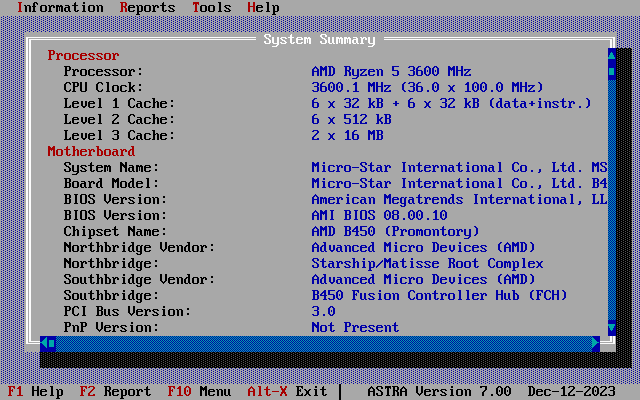 ASTRA is a technical application that performs computer configuration analysis and diagnostics. It gives detailed information about your computer hardware and devices operational modes, including undocumented information. A unique quick HDD Health Status checker is also included. ASTRA also provides information on CPU, motherboard, hard disks, S.M.A.R.T., CD/DVD devices, SCSI devices, memory modules, chipset, BIOS, PCI/AGP, ISA/PnP and PnP devices, monitor, video card, sound card, network card, printer, etc. ASTRA also creates a report file in plain text, INI, HTML, XML and CSV format, and is able to run in batch mode. The DOS version is especially designed for systems restore purposes and may be used by repair professionals, Windows version also available. ASTRA is a technical application that performs computer configuration analysis and diagnostics. It gives detailed information about your computer hardware and devices operational modes, including undocumented information. A unique quick HDD Health Status checker is also included. ASTRA also provides information on CPU, motherboard, hard disks, S.M.A.R.T., CD/DVD devices, SCSI devices, memory modules, chipset, BIOS, PCI/AGP, ISA/PnP and PnP devices, monitor, video card, sound card, network card, printer, etc. ASTRA also creates a report file in plain text, INI, HTML, XML and CSV format, and is able to run in batch mode. The DOS version is especially designed for systems restore purposes and may be used by repair professionals, Windows version also available.
ASTRA is a highly technical application that requires some technical ability; that is why it is not a program for a newbie. Some of its advanced features include the following; detects 395 processor and coprocessor types fromIntel, AMD, Cyrix, VIA, Centaur/IDT, Rise, Transmeta, NexGen, UMC, IBM, Texas Instruments, C&T, IIT, ULSI, National Semiconductor, quick HDD Health Status checker (using an unique algorithm), identifies motherboard manufacturer and URL, identifies vendor, date and version of BIOS, identifies vendor and model of chipset, detects SPD memory modules (size, type, vendor, speed parameters and many others), and a couple of others.
Want to check it out? Visit: SysInfoLab.
Posted in Main | 1 Comment »
Tuesday, March 20th, 2012
 File Acceleration Protocol (FAP) is a free HTTP based LAN file sharing tool that features chat, system spec comparison, file search, network service scanning and queable file downloads. Shared files and folders can also be downloaded via a web browser. Though, a Beta version, File Acceleration Protocol includes a number of latest changes that have brought some stability to how it works. Some of the newly added features and features include the following; it now supports Windows XP, fixed errors which were presented only on first run, redesigned the main window a bit, added the ability to pause individual downloads and also to not process your download queue, FAP Hard disk technical demo (View the FAP file system as if it was a local disk meaning you can stream media via FAP for example), etc. File Acceleration Protocol (FAP) is a free HTTP based LAN file sharing tool that features chat, system spec comparison, file search, network service scanning and queable file downloads. Shared files and folders can also be downloaded via a web browser. Though, a Beta version, File Acceleration Protocol includes a number of latest changes that have brought some stability to how it works. Some of the newly added features and features include the following; it now supports Windows XP, fixed errors which were presented only on first run, redesigned the main window a bit, added the ability to pause individual downloads and also to not process your download queue, FAP Hard disk technical demo (View the FAP file system as if it was a local disk meaning you can stream media via FAP for example), etc.
File Acceleration Protocol (FAP) enables you to find all local LAN peers automatically; and there is no need to worry about running servers unless you wish to. Some other great features included in this version include; high transfer throughput with low system resources, statistics of the local client and the network as a whole, upload and download limiter and queue, chat, Headless Linux/Mono builds (To-do), and many more.
Want to check it out? Visit Fap.
Posted in Main | No Comments »
Tuesday, March 20th, 2012
 TimeRecorder is a timer and reminder software that can remind you of things at scheduled times, record and keep track of how long you engaged in an activity along with what you did, and also save what you write or copy it to the memo. Not everyone has the ability or skill to organize their online or office activities; and that is where an application like TimeRecorder comes in. It simply enable you do things such as; getting or putting things under control, remembering your important appointments, plan your projects, and prioritize those events that are vital ahead of the not so important ones. TimeRecorder is a timer and reminder software that can remind you of things at scheduled times, record and keep track of how long you engaged in an activity along with what you did, and also save what you write or copy it to the memo. Not everyone has the ability or skill to organize their online or office activities; and that is where an application like TimeRecorder comes in. It simply enable you do things such as; getting or putting things under control, remembering your important appointments, plan your projects, and prioritize those events that are vital ahead of the not so important ones.
TimeRecorder 4.4 also comes with a lot of changes to enhance its performance. Some of these changes include the following; fully custom words of Content and words of Tip Text, countdown time exactly in format ‘0:02:02’, recording time and almost everything in the Memo, automatically delete tips (one time) which have been shown, can alarm periodically or remind you time and again after first shown, show tip along with sound even the computer has no Sound Card, remain on the task bar and can show exact time and which weekday is today, and a few others.
TimeRecorder is a simple program, but still has a long way to go when compared to a couple of advanced organizers available today.
Want to check it out? Visit: TimeRecorder
Posted in Main | No Comments »
Wednesday, March 14th, 2012
 WebLight is a web crawler that builds xml sitemaps and finds link, mark-up and CSS bugs efficiently. The application also validates and checks links in CSS, html, xhtml, news feeds and sitemaps. WebLight can scan hundreds of resources per minute and is used on sites with more than 30,000 links. You can also building XML Sitemaps is easy using the data WebLight collects and its spreadsheet like sitemap editor. Few changes made by the publisher to this version include the following; addition of Google Sitemap support, and addition of “nofollow” link support. The program is basically designed for web developers. WebLight is a web crawler that builds xml sitemaps and finds link, mark-up and CSS bugs efficiently. The application also validates and checks links in CSS, html, xhtml, news feeds and sitemaps. WebLight can scan hundreds of resources per minute and is used on sites with more than 30,000 links. You can also building XML Sitemaps is easy using the data WebLight collects and its spreadsheet like sitemap editor. Few changes made by the publisher to this version include the following; addition of Google Sitemap support, and addition of “nofollow” link support. The program is basically designed for web developers.
WebLight has some advanced features that enable users (web developers) carry out a lot of task as easily as possible. Some of these features include the following; advanced feature that enables you to analyze sites with thousands of links within a short time, validates and extracts links from HTML, CSS, News Feeds and Sitemaps, the software works on private, local and public websites, set priority, change frequency and last modified date, generate sitemapindex and multiple sitemap files for large sites, you can see the location of problems in the full source, categorize and filter problems, and many more.
Want to check it out? Visit Illumit.
Posted in Main | No Comments »
Wednesday, March 14th, 2012
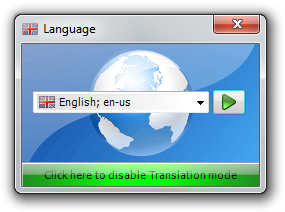 Profile Relocator is a step-based application that allows the re-locating of the Windows Users profile directory. Once re-located, any created profiles will appear in the new location in their entirety. A lot of issues have been fixed and new features added just to make it work even better than it used to. Profile Relocator now features support for Windows 8, as well as automation mode. Issues fixed in this version of the program include the following; a few English translation text strings, made registry write failure message clearer on running PR without admin rights, only one instance of Profile Relocator can now be run at a time, etc. Profile Relocator is a step-based application that allows the re-locating of the Windows Users profile directory. Once re-located, any created profiles will appear in the new location in their entirety. A lot of issues have been fixed and new features added just to make it work even better than it used to. Profile Relocator now features support for Windows 8, as well as automation mode. Issues fixed in this version of the program include the following; a few English translation text strings, made registry write failure message clearer on running PR without admin rights, only one instance of Profile Relocator can now be run at a time, etc.
Basically, the benefit of using Profile Relocator to relocate your Windows Users profile directory is that it will now be stored in a location that doesn’t reside on the system drive, ensuring that profile data isn’t compromised as a result of re-installation or system failure. Profile Relocator is a freeware program that requires Microsoft .NET Framework 2.0. it is not a difficult program to download or install, but you might need to take a few minutes to understand how it works before actually making use of it. This version has now been programmed to work on Windows XP, Vista, 7, and 8.
Want to check it out? Visit: BootBlock.
Posted in Main | No Comments »
Tuesday, March 13th, 2012
 Handy Start Menu is a freeware application that allows you to get rid of this problem by grouping Start menu applications into categories according to their purpose. It makes start-up so easy because applications are sorted automatically, and the user is not required to do anything in most situations. The publisher has made a lot of changes to this version, which makes it a massive improvement from the beta version. It kind of saves a lot of time, and helps you to avoid the stress of looking for certain applications on your system. Items or applications can now be easily grouped according to how important they are to you; this brings a lot of organization to your system. The application makes your standard start menu shorter, and simpler. Handy Start Menu is a freeware application that allows you to get rid of this problem by grouping Start menu applications into categories according to their purpose. It makes start-up so easy because applications are sorted automatically, and the user is not required to do anything in most situations. The publisher has made a lot of changes to this version, which makes it a massive improvement from the beta version. It kind of saves a lot of time, and helps you to avoid the stress of looking for certain applications on your system. Items or applications can now be easily grouped according to how important they are to you; this brings a lot of organization to your system. The application makes your standard start menu shorter, and simpler.
Handy Start Menu is designed with some nice features that include the following; access to all programs from the Start menu becomes easy and convenient, you can automatically group and reduce useless items, click on a folder with the name of an application, and the application will do the rest, easy and fast when it comes to installation, and use, and many more.
It is basically a nice application, especially for the newbie; and it is a freeware that can be downloaded and installed without any technical ability on the part of the user.
Want to check it out? Visit: HandyStartMenu.
Posted in Main | No Comments »
|
|
|




