Archive for the 'Main' Category
Thursday, February 9th, 2012
 SynWrite is a powerful text and source code editor with many features like syntax highlighting, code folding, tree structure, auto-completion, code templates, string extraction and clipboard history. Almost all kinds of encoding are supported. The use of external tools makes it possible to check your code and navigate to errors. As “Notepad replacement” SynWrite gives you a lightweight and full-featured alternative for windows text editing. Also runs as portable app or plugin for file manager “Total Commander”. SynWrite is a free source code editor and notepad replacement for Microsoft Windows Operating Systems. SynWrite is a powerful text and source code editor with many features like syntax highlighting, code folding, tree structure, auto-completion, code templates, string extraction and clipboard history. Almost all kinds of encoding are supported. The use of external tools makes it possible to check your code and navigate to errors. As “Notepad replacement” SynWrite gives you a lightweight and full-featured alternative for windows text editing. Also runs as portable app or plugin for file manager “Total Commander”. SynWrite is a free source code editor and notepad replacement for Microsoft Windows Operating Systems.
SynWrite is built with lots of key features that include the following; highlighting for lots of languages, fully customizable highlighting, code folding, determined text ranges may be collapsed, tree structure view for source code, auto-completion, source code templates, clipboard history panel, search, replace with regular expressions, search, replace in multiple files, external tools (capture of console output, errors navigation), strings extraction feature, zen Coding (HTML + CSS + XSL high speed coding engine), customizable hotkeys, “Sync-Edit” feature allows to edit identical identifiers, portable mode, Plugin support for file manager “Total Commander”, multilingual user interface, bookmarks, export to RTF/HTML file with syntax highlighting, and a host of other features.
Want to check it out? Visit SynWrite.
Posted in Main | No Comments »
Wednesday, February 8th, 2012
 AnyFileBackup is a solution for real time backup and synchronization of your data. The program is easier to understand, and faster and more secure than a few other solutions. AnyFileBackup comes with an extensive array of extremely useful tools and features. The program supports full two-way synchronization and can compress files for transfer in a number of popular compression formats. Data can also be encrypted and users have a choice of different encryption algorithms at their disposal. Keeping files on a network, FTP and in mailboxes current and reliably backed up is exactly what the application is designed for; combining these basic tasks with many advanced features for higher security and more reliable file synchronization and backup. AnyFileBackup is a solution for real time backup and synchronization of your data. The program is easier to understand, and faster and more secure than a few other solutions. AnyFileBackup comes with an extensive array of extremely useful tools and features. The program supports full two-way synchronization and can compress files for transfer in a number of popular compression formats. Data can also be encrypted and users have a choice of different encryption algorithms at their disposal. Keeping files on a network, FTP and in mailboxes current and reliably backed up is exactly what the application is designed for; combining these basic tasks with many advanced features for higher security and more reliable file synchronization and backup.
AnyFileBackup includes lots of key features such as the following; reliably back up and synchronize files between different locations with secure and advance features, notifications are sent about file transfer status and any errors that occur, notifications can be sent through LAN messengers, email, SMS and stored in report files, send files securely over any public network by using various powerful file encryption algorithms such as AES, DES, Blowfish and more, filter files using a number of different parameters such as time, file size and various other attributes which guarantees that only necessary files are replicated and backed up, etc.
Want to check it out? Visit: Any-File-Backup.
Posted in Main | 1 Comment »
Wednesday, February 8th, 2012
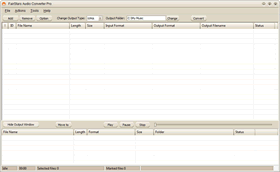 FairStars Audio Converter Pro is a professional audio file conversion tool to convert WAV, RealMedia (RM, RA, RAM, RMJ, RMVB), AIF, AIFF, AIFC, AU, Creative VOC, PVF, PAF, SVX, IFF, APE, FLAC, OGG, VQF, MP1, MP2, MP3, MP4, M4A, M4B, AAC, AMR, AWB, WMA, WMV, ASF to the popular formats – WMA, MP3, AAC, M4A, AMR, AWB, VQF, OGG, FLAC, APE and WAV formats. FairStars Audio Converter Pro lets you convert multiple files in a single batch, regardless of their source and target formats. In addition, it also includes a built-in player. The audio format conversions are performed without any temporary files, allowing high conversion speeds. Other features include normalization (adjust volume), support for ID3 tags and more. FairStars Audio Converter Pro is a professional audio file conversion tool to convert WAV, RealMedia (RM, RA, RAM, RMJ, RMVB), AIF, AIFF, AIFC, AU, Creative VOC, PVF, PAF, SVX, IFF, APE, FLAC, OGG, VQF, MP1, MP2, MP3, MP4, M4A, M4B, AAC, AMR, AWB, WMA, WMV, ASF to the popular formats – WMA, MP3, AAC, M4A, AMR, AWB, VQF, OGG, FLAC, APE and WAV formats. FairStars Audio Converter Pro lets you convert multiple files in a single batch, regardless of their source and target formats. In addition, it also includes a built-in player. The audio format conversions are performed without any temporary files, allowing high conversion speeds. Other features include normalization (adjust volume), support for ID3 tags and more.
FairStars Audio Converter Pro is built with lots of key features that include the following; batch audio files conversion (you can convert many files in one batch regardless of their source formats), automatic extracting Audio CD Image(Audio File + CUE) to audio files which contained individual audio track, support automatic volume adjustment(normalization) when converting, batch output Tag settings, and also support ID3 tags display and edit, move or copy output files by output window easily, supports dragging and dropping files or folders from the File Explorer into the window of the converter, and many more.
Want to check it out? Visit FairStars.
Posted in Main | No Comments »
Tuesday, February 7th, 2012
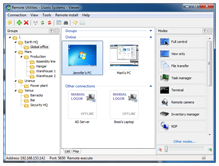 Remote Utilities is a remote PC access program for connecting to a remote PC over LAN or via the Internet. The application is used by system administrators, home users and helpdesks for remotely managing PCs in their corporate or home network, or providing customer support. Remote Utilities enable you to gain remote access to your home computer and support your family and friends via the Internet. You can easily get around firewalls, use a direct and callback connection. With this remote control software, accessing your home PC is a breeze. Remote Utilities is a remote PC access program for connecting to a remote PC over LAN or via the Internet. The application is used by system administrators, home users and helpdesks for remotely managing PCs in their corporate or home network, or providing customer support. Remote Utilities enable you to gain remote access to your home computer and support your family and friends via the Internet. You can easily get around firewalls, use a direct and callback connection. With this remote control software, accessing your home PC is a breeze.
Remote Utilities also includes a number of key features such as the following; work in 16 different connection modes including full control, file transfer, text or voice chat, remote task manager and power control, gain remote access to a PC located behind a firewall or a router, easy set up and fast speed even with a slow Internet connection, connect with the no-installation zero-configuration remote host executable that doesn’t require administrative privileges, get your own mediation server to bypass firewalls and be completely independent from our global servers, for free, use the built-in remote deployment tool to install or update Remote Utilities on a local network for secure remote access, etc.
Want to check it out? Visit RemoteUtilities.
Posted in Main | No Comments »
Tuesday, February 7th, 2012
 WebTemp is an application that reads temperatures, voltages and fan speeds from a variety of hardware monitoring tools such as SpeedFan, adds measurements like memory and CPU usage, network traffic and creates nice looking and customizable statistics which you can then have uploaded automatically to a FTP server in order to remotely monitor your computer’s or (Windows) server’s health. WebTemp also incorporates a lot of other features like alarm and emergency shut down as well. WebTemp is an application that reads temperatures, voltages and fan speeds from a variety of hardware monitoring tools such as SpeedFan, adds measurements like memory and CPU usage, network traffic and creates nice looking and customizable statistics which you can then have uploaded automatically to a FTP server in order to remotely monitor your computer’s or (Windows) server’s health. WebTemp also incorporates a lot of other features like alarm and emergency shut down as well.
WebTemp displays temperatures like CPU temperature as well as voltages and fan speeds measured by SpeedFan or other hardware monitoring tools and together with CPU and memory load. It also creates network traffic and notebook battery status statistics which can be saved, uploaded to FTP servers or emailed at any time. WebTemp can also set off an alarm on high CPU temperature or low fan speeds by sending emails and/or powering off the system.
WebTemp is a nice application, but users without some technical experience may not find it easy to understand how to read the graph. Basically, it is a nice application that costs a few dollars, and even offers more features worth more than its price.
Want to check it out? Visit Webtemp.org.
Posted in Main | No Comments »
Monday, February 6th, 2012
 Linkman is a complete bookmarking solution to store, organize, annotate and check your favorite Internet pages. The program efficiently handles up to tens of thousands of URLs by using a database to store your links. Linkman can call upon many powerful facilities that replace the browser’s native bookmark management systems. You can easily add URLs from all opened browser sessions and let retrieve keywords and descriptions automatically. The user interface is highly customizable, and you also get the capability to import and synchronize from existing bookmark collections and export bookmarks in a variety of formats. Linkman also lets you build your own Export Templates. Several Template examples like XML and HTML output are included. The program also supports multiple versions of ten different Windows browsers. Linkman is a complete bookmarking solution to store, organize, annotate and check your favorite Internet pages. The program efficiently handles up to tens of thousands of URLs by using a database to store your links. Linkman can call upon many powerful facilities that replace the browser’s native bookmark management systems. You can easily add URLs from all opened browser sessions and let retrieve keywords and descriptions automatically. The user interface is highly customizable, and you also get the capability to import and synchronize from existing bookmark collections and export bookmarks in a variety of formats. Linkman also lets you build your own Export Templates. Several Template examples like XML and HTML output are included. The program also supports multiple versions of ten different Windows browsers.
Though Linkman Lite only comes with limited features unlike the pro version; nevertheless, you will be able to enjoy a few features that allows you do a lot of things. If you add a new bookmark in one browser, for example Google Chrome, the bookmark becomes immediately synchronized; and you can access it through the Linkman Addons in Firefox, Internet Explorer and the Opera browser. After you import bookmarks from Firefox, Internet Explorer, Chrome, Opera or start from scratch, Linkman will store your bookmarks in a XML database.
Want to check it out? Visit Outertech.
Posted in Main | No Comments »
Monday, February 6th, 2012
 HDClone is the ideal tool for moving or cloning contents of entire hard disks. Since it works on physical level it can be used with any operating system and any filesystem. The tool copies the data for you; thereby allowing you to transfer entire system installations to a newer hard disk quickly and easily (hard disk migration). HDClone also adds the additional disk space automatically if desired. Since it has its own operating system and is self-booting, it can be used even if the installed operating system is damaged. Therefore HDClone is also a great solution for data rescue on damaged hard disks or system installations. The commercial versions HDClone Basic Edition, HDClone Standard Edition, HDClone Professional Edition, and HDClone Enterprise Edition offer extended features. HDClone is the ideal tool for moving or cloning contents of entire hard disks. Since it works on physical level it can be used with any operating system and any filesystem. The tool copies the data for you; thereby allowing you to transfer entire system installations to a newer hard disk quickly and easily (hard disk migration). HDClone also adds the additional disk space automatically if desired. Since it has its own operating system and is self-booting, it can be used even if the installed operating system is damaged. Therefore HDClone is also a great solution for data rescue on damaged hard disks or system installations. The commercial versions HDClone Basic Edition, HDClone Standard Edition, HDClone Professional Edition, and HDClone Enterprise Edition offer extended features.
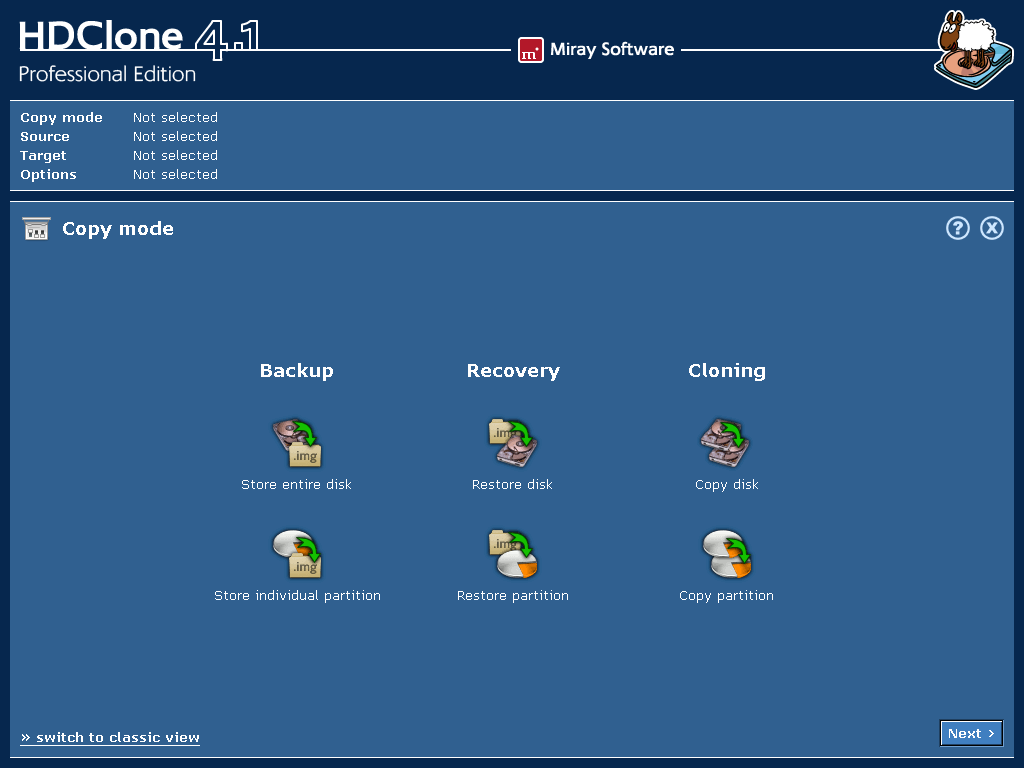 HDClone creates physical or logical copies (clones) and file images of hard disks and other mass storage media. It is a perfect tool for backups and copies of entire software or operating system installations. A special ‘SafeRescue’ mode makes HDClone an invaluable tool for rescuing defective hard disks and other media. HDClone works independent of partitioning scheme, file system, and operating system. It also works with proprietary formats which otherwise would be inaccessible. HDClone creates physical or logical copies (clones) and file images of hard disks and other mass storage media. It is a perfect tool for backups and copies of entire software or operating system installations. A special ‘SafeRescue’ mode makes HDClone an invaluable tool for rescuing defective hard disks and other media. HDClone works independent of partitioning scheme, file system, and operating system. It also works with proprietary formats which otherwise would be inaccessible.
Want to check it out? Visit Miray.de.
Posted in Main | No Comments »
Monday, February 6th, 2012
 FLATT (Flexible Automation and Troubleshooting Tool) can be described as a FAQ on steroids. Instead of listing the steps necessary to perform a task FLATT actually performs these steps. It is an application that takes what IT professionals are already doing, allows them to do it in a tenth of the time, presents the information as readable graphics/reports, and allows IT professionals to better use their time by sharing procedures and methodologies within the company. Among new features include client UI allows selecting internal or external proxy to execute plugins, and addition of a Tomcat servlet to process client requests to execute plugins. FLATT (Flexible Automation and Troubleshooting Tool) can be described as a FAQ on steroids. Instead of listing the steps necessary to perform a task FLATT actually performs these steps. It is an application that takes what IT professionals are already doing, allows them to do it in a tenth of the time, presents the information as readable graphics/reports, and allows IT professionals to better use their time by sharing procedures and methodologies within the company. Among new features include client UI allows selecting internal or external proxy to execute plugins, and addition of a Tomcat servlet to process client requests to execute plugins.
Currently, many IT staff in the same company are doing redundant work and communication is a struggle. FLATT automates many processes with little to no installation or set up, and packages information into something an IT professional or CEO or a manager can understand and use to make educated decisions about essential functions relating to multiple servers. Just as Adobe Dreamweaver allows web developers to create websites using graphical UI instead of writing HTML code line by line, FLATT does the same thing with server management. FLATT is a freeware program that enables you carry out a lot of task easier; especially if you have some basic IT skills.
Want to check it out? Visit WorldAutomation.
Posted in Main | No Comments »
Monday, February 6th, 2012
 Anti-keylogger is a security program that provides every computer with strong protection against most types of keylogging programs (software keyloggers), both known and unknown, currently in use or being developed at the present moment. The program is designed with features to buck various types of keylogging programs possibly included in any commercial, shareware, freeware products, as well as in Trojan horses, viruses of very different operation principles. Anti-Keylogger is can protect against even “custom-made” software keyloggers, which are extremely dangerous, and very popular with cyber criminals. Anti-keylogger is a security program that provides every computer with strong protection against most types of keylogging programs (software keyloggers), both known and unknown, currently in use or being developed at the present moment. The program is designed with features to buck various types of keylogging programs possibly included in any commercial, shareware, freeware products, as well as in Trojan horses, viruses of very different operation principles. Anti-Keylogger is can protect against even “custom-made” software keyloggers, which are extremely dangerous, and very popular with cyber criminals.
Anti-Keylogger is a dedicated anti-keylogging product that works differently from most other anti-spyware. The program doesn’t depend on signature bases, and this is because it doesn’t use them. The newly developed solutions and algorithms allow it to spot behavior of a spy program, and disable it instantly. The program can protect against even “custom-made” software keyloggers, which are extremely dangerous – and very popular with cyber criminals.
Anti-Keylogger is easy to install, and gives you lots of confidence when carrying out your online activities. The program will guard your privacy and guarantee that all your confidential information remains secret. Anti-Keylogger is a shareware program, and is compatible with all Windows operating systems.
Want to check it out? Visit Anti-Keyloggers.
Posted in Main | No Comments »
Thursday, February 2nd, 2012
 Greenshot is a light-weight screenshot application for Windows. The application enables you to create complete or partial screenshots quickly. Also, Greenshot enables you to easily annotate, highlight or obfuscate parts of the screenshot, send the screenshot to a file, the clipboard, a printer or as e-mail attachment. Being easy to understand and configurable, Greenshot is an efficient tool for project managers, software developers, technical writers, testers and anyone else creating screenshots. Greenshot is a light-weight screenshot application for Windows. The application enables you to create complete or partial screenshots quickly. Also, Greenshot enables you to easily annotate, highlight or obfuscate parts of the screenshot, send the screenshot to a file, the clipboard, a printer or as e-mail attachment. Being easy to understand and configurable, Greenshot is an efficient tool for project managers, software developers, technical writers, testers and anyone else creating screenshots.
Greenshot is definitely one of the best programs in its categories, and is able to achieve even more because of its features. The program is lightweight, and very easy to use; especially for a newbie. Among its key features are the following; create complete or partial screenshots quickly, easily annotate, highlight or obfuscate parts of the screenshot. Send the screenshot to a file, the clipboard, a printer or as email attachment.
On the downside, Greenshot is unable to take screenshots of full web pages, and does not capture scrolling windows. Basically, a couple of other programs don’t have this feature as well, and that is why Greenshot is not a bad idea after all. The fact that it is even an open source program with easy to use features makes it worth the effort.
Want to check it out? Visit GetGreenshot.
Posted in Main | 1 Comment »
|
|
|




