Archive for the 'Main' Category
Thursday, February 2nd, 2012
 Mass Folder Manager Suite is a complete folder manager that allows you to copy, delete, rename existing, and create new multiple folders and folder structures automatically and reliably. Everything about this program is visible and controllable in the system, so no unwanted results or errors remain hidden. Mass Folder Manager Suite has a lot of important features to enable you manage the folder structures of your projects efficiently; no scripts and no programming required. New features include real time statistics, ability to automatically collect sub-folders from multiple sub-folder levels, and sub-folder list builder window. Mass Folder Manager Suite is a complete folder manager that allows you to copy, delete, rename existing, and create new multiple folders and folder structures automatically and reliably. Everything about this program is visible and controllable in the system, so no unwanted results or errors remain hidden. Mass Folder Manager Suite has a lot of important features to enable you manage the folder structures of your projects efficiently; no scripts and no programming required. New features include real time statistics, ability to automatically collect sub-folders from multiple sub-folder levels, and sub-folder list builder window.
Mass Folder Manager Suite includes a lot of important features such as the following; easy communication between the program components, the program and other applications, automatically add multiple folder lists to the Include window, or use the import option, manually add items to the list in the Include window, easily modify folder list(s) before or after the folder processing – at any time, view the subfolder structure of the selected folder from the Include list, Copy folder Structures to the existing list of folders, delete multiple Folder Structures and/or Main Folders, Create multiple folders or folder structures, and many others.
Want to check it out? Visit Prognext.
Posted in Main | No Comments »
Thursday, February 2nd, 2012
 Google Earth combines satellite imagery, maps and the power of Google Search to put the world’s geographic information at your fingertips. Fly from space to your neighborhood. The software is easy to understand; and all you need to do is type in an address and zoom right in. You can also search for schools, parks, restaurants, and hotels, get driving directions, tilt and rotate the view to see 3D terrain and buildings. Google Earth for Windows also enables you to save and share your searches and favorites, and even add your own annotations. Google Earth combines satellite imagery, maps and the power of Google Search to put the world’s geographic information at your fingertips. Fly from space to your neighborhood. The software is easy to understand; and all you need to do is type in an address and zoom right in. You can also search for schools, parks, restaurants, and hotels, get driving directions, tilt and rotate the view to see 3D terrain and buildings. Google Earth for Windows also enables you to save and share your searches and favorites, and even add your own annotations.
Google Earth is being used by a lot of people and organizations; and is the world famous application for geographic information on your fingertips. This is an updated version of the program, and you will be thrilled with the fact that you can see buildings in 3D. Google Earth lets you fly anywhere to view satellite imagery, maps, terrain, 3D buildings, galaxies in outer space, and the depths of the ocean. Google Earth has a few key features including the following; explore rich geographical content, search for business locations, see 3D buildings and add your own models, visualize your GPS tracks and share with others, and dive beneath the surface of the ocean.
Want to check it out? Visit GoogleEarth.
Posted in Main | No Comments »
Wednesday, February 1st, 2012
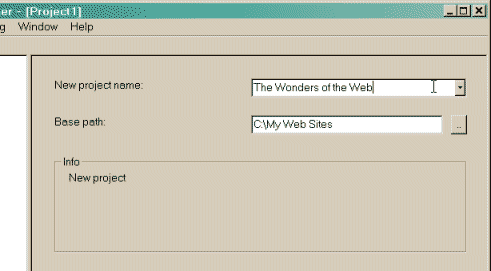 HTTrack is an offline browser utility that allows you to download a website from the Internet to a local directory, building recursively all directories, getting html, images, and other files from the server to your computer. HTTrack Website Copier arranges the original site’s relative link-structure. All you need to do is to simply open a page of the “mirrored” website in your browser, and you can browse the site from link to link, as if you were viewing it online. The program can also update an existing mirrored site, and resume interrupted downloads. It is fully configurable, and has an integrated help system. HTTrack is an offline browser utility that allows you to download a website from the Internet to a local directory, building recursively all directories, getting html, images, and other files from the server to your computer. HTTrack Website Copier arranges the original site’s relative link-structure. All you need to do is to simply open a page of the “mirrored” website in your browser, and you can browse the site from link to link, as if you were viewing it online. The program can also update an existing mirrored site, and resume interrupted downloads. It is fully configurable, and has an integrated help system.
HTTrack Website Copier is so easy to understand that you won’t encounter any difficulty when it comes to downloading and installing it on your system. The publisher also provides a documentation page where you can find more info about HTTrack Website Copier for Windows. Moreover you can also check the forum for more information or topics on how to use the program. You can get help on how this version of Windows works, and how the Command line version works as well. HTTrack Website Copier is available as a freeware.
Want to check it out? Visit Httrack.
Posted in Main | No Comments »
Wednesday, February 1st, 2012
 RegDoctor can safely and quickly clean and repair Windows registry problems with a few simple mouse clicks. The program uses an intelligent, high-performance detection engine to accurately identify missing and invalid references in your Windows registry. Identified registry problems are listed and rated by risk level using an easy to understand color-coded system for your information. You can choose to have the program automatically repair all identified problems, or more selectively choose which problems to repair immediately. RegDoctor can safely and quickly clean and repair Windows registry problems with a few simple mouse clicks. The program uses an intelligent, high-performance detection engine to accurately identify missing and invalid references in your Windows registry. Identified registry problems are listed and rated by risk level using an easy to understand color-coded system for your information. You can choose to have the program automatically repair all identified problems, or more selectively choose which problems to repair immediately.
RegDoctor uses an intelligent, high-performance detection engine to accurately identify missing and invalid references in your Windows registry. RegDoctor offers a Restore feature to create registry backup files, giving you the capability to safely undo any registry changes. The auto-start feature of the program helps to support its regular use. By using RegDoctor regularly to clean and repair your registry, your system should not only be more stable but it will also help Windows and your software run faster. A few key features of RegDoctor include the following; safely clean and repair Windows registry problems with a couple of clicks, intelligent, high-performance detection engine to accurately identify missing and invalid references in your Windows registry, automatic features enable you to repair identified issues, and many more.
Want to check it out? ITcompany.
Posted in Main | No Comments »
Tuesday, January 31st, 2012
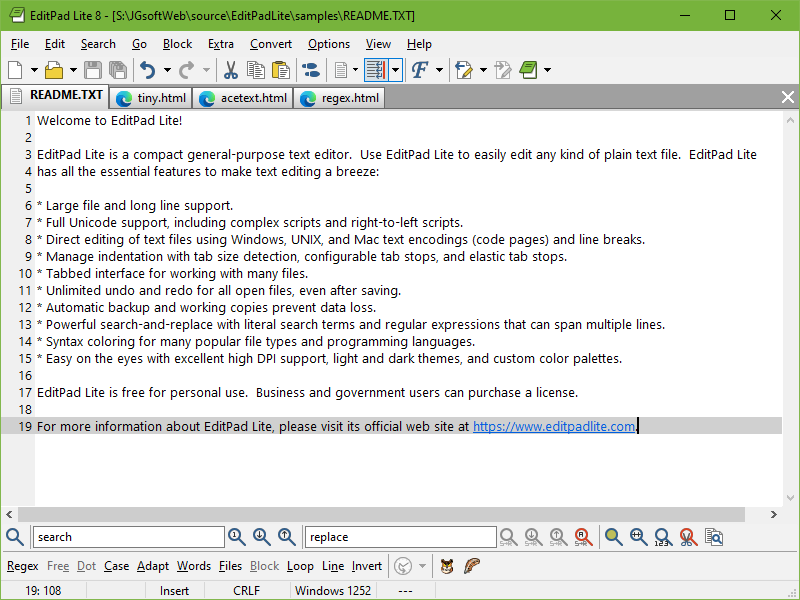 EditPad Lite is a general-purpose text editor, designed to be small and compact, yet offer all the functionality you expect from a basic text editor. The program has a couple of outstanding features that make it different from a few other programs out there today. EditPad Lite doesn’t offer you any major difficulty when it comes to usage, and this is a rare feature in most competing programs today; and this is quite commendable on the part of the publisher. There are quite a lot of things you can achieve with EditPad Lite; and you can be sure they are quite easy. EditPad Lite is a general-purpose text editor, designed to be small and compact, yet offer all the functionality you expect from a basic text editor. The program has a couple of outstanding features that make it different from a few other programs out there today. EditPad Lite doesn’t offer you any major difficulty when it comes to usage, and this is a rare feature in most competing programs today; and this is quite commendable on the part of the publisher. There are quite a lot of things you can achieve with EditPad Lite; and you can be sure they are quite easy.
EditPad Lite for Windows has a lot of key features including the following; easily open and edit many text files at the same time since man y of its editing commands can work on all files in a given project at once, quickly find the part of the file you want to edit (highlight matches, fold lines, and skip over matches and files), clip collection makes it easy to keep a list of text snippets at your fingertips, ready to be inserted into the file’s you’re editing, choose how many backup copies you want to keep and/or for how long, and many more.
Want to check it out? Visit EditPadLite.com.
Posted in Main | No Comments »
Tuesday, January 31st, 2012
 JavaRa will check if your computer has the latest version of Java Runtime Environment (JRE). If the version you have installed has been superseded by a newer version the program will download and install this newer version for you, by running Java’s update program. JavaRa will then allow you to remove all possible older versions of this program. This will ensure that the security of your computer is enhanced and extra space on your hard disk is created. As with every program, the JRE is updated on a regular basis because this is necessary to add new functionalities, to remove programming bugs or to repair possible vulnerabilities. Doing all those ensures that the security of your computer is enhanced and extra space on your hard disk is created. JavaRa will check if your computer has the latest version of Java Runtime Environment (JRE). If the version you have installed has been superseded by a newer version the program will download and install this newer version for you, by running Java’s update program. JavaRa will then allow you to remove all possible older versions of this program. This will ensure that the security of your computer is enhanced and extra space on your hard disk is created. As with every program, the JRE is updated on a regular basis because this is necessary to add new functionalities, to remove programming bugs or to repair possible vulnerabilities. Doing all those ensures that the security of your computer is enhanced and extra space on your hard disk is created.
JavaRa key features include the following; cleanse up all leftovers immediately after any uninstall is carried out with a single button, supports a growing number of command line parameters, removes old and redundant versions of Java Runtime on your system that may pose some security and vulnerability issues or threats, and a few others. JavaRa currently supports Windows 9x, 2k, XP, and Vista without UAC.
Want to check it out? Visit Raproducts.org and SingularLabs.
Posted in Main | 2 Comments »
Sunday, January 29th, 2012
 O&O DiskImage will enable you create images and restore entire systems quickly and easily. The application offers reliable protection from unforeseen data loss. All standard and professional functions are bundled up in one product. Automated, as well as individual settings are possible; all thanks to the Start CD, which includes additional system rescue tools, you will quickly have all your important data available again; even, if Windows does not start up anymore. O&O DiskImage will enable you create images and restore entire systems quickly and easily. The application offers reliable protection from unforeseen data loss. All standard and professional functions are bundled up in one product. Automated, as well as individual settings are possible; all thanks to the Start CD, which includes additional system rescue tools, you will quickly have all your important data available again; even, if Windows does not start up anymore.
O&O DiskImage combines features for both the home user and the IT expert in one single product. A whole range of default and user-defined options lets you create the backup scenario that suits you best. A boot-medium containing additional system recovery tools will let you quickly restore important data -even when the images were created with older versions of the product. Key features of the program include the following; image an entire computer with the push of a button, create images of system and data drives, clone drives and entire disks, backup and restore individual files and/or folders (new feature), automatic Updates to current Program Versions (new feature), improved machine Independent Restoration (M.I.R.), advanced burning on CD/DVD/Blu-ray/HD-DVD, works with Microsoft Virtual PC Disks (VHD), mount data from ISO files (a new feature), and many more.

Want to check it out? Visit OO-Software.
Posted in Main | No Comments »
Saturday, January 28th, 2012
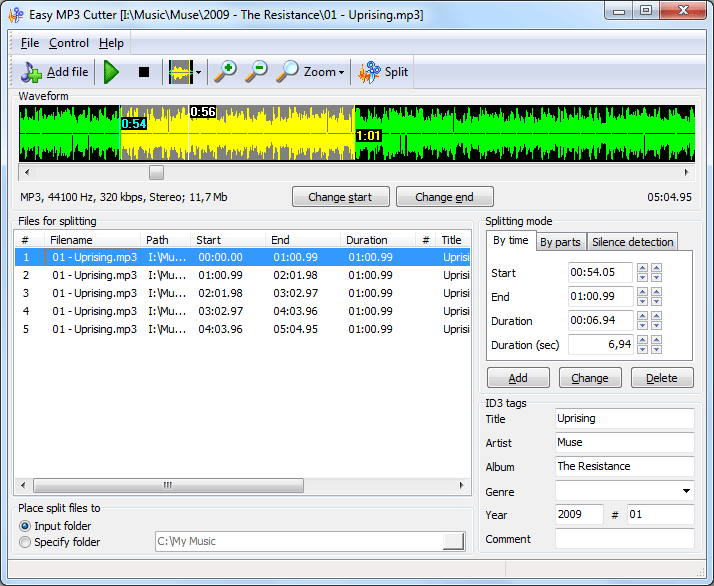 Easy MP3 Cutter allows you to split a large MP3 or WAV file into a number of smaller ones. This can be useful in separating logical parts of a continuous recording and organizing them for easy access, or in case you need only a part of the recording (for example, to use later as a tune for your cellular phone). Easy MP3 Cutter is small and handy, and doesn’t require its user to be experienced in audio editing. Easy MP3 Cutter supports Drag&Drop, batch MP3/WAV splitting, multilingual interface, and can supply output files with user defined ID3v1 and ID3v2 tags. Easy MP3 Cutter allows you to split a large MP3 or WAV file into a number of smaller ones. This can be useful in separating logical parts of a continuous recording and organizing them for easy access, or in case you need only a part of the recording (for example, to use later as a tune for your cellular phone). Easy MP3 Cutter is small and handy, and doesn’t require its user to be experienced in audio editing. Easy MP3 Cutter supports Drag&Drop, batch MP3/WAV splitting, multilingual interface, and can supply output files with user defined ID3v1 and ID3v2 tags.
Easy MP3 Cutter enables you to automatically cut your MP3 or WAV file into equal parts by specifying duration, number of output parts or size of each resulting file. If there is silence between the parts you want to extract, the program can detect it and mark the parts for splitting with just one click. Also, visual audio splitting option is available, in which the splitting boundaries are set manually on the audio waveform. The program also has built-in audio player that helps to recognize and verify the exact point of splitting. Easy MP3 Cutter doesn’t recompress your files, so no quality losses occur during splitting.
Want to check it out? Visit MyMusicTools.
Posted in Main | No Comments »
Friday, January 27th, 2012
 OutlookTabs makes it a breeze to manage and organize your email tabs. The session is saved so when you restart Outlook your tabs are restored. The program works on Microsoft Outlook 2010 and 2007 and supports Windows 7 / Vista and Windows XP SP2. OutlookTabs works with most Outlook addins. With OutlookTabs you can keep multiple email folders open in one Outlook window so you can keep an eye on the conversations which are important. OutlookTabs hooks seamlessly into Outlook so the only new stuff you have to learn is how use the extra power. You can easily and conveniently do email just the way you want it and precisely how you want it to be with this program. OutlookTabs makes it a breeze to manage and organize your email tabs. The session is saved so when you restart Outlook your tabs are restored. The program works on Microsoft Outlook 2010 and 2007 and supports Windows 7 / Vista and Windows XP SP2. OutlookTabs works with most Outlook addins. With OutlookTabs you can keep multiple email folders open in one Outlook window so you can keep an eye on the conversations which are important. OutlookTabs hooks seamlessly into Outlook so the only new stuff you have to learn is how use the extra power. You can easily and conveniently do email just the way you want it and precisely how you want it to be with this program.
OutlookTabs comes with a lot of key features that include the following; keep multiple email folders open in one Outlook window so you can keep an eye on the conversations which are important, works on Microsoft Outlook 2010 and 2007 and supports Windows 7 / Vista and Windows XP SP2, easy to install and configure, freedom to do email the way you want it and how you want it, hooks seamlessly into Outlook so the only new stuff you have to learn is how use the extra power, and many more.
Want to check it out? Visit OutlookTabs.
Posted in Main | 1 Comment »
Friday, January 27th, 2012
 Audio Speed Changer is an application that enables you to speed up audio files without affecting the pitch. The program is primarily intended for accelerating audio books as well as podcasts, but can also be used with any other sound track or file. The batch processing feature and convenient user interface make Audio Speed Changer Pro a valuable tool for book listeners and authors who want to save time. Version 1.4 includes a number of features and fixes such as; command line interface (CLI), digital signature for the main and setup executables, tested compatibility with the Windows 8 Developer Preview, all the BASS libraries are now up to date, and corrected grammar. Audio Speed Changer is an application that enables you to speed up audio files without affecting the pitch. The program is primarily intended for accelerating audio books as well as podcasts, but can also be used with any other sound track or file. The batch processing feature and convenient user interface make Audio Speed Changer Pro a valuable tool for book listeners and authors who want to save time. Version 1.4 includes a number of features and fixes such as; command line interface (CLI), digital signature for the main and setup executables, tested compatibility with the Windows 8 Developer Preview, all the BASS libraries are now up to date, and corrected grammar.
Audio Speed Changer Pro is designed with a number of amazing features that include the following; individual tag editing, handles the MP3, OGG, WAV, and AAC/MP4/M4A/M4B file formats as input, allows you to specify different tempo changing, pitch shifting, and the playback rate multiplier for separate files in the list, previewing of changes before final conversion, supports configurable output to the MP3, OGG, PCM/WAV, and AAC/MP4 file formats, ability to normalize volume level of all output files, works on all NT-based operating systems, from Microsoft Windows 2000 and XP, up to Windows Vista and 7, including x64 editions, and a few others.
Want to check it out? Visit Superutils.
Posted in Main | No Comments »
|
|
|




