Archive for the 'Main' Category
Thursday, January 5th, 2012
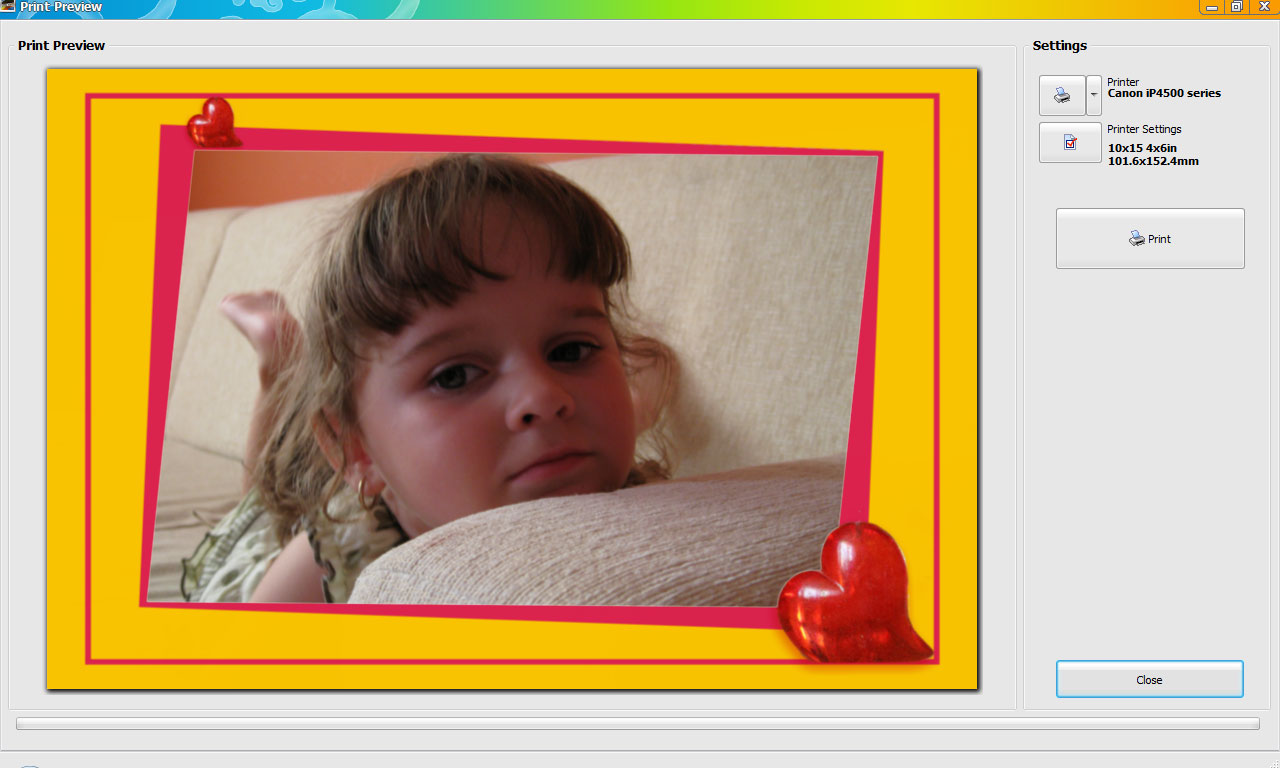 Photo Frame Studio has been designed to edit and decorate digital photographs. With this program, each picture will look different and operating our program will be a real pleasure for you. Photo Frame Studio offers over 200 frames and what is more, every one of them can be modified by the options which are contained in the program. The interface of the program is user-friendly and it has been designed in such a way that everyone can operate it without any problems. You can decorate your picture using a few instructions by means of adding to it a frame, a mask, the background, a shade or a text. Photo Frame Studio has been designed to edit and decorate digital photographs. With this program, each picture will look different and operating our program will be a real pleasure for you. Photo Frame Studio offers over 200 frames and what is more, every one of them can be modified by the options which are contained in the program. The interface of the program is user-friendly and it has been designed in such a way that everyone can operate it without any problems. You can decorate your picture using a few instructions by means of adding to it a frame, a mask, the background, a shade or a text.
With Photo Frame Studio, you can print pictures using your printer as well as save ready photos in high quality mode in order to send them to photo-labs. Moreover you can also save pictures in lower quality mode so that they can be published in the internet. Some of the key features of the program include the following; multilingual support including English, German, Portuguese, Spanish, Italian, French, Norwegian, Swedish, Polish, Czech, Hungarian, Russian, Bulgarian, Farsi(Persian), Serbian, Romanian, Croatian, Unicode support, support right to left languages (like Arabic, Hebrew), export to high resolution (300 DPI , 600 DPI) PDF, jpg, tiff, bmp graphics file, and many more.
Want to check it out? Visit PhotoFrameStudio.
Posted in Main | 1 Comment »
Thursday, January 5th, 2012
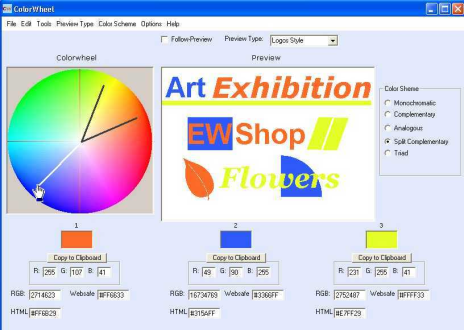 Free Colorwheel is a free application for creating correct color schemes for graphic designs such as images, WebPages. The program can be used to create 5 different types of color schemes including; Monochromatic, Complementary, Analogous, Split Complementary and Triad Colors each having a different effect. A preview of the color scheme is being shown and also the RGB, HTML, Websafe codes of the colors. Life Software Colorwheel provides also the HTML code for creating colored HTML scroll-bars and also a converter for color code formats (RGB, HTML, Websafe formats). Free Colorwheel is a free application for creating correct color schemes for graphic designs such as images, WebPages. The program can be used to create 5 different types of color schemes including; Monochromatic, Complementary, Analogous, Split Complementary and Triad Colors each having a different effect. A preview of the color scheme is being shown and also the RGB, HTML, Websafe codes of the colors. Life Software Colorwheel provides also the HTML code for creating colored HTML scroll-bars and also a converter for color code formats (RGB, HTML, Websafe formats).
Free Colorwheel has an interesting feature that makes it more intuitive to use. At heart, it is a CW/RW system with an un-normalised color wheel. However, and unlike a few other similar programs out there, Free Colorwheel represents two dimensions of the color space, lightness and hue2, and the user can extend the wire-frame (so that the colors chosen are full-saturation hues) or contract it (so that the colors are light, low saturation colors, typically called pastels). This makes the program more intuitive when it comes to being used than some of the other color choice interfaces even though the number of colors chosen is restricted to just 3.
Want to check it out? Visit ColorWheel.
Posted in Main | No Comments »
Thursday, January 5th, 2012
 Microsoft PerfView is a performance-analysis tool that helps isolate CPU- and memory-related performance issues. The program is a performance analysis tool focusing on ETW information (ETL files) as well as CLR memory information (heap dumps). Microsoft PerfView can collect and view ETL files as well as XPERF CSV files. Powerful grouping operators allow you to understand performance profiles in ways other tools can’t. The program is used internally at Microsoft by a number of teams and is the primary performance investigation tool on the .NET Runtime team. Microsoft PerfView is a performance-analysis tool that helps isolate CPU- and memory-related performance issues. The program is a performance analysis tool focusing on ETW information (ETL files) as well as CLR memory information (heap dumps). Microsoft PerfView can collect and view ETL files as well as XPERF CSV files. Powerful grouping operators allow you to understand performance profiles in ways other tools can’t. The program is used internally at Microsoft by a number of teams and is the primary performance investigation tool on the .NET Runtime team.
Microsoft PerfView is used internally at Microsoft by a number of teams and is the primary performance investigation tool on the .NET Runtime team. Microsoft PerfView has a lot of features that include the following; Xcopy deployment – copy and run, non-invasive collection – suitable for use in live, production environments, memory, support for very large heaps (gigabytes), Snapshot diffing, Dump files (.dmp), CPU Performance, Support for managed, native, and mixed code, Can read XPerf logs, and Profile diffing.
Actually, you wouldn’t be finding this program difficult to use since it doesn’t require any installation; all you need to do is copy and run. You can find more help or information on the “Help” or user guide section.
Want to check it out? Visit Microsoft
Posted in Main | No Comments »
Thursday, January 5th, 2012
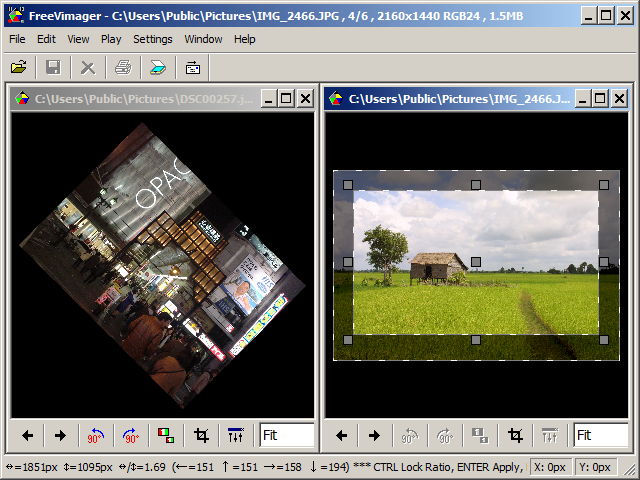 FreeVimager can as well play avi video files and some type of audio files. Actually, there are many tools around doing similar thing, but the aim of the program is to be a small and handy tool doing what it says and running also as a standalone exe file. IPTC & XMP single file/batch editing support for jpeg and tiff files. Batch Processing and CD / DVD Slideshow creation. Recursive directory slideshow to view all files in a directory and its subdirectories. Print Preview with image positioning by dragging. FreeVimager can as well play avi video files and some type of audio files. Actually, there are many tools around doing similar thing, but the aim of the program is to be a small and handy tool doing what it says and running also as a standalone exe file. IPTC & XMP single file/batch editing support for jpeg and tiff files. Batch Processing and CD / DVD Slideshow creation. Recursive directory slideshow to view all files in a directory and its subdirectories. Print Preview with image positioning by dragging.
FreeVimager has a lot of key features that include the following; support for all Windows versions from Windows 95 up to Windows 8, The program is freeware and available in four languages including English, German, Italian and Russian, Touch screen gestures support for zoom in/out and for next/previous picture, View & Edit picture files of type like jpeg, bmp, gif, tiff (multi-page), png, pcx and emf, save As PDF command, Jpeg lossless rotate and crop, full-screen multi-monitor support, the executable only version stores the settings to a INI file in the same directory, Unicode support: Open, Edit, Batch Process or Batch Rename your files named in Russian, Indian, Chinese, Japanese, and many more.
Want to check it out? Visit Contaware.
Posted in Main | No Comments »
Wednesday, January 4th, 2012
 Program Protector is a security utility, which allows you to password protect any Windows application. This functionality is achieved by modifying executable file of the application, so that it requires entering valid password before program can start. It is unique because unlike other protection software, it does not run any protection programs in background to provide functionality. Program Protector is a security utility, which allows you to password protect any Windows application. This functionality is achieved by modifying executable file of the application, so that it requires entering valid password before program can start. It is unique because unlike other protection software, it does not run any protection programs in background to provide functionality.
Program Protector is also a unique program because it works with any Windows program, and unlike other protection software, it is safe against circumvention. Malicious or potentially dangerous programs cannot disable protection by renaming the protected program file or simply uninstalling Program Protector.
Program Protector includes a lot of key features such as; password protect any Windows application, drag and drop program files and shortcuts to protect them, browse the list of protected programs, password protect the Program Protector itself, customize password prompt, view protected program activity log, 100% protection, can’t be bypassed, compatible with all programs, including Internet Explorer and Outlook Express, and very easy to use. Program Protector supports the following operating systems; Windows 2000, Windows XP, Vista, Windows 7 (32-bit and 64-bit). The publisher is also offering a 30 day money back guarantee to users; and that is something to look forward to.
Want to check it out? Visit Blumentals.
Posted in Main | No Comments »
Tuesday, January 3rd, 2012
 ContaCam is a Security Surveillance and Live Webcam solution for Windows that supports an unlimited number of WDM, VfW, DV and Network cameras. The publisher has carried out and included a lot of changes that make the ContaCam works even better than previous version. Some of the changes and additions include the following; overall speed optimizations and memory page faults reduction, especially the motion detection engine is now less CPU intensive, motion detection configurable zones size, new command to import/export motion detection zones, External motion trigger file to support contact sensors and PIR detectors, and a couple of others. ContaCam is a Security Surveillance and Live Webcam solution for Windows that supports an unlimited number of WDM, VfW, DV and Network cameras. The publisher has carried out and included a lot of changes that make the ContaCam works even better than previous version. Some of the changes and additions include the following; overall speed optimizations and memory page faults reduction, especially the motion detection engine is now less CPU intensive, motion detection configurable zones size, new command to import/export motion detection zones, External motion trigger file to support contact sensors and PIR detectors, and a couple of others.
ContaCam also include a lot of quality features such as; motion detection actions like FTP upload, send email (SSL/TLS or STARTTLS support) with attached movement file or run an external program, live webcam with possibility of history tracking, see this live demo and select a past day, Integrated web server with password protection (internet or intranet), supports Webcams, WDM and DV devices and Network cameras (IP cameras), unlimited parallel cameras setup, can be started as a windows service, Audio storing with the 24 hours recording mode (no audio record on motion detection), Support for all Windows versions from Windows 95 up to Windows 7, and many more.
Want to check it out? Visit Contaware.
Posted in Main | No Comments »
Tuesday, January 3rd, 2012
 Rank Tracker Enterprise is not only a fast and accurate rank monitoring tool, it also works as a powerful keyword research program and an indispensable reporting tool for SEO companies. Rank Tracker Enterprise 5.8.1 features a couple of new changes that include the following; you can now track rankings as if you are in another country (Google gl parameter added), Yahoo BOSS 2.0 API supported, CSV data exports improved, and number of supported search engines has reached 774. The program requires Java Runtime Environment 1.5 before it can function properly on your system. Rank Tracker Enterprise is not only a fast and accurate rank monitoring tool, it also works as a powerful keyword research program and an indispensable reporting tool for SEO companies. Rank Tracker Enterprise 5.8.1 features a couple of new changes that include the following; you can now track rankings as if you are in another country (Google gl parameter added), Yahoo BOSS 2.0 API supported, CSV data exports improved, and number of supported search engines has reached 774. The program requires Java Runtime Environment 1.5 before it can function properly on your system.
Rank Tracker Enterprise lets you check your client’s rankings in a dozen of search engines, for a thousand keywords, without spending weeks rummaging through Google’s results pages manually. That means you can impress a lot of clients with professional-looking ranking reports that demonstrate the deliverable and keep the customer happy with this program.
Rank Tracker Enterprise enables you to cut costs by simply improving efficiency, thereby automating those tremendously time-consuming tasks as much as possible within a very short time. Rank Tracker Enterprise is able to assist you cut costs dramatically by slashing the time spent on those activities up to about 90% and enabling your staff to accomplish a lot more in less time.
Want to check it out? Visit Rank-Tracker.
Posted in Main | No Comments »
Tuesday, January 3rd, 2012
 PC Activity Monitor is designed for monitoring user’s PC activity, and works under Windows 2000/XP operating systems. All data collected by the monitoring are saved to the encrypted log file located on the user’s machine. Monitoring program works in background, transparent for the user, on the level of OS kernel. PC Activity Monitor supports UNICODE. Another strong side is its protection measures, and is completely hidden, and even the experienced user cannot locate, stop or destroy the program. PC Activity Monitor is designed for monitoring user’s PC activity, and works under Windows 2000/XP operating systems. All data collected by the monitoring are saved to the encrypted log file located on the user’s machine. Monitoring program works in background, transparent for the user, on the level of OS kernel. PC Activity Monitor supports UNICODE. Another strong side is its protection measures, and is completely hidden, and even the experienced user cannot locate, stop or destroy the program.
PC Activity Monitor has unique monitoring features that favorably distinguish it from a couple of other monitoring software. Some of these unique features include the following; interception of all languages (UNICODE support), Window text capturing, keystroke capturing, clipboard capturing, capturing of text from Microsoft Office documents, internet monitoring (visit websites), recording e-mails, instant messengers and chats, recording of system logon name/password, high transparency and invisibility in the system, smart-looking reports converted into HTML format, archiving of recorded data stored in the database, silent installation of the monitoring agent, client/server architecture, remote monitoring via a network, centralized data storage, processing and analyzing, secure transmission of log files, and a lot more.
PC Activity Monitor has a couple of bug fixes and updates; and you can find out more when you download a trail copy that is limited to only 10 days.
Want to check it out? Visit PCacme.com.
Posted in Main | No Comments »
Friday, December 30th, 2011
 Productivity software, especially those designed for being document editor and creator, are seldom made with any effort to give the users something really new, and groundbreaking. If you are bored of working in the same old MS Word, or other similar programs, may be its high time you tried something entirely new- from a different league altogether. Well, if your answer is “YES”, just give a quick look at the Document Speaker 5.0, a software from the house of SteelSoft, which has been designed with facilitating you an entirely new experience. Productivity software, especially those designed for being document editor and creator, are seldom made with any effort to give the users something really new, and groundbreaking. If you are bored of working in the same old MS Word, or other similar programs, may be its high time you tried something entirely new- from a different league altogether. Well, if your answer is “YES”, just give a quick look at the Document Speaker 5.0, a software from the house of SteelSoft, which has been designed with facilitating you an entirely new experience.
As it is clear from the name of the title, document speaker it is a software designed with ability to read documents in loud human voice along with listening e-books, Word Documents, PowerPoint documents and also can read any text on your PC. User can convert documents into wave files to make it compatible for their audio player and also helpful for modern gadgets users like iPod etc. With this software conversion is possible at fast speed and by following easy steps and the best part is it can also convert into files that are supported by your car player and one can take advantage of this software at time of driving car. Sometimes files are too large and boring to read on your own that user feels uneasy to read it so now with this software he can hear that document by just clicking on “Speak”. The other features that come with this software are as follows: one can listen all types of DOC, PDF, TXT files, convert the complete text of document to Wave to make it ready to play in audio mode, user can control its volume, speed and user can select different speaker as its settings are customizable.
To conclude software comes with easy to use controls and user friendly interface as it provides timely notification of all events taking place progress of conversion.
{More Info and Download}
Posted in Main | No Comments »
Thursday, December 29th, 2011
 Password Depot is a powerful and extremely user-friendly tool for the management of all your passwords. The application uses some of the latest security algorithms such as BlowFish and Rijndael to encrypt your files. Password Depot’s file shredding method complies with the directives DOD 5220.22-M of the US Department of Defence and allows you to fully destroy files created with the program. User-friendly interface similar to Windows Explorer allows for the efficient navigation through your password lists. Password Depot enables you to protect your passwords from external access to the best possible extent due to double encryption with AES (Rijndael 256). Password Depot is a powerful and extremely user-friendly tool for the management of all your passwords. The application uses some of the latest security algorithms such as BlowFish and Rijndael to encrypt your files. Password Depot’s file shredding method complies with the directives DOD 5220.22-M of the US Department of Defence and allows you to fully destroy files created with the program. User-friendly interface similar to Windows Explorer allows for the efficient navigation through your password lists. Password Depot enables you to protect your passwords from external access to the best possible extent due to double encryption with AES (Rijndael 256).
Password Depot has a lot of key features that include the following; memorize only one password, save your passwords locally and also on a USB device, mobile phone, in the network or on an FTP server, your passwords are protected from external access to the best possible extent due to double encryption with AES (Rijndael 256), store your software licenses, documents, TANs and credit cart data, with Password Depot Server, you can manage password files in the network to use them together in a team, and a few others. Password Depot is very easy to use, and saves you a lot of stress when it comes to keeping or remembering too many passwords.
Want to check it out? Visit Password-depot.
Posted in Main | No Comments »
|
|
|




