Archive for the 'Main' Category
Wednesday, November 2nd, 2011
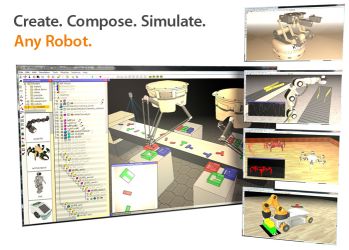 V-REP Player is a totally free application that can run robotic simulations on almost any suitable Windows system. It is founded on V-REP, the Virtual Robot Experimentation Platform, an advanced application for simulating the function and actions of numerous robotics systems within a 3D environment. It is based on a distributed control architecture, and it lets users run control programs simultaneously in threaded or non-threaded fashion. V-REP Player is a totally free application that can run robotic simulations on almost any suitable Windows system. It is founded on V-REP, the Virtual Robot Experimentation Platform, an advanced application for simulating the function and actions of numerous robotics systems within a 3D environment. It is based on a distributed control architecture, and it lets users run control programs simultaneously in threaded or non-threaded fashion.
You can’t make use of V-REP Player to create simulations, merely play them. Nevertheless, it’s got several possible uses, for example remote monitoring, hardware control, fast prototyping, safety systems, factory automation simulations, and as a teaching tool. It is totally free to use and distribute. The complete version of V-REP is available free for evaluation and to students for home use, and there are online manuals, videos, and other forms of assistance. Opening the V-REP Player’s interface displays a 3D space with a checkerboard-patterned floor.
The program displays the view’s axial orientation (X, Y, and Z) in the lower corner; the user is able to grab this icon and rotate it to rotate the main view. Additionally, V-REP Player offers toolbar controls that can display simulations from any angle, perspective, or aspect, including a flyover camera view, as well as providing the ability to shift, rotate, and tilt the camera or object views; speed controls; and eight radio buttons with which it is very easy to toggle between preset views. The program offers some options, such as the ability to choose either the Bullet or ODE Dynamics Engine and to create MTB Robot Properties modules, including an option to connect with a robotics server through pipes or sockets.
Overall this program is best for remote monitoring, hardware control, fast prototyping and verification, fast algorithm development / parameter adjustment, safety double-checking, robotics-related education, factory automation simulations and even more!
Check out the homepage at V-rep.eu.
Posted in Main | No Comments »
Wednesday, November 2nd, 2011
 Many among us that sit down at a desk all day long understand the significance of getting frequent breaks in order to stretch out muscles as well as refresh tired eyes. However while you are knee-deep in work, you can easily forget to take some time for your own benefit. Many among us that sit down at a desk all day long understand the significance of getting frequent breaks in order to stretch out muscles as well as refresh tired eyes. However while you are knee-deep in work, you can easily forget to take some time for your own benefit.
Workrave offers users an easy way to set break reminders. Its interface could use a little work in the design department, however it gets the job done. Workrave really is not much to look at. A box appears on your desktop. It has three break options – Micro-break, Rest break, Daily Limit – each represented by a vague icon. To configure each break, you have to right-click on the system-tray icon. From there, the Preferences menu lets you enable/disable each timer, modify the time between breaks, and set the break durations.
You also have the choice of displaying the Postpone and Skip buttons when the timers go off. There is a User Interface option for choosing sounds, and an always-on-top option that keeps the program on top of whatever you are working on at the moment. When the appropriate timer expires, a box will flash around on your screen and a sound will let you know that it is time to have a break. As an extra, Workrave includes a series of exercises that you can scroll through to get the most out of your break time. Workrave does not have a help feature, but one isn’t really needed as it’s quite easy to use.
Check it out at Workrave.org/
Posted in Main | No Comments »
Wednesday, November 2nd, 2011
 There is certainly an almost endless availability of Web-based resources that will convert almost any measurement from one unit to another. If you want to convert really obscure units, however, or need a conversion tool frequently, try out Unit Converser Professional from Inventive Design. There is certainly an almost endless availability of Web-based resources that will convert almost any measurement from one unit to another. If you want to convert really obscure units, however, or need a conversion tool frequently, try out Unit Converser Professional from Inventive Design.
It’s a totally free Flash-based tool that converts more than 800 pairs of units in 32 categories. Additionally, it features a calculator and a library of scientific formulas. Unit Conversion Professional’s dialog-style interface starts with its menu page, which offers two scrolling lists, View Formulas and Convert Units. The conversion units are categorized from Acceleration to Volume. Simply clicking on a category calls up applicable conversion tools; clicking on Menu takes you back to the menu page. You can also select Browse A-Z, which shows a list which range from Abampere-Current to Zip 250-Data Storage; an outstanding variety.
Conversions are very simple: just enter the values and units and the tool does the rest. The View Formulas list works in similar fashion; for example, clicking on Mechanics calls up a list of variables and equations for velocity, acceleration, angle, and more. You will be able to print any view or expand or contract the view from the interface by clicking plus and minus icons. The Calculator tool has an interesting angled 3D perspective and a realistic rendition. It is a basic calculator, not a scientific tool. This program has no Help file besides an About file for Adobe Flash Player, but it needs none. Unit Converter Professional is completely free and supported by Windows 98 / Me / 2000 / XP / 2003 / Vista / 7.
Check it out at Inventive-design.com.
Posted in Main | No Comments »
Tuesday, November 1st, 2011
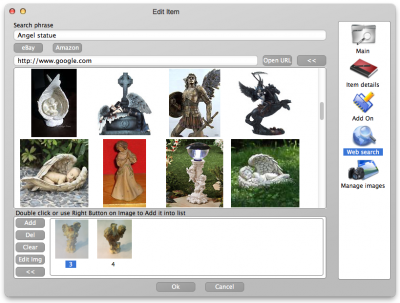 LignUp Multi Collector is a universal tool for managing many collections with any collectibles. The application includes a host of key features like creating custom collection database; capturing images from web camera, get images online, correct images in graphic editor, and edit various categories; password protection; report generation as PDF document and HTML site; smart filters and data sorting. LignUp Multi Collector is a universal tool for managing many collections with any collectibles. The application includes a host of key features like creating custom collection database; capturing images from web camera, get images online, correct images in graphic editor, and edit various categories; password protection; report generation as PDF document and HTML site; smart filters and data sorting.
With the LignUp Multi Collector lots of separate elements become a genuine treasure; an ordered harmonious collection. Each item keeps its own place in right category, and you can easily assort the collection as you like, add random sections and keep all necessary information about items in database.
When you install LignUp Multi Collector on your system, some of the features you can look forward to include the following; choose between dozens of categories or create custom one for your own needs, make photo of your items directly from your web camera, and edit your images using embedded image editor, search online information and capture images directly from program, use Google, eBay and Amazon to find proper images, keeps all information in the way you prefer, provides data export to many popular file formats (PDF, Excel CSV, HTML), so you can proudly present your collection to anyone, and many more.
Want to check it out? Visit Lignup.com.
Posted in Main | No Comments »
Tuesday, November 1st, 2011
 Sender’s Time Zone for Outlook is an application that will show you the sender’s local time when you open or reply to an e-mail message. As soon as the Sender’s Time Zone is installed, no setting and no configuring is required; and from then on, you will never be confused with the time zones differences. You just open an e-mail message and besides the standard Outlook timestamp, you will see the sender’s current time, your time zone difference and the time since the message was sent. Sender’s Time Zone for Outlook has undergone a lot of changes that include some of the following; addition of support for 64-bit version of Microsoft Outlook 2010, addition of feature that lets you customize sender’s time zone option, and addition of sender’s time zone panel shows up in the Outlook Explorer reading pane when replying to a message. Sender’s Time Zone for Outlook is an application that will show you the sender’s local time when you open or reply to an e-mail message. As soon as the Sender’s Time Zone is installed, no setting and no configuring is required; and from then on, you will never be confused with the time zones differences. You just open an e-mail message and besides the standard Outlook timestamp, you will see the sender’s current time, your time zone difference and the time since the message was sent. Sender’s Time Zone for Outlook has undergone a lot of changes that include some of the following; addition of support for 64-bit version of Microsoft Outlook 2010, addition of feature that lets you customize sender’s time zone option, and addition of sender’s time zone panel shows up in the Outlook Explorer reading pane when replying to a message.
The program is easy to install, light on your computer; and requires no major configuration. Once you open an email, and besides the standard Outlook timestamp you will see the sender’s current time, the time zone difference (i.e. the number of hours behind or ahead) and the time since the message was sent.
Want to check it out? Visit Ablebits.com.
Posted in Main | No Comments »
Monday, October 31st, 2011
 GPS Tracker Data Logger acts as the server and allows you to collect data from an unlimited number of various GPS trackers simultaneously. The data obtained is processed, uniformed and written to a log file or a database. Also, the program has a set of interfaces so other applications can get data in real time. GPS Tracker Data Logger is built with capacity to convert data into other formats (the formats of other trackers) and send them to other servers. This shareware application also allows you to connect previously unsupported devices to existing systems or view data from heterogeneous GPS trackers with the help of integrated client software. GPS Tracker Data Logger acts as the server and allows you to collect data from an unlimited number of various GPS trackers simultaneously. The data obtained is processed, uniformed and written to a log file or a database. Also, the program has a set of interfaces so other applications can get data in real time. GPS Tracker Data Logger is built with capacity to convert data into other formats (the formats of other trackers) and send them to other servers. This shareware application also allows you to connect previously unsupported devices to existing systems or view data from heterogeneous GPS trackers with the help of integrated client software.
GPS Tracker Data Logger can be used to solve a lot of problems; but you need a few technical skills to be sure you are doing the right thing. The program helps you to considerably reduce your company’s expenses due to reduced expenditure on deviations from the route, and prevents personal use of company’s vehicles. Companies can also reduce the amount of client and server software being used thanks to the possibility to receive and process data from various trackers. There are lots of other things you can achieve by using GPS Tracker Data Logger, but be sure you have some technical ability.
Want to check it out? Visit Aggsoft.
Posted in Main | No Comments »
Monday, October 31st, 2011
 BitTally is a professional and reliable network monitoring application that is more than a low-level packet sniffer, like the ones in use by most network administrators, programmers, and other geek types. BitTally is for normal people – like managers, parents, etc – who want to know what is going on their networks. The program includes a lot of functions or features that will help you do a lot of things easier than a couple of premium programs out there. The applications’ engine is based on based on Deep Packet Inspection technology (DPI). BitTally recognizes over 100 application protocols including the following; BitTorrent, eDonkey, FTP, HTTP, SMTP, POP3, SIP, Skype, and many more. Users can also be sure that the program also supports encrypted BitTorrent, Skype, and a host of others. BitTally is a professional and reliable network monitoring application that is more than a low-level packet sniffer, like the ones in use by most network administrators, programmers, and other geek types. BitTally is for normal people – like managers, parents, etc – who want to know what is going on their networks. The program includes a lot of functions or features that will help you do a lot of things easier than a couple of premium programs out there. The applications’ engine is based on based on Deep Packet Inspection technology (DPI). BitTally recognizes over 100 application protocols including the following; BitTorrent, eDonkey, FTP, HTTP, SMTP, POP3, SIP, Skype, and many more. Users can also be sure that the program also supports encrypted BitTorrent, Skype, and a host of others.
BitTally is also designed to track bandwidth usage, collecting statistics by user, application protocol, domain, domain category, country. The program also has capacity to detect suspicious activities, reset undesirable TCP connections, or even redirect HTTP sessions. BitTally Lite is created for some specific environment that includes the following; office (by increasing employee productivity), schools and library (set up and enforce acceptable internet usage policies), and in home environment (to help you know what your kids are up to or doing).
Want to check it out? Visit BitTally.
Posted in Main | No Comments »
Sunday, October 30th, 2011
 CodeTwo Outlook Reply All Reminder is a program created to prevent Outlook users from accidental excluding other recipients (specified in the Cc: or To: fields) when replying to a group message. Sometimes it does happen to everyone to forget to hit the Reply instead of the Reply All button, but when it comes to business group correspondence, skipping an important recipient may cause a lot of trouble. CodeTwo Outlook Reply All Reminder is a program created to prevent Outlook users from accidental excluding other recipients (specified in the Cc: or To: fields) when replying to a group message. Sometimes it does happen to everyone to forget to hit the Reply instead of the Reply All button, but when it comes to business group correspondence, skipping an important recipient may cause a lot of trouble.
A lot of people have lost a lot of deals just by hitting the Reply button instead of the Reply All button; and this can cause a lot of problems in the end; especially if you have an important project. Some of these mistakes can be very costly, and can actually make you lose a couple of important deals as well; and that is one of the reasons behind creating this program.
Code Two Outlook Reply All Reminder is an easy to use application that makes things easier for you. What it means is that you may eventually be able to overcome any problem that has to do with hitting the wrong button. The best part is that this program is free, and users can download and use it as soon as possible since it is also easy to understand.
Want to check it out? Visit CodeTwo.
Posted in Main | No Comments »
Sunday, October 30th, 2011
 Bram is a Batch Renamer and Mover program that is used to batch rename files or folders, as well as move them or copy them. You can work with one folder of items or include its subfolders’ items as well. The program offers you different ways by which you can rename files, including dynamic parts that are unique for each file. Bram also has an easy to use interface that will be familiar to anyone who has ever used the Windows file explorer, and also supports multithreading when it performs file and folder operations, so it’s efficient. Bram is a Batch Renamer and Mover program that is used to batch rename files or folders, as well as move them or copy them. You can work with one folder of items or include its subfolders’ items as well. The program offers you different ways by which you can rename files, including dynamic parts that are unique for each file. Bram also has an easy to use interface that will be familiar to anyone who has ever used the Windows file explorer, and also supports multithreading when it performs file and folder operations, so it’s efficient.
Bram is compatible with Windows 7, Vista, and XP, and includes a lot of key features such as; rename multiple files/folders using common naming scheme, dynamic naming scheme parts, undo the last set of changes in case you have some problems with applied changes, when displaying items, you can display either files or folders, when displaying items, you can either display only the items in a folder or you can include all of the items in its subfolders, when displaying files, you can filter the items by file extensions, and lots of other features.
Bram is an application that requires the Microsoft .NET Framework 4.X; and is also available for free download.
Want to check it out? Visit Weebly.com.
Posted in Main | No Comments »
Sunday, October 30th, 2011
 Pazera Free MP4 to AVI Converter is a freeware program that converts MP4, M4V and MP4V files to AVI or MPG (MPEG-1, MPEG-2). MP4 files are commonly used in video sites (YouTube), portable players (iPod, PSP), mobile phones (iPhone) and other devices. The problem is that a lot of players and video editing software does not support the MP4 format; and that is why it is necessary to convert MP4 file to more common formats such as AVI or MPG. This latest version however, includes some few changes such as; new version of FFmpeg, encoder, addition of mechanism to support multiple languages, improved matching of encoding parameters with automatic settings, as well as a couple of bug fixes. Pazera Free MP4 to AVI Converter is a freeware program that converts MP4, M4V and MP4V files to AVI or MPG (MPEG-1, MPEG-2). MP4 files are commonly used in video sites (YouTube), portable players (iPod, PSP), mobile phones (iPhone) and other devices. The problem is that a lot of players and video editing software does not support the MP4 format; and that is why it is necessary to convert MP4 file to more common formats such as AVI or MPG. This latest version however, includes some few changes such as; new version of FFmpeg, encoder, addition of mechanism to support multiple languages, improved matching of encoding parameters with automatic settings, as well as a couple of bug fixes.
If you are a novice and probably wondering how to handle a program like this; well the publisher included some predefined settings to help you get started without any problem. That is not all there is to this program because experience users can also customize video and audio encoding parameters used by encoder including the following; video and video codec, audio and video bitrate, fps, sampling frequency, resolution, volume and a couple of others.
Want to check it out? Visit Pazera-Software.
Posted in Main | No Comments »
|
|
|




