Archive for the 'Main' Category
Thursday, August 27th, 2009
 Pazera has released a couple of video converters in the past. However, the previous video converters are all geared towards specific video formats. The Pazera Video Converters Suite is basically a collection of these video converters so that users do not have to use different applications for video conversion. Pazera has released a couple of video converters in the past. However, the previous video converters are all geared towards specific video formats. The Pazera Video Converters Suite is basically a collection of these video converters so that users do not have to use different applications for video conversion.
The application helps users convert videos to specific mobile devices. Video formats that can play in iPod, Zune and PSP are grouped and tagged according to the device. Most users will no longer have to manually configure the video since the links offered for portable devices are already set for the specific portable device.
Pazera Video Converters Suite also supports FLV and 3GP. Users can covert FLV files into AVI or MPEG. The application also supports conversion of any video format to FLV for faster upload to popular video sharing websites. 3GP support is almost the same as it allows conversion of 3GP to AVI as well as conversion of other popular video formats to 3GP.
Conversion of large file formats is also possible with Pazera Video Converters Suite. Specifically, MP4 files can be converted to AVI and MOV (for iPod) can also be converted into the same file format. Audio extraction is also possible with the application and audio conversion is a breeze.
The simplicity of the interface of the application has made Pazera Video Converters Suite a highly recommended conversion application. This is especially recommended for first time users who do not want to deal with manual configuration. It has helped many users through its collection of shortcuts to various tools with simple explanation on video format conversion.
Check it out at pazera-software.com
Posted in Main | 1 Comment »
Thursday, August 27th, 2009
 Pola is a small and lightweight application that can easily convert any photo into Polaroid format. The application is less than 1MB so downloading the application and using it can only be in minutes even in slow internet connection. Pola is a small and lightweight application that can easily convert any photo into Polaroid format. The application is less than 1MB so downloading the application and using it can only be in minutes even in slow internet connection.
Pola’s unique interface makes it a must download for those who wanted to have a fancy version of their digital images. The application has no buttons as it will allow you to operate the application through mouse clicks. To convert a photo, you simply drag the image you want in the application and wait for it to convert your photo into Polaroid version. If you want to save the file, simply right click on the image and save the image in your preferred destination. Small image files can be converted instantly but high resolution images could require a minute or two. The application automatically provides an almost authentic-Polaroid shot in any image.
Aside from its unique interface, there are also additional features that made Pola a worthy download for those who wanted an instant Polaroid processing application. The application is portable which means you don’t need to install the application just to use it. Simply click on the application file and the Pola will instantly launch. The application is also cross-platform which means Pola can be used in major operating systems. You can place the application in your portable storage device and use in any computer even in a different operating system.
Pola may only have one function but it has enough features that made this application a worthy download for everyone.
Check it out at manuelbarzi.com
Posted in Main | No Comments »
Wednesday, August 26th, 2009
 LuckyWire is basically a clone of a popular P2P file sharing application, LimeWire. But even though it’s a clone of the popular file sharing application, it offers distinct features that made the application a recommended application for many users. LuckyWire is basically a clone of a popular P2P file sharing application, LimeWire. But even though it’s a clone of the popular file sharing application, it offers distinct features that made the application a recommended application for many users.
The interface of LuckyWire is not difficult to understand especially for those who have used LimeWire a few times. Even the default screen of the application has the same look with LimeWire although the buttons have the Mac-like look. The application also loads like LimeWire as it inform the users of the current action of the application before it is completely loaded.
There are two unique features in LuckyWire that can’t be found in the LimeWire. The first unique feature is the information sharing with other websites. Users can share the information about the downloaded file in FaceBook, LiveJournal or send the data via email. The second unique feature of the application is its ability to connect to as many sources possible. This feature is also available in LimeWire but you have to spend before you can avail this feature. The basic account in LimeWire only limits the number of sources which significantly slows down download of the specific file.
The only downside of LuckyWire is that the application has a very large installation file. The installation file size is 43.77mb for LuckyWire while the latest LimeWire version only has 18mb. But with a decent internet connection, LuckyWire can be downloaded in less than an hour and installed in the local computer in minutes.
Check it out luckywire.com
Posted in Main | 2 Comments »
Wednesday, August 26th, 2009
 Modify File Timestamp is an application for advanced computer users but very easy to use. Its sole function is to modify the time and date tags in your file and folders. You’ll be able to implement these changes even though you did not manually access your files. Modify File Timestamp is an application for advanced computer users but very easy to use. Its sole function is to modify the time and date tags in your file and folders. You’ll be able to implement these changes even though you did not manually access your files.
The impressive feature of the application is in its ability to timestamp multiple files and folders. Users simply target the files and folders they want to change and the application will immediately implement your preferred timestamp. This makes it easier for users to change the tags in their files to easily organize the files in their system.
Users can also specify which fields should be changed when timestamp is implemented. Users can choose to change when the file was created, last modified or last accessed. Of course, they can also change these types of data at the same time.
There are two forms of implementation of timestamp in the application: first is auto-synchronization with the computer or a specific time zone. The second format is the specific time and date. You can actually specify the date accessed up to the last second. When users choose multiple files or a folder, the timestamp can implement intervals depending on the user’s specification.
It’s a relatively large application (2.41mb) for this small function. But the file size only increases the speed of the application in the computer without using too much resource. The interface is also very straightforward as the instructions and commands are placed in a single page.
Check it out at moo0.com
Posted in Main | No Comments »
Tuesday, August 25th, 2009
 As the name suggests, the application will help users download videos for free online. The application is geared towards video sharing sites such as YouTube.com. The application is very easy to launch since it does not need installation. Free Video Downloader will launch as soon as the files are extracted from the zipped (.zip) file. As the name suggests, the application will help users download videos for free online. The application is geared towards video sharing sites such as YouTube.com. The application is very easy to launch since it does not need installation. Free Video Downloader will launch as soon as the files are extracted from the zipped (.zip) file.
The interface of Free Video Downloader is very small. The application starts with a small box that asks users if they want to convert or download videos online. The application continues by asking users to place the specific link on the URL box, ask for the output filename and the destination of the downloaded file. Additional options also allow users to download the high quality version of the video.
An impressive feature of the small application is the auto-conversion tool of the application. The application will download the videos and convert them to the specified format at the same time. The application can even be used as a converter into popular formats. It can also be used to extract audio from YouTube.com and store them as mp3 format. Audio from videos in your hard drive can be extracted by Free Video Downloader.
While the application is relatively small and can launch without any installation, the websites where the application can work is very limited. Free Video Downloader is only useful for YouTube.com and Wrzuta.pl. Available file formats are also limited to major file formats. The application lacks conversion for 3GP which should have allowed viewing of videos in mobile phones and other portable media devices.
More info and download available here.
Posted in Main | No Comments »
Tuesday, August 25th, 2009
 While creating backup for all your DVD movies, you might be dealing with issues related to copying your favorite movie from a Blu-ray discs? Well, here you require some expertise assistance in creating backup of this type of discs, which has been provided to you in form of Blue-Cloner 1.10. The utility functions adeptly to create quality Blu-ray disc backup over your PC hard disk or BD-R/REs. It processes the disc content quickly, and is capable of eliminating non-required movie features. Even, while copying the data, you can make specific selections relating audio track, subtitle, compression rate, and even more. Moreover, the program’s user-friendly interface allows you to easy perform the Blu-ray movie copying task. While creating backup for all your DVD movies, you might be dealing with issues related to copying your favorite movie from a Blu-ray discs? Well, here you require some expertise assistance in creating backup of this type of discs, which has been provided to you in form of Blue-Cloner 1.10. The utility functions adeptly to create quality Blu-ray disc backup over your PC hard disk or BD-R/REs. It processes the disc content quickly, and is capable of eliminating non-required movie features. Even, while copying the data, you can make specific selections relating audio track, subtitle, compression rate, and even more. Moreover, the program’s user-friendly interface allows you to easy perform the Blu-ray movie copying task.
With the Blue-Cloner, you can easily create backup of your Blu-ray disc, without compromising over the quality. The interface comprises of first feature that helps you select the DVD, automatically detected by the program. Immediately after the DVD is detected you’d be shown the title, size, etc info over the bar placed below the source drive selections bar. After making the DVD selection, you can set the output directory where you want to save the copied file. When you’re through with the selections, just click large Start button provided over the right side. Pressing Start, the utility shows source movie info, along with ‘Don’t popup again’ and ‘Number of copies’ features to mark/unmark, as required. As the copying event takes place, the activity log is also shown simultaneously. You can either copy your movie to your hard disk or BD-R/REs, as the program also supports carrying out the burning with ease. If you don’t wish to sit in front of the PC while tasks completes, then you can even command the program to shutdown the computer on task completion. Furthermore, you’re allowed to alter configurations to get desired functioning from the program.
Blue-Cloner software allows you to effectively copy the Blu-ray disc movie into another DVD or your PC hard drive, without sacrificing the content quality.
{More Info and Download}
Posted in Main | No Comments »
Monday, August 24th, 2009
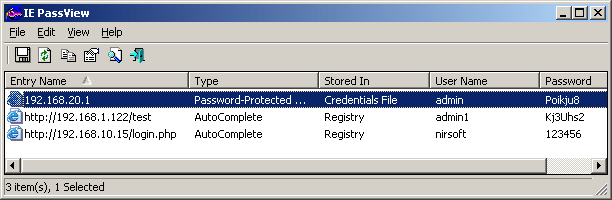 IE PassView is a small but very useful utility for IE (Internet Explorer) users. The application allows users to view username and password stored in various websites. It’s a very useful security tool because the software extracts this type of information and knows how these passwords are used in various websites. IE PassView is a small but very useful utility for IE (Internet Explorer) users. The application allows users to view username and password stored in various websites. It’s a very useful security tool because the software extracts this type of information and knows how these passwords are used in various websites.
The application automatically lists down every username and password you use in the browser. Aside from the security credentials, the application also informs the user how the username and password is applied in a specific website. Some sites will allow you to auto-fill the password while others have mandatory key-in of information.
A distinctive feature of the application is that it detects the storage location of the username and password. This is very important for users since this information will tell them if their username and password is stored in the website and not just in the browser. The application will tell you if the information was placed as credential file (stored in the browser) or in registry (provided in the application). Through this data, you’ll be able to detect which website has your username and password. Users can also export the username and password to their preferred document if they want the information viewed in another format.
The interface of the application is very simple. The size of the application is very small (less than 50k) so installation and use is almost in an instant. The application is a very small and lightweight utility but a useful companion for frequent IE users.
Check it out at http://www.nirsoft.net/utils/internet_explorer_password.html
Posted in Main | No Comments »
Monday, August 24th, 2009
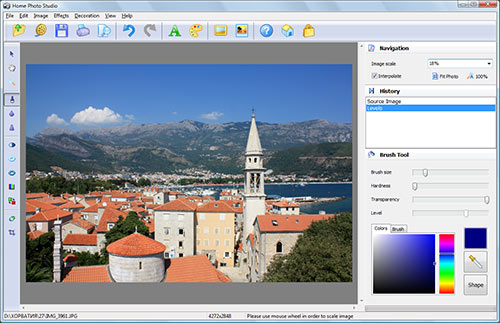 While shuffling through the images of your kid’s first birthday, you must be thinking of pouring in some eye catchy effects on them. Well, the task requires you to log on to the web to grab a handy image editing tool, which could in turn result in wasting a lot of your useful time. However, there is no need to get yourself indulged into this time-taking chore, as you can straightaway try out the all new Home Photo Studio 1.25 application, which comprises of several image editing features to help you through. You can effortlessly learn the functions to view and edit images with features like retouch, color enhancement, red eye removal, blur, and also add various other effects such as lightening, 3D composition, weather effects, etc. Not just editing, but you also can generate slideshows, collages, and postcards, after editing images. While shuffling through the images of your kid’s first birthday, you must be thinking of pouring in some eye catchy effects on them. Well, the task requires you to log on to the web to grab a handy image editing tool, which could in turn result in wasting a lot of your useful time. However, there is no need to get yourself indulged into this time-taking chore, as you can straightaway try out the all new Home Photo Studio 1.25 application, which comprises of several image editing features to help you through. You can effortlessly learn the functions to view and edit images with features like retouch, color enhancement, red eye removal, blur, and also add various other effects such as lightening, 3D composition, weather effects, etc. Not just editing, but you also can generate slideshows, collages, and postcards, after editing images.
The work console of Home Photo Studio 1.25 has been designed modestly to help you edit your images with different provided effects and tools. You can begin with loading the images from the desired directory using the File Explorer provided over left. The images are queued up at the mid screen, from where you can select any and begin with the editing task. The editing tools integrated relate to color adjustment, blur, add text, reset channels, brightness, contrast, and apply different effects. You can create 3D compositions by loading an image, select 3D composition, apply ready to use glow effects and backgrounds, add illumination for lightning effect, set auto levels, and done. Further, you’re also allowed improving facial features such as decrease nose size, transform lips shape, decrease chin, and remove wrinkles with Blur Tool. Moreover, generating stunning collages, slideshows, postcards, etc is also an easier task with the provided option variety.
Home Photo Studio 1.25 application is a fantastic image editor for novice as well as well-versed users.
{More Info and Download}
Posted in Main | No Comments »
Monday, August 24th, 2009
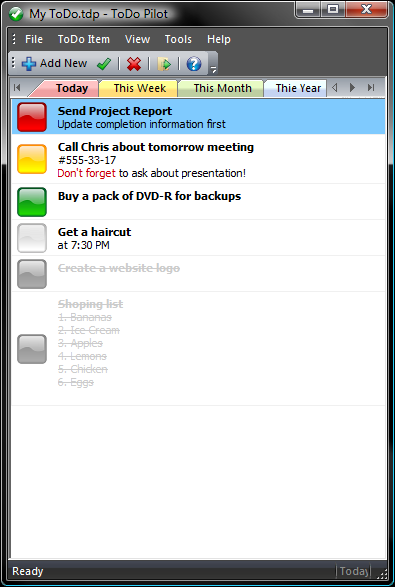 Are you really fed up of sticking lot many notes around your work desk to help you remember your important meeting, events, appointments, etc? Well, in such a case notepad application doesn’t help much, and even sticking digital notes on your desktop make it look cluttered. Nonetheless, an easier and adept solution is what you need in such a situation, and this time you can have it in the form of ToDoPilot 1.11. Though a small application, it perfectly aids you in recording, organizing and viewing the tasks over your PC. The program features five tabs with different colors, named as Today, This Week, Month, and Year, to lets you record and view activities accordingly. Even, it integrates an extra tab for recording tasks you want to perform someday in future. Are you really fed up of sticking lot many notes around your work desk to help you remember your important meeting, events, appointments, etc? Well, in such a case notepad application doesn’t help much, and even sticking digital notes on your desktop make it look cluttered. Nonetheless, an easier and adept solution is what you need in such a situation, and this time you can have it in the form of ToDoPilot 1.11. Though a small application, it perfectly aids you in recording, organizing and viewing the tasks over your PC. The program features five tabs with different colors, named as Today, This Week, Month, and Year, to lets you record and view activities accordingly. Even, it integrates an extra tab for recording tasks you want to perform someday in future.
The ToDoPilot executes with an attractive screen displaying an overlaid dialog box presenting you with choices to create a new notepad or open an existing notepad. Selecting to create a new notepad, you’d have to name it and save it at the desired location. Now you can begin with adding your tasks within respective tabs by clicking on ‘Add New’ button. While creating new task, you’d have to set the icon, caption, any additional info, period using ‘When’, creation date, and click Ok. With right click over the task, you can toggle completion, clone task, delete ToDo, move to another tab, and open the task. Even, you can easily mark any event as complete by editing or selecting toggle completion. Further, with the ‘Program Options’ you can change the interface appearance, enable colored tabs, program startup settings, system tray options, and select icon set. The utility functions as a good planner to help you schedule your daily activities.
With ToDoPilot software, you can effectively plan your routine tasks not just for a day, but month and even entire year.
{More Info and Download}
Posted in Main | No Comments »
Monday, August 24th, 2009
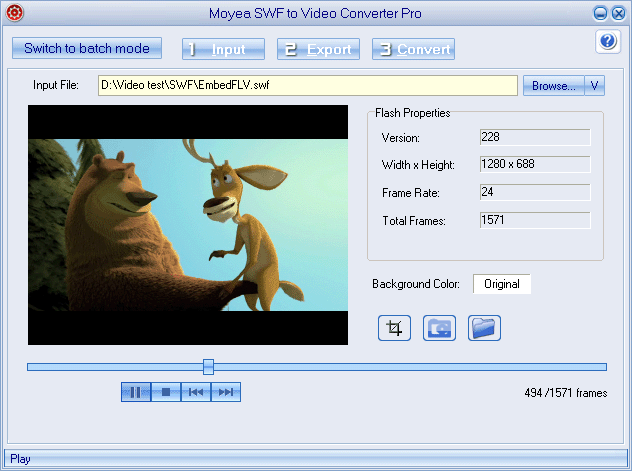 Have you ever downloaded a large number of your favorite flash video files from the web, but then dealt with troubles while playing them using your multimedia player? Even if you install a suitable flash player application, you won’t be able to enjoy viewing them over your multimedia devices such as iPod, iPhone, PSP, Xbox 360, etc. It’s primarily due to the incompatibility of flash format with such devices. Nonetheless, such a difficulty can be dealt with ease by using an effective solution, which comes to you as Moyea SWF to Video Converter Pro. The program functions skillfully to perform the SWF flash file conversion from online URL or local file, into known video and audio formats. The output format series goes like AVI, FLV, MP4, WMV, 3GP, followed by MPEG, DV, and MP3. It can even convert SWF file to image file, and even provides SWF downloader for downloading SWF files from web. Have you ever downloaded a large number of your favorite flash video files from the web, but then dealt with troubles while playing them using your multimedia player? Even if you install a suitable flash player application, you won’t be able to enjoy viewing them over your multimedia devices such as iPod, iPhone, PSP, Xbox 360, etc. It’s primarily due to the incompatibility of flash format with such devices. Nonetheless, such a difficulty can be dealt with ease by using an effective solution, which comes to you as Moyea SWF to Video Converter Pro. The program functions skillfully to perform the SWF flash file conversion from online URL or local file, into known video and audio formats. The output format series goes like AVI, FLV, MP4, WMV, 3GP, followed by MPEG, DV, and MP3. It can even convert SWF file to image file, and even provides SWF downloader for downloading SWF files from web.
Using Moyea SWF to Video Converter Pro 3.6 application presents pleasing and attractive console for carrying out the entire conversion process. It offers two modes single and batch, for performing individual or multiple SWF file conversion. The program even integrates an in-built player for previewing the selected SWF files. In Batch Mode, you can add files from folder, grab SWF, from IE cache, from Url, or Flash Projector. You can even capture the snapshots, and even can crop the movie screen size to giver it a suitable visual appearance according to different devices. Further, while cropping the video, it allows you to apply an image watermark over the output video. Finally, you can choose to export the SWF files as Video, Video with alpha, and Image series. You’d require selecting an output format from the provided dropdown list, quality, export location, and choose to rip audio, for deriving the final results. Similarly, you can perform the single SWF video file conversion.
Moyea SWF to Video Converter Pro 3.6 is a convenient solution for converting your SWF videos into other format videos, along with generating audio and images.
{More Info and Download}
Posted in Main | No Comments »
|
|
|




