Archive for the 'Main' Category
Wednesday, April 2nd, 2008
 Choose the video movie or its part and then crop it for your avatar or userpic. By using Video Avatar you can create original avatars for your blogs, journals, you can also set userpic in your profile page for any forums, communities. Choose the video movie or its part and then crop it for your avatar or userpic. By using Video Avatar you can create original avatars for your blogs, journals, you can also set userpic in your profile page for any forums, communities.
Pros: Essentially the Video Avatar is a tool for creating animated GIF avatars. One can choose to use a video clip or even a small part of it, get it converted to an animated GIF and use it as avatar or a user picture as a interesting variation on just using a static image. At one level this application is a video cropper. Use these avatars for your blogs, journals; you can also set userpic in your profile page for any forums, communities, your website, etc.
Video Avatar supports all the video formats for inputs. These include formats AVI, ASF,MP4, MPG, MPEG, MOV and WMV. Output parameter settings include width & height in terms of pixels, frames per second and whether the animation should play straight or in reverse. One could use a piece of a movie that one likes, a cartoon, music video or a personal clip. Same can be cropped to skip unwanted frames or give it a zoomed look by doing a rectangular crop on every frame chosen. The user interface provides a range bar with a preview panel to enable choosing the frames right. You could easily decide the time length of the animation you want to create. The range bar is a direct timeline for this purpose. One can save single image or the animated avatar and the corresponding animated GIF is saved in the same directory as the source or one chosen by the user.
Cons: Flash and FLV support would have added to the versatility of the package.
{More Info and Download}
Posted in Main | No Comments »
Monday, March 31st, 2008
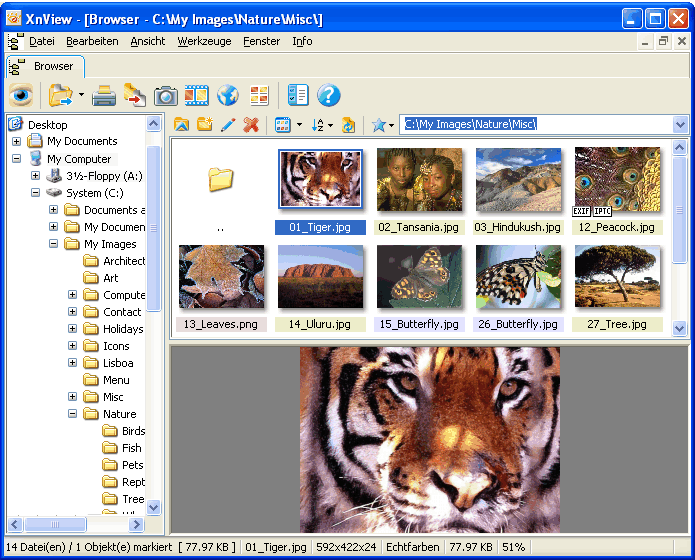 There are very few programs released for free that are genuine high powered programs. While there are many free programs that have one specific function that is extremely useful, the age we live in now lends itself to high powered programs being sold as proprietary software. Thankfully, there are exceptions to this rule and XnView for Windows is most definitely one of the pieces of software that are an exception to the rule. With all of the different features that it has in the area of graphics manipulation, XnView can most definitely be referred to as a high powered piece of software. There are very few programs released for free that are genuine high powered programs. While there are many free programs that have one specific function that is extremely useful, the age we live in now lends itself to high powered programs being sold as proprietary software. Thankfully, there are exceptions to this rule and XnView for Windows is most definitely one of the pieces of software that are an exception to the rule. With all of the different features that it has in the area of graphics manipulation, XnView can most definitely be referred to as a high powered piece of software.
Simply put, XnView allows you to view files from over 400 different graphics formats (most people don’t even know that there are that many graphics formats in existence) and it allows you to convert many of those formats to file types that are more acceptable in today’s world (i.e. formats such as .jpg or .gif). In total, XnView is capable of the creation of 52 different graphics formats and you can also create slide show presentations through XnView as well. You can do almost anything that you would need to do in the area of graphics conversion and manipulation from a file type perspective in XnView, making it one of the free high powered programs out there.
More information is available at http://www.xnview.com/
Posted in Main | No Comments »
Friday, March 28th, 2008
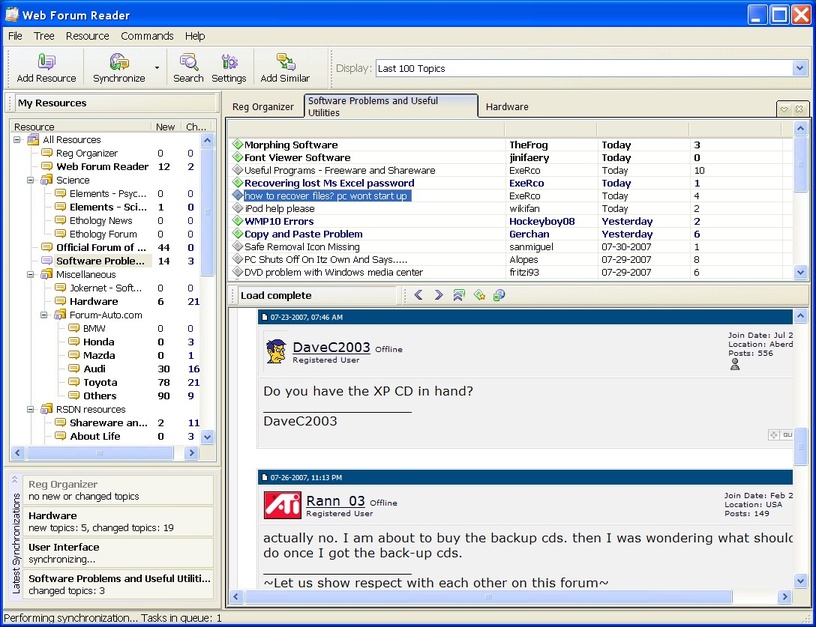 The Lite version of the Web Forum Reader is actually a very smartly toned down version of the full Web Forum Reader with a number of different features that allows you to still enjoy the main purpose of the software without having to pay for it as in the case of the full version (the full version is shareware). Unlike many other Lite programs which just turn out to be cripple ware, the Web Forum Reader Lite has the basics of the reader program in place and therefore it allows you the basic functionality that is at the core of what makes the Web Forum Reader such a good program. The Lite version of the Web Forum Reader is actually a very smartly toned down version of the full Web Forum Reader with a number of different features that allows you to still enjoy the main purpose of the software without having to pay for it as in the case of the full version (the full version is shareware). Unlike many other Lite programs which just turn out to be cripple ware, the Web Forum Reader Lite has the basics of the reader program in place and therefore it allows you the basic functionality that is at the core of what makes the Web Forum Reader such a good program.
Simply put, you can use this piece of software to read forums on the internet. You simply plug in the usernames and the passwords as well as the URLs for all your favourite forums and you can follow along with different discussions regarding everything that you want. You can also get the program to hide everything that you have read and display an amalgamation of files from different forums that you haven’t read, allowing you to save a lot of time in your checking up on the forums of the day.
More information about this free version of the Web Forum Reader can be found by visiting http://www.chemtable.com/WebForumReader.htm
Posted in Main | 4 Comments »
Friday, March 28th, 2008
 While there are many index photo software packages out there, MyPhotoIndex has to be one of the more impressive ones. This can be deduced by taking into account not only the fact that it is a free piece of software, but also the fact that you can use it as an electronic photo album in order to catalogue and organize all of the pictures that you take, upload or download. All in all, the full photo album functionality is available with this particular piece of software and that is something that has been proven to anyone that takes the time to explore and use this piece of software. While there are many index photo software packages out there, MyPhotoIndex has to be one of the more impressive ones. This can be deduced by taking into account not only the fact that it is a free piece of software, but also the fact that you can use it as an electronic photo album in order to catalogue and organize all of the pictures that you take, upload or download. All in all, the full photo album functionality is available with this particular piece of software and that is something that has been proven to anyone that takes the time to explore and use this piece of software.
MyPhotoIndex’s focus as a software package is in the tagging and cataloguing of images and there is a lot of support and functionality provided by the program in these two areas. This means that you can not only use it to catalogue and organize your photos to be displayed on screen in the actual software, but you can also tag the actual files so that organizing them in the folders they appear in is easy as well. This is particularly useful if you want to send photos to other people or if you want specific files to be available to you for use online. Not many other photo album programs have this type of functionality and even fewer free ones are able to boast about it.
More information about MyPhotoIndex can be found at http://www.myphotoindex.com/
Posted in Main | No Comments »
Friday, March 28th, 2008
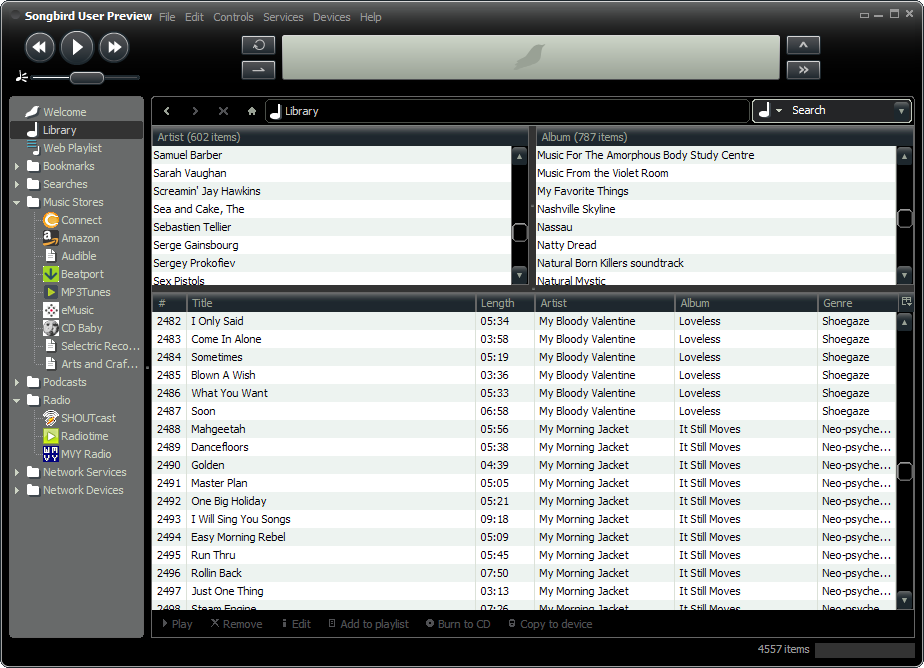 One of the great things about Mozilla is that after creating their world class Firefox browser, they took that engine and then transposed it onto a number of the other areas of internet software. First was Thunderbird, their online e-mail client that was released as competition to Outlook and then finally they ended up releasing Songbird, which is the piece of software being discussed here. One of the great things about Mozilla is that after creating their world class Firefox browser, they took that engine and then transposed it onto a number of the other areas of internet software. First was Thunderbird, their online e-mail client that was released as competition to Outlook and then finally they ended up releasing Songbird, which is the piece of software being discussed here.
Songbird, simply put, is an online music player that operates on the same engine that Firefox uses. It allows you to play any .mp3 file that is available on the internet without leaving the actual page that you are on. You can also use it to view web pages and create dynamic play lists from those websites. Essentially, you can use Songbird to make your internet music life a lot easier. If you’re the type of person that loves listening to or watching online videos and you want to get the songs from those videos and song websites without having to waste too much time in the process, then Songbird is most definitely the piece of software for you.
More information about Songbird is available at http://www.songbirdnest.com/
Posted in Main | No Comments »
Thursday, March 27th, 2008
 Have you considered analyzing and benchmarking your computer system? Well, Fresh Diagnose is actually designed to analyze and benchmark many kinds of hardware like hard disk performance, mainboard/motherboard information, CPU performance, video system information and so much more. A new version has been recently released. Have you considered analyzing and benchmarking your computer system? Well, Fresh Diagnose is actually designed to analyze and benchmark many kinds of hardware like hard disk performance, mainboard/motherboard information, CPU performance, video system information and so much more. A new version has been recently released.
It’s a utility that scans your system and gives a complete report about your computer’s hardware and software.
The latest version of this tool, Fresh Dioagnose 7.78 was released recently with the main feature change being:
- Windows upgrade and HotFixes module
Want to try it out? Check http://www.freshdevices.com/freshdiag.html
Posted in Main | No Comments »
Thursday, March 27th, 2008
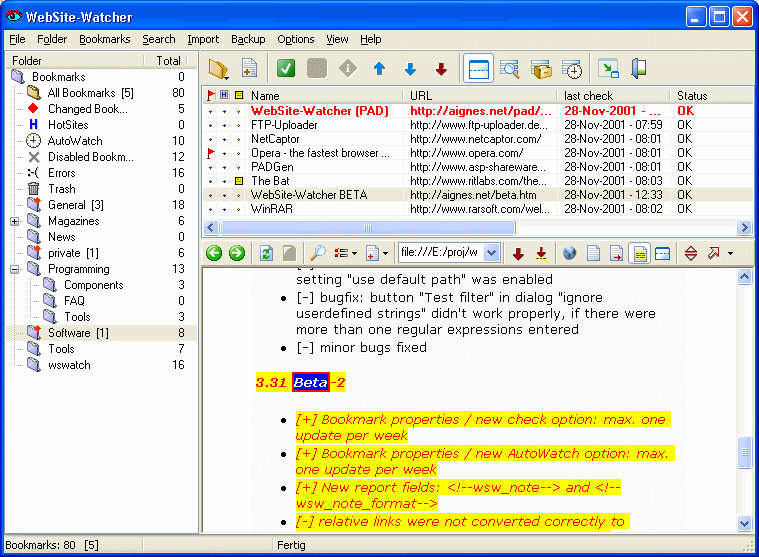 Want to keep an eye on your favourite websites easily? Check out this software, it should do the job, it’s called Website Watcher. Want to keep an eye on your favourite websites easily? Check out this software, it should do the job, it’s called Website Watcher.
WebSite-Watcher checks an unlimited number of web-sites for updates and changes with a minimum of time and online-costs. When changes in a website are detected, it saves the last two versions to your hard disk and highlights all changes in the text.
This program will save definitely save you hours daily. The fact that you can monitor different websites easily with this tool to check for changes means that you get to save yourself quality time which would have been spent going to each site manually just to see if anything has changed.
Want to check it out? Go to check out the trail version at http://www.aignes.com/
Posted in Main | No Comments »
Thursday, March 27th, 2008
 You’ve probably seen them before, those pictures that, when you look closer, are made of lots of other much smaller pictures. I’ve always thought these were pretty cool. They’re know as Photo Mosaics and usually there’s a computer program involved in arranging them,due to the precise patterning involved. Andreamosaic is one such program. You’ve probably seen them before, those pictures that, when you look closer, are made of lots of other much smaller pictures. I’ve always thought these were pretty cool. They’re know as Photo Mosaics and usually there’s a computer program involved in arranging them,due to the precise patterning involved. Andreamosaic is one such program.
To create such a mosaic you’ll need a selection of pictures to use as the tiles of the mosaic and you also need a picture to use as the main picture which you’ll be creating in mosaic form, out of the smaller pictures. You can then set the parameters in the program for creating different kinds of mosaics.
If this sounds a tad hard to follow, its worth spending a couple of minutes to read one of the step-by-step tutorials at the website, they’re very helpful and easy to follow. Theres plenty of options and settings, but the tutorials really simplify everything.
You can download it for free and start making your very own mosaics in a matter of minutes. For very helpful tutorials, examples and the program download, go to the homepage.
Posted in Freeware, Main, Photo | 1 Comment »
Wednesday, March 26th, 2008
 Sameplace instant messenger is a Firefox add-on which allows you to Instant message from your Firefox sidebar. It means that instead of having one or more instant messenger clients running, you can just open this add-on in your Firefox sidebar, where you can be logged into one or more Instant Messenger services. Sameplace instant messenger is a Firefox add-on which allows you to Instant message from your Firefox sidebar. It means that instead of having one or more instant messenger clients running, you can just open this add-on in your Firefox sidebar, where you can be logged into one or more Instant Messenger services.
It currently supports all the big Instant messengers such as MSN, Yahoo!, ICQ, AIM, GMail and also Jabber and Twitter. You’ll find features you’d expect from an instant messenger, plus some bonus ones such as being able to drag and drop a picture directly from a website in order to share with a contact. It also can be quickly closed by hitting F12, just in case the boss passes by maybe?
If you use Firefox a lot and dislike having extra programs running unless absolutely necessary, you may be interested in trying this out.
Want more info? Check the homepage you can also download from the Mozilla extensions homepage
Posted in FireFox, IM, Main | No Comments »
Tuesday, March 25th, 2008
 Whether you’re a budding astronomer with stars in your eyes or a more serious astronomy enthusiast you might be interested in checking out the Starry Night range of software. The versions of available software on offer from Starry Night range from “Starry Night Pro” for the serious stargazers amongst you, to cheaper, slightly more basic packages like “Starry Night Enthusiast”. These packages include some very cool 3D graphics along with seriously detailed information on constellations, auroras stars, planets etc. Whether you’re a budding astronomer with stars in your eyes or a more serious astronomy enthusiast you might be interested in checking out the Starry Night range of software. The versions of available software on offer from Starry Night range from “Starry Night Pro” for the serious stargazers amongst you, to cheaper, slightly more basic packages like “Starry Night Enthusiast”. These packages include some very cool 3D graphics along with seriously detailed information on constellations, auroras stars, planets etc.
Theres also 3D models of spacecraft for you to learn about. Also included are many images that are either very well illustrated or visualized using images from the Hubble telescope. The Pro version even includes the ability to control your telescope.
These are some of the best software packages available in the astronomy world and the list of features is far beyond the scope of a short blog entry, after all its a very big universe out there, even in our little corner of it!
For much more information check out the Starry Night Homepage here.
Posted in Main | No Comments »
|
|
|




