Archive for the 'Main' Category
Thursday, April 24th, 2014
 Do you want an application that combines the automatic creation of high quality panoramic images with extensive post-processing features for advanced users? Do you want such a program to have features and clearly arranged user interface? Then you should check out PanoramaStudio. Do you want an application that combines the automatic creation of high quality panoramic images with extensive post-processing features for advanced users? Do you want such a program to have features and clearly arranged user interface? Then you should check out PanoramaStudio.
What is PanoramaStudio?
PanoramaStudio is a program that combines the automatic creation of high quality panoramic images with extensive post-processing features for advanced users in an easy and clearly arranged user interface.
The automatic panorama creation contains an automatic alignment of the images, an exposure adjustment as well as a seamless blending of the images to the panorama. The Exif data of the photos will be used to accomplish great stitching results especially if it is available. In other words, the profiles of more than 1400 digital cameras are already stored in the internal database. Besides the automatic assembling of the panorama, there are image-processing filters for optimizing the panorama and a hotspot editing tool for virtual tours included.
PanoramaStudio offers an import filter for many RAW formats and a full 16 bit workflow. The option to save the individual images of a panorama in a layered PSD file completes the list of features for professional processing. Compared to a lot of programs out there, this one is able to do a lot of things.
Any downside?
PanoramaStudio has a 30 day trial limitation. Full version would cost you $44.95 (or $89.90 for PRO version).
Want to check it out? Visit Tshsoft.de.
Posted in Main | No Comments »
Thursday, April 24th, 2014
 Bulk file optimizing can be a lot of work if you don’t the kind of application that you need to speed things up. As a matter of fact, there is no reason you shouldn’t have an application designed to carry out such a task on your system, and that is why you are better off taking a look at FileOptimizer. Bulk file optimizing can be a lot of work if you don’t the kind of application that you need to speed things up. As a matter of fact, there is no reason you shouldn’t have an application designed to carry out such a task on your system, and that is why you are better off taking a look at FileOptimizer.
What’s FileOptimizer?
FileOptimizer is a lossless file size optimizer supporting AIR, APK, APNG APPX, CBZ, DOCX, GIF, GZ, EPUB, ICO, JAR, JPEG, MNG, MPP, PNG, PPTX, PDF, PUB, SWF, TIF, VSD, XAP, XLSX, and ZIP file formats among others.
FileOptimizer now has a lot of newly added updates that make the program a lot easier to use. Some of these updates and fixes include the following: added HTML optimization support with tidy-html5 (Metallicow); added CSS optimization support with TidyCSS; added JS optimization support with jsmin (custom built); added ini option CSSEnableTidy=false to enable CSSTidy when processing CSS files. When activated CSS files will be optimized, and be visually equal to the original, but may prevent the to be edited; added DCX to the PCX tool chain; and added ini option HTMLEnableTidy=false to enable tidy-html5 when processing HTML files. When activated HTML files will be optimized, and be visually equal to the original.
Any downside?
It is a nice program that won’t give you cause for concern.
Want to check it out? Visit Nikkhokkho.sourceforge.net
Posted in Main | No Comments »
Thursday, April 24th, 2014
 Everyone wants to be able to communicate with their loved ones, and that is why there are various chat applications to make this a reality. 123 Flash Chat gives you an excellent opportunity to chat and do a lot of things. Everyone wants to be able to communicate with their loved ones, and that is why there are various chat applications to make this a reality. 123 Flash Chat gives you an excellent opportunity to chat and do a lot of things.
123 Flash Chat can add a chat room to dating sites and social networking services, with users single sign-on. It can be easily added to almost all the websites: Joomla!, phpBB, vBulletin, Skadate, etc. Newly releases a HTML5 client to work across mobile and PC, with a new UI especially designed for mobile.
123 Flash Chat has virtually every feature you will need in a chat including the following: dynamic skin change, upload/webcam avatar, video special effects, avatars, smiles, flash emotions, voice messages, multiple rooms, separate video windows, a Facebook-like chat bar, social connect, video conference mode. Other features including multiple user levels to optimize user retention and monetization, which enable chat users to have remarkable icons, unique username colours and higher places among the user list. Both end-user and administrator will find no problems with adjusting 123FlashChat thanks to its ease of use. It works well cross-platform, such as Windows, Linux, and Mac OS.
Any downside?
123 Flash Chat has a 30 day trial limitation.
Want to check it out? Visit 123flashchat.com.
Posted in Main | No Comments »
Tuesday, April 22nd, 2014
 Are you looking for a server that is very easy to use, and does not cost a fortune? Then you can check out Xlight ftp server. Are you looking for a server that is very easy to use, and does not cost a fortune? Then you can check out Xlight ftp server.
Xlight ftp server?
Xlight ftp server is an easy-to-use ftp server with SSL, remote administration, ODBC and IPv6 support. Unlike other ftp servers, it uses very little memory and CPU for handling high speed download or many users. It also has a lot of unique features.
Xlight FTP Server has three editions: personal, standard, professional. Personal edition is free for personal use and home users. To see the difference of three editions, you can visit the publisher’s site.
Some of its features include the following: user settings and password can be stored in the external database and retrieved through ODBC connections; supports ftp xferlog format, supports SFTP(SSH2) protocol, etc.
A few changes have already been made recently by the publisher to make Xlight ftp server more stable and easy to use. Some of these changes and updates include the following: fixed the Xlight UPnP compatible problem with many home routers; fixed a few bugs related to UPnP port forwarding when running FTP server behind home routers; and addition of TCP keepalive for FTP and SFTP/SSH2 control connection to detect dead peer connection.
Any downside?
Xlight ftp server doesn’t have any downside
Want to check it out? Visit xlightftpd.com.
Posted in Main | No Comments »
Tuesday, April 22nd, 2014
 A lot of browsers these days are combining features that enable users to browse the internet without many threats to their privacy. What this means is that people want a browser that has a lot of features, yet without having to worry about the amount of space it will take on your system. One browser that is trying to combine some of those features is QupZilla. A lot of browsers these days are combining features that enable users to browse the internet without many threats to their privacy. What this means is that people want a browser that has a lot of features, yet without having to worry about the amount of space it will take on your system. One browser that is trying to combine some of those features is QupZilla.
What is QupZilla?
QupZilla is modern and very fast lightweight web browser based on WebKit core and Qt Framework. WebKit guarantee fast browsing and Qt availability on all major platforms. It boasts features comparable to Chrome and Firefox, yet uses fewer resources than either. It has all standard functions you expect from a web browser. QupZilla is a browser that unifies bookmarks, history and rss reader in one well-arranged window. No more multiple windows, QupZilla uses just one! With the integrated rss reader, you can stay up to date with your favourite sites.
Some of the key features of the browser include the following: QupZilla unifies bookmarks; integrated adblock; access your favourite pages as fast as you want on one page opened in new tab; state up to date with your favourite websites; and many more.
Any downside?
It is not a bad program since it only uses little resources of your system.
Want to check it out? Visit QupZilla.com.
Posted in Main | No Comments »
Monday, April 21st, 2014
 The need for programs with very useful features including ease of use and security is the reason a lot of people take a lot of time to search for a server that gives them a lot of confidence. If this description describes what you are looking for in a server, then what you are looking for WinSSHD. The need for programs with very useful features including ease of use and security is the reason a lot of people take a lot of time to search for a server that gives them a lot of confidence. If this description describes what you are looking for in a server, then what you are looking for WinSSHD.
What’s WinSSHD all about?
WinSSHD is a SSH server with graphical configuration; support for public key authentication and Windows domain accounts; secure TCP/IP tunnelling with flexible permission rules; secure file transfer with SFTP and SCP; secure graphical access with Remote Desktop or WinVNC; and vt100, xterm or bvterm terminal access.
The WinSSHD server is designed for all Windows NT-series operating systems. Supported platforms include all desktop and server versions of Windows, starting from Windows 2000, to the most recent, including Windows 8 and 2012. Both 32-bit and 64-bit versions of Windows are supported. Windows NT4 is still supported by WinSSHD version 4.
The server also supports the following platforms:
Secure remote access via console (vt100, xterm and bvterm supported); secure remote access via GUI (Remote Desktop or WinVNC required); secure TCP/IP connection tunnelling (port forwarding); and file transfer using SFTP and SCP (compatible with all major clients).
Does it have any downside?
The program has a 30 day trial limitation.
Want to check it out? Visit BitVise.com.
Posted in Main | No Comments »
Thursday, April 17th, 2014
 Not every VPN program out there is fully-featured; but not when that program is OpenVPN. If what you are searching for in a VPN program are easy and advanced features; then I think you should consider taking a look at OpenVPN. Not every VPN program out there is fully-featured; but not when that program is OpenVPN. If what you are searching for in a VPN program are easy and advanced features; then I think you should consider taking a look at OpenVPN.
What’s OpenVPN?
OpenVPN is a full-featured SSL VPN solution which can accommodate a wide range of configurations, including remote access, site-to-site VPNs, WiFi security, and enterprise-scale remote access solutions with load balancing, failover, and fine-grained access-controls.
OpenVPN implements OSI layer 2 or 3 secure network extension utilizing the SSL/TLS protocol, fortifies flexible client authentication methods predicated on certificates, perspicacious cards, and/or 2-factor authentication, and sanctions utilizer or group-concrete access control policies. It is able to achieve all these with the use of firewall rules applied to the VPN virtual interface. OpenVPN is not a web application proxy and does not operate through a web browser.
The program’s main strengths include cross-platform portability across most of the kenned computing universe, excellent stability, scalability to hundreds or thousands of clients, relatively facile installation, and support for dynamic IP addresses and NAT.
Want to check it out? Visit OpenVPN.net.
Posted in Main | No Comments »
Thursday, April 17th, 2014
 Are you looking for a tool that can be used to analyse the content of a hard drive partition or a folder? Then Xinorbis is the tool you are looking for. It is designed to provide you with detailed information and visual representations of the disk usage. Are you looking for a tool that can be used to analyse the content of a hard drive partition or a folder? Then Xinorbis is the tool you are looking for. It is designed to provide you with detailed information and visual representations of the disk usage.
What’s the big deal about Xinorbis?
Xinorbis is an easy to use disk analysis tool that can provide you with information as to how your disk space is being used up. It gives quick and easy to interpret results. It generates a large range of graphs and tables, allowing you to see where and how your disk space is used. The tool is ideal for anyone with a vested interest in hard disk management.
The essence of designing this program is to scan a target folder, disk partition or USB device and to generate a set of reports. The reports can be used for analysing the file structure and distribution in order to clean the storage device.
The main criterion of analysis is the file extension which enables the program to group the files into categories. You can define your own categories by specifying the file types in order to easily find out the number, size and folder location.
Latest version of Xinorbis is more stable because of the number of bug fixes that have been made by the developer.
Want to check it out? Visit Xinorbis.com.
Posted in Main | No Comments »
Thursday, April 17th, 2014
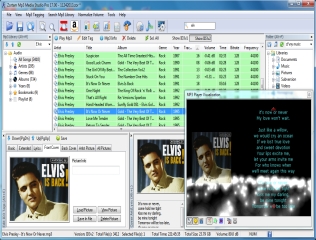 Are you looking for an all-in-one MP3 application that combines all the best features you can think of today? Then Zortam does look like the right application for you. Are you looking for an all-in-one MP3 application that combines all the best features you can think of today? Then Zortam does look like the right application for you.
What’s Zortam Mp3 Media Studio all about?
Zortam Mp3 Media Studio is all-in-one Mp3 application. It has several modules such us Mp3 Organizer, ID3 Tag Editor, Zortam Auto Tagger, Mp3 Player, Mp3 Normalizer, Mp3 to Wav converter. With it you can batch auto tag your Mp3 files using Zortam song database. Batch auto tag processing gets cover art, lyrics and other song info from our database and automatically auto tag your Mp3 files.
Within few minutes you can have all of your Mp3 files tagged with cover arts and lyrics and you can transfer it to any device such us iPhone, iPod or your mobile phones. It enables you to play your tagged Mp3 files showing cover art and scrolling lyrics together with different visualization effects.
Also included in the program is an advanced CD Ripper for decoding your music CD to Mp3 files and get them automatically tagged with all mp3 information including album cover and lyric from Zortam database. You can also manage your Mp3 play lists, fast search for mp3 files, rename files using ID3 tags, synchronize ID3v1 and iD3v2 tags, search for duplicate Mp3 files, and many more.
Zortam Mp3 Media Studio Pro version 17.xx is available for $19.95 or you can buy a lifetime license for any future version that’ll cost you $29.95.
Want to check it out? Visit Zortam.com.
Posted in Main | No Comments »
Thursday, April 17th, 2014
 Do you feel like you could do with a program that lets you open the game resource files in an explorer-like interface then extract the content at will? Then Dragon UnPACKer is that program because it has some very nice features that are a bit easy to use. Do you feel like you could do with a program that lets you open the game resource files in an explorer-like interface then extract the content at will? Then Dragon UnPACKer is that program because it has some very nice features that are a bit easy to use.
What is Dragon UnPACKer?
Dragon UnPACKer allows you to open the game resource files in an explorer-like interface then extract the content at will. More than 80 games are supported directly. If the game is not supported, Dragon UnPACKer include a very useful tool named HyperRipper. This tool searches for known patterns in unknown file formats. This allows to extract texture, sounds, music and more from unknown file formats. It is plugin based and therefore can be easily updated to support new formats.
The publisher has introduced a lot of features to make the program a bit more stable. Some newly added features and fixes in the program include the following: added support for Star Wars Starfighter .PAK file format; new theme feature (currently ugly…); performance enhancements everywhere; bug fixes, LOTS of memory leaks fixed; added support for The 7th Guest .GJD file format; and a few others.
This is one of the best tools available online at the moment.
Want to check it out? Visit ElberethZone.net
Posted in Main | No Comments »
|
|
|




