Archive for the 'Main' Category
Thursday, September 26th, 2013
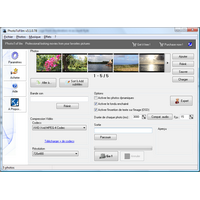 Are you looking for an application that will help you make those small movies you have always desired or dreamed of? Do you want to make small movies out of your pictures compress them in order to distribute your production to your friends and family? Then PhotoToFilm is an application for you. Are you looking for an application that will help you make those small movies you have always desired or dreamed of? Do you want to make small movies out of your pictures compress them in order to distribute your production to your friends and family? Then PhotoToFilm is an application for you.
What is PhotoToFilm?
PhotoToFilm is a user friendly solution for anyone who wants to easily make a movie out of digital pictures. Such film can be easily sent to friends or relative. The application is designed for every lover of digital camera. It combines a lot of outstanding and easy to use features that enable you do a lot of things.
The program has a lot of amazing features including the following: user friendly interface; makes transitions (such as cross fading) between your photos; features dynamic images support; sound track (MP3) support; supports most popular photos formats (JPEG, Bitmaps); on Video dynamic text insertion; creates movies using codecs present on your computer (such as DivX); Ability to burn DVDs (requires ToDVD); International support’ and a host of others.
PhotoToFilm is not a bad program especially when you consider its ease of use. The free version does not have the kind of features you will find in this full version of PhotoToFilm.
Want to check it out? Visit KCSoftwares
Posted in Main | No Comments »
Wednesday, September 25th, 2013
 Do you want to add most used applications and folder shortcuts in your right click menu? Do you also desire an application that enables you save valuable time by using right click tweaks that provides easy to use quick operations directly in your right click? Then Right Click Enhancer is one program you can use. Do you want to add most used applications and folder shortcuts in your right click menu? Do you also desire an application that enables you save valuable time by using right click tweaks that provides easy to use quick operations directly in your right click? Then Right Click Enhancer is one program you can use.
What’s Right Click Enhancer?
Right Click Enhancer gives you power to control the right click menu everyone uses. Right Click Enhancer allows you to edit your right click menu in the way you want. Now with help of this wonderful tool you can add some good stuff to your right click context menu. Right Click Enhancer consist of 7 tools to manage your right click context menu. All of them are described below.
With Right Click Enhancer you can achieve a lot in a very short time. It enables you to do a lot of things including the following: save time in copy paste operations by adding new folder shortcuts in send to menu; add new file types into New menu to ease the operation of creating new files; add templates files to new menu so you can get preformatted files upon creating new files and start working on it in less time; and many more.
Want to check it out? Visit: Nbsoft.
Posted in Main | No Comments »
Wednesday, September 25th, 2013
 I own quite a large cache of music and videos. So naturally I wanted a media player that would help me enjoy my favorite music and movies. While I agree there are tons of media players out there, I seem to have fallen in love with KMPlayer. I own quite a large cache of music and videos. So naturally I wanted a media player that would help me enjoy my favorite music and movies. While I agree there are tons of media players out there, I seem to have fallen in love with KMPlayer.
What is this program all about?
KMPlayer has very impressive playback abilities; it can play literally any video and audio format you could possible use such as VCD, DVD, AVI, MKV, Ogg Theora, OGM, 3GP, MPEG-1/2/4, WMV, RealMedia, and QuickTime among others. It comes with its own internal codecs as standard, so no downloading messy codec packs!
It has a customizable skin, has very good subtitle support, and a neat option to have the subtitles only show on the black bars, underneath your movie instead of over it. It also helps you to capture audio, video, and screenshots in many ways.
Some of the main features of this application are: same kind of winamp options, playlist support and it’s even compatible with some winamp plug-ins! Audio streaming is supported too so you can listen to your favorite radio stations online.
KMP Media Corporation, the publisher of this program, added the following new changes to this version: Changed KMP Plus platform from Flash to web. Proving Album Art Automatic Movie info TMDB matching service. Configuring function for playing FTP server videos with Album Art. Syncing function for KMP Play List with Album Art. Multi-deleting function for Album Art. Proving Image View& List View mode. A variety of content within KMP App. Added Plug Web and Added YouTube channels and searching service.
Downsides?
It’s a bit bloated and contains ads. Still a very good media player though.
To know more about this program, please go to Kmpmedia.
Posted in Main | No Comments »
Wednesday, September 25th, 2013
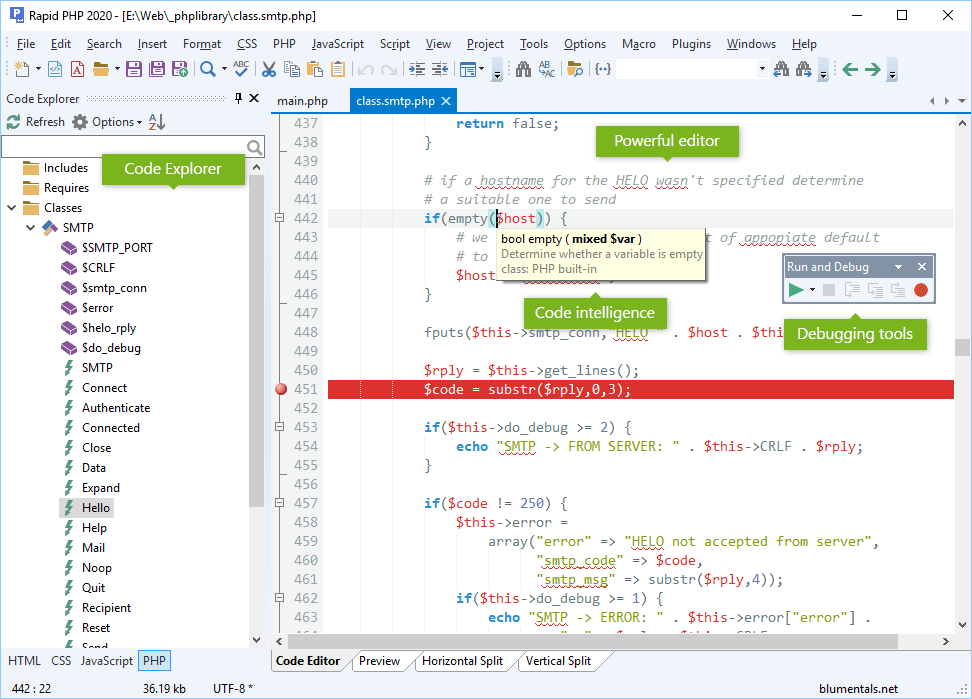 If you are web developer looking for a nice text editor, then you have got one in Rapid PHP. This application has one of the best clip library functions you can imagine. If you are web developer looking for a nice text editor, then you have got one in Rapid PHP. This application has one of the best clip library functions you can imagine.
What is Rapid PHP?
Rapid PHP is a quick, lightweight and very powerful PHP editor that combines features of a fully-packed PHP IDE with unmatched performance. Rapid PHP is the most complete all-in-one software for coding PHP, HTML, CSS, JavaScript and other web development languages with tools for debugging, validating, reusing, navigating and formatting your code. Whether you are a professional developer or pure enthusiast, with Rapid PHP editor you can get your job done faster, save your time and increase productivity.
Rapid PHP combines a lot of beautiful features that make the program very attractive. So ot these features include the following: full HTML5 and CSS3 compatibility; syntax highlighting for all popular web development languages; advanced PHP debugger; code intelligence for PHP, HTML, CSS, JavaScript and Smarty; PHP formatter; bracket highlighting; code folding; built-in File and (S)FTP Explorer; project management; built-in Web browser; integration with Web server; code explorer; built-in multi-browser preview; SQL explorer; find and replace with regular expression support; find and replace in files; multi-item clipboard; UTF-8 Unicode support; spelling checker; code snippet library; HTML and CSS code assistants; HTML and CSS validation tools; support for popular PHP and JavaScript frameworks; and many others.
Any downside?
The program lacks the ability to change the printed page format.
Want to check it out? Visit RapidPHPEditor.
Posted in Main | No Comments »
Wednesday, September 25th, 2013
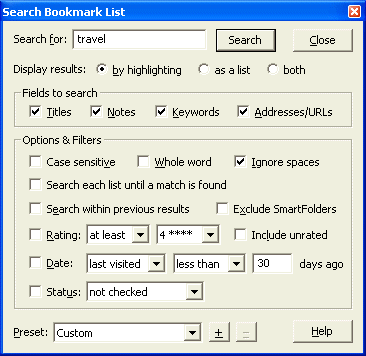 You probably have quite a lot of interesting links and websites that you’ve bookmarked and are looking for how to organize them. Then check out Bookmark Buddy. You probably have quite a lot of interesting links and websites that you’ve bookmarked and are looking for how to organize them. Then check out Bookmark Buddy.
What is Bookmark Buddy?
Bookmark Buddy is an advanced but intuitive favorites organizer and login manager that keep your Internet favorites, log-in details and notes secure and accessible no matter what browser you’re using. It also lets you organize program, document and folder shortcuts with the same simplicity and reliability.
It enables you to organize your bookmarks/favorites and shortcuts simply, quickly and reliably with this bookmark manager: search, sort, check, encrypt, import, export, backup & print any number of bookmarks; keep notes; and manage your logins. It works well all web browsers and offers import support for Internet Explorer, Netscape/Mozilla, MSN, Opera, AOL and CompuServe.
Some of the features of this program are: find a bookmark quickly, add notes to a bookmark easily, schedule bookmark visits, it helps you to quickly file a bookmark, manage your login details, and protect your privacy. Others include import your favorite existing bookmarks, export and print your bookmarks.
All in all a very nice bookmark organizer.
To learn more about this program, please visit BookmarkBuddy.net.
Posted in Main | No Comments »
Tuesday, September 24th, 2013
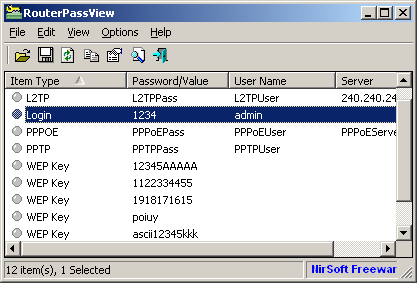 Did you know that backup file of the router usually contains important data like your ISP user name/password, the login password of the router, and wireless network keys? So what happens when you if you lost want of your password/keys? That is why an application like RouterPassView might help you to recover your lost password from your router file. Did you know that backup file of the router usually contains important data like your ISP user name/password, the login password of the router, and wireless network keys? So what happens when you if you lost want of your password/keys? That is why an application like RouterPassView might help you to recover your lost password from your router file.
What’s RouterPassView?
Most modern routers allow you to backup the configuration of the router into a file, and then restore the configuration from the file when it’s needed. The backup file of the router usually contains important data like your ISP user name/password, the login password of the router, and wireless network keys. If you lost one of these password/keys, but you still have a backup file of your router configuration, RouterPassView might help you to recover your lost password from your router file.
RouterPassView is a very useful tool that will or can help you recover your important password or key. It is a great utility that works on any version of Windows, starting from Windows 2000 and up to Windows 8. RouterPassView however, supports only a limited number of router models.
Any downside?
The application is not a bad one; but the problem is that it only supports a small number of router models.
Want to check it out? Visit NirSoft.
Posted in Main | No Comments »
Tuesday, September 24th, 2013
 AeroBlend automatically changes the Windows Color to match the current wallpaper or active application icon\contents. When in wallpaper mode, as each wallpaper is changed, either manually or via the Windows slideshow, the Windows color will change to match the wallpaper. AeroBlend automatically changes the Windows Color to match the current wallpaper or active application icon\contents. When in wallpaper mode, as each wallpaper is changed, either manually or via the Windows slideshow, the Windows color will change to match the wallpaper.
It is a simple and intuitive application designed to automatically change the Windows color to match the current wallpaper, so all your computer colors are in tune. AeroBlend uses a quick algorithm to obtain the average color of the wallpaper or icon or window content. You can easily customize the color intensity as well as other options.
Additionally other modes include using the active application icon, it’s contents or even set the color manually by picking on the desktop or choosing a color.
Carthago Software, the publisher of this program, added the following changes to this version:
Added two manual modes to set the Aero color: via screen picking or directly choosing a color, Reorganized the options dialog, Added new options referring to the new manual modesFixed: Auto-Colorization warning in Windows 8 would never be disabled and Minor bug fixes and tweaks.
Want to try? Visit AeroBlend.
Posted in Main | No Comments »
Tuesday, September 24th, 2013
 Ever wanted an application that enables you view and access all your files on your computer from a web browser, Smartphone, tablet or even DLNA enabled devices? Then Tonido has almost everything your heart desires. Ever wanted an application that enables you view and access all your files on your computer from a web browser, Smartphone, tablet or even DLNA enabled devices? Then Tonido has almost everything your heart desires.
What’s Tonido?
Tonido Desktop is an application that allows you to access all your files on your computer from a web browser, Smartphone, tablet or even DLNA enabled devices; and it will interest you to know that no setup necessary.
With newly added features and updates; Tonido is a bit more stable than it used to be. Some updates and fixes include the following: make folder songs indexed using track number; make it easy to set the indexed folders in getting started; sharing list is sorted by most recent at top; Revamp Sharing Options Dialog box; show Drives directly instead of inside “Drives”; and addition confirmation saying that original files will be deleted.
Tonido is also designed with a lot of outstanding features including the following: Access, Sync and Share ALL your docs, photos, music and videos on PC (Win, Mac or Linux) from anywhere using Tonido Desktop Software; Access, Sync and Share ALL your docs, photos, music and videos on USB and SATA drives using a TonidoPlug; and many more.
Any downside?
There is a need to improve the user interface of this application.
Want to check it out? Visit: Tonido.
Posted in Main | No Comments »
Tuesday, September 24th, 2013
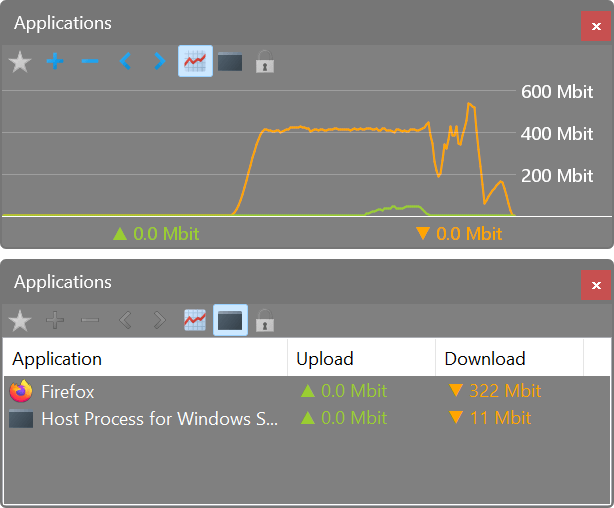 I’ve been searching for a software that help me to monitor my internet data usage. The thing is my data gets exhausted before their validity period and I don’t indulge in heavy downloads or streaming. It leaves me feeling ripped off till I found an amazing program that helped me monitor things. I’m talking of none else than NetWorx. I’ve been searching for a software that help me to monitor my internet data usage. The thing is my data gets exhausted before their validity period and I don’t indulge in heavy downloads or streaming. It leaves me feeling ripped off till I found an amazing program that helped me monitor things. I’m talking of none else than NetWorx.
What is NetWorx?
This is an intuitive freeware that helps you to monitor and manage your internet bandwidth. It also helps you measure your Internet speed and network connections. It can be used to collect bandwidth usage data and measure the speed of your Internet or any other network connection. It can help you identify possible sources of network problems, ensure that you don’t exceed the bandwidth limits specified by your ISP, or track down suspicious network activity characteristic of Trojan horses and hacker attacks. The program allows you to monitor all your network connections or a specific network connection (such as Ethernet or PPP) only.
It has a highly customizable visual and sound alert which can be scheduled to alert you when the network connection is down or when some suspicious activity, such as unusually heavy data flow, occurs. It can also automatically disconnect all dial-up connections and shut down the system.
Some of the main features of NetWorx are: clear graphic/numeric display, data usage reports which can be exported to a variety of file formats, permits close supervision of uploads and downloads. It works well with dial-up, ISDN, cable modems, ADSL, Ethernet cards and several more.
SoftPerfect Research, the author of this program, added the following changes to this version: Added a hidden setting to suppress the graph on full-screen apps, Added highlighting changed hidden options in bold, Added totals to the dial-up log and a session filter, Added sorting by application in the application view, Added a more stable version of the WFP driver for LAN traffic filtering and Fixed showing popup menu on the graph on left-positioned secondary display.
Downsides?
Absolutely none to the best of my knowledge. I wonder how I survived online for so long without this program. Kudos SoftPerfect Research.
To learn more about this amazing program, please visit SoftPerfect.
Posted in Main | No Comments »
Wednesday, September 18th, 2013
 Do you want a tool or application that can help you tag your music files without any hitch? Are you tired of wasting too much time when searching for your favorite music files? Then I suggest you give this application a try. Do you want a tool or application that can help you tag your music files without any hitch? Are you tired of wasting too much time when searching for your favorite music files? Then I suggest you give this application a try.
What’s GodFather?
The GodFather is here to put order to chaos and put you in control. No more strange file names and endless search for “that song.” Rename, update tags, restructure files on hard disk, create/merge play lists, encode-decode with LAME/Ogg Vorbis/MpcEnc, export/import to/from file, play, use freedb.org and allmusic.com with ease of use and perfect results every time.
The GodFather has a lot of key features that have also been recently updated. Some of these features include the following: disc Field formatting options added; ability to use current file/selection to (rename, update, remove tags) with either popup menu or shortcut keys; new Replacement matrix options: ignore values inside ‘()[]’ and also regex usage and case insensitive replacements; quick search panel for the main grid; Amazon engine update; and field mapping for Vorbis and Ape tags.
The GodFather enables you to rename, update tags, restructure files on hard disk, create/merge play lists, encode-decode with LAME/Ogg Vorbis/MpcEnc, export/import to/from file, play, use various online sources, catalog them in a library with ease of use and perfect results every time.
This is definitely one of the best applications for manipulating ID3 tags, titles, and a host of others.
Want to check it out? Visit Jtclipper.
Posted in Main | No Comments »
|
|
|




