Archive for the 'Main' Category
Tuesday, June 4th, 2013
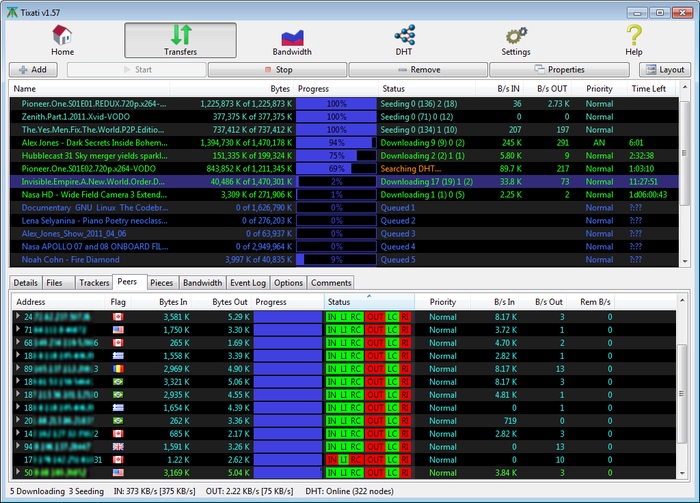 Need a powerful peer-to-peer file transfer system? Check out the all new Tixati. Need a powerful peer-to-peer file transfer system? Check out the all new Tixati.
What is Tixati?
It gives you an easy to use but very powerful and flexible application for peer-to-peer file transfers. Its interface is very easy to use, allowing inexperienced users to manage downloads easily, while also providing a variety of transfer monitoring statistics, such as the upload ratio and the download time, the download source for each file piece, detailed transfer graphs, incoming and outgoing bandwidth usage charts.
It uses bittorrent protocol for fast average download speed, it comes with advanced charting capabilities and transfer properties. Tixati features dedicated functions for helping you configure bandwidth throttling, including trading and seeding limiters, as well as transfer priority options for individual transfers. It enables you to create new transfers and includes efficient peer selection and chocking algorithms.
Some of the main features of this application are: detailed user interface, with views of individual peers, detailed bit-field graphs, and bandwidth usage charting, highly flexible bandwidth throttling, including trading/seeding share adjustment and adjustable priority for individual transfers and peers, efficient peer choking / unchoking algorithms to ensure fast downloads, easy to create and seed new transfers, peer, transfer, and system-wide event logging with adjustable detail level and back-scroll size, move downloaded files to new filesystem location while transfer is in progress, even to different partition and full DHT (Distributed Hash Table) implementation including detailed message traffic charting.
Fast and clean P2P client without nagging and annoying ads.
To learn more about this program, please go to Tixati.
Posted in Main | No Comments »
Monday, June 3rd, 2013
 Our computers are constantly under threat from all kinds of viruses, spyware, Trojans. We therefore need to protect them and keep them safe at all times. One software you could use to provide such protection is Auslogics Antivirus. Our computers are constantly under threat from all kinds of viruses, spyware, Trojans. We therefore need to protect them and keep them safe at all times. One software you could use to provide such protection is Auslogics Antivirus.
What is Auslogics Antivirus?
This is an antivirus that offers comprehensive real-time protection for your PC against viruses, spyware, Trojans and other known and unknown threats before they cause damage to your computer. It would constantly analyze all the applications running on your PC and warns you if any of them tries to perform a malicious action.
Some of the main features of this program include: Prevents viruses from being copied to the disks, monitors and blocks attempts to modify system files, Uses heuristics to counter stealth and polymorphic viruses, unmatched spyware and virus detection rate. Blocks web pages that attempt to steal your credit card data.
It can also block keyloggers monitoring your Internet activity, scans all web, e-mail and instant messaging traffic in real-time. It prevents leaking of personal data via e-mail or instant messenger. Encryption can keep your Yahoo! or MSN Messenger chats private. Your online identity is securely protected: so you can shop, bank and browse privately. It skips safe files for better scan speed and lower CPU load. Laptop mode prolongs battery life of laptops and netbooks and nettops.
Auslogics, the publisher of this program, has added some changes to this version. They are: Full Windows 8 compatible, Auslogics Autopilot – quietly makes all the security related decisions for you, Auslogics Safepay – keeps hackers at bay by automatically opening all your e-banking and e-shopping and USB Immunizer – immunizes Flash Drives from viruses when connected to your PC.
Downsides?
None. Blocked every threat that my computer encountered with.
To know more about this program, visit Auslogics.
Posted in Main | No Comments »
Monday, June 3rd, 2013
 May be your Windows PC is currently running painfully slow. There are several reasons why this is happening. Maybe there are unused files that are clogging up your PC. Probably it is registry issues. Whatever it is, there is an application that can effectively handle them ALL. Simply get CCleaner for Windows and get the solution. May be your Windows PC is currently running painfully slow. There are several reasons why this is happening. Maybe there are unused files that are clogging up your PC. Probably it is registry issues. Whatever it is, there is an application that can effectively handle them ALL. Simply get CCleaner for Windows and get the solution.
What is CCleaner?
This is a freeware system optimization, privacy and cleaning tool. It helps to get rid of unused files thus making your PC run faster and frees up the much needed hard disk space. It performs a thorough analysis of your system and detects unused or invalid entries that clog the Windows registry, and gets rid of them. It can clear all traces of your online activities and contains a fully featured registry cleaner.
CCleaner features a clean, professional-looking interface split into four areas: Cleaner, Registry, Tools and Options. The Registry module concentrates on repairing issues found in the Windows Registry. It contains an uninstall manager (lists and allows you to remove installed software) and a system restore feature (allows you to manage all system restore points) and a drive wiper (securely erases the contents of drives).
One thing I particularly like about this program is the fact that it does not contain any adware or spyware at all. It is very fast (normally taking less than a second to run). CCleaner is able to clean your computer of junk files, unused entries from browsers, system files and third-party software. It keeps your computer fully optimized and saves you the time you would spend uncluttering it manually.
Piriform Ltd, the author of this program, has added some changes to this version. The changes are: Improved History cleaning for Internet Explorer 10, Optimized Cache cleaning for Internet Explorer 10, Improved Download History cleaning for Firefox, Improved DOMStore cookie cleaning for Internet Explorer 10, Optimized detection of Google Chrome Startup items and improved drive detection in File Finder.
To learn more about this amazing program, please visit CCleaner.
Posted in Main | No Comments »
Monday, June 3rd, 2013
 Searching for a good image viewer for your photo collection? If yes, then XnView is one of the best solutions you can ever get. Searching for a good image viewer for your photo collection? If yes, then XnView is one of the best solutions you can ever get.
What is the big deal about XnView?
XnView is a group of utilities that features viewing, converting, screen capture, slideshow, and Twain support. These utilities support viewing more than 400 graphic formats and can be used to create several dozens more. It has a highly-customizable interface that is easy to understand. It has a tabbed GUI that allows you to open as many images as you want and hop from image to image. It is free and does not contain any spyware or adware.
The menu allows you to carry out the following functions: start a batch conversion or renaming, send the photo by email, move or copy it to a certain folder, tag and rate it, set it as wallpaper and many other things. An interesting feature of this application is that you can turn a photo into JPEG, TIFF, BMP and PNG formats in a second by a simple click.
Some of its main features include: import about 400 graphic file formats, export about 50 graphic file formats, multipage TIFF, animated TIFF, animated ICO support, adjust for brightness, contrast, Twain support (windows only), apply effects(lens, wave) among other rich features.
Downsides?
No. Hmm… this is one of the best image viewers around.
To familiarize yourself with this program, please visit Xnview.
Posted in Main | No Comments »
Wednesday, May 29th, 2013
 Network administrators are saddled with the responsibility of specifying which user can access which device(s). DeviceLock is one application that would to make that job a lot easier. Network administrators are saddled with the responsibility of specifying which user can access which device(s). DeviceLock is one application that would to make that job a lot easier.
What is Device Lock?
This program is used by network administrators to assign and enforce permission for how, when, where to, and by whom data can or can’t be moved to or from company laptops or desktop PCs via devices like phones, digital cameras, USB sticks, CD/DVD-R, tablets, printers or MP3 players.
DeviceLock enhances access control for Windows System Administrators and helps control removable disk usage. It can protect network and local computers against viruses, trojans and other malicious programs often injected from removable disks. Network administrators can also use DeviceLock to flush a storage device’s buffers and obtain extended information about devices and NTFS partitions.
One of the benefits of its close integration with Active Directory is that it gives the solution virtually limitless scalability. The DeviceLock Endpoint DLP Suite can effortlessly run on every endpoint listed in your Active Directory database no matter their number.
Some of the features of this program are: it controls which users or group can access USB, FireWire ports, WiFi and Bluetooth adapters, PDAs etc, authorize only specific USB devices that will not be locked regardless of any other settings, deploy permissions and settings via group policy in the Active Directory domain, control everything remotely using the centralized management console and so many others.
Downsides?
This program appears to be best suited for advanced users. great for network administrators but not really for home users.
To know more about this program, please visit DeviceLock.
Posted in Main | No Comments »
Wednesday, May 29th, 2013
 Tired of having to change your network settings each time you whenever you plug in the network cable in a different location? NetSetMan would help you handle that. Tired of having to change your network settings each time you whenever you plug in the network cable in a different location? NetSetMan would help you handle that.
What is the big deal with NetSetMan?
This is a network manager that allows you to easily switch between 5 different structured profiles. It has a very easy to use interface that basically allows six different sets of network settings. It works this way: once your network settings are saved, you simply pick the settings you need and click on the apply button.
It has a plain and easy to understand interface: just enter the to enter network settings, including IP address, subnet mask, gateway, DNS and WINS servers and then save your settings. This application supports WiFi, printers, workgroups, PC names and DNS domain settings. It has dedicated tools to export and import the settings. It can effectively handle multiple network adapters at the same time. If you a person that travels often and connects to different networks regularly, then this program is what you need.
Some of the main features of this program are: IP address settings, default gateway settings, preferred and alternate DNS server settings and computer name and workgroup setting.
Ilja Herlein, the author of this program, has added a few changes to this version. The changes are: changing wireless network on logon screen, multiple IE home pages, IE proxy, several Wi-Fi fixes and improvement, improvement for all lists/tree and Changing wireless network on logon screen now available.
Downsides?
None that come to mind. This is a great program for switching between networks.
To know more, please visit NetSetMan.com.
Posted in Main | No Comments »
Wednesday, May 29th, 2013
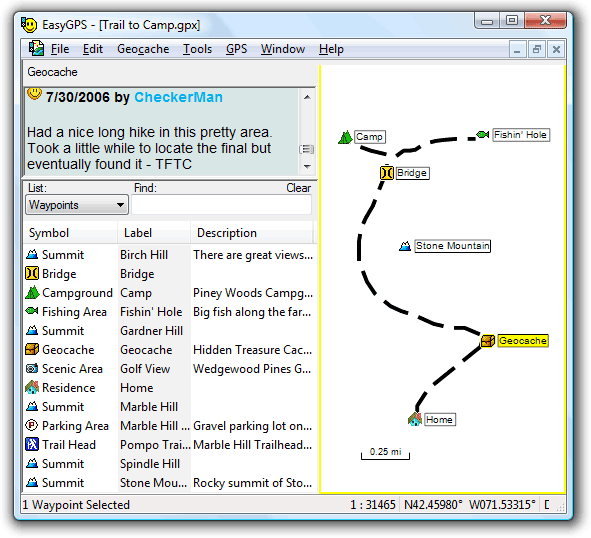 Wondering how to sync your waypoints and routes between your computer and your Garmin, Magellan, or Lowrance GPS? Then get the EasyGPS Free software. Wondering how to sync your waypoints and routes between your computer and your Garmin, Magellan, or Lowrance GPS? Then get the EasyGPS Free software.
What is this program all about?
This program provides you a fast and easy way to create, edit, and transfer waypoints and routes between your computer and your Garmin, Magellan, or Lowrance GPS. It allows you to manage all of your waypoints and routes, and show them in lists sorted by name, elevation, or distance. You can download waypoint singly or in groups without deleting everything you saved. You could connect your GPS to some of the best mapping and information sites on the Internet, giving you one-click access to street and topo maps, aerial photos, driving directions, weather forecasts, and nearby attractions.
You could use this program to back up and organize your GPS data, print maps, or load new waypoints onto your GPS for your next hike or geocaching adventure. You can download geocaches and waypoints to your GPS and backup and print out your POIs and tracks. Been a part of the TopoGrafix family of outdoor products, you’ll be able to exchange GPS data with EasyGPS, PanTerra and ExpertGPS users all over the world.It has no nagscreen, ads or spyware. What’s more it is 100% free.
To learn more about this awesome program, please visit EasyGPS.
Posted in Main | No Comments »
Tuesday, May 28th, 2013
 Searching for a LAN messenger for your corporate network? Why not check out Softros LAN Messenger. Searching for a LAN messenger for your corporate network? Why not check out Softros LAN Messenger.
What is the big deal about this program?
This shareware provides you with a secure and easy to use instant messaging program for user-to-user or user-to-group message and file exchange through your corporate network (LAN, WAN, VPN). It does not require any server and is easy to install. It has both a multiple user and single user capability with offline messaging system.
It has a strong messaging encryption for all incoming and outgoing messages, guaranteeing no unauthorized person ever reads personal correspondence. It can be used for contacting individual users or for group notification. Your chats are logged and there’s no need to worry about losing any messages; you simply won’t! it has message notification alerts for incoming messages.
No internet connection is required to use this application. It works inside your LAN or WAN saving your Internet bandwidth and allowing you to minimize firewall breaches that could allow outside attacks and IM worms. It supports Microsoft/Citrix Terminal Services and Microsoft Active Directory.
Some of the main features of this program are: instant messaging with LAN chat, group broadcast messaging, offline messaging, file transmission, serverless architecture, no internet connection required, easy to install and multi-language interface.
Softros Sytems, Inc., the author of this program, has added a few changes to this version. They are: new drag and drop to user list and conversation file transfer method, new History viewer with searcher, emoticons and UTF8 support.
Downsides?
None to be mentioned. This is one on=f the best LAN messengers you would ever find.
To familiarize yourself with this program, please do visit Softros.
Posted in Main | No Comments »
Tuesday, May 28th, 2013
 Want an application that allows you to create screenshots very quickly? Try this out: Greenshot. Want an application that allows you to create screenshots very quickly? Try this out: Greenshot.
What is Greenshot?
Greenshot is a light-weight screenshot software tool for Windows. This application allows you to quickly create complete or partial screenshots. It is easy to use and configure. It allows you to easily annotate, highlight or obfuscate parts of the screenshot, send the screenshot to a file, the clipboard, a printer or as e-mail attachment.
You can use it to even capture complete (scrolling) web pages from Internet Explorer. It saves you a lot of time and/or money. In addition, you can configure printing options (e.g. shrink printout to fit paper size, center printout on page) and apply effects (play camera sound, show flashlight). Greenshot is an efficient tool for project managers, software developers, technical writers, testers and anyone else creating screenshots. This software requires a moderate amount of system resources,
Some of the main features of this program are: create complete or partial screenshots quickly, easily annotate, highlight or obfuscate parts of the screenshots and send the screenshot to a file, the clipboard, a printer or as e-mail attachment.
Downsides?
It’s a great software for creating screenshots.
To know more about this program, please do visit GetGreenShot.
Posted in Main | No Comments »
Sunday, May 26th, 2013
 Filling passwords or forms can be a bit challenging especially if it becomes a task that has to be repeated every few minutes or sours depending on a lot of factors. This can be taken care of if you have an application like Sticky Password. Filling passwords or forms can be a bit challenging especially if it becomes a task that has to be repeated every few minutes or sours depending on a lot of factors. This can be taken care of if you have an application like Sticky Password.
What’s Sticky Password?
Sticky Password is an application that automatically fills login and password fields in web forms and usual dialog windows. Sticky Password has a unique feature named “Sticky Button’ which appears on any window that had password saved for. Careful backup feature will keep your entire password safely stored until you will need them. It also allows multiple logins and passwords for a single account as well as other amazing features.
Sticky Password has so much benefits that you can enjoy including the following; saves you a lot of time by automatically login in you to your favourite websites; protects you by generating, encrypting, and storing strong passwords, easily manage your application and website passwords, use portable version by taking all your passwords with you wherever you go, fill all online forms with a single click, protection against keyloggers phishing, and identity theft, and many more.
Any downsides?
This free version is limited in terms of features and what you can do with it.
Want to check it out? Visit StickyPassword.
Posted in Main | No Comments »
|
|
|




