Archive for the 'Main' Category
Friday, January 25th, 2013
 Choosing a great and useful application that simplifies all your online activities these days can be a huge task; especially when you consider the fact that there are a lot of poorly packaged programs out there. However, you won’t have to search for too long if what you are looking for is a program like Pokki. Choosing a great and useful application that simplifies all your online activities these days can be a huge task; especially when you consider the fact that there are a lot of poorly packaged programs out there. However, you won’t have to search for too long if what you are looking for is a program like Pokki.
What is the big deal about Pokki?
It is a program capable of transforming your websites into desktop applications. Pokki is simply different from other applications because it does not involve wrapping a website in a new window. It is based on several specially designed applications each with ability to use specific online service.
Pokki has several applications that can be used to integrate the likes of Twitter and Facebook into your desktop. The application is like a desktop version of Android running on your desktop and the experience of switching between several sites or applications feel different to switching between the tabs you would normally be using in your web browser.
With Pokki, you can stay informed with notifications from your favorite applications; thereby keeping you up to date with latest information on your emails, tweets, and many more.
All in all Pokki has no downfalls that should be noted here.
Want to check it out? Visit Pokki.
Posted in Main | No Comments »
Friday, January 25th, 2013
 Are you searching for a peer to peer program or application that enables you share files, with friends and loved ones online? Perhaps, you want to give Ares a try because of its features, and the fact that it is an open source program. Are you searching for a peer to peer program or application that enables you share files, with friends and loved ones online? Perhaps, you want to give Ares a try because of its features, and the fact that it is an open source program.
What is Ares?
It is a peer to peer file sharing application that enables all users share their digital files including images, audio, video, software, documents, and many more all for free. Ares is an open source application that also allows you easily publish your files through the Ares network.
As a member of the Ares network, you can also search as well as download any digital media of your choice. The application also gives you the opportunity to host chat rooms and meet new friends online.
Ares is an amazing program that takes up only a small size of your computer; and does not drag or slow down the performance of your computer. Some of the benefits of this P2P program over several others include the following; lightweight, easy configuration, open source, fast download, easy configuration, and several other amazing benefits and features.
Ares also has a built-in library organizer that enables you organize your shared files in different categories. Files can be sorted out by type, category, and many more.
Any downsides?
Ares has no downside at the moment, and is highly rated by a lot of users.
Want to check it out? Visit AresGalaxy.
Posted in Main | No Comments »
Friday, January 25th, 2013
 CuteRank is a freeware that helps you to “check” and “track” multiple keyword ranking performance on multiple search engines including Google, Yahoo!, Bing, Ask, and AOL. CuteRank is a freeware that helps you to “check” and “track” multiple keyword ranking performance on multiple search engines including Google, Yahoo!, Bing, Ask, and AOL.
What is the big deal about CuteRank?
This program allows you to easily see how your keywords are performing in the top search engines. For SEO experts, you would want to figure out what words people are likely to type into a search engine to try to find your Web site, and to then make sure that your Web site contains those words. This program would not show you which keywords the traffic is using to get to your website, it will however show you effective the keywords you have chosen are.
It also allows you to track the performance of your keywords over time. It could create reports and schedule updates for a particular time each day.
Some of the key features of this program are: check your keyword ranking in an instant, track the performance of your keywords, check which page ranks the best on search engines and generate keyword ranking reports.
CuteRank.net, the publisher of this program, has added a few changes to this version. The changes include: Add function to update all “failed” keywords, improved rank updating algorithm for unusual changes, improved trend chart display for range larger than 30 days, improved PDF report function and Improved CSV report function.
Downsides?
Not very stable. It sometimes locks up Windows and you can only use it to monitor website.
To familiarize yourself with this program, please go to CuteRank.
Posted in Main | 1 Comment »
Thursday, January 24th, 2013
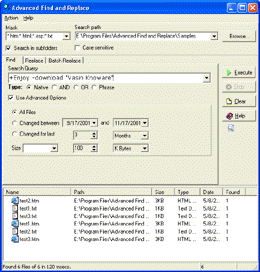 Searching out a file or document on a system can be a tough task sometimes. This could take a couple of minutes with the normal process or way of doing it through the standard application finder on Windows. However, you can save some of your precious time by installing Advanced Find And Replace application that enables you do just that within seconds. Searching out a file or document on a system can be a tough task sometimes. This could take a couple of minutes with the normal process or way of doing it through the standard application finder on Windows. However, you can save some of your precious time by installing Advanced Find And Replace application that enables you do just that within seconds.
What’s Advanced Find and Replace?
Advanced Find And Replace is a program that lets you find documents on a local machine within a couple of seconds. You may also choose to specify normal AltaVista or Infoseek queries in order to find documents of your choice. Advanced Find And Replace represents a capable replacement of your standard find application in Windows. It not only saves you a lot of time, but also helps you save a lot of money that would have been spent mining information from your local machine.
Advanced Find And Replace application has a lot of advanced features that include the following; search files with smart queries just like you do with Google and other search engines, complete search and replace Microsoft Office Word, Excel and PowerPoint files, preview found text as with Google, fast, and many more.
Any downsides?
Version 7.8.1 already includes a couple of fixes and corrections that affected its compatibility with Windows 8.
Want to check it out? Visit Abacre.
Posted in Main | No Comments »
Wednesday, January 23rd, 2013
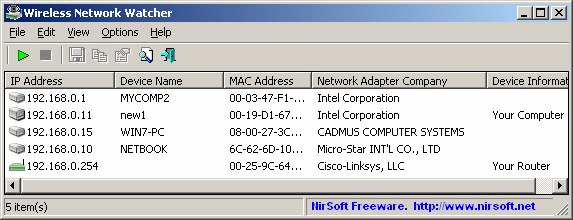 This is a small utility that scans your wireless network and displays the list of all computers and devices that are currently connected to your network. This is a small utility that scans your wireless network and displays the list of all computers and devices that are currently connected to your network.
What is the deal with this program?
It displays the IP address, MAC address, the company that manufactured the network card, and optionally the computer name of every computer or device that is connected to your network. Its easy-to-use user interface makes everything pretty easy. You can configure the format of the displayed MAC address, perform background scanning, place an icon in the Windows System Tray for instant access and beep as soon as a new computer is detected.
This program gives you the option of choosing the network adapter you wish to use, in case there are several of such hardware devices on your computer, but also the IP address range to be scanned. This utility lets you to export the list of connected devices to multiple formats, including HTML, XML, CSV or text file. It doesn’t take up much of your system resources and works well with all versions of Windows without slowing down your system. You can configure the format of the displayed MAC address, perform background scanning, place an icon in the Windows System Tray for instant access and beep as soon as a new computer is detected.
The publisher of this software, Wireless Network watcher, ahs added a few changes to this version. The changes are: Added ‘Mark Odd/Even Rows’ option, under the View menu. When it’s turned on, the odd and even rows are displayed in different color, to make it easier to read a single line and fixed issue: Dialog-boxes opened in the wrong monitor, on multi-monitors system.
Downsides?
None noted.
To find out more about this program, please visit Wireless Network Watcher.
Posted in Main | No Comments »
Tuesday, January 22nd, 2013
 MIRC is a fully featured internet relay chat application or client for Windows that can be used to communicate or share or play or even work with your online friends on the IRC network across several locations of the world. The application can be used either as multi-user group conferences or in one-to-one private discussions. MIRC is a fully featured internet relay chat application or client for Windows that can be used to communicate or share or play or even work with your online friends on the IRC network across several locations of the world. The application can be used either as multi-user group conferences or in one-to-one private discussions.
MIRC has a clean, practical interface that can be easily configured once installation is complete. It also gives you the opportunity to configure or reconfigure its settings whenever you feel like. MIRC supports various advanced features such as; buddy lists, file transfers, multi-server connections, SSL encryption, proxy support, UTF-8 display, customizable sounds, spoken messages, tray notifications, message logging, and a host of others.
This new version or update is also built with a powerful scripting language that can be used to automate MIRC and to create applications that perform a variety of other functions including network communications and playing games.
What has worked to the advantage of this chat application is the fact that the publishers keep updating it. This has helped in several ways to deal with various bugs and issues that affected past editions. However, MIRC still has a lot more updates and fixes to get it to where it should actually be.
Downside
MIRC has only 30 day limitation period, and is not free application.
Want to check it out? Visit mIRC.
Posted in Main | No Comments »
Monday, January 21st, 2013
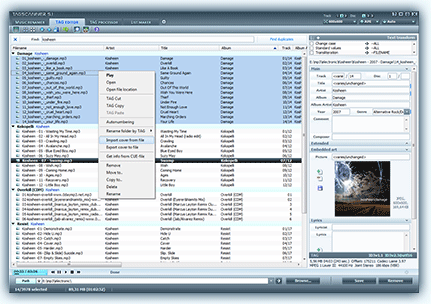 Do you want a program that can help you organize and manage your music collections? Then TagScanner is one application that can be used for such purposes and much more. Do you want a program that can help you organize and manage your music collections? Then TagScanner is one application that can be used for such purposes and much more.
What is TagScanner?
It is an application that can help you organize and manage your music collections. It can also be used for a lot of other things including; editing tags of mostly state-of-the-art studio formats, renaming files based the tag information, generating tag information from filenames, and performing any transformation of the text from tags and filenames.
With TagScanner, you can also get album information from online databases like freedb or Amazon. The program supports ID3v1, ID3v2, Vorbis comments, APEv2, Windows Media, and MP4 (iTunes) tags.
Besides having some of the most advanced features that have been added to it; TagScanner also comes with an easy to use built-in player. This version features a couple of updates and fixes including the following; fixing of changing of filename in export interface didn’t work, fixing of renaming of files directly in filelist, and translations into German.
TagScanner is an easy to use application that is unbelievably available as a freeware. As a matter of fact, the application offers you more features and functions than a couple of other paid ones out there.
Improvements:
A couple of bugs and issues noticed in older versions have been fixed; which makes TagScanner 5.1.530 very stable.
Want to check it out? Visit Xdlab.
Posted in Main | No Comments »
Monday, January 21st, 2013
 Are you having problems with setting up an OSS mail system? Then MDaemon is your best bet. The program is one of the easiest in terms of setup and features. It also offers you great value for money especially when compared to several other programs out there. Are you having problems with setting up an OSS mail system? Then MDaemon is your best bet. The program is one of the easiest in terms of setup and features. It also offers you great value for money especially when compared to several other programs out there.
What is MDaemon?
This program is a Windows-based email server that provides full mail server functionality and control as well as several other great features. MDaemon is also built with antivirus and anti-spam security features, seamless web access to email via the integrated WorldCleint component. The application can be remotely administered through the web-based WebAdmin plug-in and many more.
MDaemon supports IMAP, SMTP, and POP3 protocols, and also delivers solid performance from a wide range of built-in features. The program provides secure and standards-compliant as well as low total cost of ownership features for all kinds and sizes of businesses or organizations.
MDaemon also supports a variety of mobile devices that have access to email, calendar, and contacts. The program also includes support for BlackBerry push email with a seamless experience; which is regarded as a big boost for organizations that require simplicity and affordability. With the programs simple user-interface, organizations can easily setup and receive push email delivery from the mail server to the BlackBerry smartphone.
Downside
MDaemon has no downside, and seems to beat a lot of other programs out there despite the fact that it is a shareware.
Want to check it out? Visit MDaemon.
Posted in Main | No Comments »
Monday, January 21st, 2013
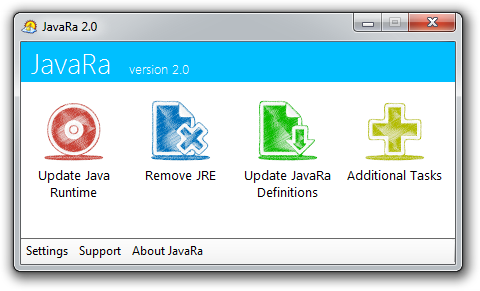 What about installing or having a program installed on your PC that gives you opportunity to have your old version of Java updated as soon as a new or updated version is available online? That is what you get when you install this open source program called JavaRa. What about installing or having a program installed on your PC that gives you opportunity to have your old version of Java updated as soon as a new or updated version is available online? That is what you get when you install this open source program called JavaRa.
What is JavaRa?
It is a program that enables you to update your installed Java application to the latest version as soon as an update is made available online. JavaRa is built or designed with features to enable you update existing Java application to the latest version.
JavaRa will download and also install the latest version of Java Runtime Environment if the version you have installed supersedes a newer version. The application also allows you to remove all older versions of this program. This also ensures that the security of your computer is further boosted; and best of all is that it also creates extra space on your hard disk.
The amazing thing about this application is that virtually everyone can use it because it offers a lot of flexibility. As a matter of fact, all you have to do is download and install it even if you are a newbie.
Downsides
However, the interface of this application is a bit confusing at first.
Want to check it out? Visit: JavaRa.
Posted in Main | No Comments »
Sunday, January 20th, 2013
 Searching for an application that lets you utilize modern hardware COM servers without changing your software or exchanging data between a TCP/IP application and an old-fashioned program that can only connect to a serial port? Then you might want to consider Serial Port Redirector. Searching for an application that lets you utilize modern hardware COM servers without changing your software or exchanging data between a TCP/IP application and an old-fashioned program that can only connect to a serial port? Then you might want to consider Serial Port Redirector.
What is Serial Port Redirector?
Serial Port Redirector is a program that is used as a serial application to a remote TCP socket. It allows you to utilize modern hardware COM servers without changing your software or exchanging data between a TCP/IP application and an old-fashioned program that can only connect to a serial port?
The program now has a couple of new changes that include the following; you can now use virtual ports created by other Fabula Tech products as server physical ports, compatibility with Windows 2000 server has been fixed, and auto update utility has also been fixed.
Serial Port Redirector has a lot of advanced features such as; ability to work exactly as hardware serial port, high configurable virtual COM ports, fully supports Telnet RFC2217 protocol, extra strings sending on port opening/closing, unlimited number of virtual serial ports can be created simultaneously on a single computer, raw data transmission support, preset serial port control, and many more.
Be sure to watch online demos and video tutorials and find out more about usage examples for the software.
Downside
It has a 15 day trial limitation.
Want to check it out? Visit Serial Port Redirector.
Posted in Main | No Comments »
|
|
|




