O. James Samson - October 20, 2011
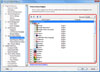 SEO PowerSuite is about the most complete free SEO toolkit; and comprises of four powerful SEO tools, each covering its specific area of SEO activities. Rank Tracker unearths hundreds of traffic-productive keyword variants for your website optimization and monitors your website’s positions in any of 600 supported search engines. The WebSite Auditor features helps you optimize your website’s structure and HTML coding and creates search engine friendly content for its separate pages. This version of the program also requires java runtime environment 1.5 to be installed, and also comes with updates such as the following; 14 brand new SEO reports introduced in beta, proxy status identification process made more accurate, several new sources for finding free proxy lists added, and the number of supported search engines also increased to 750. SEO PowerSuite is about the most complete free SEO toolkit; and comprises of four powerful SEO tools, each covering its specific area of SEO activities. Rank Tracker unearths hundreds of traffic-productive keyword variants for your website optimization and monitors your website’s positions in any of 600 supported search engines. The WebSite Auditor features helps you optimize your website’s structure and HTML coding and creates search engine friendly content for its separate pages. This version of the program also requires java runtime environment 1.5 to be installed, and also comes with updates such as the following; 14 brand new SEO reports introduced in beta, proxy status identification process made more accurate, several new sources for finding free proxy lists added, and the number of supported search engines also increased to 750.
SEO PowerSuite Free comes with key features that include the following; easy and fast, tested and used by a few individuals with vast experience in the area of search engine optimization or search engine ranking, has a lot of features just like a premium program, frequently updated, compatible with Windows, Mac, OS X as well as Linux.
One unique thing about this program is that it is easy to use, and does not require a very long time to get used to.
Want to check it out? Visit Link-assistant.com.
Rating:  Loading... 1 Comment »
O. James Samson - October 20, 2011
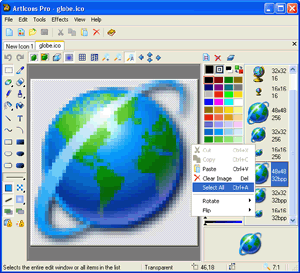 ArtIcons is an advanced icon-specific utility created for Windows. It allows both professional and amateur graphic artists alike to create and edit icon images and manage icon files and libraries. This version, which is pro allows you to do virtually everything in the standard version including importing GIF, Adobe Photoshop PSD, WMF, XPM, XBM and WBMP images, CUR and ANI cursor files. ArtIcons Pro also allows you to export images to GIF, Adobe Photoshop PSD, RC, XPM, XBM, WBMP and CUR files, import and export icon colour palettes, work with image lists in BMP and PNG formats, export library items into one single image, split icon libraries into individual icon files, and Split icons into sub-icons. ArtIcons is an advanced icon-specific utility created for Windows. It allows both professional and amateur graphic artists alike to create and edit icon images and manage icon files and libraries. This version, which is pro allows you to do virtually everything in the standard version including importing GIF, Adobe Photoshop PSD, WMF, XPM, XBM and WBMP images, CUR and ANI cursor files. ArtIcons Pro also allows you to export images to GIF, Adobe Photoshop PSD, RC, XPM, XBM, WBMP and CUR files, import and export icon colour palettes, work with image lists in BMP and PNG formats, export library items into one single image, split icon libraries into individual icon files, and Split icons into sub-icons.
ArtIcons Pro has experienced a lot of significant improvement over the past couple of years. Some of its important features include the following; create and edit icons in either standard or custom sizes, in colour depths up to 16 million colours, create and edit icons for Windows XP in 32-bit colour depth with 8-bit alpha channel, create and store images containing several layers, paint images with gradient and chess fill, create and manage icon libraries for better and more efficient storage, replace image colours, and lots of others.
Want to check it out? Visit Aha-soft.com.
Rating: Loading... 1 Comment »
Ciaran Moore - October 20, 2011
 An ounce of prevention may be worth a pound of cure, so that explains why nearly every business focused on its bottom line takes this to heart by using preventative maintenance. No matter if you’re utilizing computers, vehicles, or other types of machinery, carrying out a frequent maintenance routine can certainly avoid future problems and also help save significant money. An ounce of prevention may be worth a pound of cure, so that explains why nearly every business focused on its bottom line takes this to heart by using preventative maintenance. No matter if you’re utilizing computers, vehicles, or other types of machinery, carrying out a frequent maintenance routine can certainly avoid future problems and also help save significant money.
PM Master is an easy-to-use program which helps schedule and assign maintenance tasks, making certain these essential tasks have completed whenever they are supposed to. The actual program’s user interface is practical and simple to understand, along with clearly marked buttons and menus across the top. The program supports the use of multiple databases, letting you keep tasks in various departments separate. It’s very simple to include new equipment, employees, and maintenance types and then create tasks with them.
For every task, you are able to set a request date, a scheduled start date and time, plus a scheduled end date and time. There is also space within each task to list particular steps or components of the task and to track required materials and their costs. Recurring tasks can be automatically generated, cutting down the effort of making them from scratch each time. You are able to set up both desktop and email notifications for tasks that are due, and PM Master also lets you create work orders with ease.
A built-in Help file provides a basic overview of the program’s features. Overall, PM Master is an intuitive and effective tool, and it’s recommended to anybody that needs an easier way to handle maintenance tasks. It’s also totally free!
Check it out at Nhuntsoftware.
Rating: Loading... No Comments »
Ciaran Moore - October 19, 2011
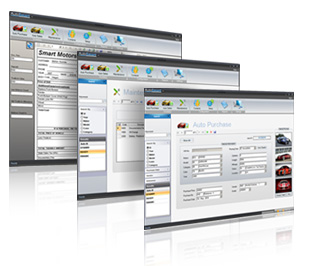 As it’s name would suggest, this software is for managing a dealership. The program’s user interface is certainly smooth and simple to get around, with screens for sales, purchasing, and maintenance, in addition to configuration options for contacts and other important info. As it’s name would suggest, this software is for managing a dealership. The program’s user interface is certainly smooth and simple to get around, with screens for sales, purchasing, and maintenance, in addition to configuration options for contacts and other important info.
By using it it is rather easy to record purchase and sales transactions, and the software generates professional-looking invoices automatically. You will really enjoy how simple it is to customize AutoSmart Dealership Management System to suit your needs; the user has the ability to add vendors, salespeople, customers, mechanics, and other people to the database in a quick and intuitive way, and it is just as easy to add vehicle makes and models.
This program also has tools for dealing with chargebacks and sales commissions. A report function helps you create a variety of reports, such as current inventory, profit and loss reports, and sales and purchase histories.
There is no Help file, however anyone with basic computer skills and auto sales experience should be able to figure it out. Overall AutoSmart Dealership Management System is fairly impressive, and is highly recommend to any dealership looking for a straightforward solution to manage its business.
You can check it out at Tech-weavers.com
Rating: Loading... 1 Comment »
Ciaran Moore - October 19, 2011
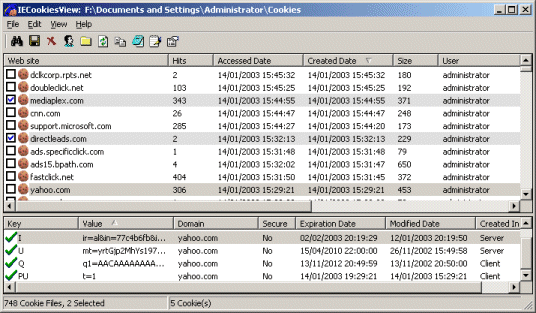 Cookies are very small files that are put on your computer when you are surfing the Internet, letting the sites you visit remember your preferences, log-in information, and more. Although most cookies are harmless, they are occasionally the subjects of privacy concerns. If you want to view and manage the cookies you have accumulated while using Internet Explorer, try IECookiesView. Cookies are very small files that are put on your computer when you are surfing the Internet, letting the sites you visit remember your preferences, log-in information, and more. Although most cookies are harmless, they are occasionally the subjects of privacy concerns. If you want to view and manage the cookies you have accumulated while using Internet Explorer, try IECookiesView.
This simple program makes it easy to keep tabs on cookies and ensure that you are only sharing information with sites that you trust. The program’s interface is plain and easy to navigate, with menus and buttons at the top. A large display pane shows a list of cookies with the dates they were created, modified, and accessed, as well as their size, status, domain, and number of hits. Check boxes next to the cookies let users select them and take bulk actions, including deleting, destroying, and blocking them. If there are cookies stored in multiple locations or for multiple users, IECookiesView lets users easily switch between them.
This program is fairly straightforward and the Help file contains useful information that can let users get even more from the program. Overall, it’s nothing fancy, but it is a good choice if you need a basic tool that will let you view and manage your Internet Explorer cookies.
Check it out at http://www.nirsoft.net/utils/iecookies.html
Rating: Loading... No Comments »
Ciaran Moore - October 19, 2011
 OkMap is a free geographical application which enables you to create, edit, and manage digital maps, import data from GPS devices, scanners, as well as other sources, plot your position instantly, and extract statistics. Using its detailed toolbar and feature-packed menu bar, OkMap’s user interface has a strong similarity to digital imaging and word processing tools, although with a distinct geographical emphasis. OkMap is a free geographical application which enables you to create, edit, and manage digital maps, import data from GPS devices, scanners, as well as other sources, plot your position instantly, and extract statistics. Using its detailed toolbar and feature-packed menu bar, OkMap’s user interface has a strong similarity to digital imaging and word processing tools, although with a distinct geographical emphasis.
This program starts with an optional tool tip which you can click through for a basic view of the program’s functions. An online-hosted, PDF-based Help file does a great job of explaining this convenient application’s many functions and options in its 214 pages; obviously, this tool requires a while to set up and become familiar with. It is advisable to get started by creating some simple maps to get a feel for how OkMap functions. You’ll be able to create two kinds of maps with OkMap: raster maps, which are pixel-for-pixel images and can be very big – as large as printed map sheets – and vector maps, that are “smart maps” like Google Maps that enable you to zoom in and out, change the perspective, and manipulate objects. The New Vectorial Map option initiates a wizardlike process that will let you select a wide range of parameters and choices with which to create your raw map file. Then you can draw and connect lines; add icons, polygons, comments, and other functions; including waypoints, routes, and tracks from GPS data or entered manually.
The user is also able to access Google Earth, Google Maps, remote feeds, and data sources, as well as export data in a number of ways. You do not need a GPS device to make use of OkMap, but the program can upload data from your handheld receiver for storing and displaying in several ways. If you ever hook your GPS up to a laptop running OkMap, you can track and display your position in real time. You don’t any extra hardware to use this program at 100% and it is totally free.
Check it out at Okmap.org.
Rating: Loading... No Comments »
O. James Samson - October 18, 2011
 Cherbox is password management software that features quite convenient automatic password generation function, and can also be used to manage password information. That aside, Cherbox is also a type of fully functional personal management software. You can manage desktop icons of the operating system, application programs, files, folders, notes, URLs, etc. with it. Cherbox is password management software that features quite convenient automatic password generation function, and can also be used to manage password information. That aside, Cherbox is also a type of fully functional personal management software. You can manage desktop icons of the operating system, application programs, files, folders, notes, URLs, etc. with it.
The program provides a function similar to win+r in the Windows Operating System. Users can rapidly start an application program, URL or data entry with defined abbreviated characters by pressing the shortcut key CTRL+Q (default, set optionally). A good example is the fact that Firefox can be rapidly started by inputting something like “ff”. Even though you haven’t defined an abbreviation, you can also run it by inputting the title of the application program (such as “Firefox”).
Cherbox can be used as a virtual desktop when managing your files or folders. To make this happen, all you need do is simply drag or add them in Cherbox. The software integrates the context menu of the Windows Operating System, with which file operations can be conveniently fulfilled. Worthy of mention is the fact that it also has an automatic image browse function that enables convenient image management.
Want to check it out? Visit Bainsoft.com.
Rating: Loading... No Comments »
O. James Samson - October 18, 2011
 DEKSI Shield is one of the most advanced, yet powerful applications with lots of key features rich enough to protect your computer system. The program is designed to hide files, folders, and drives, and set access rules using flexible security combinations for your most valuable data. One unique feature of DEKSI Shield is the combination of data hiding and encrypting. Version 2.2 already includes a wizard as well as the option of restricting personal folders and settings, files/folders/drives protection, a hiding expert, and a data encryption master. DESKI Shield gives you a lot of options when it comes to security and this also include the opportunity to password-protect your date, program start-up or even program uninstall among others. DEKSI Shield is one of the most advanced, yet powerful applications with lots of key features rich enough to protect your computer system. The program is designed to hide files, folders, and drives, and set access rules using flexible security combinations for your most valuable data. One unique feature of DEKSI Shield is the combination of data hiding and encrypting. Version 2.2 already includes a wizard as well as the option of restricting personal folders and settings, files/folders/drives protection, a hiding expert, and a data encryption master. DESKI Shield gives you a lot of options when it comes to security and this also include the opportunity to password-protect your date, program start-up or even program uninstall among others.
DESKI Shield comes with some notable features that include the following; ability to hide files, folders or drives from all other users (including the administrator), encrypt files and folders, a mask that enables you to hide file groups, ability to set permissions for any file, folder and drives, access lock on your private folders and settings, protection wizard, password protection for files, folders and drives, use of hotkeys to start DESKI Shield and to change the protection mode from other Windows application, unlimited number of objects to protect, and a few others.
Want to check it out? Visit Deksoftware.
Rating: Loading... No Comments »
Ciaran Moore - October 18, 2011
 GeoSetter is a cost-free program intended for editing digital image metadata, however with a unique emphasis on geographical information. It provides a Google Map function which displays where the image has been taken. GeoSetter is a cost-free program intended for editing digital image metadata, however with a unique emphasis on geographical information. It provides a Google Map function which displays where the image has been taken.
Needless to say, not every picture includes geo data, but GeoSetter also edits EXIF as well as other image data. In fact, it is one of the most capable image data tools at the moment, and the embedded Google Map makes it fun, too.
GeoSetter’s basic interface is divided into two halves. On the left, there are file browser and image preview panes, and on the right is an embedded Google Map. The program also opens with an extensive Settings page, with 10 tabs for setting up File Choices, Camera, Startup, ExifTool, and more. Simply browse to a folder or single image, load your choices, and click each individually to call up its metadata.
Double-clicking an image will open its Edit Data page, which offers tabs for editing Location, Source / Description, Categories / Keywords, Contact, Date, and Custom View, which lets you select from the other tabs’ entries. You can also enable the Tracks feature, search the map directly, enter coordinates, and use other Google Maps features. The navigation between directories is not as smooth as it might be, though that is a minor point. On the plus side, there is an excellent Help file, FAQs, and other assistance.
If you like to travel, even by armchair, GeoSetter can help you get more out of your snapshots. But even if your images do not contain GPS or other geo data, you can still use GeoSetter to edit virtually any other aspect of an image’s data.
Check it out at http://www.geosetter.de/en/.
Rating: Loading... No Comments »
O. James Samson - October 17, 2011
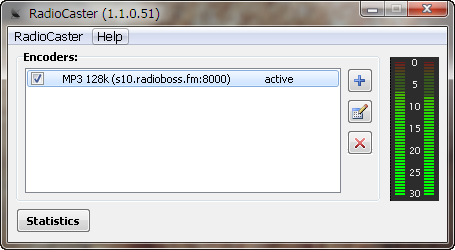 RadioCaster takes any type of audio, including analog recordings, from devices which are connected to the computer. The program can also broadcast any audio being played on the computer, and thereafter broadcast them online for your Internet radio station. RadioCaster allows you to stream this audio on an unlimited number of servers from your computer. You can easily use old audio sources from playback devices connected to the computer and have them seamlessly converted to high-quality streaming radio stations on the web for the world to hear. RadioCaster takes any type of audio, including analog recordings, from devices which are connected to the computer. The program can also broadcast any audio being played on the computer, and thereafter broadcast them online for your Internet radio station. RadioCaster allows you to stream this audio on an unlimited number of servers from your computer. You can easily use old audio sources from playback devices connected to the computer and have them seamlessly converted to high-quality streaming radio stations on the web for the world to hear.
RadioCaster includes a lot of key features such as the following; ability to broadcast any audio that you have on your PC (this is due to support for audio capture from any computer input or playback device), support for ASIO devices, full Windows 7 support, 32 and 64 bits, works with Icecast, Shoutcast and compatible services (such as Live365), metadata support, broadcast statistics, select your station’s bitrate, audio source (device or URL) and song title source, simple and easy to use interface and as well as easy user configuration, etc.
RadioCaster is a shareware program, but has a 30 day trial period for users. With the price put at $39.95, users shouldn’t have problem going for it.
Want to check it out? Visit Djsoft.net.
Rating: Loading... No Comments »
|
|
|





