O. James Samson - October 6, 2011
 Wuala is secure online storage, a haven in the cloud to store your files. The program gives you access so you can safely access and share your files with friends, family, and co-workers. Wuala encrypts the data on your computer before it is uploaded; thereby protecting your files with automatic backup and file versioning. It is also capable of keeping your files in sync with just one click, while enabling you to easily access your files from any computer with an Internet connection, and wherever you are. Instead of emailing files, share documents, photos, and media directly from your Wuala account. Create a Wuala Group of your own design and build a social network. Wuala is secure online storage, a haven in the cloud to store your files. The program gives you access so you can safely access and share your files with friends, family, and co-workers. Wuala encrypts the data on your computer before it is uploaded; thereby protecting your files with automatic backup and file versioning. It is also capable of keeping your files in sync with just one click, while enabling you to easily access your files from any computer with an Internet connection, and wherever you are. Instead of emailing files, share documents, photos, and media directly from your Wuala account. Create a Wuala Group of your own design and build a social network.
Wuala is a program that requires subscription; and that is where a few users may have some issues. Basically, there are a few freeware programs that can achieve similar functions as Wuala, and sometimes even better. However, that should not be taken as an indication that the program is not worth checking out; at least for some of its cool features. Some of the features of Wuala include the following; users can backup their files securely online, sync their files across multiple computers, share files with selected files, as well as encrypt all files.
Want to check it out? Visit Wuala.
Rating:  Loading... No Comments »
O. James Samson - October 6, 2011
 SolarWinds Storage Manager is an intuitive, web-based application that combines storage monitoring, reporting, alerting, and forecasting across the entire multi-vendor storage stack for DAS, NAS, and SAN systems. The application unifies the view from all layers in the stack-from the user, all the way through to the disk-making administration more efficient, mitigating risks, and optimizing what you’ve got to work with. Current version of this program is easier, yet more powerful to use than past versions. The program’s historical trend analysis can help you manage the performance and growth of your storage network. SolarWinds Storage Manager is an intuitive, web-based application that combines storage monitoring, reporting, alerting, and forecasting across the entire multi-vendor storage stack for DAS, NAS, and SAN systems. The application unifies the view from all layers in the stack-from the user, all the way through to the disk-making administration more efficient, mitigating risks, and optimizing what you’ve got to work with. Current version of this program is easier, yet more powerful to use than past versions. The program’s historical trend analysis can help you manage the performance and growth of your storage network.
Unlike past versions, SolarWinds Storage Manager optimizes the performance and capacity of your physical and virtual storage infrastructure and delivers visibility and insight into how your storage infrastructure maps to your virtualized environment. The program also gives you a comprehensive view into the real-time status of your entire multi-vendor SAN—through a single pane of glass.
Solar Winds Storage is a massive program that has undergone a lot of advanced changes to make it more stable than previous version. You can try it out for 30 days before going for a full version if you choose to. The program is compatible with Windows 2007, 2000, 2003, Vista, as well as XP.
Want to check it out? Visit SolarWinds.
Rating: Loading... No Comments »
O. James Samson - October 6, 2011
 Ashampoo Photo Commander is an all-in-one application for organizing, editing, sharing and presenting photo collections with additional audio and video playing and management capabilities. The program is preloaded with virtually every photo editing tools you need. You can now enhance your images with the one-click optimizer, remove the red-eye effect, adjust colors, contrast, hue and many other parameters, resize, crop, rotate, add a wide range of special effects. After editing you can then use the integrated creativity tools to turn your photos into slide shows with music, web albums, photo collages, calendars and a host of others. Ashampoo Photo Commander is an all-in-one application for organizing, editing, sharing and presenting photo collections with additional audio and video playing and management capabilities. The program is preloaded with virtually every photo editing tools you need. You can now enhance your images with the one-click optimizer, remove the red-eye effect, adjust colors, contrast, hue and many other parameters, resize, crop, rotate, add a wide range of special effects. After editing you can then use the integrated creativity tools to turn your photos into slide shows with music, web albums, photo collages, calendars and a host of others.
Some of the features you can look forward to in version 9 of Ashampoo Photo Commander include the following; the new dual-view mode for the comparison of an original picture and that picture while editing, tools and video functions have also been improved, addition of new effects, and a host of others.
Some other well known features of Ashampoo Photo Commander also include the following; import from cameras and scanners, editing and optimizing photos, tagging, skins and plug-ins, audio and video, batch processing, miniature view with grouping function, burn discs, send emails and create PDFs, HTML albums, slideshows, collages, and many more.
Want to check it out? Visit Ashampoo.
Rating: Loading... 1 Comment »
O. James Samson - October 6, 2011
 SpeedCommander is a comfortable file manager that builds on the proven 2 window technology and offers a multitude of exclusive features. Users can sort, copy, move or delete their files either using the keyboard or the mouse. SpeedCommander reads and creates ZIP archives, Microsoft CAB files, and fully supports ten additional compression formats. The program’s newly expanded search feature will find files within all ten supported Archive formats. SpeedCommander is a comfortable file manager that builds on the proven 2 window technology and offers a multitude of exclusive features. Users can sort, copy, move or delete their files either using the keyboard or the mouse. SpeedCommander reads and creates ZIP archives, Microsoft CAB files, and fully supports ten additional compression formats. The program’s newly expanded search feature will find files within all ten supported Archive formats.
The internal file viewer displays over 80 graphics and text formats. In addition, it contains a powerful text editor with numerous extras including syntax highlighting. With the integrated FTP client, you can both download files from the net and upload your own web pages. It even integrates a web browser for you to surf the web. As with other versions of this program, the publishers have been able to include a couple of features that make this program a bit advanced than other competing programs.
SpeedCommander displays files and folders in the proven 2 window technology; source and target of operations are therefore always visible. This ensures a higher productivity compared to Windows Explorer as well as an extremely fast navigation through files, folders and FTP sites. You can also enjoy many features such as; copying and moving files, secure deletion compliant to governmental standards, and a host of others.
Want to check it out? Visit SpeedProject.
Rating: Loading... No Comments »
Ciaran Moore - October 4, 2011
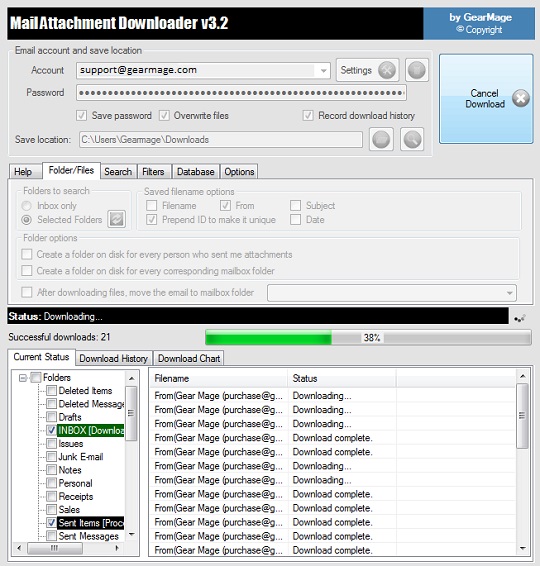 If you are a heavy user of email attachments, you know how tedious it can be to download them individually and make sure that they are saved in the right location. But they can also take up a lot space within your email account, so letting them hang out there is not always a great idea, either. If you are a heavy user of email attachments, you know how tedious it can be to download them individually and make sure that they are saved in the right location. But they can also take up a lot space within your email account, so letting them hang out there is not always a great idea, either.
Mail Attachment Editor is an innovative program that can automatically find and download your email attachments and save them wherever you would like. You will be very impressed with both its ease of use and its effectiveness. You may think that accessing email accounts for one reason or another would spend you a lot of time fiddling with Mail Attachment Downloader’s settings in order to get it to connect. But that is not the case at all. Just enter your email username and password and the program will connect in a matter of moments.
Also, the program will let you access not only the contents of your inbox, but also all the other folders within your email account. The program has advanced search filters that let you search for particular attachment file types, dates, senders and recipients, subjects, and more. You can have the program automatically create folders for individual senders or folders that correspond with those within the e-mail account. Mail Attachment Downloader can be scheduled to run automatically at user-defined intervals, making it possible to keep up-to-date copies of all attachments on desktops.
The program has a brief built-in Help file, but you will not need to consult it; the intuitive interface makes everything easy to figure out. Mail Attachment Downloader is a great tool for anyone who works with email attachments with any regularity.
Check it out at Gearmage.com.
Rating: Loading... 2 Comments »
Ciaran Moore - October 3, 2011
 Uninstalling media players can leave invalid Autoplay entries in your Registry that repeatedly prompt you to use programs that you have already attempted to get rid of. Autoplay Repair Wizard is a utility that can display these invalid entries and let the user delete them for good. Uninstalling media players can leave invalid Autoplay entries in your Registry that repeatedly prompt you to use programs that you have already attempted to get rid of. Autoplay Repair Wizard is a utility that can display these invalid entries and let the user delete them for good.
Although the idea of the program is good, it is not necessarily easy to use. The program’s interface is plain and does not offer a lot of direction for new users. A tabbed Autoplay Manager screen lets users view the installed Autoplay handlers for audio and video files, audio CDs, DVDs, blank discs, images, and mixed content. Users can modify, remove, and erase handlers from each of these manually. The program also has a tool that lets users disable Autoplay entirely for specific drives. All of this is fairly intuitive, but the autorun cleanup does not make a whole lot of sense; it displays a list of Registry entries with check boxes next to them, and the only instructions are to “use drag and drop to add new entries into different sections.”
You will like the fact that Autoplay Repair can create a backup before you go tinkering with your Registry entries, which is always a good idea, but the complete lack of instruction or documentation is problematic for users who have not used this kind of software before.
Overall, Autoplay Repair can be a useful tool for those who are being bugged by invalid Autoplay entries, but it needs to be used with caution.
You can get it at Microsoft.
Rating: Loading... No Comments »
O. James Samson - October 3, 2011
 TorrentControl is a Windows freeware program that allows modification of uploaded data amount announced to BitTorrent trackers according to rules. Rules are created automatically when download is started and can be created, modified or deleted manually. Rules are based on random values computed from specific range unique for each BitTorrent tracker. TorrentControl supports every BitTorrent client that can be connected through HTTP Proxy. The program is easy to use, and comes with some new features that include the following; addition of missing English localization, refactoring of portions of application, range of allowed values in rule properties changed 0-100, configuration values added in previous versions can be modified in options window, and maximum number of items in activity log can be set, and a few others. TorrentControl is a Windows freeware program that allows modification of uploaded data amount announced to BitTorrent trackers according to rules. Rules are created automatically when download is started and can be created, modified or deleted manually. Rules are based on random values computed from specific range unique for each BitTorrent tracker. TorrentControl supports every BitTorrent client that can be connected through HTTP Proxy. The program is easy to use, and comes with some new features that include the following; addition of missing English localization, refactoring of portions of application, range of allowed values in rule properties changed 0-100, configuration values added in previous versions can be modified in options window, and maximum number of items in activity log can be set, and a few others.
TorrentControl ensures you fully take control of what is announced to trackers by BitTorrent clients while downloading or seeding. You can announce real values, values modified according to the defined rules, or disable announcing completely (for specific trackers or globally).
Users are however, required to obtain their free licenses, which can be obtained anonymously and directly from the application and at least Windows XP Service Pack 3 with installed .NET Framework 3.5 Service Pack 1. Currently supports Czech and English languages.
Want to check it out? Visit TorrentControl.
Rating: Loading... No Comments »
O. James Samson - October 1, 2011
 DecoCharts for VCL are interactive charting components for specialized purposes. These components, allows your application to be extended with decomposition bar charts, budget status indicators, KPI status tables, and similar presentations. The program is a shareware, and goes for just $28.00 with lots of exciting features that you can enjoy. Basically, components are designed as a lightweight alternative to the universal grids and charting components. Every component from the DecoCharts package can be used separately for its concrete purposes, without some resource-heavy universal component class in the background. DecoCharts for VCL are interactive charting components for specialized purposes. These components, allows your application to be extended with decomposition bar charts, budget status indicators, KPI status tables, and similar presentations. The program is a shareware, and goes for just $28.00 with lots of exciting features that you can enjoy. Basically, components are designed as a lightweight alternative to the universal grids and charting components. Every component from the DecoCharts package can be used separately for its concrete purposes, without some resource-heavy universal component class in the background.
DecoCharts for VCL comes with very useful features that include the following; TDecoBar that is an interactive decomposition chart that allows you to present different types of financial, statistical or general numeric data in a clear form of expandable bars, TDecoProgressGrid that is a specialized grid of progress bars and their additional (supporting) data, and TDecoBarPlus and TDecoProgressGridPlus components, which is descendants of the standard DecoCharts components (mentioned above), that use the GDI+ library for antialiased and composite drawing. This enhances the look and the feel of resulting charts/grids.
You can download a trial version that lasts for 30 days, and comes with all the features. The program also features a few changes from last version.
Want to check it out? Visit Decocharts.
Rating: Loading... No Comments »
O. James Samson - October 1, 2011
 Able Fax Tif View is a fax and tiff viewer and converter offering you full solution for viewing, editing, printing, saving, and converting. The application can show all kinds of FAX images, multipage FAX and TIFF images with RGB, CMYK, B/W, and animated GIF. Also FAX, G3F and G3N formats supported for loading, and support many FAX file formats. Able Fax Tif View also supports 4, 8, 16, 32, 64, 128 and 256 colours paletted images. Images viewed on the screen can be sent directly to any printer supported by your operating system; size, area and position are adjusted using a comfortable printer dialog. Able Fax Tif View is a fax and tiff viewer and converter offering you full solution for viewing, editing, printing, saving, and converting. The application can show all kinds of FAX images, multipage FAX and TIFF images with RGB, CMYK, B/W, and animated GIF. Also FAX, G3F and G3N formats supported for loading, and support many FAX file formats. Able Fax Tif View also supports 4, 8, 16, 32, 64, 128 and 256 colours paletted images. Images viewed on the screen can be sent directly to any printer supported by your operating system; size, area and position are adjusted using a comfortable printer dialog.
Able Fax Tif allows you to carry out a lot of task without much effort. Some of the things you can do with the program include the following; handle Windows standard imaging documents, Kodak imaging compatible, support over 30+ image formats, view and save multipage images in Tiff or PDF formats, automatic image processing tools useful for touching up scanned images, convert FAX, TIF (TIFF), PDF, DCX, EPS, PS, AI, DICOM, JBIG and GIF files to standard TIFF/FAX format, JPEG format (RGB, GrayScale, YCbCr, CMYK, YCbCrK), PNG, BMP, Adobe PDF, PCX, PostScript PS, Wireless Bitmap WBMP, GIF, DIB, RLE, TGA (TARGA, VDA, ICB, VST, PIX), Portable Bitmap PBM, PGM and PPM, and a host of others.
Want to check it out? Visit Graphicregion.com.
Rating: Loading... No Comments »
O. James Samson - October 1, 2011
 TagCloud is a VCL implementation of a well known “tag cloud” navigation element, widely used in an internet environment. The program has all the common features for easy presentation of the list of data to the user, which you can expect from this kind of visual representation. TagCloud for VCL 1.6 is out with a few additional features, which include; compatibility with Delphi XE2, Automatic installer (setup wizard), as well as a couple of other improvements. Navigational features and the different drawing styles of tag cloud component are applicable to a various kinds of sidebar panels or special lists of items, and of course, this component can be used to extend the search functionality of your applications. TagCloud is a VCL implementation of a well known “tag cloud” navigation element, widely used in an internet environment. The program has all the common features for easy presentation of the list of data to the user, which you can expect from this kind of visual representation. TagCloud for VCL 1.6 is out with a few additional features, which include; compatibility with Delphi XE2, Automatic installer (setup wizard), as well as a couple of other improvements. Navigational features and the different drawing styles of tag cloud component are applicable to a various kinds of sidebar panels or special lists of items, and of course, this component can be used to extend the search functionality of your applications.
TagCloud is a shareware program put at $20, and with some key features that include the following; font size and color scaling (custom color levels), support for linear, logarithmic and custom scales, settings for alignment and spacing between tags, variable and/or fixed row height, support for fixed columns width, tags can be placed in a horizontal or vertical direction, a lot of different styles for normal, hovered and selected tags, transparent background, drawing over the Aero Glass effect on the parent controls, event handlers for custom of items and backgrounds, and many more.
Want to check it out? Visit Tagcloud.
Rating: Loading... No Comments »
|
|
|





