O. James Samson - July 26, 2011
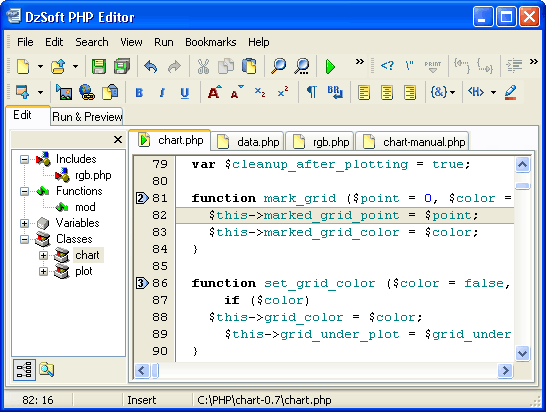 DzSoft PHP Editor is a tool for writing, editing, and debugging PHP scripts and HTML pages. DzSoft PHP Editor has a built-in FTP client and browser, Code Explorer, File Explorer, customizable Code Templates, and a host of others. The tool is also easy to use, and is very powerful with easy to use interface specially designed for PHP programmers. Users are not required to have a web server on your computer to test your PHP scripts. DzSoft PHP Editor is a tool for writing, editing, and debugging PHP scripts and HTML pages. DzSoft PHP Editor has a built-in FTP client and browser, Code Explorer, File Explorer, customizable Code Templates, and a host of others. The tool is also easy to use, and is very powerful with easy to use interface specially designed for PHP programmers. Users are not required to have a web server on your computer to test your PHP scripts.
DzSoft PHP Editor has a lot of quality key features that include the following; PHP and HTML/XML Syntax Highlighting, Built-in FTP Client (it now supports FTP over SSL), the code explorer, the file explorer, project manager, file search utility, one-click run and preview, Syntax checking, full reporting of errors and warnings, full control of the input data and environment variables, supports testing scripts than output images and other content types, PHP extensions supported, quick insertion of PHP functions, features for quick navigation in the code, customizable code templates, possibility to export the source code to HTML and print it with syntax highlighting, bookmarks, tabbed multi-document interface, PHP help support with quick keyword search, and many more.
DzSoft PHP Editor runs on Windows 2000, XP, Vista, and Windows 7.
Want to check it out? Visit Dzsoft.
Rating:  Loading... No Comments »
O. James Samson - July 26, 2011
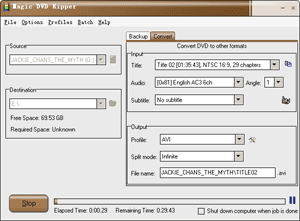 Magic DVD Ripper is an easy-to-use DVD backup software that can copy protected DVD to hard drive with 4 optional mode (disc fully, main movie, split DVD-9 into DVD-5, files). This application can also convert DVD to VCD, SVCD and AVI(DivX) formats. The converted files can be enjoyed anytime without DVD discs, or burn them to blank discs by burning software. With optimized for Intel CPU, Magic DVD Ripper provides fast ripping speed and wonderful output quality, supports batch converting and has many settings that you can customize. Magic DVD Ripper automatically detect DVD-ROM and select appropriate settings for beginner, so you can get started with just one click. Magic DVD Ripper is an easy-to-use DVD backup software that can copy protected DVD to hard drive with 4 optional mode (disc fully, main movie, split DVD-9 into DVD-5, files). This application can also convert DVD to VCD, SVCD and AVI(DivX) formats. The converted files can be enjoyed anytime without DVD discs, or burn them to blank discs by burning software. With optimized for Intel CPU, Magic DVD Ripper provides fast ripping speed and wonderful output quality, supports batch converting and has many settings that you can customize. Magic DVD Ripper automatically detect DVD-ROM and select appropriate settings for beginner, so you can get started with just one click.
Magic DVD Ripper is one fine program that can also copy any DVD movie to blank DVD or hard drive without any loss of quality, or compress a DVD9 movie to fit on a 4.7 GB DVD. All you need to do is insert your DVD movie and a blank DVD then press Go, everything will happen automatically and complete within 20-60 minutes.
Some of its key features include the following; convert DVD to Xvid, DivX or other AVI formats, convert DVD to WMV, convert DVD to MP3, convert DVD to VCD or SVCD, easy to use, and many more.
Want to check it out? Visit MagicDVDRipper.
Rating: Loading... 1 Comment »
O. James Samson - July 25, 2011
 PerfectDisk Professional is one application that redefines enterprise disk defragmentation addressing an issue that Microsoft, in various published articles, states is often the cause of poor system performance on a system. PerfectDisk Professional provides the comprehensive solution for defragmentation by optimizing virtually every file on the system, including the Master File Table (SMFT), all metadata, paging files, and directories. Patented SMART Placement technology arranges files on a disk to ensure that free space is consolidated and the future rate of fragmentation is minimized. PerfectDisk Professional is one application that redefines enterprise disk defragmentation addressing an issue that Microsoft, in various published articles, states is often the cause of poor system performance on a system. PerfectDisk Professional provides the comprehensive solution for defragmentation by optimizing virtually every file on the system, including the Master File Table (SMFT), all metadata, paging files, and directories. Patented SMART Placement technology arranges files on a disk to ensure that free space is consolidated and the future rate of fragmentation is minimized.
PerfectDisk Professional has a lot of additional features and can be tried by all users for 30 days. Some of the newly added features include the following; the correction that was made to real time defragmentation aggressively allocated space to prevent additional fragmentation, which resulted in consuming large amounts of space unnecessarily, multiple text changes were made to maintain the PerfectDisk consistent with the PerfectDisk Console, when enabling or disabling the SMART feature, the PerfectDisk GUI did not reflect the changes until you closed and reopened the GUI (this has now been fixed), and a couple of other changes.
On the other end, the publishers should consider lowering the price to attract more users. Certainly PerfectDisk Professional is not a bad program; especially with some of its new additions and features.
Want to check it out? Visit Raxco.
Rating: Loading... No Comments »
O. James Samson - July 25, 2011
 Cereus Reporitng is a program created to add PDF/HTML reporting capabilities to the Cacti performance measurement application. PDF reports containing performance graphs or host availability information can be created and send out via email on a defined schedule. PDF reports can be custom designed using PDF templates and CSS. Cereus Reporting Corporate Edition allows you to provide enhanced reporting services to your customers with customer specific reports. Cereus Reporitng is a program created to add PDF/HTML reporting capabilities to the Cacti performance measurement application. PDF reports containing performance graphs or host availability information can be created and send out via email on a defined schedule. PDF reports can be custom designed using PDF templates and CSS. Cereus Reporting Corporate Edition allows you to provide enhanced reporting services to your customers with customer specific reports.
This version adds weathermap support, drag & drop support for the report items on a multi-report and the possibility to store the availability data in a rrd-like mode. The publishers have also provided an option for users who would prefer a different version. SingleServer edition for instance is restricted to a single server, but has the same functionality as the unrestricted edition and can only be installed and run on one Server. During the order process you will be asked to provide the server data for the license.
Cereus Reporting has a lot of features that include the following; PDF report generation within Cacti, user selectable report format, graph selection support, boost plug-in support, subtitle and footer customizable, custom logo support, graphs link back into cacti, optional custom cover page per tree, and a host of others.
Want to check it out? Visit Network-Outsourcing
Rating: Loading... No Comments »
O. James Samson - July 25, 2011
 Script It! is cross-platform script writing application that features story planning and screenplay formatting ideal for the novice writer who is learning the craft of screenwriting. The program uses the simple technique of step-outlining to build your screenplay scene by scene, allowing you to focus on each key event of your script without losing sight of the bigger picture. Script It! is the lite version of the professional screenplay development software Movie Outline developed by the same publishers, which was created by a produced writer to take the complexity out of the screenwriting process. Script It! is cross-platform script writing application that features story planning and screenplay formatting ideal for the novice writer who is learning the craft of screenwriting. The program uses the simple technique of step-outlining to build your screenplay scene by scene, allowing you to focus on each key event of your script without losing sight of the bigger picture. Script It! is the lite version of the professional screenplay development software Movie Outline developed by the same publishers, which was created by a produced writer to take the complexity out of the screenwriting process.
Script It! has fewer features, but is ideal enough for a first time writer learning the craft of screenwriting. The truth about this program is that it uses the same simple technique as Movie Outline of step-outlining to build your screenplay scene by scene, allowing you to focus on each key event of your script without losing sight of the bigger picture.
With Script! Application, you can build and navigate your outline, script and notes step by step through an AV remote-style console, even as a novice. That aside, Script It’s Title Page Panel also allows multiple pages and automatically paginates which means you can use it as a simple cover page, list your cast for stage plays, or even use it for writing a long form treatment or synopsis independent of the main project’s outline and script!.
Want to check it out? Visit Nuvotech.
Rating: Loading... No Comments »
O. James Samson - July 25, 2011
 Windows Intune is a program that helps you manage and secure computers in your environment through a combination of Windows cloud services and upgrade licensing. Windows Intune delivers cloud-based management and security capabilities through a single web-based administrative console. With Windows Intune, you can manage computers from almost anywhere. This program is out with a lot of outstanding features that you can easily understand and use. Windows Intune is a program that helps you manage and secure computers in your environment through a combination of Windows cloud services and upgrade licensing. Windows Intune delivers cloud-based management and security capabilities through a single web-based administrative console. With Windows Intune, you can manage computers from almost anywhere. This program is out with a lot of outstanding features that you can easily understand and use.
Some of its features include the following: multiple account consoles, that means you can manage multiple accounts; software inventories for Windows Intune (software catalogue in Windows Itune); update management in Windows Intune; configure update policy in Windows Intune. Microsoft Windows Itune also report; hardware filters in Windows Intune, using filters to track deployments, and software reporting in Windows Intune.
You can use the Computers workspace to create and manage computer groups, for ease and flexibility of management. You can organize groups in the way that best suits your organizational needs and plans. You can organize groups in the following ways; by geographic location, department, or hardware characteristics. Windows Intune Endpoint Protection helps enhance the security of managed computers in your organization by providing real-time protection against potential threats, keeping malicious software definitions up-to-date, and automatically running scans.
Want to check it out? Visit Technet.Microsoft.
Rating: Loading... No Comments »
O. James Samson - July 24, 2011
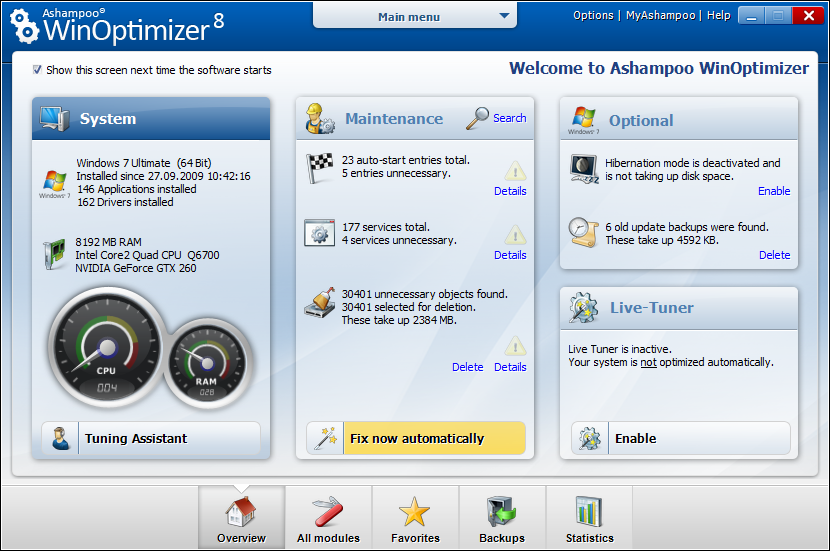 Ashampoo WinOptimizer is an application designed to enable both new and experienced users clean and optimize their Windows system and adapt it to their own needs. Ashampoo WinOptimizer feels equally at home optimizing the Windows XP and Vista operating systems as it does under Windows 7. The latest generation of Ashampoo WinOptimizer has a fresh look and feel that is inspired by the user interface of Windows 7. The easy-to-use menus allow fast access to the individual modules of the program and make it possible to measure system performance, deactivate annoying auto start entries, or delete unnecessary files – all with a single click. Ashampoo WinOptimizer is an application designed to enable both new and experienced users clean and optimize their Windows system and adapt it to their own needs. Ashampoo WinOptimizer feels equally at home optimizing the Windows XP and Vista operating systems as it does under Windows 7. The latest generation of Ashampoo WinOptimizer has a fresh look and feel that is inspired by the user interface of Windows 7. The easy-to-use menus allow fast access to the individual modules of the program and make it possible to measure system performance, deactivate annoying auto start entries, or delete unnecessary files – all with a single click.
Ashampoo WinOptimizer costs $49.99 per download and gives you more value for money. The publishers made a lot of improvements into this version, which is in contrast to earlier version. The program is now faster, more efficient, and many more. In real time the new live tuner pools all available resources in exactly those places where they are urgently needed. Existing processor cores, Windows priorities and assigned usages of applications are customized, in order to ensure a trouble-free workflow. The all-in-one user-interface has been developed further for the Ashampoo WinOptimizer 8. Via the clearly structured main window, it is easier to access all 6 function groups, in which over 20 modules with hundreds of options and functions are assembled.
Want to check it out? Visit Ashampoo.
Rating: Loading... No Comments »
O. James Samson - July 24, 2011
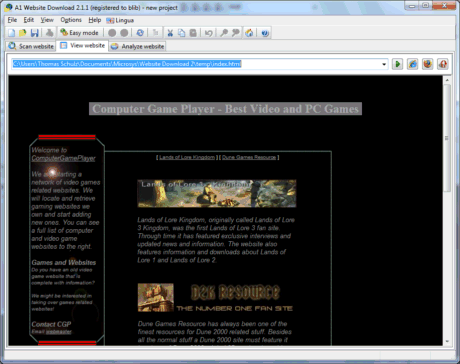 A1 Website Download is an application that lets you download and archive entire websites that include the following; forums, galleries, online books and articles. Website downloader can perform also perform a lot of other functions that include the following; website login and handle cookies, copy and store websites on portable media such USB and CD, convert dynamic database driven websites into static, present websites to clients in offices with no internet access, automate download of websites at times convenient to you, e.g. during the night. Convert all links in the website to relative, upload the downloaded website to mirrors and servers, and a host of others. This version has a couple of new updates. A1 Website Download is an application that lets you download and archive entire websites that include the following; forums, galleries, online books and articles. Website downloader can perform also perform a lot of other functions that include the following; website login and handle cookies, copy and store websites on portable media such USB and CD, convert dynamic database driven websites into static, present websites to clients in offices with no internet access, automate download of websites at times convenient to you, e.g. during the night. Convert all links in the website to relative, upload the downloaded website to mirrors and servers, and a host of others. This version has a couple of new updates.
A1 website Downloader understands all kinds of references including redirects, frames, javascripts and images. It is also able to correctly convert links in CSS and most Javascript files. You can even scan and download websites from multiple start paths, useful if content in a website is not crosslinked. A1 Website Download can also copy websites to your disk, and not store websites using a proprietary database format. All links get corrected to relative file paths, you can copy and take the downloaded websites with you anywhere, and later view them offline in any browser.
You can download a 30 day time out version and find out more how it works.
Want to check it out? Visit MicroSysTools.
Rating: Loading... 2 Comments »
O. James Samson - July 23, 2011
 The publisher of Folder Axe had one purpose in mind when this program was created, and that is to help users split their folders into many smaller folders. You may split the folders in various ways; as a matter of fact, two of the possible ways are “By Amount”, which splits the folder into many smaller folders, where you specify a limit for the number of files that can be in each resulting folder; and “By Size”, in which you specify a size limit for each of the resulting folders. The publisher of Folder Axe had one purpose in mind when this program was created, and that is to help users split their folders into many smaller folders. You may split the folders in various ways; as a matter of fact, two of the possible ways are “By Amount”, which splits the folder into many smaller folders, where you specify a limit for the number of files that can be in each resulting folder; and “By Size”, in which you specify a size limit for each of the resulting folders.
Folder Axe has a lot of features to help enrich your experience. These features include the following; split by amount (specify the number of files each resulting folder is limited to), split by size (split by name (specify the size limit of each resulting folders), split by name (created folders based upon the first x number of characters in file names), split by file type (files split into folders according to their extensions), split by file group (files split into seven different groups), set the naming scheme for the resulting folders, process folders of any size, automatic update checking, so you can always have the latest version, and log window so you exactly what is going on all times.
Want to check it out? Visit BKPrograms.Weebly.com.
Rating: Loading... No Comments »
O. James Samson - July 22, 2011
 SquirrelMail is a standards-based webmail package written in PHP4. SquirrelMail includes built-in pure PHP support for the IMAP and SMTP protocols, and all pages render in pure HTML 4.0 (no JavaScript required) for maximum compatibility across browsers. The program has very few requirements and you can easily install and configure it without any stress. It has all the functionality you would want from an email client, including strong MIME support, address books, and folder manipulation. The publisher has been able to address a lot of issues earlier recorded in previous versions. These problems or issues where basically in the areas of security, harsh and hard to exploit XSS bugs, and general click-jacking vulnerability, and a small problem with message sanitizing. SquirrelMail is a standards-based webmail package written in PHP4. SquirrelMail includes built-in pure PHP support for the IMAP and SMTP protocols, and all pages render in pure HTML 4.0 (no JavaScript required) for maximum compatibility across browsers. The program has very few requirements and you can easily install and configure it without any stress. It has all the functionality you would want from an email client, including strong MIME support, address books, and folder manipulation. The publisher has been able to address a lot of issues earlier recorded in previous versions. These problems or issues where basically in the areas of security, harsh and hard to exploit XSS bugs, and general click-jacking vulnerability, and a small problem with message sanitizing.
Users of older version of SquirrelMail should take note of a few things when upgrading to this new version. As a result of a fix made that standardizes the folder list display, administrators who had their configuration file set to work around this issue in the past will need to update their configuration. This will commonly affect those using Courier IMAP, but could affect others as well. So, you have to be sure you take this into consideration when updating.
SquirrelMail is a freeware, and runs on Mac, Unix, and Windows 2000/2003/9x/XP.
Want to check it out? Visit SquirrelMail.
Rating: Loading... No Comments »
|
|
|





