Ciaran Moore - February 27, 2011
 One particular misconception to have about your PC is to believe that its gradual slowdown and growing lack of stability is due to its physical health – that the only choice is to keep it going for as long as is possible and then get a new computer. In actual fact,with the overwhelming majority of cases, system instability and slowness is as a result of the state of your Windows installation over time – reinstall Windows from scratch on a fresh formatted drive and your computer is returned to new. One particular misconception to have about your PC is to believe that its gradual slowdown and growing lack of stability is due to its physical health – that the only choice is to keep it going for as long as is possible and then get a new computer. In actual fact,with the overwhelming majority of cases, system instability and slowness is as a result of the state of your Windows installation over time – reinstall Windows from scratch on a fresh formatted drive and your computer is returned to new.
Of course, the down side to all of this is that re-installing takes the best part of an uninterrupted day to accomplish. It’s definitely considerably better to extend the life of your present installation by keeping your PC well maintained. You can do this manually,or else you can decide on a program like MAGIX PC Check & Tuning 2011 to do the job for you.
Once running, MAGIX PC Check & Tuning 2011 consists of a group of features. To start with, there’s the PC Check utility, which is placed in the background conducting a variety of checks on an hourly schedule, alerting you to any possible challenges it discovers. Then there’s the “1-click quick maintenance” tool: click this to see a list of frequent maintenance tasks – tick the ones you need to do, click the button and leave the program to carry out the rest.
The final component is the main PC Check & Tuning tool itself,which happens to be where you take full power over the maintenance process. This comes with a large variety of tools – some integrated into the main program itself, others launched as separate standalone tools – and overlaps to some extent the other two components. However, the 3 make an effort to work together, providing you with a staggered solution to PC maintenance: the PC Check utility helps to keep a zealous observation on major areas of system health, while the one-click tool is designed to be run on a weekly basis. Finally, the main component is there for occasional use to quickly optimize and speed up your system. Read the rest of this entry »
Rating:  Loading... No Comments »
O. James Samson - February 25, 2011
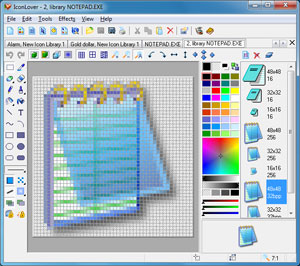 The idea of creating IconLover is specifically to help users scan files, folders, or all local hard disks for icon images. The function also include, but not restricted to the following; extract icon images from ICO, CUR, ANI, DLL, EXE, ICL, IL, NIL, OCX , SCR, CPL, BPL, and other files. Furthermore, this program can be used to create and manage ICL icon libraries, save found icons in own, ICC icon collection format for better and more efficient icon storage, delete identical icons in collections, sort icons inside collections, export icons to ICO and BMP files, and customize Windows Desktop and folder icons. As a matter of fact, IconLover comes with a lot of features that may take a few days to understand. The Icon database in this version has been updated in the Icon editor. The idea of creating IconLover is specifically to help users scan files, folders, or all local hard disks for icon images. The function also include, but not restricted to the following; extract icon images from ICO, CUR, ANI, DLL, EXE, ICL, IL, NIL, OCX , SCR, CPL, BPL, and other files. Furthermore, this program can be used to create and manage ICL icon libraries, save found icons in own, ICC icon collection format for better and more efficient icon storage, delete identical icons in collections, sort icons inside collections, export icons to ICO and BMP files, and customize Windows Desktop and folder icons. As a matter of fact, IconLover comes with a lot of features that may take a few days to understand. The Icon database in this version has been updated in the Icon editor.
IconLover 5.17 supports the compressed PNG format recommended for 256×256 icons in Windows Vista as well as Windows 7. The application also reduces the overall size of the file without sacrificing the quality of the image, and also preserving alpha channel transparency.
You can also manage icons, static and animated cursors, icon and cursor libraries and image lists. The features are just too numerous to be listed in this reviews; however, that is not an indication that the program does not have a few challenges. The price for instance, is a bit on the high side.
Want to check it out? Visit Aha-Soft.
Rating: Loading... No Comments »
O. James Samson - February 25, 2011
 mfNotePad is a utility tool designed to replace the yellow post-it notes around your monitor. The application appears as a thin line on the edge of the screen; however, each file has its own color that a user can set. It allows you to add up to twenty files, and can also used as a program launcher. All you need is to left click and hold on, and a color opens the text editor temporarily; the right click makes it stay open. You can even configure a windows hot-key to open the last file edited. mfNotePad is a utility tool designed to replace the yellow post-it notes around your monitor. The application appears as a thin line on the edge of the screen; however, each file has its own color that a user can set. It allows you to add up to twenty files, and can also used as a program launcher. All you need is to left click and hold on, and a color opens the text editor temporarily; the right click makes it stay open. You can even configure a windows hot-key to open the last file edited.
The Rich text format support (RTF fonts, sizes, colors, lists, bold etc.) Users can also search through all of the files as well as set bookmarks. mfNotepad is also capable of encrypting your text files with a password, so no-one else can read them. (With an option to auto encrypt if computer is idle.) You can click on the F1 button to access more information. Version 0.0.217 has been modified to accommodate a few changes and a few bug fixes as well. This version also requires the Richtx32.ocx to be in the same folder or in Windows system folder.
The basic requirement to install this version on your system includes a Visual Basic 6 runtime file; and this can be downloaded straight from Microsoft.
Want to check it out, Visit 8887.eu
Rating: Loading... No Comments »
O. James Samson - February 25, 2011
 Pegasus Mail is an e-mail client or program that interacts directly with the user. It is designed to allow mail to be sent, read, filed, printed and otherwise manipulated through a graphical interface. Pegasus Mail is a small and fast that can be left running permanently on the workstation. The program has great features that include some powerful tools to notify the user when new mail arrives. It can run on single Windows computers, or local area networks. Pegasus Mail has support for Novell NetWare LANs that allow it to operate intuitively and with almost no maintenance; however, Pegasus Mail also supports multiple users on a single computer. It can also act as a complete internal mail system on its own without a need for further servers or components. It can also be used to send and receive Internet mail on its own, using standard protocols (SMTP, IMAP and POP3). Pegasus Mail is an e-mail client or program that interacts directly with the user. It is designed to allow mail to be sent, read, filed, printed and otherwise manipulated through a graphical interface. Pegasus Mail is a small and fast that can be left running permanently on the workstation. The program has great features that include some powerful tools to notify the user when new mail arrives. It can run on single Windows computers, or local area networks. Pegasus Mail has support for Novell NetWare LANs that allow it to operate intuitively and with almost no maintenance; however, Pegasus Mail also supports multiple users on a single computer. It can also act as a complete internal mail system on its own without a need for further servers or components. It can also be used to send and receive Internet mail on its own, using standard protocols (SMTP, IMAP and POP3).
In terms of flexibility and ease of use; Pegasus Mail is far ahead of other email clients. In terms of its ability to organize your emails; this application makes your task a lot easier than a few other programs out there. The publisher of this program deserves a lot commendation because of the great work done on it.
Want to check it out? Visit Pmail.
Rating: Loading... No Comments »
O. James Samson - February 25, 2011
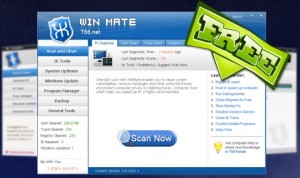 WinMate is a freeware Windows system optimizer that runs an optimization scan on Windows startup. The application also offers various powerful utilities (tools), and Internet Explorer (IE) security tools to make Windows system runs smoother and faster. WinMate utilizes the high-performance detection algorithm that will quickly finds Windows errors to prevent computer freezing, crashing and getting Blue Screen. A few bug fixes here and there make it more effective than the older versions released into the market. The scan error on Windows 7 is one of such bugs that have been fixed by the publishers. WinMate is a freeware Windows system optimizer that runs an optimization scan on Windows startup. The application also offers various powerful utilities (tools), and Internet Explorer (IE) security tools to make Windows system runs smoother and faster. WinMate utilizes the high-performance detection algorithm that will quickly finds Windows errors to prevent computer freezing, crashing and getting Blue Screen. A few bug fixes here and there make it more effective than the older versions released into the market. The scan error on Windows 7 is one of such bugs that have been fixed by the publishers.
WinMate also has built-in junk file cleaner, service optimizer, program uninstaller, plug-in remover, memory tweaker, defragment tool and many more; and as a matter of fact, T55 WinMate will give your computer all-round protection. Some other unique features of WinMate include the following: ability to boost the speed of your computer system; ability to keep your computer clean from junks; online payment safeguard; you can backup all your system files; and many more.
The fact that this program is a freeware, and with a few unique features makes it worth checking out; at least it can be used at no cost.
Sadly, it gives users a lot of headaches and pain each time they want to uninstall it from their system; and this can be very irritating.
Want to check it out? T55.net.
Rating: Loading... 1 Comment »
O. James Samson - February 25, 2011
 MSI Afterburner is an overclocking application for MSI graphic cards. It is designed with features such as: GPU/Shader/Memory clock adjustment; advanced fan speed; and GPU voltage control among others. In order to display the graphic card operating status more accurately, MSI provides a complete monitoring function; with important information that include the following; GPU core clock, memory clock, temperature, voltage, and fan speed have a real-time on-screen-display monitor in games and real-time information in Windows Tray Icon. As a matter of fact, virtually all the adjustments can be saved as five profiles. Users can also quickly switch from one setting to another with hotkeys. MSI Afterburner is an overclocking application for MSI graphic cards. It is designed with features such as: GPU/Shader/Memory clock adjustment; advanced fan speed; and GPU voltage control among others. In order to display the graphic card operating status more accurately, MSI provides a complete monitoring function; with important information that include the following; GPU core clock, memory clock, temperature, voltage, and fan speed have a real-time on-screen-display monitor in games and real-time information in Windows Tray Icon. As a matter of fact, virtually all the adjustments can be saved as five profiles. Users can also quickly switch from one setting to another with hotkeys.
In order to improve upon previous versions; the publishers have introduced a lot of changes. Some of these new features include; addition of AMD Barts and Cayman graphics processors family support, addition of core voltage control for reference design AMD RADEON 6970 graphic cards with CHL8228 voltage regulators, addition of core voltage control reference design AMD RADEON 6970 graphic cards with VT1556 voltage regulators; and a few others.
MSI Afterburner is one of my favorite overlocking programs; and the fact that it a freeware makes it even more attractive.
Want to check it out, visit Afterburner web-page.
Rating: Loading... No Comments »
O. James Samson - February 22, 2011
 Sothink Web Video Downloader is a shareware application that lets you download videos from YouTube, Facebook, Google, MySpace, many other websites. It is one of the easiest YouTube downloader that saves online videos to a lot of popular formats such as; FLV, AVI, MP4, MP3, 3GP, RM, SWF and HD. Sothink Web Video Downloader is capable of capturing any video while browsing a web page. As soon as it captures any video, it immediately downloads it to your favorite format, and then transfers straight into your PC, iPod, iPhone, PSP or mobile phones without using additional software or program. Sothink Web Video Downloader is a shareware application that lets you download videos from YouTube, Facebook, Google, MySpace, many other websites. It is one of the easiest YouTube downloader that saves online videos to a lot of popular formats such as; FLV, AVI, MP4, MP3, 3GP, RM, SWF and HD. Sothink Web Video Downloader is capable of capturing any video while browsing a web page. As soon as it captures any video, it immediately downloads it to your favorite format, and then transfers straight into your PC, iPod, iPhone, PSP or mobile phones without using additional software or program.
Sothink Web Video Downloader version 2.0 has no uninstaller; moreover, there are a couple of freeware programs that can compete with it. The price may not be too much on the high side, but the program sure has a lot of catching up to do with some other free or shareware video grabbers online. The newly added features in this version incude the following: support converting the downloaded videos to different formats such as AVI, MP4, WMV, 3GP, MOV, MKV, SWF and MP3; and support for converting the downloaded videos to iPod, iPhone, iPad, PSP, Zune, PS3, Xbox 360, Wii, mobiles, and many more.
Want to check it out? Visit SothinkMedia.
Rating: Loading... No Comments »
O. James Samson - February 22, 2011
 IObit Uninstaller is a simple lightweight application that helps you uninstall and delete unwanted programs and folders from your computer as quickly and as easily as possible. Some of the built-in features allow you to successfully uninstall any program where the built-in “Windows Add or Remove Programs” option fails. The Uninstaller works as always and picks up the leftover files; and guess what, it is actually a freeware. If you have been using some of the programs from the publishers of this software in particular; then you know something really good can be achieved with this one. IObit Uninstaller is a simple lightweight application that helps you uninstall and delete unwanted programs and folders from your computer as quickly and as easily as possible. Some of the built-in features allow you to successfully uninstall any program where the built-in “Windows Add or Remove Programs” option fails. The Uninstaller works as always and picks up the leftover files; and guess what, it is actually a freeware. If you have been using some of the programs from the publishers of this software in particular; then you know something really good can be achieved with this one.
With a size of about 673 KB, this is definitely one lightweight uninstaller you are not going to have a problem with; especially when it comes to installation. Some of its major features include: uninstall numerous applications without any difficulty (batch uninstall); advanced uninstall function that helps users scan Windows Registry and hard drive for any possible installation leftovers; one click toolbars removal (that means you can easily remove those irritating toolbars); and lots of other benefits.
That means you don’t have to lose sleep over those Windows’ programs without built-in uninstallers. Since the program is light in size, you can download and even install it within a couple of seconds.
Want to check it out? Visit Iobit.com.
Rating: Loading... No Comments »
O. James Samson - February 22, 2011
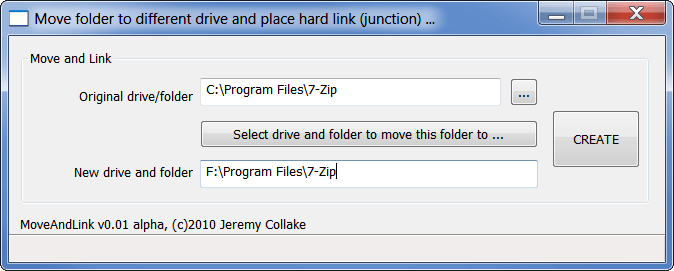 JunctionMaster allows you to move and possibly link a folder to another drive in one easy step. You can easily use this program to replaces the original folder with a hard link (junction point). Actually, these have been around in NTFS since its inception, but only in Windows 7 does it show any indication that it is a link. JunctionMaster allows you to move and possibly link a folder to another drive in one easy step. You can easily use this program to replaces the original folder with a hard link (junction point). Actually, these have been around in NTFS since its inception, but only in Windows 7 does it show any indication that it is a link.
Basically, JunctionMaster x32 edition can be used to move the files to f:\movies, but c:\movies still accesses them just the same (with no perceptible difference at all in the shell until Windows 7, where it now shows a link overlay on the folder icon). JunctionMaster x32 is compatible with all NT based kernels; however, there is a possibility that it is not compatible with the following systems: Windows 95/98/ME. It is also compatible with Windows NT, Windows 2000, Windows 2003, Windows Home Server, Windows XP, Windows Vista, Windows 2008, and Windows 7.
What about the features? Well, there are a couple of them you can use, and these include the following; integrates with shell (explorer), uses shell move operation (SMO), this makes it looks as if you cut and pasted it yourself, and safe and conservative.
JunctionMaster x32 Edition 0.07 is a freeware program; and can be downloaded and installed for free. Not actually a bad program, despite the fact that it is a freeware program.
Want to check it out? Visit JunctionMaster.
Rating: Loading... No Comments »
O. James Samson - February 22, 2011
 MetroTwit is a Twitter client for Windows; and its user-interface is simple even for a novice to quickly understand. With MetroTwit, you have a lot of wonderful features to play around with. With some of these features, there is no telling how much fun you can have with this application. MetroTwit runs on the very latest Microsoft .NET 4.0 and Windows Presentation Foundation 4 frameworks. MetroTwit is a Twitter client for Windows; and its user-interface is simple even for a novice to quickly understand. With MetroTwit, you have a lot of wonderful features to play around with. With some of these features, there is no telling how much fun you can have with this application. MetroTwit runs on the very latest Microsoft .NET 4.0 and Windows Presentation Foundation 4 frameworks.
Some of its highly-advanced and friendly features include the following: infinite scrolling that lets you read more tweets once you scroll down; autocomplete for usernames and hashtags, which means you can search for people you love to hang out with by simply typing a few letters; themes and accents, which allows you choose between background and vice versa including a selection of color accent to personalize the design; URL shortening and previews, this helps you to take control of links with an intuitive URL shortener that automatically saves you space and time tweeting; quick and glance applications that enables you to read excerpts from new tweet updates as they cycle through in the notifications; re-sizable and re-ordable columns; and a few other features.
This is a beta version, and it is possible to run into a few bugs that may cause a few problems; however, it is not a bad program all the same.
Want to check it out? Visit Metrotwit.
Rating: Loading... 1 Comment »
|
|
|






