O. James Samson - February 22, 2011
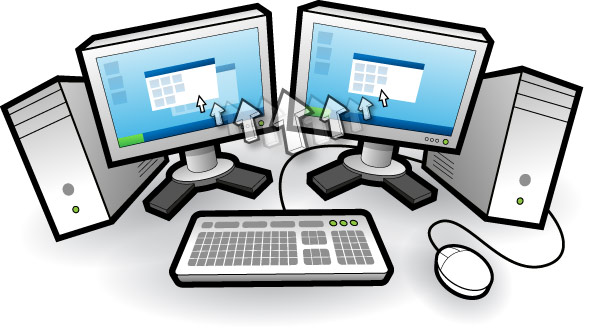 Input Director is an application that allows you control multiple Windows systems with the use of the keyboard or mouse attached to a single computer. The program is designed for users who have up to two or more computers set up at home and find themselves regularly sliding from one system to another. Some of the features of Input Director allow share a single keyboard/mouse across a set of computer systems. Presently, there are no versions being made for other programs such as Linux and Mac. That means only Windows users can take advantage of this great freeware program. Input Director is an application that allows you control multiple Windows systems with the use of the keyboard or mouse attached to a single computer. The program is designed for users who have up to two or more computers set up at home and find themselves regularly sliding from one system to another. Some of the features of Input Director allow share a single keyboard/mouse across a set of computer systems. Presently, there are no versions being made for other programs such as Linux and Mac. That means only Windows users can take advantage of this great freeware program.
Version 1.3 Beta has the following latest changes: ability to auto-switch between master and slave roles allowing users to use any mouse/keyboard control system; ability to right-click on a file Windows Explorer and choose to open it on any computer running Input Director; direct a file to open a different system from Windows Explorer; and ability to bind a keyboard key to a specific system.
Of course the older versions still work as great as this latest beta version. Some other features that have brought this program this far include the following: lock down lock down Input Director configuration so that only administrators can make changes; synchronize the screensavers across computers; hotkeys that can be easily setup to switch control to a specific computer or move to the next computer either to the left or right; and many more.
Want to check it out? Visit InputDirector.
Rating:  Loading... No Comments »
Tilgore Kraut - February 21, 2011
 Since its advent, the PDF format has become quite a favorite amongst us all owing to its enhanced and neat properties which make it easy for the user to access and save up documents independently without any hassles. Further, whenever we wish to save up any document or page in PDF format, we do not have to worry about any problems surrounding it and can make up suitable usage of this document format while working with any of the operating systems. Also, working with PDF documents also proves to be more useful and formatted as it works simply and independently. To cater to this utility value, a tool like WebReader 2.01 that enables a user to have PDF formatted documents stored up on the system and have them organized to be accessed later. Since its advent, the PDF format has become quite a favorite amongst us all owing to its enhanced and neat properties which make it easy for the user to access and save up documents independently without any hassles. Further, whenever we wish to save up any document or page in PDF format, we do not have to worry about any problems surrounding it and can make up suitable usage of this document format while working with any of the operating systems. Also, working with PDF documents also proves to be more useful and formatted as it works simply and independently. To cater to this utility value, a tool like WebReader 2.01 that enables a user to have PDF formatted documents stored up on the system and have them organized to be accessed later.
WebReader 2.01 opens with a neatly arranged interface with the chief options placed at the top left corner pane in the form of emotive icons that can be easily understood. The main screen shows the list of documents and books that are stored up to be accessed at anytime and any format as desired. Any kind of user manuals or books can be easily accessed with the help of this utility and organizes them simply so that the user can duly save them up for any later reference or access. This application can used from the system tray where it is located nearby the clock icon over the task bar. The user can view, browse through and print the documents placed up and create folders within Windows Explorer to refer to these documents and navigate.
To sum up, WebReader 2.01 certainly works as a suitable and useful application for any of the users that have PDF formatted documents or pages kept up.
{More Info and Download}
Rating: Loading... No Comments »
Tilgore Kraut - February 21, 2011
 Most of us using the computer facility might go ahead and use the utility of webcam by which we can record and capture almost anything happening around us in the nearby vicinity. Further, webcam utilities are increasingly being used for security purposes across the world owing to the rising instances of crime all across and the willingness of adapting to new technology steadily for enhanced working and performance and facilitates speedier recording. Apart from all these usages, the webcam facility can also be successfully utilized for business purposes, keeping in mind globalization requirements and professional usage through which interaction and communication is made possible. Out of the varied options available with us, Camersoft Webcam Recorder can be considered to be quite practical and powerful utility for its features. Most of us using the computer facility might go ahead and use the utility of webcam by which we can record and capture almost anything happening around us in the nearby vicinity. Further, webcam utilities are increasingly being used for security purposes across the world owing to the rising instances of crime all across and the willingness of adapting to new technology steadily for enhanced working and performance and facilitates speedier recording. Apart from all these usages, the webcam facility can also be successfully utilized for business purposes, keeping in mind globalization requirements and professional usage through which interaction and communication is made possible. Out of the varied options available with us, Camersoft Webcam Recorder can be considered to be quite practical and powerful utility for its features.
Camersoft Webcam Recorder 3.1.12 opens with a neatly arranged and vibrant looking interface with the chief options placed at the top pane in the form of vivid icons and right side of the screen showing the varied animations available that can be integrated with the webcam video to enhance the experience. The bottom pane shows the procedure to start up the webcam utility and makes the working extremely simplified and neat. The webcam works like a VCR or DV and easily records videos with a simple and ready to use interface; the user only needs to click on the record tab to enjoy digitally recorded videos. The program can also take up snapshots and pictures easily save them as BMP files onto the system and is fully compatible with Windows 7, Vista and 2000 systems.
To conclude, Camersoft Webcam Recorder 3.1.12 definitely works as one of the most powerful and suitable utilities for capturing and recording data.
{More Info and Download}
Rating: Loading... No Comments »
O. James Samson - February 17, 2011
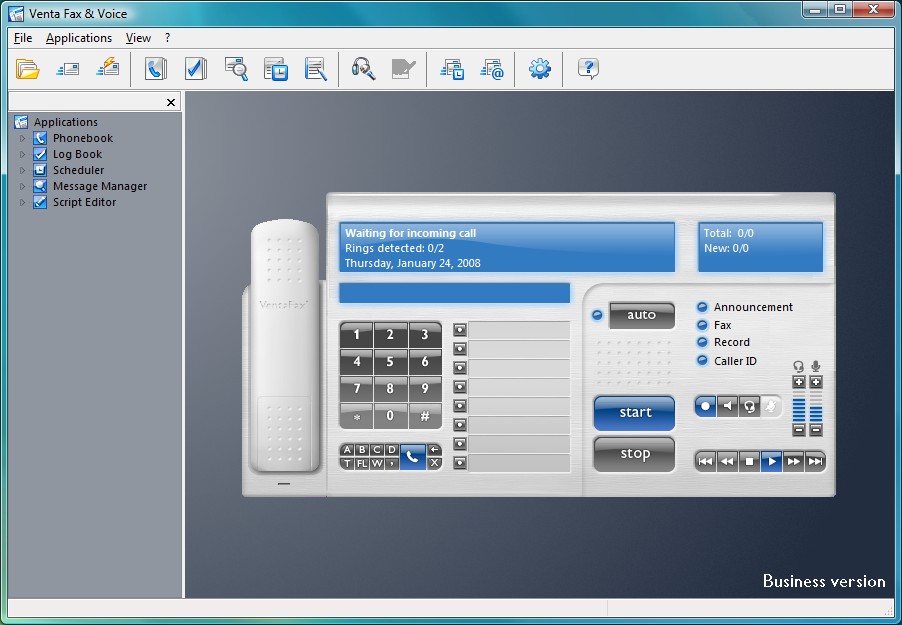 VentaFax is a popular fax/voice messaging system with features and stability that can compete favorably with other popular program like WinFax. It is quick, nimble, with a small footprint. It is able to send and receive fax messages via Class 1, 1.0, 2 and 2.0 faxmodems and emulates an answering machine with tone remote control, supporting most voice modems. VentaFax program is user-friendly and intuitive; the main control panel shows the image of page as it travels out of the visual fax machine slot. However, installation and configuration can give users a lot of problems. The customer service is not also top-notch; but there seems to be a lot of improvements over previous versions. VentaFax is a popular fax/voice messaging system with features and stability that can compete favorably with other popular program like WinFax. It is quick, nimble, with a small footprint. It is able to send and receive fax messages via Class 1, 1.0, 2 and 2.0 faxmodems and emulates an answering machine with tone remote control, supporting most voice modems. VentaFax program is user-friendly and intuitive; the main control panel shows the image of page as it travels out of the visual fax machine slot. However, installation and configuration can give users a lot of problems. The customer service is not also top-notch; but there seems to be a lot of improvements over previous versions.
You can send and receive black and white or color faxes after scaling through the configuration hurdle. You can also retrieve your fax and voice messages from any touchtone phone, and enjoy email and fax forwarding directly as attachment. One other feature that makes it a program worth trying out is its ability to record a telephone conversation with just a single click. Moreover, VentaFax 6.6.133.340 also supports Caller ID (if available).
VentaFax is compatible with the following operating system: Windows 7; Vista; Windows XP; Windows 2000; and Windows 98.
Want to check it out? Visit Ventafax.
Rating: Loading... 1 Comment »
O. James Samson - February 17, 2011
.gif) Kaspersky Rescue Disk is one of the best programs to easily remove all kinds of viruses from your computer, and make it clean once again. It also has the capacity to reduce or totally eliminate the possibility of having your computer infested with malware programs. You can boost from the Kaspersky Rescue Disk in order to scan and remove threats from a computer that has been attacked by virus. To use this program, you may have to burn the ISO image to a CD. When your system is infested with virus, all you need to do is insert the CD into the CD-ROM drive, enter the PC’s BIOS, set it to boot from the CD, and reboot the computer. Kaspersky Rescue Disk is one of the best programs to easily remove all kinds of viruses from your computer, and make it clean once again. It also has the capacity to reduce or totally eliminate the possibility of having your computer infested with malware programs. You can boost from the Kaspersky Rescue Disk in order to scan and remove threats from a computer that has been attacked by virus. To use this program, you may have to burn the ISO image to a CD. When your system is infested with virus, all you need to do is insert the CD into the CD-ROM drive, enter the PC’s BIOS, set it to boot from the CD, and reboot the computer.
Remarkably, Kaspersky has been in the forefront of providing advanced security and anti-virus programs for a long time. The name Kaspersky is enough to attract attention to this program; however, it is not good to take attention off the importance of this program.
Kaspersky Rescue Disk program is almost as good as other popular programs from the stable of the publisher. The doscsi enables SCSI support in the initial ramdisk boot, while the noscsi disables it; this makes it easier to use this program in removing malware from your system.
The file is huge, and works on virtually all Windows operating system.
Want to check it out? Visit Kaspersky.
Rating: Loading... No Comments »
O. James Samson - February 17, 2011
 Shareaza is a peer-to-peer file sharing client or application, which supports the Gnutella, Gnutella2, eDonkey Network, BitTorrent, FTP and HTTP network protocols and handles magnet links, ed2k links, Piolet links, and the Gnutella links. Shareaza 2.5.4.0 is available in thirty different languages; making it accessible to as many people as possible. Shareaza is a completely free application that can be downloaded and installed fro free; and that means you might not need to pay for a p2p program anymore. Shareaza is a peer-to-peer file sharing client or application, which supports the Gnutella, Gnutella2, eDonkey Network, BitTorrent, FTP and HTTP network protocols and handles magnet links, ed2k links, Piolet links, and the Gnutella links. Shareaza 2.5.4.0 is available in thirty different languages; making it accessible to as many people as possible. Shareaza is a completely free application that can be downloaded and installed fro free; and that means you might not need to pay for a p2p program anymore.
The program has the capacity to connect up to four different Peer-to-Peer networks, which means you can access thousands of other users from a single program. Downloads/uploads are possible from the following websites: Edonkey2000; Gnutella, BitTorrent, as well as Gnutella2 (G2). Also, the publishers of Shareaza have now introduced a feature known as “collections.” This feature groups preview of album covers, descriptions, and song lists all in one complete package. Once you have discovered the collection, all you need to do is click on the file-list to download.
The user-interface also has a lot to offer; and as a matter of fact, it has more to offer than many of the P2P programs out there. There are many other features that makes it one of the best P2P clients out there.
Moreover, this open source program comes with an uninstaller.
Want to check it out? Visit Shareaza.
Rating: Loading... No Comments »
O. James Samson - February 17, 2011
 QManga is an image viewing program designed to read images sequentially as is the case with Manga. All common image formats are supported and images can also be loaded from within zips and rars without extraction. QManga also supports Nested zips, right to left reading mode, and Unicode support also enhance the reading of manga. The user-interface is very easy to understand compared to CDisplay. QManga 0.3 requires Microsoft Visual C++ 2008 redistributable before installation can be made. Some of its latest changes include: support for cbz and cbr; some window geometry bug fixes; faster reload speed; addition of scroll sensitivity options; addition of rotation options; and addition of don’t enlarge images option. However, this version does not have support for color separation. As a matter of fact, not many changes were made to this version. QManga is an image viewing program designed to read images sequentially as is the case with Manga. All common image formats are supported and images can also be loaded from within zips and rars without extraction. QManga also supports Nested zips, right to left reading mode, and Unicode support also enhance the reading of manga. The user-interface is very easy to understand compared to CDisplay. QManga 0.3 requires Microsoft Visual C++ 2008 redistributable before installation can be made. Some of its latest changes include: support for cbz and cbr; some window geometry bug fixes; faster reload speed; addition of scroll sensitivity options; addition of rotation options; and addition of don’t enlarge images option. However, this version does not have support for color separation. As a matter of fact, not many changes were made to this version.
However, this version still lacks interface for editing hotkeys; even though most of them can be changed by editing the generated .xml file. Nevertheless, you can still make use of the following features: read images within the ZIPs and RARs without extraction; support for ZIPs within ZIPs; a visual go-to image dialog; ability to add whole folders (including subdirectories); dual page viewing and Japanese reading mode; remember last opened file; and a few others.
QManga is a freeware program, and is a bit easy to use.
Want to check it out? Visit Qmanga.
Rating: Loading... No Comments »
O. James Samson - February 15, 2011
 Wireless Protector is windows based management and security software that has the capacity to automatically disable Wi-Fi adapters on computers. Basically, these are computers connected to the network LAN of your company; and it further re-enables Wi-Fi when the LAN cable is disconnected from the wireless computers. It runs on the following programs or platforms; Microsoft Hyper-V Server 2008, Windows 7/2000/2003/Vista and Windows XP. Wireless Protector is windows based management and security software that has the capacity to automatically disable Wi-Fi adapters on computers. Basically, these are computers connected to the network LAN of your company; and it further re-enables Wi-Fi when the LAN cable is disconnected from the wireless computers. It runs on the following programs or platforms; Microsoft Hyper-V Server 2008, Windows 7/2000/2003/Vista and Windows XP.
The program also has an auto switching capability that helps to secure IT environments from insecure Wi-Fi connections that are capable of being used by intruders as a bridge to an organization. As a matter of fact, it is also capable of preventing computers from duplicate network resources. Its key features and functions include the following: provides east-to-use network administration interface; provides enhanced statistics and reports; provides activity logging tracking; enables automatic exporting capabilities to text file or SQL/Access ODBC databases; provides wireless auto switch protection; automatically disable Wi-Fi when connected to LAN network; enables automatic active protection re-scanning on Wi-Fi network computers; and many more.
Wireless Protector Workgroup also provides easy-to-use network administration interface, report, exporting capabilities and database support. It is also capable of collecting logging on disabled Wi-Fi adapters and protection status. Version 1.6 comes with a 30 days trial period; including an uninstaller.
Want to check it out? Visit Lan-Secure.
Rating: Loading... No Comments »
O. James Samson - February 15, 2011
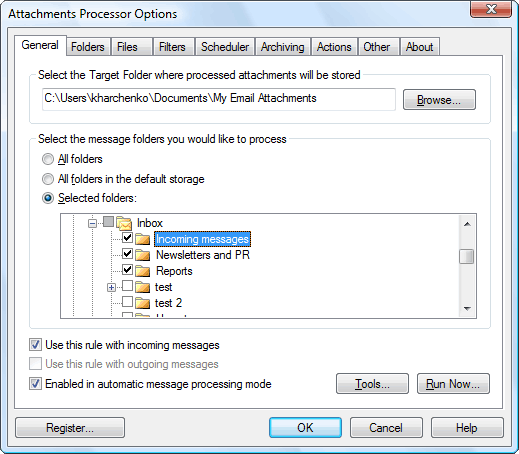 Attachments Processor for Outlook has built-in features that can automatically extract attachments from incoming messages and have them saved to your computer hard disc. Extracted attachments are replaced in a message with a link to the file on disc, or, at your discretion, you can add a text file with attachment description and the link to the message. This version in review has a few changes which include; Microsoft Office 2010 (64-bit editions) which has been added, and an uninstaller. Attachments Processor for Outlook has built-in features that can automatically extract attachments from incoming messages and have them saved to your computer hard disc. Extracted attachments are replaced in a message with a link to the file on disc, or, at your discretion, you can add a text file with attachment description and the link to the message. This version in review has a few changes which include; Microsoft Office 2010 (64-bit editions) which has been added, and an uninstaller.
Attachment Processor for Outlook is also a three-in-one program with capacity to do the following: allows extracting attachments from the incoming messages and save them to your hard disk; the attachment zip compressor allows automatic archiving the attached files by ZIP both for incoming and outgoing messages; blocked attachments management, which is a utility for managing the lists of attachment types, which is blocked by the outlook security system.
Attachment Processor for Outlook is a highly innovative add-on for Microsoft Outlook; and is ideal for managing attached files. It is capable of easily extracting and removing email attachments; thereby saving you both time and effort. The program has become one of the most important programs for people working in an organization.
Want to check it out? Visit Mapilab.
Rating: Loading... No Comments »
O. James Samson - February 14, 2011
 Password Genie is a password manager that works across different computers and users. The program is designed to offer its users both security and convenience at the same time. Password Genie allows you to save all usernames and passwords in a single location that is highly protected and can only be accessed only by you anytime you want to. If you have been having problems managing your passwords and usernames; here is an application capable of saving all the details for you. There might not be any need to keep writing your username and password in a particular place; this eliminates any stress that has to do with manually storing your passwords in documents that are not secure. Password Genie is a password manager that works across different computers and users. The program is designed to offer its users both security and convenience at the same time. Password Genie allows you to save all usernames and passwords in a single location that is highly protected and can only be accessed only by you anytime you want to. If you have been having problems managing your passwords and usernames; here is an application capable of saving all the details for you. There might not be any need to keep writing your username and password in a particular place; this eliminates any stress that has to do with manually storing your passwords in documents that are not secure.
With Password Genie, visiting your favorite websites is no longer going to be a problem as usual; after all, there would not be any need to commit any password to memory. Some key features included in this version include: an uninstaller; protection against identity theft; eliminate unprotected storage of password; standard industry strength encryption; save time searching for your username or password; auto populate and auto login; user guide; phone and online customer chat support; and many more.
Password Genie is a shareware program, users are also allowed a 30 days trial period.
Want to check it out? Visit MyPasswordGenie.
Rating: Loading... No Comments »
|
|
|





