O. James Samson - June 23, 2010
 Reg Organizer provides a variety of tools required for effective System Registry and configuration files management. What this software does is simply that it allows the user view, edit, fix errors in the system, improve computer performance, maintain registry, clean the Registry and preview the registry files they may wish to import. Reg Organizer provides a variety of tools required for effective System Registry and configuration files management. What this software does is simply that it allows the user view, edit, fix errors in the system, improve computer performance, maintain registry, clean the Registry and preview the registry files they may wish to import.
Reg Organizer helps users to edit registry files and also view file content directly from Windows Explorer. It also comes with a built-in application uninstaller, allowing users the freedom to uninstall unused applications from the system.
The main features of Reg Organizer are as follows: can find all keys related to a certain application and delete them, if necessary; viewing and editing the system registry, manipulating the registry keys and values, exporting, importing, copying them; increase the performance of the registry and consequently the overall performance of your system; allowing users to edit keys and values, add and delete data containing in the reg files; it offers users a variety of options for searching the registry and replacing the records matching the specified criteria; has the capacity to take snapshots before and after application installs and eradicate; it automatically remove unnecessary files from the hard drive of your computer, and to search for and fix invalid shortcuts.
Want to check it out? Visit Chemtable
Rating:  Loading... No Comments »
O. James Samson - June 23, 2010
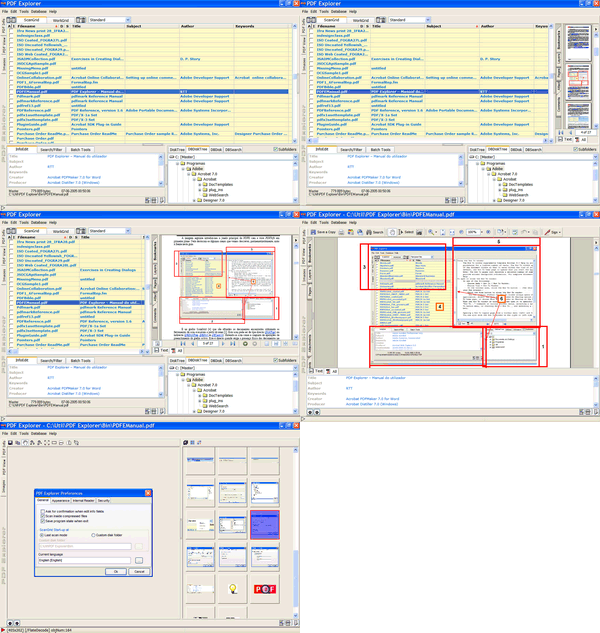 PDF Explorer 1.5 is a CHM and PDF files management software and image extraction tool. What it does is to provide users with the opportunity of easily gather and add all their CHM and PDF documents to a database file, which displays an overview of Filename, Subject, Creation Date, Producer, Title, and Author, Number of Pages, Modification Date and a maximum of 100 custom fields to enter custom data. PDF Explorer 1.5 is a CHM and PDF files management software and image extraction tool. What it does is to provide users with the opportunity of easily gather and add all their CHM and PDF documents to a database file, which displays an overview of Filename, Subject, Creation Date, Producer, Title, and Author, Number of Pages, Modification Date and a maximum of 100 custom fields to enter custom data.
With the introduction of this tool, users can search through all the files, have a chance to view them, batch rename them and do much more. PDF Explorer 1.5 can also be used to scan within ZIP files and so much more.
What differentiate PDF Explorer 1.5 from the past versions are: a context-sensitive help system; the database editor shows now an improved database tree; Rename Files, Copy Files, Move Files and Delete Files functions added to the web interface API; import wizard can now open, more easily, very big .CSV files; PDF Creator tool can set some of the standard metadata fields, supports drag and drop of image files from applications other than the Shell.
The sad part of this tool is that it actually does not extract the images with the proper color settings.
Want to check it out? Visit Rttsoftware
Rating: Loading... No Comments »
O. James Samson - June 23, 2010
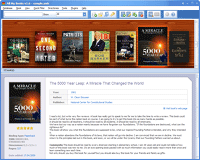 This is for all those who love books, and who love giving out books. All My Books helps you to organize your book collection; acting like the library you have always wanted. It helps you to organize your bookshelves, making a better library that is very easy to browse, and search at the same time. You can decide to group and browse your collection of books by title, publisher, author, and even run a quick search by any field. As a user, you can define your own fields to label your books, such as memos or comments, coming back to search them at your convenience. This is for all those who love books, and who love giving out books. All My Books helps you to organize your book collection; acting like the library you have always wanted. It helps you to organize your bookshelves, making a better library that is very easy to browse, and search at the same time. You can decide to group and browse your collection of books by title, publisher, author, and even run a quick search by any field. As a user, you can define your own fields to label your books, such as memos or comments, coming back to search them at your convenience.
The publishers have made some few changes and additions to this version; these include: displaying book titles that has no cover images in the virtual bookshelf mode; addition of up and down keys moves to previous/next match while cursor is in quick book search field; addition of volume field to the list of additional columns; and fixing of book details import from Bol.com Bol.de, Powells.com, and Barnesandnoble.com.
All My Books 1.9 Build 1118 is a Shareware, and goes for $34.95 per download, but users can download a free trial for 30 days. The feature I love so much is the support for “Audiobooks,” which allows users to start playback from the program in just one click.
Want to check it out? Visit Bolidesoft
Rating: Loading... No Comments »
O. James Samson - June 23, 2010
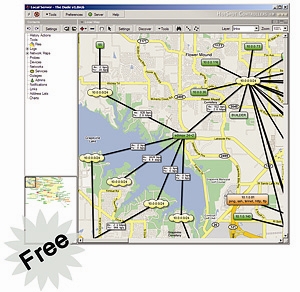 The Dude is a network monitor application that helps to improve the way users manage their network environment. It is built to automatically scan every device specified under subnets. It also draws and completely layout a map of the network of users; monitors the devices and alerts users in case of any problem developed in some of the services. The Dude is a network monitor application that helps to improve the way users manage their network environment. It is built to automatically scan every device specified under subnets. It also draws and completely layout a map of the network of users; monitors the devices and alerts users in case of any problem developed in some of the services.
It is a great program, considering it is a freeware; the publishers have indeed put together a fairly good program. The publishers, which are also well-known for manufacturing of routers, have added some nice features to this program. Some of the features include: discovers any type or brand device; auto network discovery and layout; easy installation and usage; inclusion of SVG icons for devices, and supports custom icons and background; device, link monitoring, and notifications.
For easy configuration of the Dude 4.0 Beta 1, users may have to hire a Dude expert to help them handle their configuration. The Dude is built to handle a lot of things, and users can enjoy all the support from any of the Dude online experts.
Interestingly too, Dude comes with an uninstaller each time you download it from the publisher’s page.
Want to check it out? Visit mikrotik
Rating: Loading... No Comments »
Ciaran Moore - June 22, 2010
 It is essential that your computer system is kept in good condition so that you can continue to execute programs smoothly and keep the whole thing in good running order. Tweaking your computer is not an easy task. Basically it can require different utility software for different hardware like a memory optimizer for RAM and a disk cleaner and defragmenter for hard drive cleaning and optimizing. It is essential that your computer system is kept in good condition so that you can continue to execute programs smoothly and keep the whole thing in good running order. Tweaking your computer is not an easy task. Basically it can require different utility software for different hardware like a memory optimizer for RAM and a disk cleaner and defragmenter for hard drive cleaning and optimizing.
Fortunately, you don’t have to search for and install several things, as TweakNow PowerPack offers an all-in-one tweaking utility for your computer. An all-in-one windows cleaner, disk cleaner, registry cleaner, defragmenter and more – that’s what TweakNow PowerPack has to offer. To help you get started, here is a rundown of its abilities.
This software runs on Windows 2000 and later versions (32 bit). It does not require any third party software nor have any conflict on any of the software installed on your computer. Hence, installing it will not be a problem.
It also does not require any specific hardware, as long as it runs the required Windows version. A simple and intuitive user interface – that’s the GUI of this program. All of the specific tools are categorized into a single category for quick finding of the needed tools. Icons for different tools are also provided. The only problem may be the actions for a specific tool (scan drive for disk cleaner for example) is very small and not noticeable the first time you use the program.
The program contains all the needed tweaking tools for your computer. Read the rest of this entry »
Rating: Loading... No Comments »
Ciaran Moore - June 22, 2010
 This program provides your computer all out protection from threats like viruses, worms, Trojans, malware, spyware and other Internet threats. Name the threat and this program will provide the needed protection. This program provides your computer all out protection from threats like viruses, worms, Trojans, malware, spyware and other Internet threats. Name the threat and this program will provide the needed protection.
The program’s interface is way better than some popular ones. Features and tools are well organized. Large images and icons are provided so users with not so good eyesight can see it clearly. The highlight of the program’s interface is the color designation of the protection level of your computer; red for low, yellow for medium and green for high protection.
Scanning capability of this software is superb as it provides you three options on will you going to scan your computer. Full Scan Option allows you to scan all drives found on your computer. Quick scan allows you to scan memory, register and other system files to check if any malicious programs are residing in this important area. Custom Scan allows you to scan only drives that you want to scan. Useful if you frequently attach external storage like USB drives.
The program also performs real-time scan to protect your computer while you are doing your tasks like surfing the web, checking e-mails and downloading files from the Internet. These tasks are considered to be high risk and viruses and other external threats frequently come aboard your computer from online sources.
InstaUpdate function automatically downloads database update from the Internet. This feature is highly customizable; you can have the updates hourly, daily or weekly.
Quarantined files are also accessible. So if some of your applications were treated as a threat as a result of false positive, you can restore it and use it all over again. However, be careful in restoring files from quarantine because you might end up restoring viruses if you don’t have that much knowledge about viruses.
Firewall protection and sensitivity is also customizable; you can set it low, medium, high or custom. This is helpful when you want to set firewall protection to high when surfing the net or low when you want to play LAN games.
The program also supports interactivity with its use through its Submit Sample feature. If you have some programs or files that looked suspicious and were not detected by the program, you can submit it to the software’s database online.
Protector Plus Professional Antivirus is recommended for users who are sick with the popular antivirus and wants a new flavor when it comes to computer protection. This antivirus provides flexibility and interactivity not found from competitors. However, these unique features together with its foolproof protection come with a cost, but a 30 day trial is available for free download to test the product’s performance before purchasing.
You can purchase and download Protector Plus Professional Antivirus at Protectorplus
Rating: Loading... No Comments »
Ciaran Moore - June 21, 2010
 PhotoScape is a free photo editing software that lets you easily do basic enhancement and manipulation of photo files. Though the program is not as popular or as sophisticated as Photoshop, its basic tools for image editing are more than enough to perk up the quality of your memorable and favorite photos. PhotoScape is a free photo editing software that lets you easily do basic enhancement and manipulation of photo files. Though the program is not as popular or as sophisticated as Photoshop, its basic tools for image editing are more than enough to perk up the quality of your memorable and favorite photos.
Rich tool support for basic image and photo editing; that’s something to look forward to with this program. It allows you to edit almost everything on your photo; adjust the brightness and contrast, add effects like grayscale and sepia and more. Editing has become easier with single click auto level and auto contrast functions. Other tools like brightness and filter, it also includes lots of tools for fast and high quality editing.
Its resizing and cropping features are also impressive, as it provides lots of ways on how to crop your image (D4 Ratio, D3 Ratio, 16:9 etc.) and then manually adjust the image form before cropping. You can also even resize images either by adjusting the longer length, the width or proportionally resizing the length and the width by encoding any of the 2 dimensions.
You can also customize images by adding objects, clip-arts, text caption, dialogue bubbles and more making your picture more customized and personalized. There are also advanced tools like removing moles and red-eye which is a common problem when low quality cameras are used.
Aside from full support for basic image editing, there are also other features on this program that are worth commending. You can create animated GIF images using the animated GIF creator, combining and customizing multiple photos and save them under one image file, embedding multiple photos on a single frame for printing, batch processing of multiple photos to speed up editing and many more.
Photoscape is recommended for both beginners and advanced users who only need basic image editing and nothing too complicated.There’s more to find in this program in terms of performance than simply a basic image editing tool though, as the extra features can come in very useful. Furthermore, you can have all these amazing tools and features free of charge.
You can download PhotoScape right here.
Rating: Loading... 2 Comments »
Ciaran Moore - June 21, 2010
 Music Editing Master provides users with an all around audio editing and production experience. This audio editing program offers rich features and tools available for users especially the novice and music savvy to get the output they desire. Music Editing Master provides users with an all around audio editing and production experience. This audio editing program offers rich features and tools available for users especially the novice and music savvy to get the output they desire.
The user interface is well-organized, easy to use and very user friendly. All icons for different tools are displayed so that users can easily locate the tools they need to perform tasks. Both beginners and advanced user won’t be having problems finding tools with the program’s interface.
Major features and tools of the program include editing audio files without editing the original file, unlimited changes like undo and redo commands, cut, copy etc for fast-changing if you don’t like the current output. There is also a tool to rip audio from CD and video from DVD and extract audio from different video files. When it comes to ripping, the program supports a functionality called split-ripping.
Rich support for cleaning audio files using state of the art editing and effects tools is probably the highlight feature of Music Editing Master. Using these tools, you can enhance your audio file by adding or removing silence, amplify, reverse audio, fine-tune stereo channel, normalize, reverberate and many more. Read the rest of this entry »
Rating: Loading... 1 Comment »
Ciaran Moore - June 18, 2010
 With todays technology of Wi-Fi, users with their laptops and notebooks can now access the Internet from almost anywhere without needing to bring their modems and cable wires. You can connect to the Internet even when you’re outside provided that the place is a “Wi-Fi hotspot”. But the problem of connecting to this place is aside from limited connection speed, you can’t connect to the others who are using the same wireless network unlike in a wired local area network. Well if you want to be friendly by knowing the others who are online using that same network, you may give WeFi a try. With todays technology of Wi-Fi, users with their laptops and notebooks can now access the Internet from almost anywhere without needing to bring their modems and cable wires. You can connect to the Internet even when you’re outside provided that the place is a “Wi-Fi hotspot”. But the problem of connecting to this place is aside from limited connection speed, you can’t connect to the others who are using the same wireless network unlike in a wired local area network. Well if you want to be friendly by knowing the others who are online using that same network, you may give WeFi a try.
WeFi is a communication program that allow users to have a stable connection to an available wireless network. Depending on your location, the program will find the fastest and most reliable connection available nearby. There’s more on this program than simply connecting you to a wireless network though, read on.
The very basic requirement for the program to run smoothly is hardware support for wireless networks or in layman’s term, your computer must be WiFi enabled before you can install the program.
The program also runs on Windows platform (Windows XP and later versions) and Mac operating systems.
The main function of the program as mentioned is to connect users to a reliable and fast wireless network thats available close to you. If the program detects a new network, it automatically connects users. You don’t need to manually connect your computer to the network. Another interesting feature of this program is that it has the capability to search not only one, not even a hundred but as many as 300+ thousand possible hotspots in the world as the program can find at least 300,00 possible hotspot all around the worlds provided that these wireless networks has a spot page on the program’s website (wefi.com). Complete information about the location and its connectivity will be provided by the website.
The other interesting feature is the availability of the users to connect to other users online. It works like a social network where users can add and approve each other as friends, chat with them and know their information and location. Using this program you can meet new friends and neighbors online.
WeFi is recommended to users who want to have a reliable and faster wireless connection and want to communicate with other online users of WeFi. You can have all these useful features for free. Download the program at WeFi.com to try it out for yourself.
Rating: Loading... 1 Comment »
Ciaran Moore - June 18, 2010
 With hard drive capacity increases of the last few years, you may wonder how you’re going to use such huge storage space. But after a few months of using your brand new computer with such enormous disk space; installing your favorite games, downloading music and videos and more, your computer now keeps prompting about low disk space which also causes your computer to slow down its performance. With the free disk space you thought you could never fill now vanished, you keep on asking where did this disk space go? Don’t bother with too much thinking about that lost disk space – Disk Space Fan will help you out! With hard drive capacity increases of the last few years, you may wonder how you’re going to use such huge storage space. But after a few months of using your brand new computer with such enormous disk space; installing your favorite games, downloading music and videos and more, your computer now keeps prompting about low disk space which also causes your computer to slow down its performance. With the free disk space you thought you could never fill now vanished, you keep on asking where did this disk space go? Don’t bother with too much thinking about that lost disk space – Disk Space Fan will help you out!
It scans your computer’s hard drive, displays the files or folders and shows the ones that occupy the most space on your drive – that’s the main functionality of this disk utility software. But there is still more to look for on this program than simply displaying the breakdown of file usage on different files and folders.
The program identifies the breakdown of disk usage by scanning the entire hard drive then displaying the result in an attractive fanned way. The scanning function usually takes longer for large capacity hard drive or drives that have high fragmentation.
You have different views on the different files contained on your hard drive, but the default is starting from the parent directory. To view the content in more detail, double click on the folder and it’ll display the content of the directory with its file size. If you find files that are useless or unneeded, you can delete them in an instant to free some space. Right click the folder you want will allow you to open the folder using the windows explorer for a more detailed view. If you think that the folder is of no use, you can delete it right away.
Disk Space Fan provides all the necessary features and tools for viewing and freeing some disk space on your once spacious hard drive. It is recommended to all type of users because it’s easy to use.
The program also has a professional version with more features and tools, but that’ll cost you. For full details check out the homepage.
You can download Disk Space Fan at Diskspacefan.com
Rating: Loading... No Comments »
|
|
|





