Ciaran Moore - May 5, 2010
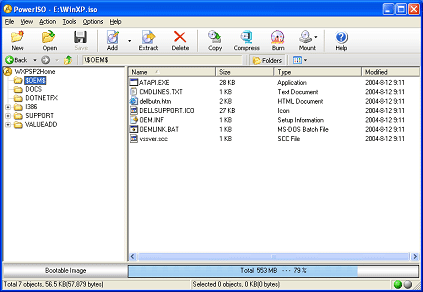 CD’s and DVD’s are the most convenient storage medium for installers because of its large storage capacity and cheap price. Also CD’s and DVD’s are easy to reproduce especially when you ‘re copying free installers and distributing it to your friends and colleagues. All you need is your CD/DVD ROM and a program that allows you to create an image of the installer, then burn this image file onto an empty disc. It seems there’s no other program in the market today that handles image files as well as that PowerISO. CD’s and DVD’s are the most convenient storage medium for installers because of its large storage capacity and cheap price. Also CD’s and DVD’s are easy to reproduce especially when you ‘re copying free installers and distributing it to your friends and colleagues. All you need is your CD/DVD ROM and a program that allows you to create an image of the installer, then burn this image file onto an empty disc. It seems there’s no other program in the market today that handles image files as well as that PowerISO.
PowerISO 4.7 offers basic features for manipulating image files like create, edit, and compress. There are also advanced features available like encrypt, and the ability to mount image files to a virtual drive. The program is compatible with the majority of image file formats available today like ISO and BIN. The program is very easy to use since it provides a drag and drop environment and allows copy and paste from clipboard. You can also create bootable ISO or extract information from a bootable ISO using the program. Its also capable of converting other image formats to standard ISO format. Another useful feature is compression of image files to save space from your hard disk. Its encryption feature is very useful in protecting your image files from being opened by others.
Though CD burning software already has the feature to create an image file from a disc, PowerISO offers much more robust image processing abilities. In fact, it’s one of the best image file processing tools available in the market today because of its unique features that competitors fail to provide.
Current version of PowerISO is at 4.7. PowerISO is commercial software from http://www.poweriso.com with a price of $29.95 but a trial version is available for free download for those who want to evaluate the product first before purchasing.
More info is available at PowerISO
Rating:  Loading... No Comments »
Ciaran Moore - May 4, 2010
 Hard disk management, (and specifically partitioning) is a very important task to be done to your computer to maintain good performance and to avoid loss of data. Its a good idea to divide (partition) your hard drive so that you have separate areas for your operating system and to store your data. This means if you have to format and reinstall your operating system, you can avoid data loss. This task together with other hard disk management tasks can all be performed using Paragon Hard Disk Manager 2010 Suite. Hard disk management, (and specifically partitioning) is a very important task to be done to your computer to maintain good performance and to avoid loss of data. Its a good idea to divide (partition) your hard drive so that you have separate areas for your operating system and to store your data. This means if you have to format and reinstall your operating system, you can avoid data loss. This task together with other hard disk management tasks can all be performed using Paragon Hard Disk Manager 2010 Suite.
The program integrates multiple tools intended for hard-disk related tasks like creating and formatting hard disk partitions, disk defragmenting etc. It includes partitioning tools allowing you to create, format, resize, or delete partitions of your hard drive in the form of an easy to follow installation wizard.
Backing up data is also possible using the Smart Backup Wizard tool integrated in the program. You can backup your entire hard disk by creating an image, or just emails and other selected files in just a few clicks. So Paragon Hard Disk Manager is very convenient to use in backing up your files even though it only offers basic back up.
Using the program, you can even transfer your Windows operating system to another hard drive and resize your current partition. A Wipe tool can be used to delete free spaces or the entire hard drive to ensure that important data can’t be retrieved. If you have multiple operating systems, Boot Manager will manage the installation and performance of multiple operating systems.
There are still more functions that Paragon Hard Disk Manager 2010 suite contains. Depending on your needs, this might be the right software for you. It is compatible with the current version of Windows (XP, VISTA, 7) and requires 1GB of free disk space.
Further information from the website.
Rating: Loading... No Comments »
Ciaran Moore - May 4, 2010
 Photo images are the most precious images you can have. Capturing happy moments with family and friends is such a nice thing to be able to do nowadays. But what if your photos got accidentally deleted by you or by someone using your camera? DiskInternals Flash Recovery is the program you need to solve such problems. Photo images are the most precious images you can have. Capturing happy moments with family and friends is such a nice thing to be able to do nowadays. But what if your photos got accidentally deleted by you or by someone using your camera? DiskInternals Flash Recovery is the program you need to solve such problems.
Flash recovery retrieves your formatted, deleted, and lost photos from your camera flash card. The program has a very simple user interface. You choose the connected flash memory you want to scan for your pictures and the program shows you the thumbnails of the pictures and other images it found. Bad news for trial users since the trial version only allows scan function but you’re not allowed to recover files. You have to buy the full version to recover your pictures.
DiskInternals Flash recovery supports a variety of image formats like jpeg, png, gif and many more. Also the program supports RAW photo formats like CRW, CR2, TIFF and other formats that latest cameras support. This program is very convenient and easy to use. No configurations are needed, just follow instructions from the photo recovery wizard. Latest version of DiskInternals Flash Recovery can recover several video formats like avi, wmv, mpg, mpeg etc. which add to the program’s advantages.
Disk Internals Flash Recovery is the program that every photographer and those who loves to take pictures should have. Accidental deletion of pictures happens anytime so it’s good to have something like this as a recovery plan.
Check it out here.
Rating: Loading... No Comments »
Ciaran Moore - April 30, 2010
 7-Zip is a file archiving software offered by 7-zip.org. It is a free and open source archiving program available for download in the internet. Latest release of this software is version 4.65, but there is a new beta version available for download. The size of this version is somehow bigger at 1.02 MB because of added features that are not included in the previous software release. There were no mentioned reasons why the version number jumped from version 4 to version 9. Right now I’m using the 7-Zip beta version 9.13 as it offers more features than the previous release of 7-Zip. 7-Zip is a file archiving software offered by 7-zip.org. It is a free and open source archiving program available for download in the internet. Latest release of this software is version 4.65, but there is a new beta version available for download. The size of this version is somehow bigger at 1.02 MB because of added features that are not included in the previous software release. There were no mentioned reasons why the version number jumped from version 4 to version 9. Right now I’m using the 7-Zip beta version 9.13 as it offers more features than the previous release of 7-Zip.
7-Zip was developed to run on variety of windows operating systems but it has also support for Linux/Unix operating systems using command line version. 7-Zip is compatible with a wide variety of archive formats like ZIP, RAR, TAR, GZ and 7z. This cross platform capability is one of the reasons why 7-Zip is already on top of the list in a short amount of time.
First thing that you will notice on this software is its user interface because it just looks like one of the forms in Windows XP. Unlike other file archiving software, 7-Zip displays bigger user interface big enough to have a better view of files and folders inside your hard drives and removable drives. Large icons on the top of the window allow you to do the compression and decompression of files easily. Functions are organized using menus for easy access to different features. Overall, its user interface is very simple but very user-friendly. Read the rest of this entry »
Rating: Loading... 1 Comment »
O. James Samson - April 30, 2010
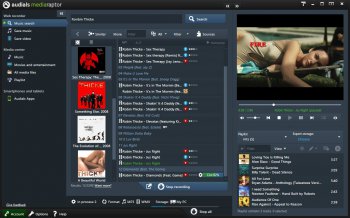 At $26.90 per download, Mediaraptor 4.2.7800.0 is worth every cent of your money. It is capable of recording so many MP3 from the Web radio stations and music videos from the internet. Users do not need to pay for subscription, once they are able to license this program just once, then the process of using it for a life time begins. At $26.90 per download, Mediaraptor 4.2.7800.0 is worth every cent of your money. It is capable of recording so many MP3 from the Web radio stations and music videos from the internet. Users do not need to pay for subscription, once they are able to license this program just once, then the process of using it for a life time begins.
It is one of the most advanced programs of its category, offering one of the best solutions for targeting and music recording at ultra high speed. This is comes with a speed that is very high and not easily compared to some other programs. At least users can get to record music from any social music platform of their choice.
I feel that the 5 days trial period allowed for those who want to have a go at this program is rarely enough. There is nothing wrong with extending the number of days just for users to have enough knowledge of how it works.
Every time you log on to YouTube or even listen to songs in most of the online social media sites, Mediaraptor records it straight for you. It is one convenient way of enjoying your favourite music, yet not missing out on anything.
Want to check it out? Visit Mediaraptor
Rating: Loading... No Comments »
O. James Samson - April 29, 2010
 The publishers describe it as a must have add-on, but I really have a contrary view about that. Though not a bad application to have alongside your Internet Explorer 1E7 pro 2.4.9, this program still has some few works to do. I think the publishers need to do some few work on the online service and get it back to work. The last time I visited that website, it was still not working, and I think something needs to be done about that, and urgently too. The publishers describe it as a must have add-on, but I really have a contrary view about that. Though not a bad application to have alongside your Internet Explorer 1E7 pro 2.4.9, this program still has some few works to do. I think the publishers need to do some few work on the online service and get it back to work. The last time I visited that website, it was still not working, and I think something needs to be done about that, and urgently too.
Some of the features include: tabbed browsing management; inline search; crash recovery; proxy switcher; mouse gesture; tab history browsing among others. Users can customize their favourite browsers, this means that IE7 pro 2.4.9 is not limited to Internet Explorer alone.
IE7 pro 2.4.9 also has features that enrich your browsing experience; some of which include the following: addition of inline search bar the same way it is with Firefox; blocking of all forms of advertising; save page to image features that lets you convert HTML from any URL to image; enhanced browsing capabilities that lets you double click to close mouse, hide search bar and enable and disable crash recovery. The publishers have been able to fix some minor bugs, and even if it is a freeware, they have to do a more especially on their website.
Want to check it out? Visit IE7Pro
Rating: Loading... No Comments »
O. James Samson - April 29, 2010
 Kaspersky Internet Security 2011 11.0.0.187 has one of the most essential security components needed to enjoy some online security. It represents a platform for creating applications that are specifically designated for protections of personal computers. This version though still in Beta stage, is well improved and comes with the improved functional abilities of Kaspersky 5.0 Lab protection products with state of the art innovations. Kaspersky Internet Security 2011 11.0.0.187 has one of the most essential security components needed to enjoy some online security. It represents a platform for creating applications that are specifically designated for protections of personal computers. This version though still in Beta stage, is well improved and comes with the improved functional abilities of Kaspersky 5.0 Lab protection products with state of the art innovations.
The features mentioned above are just a few new innovations introduced by the publishers of Kaspersky Internet Security 2011 11.0.0.187. Kaspersky Internet security therefore offers its numerous users excellent opportunities of having their computers protected from different kinds of electronic threats, including programs that are considered as malware.
Kaspersky is not new to both home and office protection and users have come to identify it with a lot of positive comments recently. The problem Kaspersky has been facing for so many years is related to place of purchase. A lot of people frown at the publishers’ policy of limiting its purchase centers to include only a few sites. Any attempt by users to purchase this program from some websites not registered by Kaspersky attracts some problems for the users. I think something must be done to make their purchase system more flexible, with more purchase centers being registered.
Want to check it out? Visit Kaspersky.com
Rating: Loading... 2 Comments »
O. James Samson - April 28, 2010
 This is a all-in-one application that helps you to locate and delete most unwanted programs like: spyware; Trojans; rootkits; viruses as well as other unwanted programs. Hitman Pro 3.5.5.97 has an executable version that can be run directly from your USB Flash Drive, including local network attached to your computer hard drive. This is a all-in-one application that helps you to locate and delete most unwanted programs like: spyware; Trojans; rootkits; viruses as well as other unwanted programs. Hitman Pro 3.5.5.97 has an executable version that can be run directly from your USB Flash Drive, including local network attached to your computer hard drive.
Just like Panda Cloud antivirus program, Hitman Pro uses cloud computing technology to identify and remove programs that are potentially harmful to your computer. When Hitman is installed on your computer, it saves it a lot of space because downloads and updates are not necessary because of its cloud technology.
Amazingly too, this program works with other antivirus programs installed on your system. It just sits there and complements the efforts of other security applications already installed. Users would love to download and use this program can either try it out for 30 days or go for a paid subscription, which covers all malware removal either now or in the future.
Hitman Pro 3.5.5.97 has an innovative early warning feature that allows users who are not connected to the internet to remove malware. It comes with an uninstaller and has the following features: users can choose quick scan from the split button; improved overall scan performance on systems protected by an active on-access AV scanner; fixing of memory leak among others.
Want to check it out? Visit Surfright.nl
Rating: Loading... 1 Comment »
Ciaran Moore - April 28, 2010
 TuneUp Utilities 2010 is the latest utility software by TuneUp Software GmbH. TuneUp utility is an integration of different utility programs available in the market today like disk defragmenter, disk error checking, registry and disk cleaner, and startup configuration to create a much more robust application. Having TuneUp Utilities 2010 installed on your computer will save you the time and hard disk space from downloading and installing individual utility for different functions just to serve your purpose. TuneUp Utilities 2010 is the latest utility software by TuneUp Software GmbH. TuneUp utility is an integration of different utility programs available in the market today like disk defragmenter, disk error checking, registry and disk cleaner, and startup configuration to create a much more robust application. Having TuneUp Utilities 2010 installed on your computer will save you the time and hard disk space from downloading and installing individual utility for different functions just to serve your purpose.
The first time I ran the application, I noticed that my computer slowed down a little bit and the program took about 30 seconds to load. But that experience only happened to me once and now I’m on my 10th day of my 30 days trial period. TuneUp Utilities run smoothly, not causing any trouble to the other programs installed, and more importantly it helped me a lot in optimizing my hard disk space and speeding up my computer’s performance.
There are a lot of features in TuneUp Utilities 2010 that are worth mentioning. First is its user interface. The program possesses a very clean, organized and informative graphical user interface. Menus on the upper right of the screen, main features on the center (also grouped as dropdown menu items with relevant icon images), and basic information in a form of slideshow presentation on the bottom made the interface of TuneUp Utilities very user-friendly. Read the rest of this entry »
Rating: Loading... No Comments »
Ciaran Moore - April 28, 2010
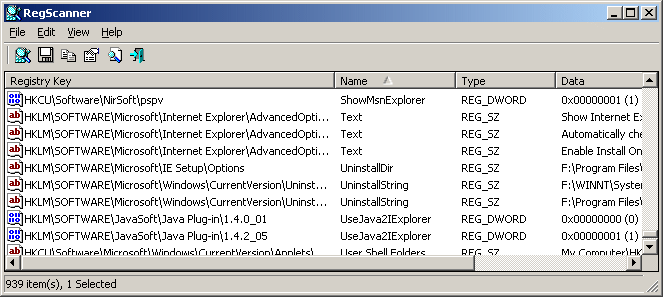 Contents of registers are very difficult to read; in fact it is unreadable at all. When you view the content of your system registry using regedit command in Windows, all you will see is just strings of hexadecimal and binary numbers representing the content of the registers. These values are too difficult for ordinary users to read or interpret. However, we need to understand even a little of what are the content of our register since it is an important component of your computer. To ease your burden with complicated regedit functions, I recommend that you use RegScanner software for this task. Contents of registers are very difficult to read; in fact it is unreadable at all. When you view the content of your system registry using regedit command in Windows, all you will see is just strings of hexadecimal and binary numbers representing the content of the registers. These values are too difficult for ordinary users to read or interpret. However, we need to understand even a little of what are the content of our register since it is an important component of your computer. To ease your burden with complicated regedit functions, I recommend that you use RegScanner software for this task.
RegScanner is a utility program used to scan for a particular entry in the register through a search string as input, and then displays all the contents that match that string all at once. Clicking the displayed result will take you directly to registry editor where you can modify the content of the register. When searching for a value, you have the option on what output would you like to appear whether display all the items that contained the specified string or the exact match of that search string. A registry scan option provides a lot of choices on what data would be displayed, how many items are to be displayed, what base key to be used etc. There are a lot more features which Windows built in regedit fails to provide.
Just a bit of advice before using RegScanner, never attempt to modify registry values if you aren’t sure about that registry entry you are searching. Modifying the content of your register might affect the performance of your computer or worst, may damage your computer. Be very careful in dealing with values of registers.
RegScanner version 1.82 is available for free download (zip file) with a file size of only 51.2 KB. You don’t need to install RegScanner to your computer, all you have to do is extract the downloaded file, click the RegScanner icon then you can start your scan. RegScanner is fast when it comes to searching so this software is highly recommended by me.
Visit the Regscanner Homepage.
Rating: Loading... No Comments »
|
|
|





