Tilgore Kraut - May 5, 2009
 Are you really troubled in managing the massive collection of music tracks you have? Such a huge collection often eats up your lots of time and efforts in organizing and managing them. Well, how about an assistant to whom you can pass on the entire responsibility of handling your music collection? This effectual assistant comes in the guise of Music Manager 9.16. It’s a music manager that enables you to manage, organize, sort, and remove duplicate music files, effectively. The utility demands little of you time prompting you to make some simple selections with few steps to perform the managing task in your specified manner. Managing and organizing your digital music is no more a hectic task, with the help of Music Manager. Are you really troubled in managing the massive collection of music tracks you have? Such a huge collection often eats up your lots of time and efforts in organizing and managing them. Well, how about an assistant to whom you can pass on the entire responsibility of handling your music collection? This effectual assistant comes in the guise of Music Manager 9.16. It’s a music manager that enables you to manage, organize, sort, and remove duplicate music files, effectively. The utility demands little of you time prompting you to make some simple selections with few steps to perform the managing task in your specified manner. Managing and organizing your digital music is no more a hectic task, with the help of Music Manager.
With the professional assistance of Music Manager 9.16 you can automatically get the music files sorted, organized and managed. The program introduces a music management wizard for the purpose with easy to go with steps. It’s capable of managing music files stored with your library, PC, music collection, and music player. The process can be carried out manually or automatically sort and organize music files according to album, artists, title, year, genre, etc. Using the program you can even erase duplicate music to ensure that disk space is not occupied uselessly. You can easily specify the source folder containing music files, after which you have to specify the action you want the program to perform. The digital music files can be moved or copied to the destination folder that you have to specify. Now, choose the music file organizing and sorting modes that are based upon various properties such as genre, artist, album, etc. Well, specifying the necessary features, you can see the program processing the files instantly.
Music Manager 9.16 makes the task much easier, and even if you not a techie, you can still gain most out of it without any hassles.
{More Info and Download}
Rating:  Loading... No Comments »
Tilgore Kraut - May 5, 2009
 How many times it has happened that you were listening to your favorite mp3 track, and it started producing some peculiar sounds or some seriously annoying noises. Had you been equipped with an effective audio processing tool, you wouldn’t have to deal with such situations. Well, it is better late than never, and now you needn’t spoiling your listening experience anymore, as Sound Normaliser 2.66 is there to assist you through. The utility aids you in improving and regaining the audio quality of your wav and mp3 files, by testing and normalizing their level volume. You wouldn’t confront any hassles in performing the task, due to its user-friendly features. It also facilitates you with batch processing capability, thus reducing the time and effort in selecting audio files individually. How many times it has happened that you were listening to your favorite mp3 track, and it started producing some peculiar sounds or some seriously annoying noises. Had you been equipped with an effective audio processing tool, you wouldn’t have to deal with such situations. Well, it is better late than never, and now you needn’t spoiling your listening experience anymore, as Sound Normaliser 2.66 is there to assist you through. The utility aids you in improving and regaining the audio quality of your wav and mp3 files, by testing and normalizing their level volume. You wouldn’t confront any hassles in performing the task, due to its user-friendly features. It also facilitates you with batch processing capability, thus reducing the time and effort in selecting audio files individually.
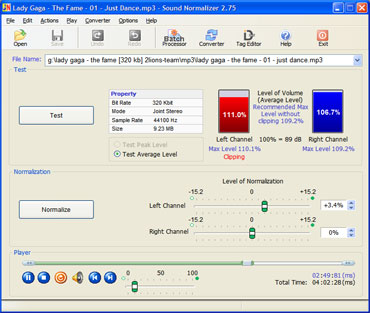
With the Sound Normaliser you’re presented with impressive and neatly framed out feature-set for carrying out the entire process. Load the wav or mp3 audio file into the program for sound normalizing, after which it would be displayed with File Name field. Selecting the sound, press ‘Test’ to check its Properties and volume levels for Left and Right channel, considering which you further can make the decision of processing it. Checking out the presented details, you’ve to move onto next section that is ‘Normalization’. With this section, you can alter level of normalization relating Left and Right Channel, followed by pressing ‘Normalize’ button to command the utility for carrying out the process. As soon as the process completes, you can play the resulting file with in-built play controls. Even, you can use the Batch Processor feature, where first you’ve to set the Type of batch processor as mp3 or wav. Here, you can add the entire folder and perform Batch Test, Batch Normalizing, and Batch Converting. Moreover, it also accompanies ‘Tag Editor’ that lets you edit the track info with ease.
Sound Normaliser helps you enhance the audio quality of your mp3 and wav files by testing and normalizing its channels effectively.
{More Info and Download}
Rating: Loading... No Comments »
O. James Samson - May 5, 2009
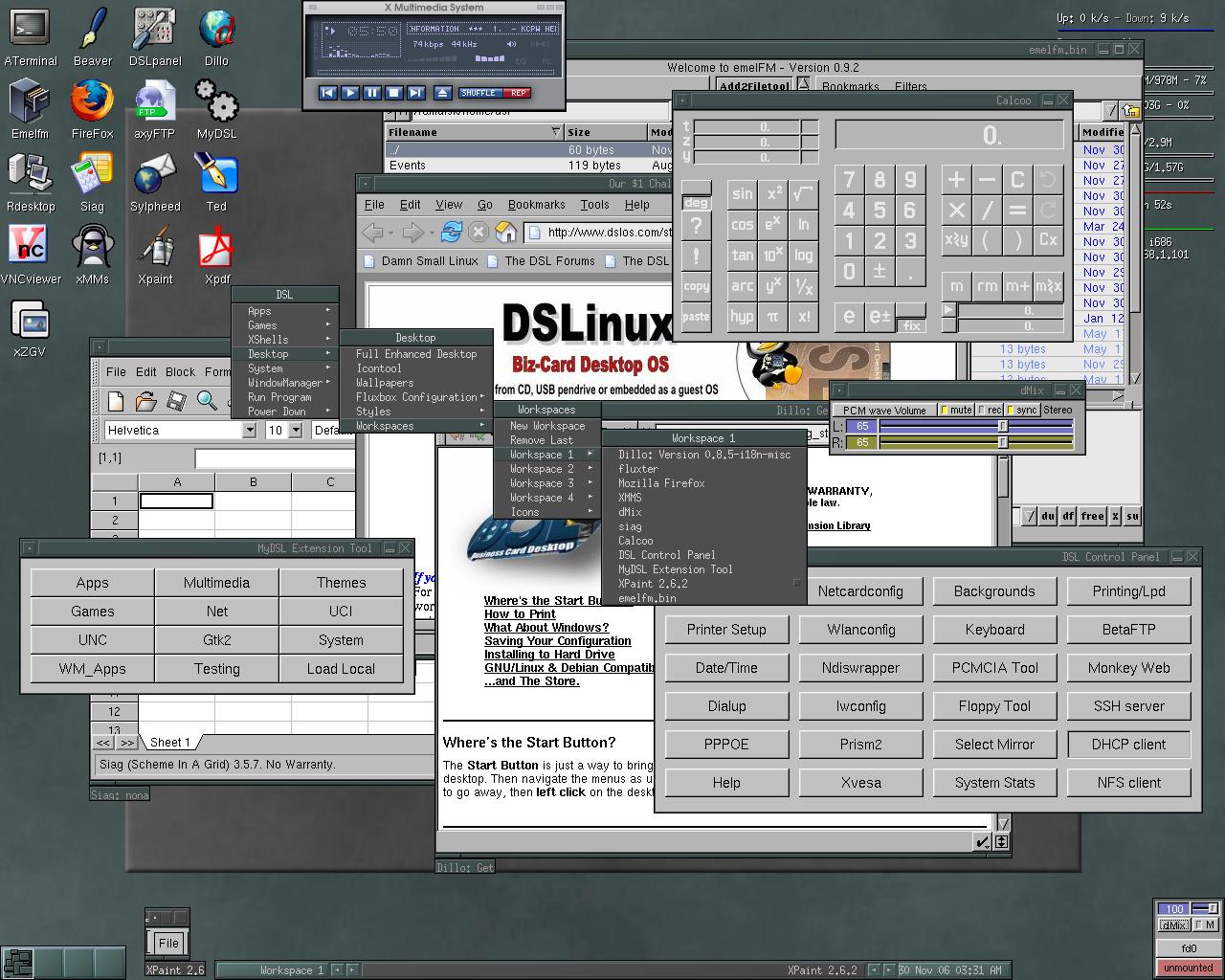 Damn Small Linux is an increasingly popular Linux operating system adapted in low-powered laptops and old computers. It’s also a choice by many computer enthusiasts who wanted to increase speed of their gadgets without compromising function. As a form of Linux, it’s a free operating system without any strings attached to those who opted to download. Damn Small Linux is an increasingly popular Linux operating system adapted in low-powered laptops and old computers. It’s also a choice by many computer enthusiasts who wanted to increase speed of their gadgets without compromising function. As a form of Linux, it’s a free operating system without any strings attached to those who opted to download.
The main feature of the operating system is its size. The name says it all – DSL is only 50MB in size. In comparison, Windows XP is 1.5GB in its simplest form. You’ll be able to save more than 1GB in hard disk space not to mention speed. Every basic function you need is already included in DSL which includes document formatting, VOIP and even games.
But DSL has also something unique to offer to users – normally, installing an OS will require a CD and will automatically give you a fresh start on your gadget. In DSL, users will be able to boot the operating system from a flash drive or a USB with a memory of no more than 128MB. Users will be able to boot the operating system right from the USB. There is also a function in DSL where the operating system will be able to boot inside another operating system.
Although DSL looks simple to run with its lightweight function, configuring DSL to work without any hitches takes time and careful research. It is highly recommended to read through the documentations to avoid any troubles such as losing data or crash in the native operating system.
For more info visit http://www.damnsmalllinux.org
Rating: Loading... 4 Comments »
Ciaran Moore - May 4, 2009
 Emesene is a MSN Messenger clone, which aims to support all features of Windows Live Messenger (WLM). It also comes with some extra features – as well as attempting to be more user friendly and have a cleaner interface, it’s a cross platform program, running on Windows, Linux and some others. For those of you on the go, you might be interested to know that it comes in a portable version too. Emesene is a MSN Messenger clone, which aims to support all features of Windows Live Messenger (WLM). It also comes with some extra features – as well as attempting to be more user friendly and have a cleaner interface, it’s a cross platform program, running on Windows, Linux and some others. For those of you on the go, you might be interested to know that it comes in a portable version too.
It has all the main features of the regular client. Contacts organization, autoreply for when you’re away, avatar support. File transferal, smilies, nudges and themes.
It also includes tabbed chat and custom emoticons. As well as being multilingual and quite customizable. You can select a color scheme, use multiple windows, and enjoy other similar Microsoft features. In fact you can do just about everything you can do in MSN Messenger.
Unfortunately Emesene currently doesn’t support audio or video chat, but they’re working on this!
Check out current Emesene development or try it out for yourself here
Rating: Loading... No Comments »
Ciaran Moore - May 4, 2009
 The usage of cellphones has become so common-place all around the world, that it’s turned into a somewhat essential device for most people nowadays. Wouldn’t it be nice if you could see how a phone operates without having to go to the store and get pressurized by salespeople? The usage of cellphones has become so common-place all around the world, that it’s turned into a somewhat essential device for most people nowadays. Wouldn’t it be nice if you could see how a phone operates without having to go to the store and get pressurized by salespeople?
Now you can, Tryphone.com is a web 2.0 site, that lets you test mobile phones online!
It gives you the chance to try out simulations of various mobile devices including the Apple iPhone, Nokia N95, HTC Shadow, Palm Centro, BlackBerry Pearl 8100 and more, on this Mobile Test Platform which is still in beta. The website offers fully interactive virtual hand sets to try out these various cellphones, without even having to leave your seat!
They also supply an overview and detailed specifications for various models.
Tryphone.com is a helpful mobile test platform to help you decide on your next purchase!
Click here to try it out for yourself
Rating: Loading... 1 Comment »
Ciaran Moore - May 4, 2009
 Greenshot is a screenshot utility, supporting numerous image types, for saving part or all of your screen as an image file. Greenshot is a screenshot utility, supporting numerous image types, for saving part or all of your screen as an image file.
This utility requires only a small amount of memory, a real positive over similar programs that can really hog your memory. Hotkeys keep it uncomplicated and you are able to get at an options menu with a simple right click. You can opt to capture just the visible window, a part of it or the full screen. When you capture the image the editor will just about instantly open and let you add text boxes or shapes such as boxes, arrows etc, to your image. Then you can save it in your image format of choice or send it to a printer.
The area to be captured turns green, this helps you in making sure you’ve selected the right area. As the program captures the image, it makes a sound like a camera’s shutter.
It also has hotkey support, to make things even more convenient, and also some other things can be customized to your liking.
Greenshot is a little utility, fast to download and effective without unneeded bells and whistles. It serves its purpose well without excessively burdening your computer. So if you’re looking for an image capturing tool, you might wanna try this out.
Visit the homepage
Rating: Loading... No Comments »
O. James Samson - May 4, 2009
 VZOchat is an increasingly popular video conferencing and chat application. It’s a very powerful application as it allows two users to connect to up to 120 participants in the video conference. The video quality of the video does not change even though you increase the number of participants in the video conference. However, only up to two users could see the entire participants as the rest would be “members only” and will only see the administrators. VZOchat is an increasingly popular video conferencing and chat application. It’s a very powerful application as it allows two users to connect to up to 120 participants in the video conference. The video quality of the video does not change even though you increase the number of participants in the video conference. However, only up to two users could see the entire participants as the rest would be “members only” and will only see the administrators.
The unique feature of VZOchat is in its ability to effectively communicate even in dial up connections. The maximum Internet speed in dial-up connection is only 56kbs but VZOchat streams video at the speed of 30kbs which could be easily handled by a dial-up connection. But since the Internet connection is slow, video quality might not be optimized or audio communication is disabled (chat is still possible).
The interface is very easy to understand. The main window will show users or participants in the video conference. The video could be minimized or maximized through the integrated webcam control. Standard add-ons such as timers, microphone volume as well as speaker volume are also added. The application can also record the video conference but it will require permission from other users for security purposes.
Before the application is enjoyed, users are required to sign-up in the application. The username can be shared to anyone online or could be blocked to prevent spamming.
Because of its ability to work with dial-up connection, it’s a great alternative to current popular VOIP and IM applications.
Check it out at http://vzochat.com/en/Default.aspx
Rating: Loading... No Comments »
O. James Samson - May 3, 2009
 Businesses today have to rely on their electronic gadgets or software in monitoring their inventory and even the improvement of their business. The PeerTranet Business 2009 Free Edition should be able to provide the said function for business owners, managers and employees. Businesses today have to rely on their electronic gadgets or software in monitoring their inventory and even the improvement of their business. The PeerTranet Business 2009 Free Edition should be able to provide the said function for business owners, managers and employees.
The free edition of this software is intended for small businesses who only sell or use limited number of materials. The free edition allows 30 types of products to be placed in the inventory including the source or the suppliers. The products becoming part of the inventory could be placed with a barcode which will be recognized by the software as well.
The application interface almost looks like a file explorer in XP. Information on products and inventory are itemized carefully since they are placed in tree view.
The impressive feature of the free edition is the multi-user support. The application could be shared within the network so that employees could easily update the stock. Up to five employees could be added in the network. Access to important data could be limited to employees depending on the preference of the administrator. Users could even add up to 10 customers so that their data could be looked up anytime.
A commercial edition is also available which unlocks the entire limitation on inventory and number of users. However, this might not be necessary for small business. The application comes with automatic data back-up in case you wanted to transfer to other applications. An option for conversion to different document formats is also available.
Check it out at Peertranet.co.uk
Rating: Loading... No Comments »
O. James Samson - April 30, 2009
 Your Cleaner is a straightforward optimization tool. It can help users delete unnecessary files in their computers so that users will increase their disk space as well as speed up computer process. The application could also work in major browsers wherein they will delete the temporary files in the browser and remove passwords stored in the system. But aside from cleaning up the temporary files in the system, the application could also be used to scan the hard drive to delete files with the same file name. Your Cleaner is a straightforward optimization tool. It can help users delete unnecessary files in their computers so that users will increase their disk space as well as speed up computer process. The application could also work in major browsers wherein they will delete the temporary files in the browser and remove passwords stored in the system. But aside from cleaning up the temporary files in the system, the application could also be used to scan the hard drive to delete files with the same file name.
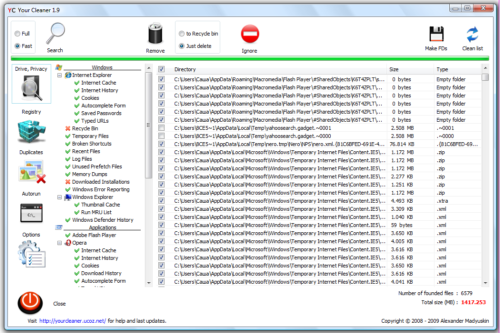
The interface of Your Cleaner is very easy to understand. What the tasks users want to execute in the application could be launched through its shortcuts. The results are displayed with its corresponding information. Users could sort through the files and select the files that should be deleted. Of course, the option of deleting all temporary files is available for a faster process.
Your Cleaner is not just your regular temporary file deletion tool. The application also comes with a simple to use registry cleaner. Like the temporary file cleaner, the tool could be used to clean up the registry so that it could speed up the process of the applications.
Users can run the application in two modes: the fast mode wherein it will scan major applications and common tools in the browser. The full mode will run a full system diagnostic so that it could detect temporary files and promptly delete them. Expect that the full mode will require more time and could slow down the application, especially the registry cleaner.
Check it out at http://yourcleaner.ucoz.net/
Rating: Loading... 2 Comments »
O. James Samson - April 30, 2009
 Choosing a domain name for a website is often a difficult task. Almost any word in the entire English language is already used or already registered for another user. Manually searching for the perfect domain name in a browser is very difficult and the results might not be accurate. Choosing a domain name for a website is often a difficult task. Almost any word in the entire English language is already used or already registered for another user. Manually searching for the perfect domain name in a browser is very difficult and the results might not be accurate.
This problem could be easily addressed by a simple application simple called “Findname”. As the name of the application suggests, the tool is used to check if the proposed domain name is already registered. The application is practically a small “whois” application.
The interface is very easy to use. The application comes with three columns – the left panel is where you place your preferred domain name, the center panel is where you’ll see the search results and the right panel provides additional information about the search results. Although the default language is in Chinese, the application is very simple and enough to be understood.
The search results will provide eight different types of TLD (top level domains). This will give you more than enough options of domain names and see which ones are available. You could even suggest numbers and letters and the application will provide variation of results as suggestions.
Bulk inquiry is also possible with the application. The lower-right side panel of the application allows users to upload text files for batch search. The search results could also be exported as a text file. The application is less than 300kb in size which eases the installation and its use will yield very minimal footprint.
Check it out at http://www.findname.cn/
Rating: Loading... No Comments »
|
|
|





