O. James Samson - April 2, 2009
 Keeping your local network secure and stable could become a lot easier with the application named Lansweeper. As the name suggests, this application will scan the entire local network and report to the user the number of active users as well as their activities on their local gadget and with the network. Keeping your local network secure and stable could become a lot easier with the application named Lansweeper. As the name suggests, this application will scan the entire local network and report to the user the number of active users as well as their activities on their local gadget and with the network.
The above mentioned feature could also be found in other local network monitoring applications. But Lansweeper is more than simple software scanner. The application could also be used to monitor the hardware of each member of the local network. This will greatly help in troubleshooting. For example, the network administrator could monitor that the number of active CD-ROMs in the network and if one is missing it could mean that one of them is not working.
With regards to the interface, the reports are divided so that a general report of the network could be created. There is also a search option so that the administrator could target a specific user. Administrators could even monitor the number of unlicensed applications running in the network to prevent spyware and viruses since it is not properly licensed.
The best feature of the application is that it could be activated without the need of prior installation to other network members. As long as the administrator has the credentials to access each user, the application will be able to monitor almost everything about the member of the network.
A pro version is available for a fee. With the pro version, users could monitor the network in real time.
http://www.lansweeper.com/
Rating:  Loading... No Comments »
O. James Samson - April 2, 2009
 Teach2000 Light 8.31 is an easy to use application that helps teachers, parents or even those who just wants to memorize information or practice a language. This application creates flash cards that could become an interactive testing tool. The data could be uploaded by teachers and the data will be processed to become an interactive exam for students. Teach2000 Light 8.31 is an easy to use application that helps teachers, parents or even those who just wants to memorize information or practice a language. This application creates flash cards that could become an interactive testing tool. The data could be uploaded by teachers and the data will be processed to become an interactive exam for students.
But this application is not just a simple test creation tool. It comes with a variety of forms such as multiple choices, multiple answers, yes or no answers and even map tests. Almost every testing form could be created with this easy to use application.
After installing the application, you can start creating a test immediately by choosing which type of exam you want to create. The application has a notepad-like interface which means you can cut and paste the data freely. Below the notepad-like interface are the questions list and its corresponding answer. Users can add remarks on the answers to encourage or provide additional tips.
The best feature of this application is the recognition of Greek letters. This is very useful in complicated math formula. The symbols are placed in a separate toolbar and could be removed if you don’t want to use the letters in your tests.
Additional features in the application include integration of sounds on the answer and questions, variety of fonts and dictionaries from major languages for translation guide. Aside from the free version, there’s also a USB version that could be installed in your flash disk if you want to bring the application anywhere.
Check it out at teach2000.memtrain.com/
Rating: Loading... No Comments »
O. James Samson - April 1, 2009
 TunnelEx 1.0.1 is a very simple application that will help network administrators control the network connections. It’s specifically built to control traffic for each members of the network wherein a member could be singled out as the target of the traffic while others will have limited access and vice versa. This could also be used to set up rules for bandwidth connectivity so that each user will have the same bandwidth to avoid abuse. TunnelEx 1.0.1 is a very simple application that will help network administrators control the network connections. It’s specifically built to control traffic for each members of the network wherein a member could be singled out as the target of the traffic while others will have limited access and vice versa. This could also be used to set up rules for bandwidth connectivity so that each user will have the same bandwidth to avoid abuse.
Direct FTP (file transfer protocol) connectivity is even possible with this application. No proxy needed – the transfer could be done directly from one server to the specified server. Even if the server is member of vast network, the traffic could be redirected to the specific server for faster transfer.
With regards to interface, you can expect that the application is a little bit confusing at first. The application will try to connect to every available network and will assist the network administrator set up rules. Basically, these rules will limit the network speed of its members. This application is also smart to redistribute network speed if one of the users is down. A tool that specifies network rules for each member of the network is also available. The endpoints could also be renamed for personalization of connection and familiarity.
Finally, the application also comes with extensive log wherein each action and data transfer is recorded. Although it needs a little bit of practice at the start, the application will eventually be very useful once all the tools are harnessed.
Want to give it a shot? Go to http://www.tunnelex.net
Rating: Loading... No Comments »
O. James Samson - April 1, 2009
 Kids Web Menu is a free browser for kids that provide an entertaining and interactive use of the web browser. Exploring the browser is very easy even for kids who can’t read since it’s based on pictures. First time computer users could easily interact with the web browser and access the information they like. Kids Web Menu is a free browser for kids that provide an entertaining and interactive use of the web browser. Exploring the browser is very easy even for kids who can’t read since it’s based on pictures. First time computer users could easily interact with the web browser and access the information they like.
This form of browser is highly secured since the application is not just an open browser. Parents and those who control the browser can select the websites to be associated with the photo links in the browser. The links in the browser can be selected from the secured online directory. There is also an option for more links which is interpreted as a recommendation to other users worldwide.
A unique feature in Kids Web Menu is the photo function. Although it’s not really relevant to the browser’s main function, it’s still an entertaining function which will surely be enjoyed by kids. As a kid’s browser, the browser themes are also changeable and equally entertaining. The themes are continuously updated so you can download more themes for your kids to choose from.
Because it’s a controlled browser, certain features have been disabled – the address box is not included in the browser and automatic block is provided if the website accessed is not on the list of the approved website. Links and ads from external websites that’s not on the list of approved websites are also blocked.
Kids Web Menu 1.5 is a very easy to use and configure browser for kids. Its selective access to websites makes it one of safest browsers available.
More info and download at http://www.webbowser.com/
Rating: Loading... No Comments »
Tilgore Kraut - March 31, 2009
 Speech is always preferred over the written words due to its ability to set up interactive communication, and help people understand the information better. Speech lays better impact on people, so why not make your presentations interactive and more effectual by converting the text into speech. This isn’t a tough task and can easily be performed using Text Speaker 3.0. The utility assists you with its effective feature-set supporting conversion of document’s text conveniently into MP3 or WAV audio files. Using the application, you can effortlessly produce audio books, and hear text from MS Word, HTML, Text, or Rich Text files. With its assistance, you can handily create narrations, proofread documents, and perform various other such functions. The text is spoken in clear and understandable human voice, adding to which you can also download new or use existing voices installed in your PC. Speech is always preferred over the written words due to its ability to set up interactive communication, and help people understand the information better. Speech lays better impact on people, so why not make your presentations interactive and more effectual by converting the text into speech. This isn’t a tough task and can easily be performed using Text Speaker 3.0. The utility assists you with its effective feature-set supporting conversion of document’s text conveniently into MP3 or WAV audio files. Using the application, you can effortlessly produce audio books, and hear text from MS Word, HTML, Text, or Rich Text files. With its assistance, you can handily create narrations, proofread documents, and perform various other such functions. The text is spoken in clear and understandable human voice, adding to which you can also download new or use existing voices installed in your PC.
The appearance of the Text Speaker 3.0 is quite soothing and you can quickly begin with selecting a voice for reading your documents. Then, you’re provided quick start dialog box presenting different functions. Using these, you can Open File, Configure Voice, access Pronunciation Editor, Configure Settings, View Tutorial, or open Help Guide. Now, loading a file into the program, it’s placed at mid of the interface screen. The utility also allows you to choose multiple files that get listed below for you to mark the specific ones for conversion. Coming to the text to speech function, you can either hear the text as speech or directly convert it into audio file. While doing this, you’re also allowed to choose a new voice, set volume, speed, and pitch. If you selected to convert text files into audio, an Audio Properties dialog would be displayed presenting features to choose the audio format and related settings, add background music, and specify the output destination directory. Adding, the utility gives you liberty to alter voice properties, change word/phrases pronunciation, purchase voice, set bookmark, insert pause, voice change, spell chosen words or phrases, and modify the program configurations to your requirements.
With the Text Speaker 3.0, you can make your presentations interactive, making it easier to understand the information and concept.
{More Info and Download}
Rating: Loading... No Comments »
Tilgore Kraut - March 31, 2009
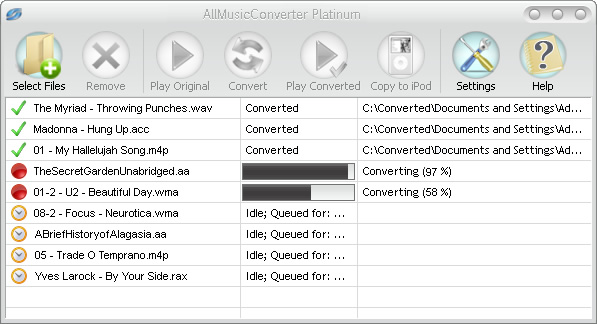 After getting hold over the blockbuster smart-phone last week, you must have chosen a list of your favorite tracks to fill the device with. However, the real trouble arises when the file format of your selected tracks is incompatible with that of the device. This isn’t the problem with the iPhone only, and one can face the problem of incompatible file formats with other devices too. So, if you’re also experiencing any such and seeking an apt solution then try converting your audio files into the most common audio formats compatible to almost every media device. Well, you needn’t pour your hard efforts in searching an apt audio conversion tool as you can try out AllMusicConverter 3.7.7 that serves the purposes efficiently. The utility aids you in converting both unprotected and protected music files and other type of media files into much known MP3, WAV or AAC audio format rapidly. After getting hold over the blockbuster smart-phone last week, you must have chosen a list of your favorite tracks to fill the device with. However, the real trouble arises when the file format of your selected tracks is incompatible with that of the device. This isn’t the problem with the iPhone only, and one can face the problem of incompatible file formats with other devices too. So, if you’re also experiencing any such and seeking an apt solution then try converting your audio files into the most common audio formats compatible to almost every media device. Well, you needn’t pour your hard efforts in searching an apt audio conversion tool as you can try out AllMusicConverter 3.7.7 that serves the purposes efficiently. The utility aids you in converting both unprotected and protected music files and other type of media files into much known MP3, WAV or AAC audio format rapidly.
While converting the different format audio files, you can easily configure the AllMusicConverter 3.7.7 to perform the required conversion task as per your specified output settings. You simply require making desired file selection, choose the output format, and finally convert and store them specified destination. Press ‘Select Files’ button to choose the audio files that after selection get enlisted on the console. To ensure that the files have been correctly chosen, you can listen to the audio file using the Play feature. Next, for the conversion process, next is the selection of output format, followed by the customization of the configurations as per your requirements. Press ‘Convert’ following which the utility would begin converting the audio files, and its progress is displayed on the screen. Moreover, the converted files can be copied to your iPod directly from the utility itself.
AllMusicConverter 3.7.7 makes your favorite music tracks compatible with various devices including your iPod, MP3 player, mobile phone, CD player, or PC.
{More Info and Download}
Rating: Loading... No Comments »
Tilgore Kraut - March 30, 2009
 3D Visioner is 3D visualization add-on for Microsoft Visio 2002/2003. The ability to see whole project in one 3D scene, including all pages, shapes, links, and even visualized hyperlinks aids in the productivity for Microsoft Visio users everywhere. 3D Visioner is 3D visualization add-on for Microsoft Visio 2002/2003. The ability to see whole project in one 3D scene, including all pages, shapes, links, and even visualized hyperlinks aids in the productivity for Microsoft Visio users everywhere.
Features: 3D Visioner is works as an add-on for Microsoft Visio 2002/2003. It adds the third dimension capability to Visio drawings. It is able to provide you 3D viewing and editing capabilities. The 3D Visioner lets you see the whole project in one 3D scene, including all pages, shapes, links, and even visualized hyperlinks. It can thus enhance productivity for Microsoft Visio users. 2D drawings can be extruded into the 3rd dimension in a single mouse click. Navigation tools displays relationships between pages in the project and you are able to navigate them easily.
You can open as many 3D windows as you need in each Visio project. All Visioner windows are usual Visio “Anchor windows”, so you can dock them and work as you get into the way of using them. Rotate, scale and pan the 3D scene of each window to set the most convenient angle of view. When you edit your Visio project through add, delete or move Visio shapes, create or delete connections, etc. the changes are immediately reflect on these windows. Navigation is made easy as you select a 3 D object the item in Visio is automatically selected. Similarly clicking on a 3D page automatically selects the same. 3D Visioner provides a convenient way to use the power of inter-page links. Simply click on two different pages to create a link.
Overall: A very convenient extension of Visio capabilities. It is easy to use too.
{More Info and Download}
Rating: Loading... No Comments »
Tilgore Kraut - March 30, 2009
 With the arrival of the notion of online social networking, websites offering multimedia content are getting popular over the passage of time. Web users keep crowding over these websites to download their favorite videos and sounds files from these websites. But, at times you may face difficulty in downloading required media files, as some websites let you listen to the tracks and watch the videos but do not offer the downloading option. Well, don’t get disheartened as there’s a perfect solution for this problem, just try out the new Replay Media Catcher 3.02 for it. The utility facilitates you in recording streaming audio and video, followed by storing it at your PC. Not just this, the application also supports converting media files into the large variety of supported audio/video formats. Along with this, you can also extract audio from the video for listening to your favorite track. With the arrival of the notion of online social networking, websites offering multimedia content are getting popular over the passage of time. Web users keep crowding over these websites to download their favorite videos and sounds files from these websites. But, at times you may face difficulty in downloading required media files, as some websites let you listen to the tracks and watch the videos but do not offer the downloading option. Well, don’t get disheartened as there’s a perfect solution for this problem, just try out the new Replay Media Catcher 3.02 for it. The utility facilitates you in recording streaming audio and video, followed by storing it at your PC. Not just this, the application also supports converting media files into the large variety of supported audio/video formats. Along with this, you can also extract audio from the video for listening to your favorite track.
After you launch the Replay Media Catcher 3.02 you just need to press Start Recording, and it would automatically grabs the audios and videos currently running in your web browser. The utility can record and store multiple files by listing the videos and audios on its console and keep on recording them simultaneously. You can see the process and video details like name, size, and start time. It would store the files at the default destination, which can be accessed from the Tools. Further, the files that have been downloaded can even be converted into desired audio and video formats. Even, audios can be extracted from the downloaded videos making your favorite tracks compatible with audio player devices. It supports converting audio and videos into FLV, MPEG, MP4, WMV, 3GP, MP3, DVD, etc, making the files compatible with iPod, iPhone, PSP, DVD, Zune, and other media devices. Moreover, it also associates Settings using which you can set Storage Directory, Plug-ins, Plug-in Options, and other General Settings. When the recording process completes, simply press Stop Recording and the application would stop the process.
Replay Media Catcher 3.02 is a powerful and effective video and audio downloading application that can be operated with tremendous ease.
{More Info and Download}
Rating: Loading... No Comments »
O. James Samson - March 27, 2009
 Security should always be on top of the list of considerations every user should have while browsing. The advancement of technology has made it possible for hackers to snoop into your account by recording your keystrokes. By recording your keystrokes, your username and password will be detected. Without you knowing it, your personal information has already been used illegally. Security should always be on top of the list of considerations every user should have while browsing. The advancement of technology has made it possible for hackers to snoop into your account by recording your keystrokes. By recording your keystrokes, your username and password will be detected. Without you knowing it, your personal information has already been used illegally.
Fortunately, securing your online presence will not cost you. The application called KeyScrambler Personal is a freeware that scrambles your keyboard entry. This makes it impossible for hackers to monitor your keystrokes since the data you entered will be scrambled in their end. Entering your username and password in very sensitive websites will be secured.
This application is an add-on to browsers. This means that it will not be installed as a separate application in your device. This will be installed to your browser and will automatically work as soon as you use your keyboard in your browser. But aside from browser security; this small application is also integrated in security enabled applications such as instant messengers. As you encode your username and password, the KeyScrambler will show the scrambled counterpart of the password.
KeyScrambler Personal is a freeware that could be used at home and other personal transactions. But this could be updated into KeyScrambler Pro wherein it will provide security support to hundreds of applications and support for business transactions. This is practically the downside of the application since the toolbar that prompts the scrambled keystroke advertises the pro version. But even with this small inconvenience, it’s an application that could easily increase security in your online transactions.
More info at http://www.qfxsoftware.com/
Rating: Loading... No Comments »
Tilgore Kraut - March 27, 2009
 While listening to your favorite songs, it might happen that you struggle to strike the precise lyrics of any song. This could pose hassles if you happen to be a person who is generally asked to sing songs on request in parties. In a bid to get the most accurate lyrics, people pour huge amount of efforts in the guise of browsing websites offering the lyrics of various songs. But, it’s possible to get rid of the tedious process conveniently, simply by taking the assistance of the new LyricsGetter. It’s a lyrics grabber tool, which allows you to search the song lyrics by specifying its name or artist. The program searches and presents the song lyrics that can be printed, saved or copied for further usage. Even the application can work in integration with Winamp as you can search the lyrics of the currently played song. While listening to your favorite songs, it might happen that you struggle to strike the precise lyrics of any song. This could pose hassles if you happen to be a person who is generally asked to sing songs on request in parties. In a bid to get the most accurate lyrics, people pour huge amount of efforts in the guise of browsing websites offering the lyrics of various songs. But, it’s possible to get rid of the tedious process conveniently, simply by taking the assistance of the new LyricsGetter. It’s a lyrics grabber tool, which allows you to search the song lyrics by specifying its name or artist. The program searches and presents the song lyrics that can be printed, saved or copied for further usage. Even the application can work in integration with Winamp as you can search the lyrics of the currently played song.
On launch the LyricsGetter 1.3.1 displays an extremely simple console for carrying out the lyrics search. For searching the lyrics, you require specifying the song title or artist name in the provided fields. Now, hit ‘Search lyrics’ and the application would search the lyrics matching the songs and displays it on the wide main screen area. Accessing the File menu option, you can open an Mp3 files for searching its lyrics, and in addition it also supports printing or storing the lyrics in text format file. Even you can alter the text font and copy the lyrics content to clipboard using the features associated with ‘Edit’ menu. Furthermore, with the View menu, you can launch Options window, where you can set the program window to appear over other windows, and place it in taskbar and system tray.
LyricsGetter facilitates you to search for the lyrics of any song by specifying the necessary details; in addition it also lets you store or print it, as required.
{More Info and Download}
Rating: Loading... No Comments »
|
|
|





