O. James Samson - March 23, 2009
 If you are a wrestling fan and love to number crunch and go through a number of what if scenarios in your head, you are absolutely going to love this extraordinary piece of freeware available online. Pro Wrestling Nexus: Complete was released as an update to the previous version of the game with the same name and now includes an interface that allows you to simulate wrestling matches between many different wrestlers from across the ages. Support for 350 different wrestlers exists within this game, allowing you to pick people that might never have fought in real life and go through the ultimate what if scenarios in order to see who the best wrestler of all time actually is. If you are a wrestling fan and love to number crunch and go through a number of what if scenarios in your head, you are absolutely going to love this extraordinary piece of freeware available online. Pro Wrestling Nexus: Complete was released as an update to the previous version of the game with the same name and now includes an interface that allows you to simulate wrestling matches between many different wrestlers from across the ages. Support for 350 different wrestlers exists within this game, allowing you to pick people that might never have fought in real life and go through the ultimate what if scenarios in order to see who the best wrestler of all time actually is.
You can create different championships with this game and even get the wrestlers that win those championships to defend their titles time and time again. You can even create new wrestlers of your own and match them against the best the world has ever seen. With extensive statistical tracking, you can even know exactly what is going on with each wrestler at any given time.
More information about this simulator can be found at http://geocities.com/exeventgames/index.html
Rating:  Loading... No Comments »
Tilgore Kraut - March 23, 2009
 Time To Leave is a perfect solution for increasing disk space that never seems to be enough. It acts as a file and folder registry, remembers what file must be erased, or just may be erased if free disk space level falls too low. The program knows exactly what files or folders can be cleaned up when you need critical disk space. Time To Leave is a perfect solution for increasing disk space that never seems to be enough. It acts as a file and folder registry, remembers what file must be erased, or just may be erased if free disk space level falls too low. The program knows exactly what files or folders can be cleaned up when you need critical disk space.
Features: Using an intuitive interface and working in the context menu of each file and folder, Time To Leave never annoys you with its presence. It works in the background until you are going to set file or folder lifetimes. Because of its silent nature and optional Windows NT service, this program perfectly suits not only Windows 98 workstations, but also huge Windows Server 2003 based file or web servers. It can
- Erase files or move them to recycle bin;
- Erase securely or compress to save more space;
- Archives may be password protected;
- Set the lifetime of files and folders etc.
Overall: There are many sweepers, cleaners and evidence eliminators on the market, all of them can clean some garbage, but it never helps. When you have no space on your 60Gb hard drive, one or ten megabytes cannot help you. You have temporary folders (usually called TEMP), you may have download (“download”, “incoming”) folders, where you collect files, and forget about them. You can set options for folders, for example, to remove old files from such folders, to recycle bin, and leave only fresh files alive. Once you make your decision, you will never need to run sweepers or cleaning tools on that folder.
{More Info and Download}
Rating: Loading... No Comments »
Tilgore Kraut - March 23, 2009
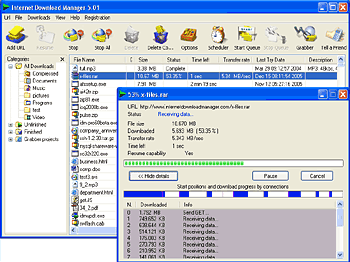 Internet Download Manager not only accelerates downloads by up to 5 times, it can also schedule downloads and recover and resume broken downloads. It reuses available connections without additional ones and their time consuming login stages to improve download performance. There is a scheduling feature which allows you to connect to the Internet at a set time, download the files you want, then disconnect or even shut down your computer when completed. Internet Download Manager not only accelerates downloads by up to 5 times, it can also schedule downloads and recover and resume broken downloads. It reuses available connections without additional ones and their time consuming login stages to improve download performance. There is a scheduling feature which allows you to connect to the Internet at a set time, download the files you want, then disconnect or even shut down your computer when completed.
Features: Internet Download Manager supports firewalls, proxy and mirror servers, FTP, HTTP and HTTPS protocols, redirects, cookies, download queues, directories with authorization, MP3 audio and MPEG video content processing, and a large number of different server platforms. IDM integrates seamlessly into all browsers automatically (IE, FireFox, Opera etc). It can be also integrated into any other Internet applications that use FTP, or HTTP protocols. It also
- Supports proxy servers, ftp and http protocols, firewalls, redirects, cookies, authorization, MP3 audio and MPEG video content processing
- IDM integrates seamlessly into Microsoft Internet Explorer, Netscape, MSN Explorer, AOL, Opera, Mozilla, Mozilla Firefox, Mozilla Firebird, Avant Browser, MyIE2
- Can drag and drop files
Overall: The program features an adaptive download accelerator, dynamic file segmentation, high speed settings technology, and multipart downloading technology to accelerate the download process. It also sports some new features such as a multi-language GUI, a free tool for capturing your desktop to any format video, multilingual support, zip preview, download categories, scheduler pro, sounds on different events, HTTPS support, queue processor, html help and tutorial, enhanced virus protection on download completion, progressive downloading with quotas, built-in download accelerator, and many others.
{More Info and Download}
Rating: Loading... 1 Comment »
O. James Samson - March 21, 2009
 Easy2Sync is a unique software developed for those who have two or more computers at home. This type of application lets users sync files in different devices for easier access of users. Although this practice sounds redundant since the same files will be available in different computers, this is a highly recommended practice to ensure that the files will be available in case one of the computers doesn’t work as expected or the hard disk in a device is destroyed. Easy2Sync is a unique software developed for those who have two or more computers at home. This type of application lets users sync files in different devices for easier access of users. Although this practice sounds redundant since the same files will be available in different computers, this is a highly recommended practice to ensure that the files will be available in case one of the computers doesn’t work as expected or the hard disk in a device is destroyed.
The difficulty of syncing files in different devices is usually on the initial set-up. But Easy2Sync deals with the problem by automatically searching for devices it can sync with. A LAN or even a WLAN should be more than enough to get you started in automatic syncing. The application also supports FTP (File Transfer Protocols) in case one of your computer functions as the server.
But even with heavy task in syncing two devices with gigabytes of files, Easy2Sync will not drag the computer to a halt. The application will just work in the background without using most of your computer’s resources. The time of syncing could also be configured depending on your preferences.
The best feature of the application is its start-up wizard. If you are not familiar with the application or even in syncing, this tool should be give you a mini-crash course and guide on how to use the application. This application is highly recommended for home and educational use since it could help preserve the most important files no matter what happens.
Check it out at http://www.easy2sync.de
Rating: Loading... No Comments »
O. James Samson - March 20, 2009
 A tool for optimizing your computer is already a must for most users. Although computers are rapidly improving in terms of hardware which will significantly upgrade their performance, there are users who wanted to squeeze more processing power from their gadgets. As a result, they use optimizing tools to remove unnecessary files applications in their computers. A tool for optimizing your computer is already a must for most users. Although computers are rapidly improving in terms of hardware which will significantly upgrade their performance, there are users who wanted to squeeze more processing power from their gadgets. As a result, they use optimizing tools to remove unnecessary files applications in their computers.
If you’re looking for an efficient optimizer, consider using PCAnalyzer. This application is remarkably small (less than 1mb) which eases the installation. Running the application will not even take up a lot of processing power so you can still run other small applications while this small tool does its task.
Because of its small size, the application can only do three things: registry fix, task management options and assistance on undeletable files. If you carefully think about it, these are the only processes you would actually need from your optimizer. Your registry could be fixed, managing processes would be a lot easier and the files that stay in your computer could be properly management. Other tools such as file defrag and virus scan are already found in your local computer and are better off with independent software.
The downside of PCAnalyzer is the required familiarity on part of the user. The interface might look complicated to the first time user especially those that are not really familiar to these type of tools. But after using the tool twice or three times, the entire application would be easier to use. PCAnalyzer is a good alternative if you don’t want to pay (it’s free) or experience computer lag from any optimizer.
Check it out at http://www.pcanalyzer.altervista.org/
Rating: Loading... 1 Comment »
O. James Samson - March 20, 2009
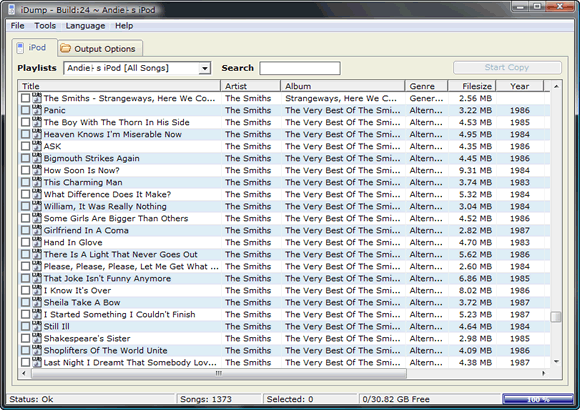 Before the iPhone and iPod Touch, the iPod is the most popular mobile device from Apple. As the gadget that boasts of hard disk storage, you can store thousands of music in a single player. With the onslaught of different iPod Video (now iPod Classic) versions, users have a good variety of gadgets to choose from for their music and video player. Before the iPhone and iPod Touch, the iPod is the most popular mobile device from Apple. As the gadget that boasts of hard disk storage, you can store thousands of music in a single player. With the onslaught of different iPod Video (now iPod Classic) versions, users have a good variety of gadgets to choose from for their music and video player.
But iPod Video and other Apple mobile devices has a huge drawback. Your gadget could only be synced with one device. After you synch your gadget with one computer, you can’t attach it with another device. If you attach your iPod to a computer with iTunes, the iTunes in another device will change the files based on the new computer. Transferring files from your iPod to another computer is also impossible.
Fortunately, these drawbacks could be taken cared of by a small application called iDump. Using the application is relatively easy – just place .exe file in your iPod and click on it if you want to transfer the files from your iPod to another computer. Since the application is less than 1mb in size, downloading and using iDump is very easy.
But remember that installing this file could destroy your warranty. It’s highly recommended to use this file after the store warranty to make sure your gadget will work as expected. Unfortunately, the application is yet to be updated so that it could work in iPod Touch and iPhone. If you have an old iPod lying around, this application should encourage you to use the former popular gadget once again.
More info and download available iDUMP
Rating: Loading... No Comments »
O. James Samson - March 20, 2009
 Avira is undoubtedly one of the most powerful anti-virus software in the world. Aside from being free, it’s an application that runs silently in the background, updates are automatic and best of all it will screen virtually everything without even you knowing it. Avira is undoubtedly one of the most powerful anti-virus software in the world. Aside from being free, it’s an application that runs silently in the background, updates are automatic and best of all it will screen virtually everything without even you knowing it.
The challenge for most anti-virus applications is almost the same – the ability to be updated with the latest list of viruses for proper detection. The solution most anti-virus applications do is to automatically download the updates while informing the user about it. Although this process is ok, it will become obtrusive since it will slow down the computer until the update ends. Avira AntiVir Personal on the other hand, will silently run in the background. You’ll just be informed that your “virus database has been updated” without slowing down your computer.
The free version of the application could go a very long way. Everything is protected – from your instant messenger to P2P transactions. Anything malicious would trigger the alarm. Although the sound would be annoying sometimes, this is done to give you a very stern warning that something malicious in your computer is happening. Even the interface is very easy as it only rests in the task bar. Just right click on the logo and control the application from there.
The latest version of Avira AntiVir Personal now comes with anti-adware. This will protect your computer from malicious ads from popping up in your screen. This application is a must download even for new computers to prevent intrusion.
Check it out at http://www.avira.com/
Rating: Loading... No Comments »
Tilgore Kraut - March 19, 2009
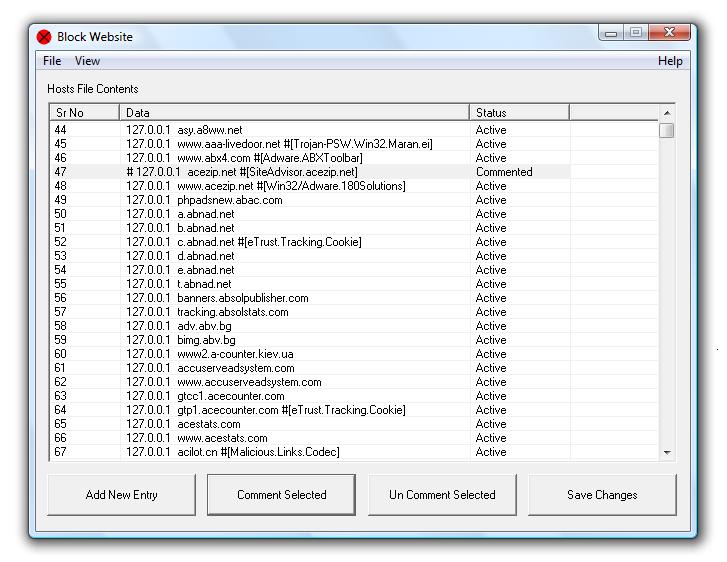 For many a reason one may want to block specific web sites. The site may be a known malware site, a known phishing site, could be a porno site you want to block from viewing by children and so on. This utility helps you do that by letting you edit and thereby add or delete or correct mistakes in the Windows Hosts file. Hosts file is the file looked up during access to various websites and if there is an entry blocking the URL then none of the browsers used in your system will access the URL. You are able to change, backup / restore settings easily. Block website using entries to hosts file, due to which all browsers will not allow navigation to the blocked website. For many a reason one may want to block specific web sites. The site may be a known malware site, a known phishing site, could be a porno site you want to block from viewing by children and so on. This utility helps you do that by letting you edit and thereby add or delete or correct mistakes in the Windows Hosts file. Hosts file is the file looked up during access to various websites and if there is an entry blocking the URL then none of the browsers used in your system will access the URL. You are able to change, backup / restore settings easily. Block website using entries to hosts file, due to which all browsers will not allow navigation to the blocked website.
The interface is simple. It shows the current content of the Hosts file. The interface has controls “add new entry”, “comment selected”, “Un-comment selected” and “save changes”. The way this would work is when you click on the new entry there’s a pop up that take the URL as well as the IP address of the host to be blocked. If for some reason you want to permit access to an existing blocked entry, simply comment it out. This is actually a temporary change. If need be one just has to un-comment the entry to introduce the ban again.
Overall: Easy to use simple utility meant for a specific task.
{More Info and Download}
Rating: Loading... No Comments »
Tilgore Kraut - March 19, 2009
 Advanced Windows Optimizer is a collection of tools to optimize and speedup your system performance. It contains utilities to clean registry, temporary files on your disks, erase your application and internet browser history. Advanced Windows Optimizer is a collection of tools to optimize and speedup your system performance. It contains utilities to clean registry, temporary files on your disks, erase your application and internet browser history.
Features: Advanced Windows Optimizer is a set of tools that help keep Windows running optimally. The interface represents the arrangement of tools available. On the left there’s a list of major group of functions and as each is selected the interface area on the right shows the tools available in that group. For example the main groups are system cleaners, system optimizers, system control, system tools, registry tools and file tools. System cleaner group contains Disk cleaner, registry cleaner, history cleaner and task scheduler. Disk cleaner cleans up all junk files. Registry cleaner clears off all invalid entries and references from the registry. It is safer to create a back up of the registry first, just in case something goes wrong.
System optimizer group contains duplicate files finder, shortcut fixers and memory optimizer. Duplicate files finder finds and removes un-needed files. Short cut finder finds all the un-connected shortcuts. Memory optimizer optimizes the memory management functions. System control group has system control, BHO remover, startup cleaner and auto shutdown features. System control helps organize & manage system settings. BHO remover helps get rid of un needed browser help objects. Startup cleaner helps clean up the list of start up programs. Auto shutdown helps specify auto shutdown times. System tools group has a process manager, uninstall manager, system information and Windows tools. Process manager and the uninstaller are obvious functions, the Windows Tools is a place where you can startup most important system tools built into Windows. The Registry Editor, Disk Defragmenter or DirectX Diagnostic Tool are just some of them.
Overall: AWO is a fast, small and easy to use power collection of tools that you may need every day. The set of tools is quite extensive, may be you can add a couple of more tools but this set is quite powerful and works well.
{More Info and Download}
Rating: Loading... No Comments »
Tilgore Kraut - March 19, 2009
 BrickShooter comes across as a challenging game that teases the gamers’ brain by testing their logical skills in moving and joining the tiles to a suitable position to earn points in the game. If you really like the thrill of the game, then you can even try the BrickShooter online 1.4.5, which is an online version of the game. BrickShooter comes across as a challenging game that teases the gamers’ brain by testing their logical skills in moving and joining the tiles to a suitable position to earn points in the game. If you really like the thrill of the game, then you can even try the BrickShooter online 1.4.5, which is an online version of the game.
The game is compatible to work with almost all known browsers like IE, Firefox, Opera and Safari. Since, the game is cross platform, it can be enjoyed on Windows, Mac OS X, Linux or any other operating, or even an Apple iPhone. The game presents various difficulty levels testing your skill to analyze and make the correct move.
While playing the BrickShooter Online 1.4.5 you can begin with level 1 and start playing the BrickShooter game. Even the game settings can be customized according to your preferences, where you can alter the number of colors, and turn on or off the sounds, music, fullscreen and timed game. Even, you can select the program skin for giving it a desired appearance. On the game screen, the complete mid area is filled with multiple colored bricks and the center part is where you need to slide the brick to make a group of three bricks, and for making it vanish.
You would gain points as the bricks vanish, and your scores for each level are recorded wit the program, which can easily be accessed. Along with these functions, you can anytime begin with a new game, jump to previous or next game, even undo one step, and save the game to play it later. Playing the game is easy and requires the players to apply their tactics in moving the bricks to a right position.
BrickShooter Online 1.4.5 is fun and can be enjoyed anytime and anywhere conveniently with your default browser.
{More Info and Download}
Rating: Loading... No Comments »
|
|
|





