O. James Samson - August 18, 2008
 Command line is a place that many old time programmers are very familiar with, having been involved in using it throughout the earlier part of their computer career. For that reason, applications that invoke the command line structure are sometimes received very well (especially if they are freeware programs) and the Command Line Calculator is no exception to that rule. Command line is a place that many old time programmers are very familiar with, having been involved in using it throughout the earlier part of their computer career. For that reason, applications that invoke the command line structure are sometimes received very well (especially if they are freeware programs) and the Command Line Calculator is no exception to that rule.
The latest version of this software was just released a few days ago and works on every Windows system from Windows 98 all the way down to the present incarnation of Windows Vista. It is a very powerful calculator that you can use for general purpose calculations and it has well over sixty different functions built into its operation.
You have an unlimited length for the expressions that you place in the calculator and you can actually use it to define variables and plot graphs. In addition to the built-in functions, users can define new functions through using the old ones and all of the progress that they make in using the calculator can be saved in order to be used another time. Overall, this is an excellent piece of software.
More information on Command Line Calculator 2.10 is available at http://www.kotiposti.net/jjhalme/index.htm
Rating:  Loading... No Comments »
O. James Samson - August 18, 2008
There are many different browsers out there, but few have the best of both worlds quality to them that the Expedition browser brings to the table. It has all of the functionality of Internet Explorer, which is of course one of the most high-powered browsers to ever be released to the market. You can therefore use Expedition to browse multiple pages at once, drag links to the main bar and drop them there as well as block pop-ups with functionality build right into the actual browser code. You can also change the skin that the browser has and you can even use the RSS reader that it has built into itself in order to catch up on all your daily reading.
However, Expedition is not Internet Explorer and for that reason you can avoid a number of the different problems that the browser can sometimes bring to the table. These problems include things like lack of virus protection, high amount of targeting by different viruses and spyware programs specifically designed for Internet Explorer and problems with your registry that can come about as a result. None of these things are problems with Expedition, making it most definitely the best of both worlds.
More information on this software can be found at http://www.immsoft.net/
Rating: Loading... No Comments »
Tilgore Kraut - August 14, 2008
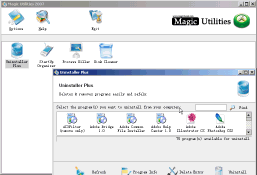 Magic Utilities is a cute program designed to make your computer clean and more stable. Magic Utilities is a cute program designed to make your computer clean and more stable.
Pros: Magic Utilities is a set of utilities that keep your computer clean and stable. Set of utilities include Uninstaller Plus, StartUp Organizer, Process Killer, Disk Cleaner, File Shredder and File Protector. The uninstaller displays the program icons currently installed in a tabular fashion which is more appealing than the long list most such programs adopt. You could take a look at the program information about the selected item to decide if you need to retain or not.
Start Up Organizer shows the programs that are set to run at start up and provides the tools to edit the list. It also has a rating field to indicate if the start up program is risky or not. The process killer helps look at current processes and lets you stop the ones that are needed or look risky. Disk cleaner removes the temporary and other junk while the file shredder helps remove the files to be properly deleted so that no one else can recover them. File protector encrypts files and access is through password. The set offered as Windows utilities also is a set of useful tools. There are several programs easily available that offer similar functionality but this set really has a easy to use interface.
Cons: When you fiddle with the internals of the OS you better be sure of the programs do what it is supposed to do and no damage is done. User data is thus useful to determine if a set is safe.
{More Info and Download}
Rating: Loading... 1 Comment »
O. James Samson - August 14, 2008
 Argente is a very important company in the world of freeware because their free products that help keep your computer clean and error-free have been famous the world over for as long as the company has existed. At the same time as they released an update for their registry cleaning software, they also released an update for their disk cleaning software. Both pieces of software are critical to the fight against malware, spyware and disk fragmentation which is why you should try to download both of them and use them to your advantage together. Argente is a very important company in the world of freeware because their free products that help keep your computer clean and error-free have been famous the world over for as long as the company has existed. At the same time as they released an update for their registry cleaning software, they also released an update for their disk cleaning software. Both pieces of software are critical to the fight against malware, spyware and disk fragmentation which is why you should try to download both of them and use them to your advantage together.
Argente Disk Cleaner functions as an ultra version of the disk defrag utility that comes with windows originally when it is installed on your computer. However, it goes well above and beyond what defrag can do, tracking down unnecessary files and destroying them completely. Any kind of temporary file or programs that might hamper privacy will be detected and removed by the disk cleaning software, allowing you to run a disk defragmentation in no time flat once you have used the disk cleaning software to get rid of anything that might hurt your progress.
More information on this software package is available at http://argentesoftware.blogspot.com/
Rating: Loading... 1 Comment »
O. James Samson - August 13, 2008
 There are many excellent software packages on the market today that make using your computer easier on a day-to-day basis, but few have the absolute simplicity that comes with the Stick program. Stick allows you to actually organize the different areas of your desktop through the use of screen tabs very much in the same way that you would organize a binder with the use of dividers. The only difference is that in the case of your desktop, the tabs represent different programs rather than different sections of paper within a binder. There are many excellent software packages on the market today that make using your computer easier on a day-to-day basis, but few have the absolute simplicity that comes with the Stick program. Stick allows you to actually organize the different areas of your desktop through the use of screen tabs very much in the same way that you would organize a binder with the use of dividers. The only difference is that in the case of your desktop, the tabs represent different programs rather than different sections of paper within a binder.
You can create screen tabs for internet browsing, windows explorer, note-taking and monitoring any RSS feeds that you might have. In essence, you can create screen tabs for all of the different programs that you might access on a daily basis. These tabs will then live on the sides of your screen, allowing you to very quickly change back and forth between the different programs whenever you wish. In a sense, Stick is very much like a super-charged taskbar that is omnipresent on your desktop and for people that use many different programs in a single day, a program like Stick could save a lot of time indeed.
More information about Stick is available at http://www.iwonderdesigns.com/?s=stick
Rating: Loading... No Comments »
O. James Samson - August 13, 2008
 Task Tome is a piece of software that people might recognize from earlier. It was not a very reliable piece of software, but the creator has changed many things in an update released earlier today and the software seems to be working much better now. All of the different coding errors have been removed and the functionality of the software has been improved immeasurably over the old version. There were also problems with missing dates in the older version and these problems are now a thing of the past. Task Tome is a piece of software that people might recognize from earlier. It was not a very reliable piece of software, but the creator has changed many things in an update released earlier today and the software seems to be working much better now. All of the different coding errors have been removed and the functionality of the software has been improved immeasurably over the old version. There were also problems with missing dates in the older version and these problems are now a thing of the past.
Task Tome has transformed itself into a very useful piece of software that can be used by anyone to help plan out their day. It allows you to view and create different time events on a screen that represents a monthly calendar, commenting on the different tasks so that you remember exactly what they are all about. You can also create a to-do task list in addition to that with comments on each task and rich text editing to allow you to make the task list look good in the window. You can even use it to do basic financial management, looking at balances on credit card and banking statements and then projecting future cash flow and creating statements to that effect.
All of this is available in a handy little software package about which more information can be found at http://tasktome.shanemca.com/
Rating: Loading... No Comments »
O. James Samson - August 13, 2008
 Free Eject is the newest program to come on the freeware market in the area of ejection sub-routines. There are many other programs out there that perform ejection functions, but Free Eject does have some special aspects to it that really set it apart from the other programs in this area. It is similar to the other programs in that it is a utility that you can use to eject any type of media in your computer that might be removable. This includes CD and DVD drives as well as disk drives for people that might have older computers. It is also very resource friendly, but that in itself is not something that is particularly new to freeware ejection utilities. Free Eject is the newest program to come on the freeware market in the area of ejection sub-routines. There are many other programs out there that perform ejection functions, but Free Eject does have some special aspects to it that really set it apart from the other programs in this area. It is similar to the other programs in that it is a utility that you can use to eject any type of media in your computer that might be removable. This includes CD and DVD drives as well as disk drives for people that might have older computers. It is also very resource friendly, but that in itself is not something that is particularly new to freeware ejection utilities.
Instead, where this program really sets itself apart from the majority of other programs available is that you can use it in the command line, allowing you to use it in many places that other utilities would be useless. Free Eject will work in scripts, coded programs that you write and even in batch files where other pieces of software would be useless. The command line interface is the key as far as this program is concerned and that same interface can give you a multitude of different choices when you are dealing with ejection problems on your computer.
More information about Free Eject can be found at http://www.freeeject.com/.
Rating: Loading... No Comments »
O. James Samson - August 12, 2008
 Ok here is a cool tool worth having – Clone DVD Mobile. Ok here is a cool tool worth having – Clone DVD Mobile.
Why is it so cool?
Well CloneDVD Mobile makes it possible for you to carry your favorite movies and videos around with you. It converts your DVD movies quickly and easily into a format that your mobile devices (Sony PSP, Apple iPod Video, iAudio X5, Creative Labs ZEN Vision, etc) can play. But that’s not all you can also convert your DVDs to other file formats, such as DivX, XviD, MP4, AVI, etc.
An updated version was released a couple of days ago, CloneDVD Mobile 1.5.0.1 Beta, in this version a couple of upgrades were made in its features. These include:
New
- Switched from mencoder to ffmpeg for transcoding to resolve numerous issues. Transcoding speed should be greatly improved especially on multi-core systems now
Fixed
- Previously selected multi-pass encoding could cause another “multipass” encoding when selecting passthrough mode, where it made no sense and only took up extra time
- Selecting all angles from a multi-angle title would cause no output to be generated. Transcoding of multiple angles into a single video file is pointless, so now selection of multiple angles is disabled
Change
- After initial installation of CloneDVD mobile the default output folder is now changed to the user’s “My Documents” directory to ensure write privileges are available
And lots more.
For more info and download, go to http://www.slysoft.com/en/clonedvd-mobile.html
Rating: Loading... No Comments »
O. James Samson - August 12, 2008
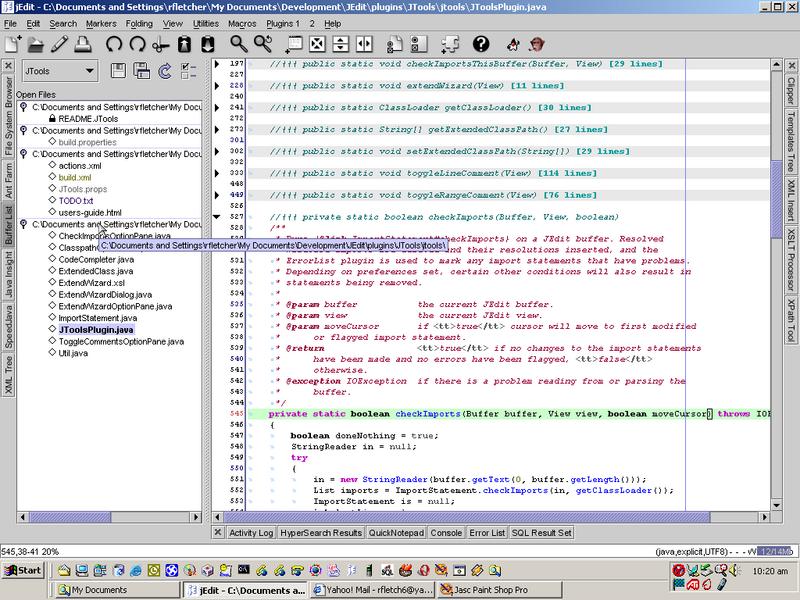 jEdit is a programmer’s text editor written in java, so it runs on Mac OS X, OS/2, Unix, VMS and Windows. The cool thing about this application is that it is better than some of expensive development tools out there yet it is released as free software with full source code. jEdit is a programmer’s text editor written in java, so it runs on Mac OS X, OS/2, Unix, VMS and Windows. The cool thing about this application is that it is better than some of expensive development tools out there yet it is released as free software with full source code.
Some of its cool features include:
- Built-in macro language; extensible plugin architecture. Dozens of macros and plugins available.
- Auto indent, and syntax highlighting for more than 130 languages.
- Supports a large number of character encodings including UTF8 and Unicode.
- Folding for selectively hiding regions of text.
- Highly configurable and customizable.
- Every other feature, both basic and advanced, you would expect to find in a text editor.
- And many more.
For more features and download check out www.jedit.org
Rating: Loading... No Comments »
O. James Samson - August 12, 2008
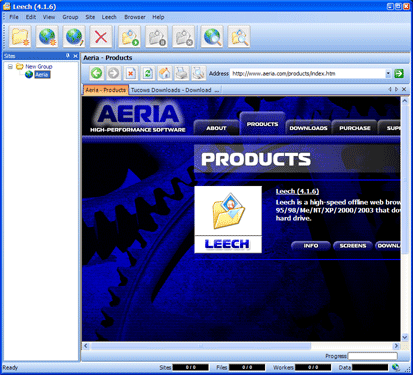 If you want an application that can help you view your favourite files easily without spending too much time on the internet, Leech may be just what you need. If you want an application that can help you view your favourite files easily without spending too much time on the internet, Leech may be just what you need.
What is Leech?
Leech is a high-speed offline Web browser for Windows that downloads web site content to your hard drive. The good thing about it is that it is a multi-threaded application, so it allows you to simultaneously “leech” multiple files from a server, hence the reason for its name – Leech.
And like offline web browsers work, with Leech the files are stored on your hard drive and can be viewed later without having to access the Internet. I love the fact that files can be filtered by file type and size, you can also filter links by directory, server, and levels. That’s not all there are also other options which enable you to restrict the amount of time and disk space used to save a site.
Want to check it out? A new updated version was released recently – Leech 4.4.1, if you have the previous version I’ll advise you to update, if you don’t have it before you may want to try it out, it may help reduce your internet bills.
Check it out at http://www.aeria.com/products_leech.aspx
Rating: Loading... 1 Comment »
|
|
|





