Tilgore Kraut - August 5, 2008
 Acquiring your potential customers e-mail addresses is a cornerstone of successful e-marketing. This innovative software allows extracting e-mail addresses from your target-audience relevant web sites. Acquiring your potential customers e-mail addresses is a cornerstone of successful e-marketing. This innovative software allows extracting e-mail addresses from your target-audience relevant web sites.
Pros: Marketing through the internet, specifically via the e-mails is a very low cost option yet the benefits could be high. Thus it is a high ROI option for marketing. Targeted e-mailing could be more effective than any other direct mail processes. So the next step is to collect relevant e-mail addresses. One could buy such lists from mailing list vendors but they are not specific enough most often and could be outdated. This package helps extract e-mail addresses from websites of specific areas one wants to target. Besides specifying the URL of a specific site, one could specify keywords too. Then the application would go though a set of sites relevant to the keywords. You can type in the desired keywords and Hunter will gather the top ranked pages directly from Google (or other search engines you choose) and then will be searching through those pages for emails. Additionally you could specify URL skipping filter, URL limiting filter and a page content filter.
The hunting process starts after a hunt URL or keywords are specified in the text field provided. Filters can be set through options. You can specify if only the current site be checked or all links should be pursued or current and subfolders also to be checked through. Depth level also can be specified. You then specify the criterion when a URL is to be skipped or limited to, page content filters are defined on this options page too. Atomic Email Hunter is capable of using proxies and identifying itself to web servers as a specified user agent. The address list can be saved in a disk, exported to clipboard, Excel or Word files for verification, editing etc. If the list is ready for work to start you could simply pass the list to the e-mail sender built in or to the email verifier or the filter that filters emails by country. Being threads based the application can be speeded up depending on processor power available.
Cons: One should be absolutely clear about if one should be sending emails to each one of his list and remember that CAN-SPAM regulations apply.
{More info and Download}
Rating:  Loading... No Comments »
Tilgore Kraut - August 5, 2008
 Every time you send an e-mail you place a few lines, including your signature at its bottom. Would you like to make this signature look less impersonal. This service can help. Every time you send an e-mail you place a few lines, including your signature at its bottom. Would you like to make this signature look less impersonal. This service can help.
Pros: Handwritten signatures adds distinction and interest to mundane things like e-mails that we are used to seeing with type faced names following a message. A handwritten signature or a look alike can add a personal touch. What this access to mysignature.com provides is several ways of creating signatures for a fee and a means to download them and use as one please. This is really kind of a unique niche the publishers have addressed.
Getting a signature made is what the service about. Once registered you could opt for one of three way of creating your signature and you could do this any number of times too. The first method is to use the signature wizard. Which essentially is handwritten script based imitation of your signature. The script based fonts can be customized in several ways. The signature wizard offers you a wide range of configurable parameters, allowing you to achieve the results you need. For example, you can adjust such parameters as name, font, size, color and slope of the signature.
Second available option is to actually sign a piece of paper, scan the same and then let the designers at the mysignature.com clean up and create a signature for you. The third option for people would like to do it in style, one can have an animated signature. Once again submit your signature and the folks at the website will create an animation out of it and give it back to you. To a recipient it’d look like you are personally signing your message in your presence. Smooth flowing animation is assured by the publisher as these are created by professionals. A welcome tour on the site explains all the details. Once you have the signature, you can easily insert it into a message in any mail client that supports signatures.
Cons: Usual caution about version 1.0 but looks robust enough. Other than that there can be concerns about giving out your signature to a third party.
{More Info and Download}
Rating: Loading... No Comments »
O. James Samson - August 4, 2008
 Computers sometimes create copies of files automatically, maybe as back-up or other. And in doing this take up hard disk space. It could pose a couple of problems for you. Clonespy helps delete such unwanted duplicates which could have exactly the same contents regardless of their name, date, time and location. Perhaps you have different versions of a file and you want to find all of them and remove the older versions. It can also find zero length files, which are files that have no content. Computers sometimes create copies of files automatically, maybe as back-up or other. And in doing this take up hard disk space. It could pose a couple of problems for you. Clonespy helps delete such unwanted duplicates which could have exactly the same contents regardless of their name, date, time and location. Perhaps you have different versions of a file and you want to find all of them and remove the older versions. It can also find zero length files, which are files that have no content.
Here are a couple of features that I think gives a pass to the recently released version, CloneSpy 2.33:
- Added: A new check box in the scan progress windows makes CloneSpy close after a scan if results are exported or deleted automatically
- Added: If a log file is generated, it can now be viewed after a scan by pressing the corresponding button in the scan progress window
- Added: The date can now be displayed in different formats (see Time + Size tab of the Options window)
- Added: Folders entered manually in the Add folder window can now be added to a pool by pressing the return key
- Added: If a pool cannot be scanned because of restrictions in the Options window, CloneSpy now provides a better explanation about the cause
- Modified: The command line option -e is now ignored if results are to be handled by the user (see the Action frame of the Main window)
- Fixed: Solved some display problems when using large fonts
It a handy tool for deleting duplicates. Visit http://www.clonespy.com
Rating: Loading... No Comments »
O. James Samson - August 4, 2008
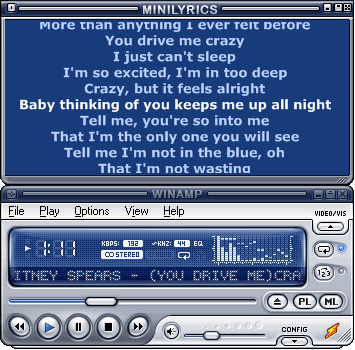 There are songs I love so much and when I hear it being played, I like to sing along but end up “chewing my mouth” sometimes I even get injured [laughs]. I stumbled on minilyrics and well I have reduced on my mouth-sores. Minilyrics actually displays lyrics of your favourite songs. It also allows you to save the lyrics and synchronize to devices. There are songs I love so much and when I hear it being played, I like to sing along but end up “chewing my mouth” sometimes I even get injured [laughs]. I stumbled on minilyrics and well I have reduced on my mouth-sores. Minilyrics actually displays lyrics of your favourite songs. It also allows you to save the lyrics and synchronize to devices.
Minilyrics Supports a whole lot of media players like Winamp, Windows Media Player, itunes, MusicMatch Jukebox, Quintessential Player, footbar2000, and RealOne, MediaMonkey and a lot more even yahoo music engine.
I have a problem with the limitations in its search and languages and I think the company should look into that. Other than that well it works well for me.
http://www.crintsoft.com/minilyrics.htm
Rating: Loading... No Comments »
Tilgore Kraut - August 1, 2008
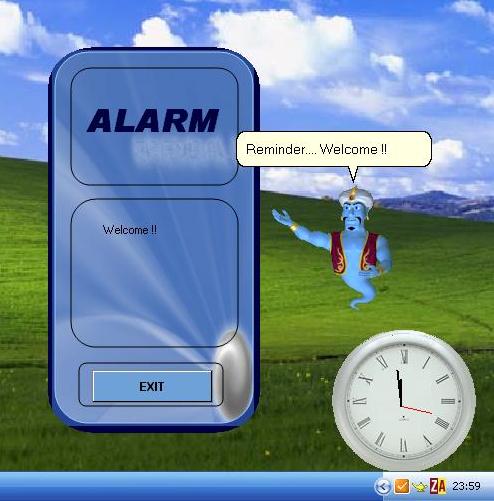 Talking Alarm Clock contains analog clock, digital clock, calendar, stopwatch etc. A MP3/wave format clip can be set to be played or a talking character can be set to remind of events. The characters (like genie) can read the reminder text. Talking Alarm Clock contains analog clock, digital clock, calendar, stopwatch etc. A MP3/wave format clip can be set to be played or a talking character can be set to remind of events. The characters (like genie) can read the reminder text.
Pros: AIV Reminder is the freeware utility that could save you from forgetting any important event. Reminders can be set via a few clicks. While the reminders can be any MP3 or WAV file you choose a alternative possibility is to use the talking characters available within the program. One sets up a reminder text and these characters can read out the reminder text to warn you of an event coming up. If you like, you could use your own voice to use as an alarm. The included calendar is good for this millennium, goes up to 2099.Four analog clocks and a digital clock are included. Daily alarms, simple and advanced alarms can be set while the animated characters Genie, Merlin and others could be used as reminders.
Simple alarm lets you set up to 3 alarm events while the complex one can tackle eight of them. Hours, minutes and AM/PM can be set. Set the reminder text too if you are going to use a genie. You have the choices of setting a MP3, the genie or your own voice. All of these are arranged in a simple interface that’s very easy to use. Alarms can be reset individually or all of them at one time. A helpful genie tells you how to go about setting up as also the current time etc.
{More Info and Download}
Rating: Loading... No Comments »
Tilgore Kraut - August 1, 2008
 Cluttered and unorganized desktop can pose all sorts of troubles to us, as fetching any important file or document usually takes considerable amount of time. The situation gets further worsened in case of professionals, as it affects them severely and hinders them in meeting their deadlines. If you are also suffering from the cluttered desktop syndrome, then PaperArchiver 2.8.2 is a perfect solution for you. The application can be used at office as well as home, and helps remarkably in managing files and folders. It helps the users in scanning, compressing, and encrypting the large number of documents. The software assists you in assigning the description and keywords to the documents. It further facilitates in performing different functions, such as- capturing, organizing, storing, scanning, indexing, searching and retrieving the scanned images, papers, and documents. Cluttered and unorganized desktop can pose all sorts of troubles to us, as fetching any important file or document usually takes considerable amount of time. The situation gets further worsened in case of professionals, as it affects them severely and hinders them in meeting their deadlines. If you are also suffering from the cluttered desktop syndrome, then PaperArchiver 2.8.2 is a perfect solution for you. The application can be used at office as well as home, and helps remarkably in managing files and folders. It helps the users in scanning, compressing, and encrypting the large number of documents. The software assists you in assigning the description and keywords to the documents. It further facilitates in performing different functions, such as- capturing, organizing, storing, scanning, indexing, searching and retrieving the scanned images, papers, and documents.
The PaperArchiver 2.8.2 consists of moderately designed interface which present the features in such as manner as to make it convenient for the users to operate them. It does not consist of complex features, hence can be used by novice users as well. You need to store your documents with the program and then make the desired modification in storing properties. It helps you to create an encrypted, digital and searchable copy of all the documents. You can assign specific category by forming different archive for various files. Using the Document Information features you can assign title, description, date, state, category, etc, details with each file. At the bottom left is the option for Archives Search which helps you to find the required files by filling up the given fields. With the helps of the encryption and the user authentication feature your documents stay protected from authorized access.
PaperArchiver 2.8.2 ensures safety of your files, and helps you in managing the documents efficiently, so that these can be fetched with ease.
{More Info and Download}
Rating: Loading... No Comments »
Ciaran Moore - July 31, 2008
 Smart Shutdown is a tidy and easy to use scheduling tool. Smart Shutdown is a tidy and easy to use scheduling tool.
It has right click operation from system tray menu to execute system operations such as shut down, log off, reboot, lock, turn off, hibernate, disconnect from the Internet or network, enter standby mode in Windows, and shut down and reboot computers in your network – all both manually and automatically, as well as if you’re away from the computer for a certain amount of time. It has the power to schedule to nearly any time.
I have tried a few other similar shut down programs, but some of them failed to completely shut down resulting in me waking to find my computer still on all night as it waited for some never to be completed shut down step to happen. Apparently the creators have given a 99.8% guarantee that this will shutdown your computer each time! Gotta be a good sign!
This small program does exactly what I need – to shut down my computer automatically when i’m not around to do it manually! Let’s not ignore that it also has style and groovy animations to add that edge, in addition to inbuilt transparency as well. When you’re in a hurry to shut down or want to do so automatically when you’re away, you’ll be glad you installed this neat program.
Its freeware, so check out the homepage.
Rating: Loading... 1 Comment »
Ciaran Moore - July 31, 2008
 If you deal with images a lot, this relatively fast and lightweight program called Imagewalker can be very useful in helping you organize and process them. If you deal with images a lot, this relatively fast and lightweight program called Imagewalker can be very useful in helping you organize and process them.
You can quickly find, sort, edit, view, print and share your images all from within Imagewalker. It also includes a fullscreen slideshow mode, useful for showing off those vacation photos when you have friends over. It lets you automatically scan for image information such as date taken, camera information, etc, as well as your own info such as keywords. It includes batch processing options to save time when manipulating or printing multiple images. It also has batch uploading to flickr, as well as the ability to create image galleries for use on your own website.
All this in an application that’s lightweight enough to run well even on slower computers. ImageWalker has an unlimited trial period with no obligations but if you continue to use ImageWalker it may be good karma to register it! One Registration currently costs US $20.00.
Click here for additional info at the Imagewalker homepage.
Rating: Loading... No Comments »
O. James Samson - July 30, 2008
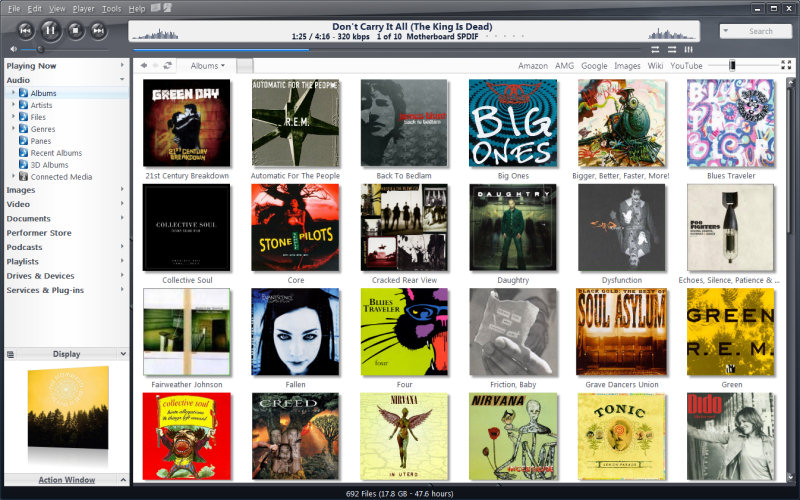 This software helps organize your media files irrespective of whatever format they are, from music, pictures, videos and all. It’s actually an all-in-one player and an organizer. This software helps organize your media files irrespective of whatever format they are, from music, pictures, videos and all. It’s actually an all-in-one player and an organizer.
One could copy files from portable digital devices into a well organized library. One could also create your favorite media collection….
Its skins are quite beautiful with full screen modes that are customizable and optional pages that show details of files.
You should try it out yourself, go to http://www.jrmediacenter.com
Rating: Loading... 1 Comment »
O. James Samson - July 30, 2008
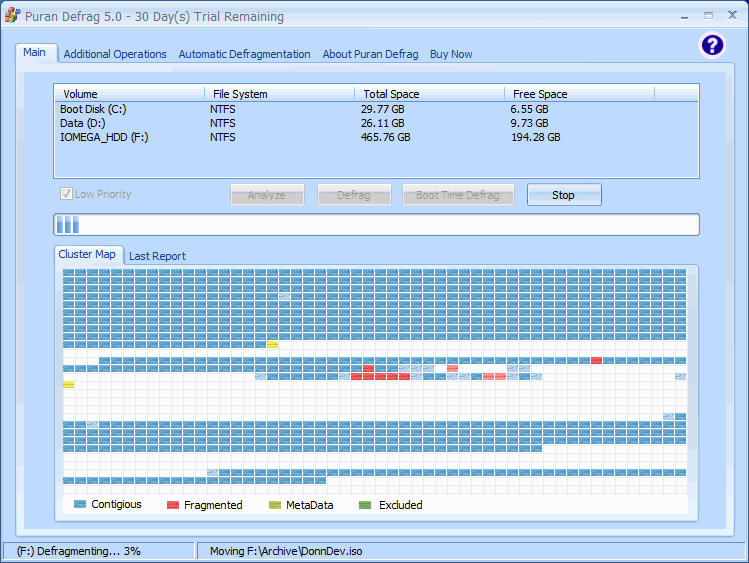 Files saved on hard disks may get fragmented due to various reasons. Sometimes getting back the file might slow down the system and pose some really terrible problems especially when you work with time. I tried Puran defrag, I can say it’s good. It has some really good features; it could automatically defrag your hard disk when it notices some hitches. Files saved on hard disks may get fragmented due to various reasons. Sometimes getting back the file might slow down the system and pose some really terrible problems especially when you work with time. I tried Puran defrag, I can say it’s good. It has some really good features; it could automatically defrag your hard disk when it notices some hitches.
Generally, Puran Defrag is a very simple defrag software which defrag the files and optimize your system, which means it collect all the fragments of a file and put them together, also it moves some frequently used files and all directories to faster disk area, this upgrade your hard disk performance and thus overall system speed and creates lots of space. In addition it results in low wear and tear of hard disk, hence increases the lifespan. It just ok for me, though I think there’s room for some improvement.
Check out http://www.puransoftware.com/
Rating: Loading... 1 Comment »
|
|
|



 (2 votes, average: 4.50 out of 5)

