O. James Samson - July 30, 2008
 This is one good IM. I never thought I could design my images, pictures and graphics and communicate with those on IMs. It’s just easy to use. This is one good IM. I never thought I could design my images, pictures and graphics and communicate with those on IMs. It’s just easy to use.
The widow doesn’t command so much in terms of beauty, just like Microsoft paint. But it works well for me and it’s quite reliable.
I should give the company thumbs-up for this ingenious creation. Its properties are also one to get acquainted with. It is also Multi-lingual and internationalized. I like it and I am sure you will.
Look it up yourself at http://coccinella.im
Rating:  Loading... No Comments »
O. James Samson - July 29, 2008
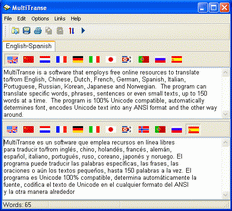 If you ever want to learn to speak a couple of languages, I am sure that this is indeed a good tool for you. If you need to know the meaning of a foreign text or get your words translated into some language, both quickly and without a dictionary, then MultiTranse is the right choice for you. it also translates a wide range of symbols. It takes advantage of the Internet and it’s free resources to provide you with adequate translation into desired language. If you ever want to learn to speak a couple of languages, I am sure that this is indeed a good tool for you. If you need to know the meaning of a foreign text or get your words translated into some language, both quickly and without a dictionary, then MultiTranse is the right choice for you. it also translates a wide range of symbols. It takes advantage of the Internet and it’s free resources to provide you with adequate translation into desired language.
It translates from the following languages: English, Chinese (both traditional and simplified), Arabic, Dutch, French, Greek, German, Spanish, Italian, Portuguese, Russian, Korean, Japanese. And that’s where I have a slight problem with it.
It would have been a lot better if it catered for a lot more languages. Languages like Urhobo, ishan, Swahili, Yoruba, Hausa, and a couple of African languages. I’m sure the company will look into that soon enough seeing that they have come this far since 2004. you don’t have to worry about fonts, MultiTranse connects to Microsoft and downloads the necessary fonts needed that your system don’t have installed.
If you are looking for a convenient way of rendering your words into a number of languages or understanding foreign texts, then MultiTranse is about the only tool you need.
Check it out here – http://www.tialsoft.com/multitranse
Rating: Loading... No Comments »
Ciaran Moore - July 29, 2008
 BitWise IM is a direct-connect messenger and voice chat application with privacy in mind. It encrypts all chats and file transfers with strong blowfish encryption (up to 448 bits). It’s constructed to function with minimal server interaction and provides an entirely server-free mode. BitWise IM is a direct-connect messenger and voice chat application with privacy in mind. It encrypts all chats and file transfers with strong blowfish encryption (up to 448 bits). It’s constructed to function with minimal server interaction and provides an entirely server-free mode.
In addition to these strong privacy features, it has text macros, offline messaging, offline message forwarding to email, invisible mode, custom away messages and more.
It has file transfer and a web interface for sending messages and checking offline messages – so even whenever you are away from your computer, you’ll be able to still check messages as long as you’ve got access to an internet browser. The included whiteboard permits users to share a drawing interface that has support for full color, layers, and even images in addition to freehand drawings.
BitWise IM is a simple to use chat client for those that want to break loose from the masses and chat in a more private and secure environment. The application uses a standalone executable which requires no installation. Free account registration is needed in order to activate your username.
This is software worth checking out for anyone who is concerned about the communication of sensitive information through the internet. BitWise is available for Windows, Mac OS X and Linux.
Check out the homepage here for futher information and to download the ad-free, free personal edition.
Rating: Loading... No Comments »
Tilgore Kraut - July 29, 2008
 Time-management is the success key to any kind of business, and modern day entrepreneurs are among the worst affected by time-management issues. Their appointment diaries are filed with a number of important business-meetings, and remembering all of them is obviously a tough ask. To alleviate such hassles one can try the MEMOTXT scheduler 1.1. The software is compiled of easy to use features that help you to manage the appointments and meetings schedules efficiently. It also allows you to set the reminders for significant events. One of the best features of the program is that it can send an SMS appointment reminder. It allows you to send SMS to yourself, so that you won’t forget about any important event. Time-management is the success key to any kind of business, and modern day entrepreneurs are among the worst affected by time-management issues. Their appointment diaries are filed with a number of important business-meetings, and remembering all of them is obviously a tough ask. To alleviate such hassles one can try the MEMOTXT scheduler 1.1. The software is compiled of easy to use features that help you to manage the appointments and meetings schedules efficiently. It also allows you to set the reminders for significant events. One of the best features of the program is that it can send an SMS appointment reminder. It allows you to send SMS to yourself, so that you won’t forget about any important event.
MEMOTXT scheduler 1.1 is an easy-to-use application that makes it convenient for you to set reminders and keep the proper record of all you meetings and appointments. The interface has been divided into three parts; Calendar, Reminder Settings and Reminders List. To start setting the reminder you need to select the date from the calendar, shown at the left side of the program window. Set the appointment time, first name, surname and mobile number for the appointments. If you have to note down any detail relating to the appointment you can use ‘Notes’ field to record it. When you are done with filling out the required information, click Add to create the reminder for an appointment. You can even Edit and Delete the reminder if required. When you save any reminder it appears with the time at the lower half of the screen with details like time, name, mobile and notes. You can easily scroll between the months, years and set the reminder on any desired date.
By using the MEMOTXT scheduler 1.1, the users can easily manage all their appointments and other crucial engagements. The program proficiently helps in reminding tasks, sends SMSs relating to any reminder, and incorporates easy to navigate features; considering all these aspects, it has been given 3 rating points on the scale of 5.
{More Info and Download}
Rating: Loading... 1 Comment »
Tilgore Kraut - July 28, 2008
 We are generally a bit careless about our desktop folders, and we often presume that password protection is good enough to save the crucial information stored in different folders. Thus, if you are looking for more than password protection for your all important folders, then just give a try to Folder Protector 1.0. The software is capable of hiding the folders to ensure the privacy of your work. It also includes the password protection feature so that hidden folders cannot be accessed by anyone except you. Not just one or two but you can hide any number of folders with the application. The program includes easy to use options like ‘Hide the folders’ and ‘Make the folders visible’. View your hidden folders with ease and get them locked again when you’ve completed your work. We are generally a bit careless about our desktop folders, and we often presume that password protection is good enough to save the crucial information stored in different folders. Thus, if you are looking for more than password protection for your all important folders, then just give a try to Folder Protector 1.0. The software is capable of hiding the folders to ensure the privacy of your work. It also includes the password protection feature so that hidden folders cannot be accessed by anyone except you. Not just one or two but you can hide any number of folders with the application. The program includes easy to use options like ‘Hide the folders’ and ‘Make the folders visible’. View your hidden folders with ease and get them locked again when you’ve completed your work.
Folder Protector 1.0 is a proficient tool that helps you to protect your folders by hiding them easily. To start hiding the folders you need to choose one drive and the containing folders are shown listed on the right side. You can select the folders that you want to hide and click on ‘Hide the folders’ that adds the selected folder to the list of hidden folders. When you want to use the folder its easy click ‘Make the folders visible’ and you can access the folder content. The program is best for safeguarding your important work folders as it is password protected that makes it accessible only by you. You can even change the password time to time for safety. It is also supported with a user manual that contains the information relating to the operations and the features of the program. Get the application and hide your folders to protect them against any distortion.
Folder Protector 1.0 is an effective utility that is designed to protect confidential work folders from any sort of distortion or sneak peak by others.
{More Info and Download}
Rating: Loading... 2 Comments »
Tilgore Kraut - July 28, 2008
 Catching web-traffic has become a challenging task for web-developers these days, and they always keep searching for an optimum tool that improves the Page Rank and other related aspects of their websites. Moreover, they also continue pooling their best efforts to get their website preferably noticed by some important search engines like Google, Yahoo, etc. In order to improve the ranking of your website, you can try out WebSite Auditor SEO Tool 1.0b. It is an SEO tool that helps you to create search engine friendly web pages by using onpage optimization methods. It’s a beneficial application for the website owners, webmasters, professional SEO’s and copywriters. Catching web-traffic has become a challenging task for web-developers these days, and they always keep searching for an optimum tool that improves the Page Rank and other related aspects of their websites. Moreover, they also continue pooling their best efforts to get their website preferably noticed by some important search engines like Google, Yahoo, etc. In order to improve the ranking of your website, you can try out WebSite Auditor SEO Tool 1.0b. It is an SEO tool that helps you to create search engine friendly web pages by using onpage optimization methods. It’s a beneficial application for the website owners, webmasters, professional SEO’s and copywriters.
WebSite Auditor SEO Tool 1.0b is compiled with a set of powerful features for onpage optimization, required by the SEO professionals. Using the application you can check the keyword density and the page elements. It enables you to know the word count and ideal density of your web pages. It helps you in the optimization of the website title, headings and other element. With the help of this tool, you will able to score a better rank for your site with Google and other search engines. To perform this task and operate the program the users need not posses any technical skills. It also provides the information relating to your top 10 competitors and about what exactly the search engine requires on your web pages. It displays the key areas that can be developed to get the attention of the visitors. For the proper functioning of your website the program checks and warns you about the problem areas of your websites. On the left side of the interface it shows the keyboard density in elements like Report Overview, Keywords Overview, Page Title, Meta Discription, Meta Keywords, Body Text, H1 Headings, Bold Text, Anchor Text, Image Alt Text and Final Words.
WebSite Auditor SEO Tool 1.0b is useful for both beginners as well as the SEO professionals, as it provides various SEP tricks that help in the developing your website.
{More Info and Download}
Rating: Loading... 1 Comment »
O. James Samson - July 28, 2008
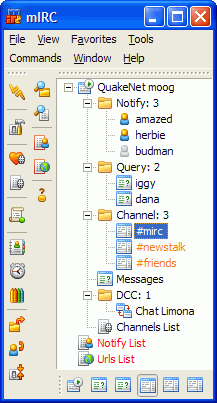 This is really worth checking out, a cool Internet Relay Chat. You get to communicate well with others on the IRC network and even share pictures, your favourite music, and files on the network. mIRC could be in multi-user interface or one-on-one private channel discussions. Its interface is clean, practical and Is highly configurable and supports a couple of features like as buddy lists, file transfers, multi-server connections, SSL encryption, proxy support, UTF-8 display, customizable sounds, spoken messages, tray notifications, message logging, and more. You could also play games on this network (that’s awesome). This is really worth checking out, a cool Internet Relay Chat. You get to communicate well with others on the IRC network and even share pictures, your favourite music, and files on the network. mIRC could be in multi-user interface or one-on-one private channel discussions. Its interface is clean, practical and Is highly configurable and supports a couple of features like as buddy lists, file transfers, multi-server connections, SSL encryption, proxy support, UTF-8 display, customizable sounds, spoken messages, tray notifications, message logging, and more. You could also play games on this network (that’s awesome).
There are some new changes, in the latest verion, mIRC 6.33, which was just recently released
New
- Editbox “automatic” lines option has been added that dynamically changes the size of the editbox in a window to show the whole of your typed message, up to half the size of the window
Added
- Support for the transfer of files larger than four gigabytes
- /var -g switch to allow you to set global variable values
- $input() identifier combobox support
Fixed
- UTF-8 text-wrapping display bug
- switchbar display button-sorting display bug
- window positions not being saved correctly for some windows
It works well, I think the company should look into the vista compatibility because there are hitches here and there when working with it and vista is here to stay.
Check it out at http://www.mirc.com
Rating: Loading... No Comments »
Tilgore Kraut - July 27, 2008
 The success of any business lies in its management of various resources, and accounts is unarguably the most significant part of it. Managing company’s accounts is turning out to be a challenge for most of the small and medium enterprises (SMEs). Precise accounting assists a lot in developing any sort of business, and a number of your hassles can be minimized through the assistance of BS1 Enterprise Accounting – Free Edition 2008.3. It is a multi-featured accounting system that includes different accounts like General Ledger, Accounts Payable, Accounts Receivable, Sales Orders and Quotes, Purchase orders, Inventory, Bank Reconciliation and Sales Analysis. The success of any business lies in its management of various resources, and accounts is unarguably the most significant part of it. Managing company’s accounts is turning out to be a challenge for most of the small and medium enterprises (SMEs). Precise accounting assists a lot in developing any sort of business, and a number of your hassles can be minimized through the assistance of BS1 Enterprise Accounting – Free Edition 2008.3. It is a multi-featured accounting system that includes different accounts like General Ledger, Accounts Payable, Accounts Receivable, Sales Orders and Quotes, Purchase orders, Inventory, Bank Reconciliation and Sales Analysis.
Starting with BS1 Enterprise Accounting – Free Edition 2008.3, it consists of an option to set up your own company accounts with the program. To create your own company, you have to enter some details like name of the company, address, etc. It is a very compact tool that fits on your screen. With the drop-down list you can choose any type of account that you want to record the transaction in. Selecting any you get a toolbar containing different related options, e.g. AR includes customers, orders, shipments and reports. Likewise working with Sales order, it can be optionally inserted as quotes and printed for the customer’s approval. You can change the status to on order after the approval. When enter the shipment data the Invoices are automatically formed from it. It supports creating user-defined financial statement through a simple process. Separate windows are associated with all the accounts that display the required fields to enter the data. Customization and Delphi source code is available for many databases. It has the option to import and print reports from the preview screen.
BS1 Enterprise Accounting – Free Edition 2008.3 is a fully-functional tool for small business accounting system.
{More Info and Download}
Rating: Loading... No Comments »
O. James Samson - July 24, 2008
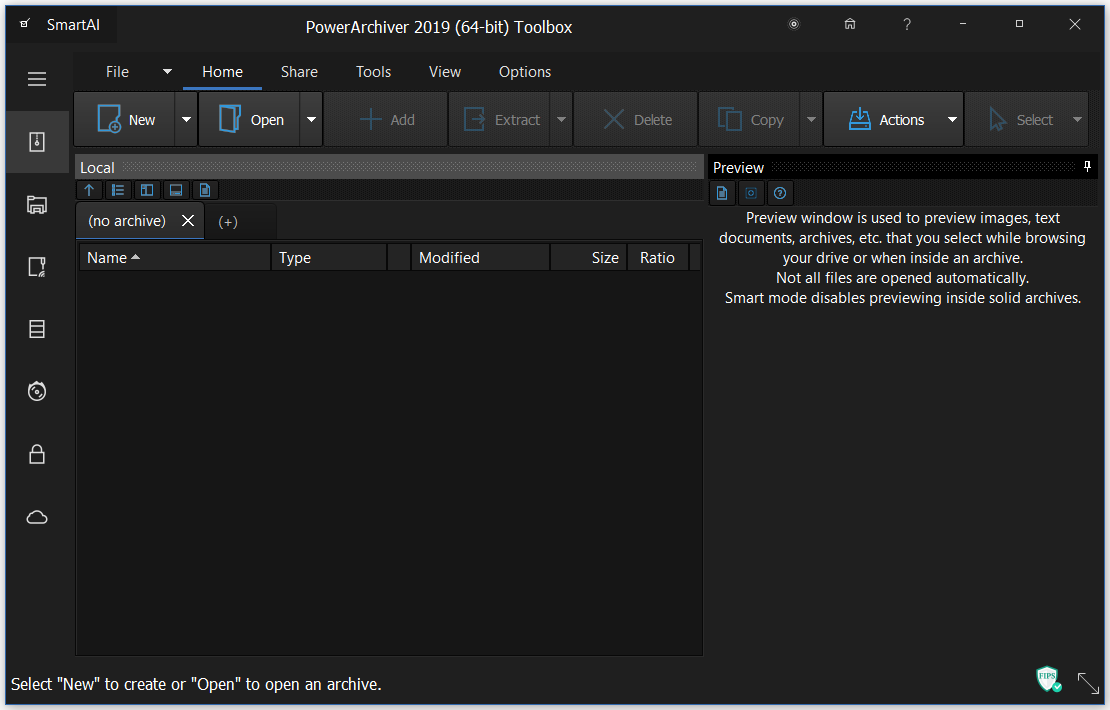 With this one, you do not need to worry about compatibility problems if you are using or considering upgrading to Vista. PowerArchiver supports ZIP, 7-ZIP, CAB, LHA (LZH), TAR, TAR.GZ, TAR.BZ2, BH, RAR, ARJ, ARC, ACE, ZOO, GZ, BZIP2, XXE, MIME, UUE and yENC file formats. An internal viewer displays TXT, RTF, and more than 18 image formats. With this one, you do not need to worry about compatibility problems if you are using or considering upgrading to Vista. PowerArchiver supports ZIP, 7-ZIP, CAB, LHA (LZH), TAR, TAR.GZ, TAR.BZ2, BH, RAR, ARJ, ARC, ACE, ZOO, GZ, BZIP2, XXE, MIME, UUE and yENC file formats. An internal viewer displays TXT, RTF, and more than 18 image formats.
PowerArchiver comes with an unprecedented level of security features. Not only does it fully support the new ZIP AES standard, PowerArchiver also offers its proprietary PAE standard for additional security with five different encryption methods. For ease of use, the PowerArchiver Password Manager will save your frequently used passwords so you do not need to remember them.
For ease of use, PowerArchiver has Compression Profiles that store frequently used compression settings. You can select a compression profile when performing operations in PowerArchiver and save considerable time.
Check it out at http://www.powerarchiver.com
Rating: Loading... No Comments »
O. James Samson - July 24, 2008
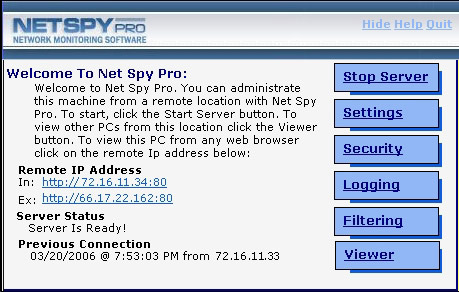 If you want to keep a leash on employee PC activity, NetSpy Pro is the way to go. If you want to keep a leash on employee PC activity, NetSpy Pro is the way to go.
Net Spy Pro gives a network supervisor or administrator the tools they need to monitor and filter employee PC activity. It also comes with network administration tools allowing them to perform various tasks on remote PCs all from the comfort of their own workstation.
The cool thing about this tool is that, it runs in total stealth and is hidden within the Application Task List in
Windows Task Manager. The network administrator gets to access the hidden control panel from anywhere within the network or from one central location.
Just recently a new version was released into the market, Net Spy Pro 4.5, with these cool changes in its features:
- New separate admin and client installers
- Real Time Keystroke Viewer
- View processes, services, shared files
- Newly designed web panel interface
- Import/Export NSP settings in web panel
- Change Password/Settings in web panel
For more info and download, check out http://www.net-monitoring-software.com/
Rating: Loading... No Comments »
|
|
|


 (3 votes, average: 4.67 out of 5)
 (2 votes, average: 3.50 out of 5)

