Tilgore Kraut - April 2, 2008
 IMC2008 is a digital photography software. It contains image viewer, screen capture, comparer, retouch, photo album and compression tools. IMC2008 is a digital photography software. It contains image viewer, screen capture, comparer, retouch, photo album and compression tools.
Pros: Image compressor comes with a comprehensive set of tools that include import, capture, scan, retouch, compare, create photo album, share and compress facilities in one.
The basic facility of compression does not require the user to make a trade off between file size and quality. The application compresses the image as best as possible for optimum quality and a reasonable size. Viewing of images has a wide range of formats that include RAW formats of many popular camera makers; Canon’s CR2 CRW, Nikon’s NEF, Kodak’s DCR and Olympus’s ORF. Photo formats supported include image file types JPEG, JPEG2000, TIFF, GIF, PNG besides the RAW formats supported.
The additional but really useful functions include professional viewer, image comparison tools, retouching tool, screen capture, image grab from the net, EXIF data editor, photoshop filter plug-ins, web photo album creation and conversion/export to multi-page PDF, animated GIF, multi-page TIFF, PowerPoint and Word.
The comprehensive user interface with a large set of features that include such functions as screen capture or image capture from the net makes for a comprehensive tool for the graphics artist. The interface is simple enough to be useful for the learner yet has enough power to be useful for a professional.
The functionality of all the extra features offered are well integrated into the application. For example capturing images from the net or creating web photo albums do not require the user to come out of the application. Application settings, screen layouts, file associations, photoshop filters or web album are parameters that can be changed for setting up a configuration suitable for you.
{More Info and Download}
Rating:  Loading... No Comments »
Tilgore Kraut - April 2, 2008
 Choose the video movie or its part and then crop it for your avatar or userpic. By using Video Avatar you can create original avatars for your blogs, journals, you can also set userpic in your profile page for any forums, communities. Choose the video movie or its part and then crop it for your avatar or userpic. By using Video Avatar you can create original avatars for your blogs, journals, you can also set userpic in your profile page for any forums, communities.
Pros: Essentially the Video Avatar is a tool for creating animated GIF avatars. One can choose to use a video clip or even a small part of it, get it converted to an animated GIF and use it as avatar or a user picture as a interesting variation on just using a static image. At one level this application is a video cropper. Use these avatars for your blogs, journals; you can also set userpic in your profile page for any forums, communities, your website, etc.
Video Avatar supports all the video formats for inputs. These include formats AVI, ASF,MP4, MPG, MPEG, MOV and WMV. Output parameter settings include width & height in terms of pixels, frames per second and whether the animation should play straight or in reverse. One could use a piece of a movie that one likes, a cartoon, music video or a personal clip. Same can be cropped to skip unwanted frames or give it a zoomed look by doing a rectangular crop on every frame chosen. The user interface provides a range bar with a preview panel to enable choosing the frames right. You could easily decide the time length of the animation you want to create. The range bar is a direct timeline for this purpose. One can save single image or the animated avatar and the corresponding animated GIF is saved in the same directory as the source or one chosen by the user.
Cons: Flash and FLV support would have added to the versatility of the package.
{More Info and Download}
Rating: Loading... No Comments »
O. James Samson - March 31, 2008
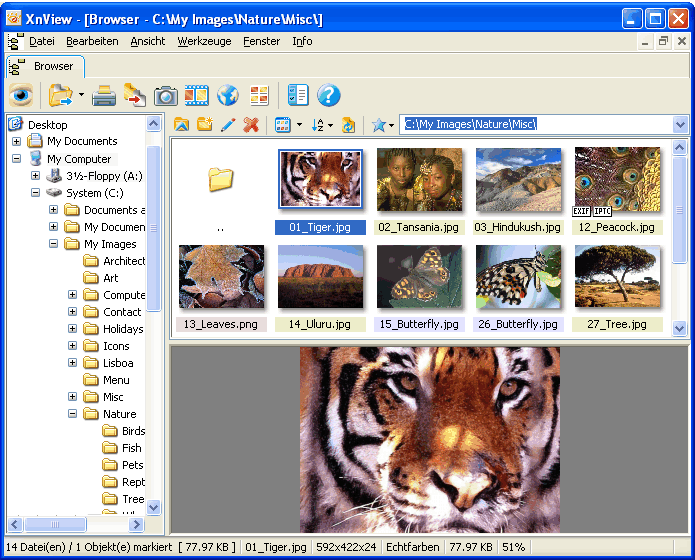 There are very few programs released for free that are genuine high powered programs. While there are many free programs that have one specific function that is extremely useful, the age we live in now lends itself to high powered programs being sold as proprietary software. Thankfully, there are exceptions to this rule and XnView for Windows is most definitely one of the pieces of software that are an exception to the rule. With all of the different features that it has in the area of graphics manipulation, XnView can most definitely be referred to as a high powered piece of software. There are very few programs released for free that are genuine high powered programs. While there are many free programs that have one specific function that is extremely useful, the age we live in now lends itself to high powered programs being sold as proprietary software. Thankfully, there are exceptions to this rule and XnView for Windows is most definitely one of the pieces of software that are an exception to the rule. With all of the different features that it has in the area of graphics manipulation, XnView can most definitely be referred to as a high powered piece of software.
Simply put, XnView allows you to view files from over 400 different graphics formats (most people don’t even know that there are that many graphics formats in existence) and it allows you to convert many of those formats to file types that are more acceptable in today’s world (i.e. formats such as .jpg or .gif). In total, XnView is capable of the creation of 52 different graphics formats and you can also create slide show presentations through XnView as well. You can do almost anything that you would need to do in the area of graphics conversion and manipulation from a file type perspective in XnView, making it one of the free high powered programs out there.
More information is available at http://www.xnview.com/
Rating: Loading... No Comments »
Ciaran Moore - March 31, 2008
 One design flaw of Windows is that during startup, all the programs that are set to start at start up all rush to start at once. This can result in considerably slow boot up times! One design flaw of Windows is that during startup, all the programs that are set to start at start up all rush to start at once. This can result in considerably slow boot up times!
Each start-up program is scrambling for attention to be loaded. This often overloads the computers resources and your computer crawls along until everything is finally loaded, sometimes minutes later!
Startup delayer is a small, free program for managing the order in which things load at start up. It enables you to set the order of start up programs launching and a time delay between each program.
This can take some experimentation before you’ll find the right timing for your computer. I think it’s worth it though as when set right, it has the potential to shave valuable time from your systems usual slow way of booting up. As this is freeware, you have nothing to lose! Give it a try, but give the help file a couple of minutes of your time,after all, its worth it if this can literally save you time in the long run!
Click here for more info and the download.
Rating: Loading... 1 Comment »
O. James Samson - March 28, 2008
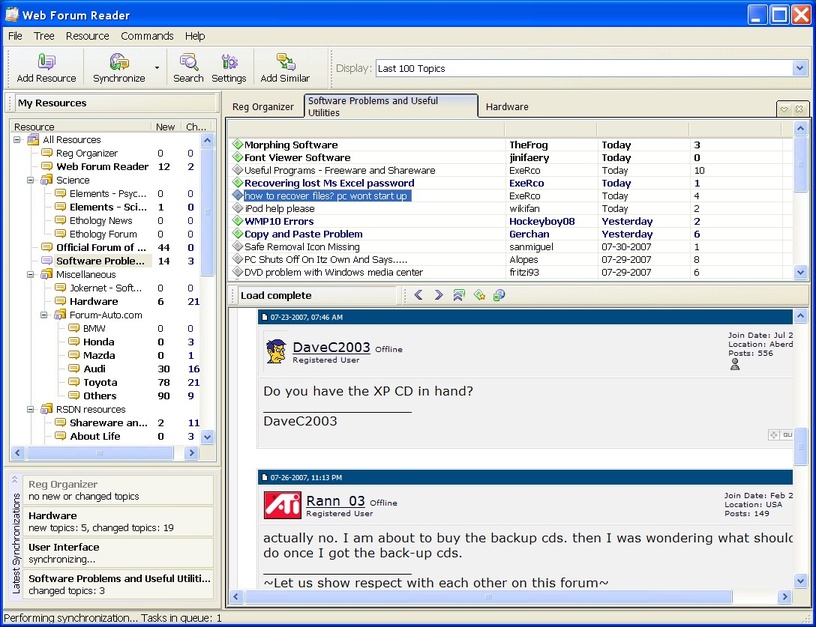 The Lite version of the Web Forum Reader is actually a very smartly toned down version of the full Web Forum Reader with a number of different features that allows you to still enjoy the main purpose of the software without having to pay for it as in the case of the full version (the full version is shareware). Unlike many other Lite programs which just turn out to be cripple ware, the Web Forum Reader Lite has the basics of the reader program in place and therefore it allows you the basic functionality that is at the core of what makes the Web Forum Reader such a good program. The Lite version of the Web Forum Reader is actually a very smartly toned down version of the full Web Forum Reader with a number of different features that allows you to still enjoy the main purpose of the software without having to pay for it as in the case of the full version (the full version is shareware). Unlike many other Lite programs which just turn out to be cripple ware, the Web Forum Reader Lite has the basics of the reader program in place and therefore it allows you the basic functionality that is at the core of what makes the Web Forum Reader such a good program.
Simply put, you can use this piece of software to read forums on the internet. You simply plug in the usernames and the passwords as well as the URLs for all your favourite forums and you can follow along with different discussions regarding everything that you want. You can also get the program to hide everything that you have read and display an amalgamation of files from different forums that you haven’t read, allowing you to save a lot of time in your checking up on the forums of the day.
More information about this free version of the Web Forum Reader can be found by visiting http://www.chemtable.com/WebForumReader.htm
Rating: Loading... 4 Comments »
O. James Samson - March 28, 2008
 While there are many index photo software packages out there, MyPhotoIndex has to be one of the more impressive ones. This can be deduced by taking into account not only the fact that it is a free piece of software, but also the fact that you can use it as an electronic photo album in order to catalogue and organize all of the pictures that you take, upload or download. All in all, the full photo album functionality is available with this particular piece of software and that is something that has been proven to anyone that takes the time to explore and use this piece of software. While there are many index photo software packages out there, MyPhotoIndex has to be one of the more impressive ones. This can be deduced by taking into account not only the fact that it is a free piece of software, but also the fact that you can use it as an electronic photo album in order to catalogue and organize all of the pictures that you take, upload or download. All in all, the full photo album functionality is available with this particular piece of software and that is something that has been proven to anyone that takes the time to explore and use this piece of software.
MyPhotoIndex’s focus as a software package is in the tagging and cataloguing of images and there is a lot of support and functionality provided by the program in these two areas. This means that you can not only use it to catalogue and organize your photos to be displayed on screen in the actual software, but you can also tag the actual files so that organizing them in the folders they appear in is easy as well. This is particularly useful if you want to send photos to other people or if you want specific files to be available to you for use online. Not many other photo album programs have this type of functionality and even fewer free ones are able to boast about it.
More information about MyPhotoIndex can be found at http://www.myphotoindex.com/
Rating: Loading... No Comments »
O. James Samson - March 28, 2008
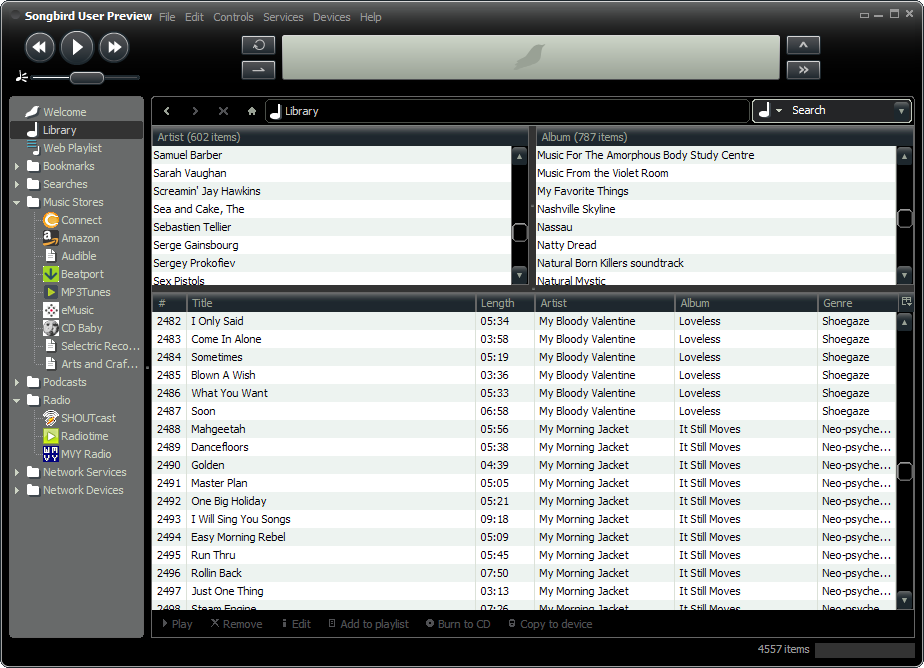 One of the great things about Mozilla is that after creating their world class Firefox browser, they took that engine and then transposed it onto a number of the other areas of internet software. First was Thunderbird, their online e-mail client that was released as competition to Outlook and then finally they ended up releasing Songbird, which is the piece of software being discussed here. One of the great things about Mozilla is that after creating their world class Firefox browser, they took that engine and then transposed it onto a number of the other areas of internet software. First was Thunderbird, their online e-mail client that was released as competition to Outlook and then finally they ended up releasing Songbird, which is the piece of software being discussed here.
Songbird, simply put, is an online music player that operates on the same engine that Firefox uses. It allows you to play any .mp3 file that is available on the internet without leaving the actual page that you are on. You can also use it to view web pages and create dynamic play lists from those websites. Essentially, you can use Songbird to make your internet music life a lot easier. If you’re the type of person that loves listening to or watching online videos and you want to get the songs from those videos and song websites without having to waste too much time in the process, then Songbird is most definitely the piece of software for you.
More information about Songbird is available at http://www.songbirdnest.com/
Rating: Loading... No Comments »
Tilgore Kraut - March 27, 2008
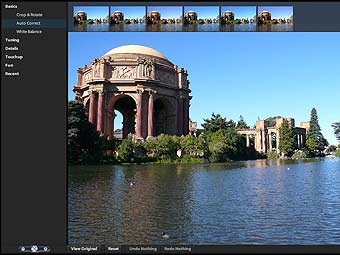 Adobe Systems Incorporated today announced Adobe Photoshop Express public beta, a free Rich Internet Application (RIA) available to anyone who wants to store, sort and show off digital photos with eye-catching effects. During the public beta period, Adobe will solicit Photoshop Express user feedback on product features and functionality, which will continue to evolve over time. As the newest addition to the Photoshop family line, Photoshop Express has taken much of Adobe’s best image editing technology and made it simple and accessible to a new online audience. Photoshop Express allows users to store up to 2 gigabytes of images online for free, make edits to their photos, and share them online in creative ways, including downloading and uploading photos from popular social networking sites like Facebook. Adobe Systems Incorporated today announced Adobe Photoshop Express public beta, a free Rich Internet Application (RIA) available to anyone who wants to store, sort and show off digital photos with eye-catching effects. During the public beta period, Adobe will solicit Photoshop Express user feedback on product features and functionality, which will continue to evolve over time. As the newest addition to the Photoshop family line, Photoshop Express has taken much of Adobe’s best image editing technology and made it simple and accessible to a new online audience. Photoshop Express allows users to store up to 2 gigabytes of images online for free, make edits to their photos, and share them online in creative ways, including downloading and uploading photos from popular social networking sites like Facebook.
“Photoshop is trusted technology that has changed the visual landscape of our world. Now, Photoshop Express allows anyone who snaps a digital photo to easily achieve the high-impact results for which Adobe is known,” said Doug Mack, vice president of Consumer and Hosted Solutions at Adobe. “Photoshop Express is a convenient, single destination where you can store, edit and share photos whether you’re at home, school or on the road.”
With Photoshop Express, digital photos can be uploaded and sorted anytime, edited non-destructively to always preserve the original image, and shared from anywhere, on any Web browser. In a few easy clicks, Photoshop Express empowers anyone to make standard edits, such as removing blemishes and red-eye, converting to black and white, cropping and resizing, and much more.
No experience is required to add special effects that will impress friends and family. In keeping with its one-click approach, Photoshop Express offers tricks like Pop Color which selects an object in an image, mutes the background color of the photo and allows the user to swap the object’s color so it jumps off the page. Sketch effects help photos look like drawings and the Distort feature allows you to distort facial features or objects within the images for a comical or artistic effect. Even users with limited photo editing knowledge can simply select what looks best from a line-up of sample photos with visual hints showing different variations of the added effect.
Photoshop Express offers a variety of creative sharing options, including uploading and showing off photos and slideshows in your own online “Gallery” hosted by Adobe, or conveniently embedding or linking photos to social networking sites and personal blogs without having to leave the application. Slideshows never looked better with animation that makes photos float and fly across the screen, allowing for viewer interactivity and unique presentation styles.
Adobe Photoshop Express beta is available now for free via any Web browser right here.
Rating: Loading... No Comments »
O. James Samson - March 27, 2008
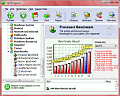 Have you considered analyzing and benchmarking your computer system? Well, Fresh Diagnose is actually designed to analyze and benchmark many kinds of hardware like hard disk performance, mainboard/motherboard information, CPU performance, video system information and so much more. A new version has been recently released. Have you considered analyzing and benchmarking your computer system? Well, Fresh Diagnose is actually designed to analyze and benchmark many kinds of hardware like hard disk performance, mainboard/motherboard information, CPU performance, video system information and so much more. A new version has been recently released.
It’s a utility that scans your system and gives a complete report about your computer’s hardware and software.
The latest version of this tool, Fresh Dioagnose 7.78 was released recently with the main feature change being:
- Windows upgrade and HotFixes module
Want to try it out? Check http://www.freshdevices.com/freshdiag.html
Rating: Loading... No Comments »
O. James Samson - March 27, 2008
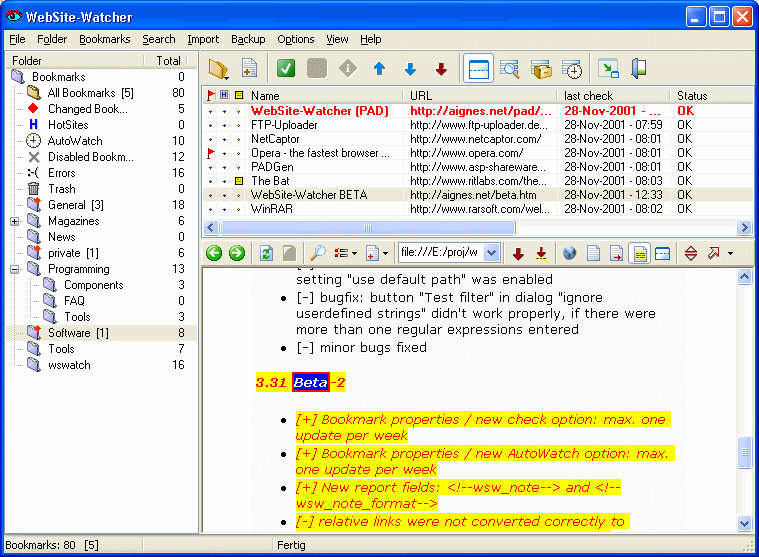 Want to keep an eye on your favourite websites easily? Check out this software, it should do the job, it’s called Website Watcher. Want to keep an eye on your favourite websites easily? Check out this software, it should do the job, it’s called Website Watcher.
WebSite-Watcher checks an unlimited number of web-sites for updates and changes with a minimum of time and online-costs. When changes in a website are detected, it saves the last two versions to your hard disk and highlights all changes in the text.
This program will save definitely save you hours daily. The fact that you can monitor different websites easily with this tool to check for changes means that you get to save yourself quality time which would have been spent going to each site manually just to see if anything has changed.
Want to check it out? Go to check out the trail version at http://www.aignes.com/
Rating: Loading... No Comments »
|
|
|



 (3 votes, average: 4.67 out of 5)

